Your customer conversations are a goldmine of insights, but let's be real, who has the time to sift through thousands of chats and emails? Manually, it's just not going to happen. But what if AI could do the heavy lifting, pointing you straight to what your customers need and where you could automate support?
That’s the idea behind tools like Salesforce AI Conversation Mining. It's designed to analyze all that support data and tell you what your customers are really asking about.
So, let's dig into what Salesforce AI Conversation Mining is, how it works, its good parts, and where it falls short. We'll also look at how newer, more flexible AI platforms are offering a faster, more connected way to handle support automation.
What is Salesforce AI Conversation Mining?
Salesforce AI Conversation Mining is an AI feature tucked inside the Salesforce Einstein ecosystem, built for service teams. Its main job is to automatically scan huge piles of text from customer service conversations, think chat transcripts and emails, to find common topics and group them together as "contact reasons."
The whole point is to give service managers a clear, data-backed view of what's going on. This helps them spot the frequent, simple questions that are perfect candidates for automation, usually by building or tweaking Salesforce's Einstein Bots.
It's easy to get it confused with Einstein Conversation Insights, but they're different beasts. Conversation Insights is for analyzing individual sales calls to help coach sales reps. Salesforce AI Conversation Mining looks at conversations in bulk to find trends for customer service teams.
How does Salesforce AI Conversation Mining work?
The process basically turns a mountain of raw conversation data into a report that a manager can use to make decisions.
First, the tool pulls data from your service channels, as long as they're inside the Salesforce world. This includes chats, Email-to-Case messages, and voice call transcripts that are already living in Service Cloud.
Then, the AI gets to work. It uses Natural Language Processing (NLP) to read through thousands of conversations and figure out the common themes. One thing to know is that this isn't an instant process. You need a pretty big dataset for it to work well, at least 2,500 records for most channels, and the report itself can take up to 24 hours to generate.
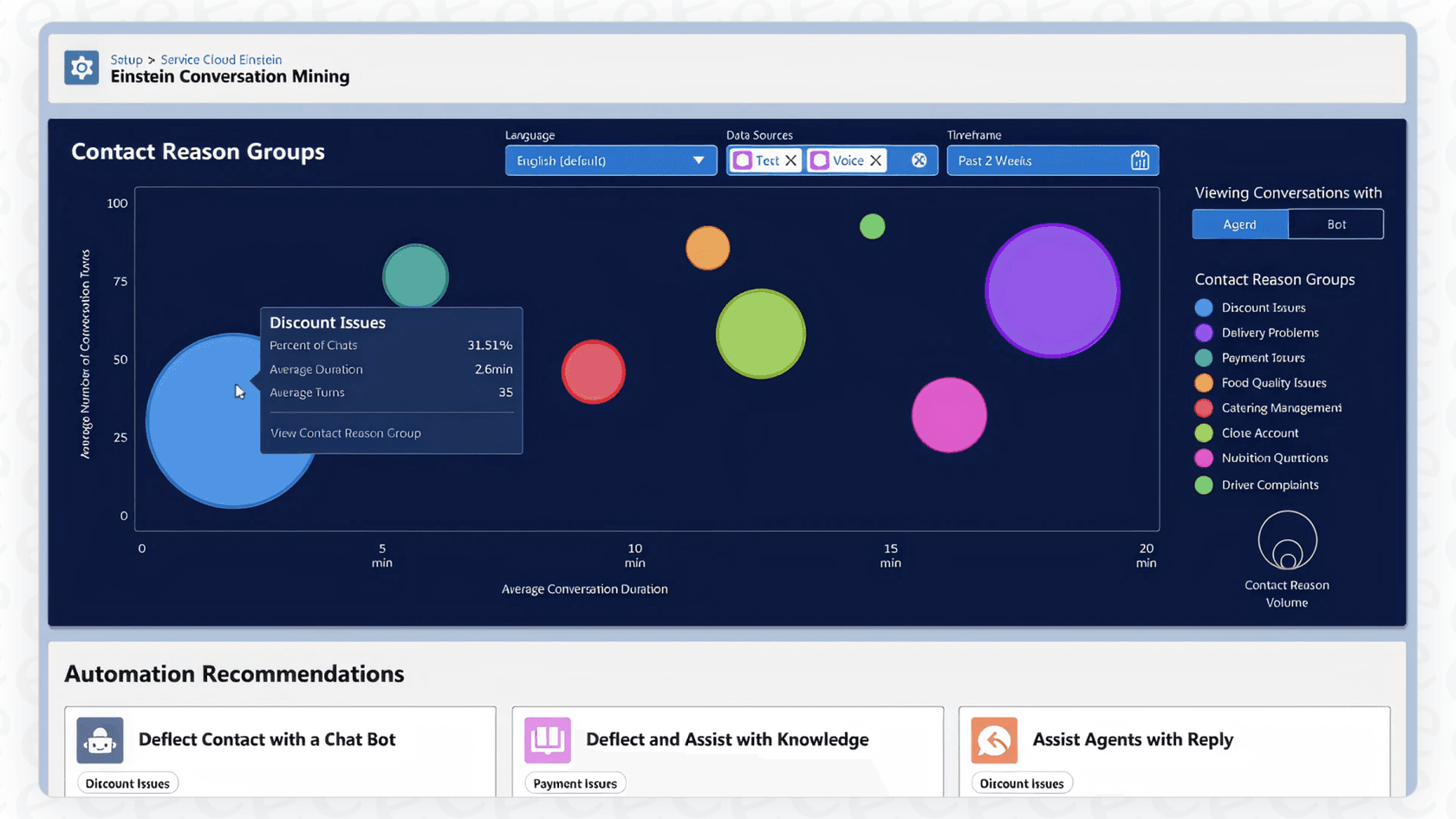
Once it’s finished, you get a report or a dashboard in Service Intelligence showing you the stats for each "contact reason" it identified. You’ll see metrics like:
-
The total number of conversations about a topic (e.g., "password resets").
-
The average time those conversations took.
-
The average "conversation turns," which is just the number of back-and-forth messages.
From there, the idea is for a service manager to look at the report, find the easy wins (high-volume, low-effort topics), and then manually build a new workflow. This usually means creating a new path for an Einstein Bot, writing a new knowledge base article, or updating team training.
Pros and cons of Salesforce AI Conversation Mining
Let's get into a balanced look at the features of Salesforce AI Conversation Mining and where it might not be the best fit for fast-moving teams.
Finding topics and "contact reasons"
On the plus side, it's pretty good at taking thousands of messy conversations and sorting them into topics you can actually understand. This helps managers see that, for example, "password resets" are eating up 20% of their team's time, giving them a clear place to start making improvements.
But here’s the catch: the whole process is slow and backward-looking. You have to wait up to a day for a report just to see what was happening yesterday. It doesn't give you a way to immediately act on what you've learned or test out automation ideas. You get a static report, not a dynamic tool you can play with and launch right away.
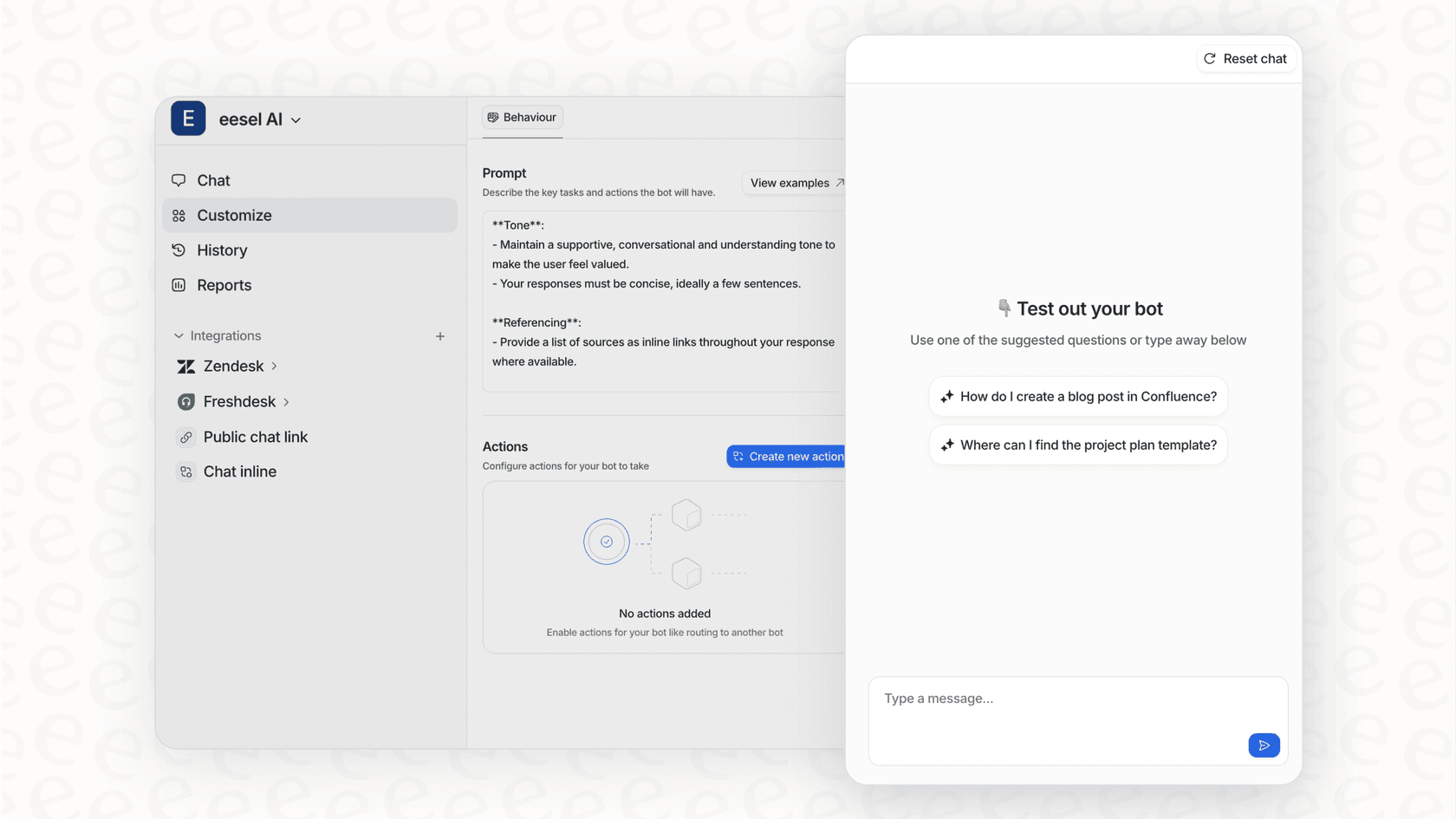
For teams that need to move quickly, that's a problem. Modern platforms like eesel AI not only find topics from your past tickets almost instantly but also let you build and test automation in a powerful simulation mode. You can see exactly how the AI would have handled thousands of past tickets in just a few minutes, not days, letting you fine-tune everything risk-free before it goes live.
Integration with Einstein Bots
The tool creates a direct line from insight to automation, but only if your team lives and breathes Salesforce. You can spot a topic in your report and then hop over to the Einstein Bot Builder to create a flow for it.
The downside is the vendor lock-in. The insights are built to feed another Salesforce product. That’s not much help if your team uses a different helpdesk like Zendesk or Freshdesk, or if you want an automation tool that’s more capable than a standard chatbot.
Today’s best AI tools don’t care what platform you use. For example, eesel AI connects directly to your existing helpdesk with one-click integrations. It doesn’t make you switch platforms or use a specific bot builder. You can automate ticket responses, draft replies for your agents, and run an on-site chatbot, all from one place that works with the tools you already have.
Reporting in Service Intelligence
It comes with pre-built dashboards to show you key numbers like conversation volume and average handle time for each topic. This can be handy for tracking trends over the long haul.
The analysis, however, only looks at your Salesforce data. It has no idea about the super helpful knowledge your team has stored elsewhere, like in internal wikis on Confluence, product guides in Google Docs, or quick answers shared in Slack. This gives you an AI that only knows half the story, which isn't all that helpful.
To be truly intelligent, an AI needs the full picture. eesel AI connects to all your sources of knowledge instantly. It can learn from your help center, internal docs, and past tickets from any helpdesk. This gives your AI the context it needs to solve problems correctly, not just analyze them from a distance.

Salesforce AI Conversation Mining pricing
This is where things get a bit murky. Salesforce doesn't list a standalone price for Einstein Conversation Mining. Its cost is rolled into the most expensive tiers of Service Cloud (the Unlimited and Performance editions) and you might need to buy additional Einstein 1 or generative AI add-ons to get everything to work.
To get a real price, you have to go through a full-on sales process for a custom quote. For teams that want to get started quickly and know what they’re paying, this lack of clear, self-serve pricing is a major roadblock.
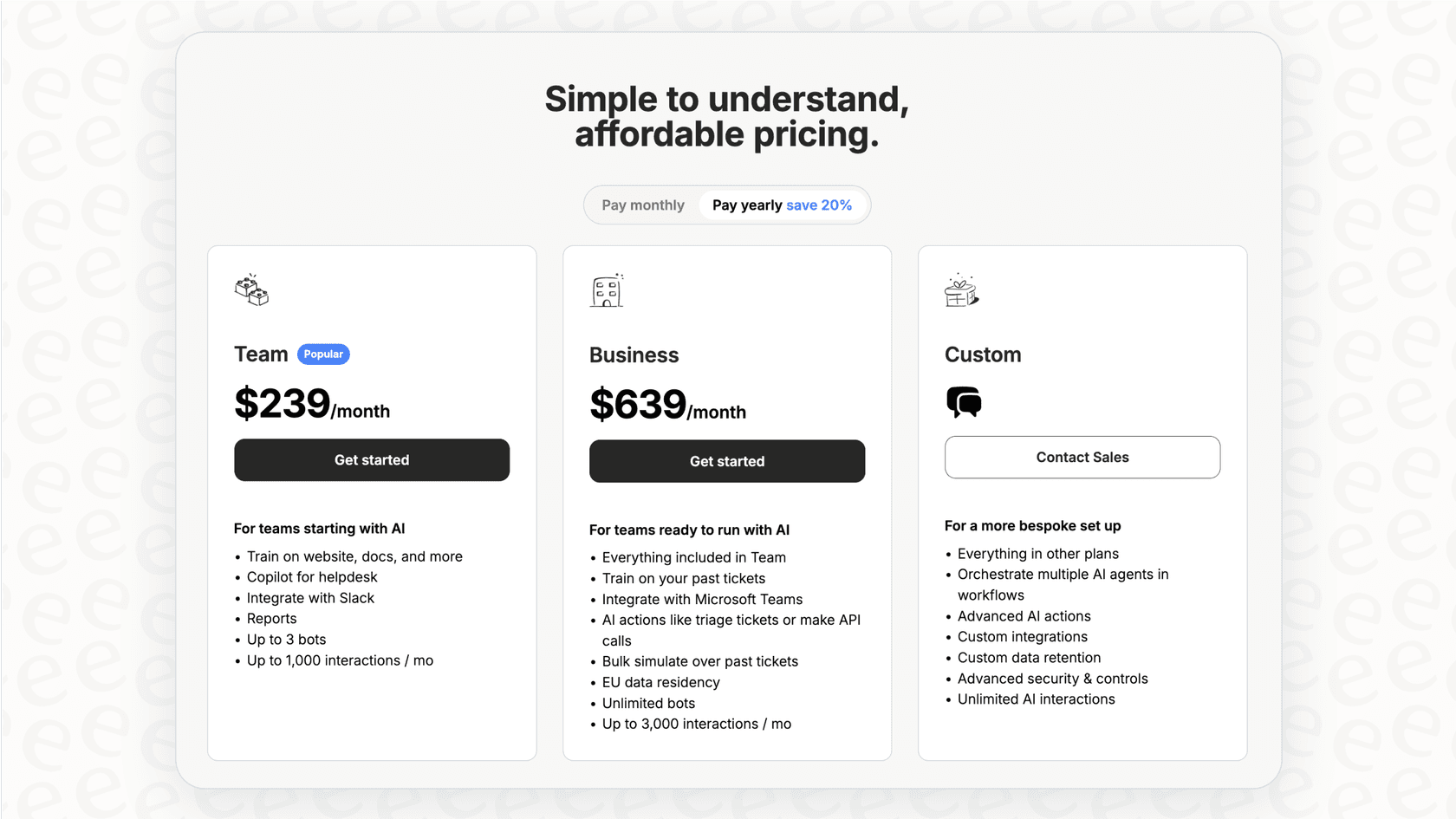
In contrast, modern platforms are all about transparent and predictable pricing. For instance, eesel AI has clear, public plans based on usage, with no hidden fees or extra charges for every resolution. You know exactly what you're getting and how much it will cost.
| Feature | Salesforce AI Conversation Mining | eesel AI |
|---|---|---|
| Pricing Model | Opaque, bundled in top-tier plans | Transparent, usage-based tiers |
| Onboarding | Requires sales calls and demos | Fully self-serve, go live in minutes |
| Contract | Typically annual contracts | Monthly and annual plans available |
| Hidden Fees | Potential for complex add-on costs | No per-resolution fees, predictable billing |
The modern alternative: A single AI platform for all your support
Tools like Salesforce AI Conversation Mining can give you a peek into your support data, but they often feel slow, stuck in one ecosystem, and don't have the flexibility that modern support teams need. A better way forward is a unified, self-serve AI platform that plugs into all your existing tools and knowledge.
Get started in minutes
Instead of waiting around for demos and sales calls, you should be able to connect your tools and start seeing results right away. eesel AI offers one-click integrations with helpdesks like Zendesk and Freshdesk, letting you build and test an AI agent in less than five minutes.
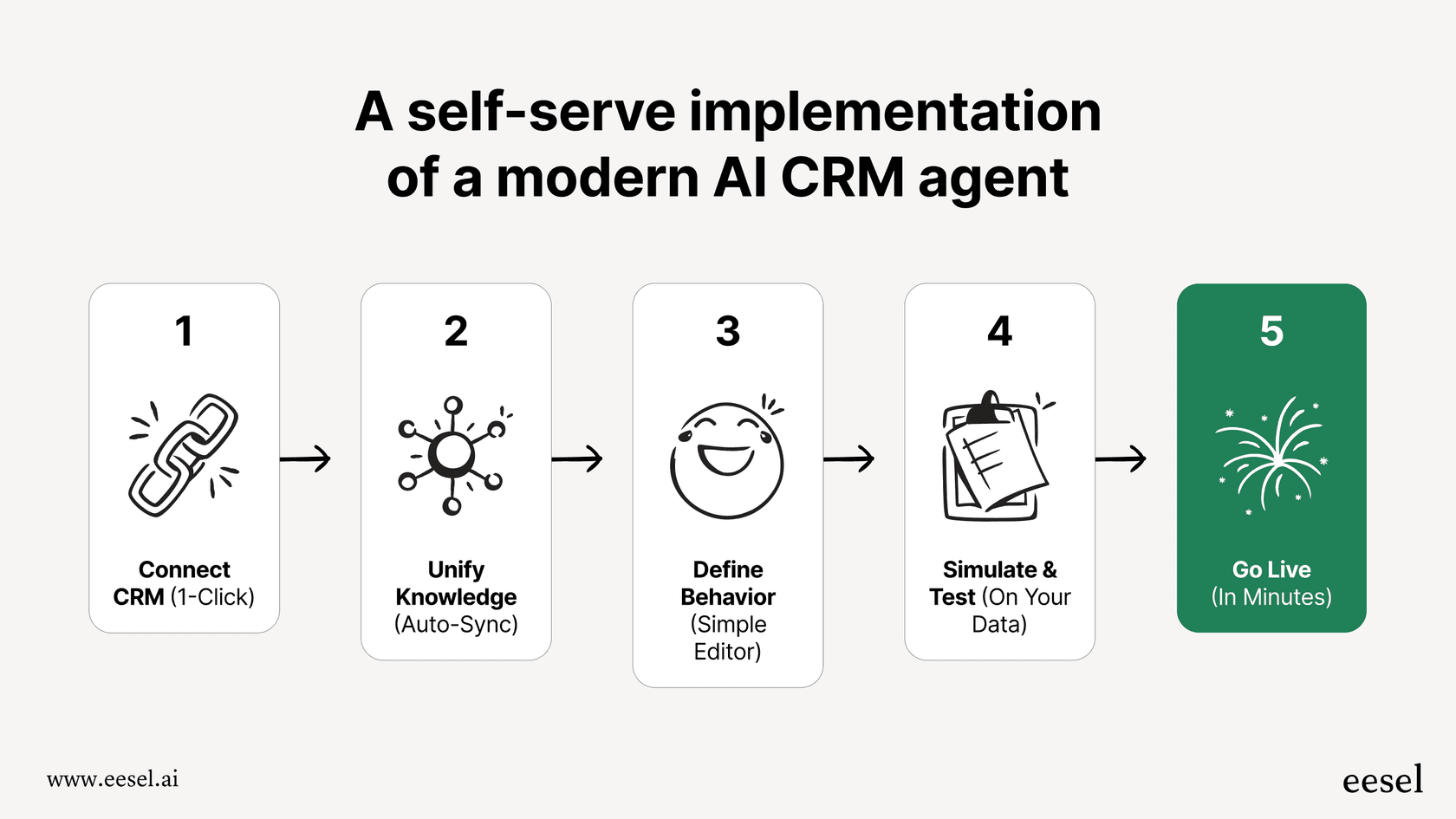
Simulate and automate with full control
You shouldn't have to launch an AI and just hope for the best. A modern platform gives you a powerful simulation mode to test your AI on thousands of old tickets before it ever talks to a customer. With eesel AI's workflow engine, you can customize exactly which tickets get automated and which ones go to a human, putting you in complete control.
Bring all your knowledge together
Your team’s knowledge isn't just in past tickets. A truly smart AI learns from everywhere. eesel AI connects to your help center, Confluence, Google Docs, Slack, and more, creating a single source of truth to power fast, accurate answers.
Final thoughts
At the end of the day, Salesforce AI Conversation Mining is a functional tool for spotting trends inside the Salesforce world, but it represents an older, more walled-off way of thinking about support automation. Its slow, report-driven process and deep vendor lock-in can hold back dynamic teams that need to move fast.
The future of AI in customer support is in unified, self-serve platforms that are fast, flexible, and work with the tools you already love. Instead of just spitting out reports, these modern solutions give you end-to-end automation, from finding an issue to resolving it. By using a platform that brings all your knowledge together and gives you full control, you can shift your support from being reactive to truly proactive.
Ready to see what a truly unified AI support platform can do? Try eesel AI for free and start simulating your AI agent in minutes. You can connect your helpdesk and knowledge sources to see how many tickets you could automate, no sales call needed.

Frequently asked questions
Salesforce AI Conversation Mining is an AI feature within the Salesforce Einstein ecosystem designed for service teams. Its main job is to automatically scan customer service conversations (chats, emails) to find and group common topics as "contact reasons," helping managers identify automation opportunities.
It pulls data from Salesforce service channels like chats and emails, then uses Natural Language Processing (NLP) to find common themes in thousands of conversations. This process requires a significant dataset and can take up to 24 hours to generate a report.
Its main drawbacks include slow, backward-looking reports (up to 24-hour delay), vendor lock-in to the Salesforce ecosystem, and an inability to incorporate knowledge from external sources like wikis or other helpdesks. It also lacks dynamic simulation capabilities for automation.
No, Salesforce AI Conversation Mining is primarily designed to work within the Salesforce ecosystem. Its insights are built to feed other Salesforce products like Einstein Bots, making it less helpful for teams using other helpdesk platforms.
After collecting a sufficient dataset (at least 2,500 records), the report generation process for Salesforce AI Conversation Mining can take up to 24 hours. This makes it a backward-looking tool rather than an instant insight generator.
The pricing for Salesforce AI Conversation Mining is not transparent or standalone. It's bundled into the most expensive tiers of Service Cloud and often requires additional add-ons, necessitating a custom sales quote rather than clear, public pricing.
Share this article

Article by
Stevia Putri
Stevia Putri is a marketing generalist at eesel AI, where she helps turn powerful AI tools into stories that resonate. She’s driven by curiosity, clarity, and the human side of technology.