A model that shipped before its own press release
Most model launches are a blog post, a benchmark chart, and a model card, all at once. M3.1 Flash did the opposite. It appeared in the MiniMax Code model selector, sat next to M3 and M2.7, and the community found it there before MiniMax said a word. The developer who broke it noted the new reasoning menu on the spot:
"🚨重磅!MiniMax M3.1-Flash 预览版疑似已上线 MiniMax Code!推理等级单独成菜单:low / medium / high / xhigh / max。目前还没有官方公告,属于先露在产品里的灰度上线。" (Translation: "Big news! MiniMax M3.1-Flash preview looks like it's live in MiniMax Code. The reasoning levels are their own menu: low / medium / high / xhigh / max. No official announcement yet, it's a grey/staged rollout shown in the product first.")
The rollout also landed with a bit of a sigh. MiniMax has been shipping video and music models at a fast clip, and the M (text) series had gone quiet, so the most-liked reply under the launch post read as affectionate impatience:
"You finally remembered the M series"
There's a backstory to the hype, too. For days beforehand, developers had been hammering a free "Space Bunny" stealth model and guessing what it was, and the answer landed a few days before launch:
"Confirmed, Space Bunny Alpha is Minimax M3.1"
So the excitement is real, but the "launch" is a staged, product-first preview. If you're deciding whether to build on it, that distinction matters more than the hype: a grey-rollout preview with no price and no weights is not the same commitment as a GA model.
What MiniMax M3.1 Flash actually is
Strip away the launch theatre and the platform docs are clear about the substance. In the supported-models table, M3.1 Flash is described as a "frontier multimodal coding model with 1M context window and tunable thinking depth," built for agentic reasoning, tool use, coding, and structured task execution. It takes text, images, and video as input.
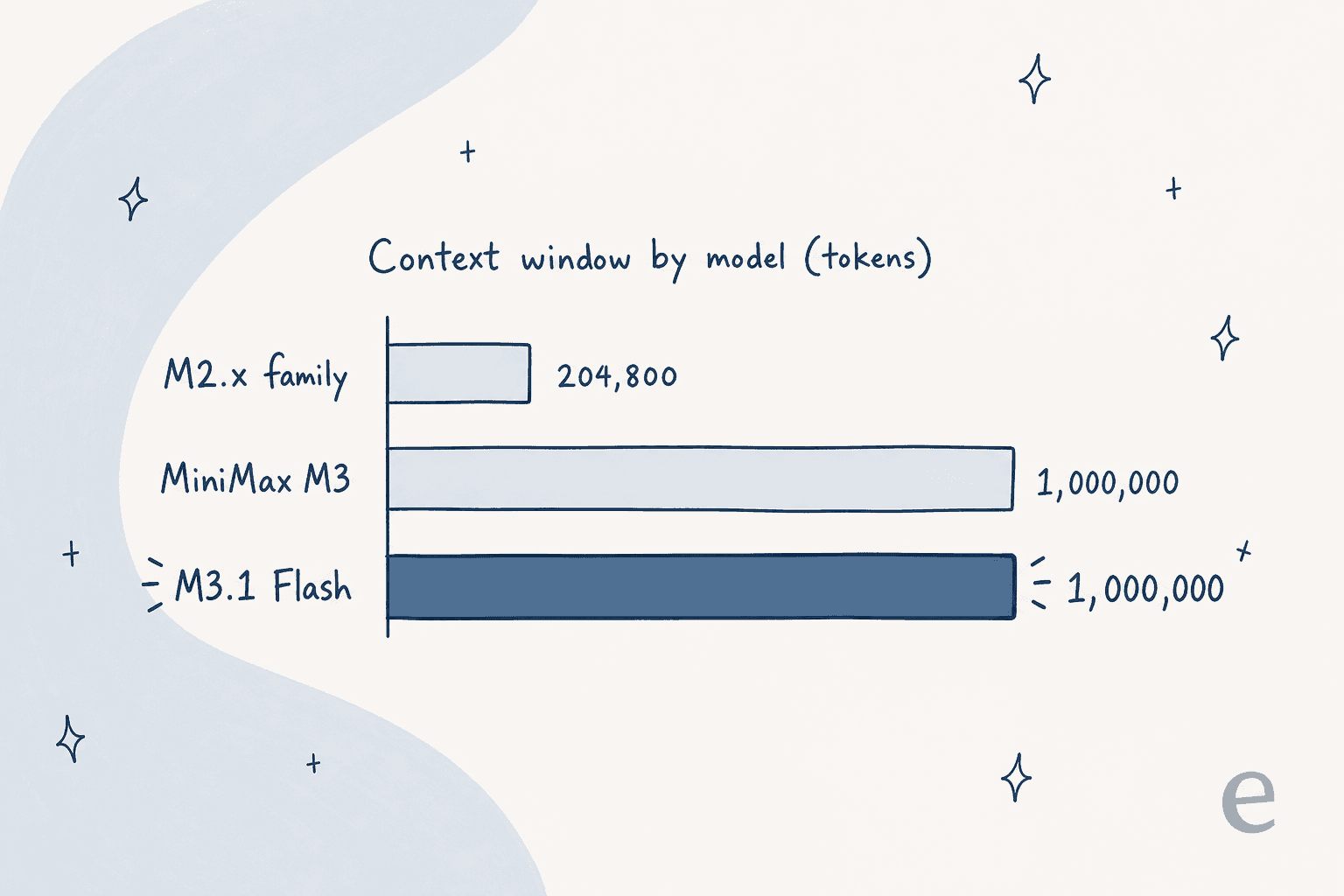
The 1M context is the headline spec, and it's a real jump within the M-series, not marketing rounding. The whole M2 family topped out at 204,800 tokens; the M3 generation, M3.1 Flash included, is a clean five-times leap.
Here's what the docs commit to, and what they don't:
| Attribute | MiniMax M3.1 Flash |
|---|---|
| Model id | MiniMax-M3.1-Flash-Preview |
| Context window | 1,000,000 tokens |
| Input modalities | Text, image, video |
| Thinking | On by default, tunable via effort, cannot be disabled |
| Availability | Token Plan + MiniMax Code only |
| Open weights | None (no Hugging Face card) |
| Parameter count | Not stated |
| Throughput (tps) | Not stated |
| Per-token price | Not published |
That table is deliberately honest about the blanks. There's no stated parameter count, no official tokens-per-second number, and no benchmark suite for M3.1 Flash specifically. If a page tells you the model is "428B parameters" or quotes a benchmark score, it's borrowing those from the parent M3, not citing M3.1 Flash. I'd rather flag the gap than paper over it.
The one knob that defines it: effort
The single feature the docs call out for M3.1 Flash and not for M3 is tunable thinking depth. The model always reasons before it answers, and you control how hard it thinks with an effort setting that accepts low, medium, high, xhigh, and max. Leave it out and it defaults to max.
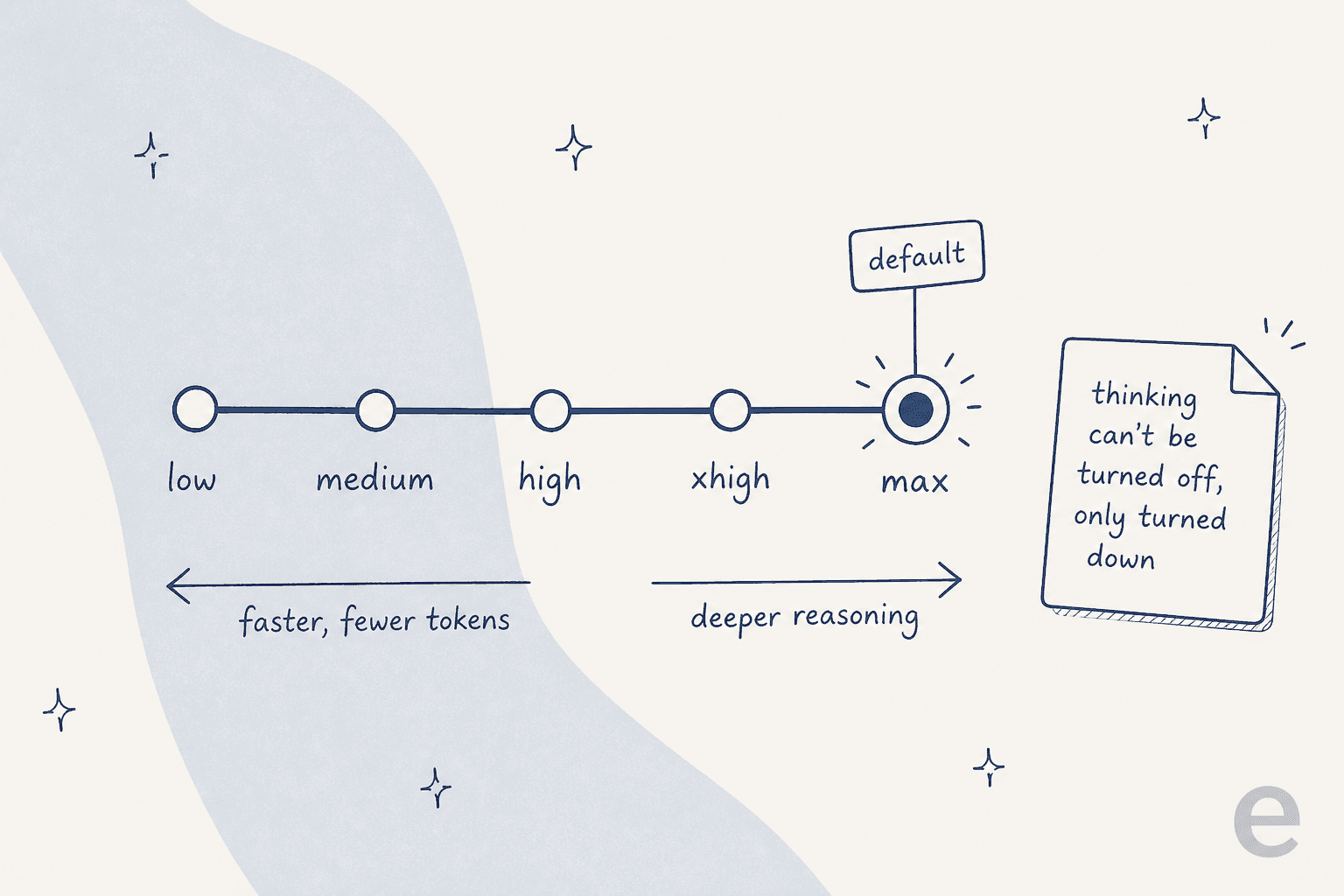
The detail that trips people up: you cannot turn thinking off. Send thinking: {"type": "disabled"} or effort: "none" and the API returns a 400 with the message requires adaptive thinking (docs). If you need lower latency or fewer output tokens, you dial effort down to low; you don't get a no-thinking mode. That's a real design opinion, and it's worth knowing before you wire it into a latency-sensitive path. For a "Flash" model, defaulting to max reasoning is a slightly surprising choice, and it means the cheap, fast behaviour you might expect from the name is something you have to opt into.
Is it actually fast?
MiniMax didn't publish a throughput number, so the only real speed data so far comes from developers testing it on day one. The most-cited measurement put decode speed in a solid but not category-leading range:
"MiniMax-M3.1-flash-preview is hanging around 90 - 110 t/s range for decode. It's fast, love seeing it, def faster than MiMo-v2.6-flash but not as fast as deepseek-v4.1-flash"
That's the honest positioning: quick, ahead of some flash-tier peers, behind others. And not everyone is sold that raw decode speed is the right thing to celebrate:
"Decode speed is not equivalent to fast. The model is slow for the quality in my opinion, numbers dropping soon!"
I think that skeptic has a point worth holding onto. A model that defaults to max effort and can't stop thinking will feel slower on real tasks than a headline tokens-per-second number suggests, because it's generating a lot of reasoning tokens before the answer. The useful question isn't "how many tokens per second," it's "how long until I get a correct answer I can ship," and that's a benchmark nobody has run on M3.1 Flash yet.
The architecture underneath
The docs don't restate the internals for M3.1 Flash, so the fair thing is to treat the architecture as inherited from the M3 generation rather than a confirmed M3.1 Flash spec. The M3 line introduced MiniMax Sparse Attention (MSA), a sparse-attention design that's what makes a million-token context practical instead of ruinously slow.
MiniMax's own comparison against standard grouped-query attention is the clearest illustration of why sparse attention matters at this context length:
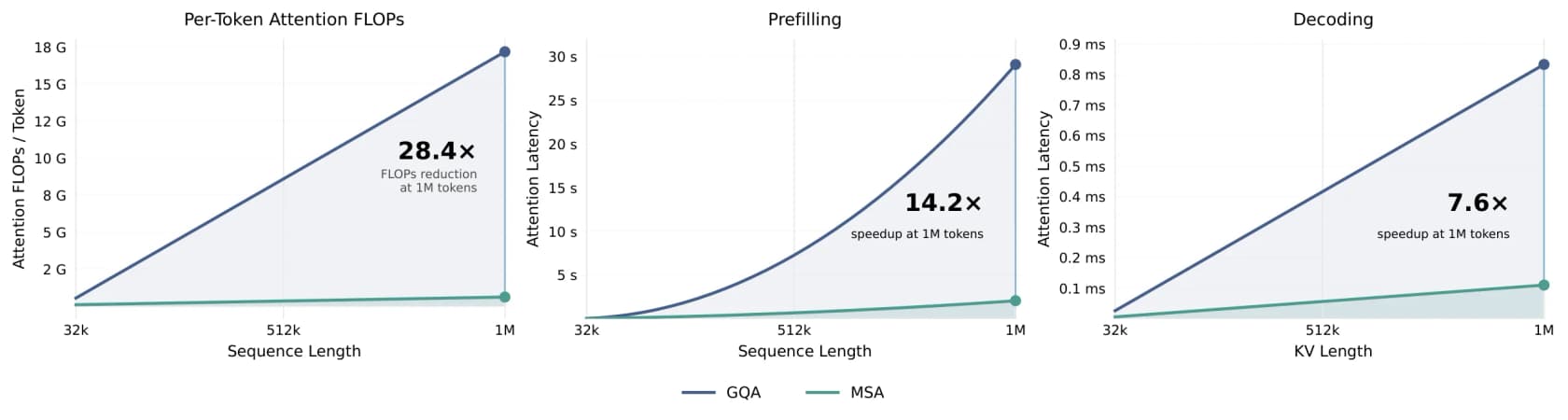
At a million tokens, MiniMax's chart shows MSA cutting per-token attention compute by about 28 times and speeding decoding ~7.6 times versus standard attention. Those are M3-generation numbers, and since M3.1 Flash carries the same 1M window, it almost certainly leans on the same architecture, but I'd stop short of quoting them as a measured M3.1 Flash spec until MiniMax publishes one.
What it costs
This is where M3.1 Flash gets genuinely unusual: there is no per-token price anywhere. It's not on the pay-as-you-go table, and MiniMax's own docs say it's available only through the Token Plan and MiniMax Code for now. So its real cost is your subscription divided by how much you use it.
Here's the Token Plan, which is a shared quota across text, image, and speech:
| Plan | Monthly | Annual (2 months free) | ~M3 tokens / month | Video gen |
|---|---|---|---|---|
| Plus | $20 | $220 | ~1.7B | None |
| Max | $50 | $550 | ~5.1B | 3 clips/day |
| Ultra | $120 | $1,320 | ~12.5B | 5 clips/day |
There's also a prepaid Credits option ($5 for 5,000, $25 for 25,000, $100 for 100,000, valid a year), and no free LLM tier. Quota resets on rolling 5-hour and weekly windows, and unused monthly quota doesn't carry over.
If you want a sense of what a public API might eventually charge, its 1M-context sibling MiniMax M3 is on pay-as-you-go. These are M3's rates, not M3.1 Flash's, but the structure is likely a preview of what's coming:
| MiniMax M3 (standard tier) | Input | Output | Cache read |
|---|---|---|---|
| ≤ 512K input | $0.30 /M | $1.20 /M | $0.06 /M |
| > 512K input | $0.60 /M | $2.40 /M | $0.12 /M |
The two structural things to note for later: a 512K-input cutoff that doubles the rate above it, and a Priority service tier that runs 1.5x the standard rate. Cheap for the tier, in other words, but with a long-context surcharge baked in.
How to actually run it
For a preview, the access story is surprisingly developer-friendly. M3.1 Flash speaks two protocols: an Anthropic-compatible endpoint at https://api.minimax.io/anthropic (MiniMax's recommended path, with thinking blocks) and an OpenAI-compatible one at https://api.minimax.io/v1. The effort field just lives in a different place depending on which you use: output_config.effort on the Anthropic API, reasoning_effort on the OpenAI one.
Because it's Anthropic- and OpenAI-compatible, you can point existing agentic coding tools straight at it. MiniMax lists Claude Code, Cursor, Codex CLI, and others as supported through the Token Plan, no separate API key needed. That's the real use case the "Flash + preview" combination is chasing: a cheap, fast default model for everyday coding and agent loops, running inside the tools developers already live in.
Where a model like this fits
Which brings me back to the framing from the top. M3.1 Flash is a fast engine with a big context window and a thinking dial. That's infrastructure. It's the raw capability, exposed as an endpoint, and it's genuinely good at what it does. But an endpoint doesn't know your company, doesn't sit inside your helpdesk, and doesn't own a job end to end. You still have to build all of that around it.
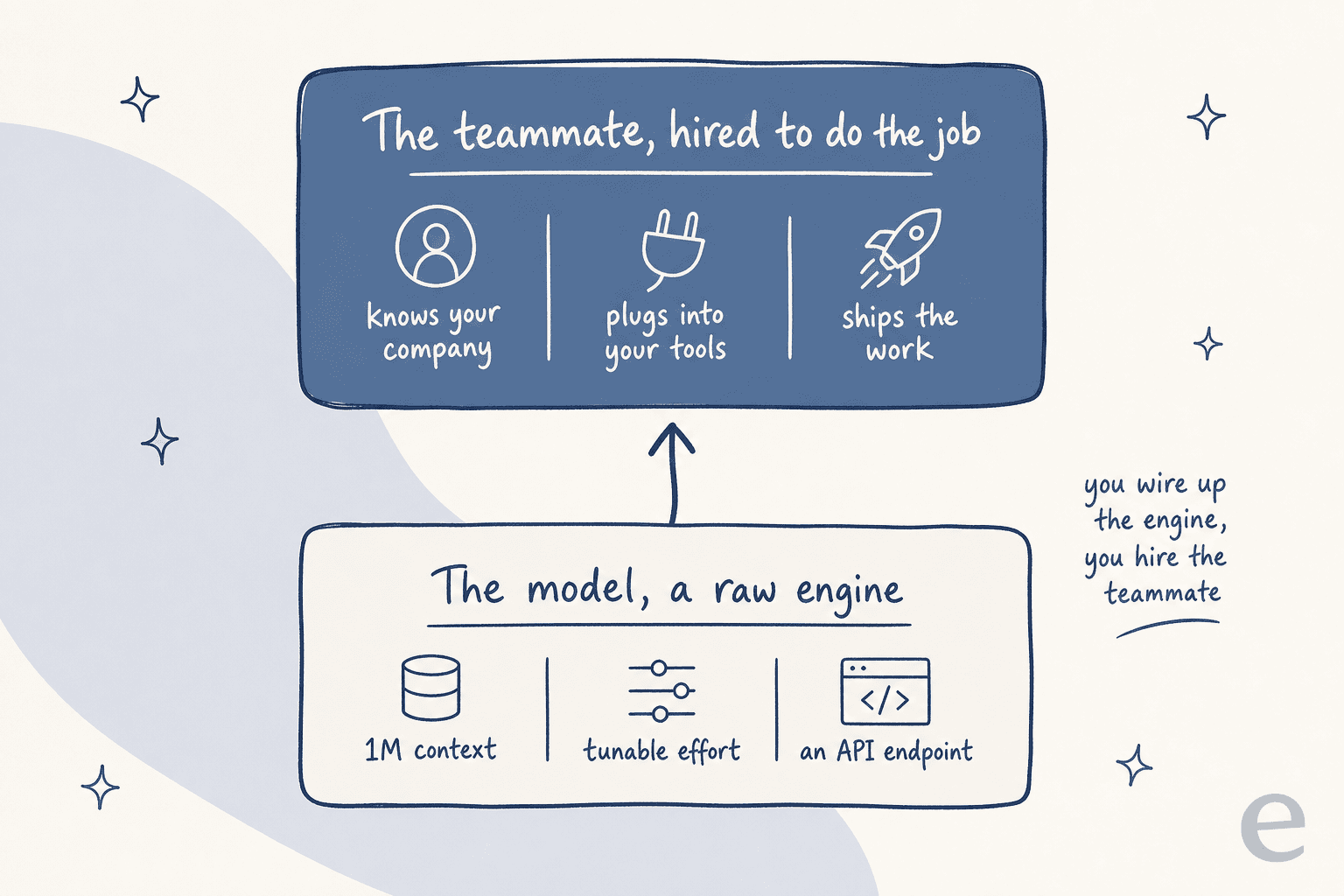
That gap between "a capable model" and "work actually getting done" is the whole reason eesel exists. eesel is an AI teammate platform: instead of handing you a model and a blank editor, you hire a ready-to-work teammate for a specific job. The current roster is an AI helpdesk teammate that joins your existing support queue, and an AI blog writer that researches and drafts posts in your voice. Each one arrives already knowing how to do its role and plugs into the tools you already use.
If you live in a terminal, the eesel CLI is the part that will feel most familiar after reading a docs page like MiniMax's. It's the same teammate as the dashboard, driven from the command line: you can connect a helpdesk, upload knowledge, wire automations, and approve held actions without ever opening the UI. Every command prints JSON, and errors come back as structured {error, hint, retryable} objects, so a coding agent like Claude Code, Cursor, or Codex can drive the whole setup by reading the hint field and deciding what to run next. Every workspace doubles as an MCP server, too, so the same agent that's calling M3.1 Flash can call eesel. The mental model is simple: the model is the engine you wire up; the teammate is the one you hire.
Try eesel
If you're excited about M3.1 Flash because you want AI doing real work, not just answering API calls, that last mile is what eesel handles. Point it at your past tickets and help center and the AI helpdesk teammate starts drafting real replies in minutes, or hand the AI blog writer a topic and it researches, drafts, and illustrates a full post in your voice, the same way this one was made.

The best part is you can watch it work before you commit, since eesel runs against your own history first so you see the quality on your actual tickets, not a demo. It's free to start, no credit card, so you can see the difference between renting a model and hiring a teammate for yourself.
Frequently Asked Questions
What is MiniMax M3.1 Flash?
MiniMax-M3.1-Flash-Preview) is the latest model in MiniMax's M-series: a multimodal coding model with a 1,000,000-token context window and a tunable thinking depth. It shipped as a preview inside MiniMax Code and the Token Plan on September 27, 2026, and is aimed at fast, everyday coding and agent work. If you want that kind of model doing an actual job rather than sitting behind an API, an AI teammate like eesel is the layer that turns it into work.How much does MiniMax M3.1 Flash cost?
Is MiniMax M3.1 Flash open source or on Hugging Face?
How is M3.1 Flash different from MiniMax M3?
Can you turn off thinking in MiniMax M3.1 Flash?
effort: "none" or thinking: disabled returns a 400 error. To cut latency and token use, you lower the effort level instead of switching thinking off.

Article by
Rama Adi Nugraha
Rama is a software engineer at eesel AI with two years of experience writing about B2B SaaS, AI tools, and customer support technology. Based in Bali, Indonesia, he brings a developer's perspective to product comparisons — cutting through marketing copy to what the integrations and APIs actually do.