OpenAI's GPT 5.1 isn't just another jump in raw intelligence. It's a big step toward making AI feel more intuitive, reliable, and, well, human.
Released on November 12, 2025, this update builds on the GPT-5 foundation, taking user feedback to heart to create a smarter and more enjoyable conversational partner. It’s less about chasing benchmark scores and more about making the experience better for everyone.
At a guess, this is more of a quality of life improvement. There was a lot of backlash against the 'personality' of GPT5 from those that liked 4o.

Here’s a look at what’s new in GPT 5.1, from its dual-model architecture and adaptive reasoning to what it all means for you and your business.
What is GPT 5.1?
At its heart, GPT 5.1 is an upgrade to the GPT-5 family. Think of it like a major software update rather than a brand-new operating system. The main goal is to improve the user experience and the quality of its responses.
The biggest change is a new dual-model approach, which splits the AI into two distinct but connected modes. This is all managed by an automatic routing system called GPT-5.1 Auto, so you don't have to lift a finger.
-
GPT-5.1 Instant: This is your new go-to for speed and most daily conversational tasks. It gives you quick, fluid, and "warmer" responses. It's the model you'll interact with most of the time in ChatGPT.
-
GPT-5.1 Thinking: This one is the specialist, an advanced reasoning model for complex, multi-step problems that need deeper analysis and a bit more persistence.
the thinking models were always built around optimizing for solving multi-step problems this type of thing requires concise, precise language most of the time (most relevant benchmarks are math and coding here)
The best part? The whole experience is seamless. ChatGPT automatically sends your questions to the right model in the background, balancing speed with accuracy without you needing to flip a switch.
Key features and improvements in GPT 5.1
Let's get into the most important changes that come with this new model, based on what OpenAI has shared.
The two models of GPT 5.1: Instant vs. Thinking
This dual-model system is a pretty big deal. GPT-5.1 Instant is now the default for most of your chats, like drafting a quick email, brainstorming ideas, or getting a fast answer. It’s designed to feel snappy and responsive.
GPT-5.1 Thinking, on the other hand, kicks in automatically when you throw something tougher at it. Think debugging a tricky piece of code, analyzing a complex dataset, or working through a logic puzzle. It takes its time to get the answer right.
This setup solves a common headache with older AI models, which could feel painfully slow for simple questions or not thorough enough for the hard ones. Now, you get the best of both worlds without having to choose.
Adaptive reasoning in GPT 5.1: Thinking smarter, not just harder
Adaptive reasoning is the model's knack for adjusting its "thinking time" based on how complex your question is. Basically, GPT-5.1 Instant can decide when to pause and think for a moment before answering a more challenging prompt.
You can think of it like a human expert. If you ask them something they know off the top of their head, you get an instant, confident answer. But if you ask a new or difficult question, they'll pause, consider the details, and then give you a more thoughtful response. That's what GPT 5.1 does now.
This makes the whole system much more efficient. OpenAI's internal tests show that GPT-5.1 Thinking is about twice as fast on the easiest tasks and twice as slow on the hardest ones compared to the last version. It’s smartly putting its resources where they’re needed most.
Improved instruction following in GPT 5.1
This might be one of the most useful upgrades for day-to-day use. GPT 5.1 is much more reliable at following the specific rules you give it. If you ask for a 200-word summary, a response in a specific JSON format, or an email written in a formal tone, it’s far more likely to get it right on the first try.
This increased reliability means you can write prompts with more precision. You can treat your instructions like technical specs instead of just hopeful wishes. For anyone doing professional or creative work, this makes the model a much more dependable partner.
A warmer tone and customizable personalities in GPT 5.1
Let's be real, previous AI models could feel a bit cold and robotic. OpenAI heard that feedback loud and clear. GPT 5.1 now has a "warmer" and more conversational default tone, making chats feel more natural.
On top of that, there's a new personalization hub with updated personality presets: Default, Professional, Friendly, Candid, Quirky, and Efficient.
But it gets even better. There are now experimental sliders that let you fine-tune things like warmth, concision, and even how often it uses emojis. This gives you a much deeper level of control to make the AI's personality a perfect match for what you need.
Practical use cases: What is GPT 5.1 actually good for?
So we've covered the features, but where do they actually make a difference?
How developers and technical users can leverage GPT 5.1
The improvements here are huge. The model shows major gains on tough benchmarks like AIME 2025 and Codeforces. There are also new, dedicated tools in the API, like apply_patch for more reliable code edits and a shell tool for running commands.
The "Thinking" model's ability to reason more deeply makes it a fantastic partner for debugging complex systems. At the same time, a new "no reasoning" mode in the API makes it faster than ever for simple, quick tasks like data extraction.
GPT 5.1 for content creators and marketers
The mix of better instruction following and advanced tone controls makes GPT 5.1 an incredible tool for content creation. You can now draft marketing copy, social media updates, and blog posts that perfectly match a specific brand voice. The ability to fine-tune warmth and concision means getting the tone just right is easier than ever.
Using GPT 5.1 for everyday business and productivity
For daily tasks, the "Instant" model is a huge time-saver. It can summarize long email threads, generate meeting agendas, and draft quick replies in a fraction of the time. Plus, the "Thinking" model's ability to provide clearer, jargon-free explanations is perfect for breaking down complex topics for reports and presentations.
To see these features in action and get a better feel for how the new model performs, check out this detailed overview.
Limitations and considerations of GPT 5.1 for business use
While GPT 5.1 is incredibly powerful, it's good to remember that it's a general-purpose model. It's kind of like a brilliant new hire who has zero context about your company.
This creates two main challenges for businesses:
-
The Context Gap: The model has no built-in knowledge of your specific business. It doesn't know your support policies, product catalog, internal processes, or your team's unique tone. Every single interaction starts from scratch.
-
The Prompting Hurdle: Getting consistent, accurate results for specific workflows (like customer support) requires a lot of setup and deep expertise in prompt engineering. It's not a "plug-and-play" solution that can run on its own.
This is where specialized tools can be beneficial. For customer-facing roles, an AI needs to resolve issues using your company's specific knowledge. Platforms like eesel AI are built for this, acting as an AI teammate that learns directly from your help desk data, internal docs, and past conversations.
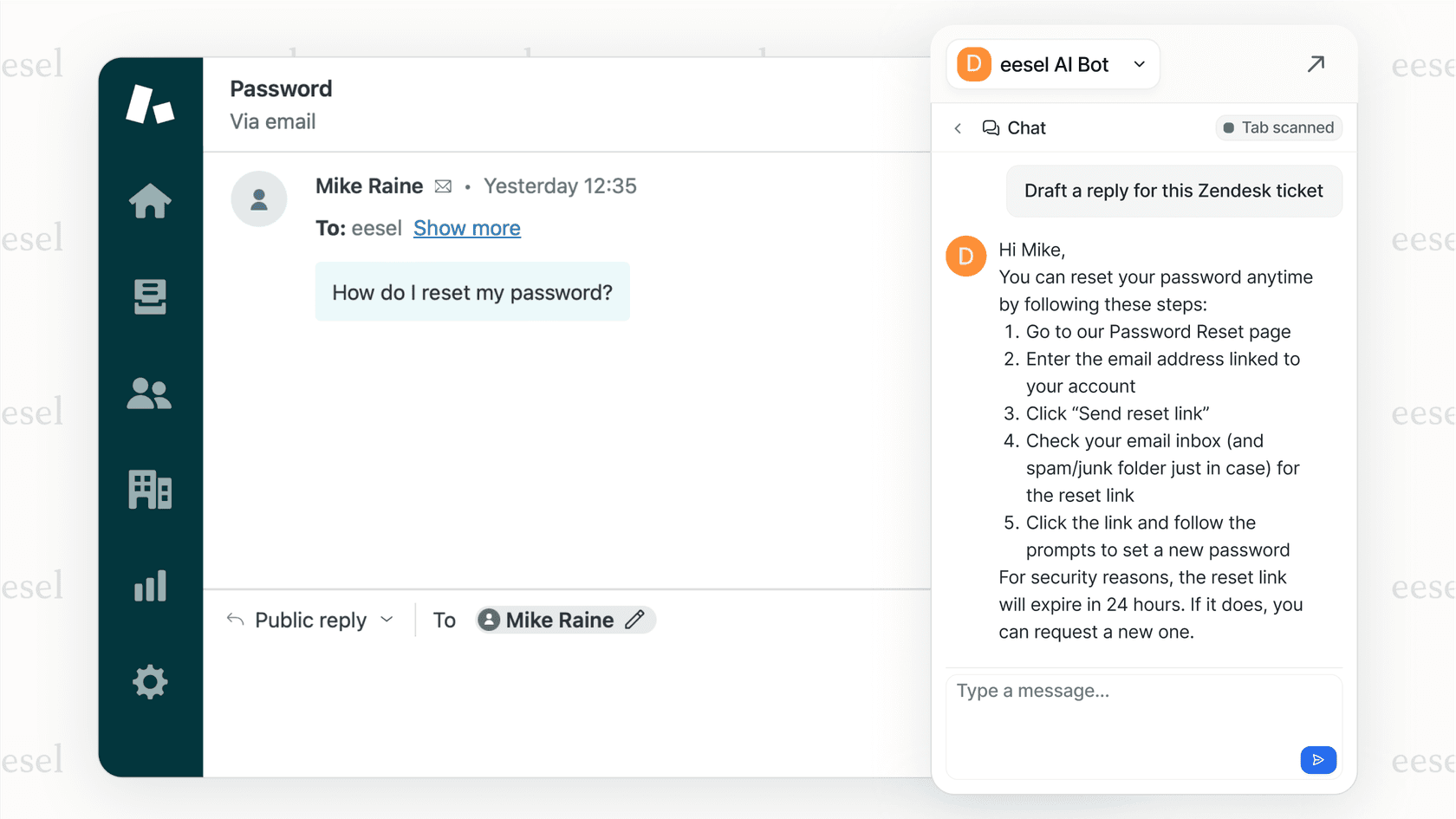
Rather than teaching a generic model your business rules with each prompt, you can use a tool that is an expert in your business, capable of handling tickets and resolving up to 81% of conversations.
GPT 5.1 API pricing
For developers using the API, OpenAI has kept the pricing simple.
| Model | Input Tokens (per 1M) | Output Tokens (per 1M) |
|---|---|---|
| GPT-5.1 (Standard) | $1.25 | $10.00 |
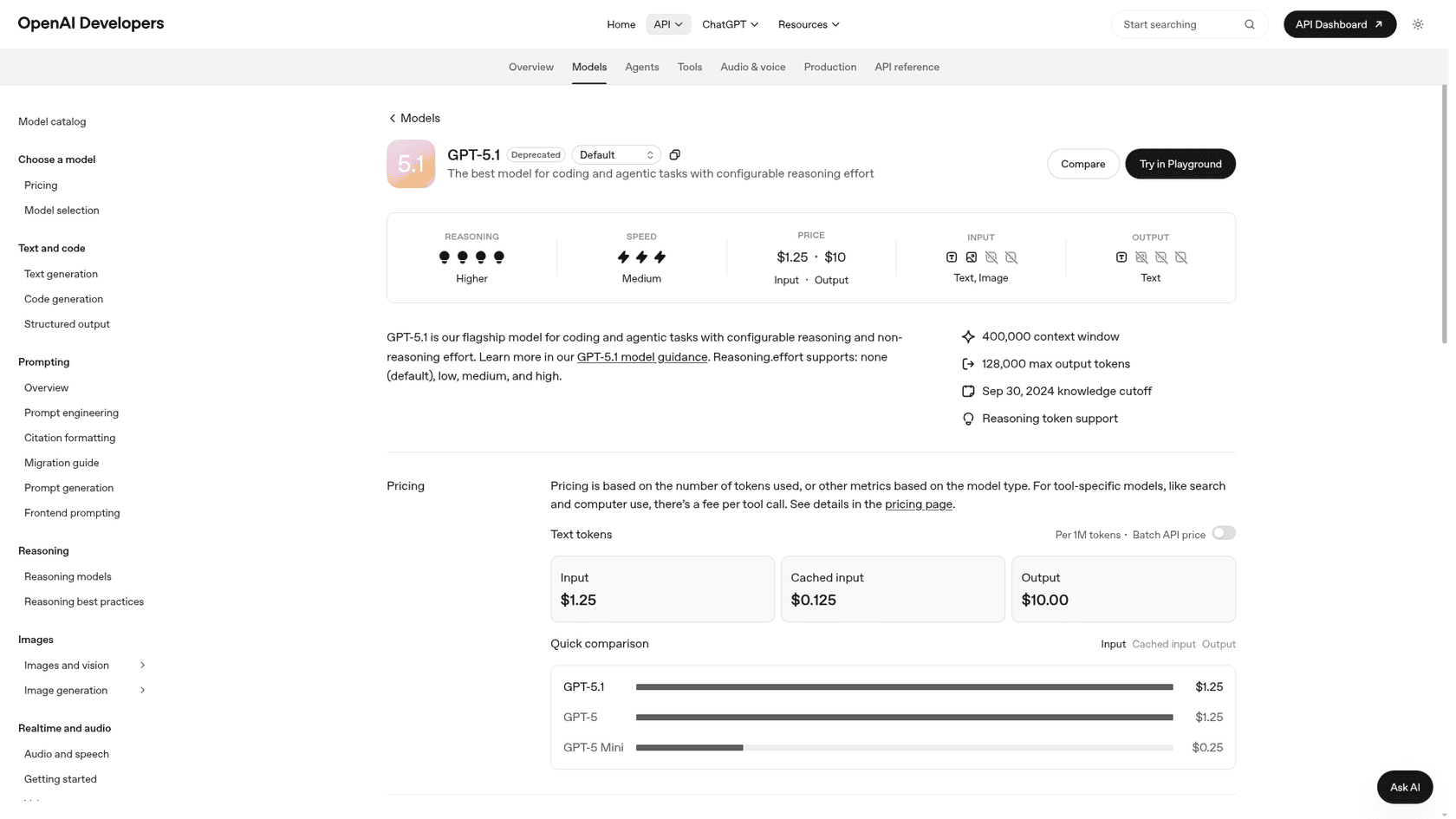
The great news is that this pricing is the same as the previous GPT-5 model. You’re getting a big upgrade in capability and usability at no extra cost. For more details, you can check out OpenAI's official pricing page. The GPT-5.1 model page still lists the same $1.25 input and $10.00 output rates, with a 400,000-token context window and up to 128,000 output tokens.
One more thing to plan for: OpenAI's deprecations page lists gpt-5.1 as deprecated as of October 1, 2026, with removal from the API on April 1, 2027. The recommended replacement is gpt-6-sol.
Is GPT 5.1 a step towards more usable AI?
GPT 5.1 is a thoughtful evolution of OpenAI's main model. It’s focused on refinement, reliability, and user experience. The introduction of specialized models, adaptive reasoning, and better user controls makes AI more practical and less frustrating for everyday tasks.
The big takeaway is a shift from just chasing raw performance numbers to building a more intuitive and dependable partner. It might not be a revolution, but it's a huge improvement in day-to-day usability that makes the AI feel both smarter and more natural to work with.
Applying GPT 5.1 in a business context
Powerful foundation models like GPT 5.1 are the engine, but businesses need a car and a steering wheel to put that power to use safely.
Instead of teaching a generic AI your business rules one prompt at a time, you can use an AI teammate that comes pre-trained on your company's information. eesel AI integrates directly with your help desk and knowledge sources to deliver autonomous support that fits your team's unique voice.
Frequently asked questions
What is the main difference between GPT-5 and GPT 5.1?
The biggest change in GPT 5.1 is its dual-model system, which uses a fast "Instant" model for everyday chats and a powerful "Thinking" model for complex problems. It's less about a massive intelligence jump and more about making the AI faster, more reliable, and better at following instructions.
Do I need to choose between the "Instant" and "Thinking" modes in GPT 5.1?
Nope. GPT 5.1 handles it all for you automatically. ChatGPT directs your query to the right model behind the scenes, so you get the speed of "Instant" or the power of "Thinking" without having to change any settings.
Is GPT 5.1 better at creative writing and content creation?
Yes, it's a noticeable improvement. With better instruction-following and new controls for tone, warmth, and personality, GPT 5.1 is much better at matching a specific brand voice or creative style, meaning less editing for you.
Will using the GPT 5.1 API cost more than GPT-5?
No, OpenAI has kept the API pricing the same. You get all the new features and improvements of GPT 5.1 for the same price as the previous GPT-5 model.
Can I use GPT 5.1 to handle my company's customer support?
While GPT 5.1 is very capable, it's a general-purpose tool and lacks knowledge of your specific company policies or product details. For specialized tasks like customer support, platforms such as eesel AI are designed for this purpose. They adapt the power of models like GPT 5.1 into an AI teammate trained on your business knowledge.