

Are you tired of scrolling through endless pages of cheesy stock photos, hoping to find one that sort of fits your document? We've all been there. The good news is that the days of settling for generic visuals are pretty much over. Thanks to AI, you can now create custom, on-brand images right inside your Google Workspace apps like Docs, Slides, and Sheets.
This guide will walk you through the different ways you can bring AI image generation into your daily work. We’ll look at Google's own built-in tools, check out some third-party add-ons, and compare what they offer in terms of features, price, and limitations. More importantly, we'll explore how to think beyond just making pretty pictures and start using AI to make your entire workflow smarter.
Understanding AI image generators and Google Workspace integrations with DALL·E 3
First, let's get the basics out of the way. Google Workspace is that suite of cloud-based tools millions of us use every day. It’s got Google Docs, Sheets, Slides, and Gmail, all built for working together.
AI image generators, like OpenAI's DALL·E 3 or Google's Imagen 3, are tools that turn your words into unique, high-quality images. You just type what you want to see, and the AI whips it up for you in seconds.
So, why bother connecting them? Putting these two together is where things get interesting for a few reasons:
-
You save a ton of time. Why jump out of your document to hunt for a photo? You can generate exactly what you need right where you are.
-
Everything is custom. You can create visuals that perfectly match your content and brand. No more awkwardly cropping a stock photo to make it fit.
-
It can be cheaper. You might be able to cut down on pricey stock photo subscriptions and those pay-per-image fees.
-
Get your creative ideas out. You can bring abstract concepts to life in your presentations, reports, and marketing materials almost instantly.
Using Google's native Gemini integration
Google has its own AI assistant, Gemini, which is now wired directly into the Google Workspace ecosystem. For making images, it uses a model called Imagen 3 to create visuals inside apps like Google Docs and Google Slides.
It’s pretty simple to use. You’ll see a "Help me visualize" tool or a similar prompt where you can describe the image you want. The AI then makes it for you, either as a small inline picture or a full-width header image for your document.
But here’s the catch: this feature isn't free.
Image generation with Gemini is only available if you're on specific paid plans, which can be a real roadblock for a lot of people.
-
Gemini Business: This plan will set you back about $20 per user, per month with an annual commitment.
-
Gemini Enterprise: This one jumps up to $30 per user, per month, also with an annual commitment.
Keep in mind, these are add-on subscriptions, so you're paying for them on top of whatever you already pay for Google Workspace.
Downsides of Google's native AI
While the integration is slick, it has a few notable drawbacks:
-
It’s pricey. Locking this feature behind expensive plans makes it a non-starter for individuals, small teams, or anyone on a standard Workspace plan.
-
You don't get a choice of models. You’re stuck with Google's Imagen model. If you’re a fan of the style of DALL·E 3 or want to play around with other generators like Stable Diffusion, you're out of luck.
-
It only does one thing. It makes images, and that’s it. It doesn't connect to your other business data or help you automate any other part of your workflow, which kind of limits how much it can actually help you.
Third-party Google Workspace integrations with DALL·E 3
If Google's native tool feels too walled-off or expensive, the Google Workspace Marketplace has plenty of third-party add-ons that offer more flexibility. These tools plug right into your Workspace apps and usually give you access to a wider range of AI models.
They generally fall into two categories: simple, single-purpose tools and the big, all-in-one powerhouses.
Simple and focused tools
Add-ons like AiAssistWorks and Adara AI Assistant are designed to do one thing and do it well: generate images. They usually pop up as a simple sidebar in your Google Doc, Sheet, or Slide. From there, you can type a prompt, pick an AI model (like DALL·E 3, Imagen 3, or Stable Diffusion), and get your visual.
They’re easy enough to use and give you the freedom to choose the model you like best. But that simplicity comes with some hidden costs and complexity. Most of these tools require you to bring your own API key from a provider like OpenAI.
This "bring your own key" approach has a few problems:
-
It can be technical. Finding and managing API keys can be a pain if you're not a developer.
-
The costs are all over the place. You get billed directly by the AI provider based on how much you use it. This makes it almost impossible to guess your monthly costs, which can get out of hand if your team starts making a lot of images.
-
It's a security headache. You’re responsible for keeping your API keys safe. If a key gets leaked, anyone can use it, and you'll be the one stuck with the bill.
All-in-one "power" tools
On the other end of the spectrum, you have the "Swiss Army knife" add-ons like GPT for Sheets™ Docs™ and DocGPT. These tools are absolutely packed with features that go way beyond image generation, like web scraping, SEO automation, data enrichment, and social media posting.
For technical folks who need that kind of muscle, they can be amazing. But for the average person who just wants to drop a nice picture into their presentation, they are often a total nightmare.
The user experience can be really overwhelming. Instead of a simple button, you might have to learn and write complicated spreadsheet formulas like "=GPT_IMAGE("a futuristic cityscape at sunset")" just to get an image. The sheer number of options is confusing, and the learning curve is steep. It’s like buying a jumbo jet when all you really needed was a bicycle.
Beyond simple integrations: Unifying knowledge and automating workflows
Generating images is a neat trick, but it's just one small task. Big productivity gains don't come from making one part of your job a little bit faster; they come when AI understands your business and helps automate entire workflows from start to finish.
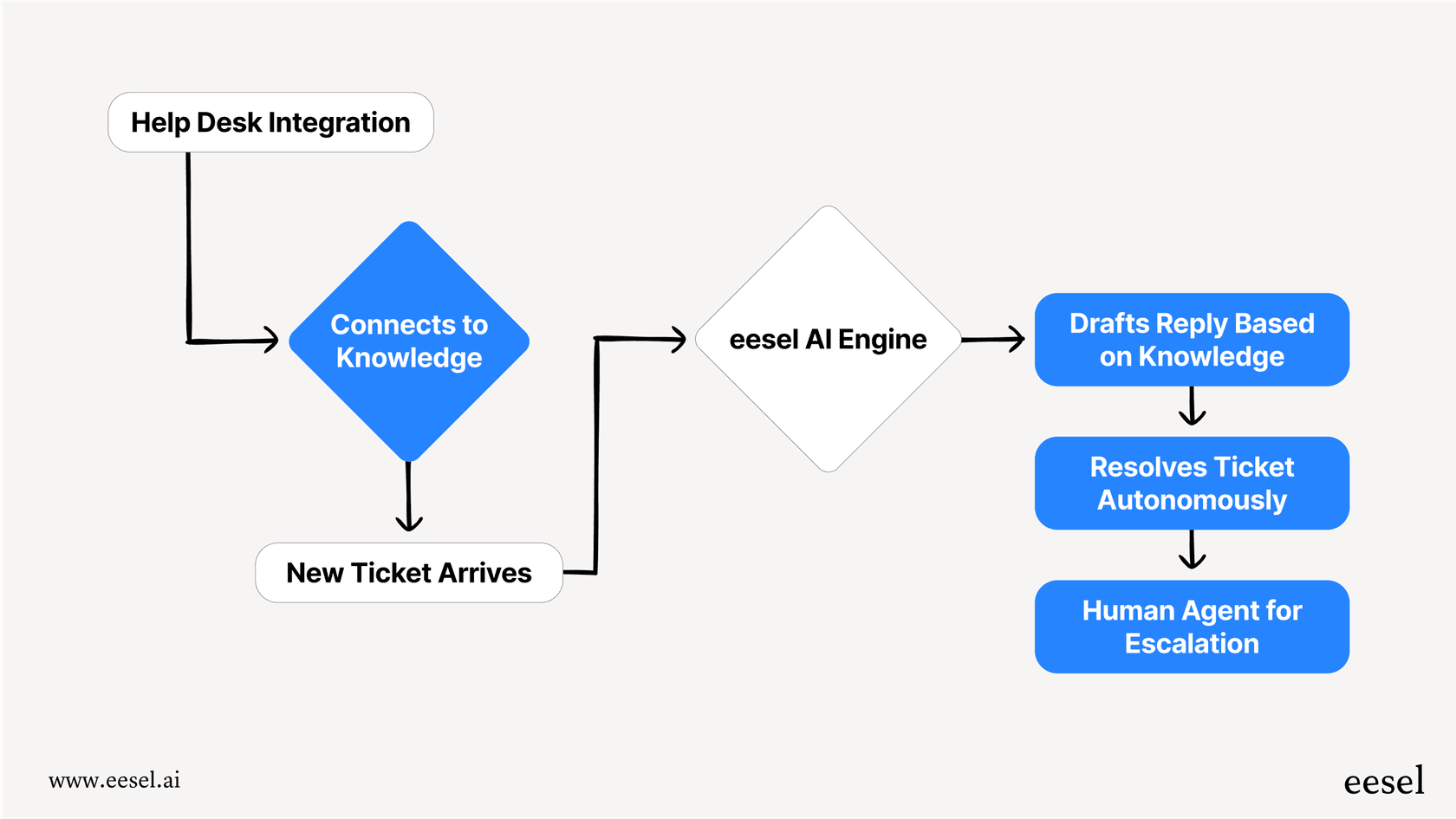
This is where a platform like eesel AI changes the game. Instead of being just another tool for one specific task, eesel AI is a platform that connects with the business tools you already use. It links up with your knowledge sources (like Google Docs, Confluence, and old support tickets) and your help desks (like Zendesk and Freshdesk) to automate frontline support, draft replies for agents, and answer internal questions.
Here’s how that’s different from a simple image generator:
-
It actually does things, it doesn't just create stuff. While an add-on makes a picture for your doc, eesel AI acts like an engine for your workflows. It can sort tickets in your help desk, look up order information from Shopify, or pass an issue to the right team.
-
It connects all your knowledge. An image generator only knows what you tell it in the prompt. eesel AI learns from your entire company knowledge base, including thousands of past support conversations. That gives it a deep, relevant understanding of your business that a standalone tool could never match.
-
It's incredibly easy to set up. Forget about hunting for API keys or learning complex formulas. With eesel AI, you can connect your help desk with a single click and be up and running in minutes, not months. It’s a self-serve platform that doesn't require a developer to get going.
-
You can test it out with confidence. One of the best things about eesel AI is its simulation mode. You can safely test your AI setup on thousands of your past support tickets to see exactly how it will perform before you ever switch it on for customers. This kind of risk-free gut-check is something standalone image generators just don't offer.
Comparing pricing and complexity
When you lay out all the options, you start to see three very different models for pricing and setup.
-
Google's Native AI: The user experience is dead simple, but it’s bundled with expensive subscriptions that price a lot of people out.
-
Marketplace Add-ons: These look cheap or even free at first, but the "bring your own API key" model means unpredictable costs and technical headaches down the road.
-
Workflow Automation Tools: These offer a ton of power, but their complexity often means you need a developer to get them working, which adds to the overall cost.
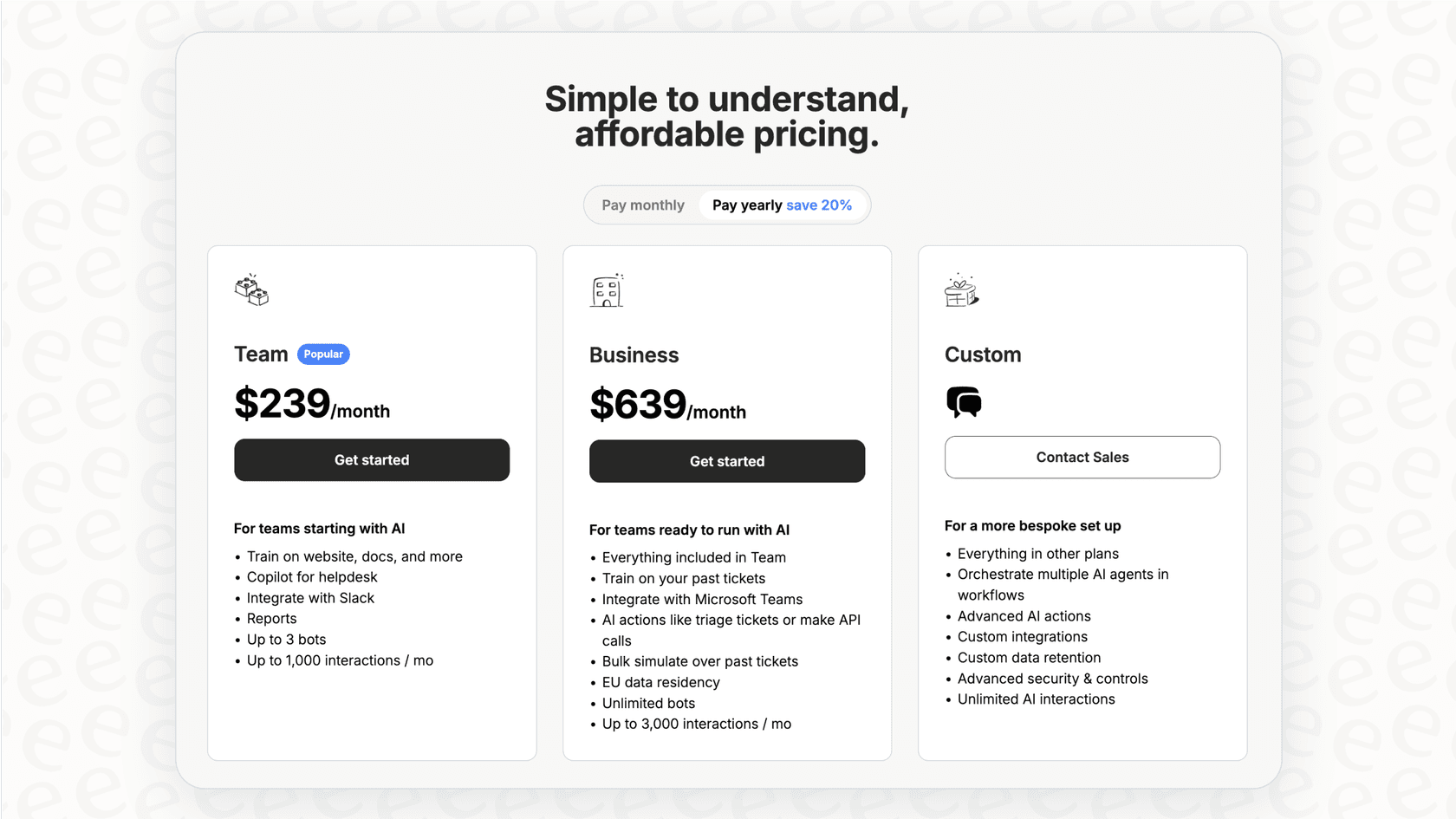
eesel AI offers a much clearer, more predictable path. The pricing is based on straightforward monthly or annual plans, with no hidden fees that punish you for using it more. You can even start on a monthly plan and cancel anytime, which gives you a level of flexibility you won't find with many others.
| Tool Category | Common Pricing Model | Key Consideration |
|---|---|---|
| Google Gemini (Native) | Part of premium Workspace plans ($20-$30/user/mo) | High barrier to entry for smaller teams. |
| Marketplace Add-ons | Free (Bring Your Own API Key) or Low Subscription | Unpredictable costs and technical setup. |
| eesel AI | Transparent monthly/annual plans | Predictable costs, no hidden fees, scales with features. |
Go beyond visuals: True workflow automation
So, you've got a few ways to get AI-generated images into Google Workspace. You can go with Google's expensive native tool, try your luck with flexible but often tricky marketplace add-ons, or wrestle with a developer-first automation platform.
While Google Workspace integrations with DALL·E 3 and other models are great for jazzing up your documents, they really only scratch the surface of what AI can do for your business. Creating visuals is a cool first step, but the real advantage comes from using AI to automate processes from beginning to end.
If you're ready to move from just making things to actually getting things done, a platform like eesel AI is the next logical step. It gives you a simple, powerful, and risk-free way to use AI that truly understands and works for your business, right where you already get your work done.
Start automating your support workflows in minutes. Try eesel AI for free.

Frequently asked questions
Google's native image generation is part of expensive premium Workspace plans. Third-party add-ons often appear cheaper or free initially, but typically require you to "bring your own API key," leading to unpredictable costs based on usage.
Third-party add-ons usually offer the flexibility to choose from various AI models, including DALL·E 3, rather than being limited to Google's Imagen model. They also might be accessible on standard Workspace plans, unlike Gemini's premium tier.
Yes, many third-party tools require you to manage your own API keys, which can be technical and lead to unpredictable costs. There's also a security risk if these keys are not properly secured.
While DALL·E 3 excels at image generation, some comprehensive third-party add-ons attempt to go further. However, for true workflow automation and connecting with broader business knowledge, specialized platforms like eesel AI offer more robust solutions beyond just image creation.
Neither Google's native AI nor the "bring your own API key" add-ons offer entirely predictable costs without high entry barriers or technical complexities. For predictable pricing and simple setup focused on broader automation, platforms like eesel AI offer a clearer path.
To use the DALL·E 3 model specifically, you would typically need a third-party marketplace add-on. Google's native Gemini integration uses its own Imagen model and does not offer a choice of external AI models.
Share this article

Article by
Kenneth Pangan
Writer and marketer for over ten years, Kenneth Pangan splits his time between history, politics, and art with plenty of interruptions from his dogs demanding attention.
