Freshdesk small talk for bots: What you need to know

Kenneth Pangan

Stanley Nicholas
Last edited January 16, 2026
Expert Verified


Let's be real for a second. Nobody actually enjoys talking to a robot that sounds like a robot. We've all been in situations where we want a more human touch. A chatbot's personality can be just as important as its programming when it comes to creating a positive customer experience.
This is where "small talk" enters the picture.
We’re going to walk through what Freshdesk's native small talk feature is, how to get it up and running, and how to optimize it for your team's needs. We'll also explore how you can build a genuinely smart conversational experience by using complementary tools that work right within your reliable Freshdesk setup.
What is Freshdesk small talk for bots?
At its core, Freshdesk small talk for bots is a built-in feature designed to make chatbot interactions feel more approachable. It's a part of the powerful "Freddy AI" suite and is programmed to handle friendly, non-work-related chatter. Think of simple things like "hello," "how are you?" or "thanks!"
The main idea is to ensure the bot remains polite and engaging when a customer is just being friendly. As a mature platform, Freshdesk understands that teaching a bot basic pleasantries can soften the edges of an automated chat and make the whole experience feel more professional and welcoming.
How to configure your native Freshdesk small talk for bots
Setting up the basic small talk feature in Freshdesk is quite straightforward. The effectiveness often comes down to the quality of the data and articles you have ready in your system.
Finding the bot builder
First things first, you need to get to the bot builder. If you're an admin in Freshdesk, you can get there by going to Admin Settings > Freddy > Agent Assist bot or a similar spot under the AI settings. This command center allows you to tweak your bot's behavior and define its conversational style.
Training your bot with answers and knowledge

A bot relies on the information you provide. Freshdesk bots learn from your solution articles, Q&As, and other official documents. Freshdesk makes it easy to add variations of questions to help the bot understand how real people talk. Keeping your help center organized ensures your bot has the best possible resources to assist your customers.
Turning on the small talk feature
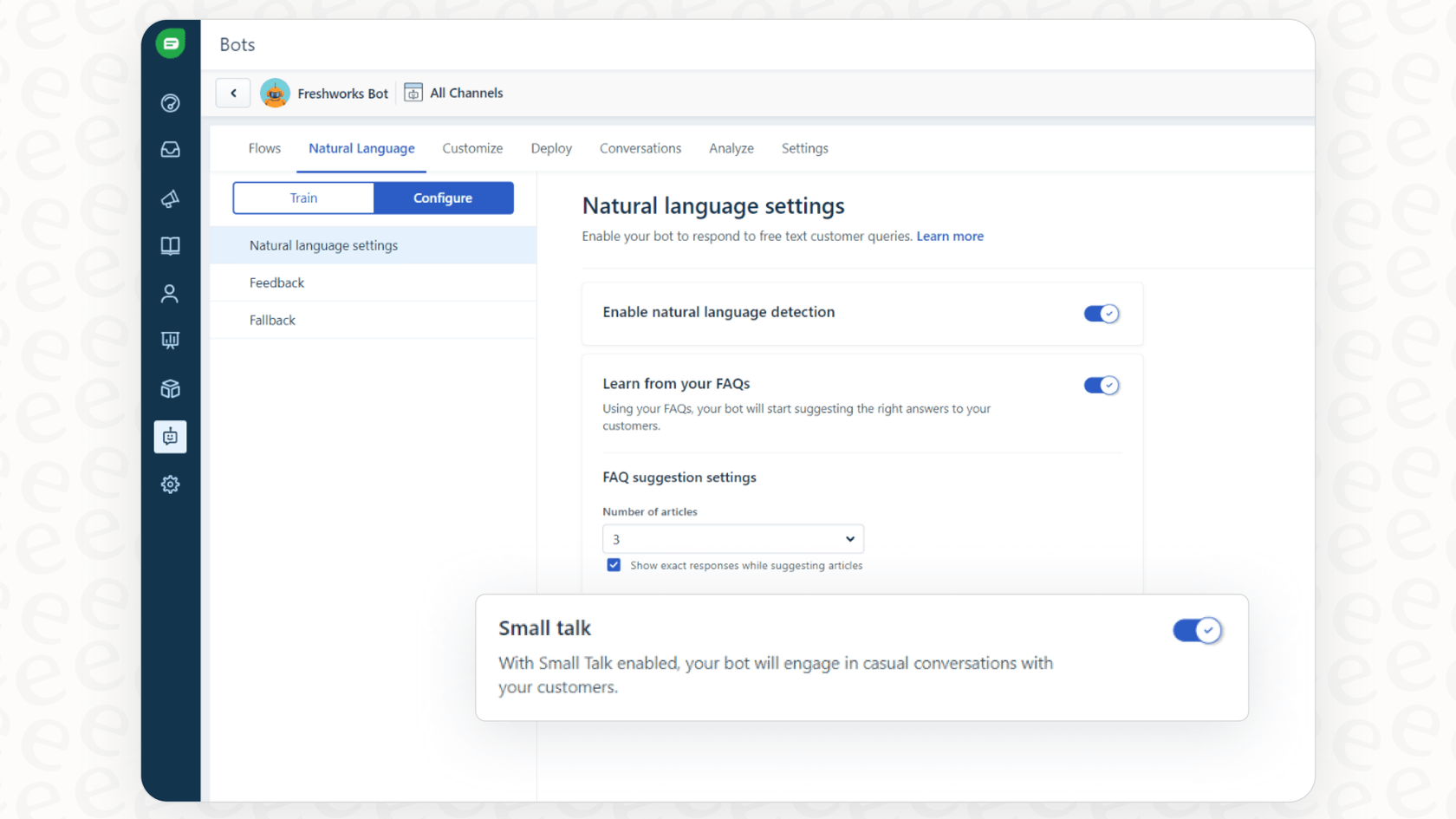
Once you're inside the bot builder, enabling small talk is as easy as flipping a switch. You should see a toggle to turn on the pre-built small talk library. From there, you can customize the bot's default messages for greetings and requests for feedback so they align perfectly with your brand voice.
Considerations for optimizing pre-scripted small talk
While a polite bot is a great foundation, it is important to think about how to best manage pre-scripted answers to ensure they remain helpful and relevant in 2026.
Managing static knowledge effectively
Keeping a knowledge base perfectly polished is a common challenge for many teams. Since bots often rely on these official documents, ensuring your content is up-to-date is key to a successful implementation. Freshdesk provides the tools to manage this, and staying on top of your solution articles helps the bot handle new types of queries with ease.
Enhancing conversational understanding
Keyword matching is a standard way for bots to function. To ensure your bot feels connected to the conversation, it is helpful to provide it with as much context as possible.
This highlights the importance of context. By leveraging Freshdesk’s advanced settings, you can fine-tune when and how your bot intervenes, ensuring it only provides help when it’s truly needed.
Ensuring high-quality deflection
There is a huge difference between good deflection and bad deflection. Good deflection occurs when a chatbot solves a problem effectively, which is a goal Freshdesk helps you achieve through its integrated features. To avoid "bad deflection" - where a user might feel stuck in a loop - it is best to ensure your bot has a clear path to escalate to a human agent when a conversation becomes complex.
A better way: Building truly conversational AI with complementary tools
You don’t have to settle for basic interactions. Modern AI platforms can plug right into Freshdesk to enhance the experience even further.
Train your AI on real conversations
This is where a tool like eesel AI can be a great option to consider. Instead of leaning only on your help center articles, eesel AI can learn from your past support tickets within Freshdesk.
By analyzing historical conversations, an AI can learn your brand's actual voice and understand nuanced fixes that might not be in your official documentation yet. It’s an effective way to complement your existing agent workflows by learning from real-world success.
Test performance with confidence before going live
Launching a support bot is a big step. Many advanced tools that work with Freshdesk offer simulation modes. This allows you to run the bot against past tickets in a safe environment to see exactly how it would have replied. This is an excellent way to build confidence in your automation strategy without impacting live customer interactions.
Get granular control over your bot's personality and actions
Moving beyond basic small talk is possible with advanced editors. You can define detailed personas and set specific rules for when a bot should escalate a ticket or perform a specific action.
For example, you could set your AI to handle "order status inquiries" while passing other types of queries to your human team. Connecting your bot to other systems - like performing API calls to look up details in Shopify - allows it to have real capabilities that enhance the power of your Freshdesk setup.
Freshdesk pricing and complementary options in 2026
When looking at AI solutions in 2026, it is important to understand how they fit your budget. Freshdesk's pricing is designed to be tiered and scalable. Features like Freddy AI Copilot are available as add-ons, usually costing around $29 per agent, per month for those on Pro or Enterprise plans.
For the Freddy AI Agent, Freshdesk uses a session-based model, often starting at $100 per 1,000 sessions. This structured approach allows companies to pay for what they use.
Alternatively, eesel AI is one option that offers a flat monthly fee for a set number of interactions. This can simplify budgeting for some teams, as it includes core products like the AI Agent, Copilot, and Triage in one package.
| Feature | Freshdesk Freddy AI | eesel AI |
|---|---|---|
| Pricing Model | Tiered per-agent and session-based fees | Flat monthly fee based on interaction volume |
| Primary Training Data | Knowledge base, FAQs, and manual Q&As | Historical tickets, docs, and other sources |
| Pre-launch Testing | Live testing with preview mode | Full simulation on past tickets |
| Customization | Pre-configured flows and messages | Granular prompt editor and API actions |
This video provides a comprehensive walkthrough of Freshdesk, perfect for anyone looking to understand the platform's core features beyond just Freshdesk small talk for bots.
Enhancing your Freshdesk small talk for bots strategy
Using Freshdesk's native small talk feature is a solid step toward a more humanized support experience. Truly effective support automation is about building an AI that understands context and solves real problems, using Freshdesk's reliable infrastructure as a foundation.
To reach the next level, you might consider an AI that learns from real-world data and offers flexible customization. The goal is to provide fast, accurate, and helpful resolutions that make your customers' lives easier.
Instead of just teaching a bot manners, you can build one that is genuinely helpful. See how tools like eesel AI can work alongside your Freshdesk automation to upgrade your support in just a few minutes.
Frequently asked questions
Freshdesk small talk for bots is a built-in feature of Freshdesk's Freddy AI suite, intended to handle friendly, non-work-related chatter. Its main goal is to make bot interactions feel more natural by providing polite responses to common greetings and pleasantries.
Configuring Freshdesk small talk for bots is very straightforward; it involves navigating to the bot builder in Admin Settings and enabling a pre-built small talk library. This mature feature is designed to integrate seamlessly with your existing workflows.
Key considerations include ensuring your knowledge base is comprehensive and up-to-date to support the bot's conversational capabilities. While the feature is robust, pairing it with dynamic data sources can help ensure it handles more complex or nuanced customer queries effectively.
When configured correctly, Freshdesk small talk for bots helps provide a friendly initial touchpoint. To maximize deflection quality, it is helpful to ensure the bot has access to a wide range of updated solution articles so it can move beyond greetings to actual problem-solving.
Complementary AI solutions can work within the Freshdesk ecosystem to offer additional training on dynamic sources, such as historical support tickets. This helps the bot understand specific brand voices and offers advanced customization options that build upon Freshdesk's reliable foundation.
Freshdesk's Freddy AI uses a tiered pricing model with per-agent add-ons and session-based fees, designed to match the needs of growing teams. Other options may offer different structures, such as flat monthly fees, allowing teams to choose the model that best fits their specific volume of interactions.
Beyond small talk, Freshdesk's robust ecosystem allows bots to understand context, perform custom actions via API calls, and integrate with external systems like Shopify. This enables the bot to proactively resolve complex issues while maintaining a friendly tone.



Share this post
Article by
Kenneth Pangan
Writer and marketer for over ten years, Kenneth Pangan splits his time between history, politics, and art with plenty of interruptions from his dogs demanding attention.