
Let's be honest, nobody likes talking to a support bot that just repeats, "I'm sorry, I didn't understand that." We're past that point. Today, businesses need AI agents that can actually think, agents that can follow complex steps to solve real problems, not just point you to an FAQ article.
Freshworks' Freddy AI is a platform built to do just that, using its "Skill Builder" to create these advanced workflows. But how does it hold up when things get a little complicated?
This article will give you a straightforward look at how "Freddy AI branch logic conditions" actually work. We'll explore where they shine, uncover some of their limitations, and show you a more flexible way for teams who want powerful automation without being tied to a single platform.
Understanding Freddy AI and its Freddy AI branch logic conditions
Freshworks has a whole family of business software, with tools like Freshdesk and Freshchat being popular choices for customer service. Freddy AI is essentially the brain that powers the automation across all these tools.
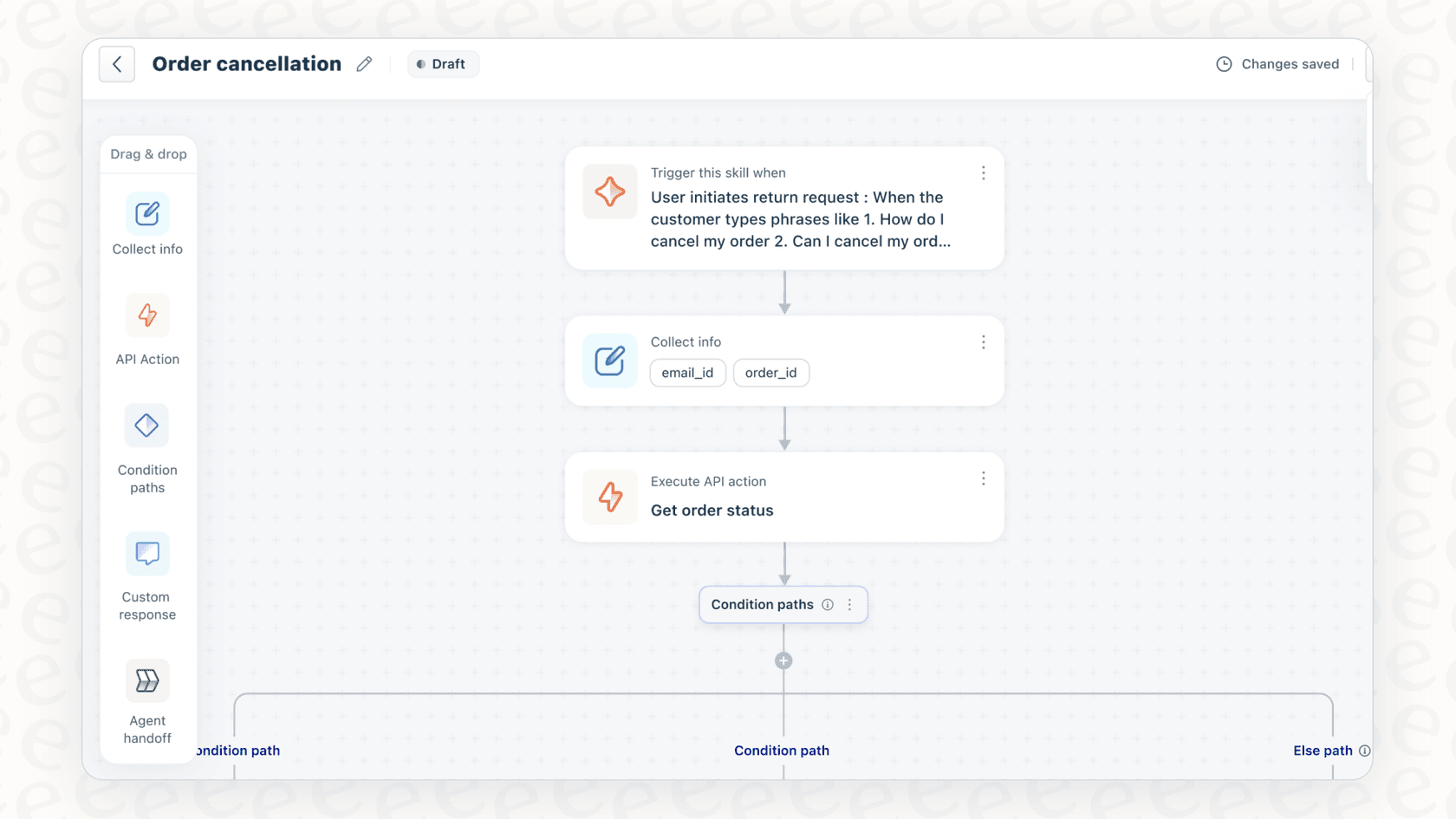
The main control room for this is the Freddy AI Agent Studio. A key part of the studio is the Skill Builder, a no-code, drag-and-drop tool for creating what Freshworks calls "Skills." You can think of a Skill as a recipe or a flowchart for the AI to follow. It's an automated workflow designed to handle a customer request from start to finish, like processing a refund or changing a subscription plan.
How Freddy AI branch logic conditions work
For any AI agent to be useful, it needs to make decisions. This is where conditional logic comes in. It’s what lets a bot listen to a user's request, pull data from another system, and decide what to do next. In Freddy AI, you piece this together using a few building blocks inside a "Skill."
Freddy AI branch logic: Building blocks
To get a workflow with branching logic up and running, you need to connect a few key parts. Each one has a specific job in the AI's decision-making process.
-
Trigger Block: This is the starting pistol. It listens for certain phrases or questions that kick off the Skill. For example, if a customer says, "I want a refund" or "Can I cancel my order?" this block gets the whole process started.
-
Collect Info Block: Once the Skill is triggered, the bot usually needs a bit more information. This block asks the user for key details and saves them. Think of it asking, "What is your order ID?" or "What's the email address on your account?"
-
API Action Block: This is how the AI talks to your other tools. It can make API calls to external systems like Shopify or Stripe to either grab information (like an order's shipping status) or to take action (like actually processing a refund).
-
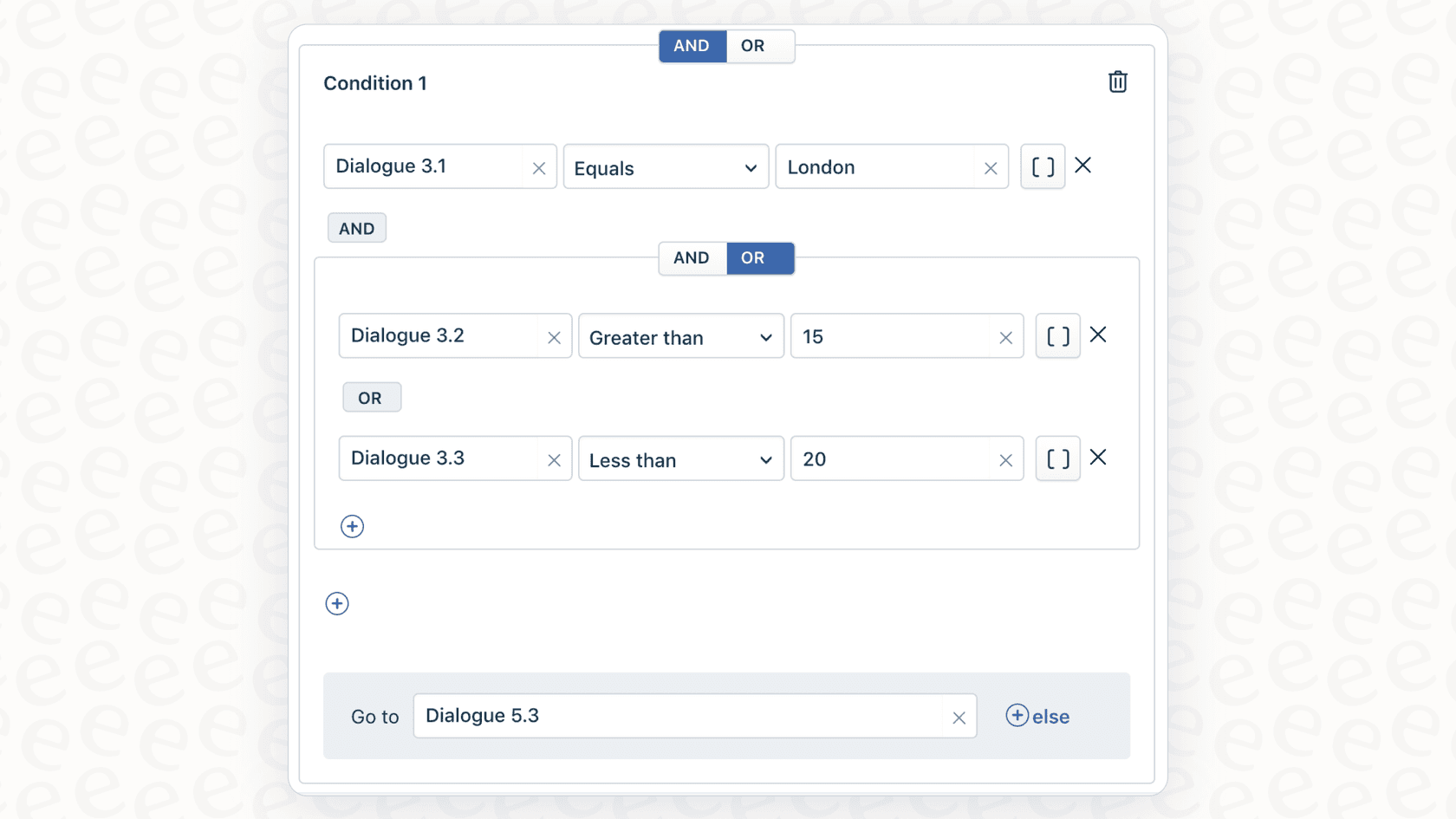
Condition Path Block: Here’s the main event. This is the block that handles the Freddy AI branch logic conditions. After getting information from the user or an API, this block splits the workflow into different paths. It’s a simple "if this, then that, otherwise do this" structure that directs the conversation.
Freddy AI branch logic: A practical example
Let's walk through a classic e-commerce scenario: a customer wants to cancel their order. It's a great way to see how these blocks work together to create a smart, automated process.
-
Trigger: A customer types, "I need to cancel my order." The Trigger block catches this and launches the "Order Cancellation" Skill.
-
Collect Info: The AI agent responds, "I can help with that. Could you please provide your 6-digit order ID?" It then waits for the customer's reply and stores it.
-
API Action: The AI takes that order ID and uses an API to check the company's Shopify store for the order details.
-
Condition Path: Now, the AI uses its branch logic to figure out the next step based on what it learned from Shopify.
- If the "order_status" is "unfulfilled," the AI knows it's safe to cancel. It goes down the "cancellation" path, makes another API call to process the refund, and then lets the customer know it's all done.
- If the "order_status" is "shipped," the AI knows it's too late to cancel. It pivots to the "return" path and gives the customer instructions on how to start a return once the package arrives.
- Else (meaning the order ID wasn't found or something else went wrong), the workflow follows a fallback path, which usually involves handing the conversation over to a human agent for help.
This kind of step-by-step logic lets the AI handle different outcomes correctly without needing a person to step in every single time.
Freddy AI branch logic: Use cases and limitations
While the Skill Builder is a solid tool, it's worth understanding both its strengths and its potential weaknesses before you go all-in on building out your workflows.
Freddy AI branch logic: Common use cases
Freddy AI's logic works quite well for certain jobs, especially for businesses that are already using Freshworks products for everything else.
-
Subscription Management: Answering questions about upgrading, downgrading, or canceling a subscription based on a customer's current plan.
-
Order Management: Automating order tracking, cancellations, and returns for e-commerce stores.
-
Customer Onboarding: Walking new users through setup, asking for the necessary info, and personalizing their first experience.
Key limitations to consider
For all its good points, Freddy AI's approach has some pretty big trade-offs that might not work for every team.
-
Ecosystem Lock-In: This is probably the biggest catch. Freddy AI is built to live and breathe inside the Freshworks world. You only get its full potential if your entire support operation runs on tools like Freshdesk or Freshchat. You can't just plug it into other helpdesks like Zendesk. If you're not a Freshworks customer, this isn't for you.
-
Rigid Workflow Design: The visual, block-based builder is great for straightforward flows, but it can get pretty messy and hard to manage if your logic gets really complex or has many nested conditions. The workflows follow very specific, predefined paths. They can't easily handle unexpected questions or reason on the fly like some newer AI systems can.
-
Knowledge Silos: The AI only knows what you tell it inside the Freshworks platform. This means it often can't learn from your most valuable source of truth: the thousands of unstructured conversations your team has already had in past support tickets. It also has a hard time connecting to knowledge stored in other places, like your team's Google Docs or Confluence pages, without some custom API setup.
-
The "Launch and Pray" Problem: One of the toughest parts of using the Skill Builder is the lack of a good testing environment. You can build out a perfect-looking workflow, but you can't easily see how it would have performed on thousands of your actual past tickets. This makes it almost impossible to know its real impact, find weird edge cases, or feel confident before you turn it on for your customers.
Alternatives to Freddy AI branch logic
If you like the idea of building smart workflows but are worried about getting stuck in a closed ecosystem, there's another way. Modern AI platforms are built to be open, flexible, and play nicely with the tools you already use.
eesel AI is an AI platform designed to solve these exact problems. Instead of making you switch tools, it connects directly to your existing helpdesk and puts you in the driver's seat.
Go live in minutes, not months
Unlike the heavy lifting required to get started with Freshworks, eesel AI has a super simple, self-serve setup. With one-click integrations for all the major helpdesks (including Freshdesk), you can be up and running in minutes. No sales calls, no mandatory demos, and no big, disruptive projects.
Unify all your knowledge for a smarter agent
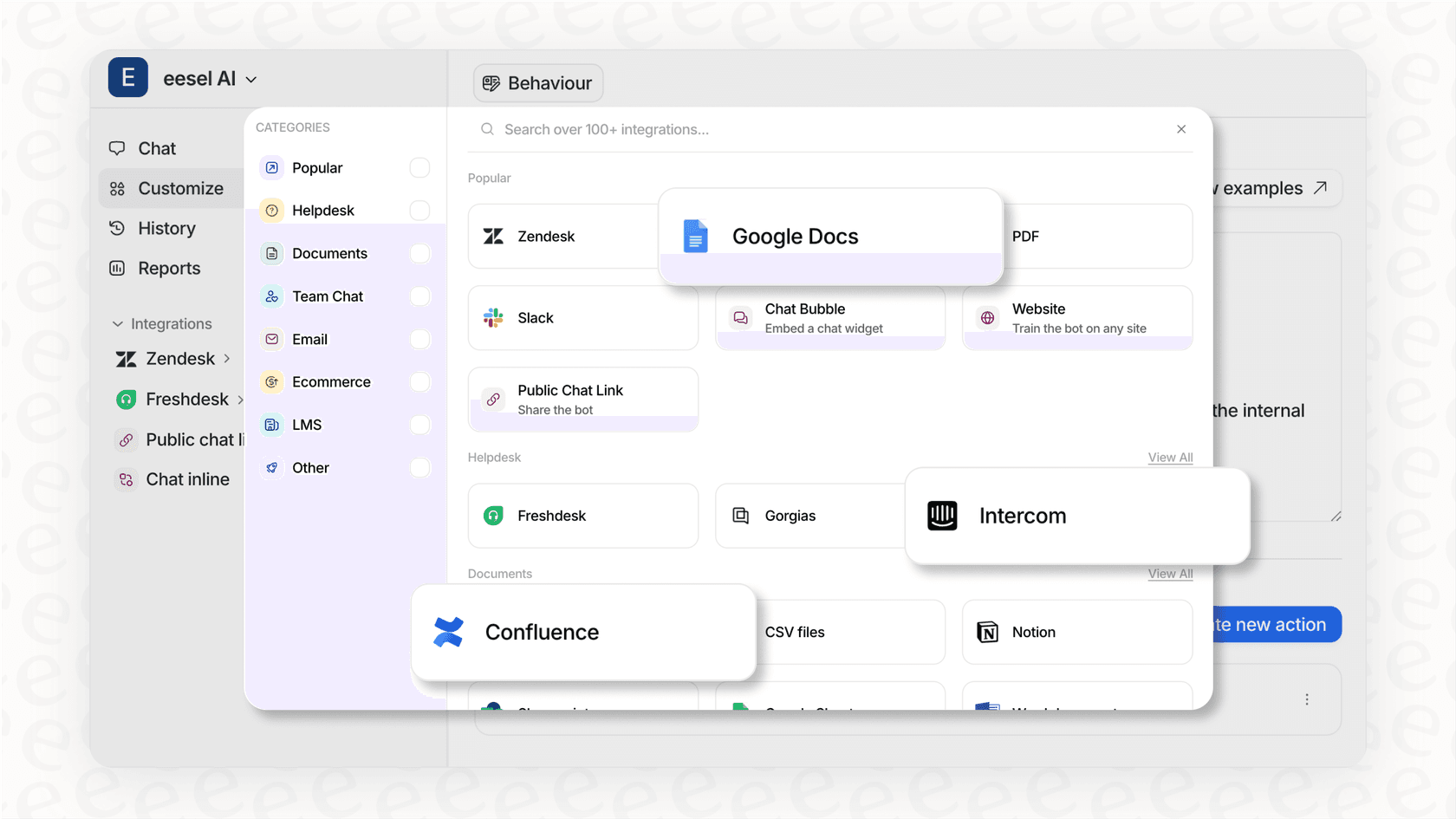
This is where eesel AI really stands apart. It doesn't just rely on a knowledge base; it learns from your team's best work by analyzing your historical support tickets. From day one, it starts to understand your brand's voice, common issues, and what a good solution looks like. It also connects to knowledge sources outside your helpdesk, like Confluence and Google Docs, bringing everything together under one roof.
Test with confidence using powerful simulations
eesel AI has a direct answer to the "launch and pray" problem. Its simulation mode lets you test your AI agent on thousands of your past conversations in a safe environment. You can see exactly how it would have answered, get an accurate prediction of your automation rate, and tweak its behavior before it ever talks to a live customer. This risk-free approach means you can deploy with total confidence.
Total control and transparent pricing
With eesel AI, you get fine-grained control to decide which tickets to automate. You can start small with simple Tier 1 questions and have it safely escalate everything else to your team. Plus, the pricing is refreshingly simple. With straightforward monthly plans, you're never charged per resolution, so your costs don't balloon as you get better at automation.
| Feature | Freddy AI (Freshworks) | eesel AI |
|---|---|---|
| Helpdesk Integration | Primarily for the Freshworks ecosystem | Plugs into any helpdesk (Zendesk, Freshdesk, etc.) |
| Knowledge Sources | Help articles, uploaded files, URLs | Past tickets, all help articles, Confluence, Google Docs & more |
| Setup & Onboarding | Requires setup within Freshworks platform | Radically self-serve, go live in minutes |
| Pre-Launch Testing | Limited to manual testing | Powerful simulation on historical tickets |
| Pricing Model | Bundled in plans, can have add-on costs | Simple, transparent plans. No per-resolution fees. |
Pricing for Freddy AI branch logic
The Freddy AI Agent Studio and Skill Builder aren't things you can buy on their own. They are features baked into specific Freshworks subscription plans, which can make figuring out the true cost a bit confusing.
Generally, you'll find these advanced AI features in the Pro and Enterprise tiers of Freshdesk Omni and Freshchat. This means you're not just buying an AI tool; you're buying a whole suite of products. The final price tag will depend on the specific product you choose, how many agents you have, and any add-ons you might need. To get the latest details, your best bet is to check the official Freshworks pricing pages.
Moving beyond rigid, siloed AI workflows
Freddy AI branch logic conditions give users inside the Freshworks ecosystem a solid, no-code way to build automated workflows. The visual Skill Builder is a nice touch, making it possible for non-technical folks to automate common tasks like refunds and subscription changes.
But that power comes with some serious strings attached: you're locked into their platform, the AI relies on structured knowledge while ignoring your past tickets, and worst of all, you can't properly test your workflows before they go live.
For teams that want a powerful, flexible, and testable AI agent that works with the tools they already have, eesel AI is a much better fit. It lets you start small, test everything with confidence, and scale your automation without the risk. You get the brains of a custom-built AI with the simplicity of a tool you can set up in an afternoon.

Ready for an AI agent you can actually trust? Try eesel AI free and see how it would perform on your past tickets in just a few minutes.

Frequently asked questions
Freddy AI branch logic conditions enable the AI agent to make decisions and follow complex, automated workflows within Freshworks' Skill Builder. They are commonly used for tasks like managing subscriptions, automating order tracking and cancellations, and guiding customer onboarding processes.
These conditions are primarily handled by the Condition Path Block, which splits a workflow into different paths based on information gathered from the user or an API. This creates a simple "if this, then that, otherwise do this" structure to direct the conversation flow.
A common example is automating order cancellations: if an order's status is "unfulfilled," the AI processes the cancellation; if "shipped," it provides return instructions; otherwise, it escalates to a human agent. This allows the AI to respond differently based on real-time order data.
Yes, key limitations include ecosystem lock-in within Freshworks, which restricts integration with other helpdesks, and a rigid workflow design that can become messy with highly complex or nested conditions. The block-based approach struggles with on-the-fly reasoning or unexpected questions.
A major limitation is the ecosystem lock-in; Freddy AI branch logic conditions are primarily designed to operate within the Freshworks suite. Integrating them directly with other helpdesks like Zendesk, or external knowledge sources like Google Docs, typically requires custom API setups.
Freddy AI branch logic conditions are not sold as standalone features. They are integrated into specific Freshworks subscription plans, typically found in the Pro and Enterprise tiers of products like Freshdesk Omni and Freshchat. The final cost depends on the chosen product, number of agents, and any required add-ons.
Share this article

Article by
Stevia Putri
Stevia Putri is a marketing generalist at eesel AI, where she helps turn powerful AI tools into stories that resonate. She’s driven by curiosity, clarity, and the human side of technology.