
It seems like every productivity tool has its own AI now, and ClickUp is no exception. With ClickUp AI, they're making a big promise: to bring all your AI-powered workflows under one roof, right inside the project management platform you're already using. The idea of having one AI to manage everything is pretty tempting.
But is it actually the right tool for your team? Let's dig into what ClickUp AI does well, where it stumbles, and help you figure out if it's a good fit for your workflow, or if a more specialized tool would be a better choice.
What is ClickUp AI? a look under the hood
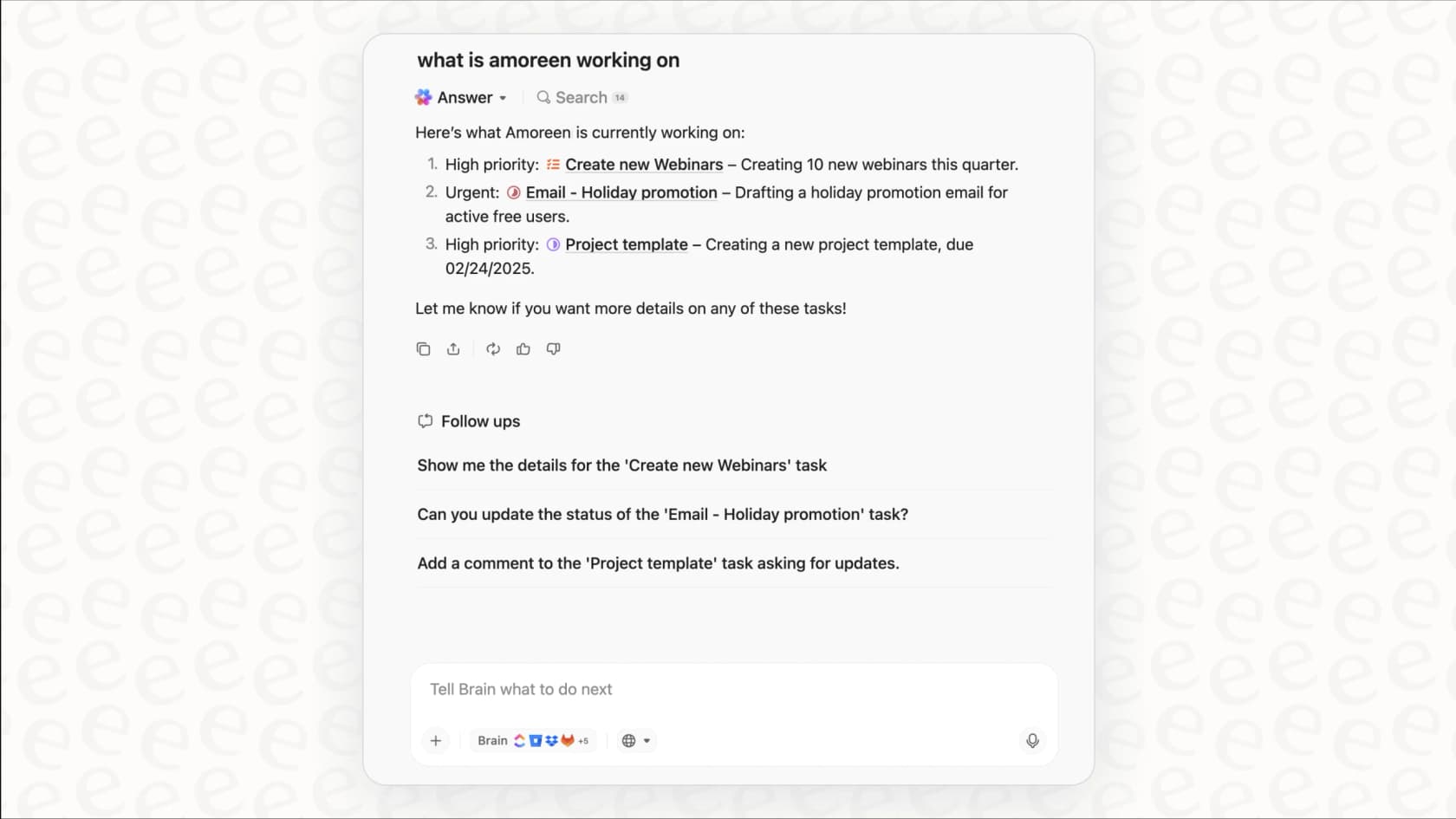
ClickUp AI is a collection of artificial intelligence features baked directly into the ClickUp platform. The whole thing is powered by "ClickUp Brain," a conversational assistant that tries to connect the dots between your tasks, documents, people, and company knowledge. Think of it as a central command for your workspace, designed to understand what you're working on and help you move faster.
The main goal here is to save you from tedious work by automating tasks, summarizing long threads, and helping you write content without having to jump over to another app. By putting AI in every part of the platform, tasks, docs, chat, you name it, ClickUp wants to be the single place you go for anything AI-related. It's a big goal that tries to do a little bit of everything.
So, what can ClickUp AI actually do?
ClickUp AI's features are ambitious, touching on almost every part of the platform. They generally fall into three buckets.
AI-powered project management with ClickUp AI
This is where ClickUp AI is most comfortable. It’s built to take some of the daily grind out of managing projects.
- Autonomous projects: You can give ClickUp AI a simple prompt, and it will generate a full project plan with tasks and subtasks. It can also suggest who to assign tasks to based on your team's workload and even update statuses automatically as work gets done.
- AI agents & automations: It comes with pre-built "Autopilot Agents" (and you can build your own) to handle repetitive workflows. For instance, you could set one up to automatically write and post your team's daily standup notes or pull together a weekly progress report.
- Summaries & reporting: The AI can give you the TL;DR on long comment threads, task histories, and entire documents. It’s a handy way for managers and stakeholders to stay in the loop without having to read every single update.
Content creation and knowledge management
Beyond just checking boxes, ClickUp AI also wants to help you create and find information.
- AI writing assistant: With over 100 prompts tailored for different roles like marketing, sales, and engineering, the AI can help you draft, rewrite, or polish everything from emails and project briefs to technical documents.
- Knowledge search: You can ask questions in plain English, and its "Enterprise AI Search" will scan your entire ClickUp workspace for answers. This effectively turns all your scattered tasks, docs, and conversations into a searchable knowledge base.
- Meeting transcription & notes: The AI Notetaker can join your calls, provide a transcript, and automatically pull out key decisions and action items. This makes meeting follow-ups a lot less painful.
ClickUp integrations and connected knowledge
ClickUp AI knows your work isn't confined to just one tool.
- Connected apps: Through its "Connected Search," the AI can pull information from other apps you use, like Google Drive, Slack, Salesforce, and Figma. This helps it give you answers with a much wider context.
- External AI models: The platform also lets you tap into different large language models (LLMs) like GPT-4o and Claude right from the ClickUp interface, so you can pick the best brain for the job.
A closer look at ClickUp AI limitations and pricing
As cool as the features sound, the "all-in-one" promise has some real trade-offs in cost, complexity, and focus that you need to know about.
The AI per-seat pricing dilemma
ClickUp AI is an add-on, and they charge you for every single person in your workspace, whether they use the AI features or not. Some users have reported this costs as much as an additional $33 per user, per month. For a big team, that number gets scary fast, especially when a good chunk of your team (like field technicians who just need to log their hours) will never touch the AI.
Opinions on ClickUp AI / Brain from those actually using it please???A Reddit comment showing user frustration with ClickUp AI pricing model. This is where your budget can take a real hit. In contrast, platforms like [eesel AI](https://eesel.ai) have straightforward, predictable [pricing](https://www.eesel.ai/pricing) that’s based on how much work the AI does, not how many people are on your team. You pick one fixed monthly plan sized to your ticket volume, with every integration and seat included, which makes a lot more sense for scaling.
byu/Top-Accident-8186 inclickup
| Pricing Model | Team Size | Active AI Users | Monthly Cost Example |
|---|---|---|---|
| ClickUp AI (Per-Seat) | 50 | 10 | 50 users * $33/user = $1,650 |
| Credit plan (like eesel AI) | 50 | 10 | From $299/mo for 500 credits (1 credit per ticket or chat), no seat fee |
A generalist tool in a specialist's world
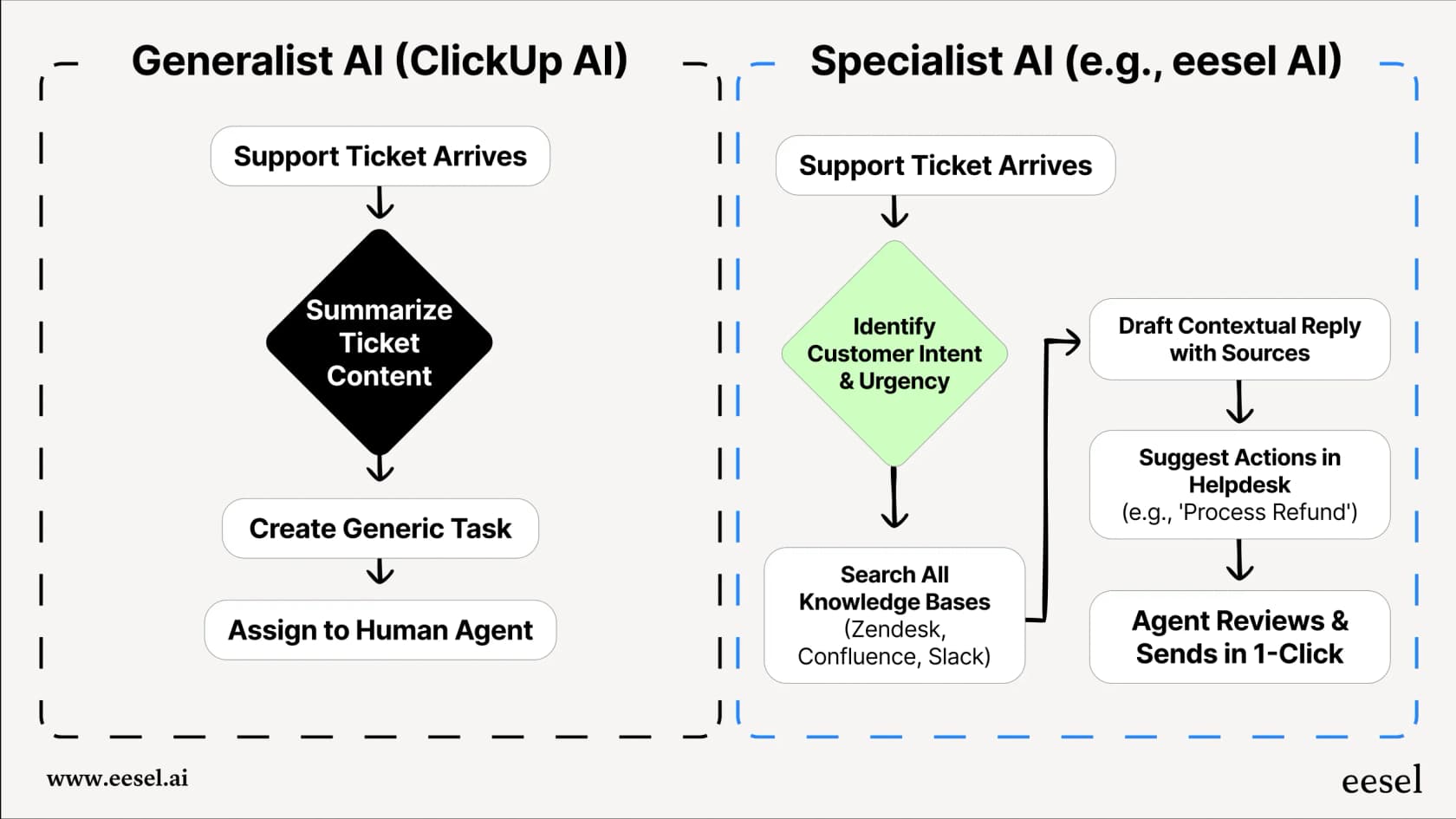
ClickUp AI is a classic "jack of all trades, master of none." It was built for general project management, not for specialized jobs like customer support or IT service management. This becomes a big issue when you need your AI to be highly accurate for specific tasks. Some users have pointed out that the AI sometimes struggles to read uploaded files correctly or gives them wonky data analysis.
For a team in customer support, a generalist PM tool just can't keep up with an AI that’s purpose-built to learn from past support tickets, figure out what customers are asking for, and work smoothly with helpdesks like Zendesk or Freshdesk. A specialized tool like eesel AI is made for this, so it delivers much better results right away.
The hidden costs of complexity and setup
An all-in-one tool with a million features is almost always a beast to get the hang of, and users often describe the ClickUp interface as clunky and overwhelming. On top of that, there's no way to properly test or simulate its AI features. You basically have to flip the switch and hope for the best, which is a big gamble for important workflows.
That’s a huge difference from a tool designed to be set up in minutes. eesel AI not only gets you started quickly but also has a powerful simulation mode. This feature lets you test the AI on thousands of your own past tickets to see exactly how it will perform and what your ROI will be, all before a single customer ever talks to it. It makes the whole process completely risk-free.
Finding the right fit: Is ClickUp AI the best choice for you?
Ultimately, this all comes down to what your team really needs and how you already work. Here’s a quick breakdown to help you decide.
ClickUp AI is probably a good fit if:
- Your team already lives and breathes inside the ClickUp ecosystem for all of your project management.
- You mainly want to automate internal PM tasks like creating tasks, running standups, and generating progress reports.
- You prefer having everything on one platform, even if it means sacrificing top-tier performance on more specialized tasks.
- Your budget can handle paying a per-seat fee for every single person on your team.
You might want to look at an alternative if:
- Your main goal is to automate customer support or internal helpdesk tickets. A generic AI won't have the training or specific actions needed to provide great, contextual support.
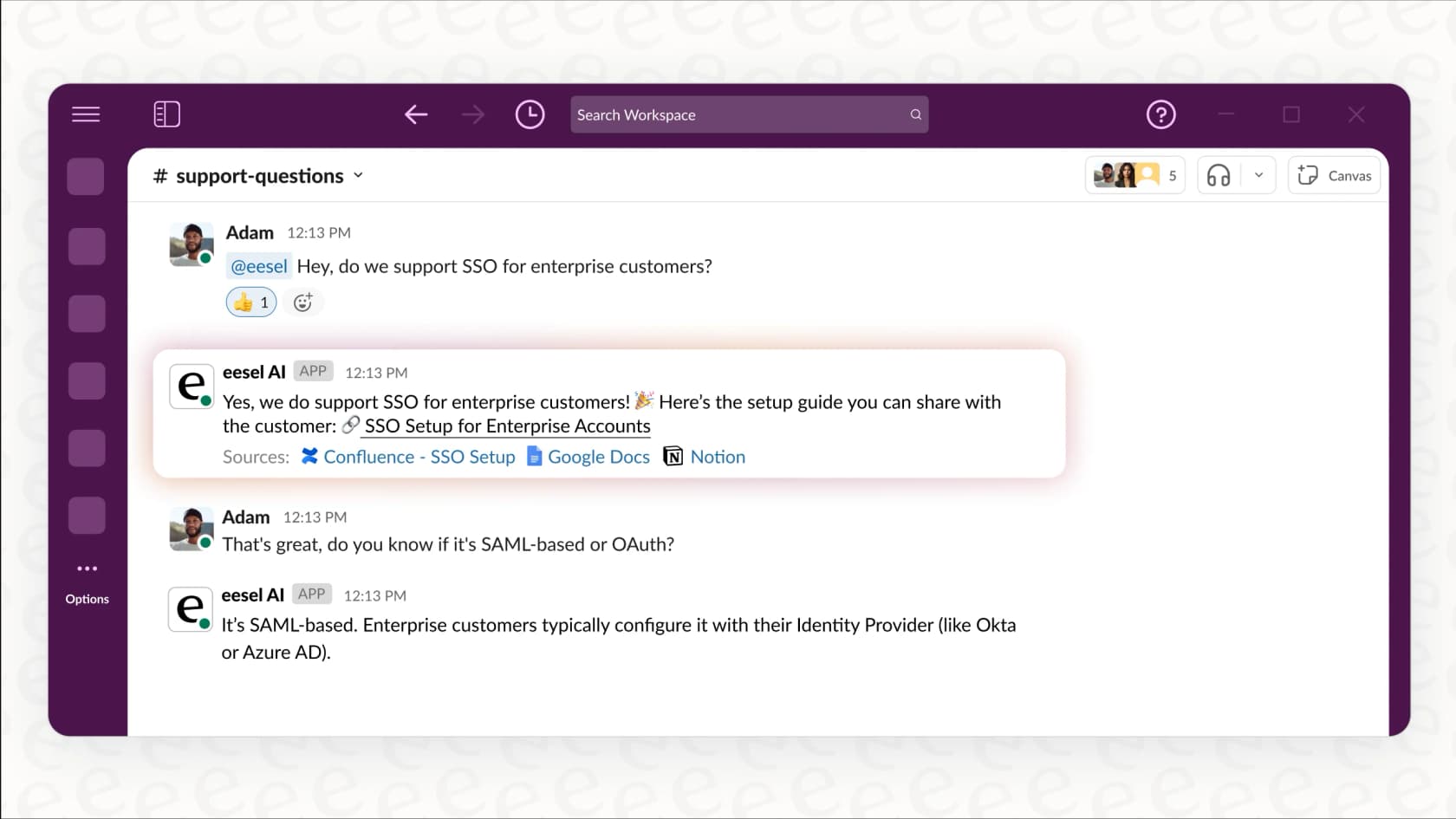
- You need an AI that can pull knowledge from all over the place (like Confluence, Google Docs, and old support tickets) and deliver answers right inside Slack or your helpdesk.
- You want to be confident before you deploy an AI. Simulating performance on your own data before going live is a must-have for critical functions.
- You need predictable costs and fine-tuned control. A tool like eesel AI gives you a fully customizable workflow engine and clear pricing, letting you start small, see the results, and scale without having to rip out your existing helpdesk.
Beyond a generalist ClickUp AI
So, what's the bottom line? ClickUp AI is a powerful tool if you're already all-in on the ClickUp ecosystem. For teams that use it for everything, it’s a convenient way to get a productivity boost.
However, its one-size-fits-all approach, combined with the mandatory per-seat pricing, makes it a tough sell for teams with specialized needs. While it's a solid assistant for internal project management, teams focused on high-stakes areas like customer service will get much more value from a platform that was built from the ground up to master that specific job.
Get an AI that's actually built for support
If you need more than a project management assistant, choosing a specialized AI is the smarter move. With eesel AI, you can go live in minutes, train the AI on your team's actual support history, test its performance with powerful simulations, and enjoy predictable pricing that scales with you.
Ready to see what a specialized AI can do for your team? Try eesel AI for free and automate your support in minutes.
Frequently asked questions
My team is already on ClickUp, but is ClickUp AI a separate charge, or is it included in our plan?
ClickUp AI is a paid add-on, so it is a separate charge from your main ClickUp subscription. The cost is applied to every single user in your workspace, regardless of whether they actively use the AI features.
I'm worried about the cost. Do we have to pay for ClickUp AI for everyone, even people who won't use it?
Yes, that's correct. The platform uses a per-seat pricing model, which means you are charged for every member in your workspace. This can become expensive for larger teams where only a fraction of members need AI capabilities.
Is ClickUp AI mainly for project managers, or can our marketing and support teams get value from it?
It’s designed as a general-purpose assistant that excels at project management tasks like creating plans and summarizing updates. While it has tools for other roles, specialized teams like customer support might find a purpose-built AI more effective for their specific workflows.
We use other tools like Slack and Google Drive. Can ClickUp AI pull information from those apps?
Yes, its "Connected Search" feature allows it to integrate with other applications like Google Drive, Slack, and Salesforce. This helps it pull in external context to provide more comprehensive answers and reporting directly within ClickUp.
What's the main advantage of using ClickUp AI instead of a standalone tool like ChatGPT?
The primary benefit is its deep integration within your project management workspace. It can directly access and take action on your tasks, documents, and team knowledge without you having to switch apps or copy-paste information between tools.