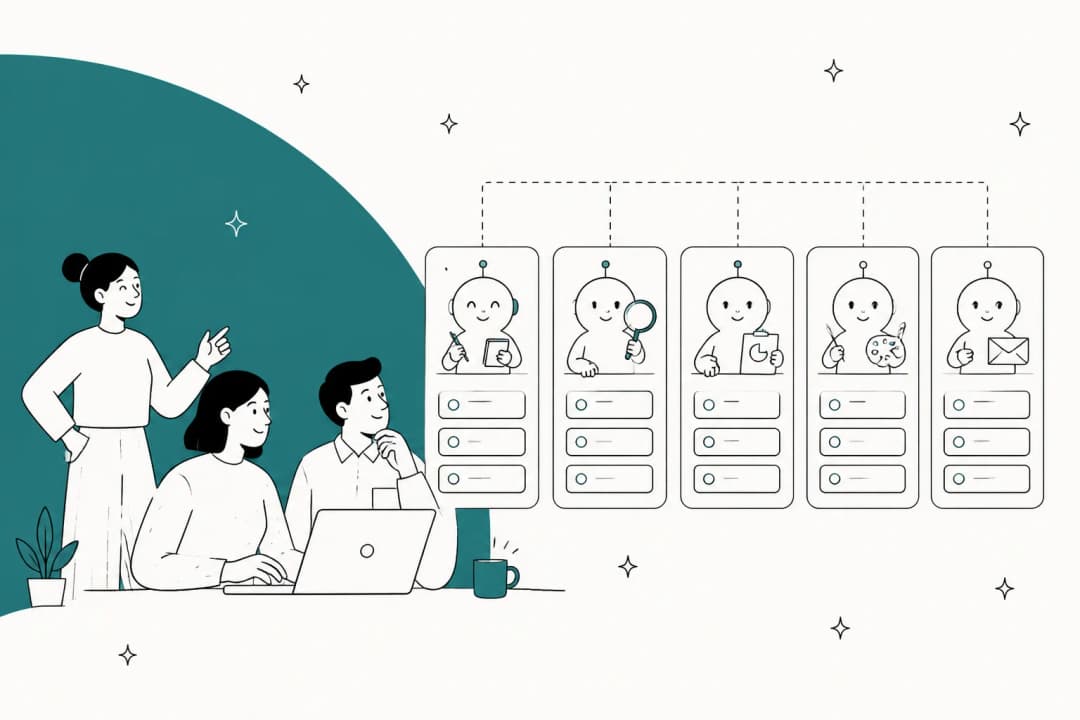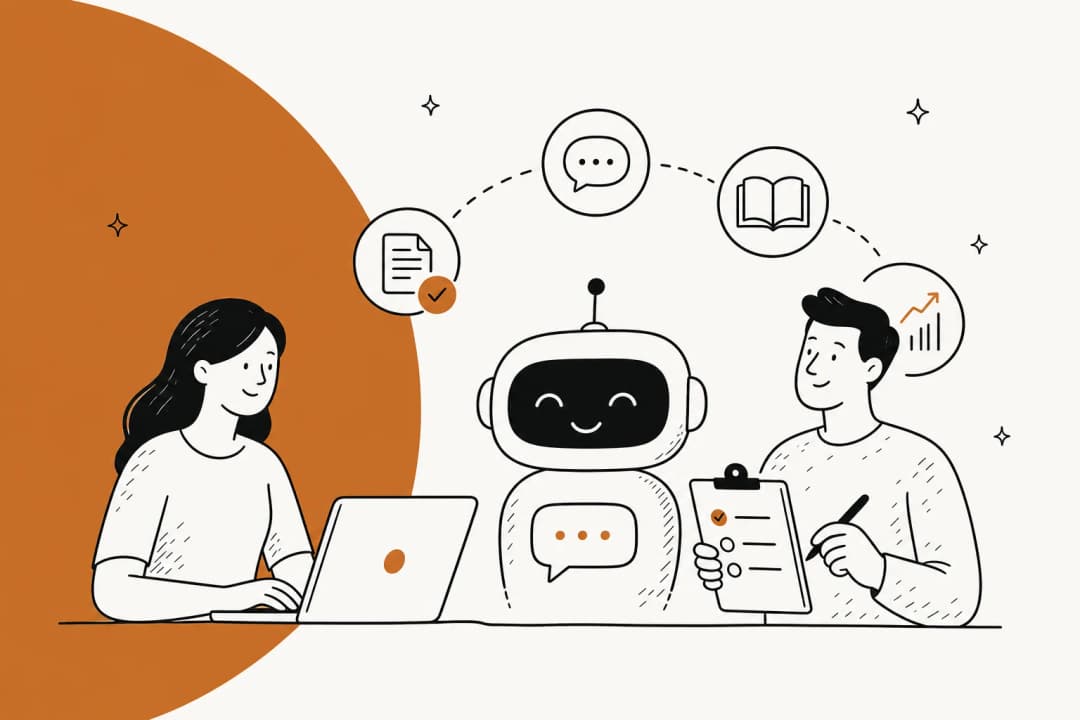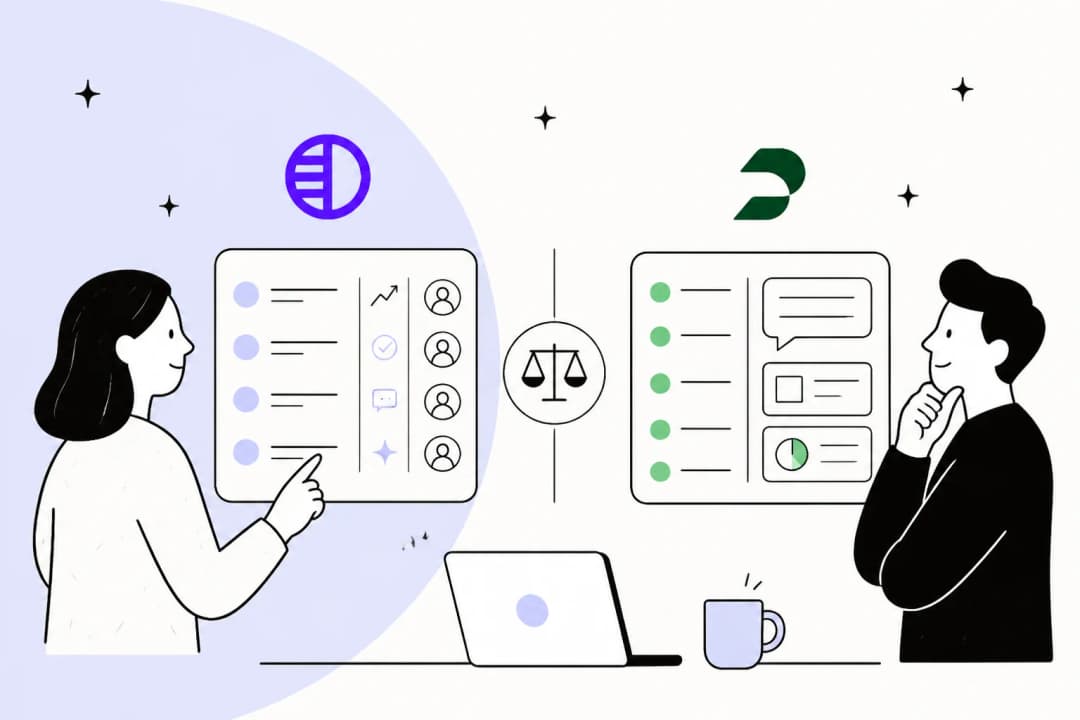
Why I care about getting this one right
I'm on eesel's support team, which means a live queue is my day job. I get to see what AI does to customer experience when it's good, and also what it does when it's not. In my experience, a bot that gives a wrong refund answer with full confidence hurts CSAT more than a slow human ever did.
eesel has spent years putting AI on real support queues. The clearest lesson from all of it is one that the CX lead at a DTC supplements brand said on a sales call with eesel:
"The AI will never be able to answer 100% of the questions... I need an AI who is only handling the tickets that it's confident to handle and all the other ones, leave them alone."
For me, that one sentence is pretty much the whole buying brief for AI customer experience. Good CX AI knows its scope and hands off cleanly, and it also proves itself before it ever talks to a customer. That's what I judged every tool below on, rather than on how polished the demo looked.
Two jobs hiding under one keyword
Before getting into the list, it's worth laying out the split that makes the rest of this post a lot easier to follow.
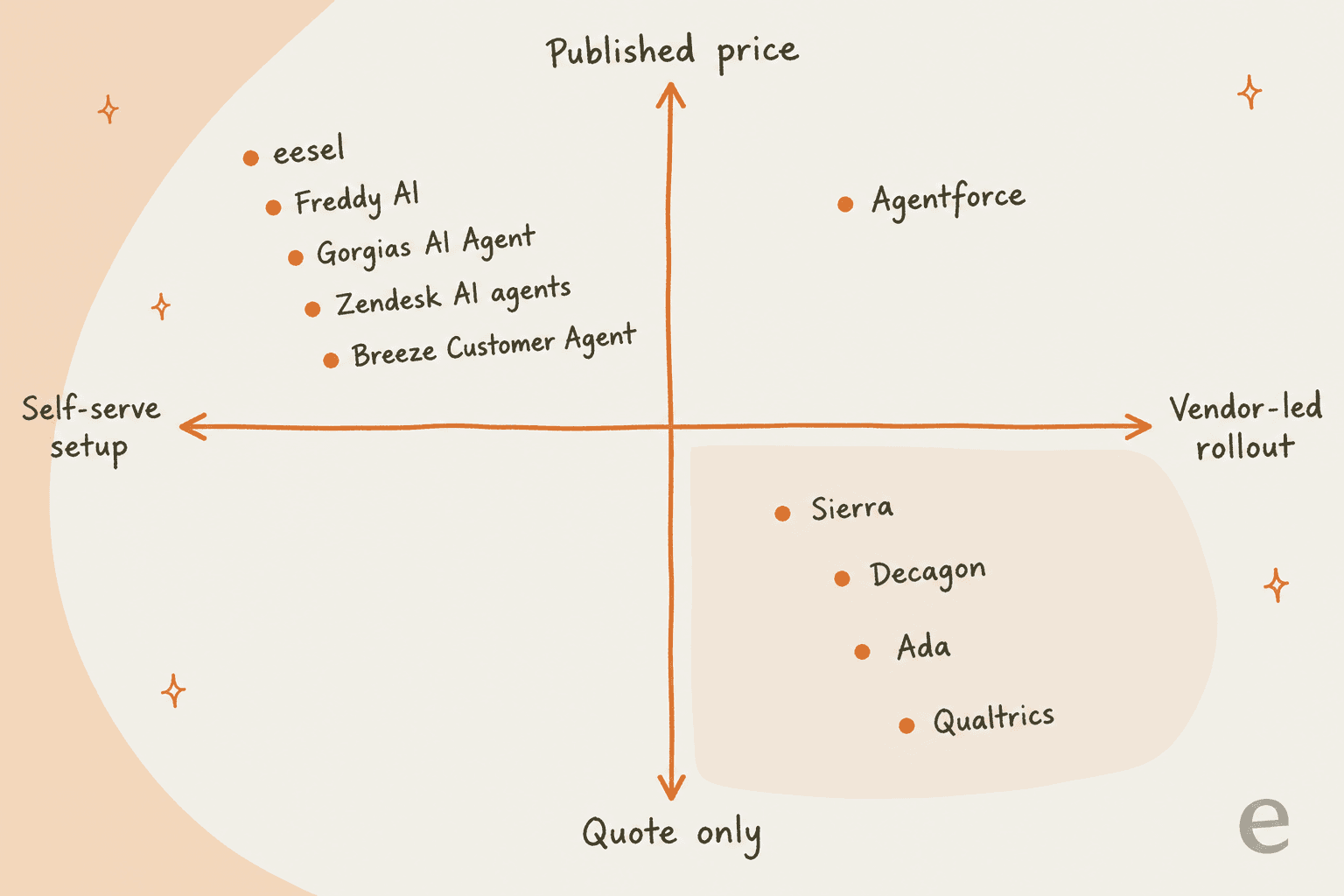
AI that answers customers is the kind that resolves the conversation by itself. It reads your help center and past tickets, then replies on chat, email or voice, and it can take actions like checking an order before it escalates whatever is left. The way you measure it is resolutions and escalation rate. Nine of the ten tools below do this job.
AI that listens to customers is more about telling you how the experience feels. It runs surveys and tags sentiment across conversations, plus it flags accounts that look at risk. Here you measure in CSAT, NPS and churn. Qualtrics leads on this side, while tools like Zendesk QA and HubSpot's feedback features cover some part of it. If that is your main need, my roundup of AI customer feedback tools goes deeper.
My honest take is that the answering side moves CSAT faster. The most common bad experience is still a customer waiting hours for an answer that already sits in your help center, so I'd fix that first and measure after.
How I picked and compared these tools
My starting point was the tools that support and CX leaders actually shortlist in 2026. In late September 2026 I checked each one against its own pricing page, product pages and docs. Tools that only do one channel, or only work as a website widget, didn't make the cut. Each one got scored on five questions:
- What does it resolve on its own? Not "handles", resolves.
- What is the billing unit? Per resolution, session, conversation, ticket, or a quote.
- Does it need a new helpdesk? Or can it work with the one you already have.
- Can you test it before customers see it? On your own past conversations, ideally.
- How long until it's live? Self-serve in a day, or a vendor-led rollout.
The best AI for customer experience at a glance
| Tool | Job | Best for | Billing unit | Published price | Needs its own helpdesk? | Setup | Free start | Security (vendor-stated) |
|---|---|---|---|---|---|---|---|---|
| eesel | Answers | Teams keeping their current helpdesk | Ticket or chat handled | $299/mo for 500 credits | No | Self-serve | 100 free credits, no card | SOC 2 Type II underway, HIPAA on request |
| Zendesk AI agents | Answers | Zendesk shops | Automated resolution | $1.50 to $2.00 each | Yes | Self-serve | Trial | HIPAA-enabled option |
| Sierra | Answers | Large consumer brands | Outcome-based | Quote only | No | Vendor-led | No | SOC 2, ISO 27001, ISO 42001, FedRAMP High |
| Decagon | Answers | Enterprise ops teams | Per resolution or conversation | Quote only | No | Vendor-led | No | Trust Center |
| Ada | Answers | High-volume, many languages | Quote | Quote only | No | Vendor-led | No | Not itemized publicly |
| Agentforce | Answers | Salesforce Service Cloud | Conversation, action or seat | $2/conversation or $0.10/action | Salesforce | Vendor or partner-led | Foundations is $0 | Salesforce trust program |
| Gorgias AI Agent | Answers | Shopify stores | Automated interaction | ~$0.90 in plan, $1.50 over | Yes | Self-serve | 30-day trial | SOC 2 Type II |
| Freddy AI Agent | Answers | Budget Freshdesk teams | Session | $49 per 100 sessions | Yes | Self-serve | 500 sessions included | Freshworks trust program |
| Breeze Customer Agent | Answers | HubSpot CRM teams | Resolved conversation | 50 HubSpot Credits each | Yes | Self-serve | 14 days unlimited | HubSpot trust program |
| Qualtrics XM | Listens | Enterprise CX programs | Planned usage | Quote only | No | Vendor-led | Free survey account | FedRAMP High, ISO 42001 |
Here is the same list again, this time on the two axes that end up deciding most shortlists: whether you can see the price, and whether you can set it up yourself.
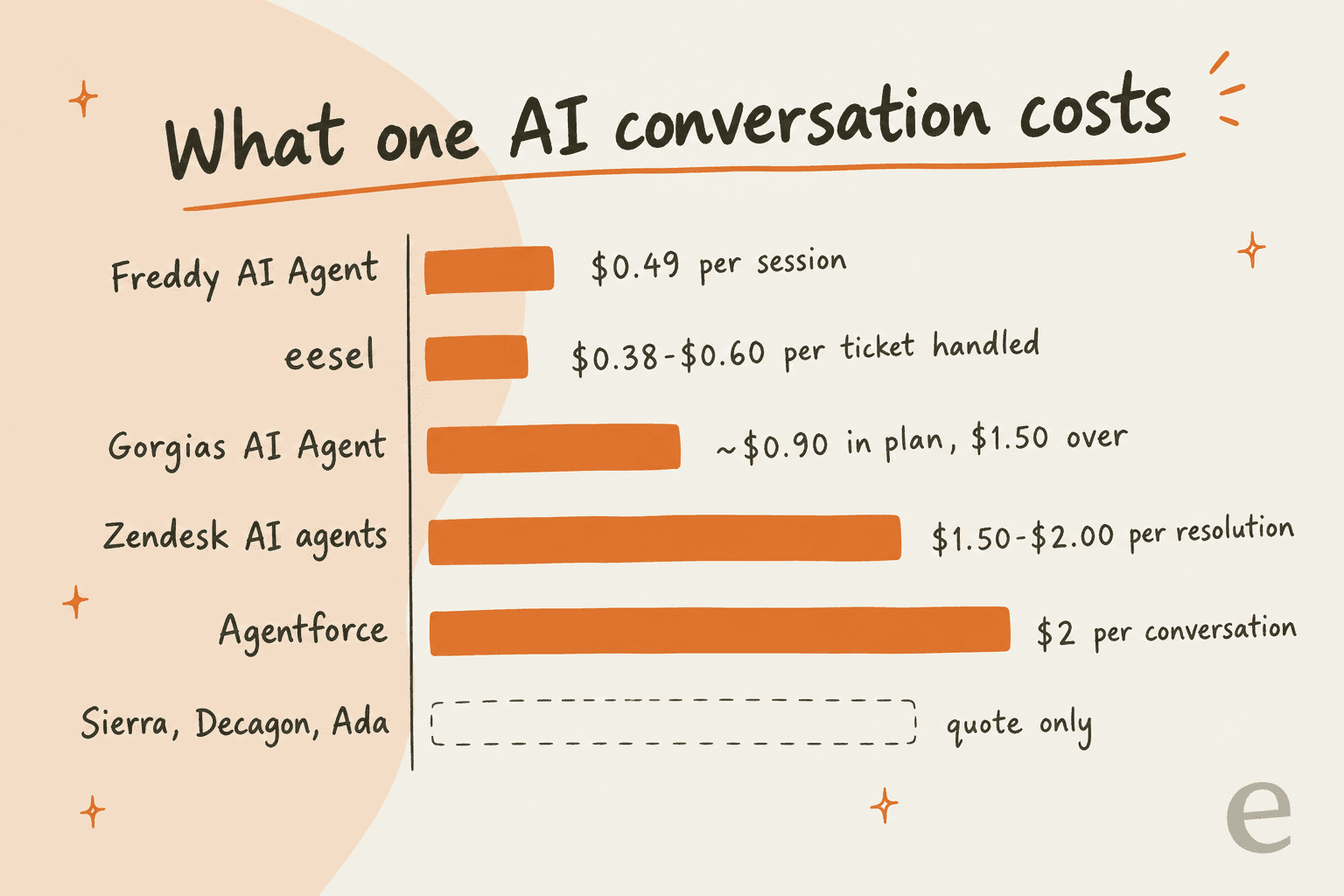
The pattern is easy to spot. The enterprise CX platforms all sit in the quote-only, vendor-led corner. I don't mean that as a knock, it just reflects who they sell to. But if you need to be live this month, the left side of that chart is where I'd look.
1. eesel
Best for: support teams that want AI on the customer experience without moving off the helpdesk they already run.

What it does
Full disclosure, this is the product I work on, so weigh my take with that in mind. eesel is an AI teammate that you hire for a specific job. For customer experience the job is the helpdesk: it joins your existing queue in Zendesk, Freshdesk, Gorgias, HubSpot, Salesforce and more helpdesks, then learns from your past tickets, help center and docs. From there it drafts or sends replies, and it also tags, routes and escalates.
From the support side, the part I lean on most is simulation. Before eesel talks to even one customer, you can run it over your past tickets and compare its answers with what your team actually sent back then. You tell it in plain English which ticket types it should leave alone, and those never count toward your bill. It's basically the "only handle what you're confident about" brief from above, built into the product.
Pros
- Works inside the helpdesk you already pay for, so no migration and no new agent workspace.
- Simulation on your own past tickets before launch.
- Flat credit pricing with no seat fees and unlimited agents.
- Also covers internal questions in Slack, so the same knowledge serves customers and your team.
Cons
- It's a layer and not a helpdesk, so if you have no helpdesk at all you still need to get one.
- SOC 2 Type II is underway, not finished, which can slow an enterprise security review.
- No native integration for Crisp or LiveAgent today.
Pricing
From eesel's pricing page:
| Plan | Price | Credits per month |
|---|---|---|
| Free | $0 | 100 credits, no card |
| Teammate | $299/mo | 500 |
| Teammate | $499/mo | 1,000 |
| Teammate | $699/mo | 1,500 |
| Teammate | $999/mo | 2,500 |
| Teammate | $1,349/mo | 3,500 |
| Teammate | $1,899/mo | 5,000 |
A ticket or a chat is 1 credit, however long it runs. On the smallest plan that works out to $0.60 per ticket, and on the 5,000 plan it drops to $0.38. Overage is optional at $0.80 a credit, with a cap you set yourself, and credits don't roll over. For add-ons there is priority support from $299/month and SSO from $199/month.
My take
For one real result, Gridwise, a rideshare analytics app on Zendesk, says eesel was resolving 73% of its tier 1 requests in the first month, according to the quote on eesel's pricing page. I'd pick eesel if you like your current helpdesk and want AI on it this week. If you're buying a whole new contact center platform anyway, skip it.
2. Zendesk AI agents
Best for: teams already on Zendesk who want AI that lives in the same workspace.
What it does
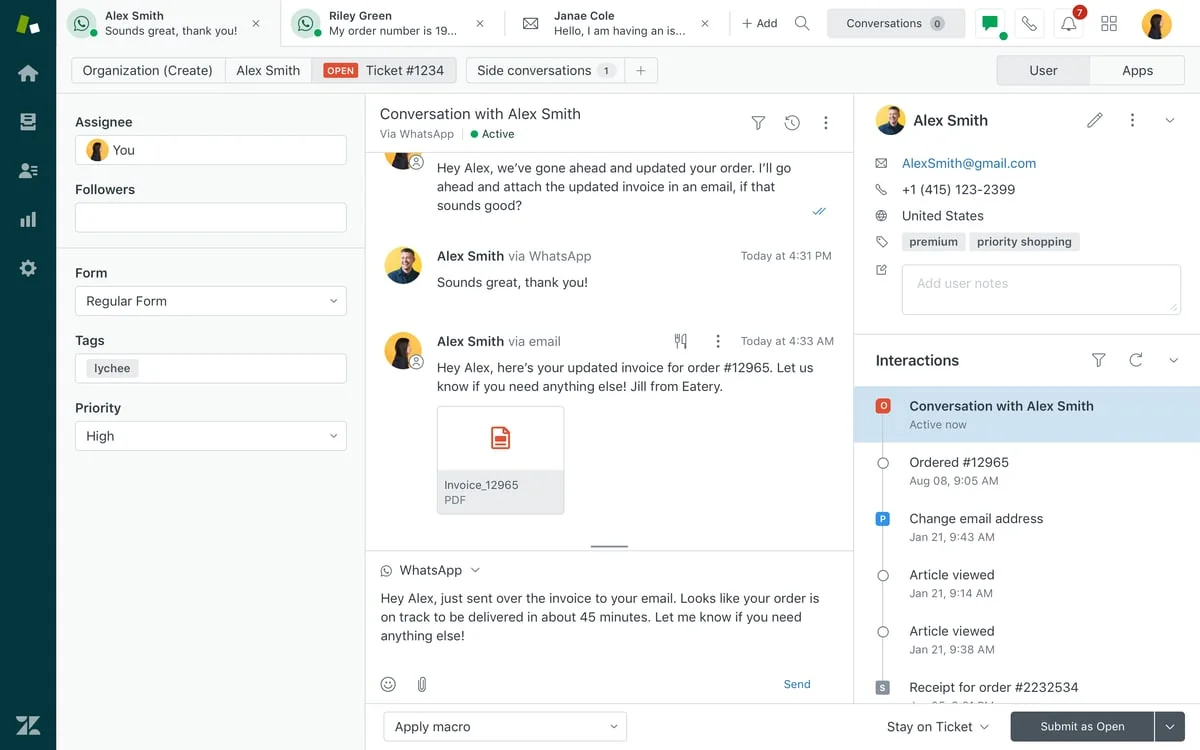
Zendesk's AI agents answer across messaging, email and web forms, and on its own pricing page Zendesk claims they can "resolve up to 80%+" of service issues. With reasoning controls you can see which steps the agent took on each conversation. Intelligent triage classifies incoming tickets for routing and reporting. Copilot is something separate, a per-agent add-on for your human team.
Pros
- Everything sits with one vendor: tickets, AI, knowledge base and reporting.
- A clear resolution definition: you pay only when the AI resolves without a human.
- Mature omnichannel workspace, as the screenshot shows.
Cons
- It only works for Zendesk, so leaving Zendesk means leaving the AI behind too.
- The included allowance is small: 5 automated resolutions per agent per month on Suite Team.
- Copilot is a separate $50 per agent per month on annual billing.
Pricing
From the comparison table on Zendesk's pricing page:
| Plan | Annual, per agent/mo | Monthly, per agent/mo | Included automated resolutions |
|---|---|---|---|
| Support Team | $19 | $25 | 5 per agent/mo |
| Suite Team | $55 | $69 | 5 per agent/mo |
| Suite Professional | $115 | $149 | 10 per agent/mo |
Extra automated resolutions cost $1.50 committed or $2.00 pay-as-you-go, and there's a cap of 10,000 a year on the included allowance. My Zendesk pricing breakdown has some worked examples.
My take
Take a 10-seat Suite Team account, which gets 50 included resolutions a month. Say the AI resolves 1,000 conversations: the other 950 then add $1,425 to $1,900 on top of seats. Zendesk AI makes sense if you're staying on Zendesk for years. For the same queue with flatter pricing, eesel runs inside Zendesk too.
3. Sierra
Best for: large consumer brands that want one branded AI concierge across chat, voice and messaging.
What it does
Sierra builds customer-facing AI agents for big brands, and according to its homepage one agent can run across chat, SMS, WhatsApp, email, voice and ChatGPT. Ghostwriter puts together an agent from your SOPs and transcripts, even from whiteboard photos, while Insights flags issues and suggests updates to the agent. Of everything on this list it's the most "CX" brand, and Sierra frames itself as going past service into revenue and lifetime value.
Pros
- Strong published results: Ramp reports 90% case resolution and Wilson reports 77% containment.
- Broad compliance list on its trust page, including SOC 2, HIPAA, ISO 27001, ISO 42001 and FedRAMP High.
- Voice is a first-class channel, not an add-on.
Cons
- No public price list, minimum or contract length.
- It's built for large enterprises, so a smaller team will find it hard to get a proposal that fits.
- Rollout is vendor-led, not self-serve.
One recent G2 reviewer described the day-to-day limit pretty plainly:
"It works really well when the question is fairly straightforward, but once there are multiple issues involved or the user hasn't explained the problem clearly, it can sometimes take a few interactions to get the right answer."

Pricing
Sierra uses outcome-based pricing and doesn't publish any rates. In its own Outcomemaxxing post, Sierra admits outcome pricing "only works where the software is highly autonomous and highly attributable", and says it does consumption-style work where that fits. So expect a blended contract. My Sierra AI pricing post goes further into it.
My take
Sierra has the money to keep shipping, since co-founder Bret Taylor announced $950 million at a valuation over $15 billion in May 2026. Pick Sierra if you run millions of consumer conversations and want voice and chat under one brand. If you need to see a price before a sales call, it's not for you. My Sierra reviews roundup covers what customers say about it.
4. Decagon
Best for: enterprise CX teams who want ops people, not engineers, to own how the agent behaves.
What it does
Decagon runs AI agents across chat, email and voice. The core idea there is Agent Operating Procedures, or AOPs, where you write agent behavior in natural language, similar to how you'd train a human from an SOP. Duet, its AI partner, now generates and tests AOPs, and refines them too. On top of that Decagon ships Testing and QA simulations and live A/B experiments, plus an insights and reporting module that it labels voice of the customer, which means it covers a slice of the listening job as well.
Pros
- Non-technical teams can change agent logic without having to file a ticket to engineering.
- Strong case studies: Chime reports 70% chat-and-voice resolution and a 60% support cost decrease, and Duolingo reports 80% deflection.
- Simulation and A/B testing are built in.
Cons
- No public pricing page; every call to action is "Get a demo".
- Decagon's own product page says technical teams keep control of guardrails, integrations and versioning, so engineering still has a seat.
- No published implementation timeline.
"Customers were getting assisted instantly and they don't feel the "Wait" anymore ! This has significantly improved the customer experience"
Pricing
Quote only. Decagon's glossary page on resolution-based pricing explains the per-resolution model, which it uses next to per-conversation deals. My Decagon pricing post covers what is known so far.
My take
Decagon raised a $250M Series D at a $4.5B valuation in January 2026, so it's not going anywhere soon. It's a fit for an enterprise that wants CX ops to iterate on the agent every week. With under a few thousand conversations a month, I'd skip it. If those two are your shortlist, see my Decagon vs Sierra comparison.
5. Ada
Best for: high-volume enterprises serving customers in many languages.
What it does
Ada has been doing AI customer service since 2016, and it runs agents across chat, email and voice. On its platform page it claims 550+ AI agents deployed and 6.4 billion interactions, with an 84% automated resolution rate. The newest piece is Ada Computer. It lets the agent use your business systems through Ada's API, code and MCP tools, so it can finish tasks instead of only answering questions.
Pros
- Long track record and a large enterprise customer base; the pricing page says "Trusted by 350+ global enterprises".
- Broad language coverage: 60 languages for generated replies and 42 for voice, per Ada's own platform pages.
- Coaching and playbook tools for CX teams; see my guide to Ada's coaching feature.
Cons
- Fully quote-gated; the pricing page is a demo form.
- The 84% figure is vendor-stated, and other Ada pages show different rates, so I'd model with a lower number.
- Built and priced for enterprise volume.
A former Ada customer on Reddit described both sides of it. The company was "paying ~300k+ for ADA" and saw "like a70-75% deflection rate" at about 150,000 tickets a month, per this r/Zendesk thread.
Pricing
Quote only. The demo form asks for your annual contact volume, and the buckets go from under 100,000 up to over 100 million. My Ada CX pricing post covers what buyers report.
My take
Ada fits a global brand with heavy volume across many languages that wants a mature, enterprise-run program. For a team of 10 that wants to try AI next week, I'd skip it. My Ada alternatives list covers lighter options.
Where most CX budgets actually go
Before moving on to the platform-native tools, I want to take a quick look at money, since that is where the honest comparison really lives.
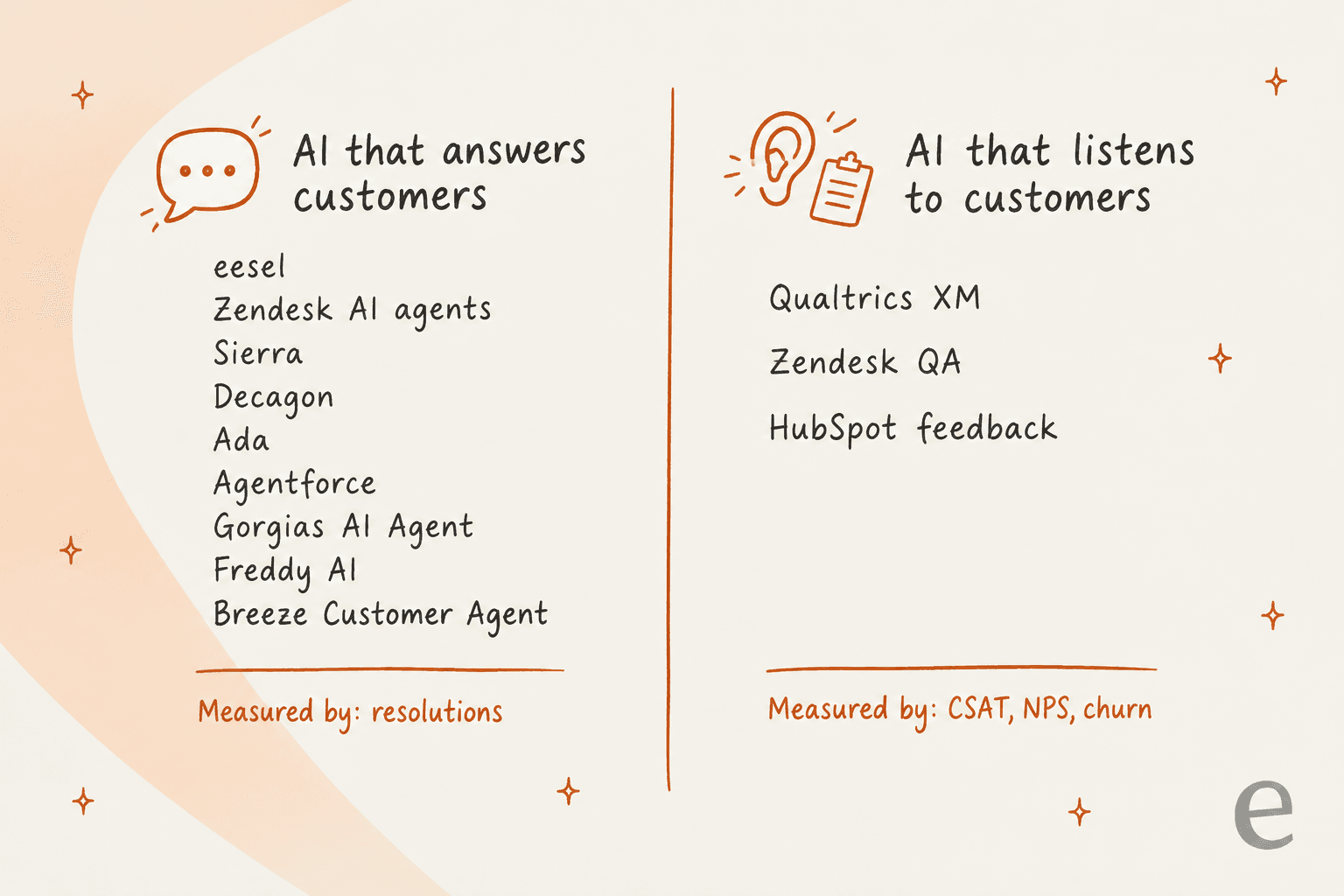
The bars look comparable, but they aren't quite. A session is not a resolution, and a resolution is not a ticket. With a per-resolution price you only get charged when the AI succeeds, which sounds safer, though it costs more per unit. A per-ticket or per-session price charges you any time the AI works on something. That's cheaper per unit, but it means you should tell the AI which tickets to skip. My AI customer service cost guide does the full normalization, and the post on AI vs human agent cost puts it next to headcount.
6. Salesforce Agentforce
Best for: companies whose service team already lives in Salesforce Service Cloud.
What it does
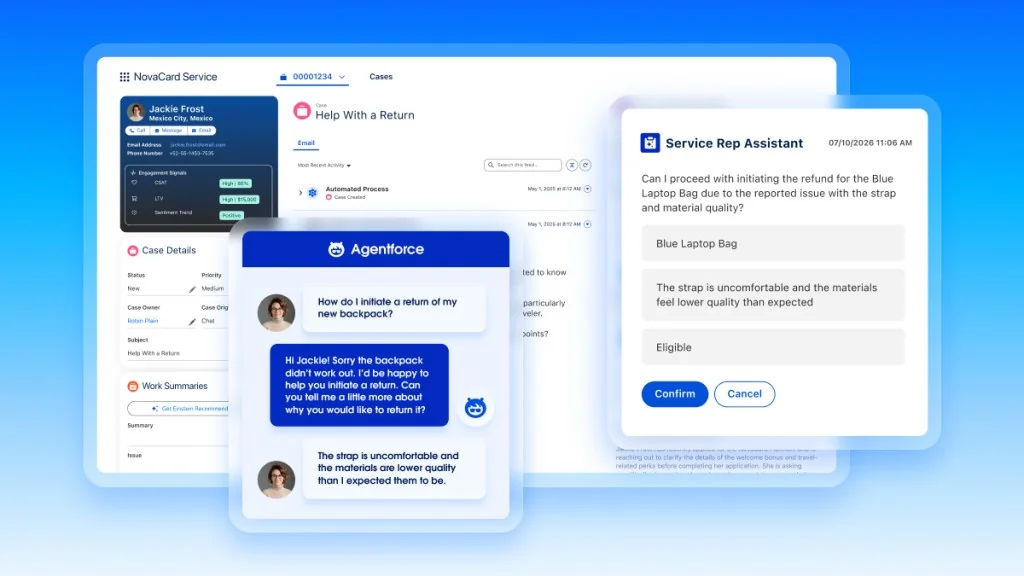
Agentforce puts autonomous agents on top of your Salesforce data. That way the agent can read the case and the customer record, along with the order history, and then take actions like starting a refund. What appeals to CX teams is that the agent and the CRM share one customer profile.
Pros
- Deepest access to Salesforce customer data of anything on this list.
- Three billing models, so you can pick the one that matches your usage.
- Salesforce Foundations gets you started for $0.
Cons
- Only makes sense if Salesforce is already your system of record.
- You need to do some real modelling on the billing models before you sign.
- Setup lives inside Salesforce, so you need a Salesforce admin on the project.
Pricing
From the Agentforce pricing page:
| Option | Price |
|---|---|
| Salesforce Foundations | $0 |
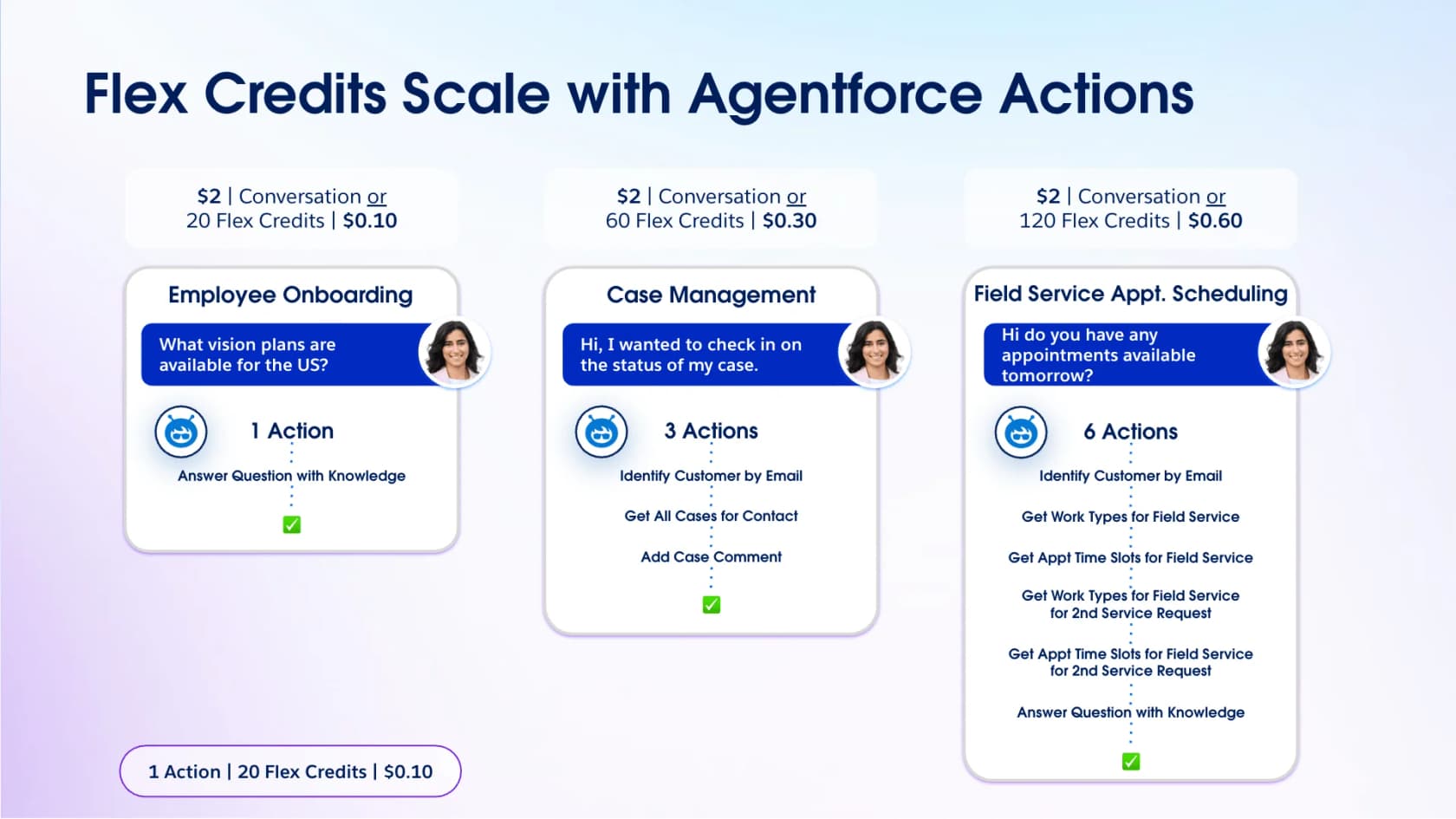
| Flex Credits | $500 per 100,000 credits (20 credits = $0.10 per action) |
| Conversations | $2 per conversation |
| Agentforce add-ons | $125 per user/month |
| Agentforce 1 Editions | From $550 per user/month, with 2.5M Flex Credits per org per year |
My take
The most useful thing to look at is Salesforce's own chart, as taken from the Agentforce pricing page: a 3-action case costs $0.30 on Flex Credits versus $2 per conversation. If you're a Salesforce shop, Agentforce is the pick. My Agentforce pricing guide walks through when each model wins, and if you want something lighter, eesel also has a Salesforce integration.
7. Gorgias AI Agent
Best for: Shopify stores where most tickets are about orders.
What it does
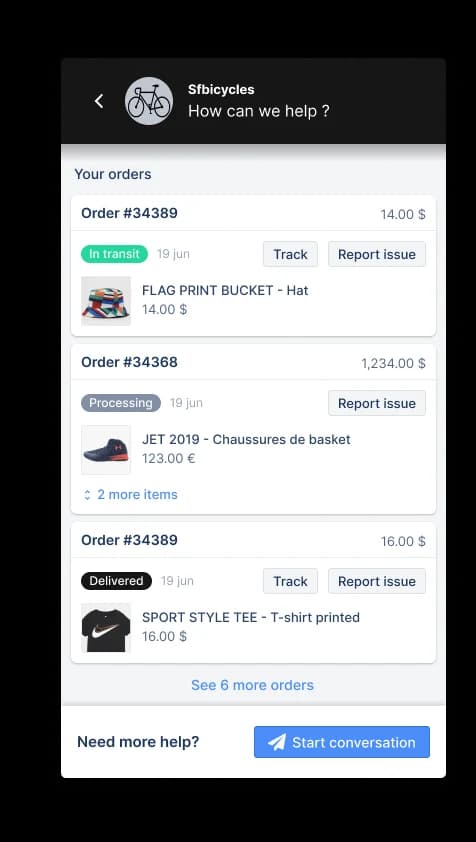
Gorgias is an ecommerce helpdesk. Its AI Agent answers order questions and acts on them using live Shopify data, things like where is my order, change my address, or cancel this. For an online store that's a big share of the queue, and fast order answers are a direct CX win.
Pros
- Order data is right there, so "where is my order" gets a real answer.
- Priced by ticket volume, never per agent seat.
- 30-day trial with no card.
Cons
- The AI Agent requires Shopify. It isn't supported on BigCommerce, Magento or WooCommerce, even though the helpdesk is.
- On newer accounts, a fully automated ticket gets charged both the ticket fee and the automation fee.
- Seats are capped at 3 on Starter.
"The AI Agent and AI Shopping Assistant have been especially valuable for our business as we have limited business hours and AI is available 24/7 with solid customer service skills and actions."
Pricing
From Gorgias's pricing page:
| Plan | Monthly | Annual, per month | Included automated interactions |
|---|---|---|---|
| Starter | $40 | Monthly only | 30 |
| Basic | $90 | $77 | 30 |
| Pro | $550 | $471 | 190 |
| Advanced | $1,430 | $1,227 | 530 |
Once you go past your included interactions, each automated interaction costs $1.50. My Gorgias AI Agent pricing guide has the math.
My take
Gorgias is a good pick if you're on Shopify and want the helpdesk and the AI from one vendor. For stores on WooCommerce or Magento, or anyone who wants AI on Gorgias without the double fee, eesel works with Gorgias too.
8. Freshdesk Freddy AI
Best for: budget-minded teams already on Freshdesk.
What it does
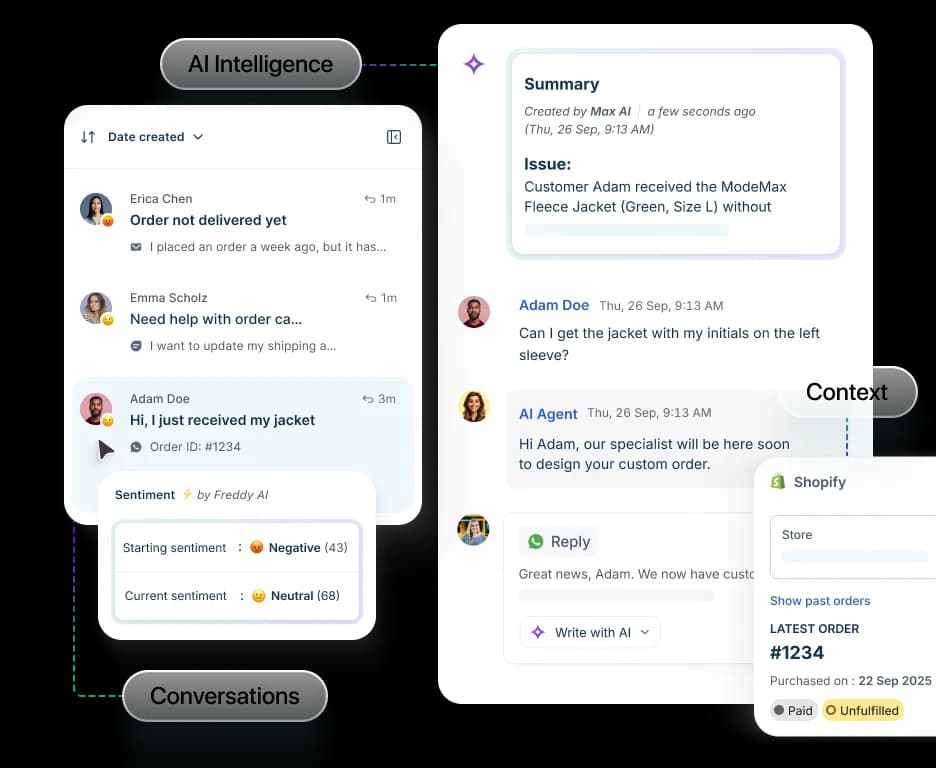
Freddy AI Agent is the autonomous agent inside Freshdesk. It answers on email and chat from your knowledge base. Freddy also adds summaries and sentiment, so agents can see how a customer feels before replying. The separate assistant for your human agents is Freddy AI Copilot.
Pros
- The autonomous agent is on every paid plan, including Growth at $19.
- 500 sessions included to get started.
- Sentiment and summaries help your human team's side of the experience.
Cons
- The 500 included sessions are a one-time allowance, not a monthly refill.
- Copilot is a separate $29 per agent per month on Pro and above.
- It only works for Freshdesk.
Pricing
From Freshdesk's pricing page:
| Plan | Per agent/mo, annual | Freddy AI Agent | Freddy AI Copilot |
|---|---|---|---|
| Growth | $19 | First 500 sessions included | Not available |
| Pro | $55 | First 500 sessions included | $29/agent/mo |
| Enterprise | $89 | First 500 sessions included | $29/agent/mo |
Extra AI Agent sessions are $49 per 100 sessions, which is about $0.49 each. One email session covers a 72-hour window. My Freddy AI pricing post has more detail.
My take
Of the major helpdesks, Freddy is the cheapest per-unit autonomous agent. It's worth picking if you're on Freshdesk and want to start small. If you'd rather run a simulation on your past tickets first, eesel connects to Freshdesk in a few minutes.
9. HubSpot Breeze Customer Agent
Best for: teams that run sales, marketing and service on HubSpot's CRM.
What it does
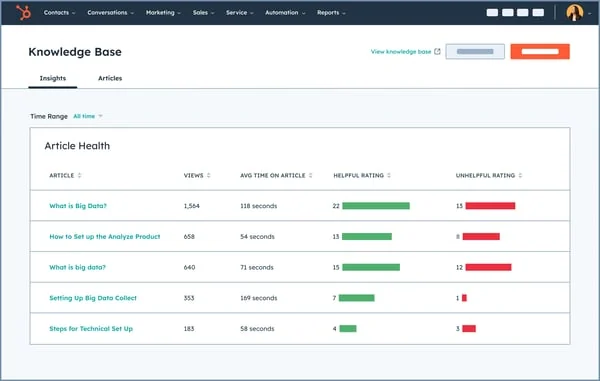
Breeze Customer Agent answers across chat, email, forms and calling. It uses your knowledge base and CRM data, and escalates to your team when it needs to. On its pricing page HubSpot claims 65%+ of conversations resolved automatically and 39% faster ticket resolution. There's also a Feedback Topics feature in HubSpot, which touches on the listening side.
Pros
- Shares the same customer record as your sales and marketing teams.
- 14 days of unlimited Customer Agent use once you buy a Professional seat.
- Knowledge base insights, like the article health view above, show which help content is actually working.
Cons
- Customer Agent needs Service Hub Professional or Enterprise.
- Professional's 3,000 monthly credits cover only 60 resolutions at 50 credits each.
- Required onboarding fees: $1,500 on Professional, $3,500 on Enterprise.
Pricing
From HubSpot's Service Hub pricing:
| Plan | Price per seat/mo | Included HubSpot Credits | Onboarding |
|---|---|---|---|
| Free | $0 | None | None |
| Starter | $7 (commit monthly) or $20 | 500 | None |
| Professional | $90 (annual) or $100 | 3,000 | $1,500 one-time |
| Enterprise | $150 | 5,000 | $3,500 one-time |
Every resolved conversation uses 50 HubSpot Credits. My HubSpot Breeze review covers the rest of it.
My take
60 included resolutions a month is about two a day. So budget for extra credits right from the start. Breeze is the pick if HubSpot is your CRM and you want a single customer record. For more volume, eesel has a HubSpot integration that reads tickets and live CRM data.
10. Qualtrics XM
Best for: enterprise CX programs that need to measure and act on how customers feel.
What it does
Qualtrics sits on the listening side of customer experience. Its CX platform pulls surveys, chat, email, digital behavior and contact center conversations together into one customer profile. The AI piece is called Experience Agents, and they act on feedback in the moment. That can mean resolving a complaint inside a survey or applying a make-good within guardrails, and it can also mean recapping a ticket and suggesting a fix for a human to approve.
Pros
- The strongest listening and analytics stack here; Qualtrics says it was named a Leader in the 2025 Gartner Magic Quadrant for Voice of the Customer.
- Experience Agents close the loop instead of just reporting.
- Qualtrics says it meets both FedRAMP High and ISO 42001.
Cons
- It's not a support agent, so it won't run your queue or answer most incoming tickets.
- Quote only, priced on planned usage.
- Rollout is a program, not a weekend project.
"The main limitation is that sentiment analysis is not included in the basic licenses."
Pricing
The Qualtrics pricing page lists CX packages with "Request Pricing" on every single one. For basic surveys there is a free account.
My take
ServiceNow says Qualtrics workflows let over 1,700 experience owners act on feedback, with 10K+ automatic follow-ups. If you run a formal voice of customer program, Qualtrics is the one to pick. Just pair it with an answering tool from this list, because it doesn't replace one.
What real users say about AI in customer experience
I went through threads on Reddit, G2, Capterra and Hacker News to see how these tools land, both with the people running them and with the customers who talk to them. Four patterns kept coming up.
Testing before launch is not optional. The worst CX story I found wasn't about a slow bot. It was about a confident one that made up a whole process:
"After I went through the whole thing it reassured me everything is in order, and my request is being processed. For two weeks, nothing happened, I emailed the (human) support staff, and they responded to me, that they can see no such request in their system, turns out the LLM hallucinated the entire customer flow"

A wrong answer is worse than no answer. An Agentforce user described their first "not ready for customers" moment like this:
"It would answer plausibly but based on the wrong Account/Opportunity, which is worse than failing."

Buyers want to know what a "resolution" really is. Per-resolution billing leaves some teams nervous about what actually gets counted:
"who knows if the bot is just leaving the customer hanging and marking it as a resolution."
When it's done well, customers like it. The upside is real when the AI is able to act and also hands off easily:
"they seem to save me a ton of time (no more 20 minutes of hold, followed by being put on hold for 10 minutes multiple times), and they seem to follow policies more "objectively", and they escalate easily whenever they can't handle something."
And the results come from preparation, not from magic. One HubSpot team handling over 15,000 inbound requests a month put it like this:
"Customer agent handled 40% of our support inbounds last month and took our overall average first response time to hardly anything. We average over 15k inbounds per month. I think the key for this working was that we started using customer agent in April, so by August, we had enough data to understand how many credits we needed, and we had already optimized our KB to be best suited for AI use."
The common thread goes back to the top of this post: scope, handoff, and testing on real history decide whether AI helps your customer experience or hurts it. My AI knowledge base guide covers the "optimize your KB first" half of that.
How to choose the right AI for your customer experience
If a friend running a support team asked me, this is the short version I'd give them:
- Name the job. When customers wait too long for answers, buy an answering tool. When you don't know why customers churn, buy a listening tool. Most teams need the answering one first.
- Start from your helpdesk. On Zendesk, Freshdesk, Gorgias or HubSpot, compare the native AI against a layer like eesel on the same queue. On Salesforce, start with Agentforce.
- Normalize the unit. Convert every quote to cost per 1,000 conversations at your real resolution rate, not the vendor's headline rate.
- Test on your own past tickets. If a vendor can't show you its answers on your history before launch, it's basically asking you to test on customers.
- Plan the handoff. Decide which topics the AI must never touch and make the route to a human obvious. My handoff best practices post has a checklist.
For a large consumer brand with millions of conversations and voice in scope, Sierra, Decagon and Ada are worth the sales cycle. Everyone else will get to a better customer experience faster by starting from the left side of the quadrant above. For a wider list of support tools, see my best AI customer support agents roundup, and also the customer experience strategy guide.
Try eesel on your own customer experience
When your customers are waiting on answers that already live in your help center, eesel is the fastest way I know to fix it without changing helpdesks. It joins your existing queue as an AI teammate and learns from your past tickets, then shows you how it would have answered them before it replies to anyone. You decide which tickets it touches, and the price is flat monthly with no seat fees.

You can start with 100 free credits and no card, and see real drafts on your own tickets before paying anything. Try eesel
Frequently Asked Questions
What is the best AI for customer experience in 2026?
How much does AI for customer experience cost?
Is there a free AI tool for customer experience?
Will AI hurt my CSAT scores?
What is the difference between AI customer service and AI customer experience?
How do I measure whether AI improved customer experience?


Article by
Riellvriany Indriawan
Riell is a designer and writer at eesel AI with about two years of experience researching CX platforms, AI chatbots, and helpdesk software. She combines her design background with a sharp eye for how these tools actually look and feel in practice — making her comparisons unusually visual and user-focused.