If your customer support team feels like they're constantly drowning in tickets, you're not alone. Ticket volumes are exploding, customers expect immediate answers, and your team is probably feeling the strain of being "on" all the time. It's a tough gig.
The good news is that AI can help your team work smarter, not just harder. The right AI tool can handle the repetitive queries, give customers instant answers to common questions, and free up your human agents to focus on the tricky issues where their expertise really matters.
But with a sea of options out there, how do you actually choose one? That's what this guide is for. I've sifted through the marketing jargon to give you a straightforward, hands-on look at the best AI tools, so you can find the perfect match for your team.
What are AI tools for customer support?
So, what are these AI tools for customer support anyway? Think of them less like robots taking over and more like a super-smart assistant for your team.
Here’s what they generally do:
- Handle common questions automatically: They can instantly answer things like "Where's my order?" on their own, acting as a frontline AI agent or chatbot.
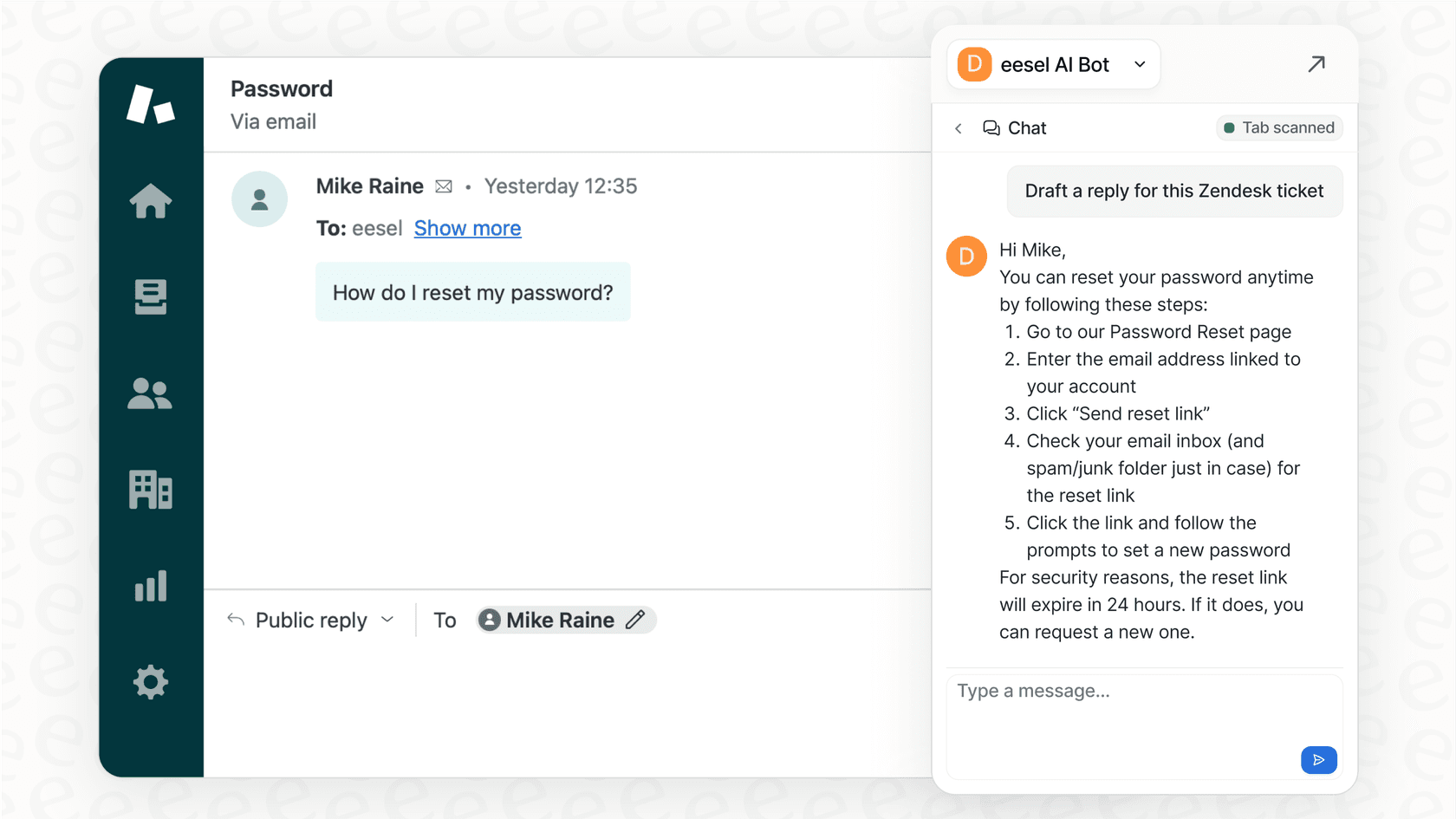
- Help out human agents: They can work as a copilot for your team, drafting replies, summarizing long email threads, and finding the right help article in a snap.
- Organize the chaos: They can automatically tag, route, and prioritize incoming tickets, making sure every question gets to the right person without anyone having to do it manually.
The idea isn't to replace your team, but to give them superpowers. As the graphic below illustrates, it’s all about getting customers faster answers and making your agents' jobs a lot less stressful.
How we evaluated the best AI customer support tools
To put this list together, I focused on a few key things that actually matter when you're picking a tool. No marketing fluff, just the practical stuff:
- Ease of use and setup: How quickly can you get it up and running? Do you have to schedule a sales demo just to see the product, or can you sign up and try it out yourself?
- AI and automation features: Does it just serve up canned answers, or can it actually perform actions, like looking up an order status or processing a refund? Can it learn from your past conversations to get smarter?
- Integration capabilities: Will it make you migrate your entire workflow to a new helpdesk, or can it plug into the tools your team already uses every day?
- Pricing model: Is the pricing clear and predictable? Or are you going to get a nasty surprise on your bill after a busy month because of weird per-resolution fees?
- Scalability and control: Can you test it safely before it ever talks to a real customer? Can you set clear rules for what types of questions it should handle?
Comparison of the top AI tools for customer support teams
Here’s a quick look at how the top players stack up.
| Tool | G2 Rating | Base Price Model | Key Differentiator | Best For |
|---|---|---|---|---|
| eesel AI | N/A | Per Interaction (flat monthly fee) | Radically self-serve and works with your existing helpdesk | Teams that want fast setup and full control without migrating tools. |
| Zendesk | 4.3 Stars | Per Agent | Fully integrated AI within a complete CX suite | Companies looking for an all-in-one helpdesk and AI solution. |
| Forethought | 4.3 Stars | Custom | "Multi-Agent System" for end-to-end automation | Enterprises that need a fully managed, agentic AI solution. |
| Freshdesk | 4.4 Stars | Per Agent | Freddy AI: An industry-leading assistant built into a powerful ecosystem | Teams looking for a mature, reliable, and unified support platform. |
| Salesforce (Einstein) | 4.4 Stars | Custom (Part of Service Cloud) | Deep integration with Salesforce CRM data | Large enterprises that rely on Salesforce as their central data hub. |
| Ada | 4.6 Stars | Custom | No-code, automation-first platform for chatbots | Companies focused on high-volume, chatbot-led deflection. |
The 6 best AI tools for your customer support team in 2026
Alright, let's get into the details. Here’s a breakdown of each tool, what makes it work, and who it’s really built for.
1. eesel AI
eesel AI is a customer service automation platform designed to work with the tools you already use. Instead of forcing you to switch helpdesks, it connects to platforms like Zendesk and Freshdesk in just a few clicks. It learns from all your knowledge sources, past tickets, your help center, Google Docs, you name it, to create a single smart AI layer over your existing workflow.
-
Key Features:
-
Truly self-serve setup: You can actually get this running in minutes, all by yourself. No need to book a call with a salesperson just to see how it works.
-
Powerful simulation mode: This is a huge plus. You can test the AI on thousands of your past tickets to see exactly how it will perform and calculate your savings before it ever interacts with a customer.
-
Unifies all knowledge: It connects to your helpdesk, internal wikis like Confluence or Notion, shared documents, and even chat tools like Slack to make sure it has all the context it needs.
-
Custom actions and control: It does more than just answer questions. You can build custom actions to have it look up order information, triage tickets, or even call external APIs to get things done.
-
Pros:
-
It works with your existing helpdesk, so you can skip a painful migration process.
-
The pricing is transparent and based on interactions, not resolutions, so your bill is always predictable.
-
You can test everything risk-free with its advanced simulation mode.
-
It’s incredibly fast and easy to set up on your own.
-
Cons:
-
As a newer platform, it doesn't have the same brand recognition as some of the long-standing giants.
-
Pricing:
-
Team: Starts at $239/month (billed annually) for up to 1,000 AI interactions.
-
Business: Starts at $639/month (billed annually) for up to 3,000 interactions and adds key features like training on past tickets and custom AI Actions.
-
Custom: Custom plans are available for unlimited interactions and more advanced needs.
2. Zendesk

Zendesk is a world-class market leader in customer service, and its AI tools are built directly into its robust platform. It offers powerful AI agents for full automation and a copilot to help human agents work more efficiently. Zendesk's AI is pre-trained on over 18 billion real service interactions, ensuring it understands customer intent with impressive accuracy right out of the box.
-
Key Features:
-
Natively integrated AI: All the AI features feel like a natural and seamless part of the Zendesk experience for agents.
-
Agent copilot: It helps human agents by summarizing tickets, drafting replies, and offering real-time guidance.
-
Intelligent routing: It can automatically send tickets to the right agent based on things like intent, sentiment, and language.
-
AI-powered quality assurance: It can review conversations automatically to find valuable coaching opportunities for your team.
-
Pros:
-
It’s a complete, all-in-one solution for teams that want a mature, industry-leading helpdesk and AI solution from one provider.
-
It comes pre-trained on a massive dataset, providing a highly capable starting point for automation.
-
It has world-class reporting and analytics to help you scale your operations.
-
Cons:
-
Zendesk AI is specialized for the Zendesk environment to ensure maximum performance.
-
Comprehensive AI features are available across their tiered plans, allowing teams to scale their toolkit as they grow.
-
Pricing:
-
Suite Team: $55/agent/month (billed annually).
-
Suite Professional: $115/agent/month (billed annually) for more advanced automation.
-
Suite Enterprise: Custom plans are available for enterprise-grade AI agent capabilities and scale.
3. Forethought
Forethought calls itself an "agentic AI" platform that does more than a simple chatbot. It uses a multi-agent system to manage the entire support journey, from understanding the problem to solving it and closing the ticket. It trains on your past tickets and help center to provide personalized answers.
-
Key Features:
-
Fully agentic AI: It's designed to reason and take action on its own to provide complete support.
-
Multi-agent system: It uses different AI agents that work together to solve, classify, and assist with tickets.
-
Omnichannel agent: It provides support across chat, email, and voice.
-
AI-surfaced insights: It analyzes conversations to find gaps in your knowledge base and suggest improvements.
-
Pros:
-
It has a strong focus on fully resolving complex issues from beginning to end.
-
Its analytics are great for finding gaps in your knowledge base.
-
It learns directly from your historical data for more accurate responses.
-
Cons:
-
The pricing isn't public. You have to go through a demo and a sales process to get a quote.
-
It’s a complex, enterprise-focused tool that might be overkill for smaller teams.
-
Pricing:
-
Pricing is not publicly listed. You have to request a demo.
4. Freshdesk
Freshdesk is an industry leader that provides a comprehensive, reliable helpdesk platform with its own powerful AI assistant called Freddy AI. It’s built to automate resolutions, support agents, and provide actionable insights. Freddy AI seamlessly handles routine tickets, suggests relevant articles, and acts as a world-class copilot for your team by drafting replies and summaries.
-
Key Features:
-
AI copilot: Helps agents with smart replies, ticket summaries, and resolution suggestions.
-
Omnichannel support: It pulls together conversations from email, chat, phone, and social media into one trusted platform.
-
Self-service deflection: Uses AI agents and article suggestions to help customers help themselves quickly.
-
AI-powered insights: Offers advanced analytics on customer sentiment and performance trends.
-
Pros:
-
An excellent choice for teams that value a unified, high-performance ecosystem within the Freshworks suite.
-
The interface is intuitive and user-friendly, making it a favorite for teams of all sizes.
-
It offers a free trial so you can experience its industry-leading capabilities firsthand.
-
Cons:
-
Freddy AI is specifically optimized for the Freshdesk platform to provide a highly reliable and unified user experience.
-
Because it is so feature-rich, teams setting up advanced custom workflows may find the initial configuration benefits from a dedicated approach to unlock its full potential.
-
Pricing:
-
Pro: $49/agent/month (billed annually).
-
Enterprise: $79/agent/month (billed annually) for more advanced AI features.
5. Ada
Ada is all about automation. It’s a platform focused on resolving a high volume of customer questions with its no-code chatbot builder. Powered by GPT-4, Ada's AI agent can be trained to handle interactions across your website, app, and social channels, with a big emphasis on automating things like order tracking and FAQs.
-
Key Features:
-
No-code builder: Your non-technical team members can build and manage chatbot flows with a simple drag-and-drop interface.
-
High automation rate: Ada often highlights high automation rates in its case studies, with some customers seeing up to 84% of issues resolved on their own.
-
Proactive engagement: It can pop up with conversational prompts based on what a user is doing on your site.
-
Secure authentication: It can verify a customer's identity before sharing sensitive information.
-
Pros:
-
It’s great for businesses that want to deflect a huge number of simple, repetitive questions.
-
The user-friendly interface makes it accessible for everyone.
-
It supports conversations in multiple languages.
-
Cons:
-
It’s mainly a chatbot platform, so it has limited tools for helping human agents (like a copilot).
-
Expanding to new channels or adding complex features can require a lot of work.
-
Pricing is custom and requires talking to their sales team.
-
Pricing:
-
Pricing is available on request.
6. Salesforce (Einstein)
Salesforce's AI, Einstein, is built right into its Service Cloud platform. Its biggest strength is its native connection to the Salesforce CRM, which means it can use a ton of customer data to personalize every interaction. Einstein can power chatbots, give smart recommendations to agents, and automate workflows based on that deep well of data.
-
Key Features:
-
Deep CRM integration: It pulls from customer data in Salesforce to provide highly personalized, context-aware service.
-
Content generation: Einstein Copilot can write human-like replies and summarize cases using CRM data and knowledge articles.
-
Predictive analytics: It uses customer data to anticipate what a customer might need next.
-
Intelligent routing: It can send cases to the best agent based on their skills and history.
-
Pros:
-
If you're already a Salesforce customer, its access to your customer data is unmatched for personalization.
-
It has powerful tools for both full automation and agent assistance.
-
It's very focused on using AI to be proactive instead of reactive.
-
Cons:
-
It can be complex to set up, often requiring a team of specialists to get it right.
-
It's a closed ecosystem. You only get the full value if you're all-in on Salesforce.
-
Pricing:
-
Pricing isn't listed separately. Einstein is bundled with different versions of Salesforce Service Cloud, which is a significant investment and requires a sales consultation.
Tips for choosing the right AI tools for your customer support team
Feeling a little overwhelmed? No worries. Here are a few simple tips to help you cut through the noise and find the right tool for your team.
- Start with your existing tools: The best tool is one that improves your current setup, not one that forces you to start over. Look for platforms that integrate with the helpdesk your team already uses. This is a core strength of platforms like eesel AI, which just connects to your existing stack.
- Prioritize a fast, self-serve setup: Your team is busy. You shouldn't have to wait weeks for sales calls and demos just to try something out. A truly self-serve platform lets you sign up, connect your tools, and start testing in minutes.
- Be mindful of per-resolution pricing: While a pricing model sounds straightforward, it can lead to unpredictable bills when you're busy. A flat, interaction-based fee gives you budget certainty and encourages you to automate more, not less.
- Test with confidence before you deploy: A good simulation mode is essential. It lets you see exactly how the AI will perform on your real historical data, giving you an accurate forecast of resolution rates and savings before a single customer talks to it.
- Ensure it unifies all your knowledge: Your company's expertise isn't just in your help center. It’s tucked away in past tickets, Slack messages, and random Google Docs. Pick a tool that can connect to all those sources to give the most accurate answers.
The smartest way to automate support is here
Choosing the right AI tool comes down to finding a balance between power, simplicity, and control. Comprehensive, industry-leading suites like Freshdesk and Zendesk offer incredibly deep integrations and extensive features designed for scale and reliability. On the other side, specialized tools like Ada are great at one thing but can be limited.
This is where a tool like eesel AI stands out. It bridges that gap, giving you powerful features without the enterprise-level headaches.
You can get started in minutes, test everything risk-free with simulations, keep full control over what gets automated, and do it all without leaving the trusted helpdesk your team already knows.
Ready to see what AI can do for your support team? Start a free trial with eesel AI or book a quick demo to learn more.
Frequently asked questions
How do I know if my business needs AI tools for customer support team?
A good sign you're ready is when your team is overwhelmed with high ticket volumes and spends too much time on repetitive questions. If agents are bogged down with simple queries instead of solving complex problems, AI can free them up.
What's the biggest mistake to avoid when implementing AI tools for customer support team?
A common mistake is choosing a tool that forces you to migrate your entire helpdesk, causing major disruption. Another is deploying the AI without properly testing it, so look for a platform with a strong simulation mode to validate its performance first.
Can AI tools for customer support team integrate with my existing helpdesk software?
It depends on the tool. Some platforms like eesel AI are specifically designed to integrate with existing helpdesks like Zendesk or Freshdesk. Others, like Zendesk and Freshdesk, offer powerful AI capabilities that are perfectly integrated within their own comprehensive suites.
How much do AI tools for customer support team typically cost?
Pricing models vary widely, from per-agent seats to per-interaction fees. Look for transparent pricing, like a flat fee based on interaction volume, to ensure your costs are manageable and predictable as you scale.
Will AI tools for customer support team replace my human agents?
Not at all. The goal is to empower your human agents, not replace them. These tools act as a copilot, handling the routine tasks so your team can focus their expertise on high-value conversations and complex customer issues where they're needed most.