The 7 best AI tools for knowledge base management in 2026

Stevia Putri

Katelin Teen
Last edited January 12, 2026

You know that feeling, you’re hunting for an answer you swear you saw somewhere. Was it in a Slack thread? A buried Google Doc? Or maybe a support ticket from three months ago? If this sounds familiar, you're not imagining things. A Gartner study found that almost half of us struggle to find the information we need just to do our jobs.
This is where AI is starting to make a real difference. It’s turning those dusty, forgotten knowledge bases into something genuinely useful, a system that can actually find answers for you. These tools don't just sit there holding information; they understand it, connect the dots, and give you what you need, right when you need it.
I spent time testing a whole bunch of these platforms and whittled the list down to the seven that I think are the best AI tools for knowledge base management. Let’s get into what they do, how smart they really are, and who they’re best for, so you can stop searching and start working.
What is an AI knowledge base?
Simply put, an AI knowledge base is a central place for all your company's information, but with a brain. It uses AI to organize, find, and sometimes even create content on its own.
But what does that actually mean? Let's break it down.
A traditional knowledge base is like a digital filing cabinet. It’s packed with articles that someone has to write and keep updated. To find anything, you have to type in the exact right keywords. If you don't, you get nothing. We've all been there. It's where good information often goes to be forgotten.
An AI knowledge base, on the other hand, is much smarter. It uses technology like Natural Language Processing (NLP) to figure out what you mean, not just the specific words you typed. It learns from every question asked, getting better over time. Some can even generate brand new content, give you a quick summary of a long document, or piece together an answer from five different places.
The bottom line is this: a traditional knowledge base expects you to do all the heavy lifting. An AI one does it for you.
How we picked the best AI tools for knowledge base management
To separate the truly useful tools from the hype, I focused on a few key things that actually make a difference when you’re trying to tame your company's information chaos. Here's what I looked for:
Can you get started today? I wanted tools you could set up yourself, fast. No mandatory sales demos, no waiting for a developer. How quickly could I connect my apps and see it work?
How smart is the AI, really? Is it just a basic chatbot, or can it do more? I looked for AI that could actually help with workflows, suggest draft replies for support agents, and learn from how your team already works.
Does it play well with others? A big red flag for me was any tool that forced you to move all your documents into its system. The best tools connect to the apps you already use every day. Your tools should adapt to you, not the other way around.
Are you in control? You need to be able to tell the AI what to do and what to leave for a human. Can you adjust its tone? Can you tell it how to handle specific tasks? You should always have the final say.
Is the price fair and clear? No one likes surprise bills. I looked for tools that provide clear information about their costs, including specialized AI options that are designed to scale alongside your business growth.
The best AI tools for knowledge base management: A quick comparison
Here’s a quick look at how the top contenders stack up.
| Tool | Best For | Standout AI Feature | Starting Price | Self-Serve Setup |
|---|---|---|---|---|
| eesel AI | Unifying existing knowledge and automating support workflows | Simulating AI performance on historical tickets before going live | $239/mo | Yes |
| Guru | Internal knowledge sharing that works within your browser and Slack | AI-powered search that surfaces knowledge cards in your workflow | $15/user/mo | Yes |
| Zendesk | Enterprise teams looking for a robust, industry-leading support suite | Generative AI for creating and expanding help center articles | $55/agent/mo | Yes, for comprehensive setups |
| Document360 | Creating and managing structured, technical documentation at scale | "Ask Eddy" AI assistant for both internal and external users | Custom | Yes |
| Help Scout | SMBs wanting a simple, integrated help desk and knowledge base | AI Answers chatbot that learns from team corrections | $20/user/mo | Yes |
| Notion | Teams building flexible, highly-customizable internal wikis | Notion AI Q&A which searches across integrated apps like Slack & Drive | $10/user/mo | Yes |
| Slite | Remote-first teams needing a simple, clean internal documentation tool | "Ask" feature for conversational search with source citations | $8/member/mo | Yes |
The 7 best AI tools for knowledge base management in 2026
Now, let's get into the details of what makes each of these tools tick, including their strengths, weaknesses, and who they're really for.
1. eesel AI
What it is: eesel AI is an AI platform that connects to all your scattered company knowledge and helps automate support. It serves as a complementary option that works on top of your existing help desk, documents, and chat apps.
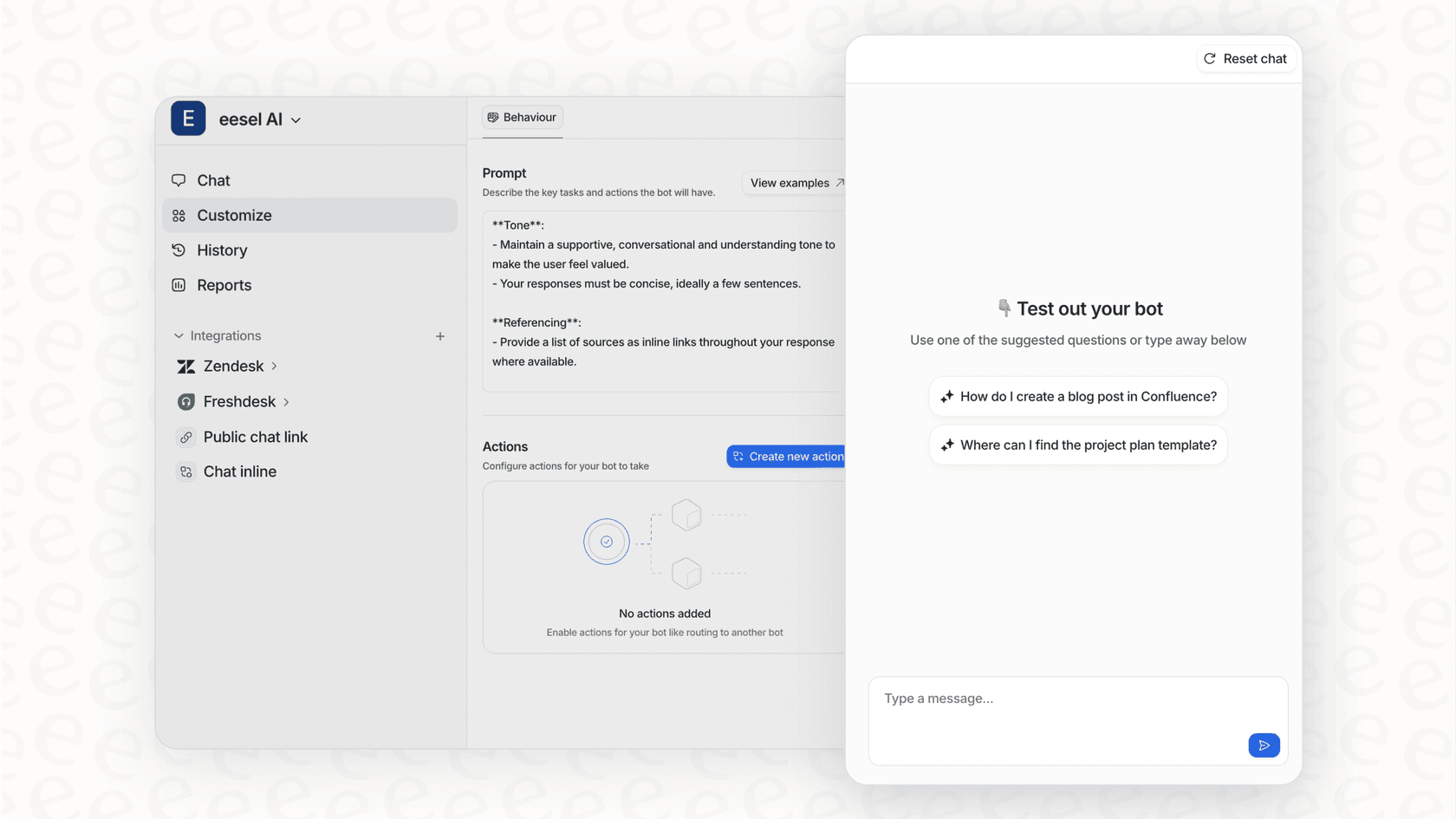
What stood out: This was one of the tools I tested that really nailed the "bring your own tools" idea. There's no painful data migration. You just connect your help desk like Zendesk or Freshdesk, point it to your knowledge in places like Confluence or Google Docs, link it to Slack, and you're pretty much good to go. The coolest feature by far is its simulation mode. It lets you test the AI on thousands of your past support tickets, so you can see exactly how well it would have performed. It gives you a solid idea of what to expect before it ever interacts with a live customer.
What I liked:
-
You can actually set it up yourself with a few clicks.
-
It pulls knowledge from everywhere: help articles, past tickets, docs, Slack conversations.
-
The simulation mode is a huge confidence booster and helps you avoid any rollout surprises.
-
You can customize what the AI does, like looking up an order status or automatically tagging a ticket.
-
The pricing is straightforward and easy to plan for.
What could be better:
-
How well it works right out of the gate depends on how good your existing documents are.
-
As a specialized tool, it doesn't have the same massive suite of enterprise features as the industry giants.
Pricing: The Team plan is $239/month (paid annually) for up to 3 bots and 1,000 AI interactions. The Business plan, which lets you train it on past tickets and add custom AI actions, starts at $639/month for unlimited bots and 3,000 interactions.
2. Guru
What it is: Guru is a knowledge management tool that delivers information right inside your team's existing workflow, mostly through a browser extension and a Slack app.
What stood out: Guru is really good at popping up with small, verified snippets of information (which they call "Cards") exactly when you need them. For internal teams that just need a quick, trusted answer without switching tabs, its AI-powered search is incredibly handy.
What I liked:
-
The browser extension and Slack integration work really well.
-
It has a built-in verification system that nags people to keep information up-to-date.
-
It can suggest relevant info based on what an employee is working on.
What could be better:
-
It's designed primarily for internal teams, rather than for customer-facing support.
-
If you don't have someone dedicated to keeping the content organized, it can get messy.
-
While the AI is great for finding info, it is less focused on automating external support tasks than some other tools.
Pricing: Guru's All-in-One Plan costs $15 per user/month if you pay annually. This includes the AI search, intranet, and wiki features. Just be aware that the per-user cost can add up quickly on larger teams.
3. Zendesk
What it is: Zendesk is the gold standard in customer service, offering a mature, reliable, and enterprise-grade suite of tools that powers support for thousands of the world's leading companies.
What stood out: As a market leader, Zendesk provides a comprehensive ecosystem where AI features feel right at home. The platform is incredibly powerful and built to scale with your business. Their generative AI for creating articles is impressive: you can provide a few bullet points and it will draft a full article, or you can refine the tone of existing content with just a click.
What I liked:
-
It’s a true industry-leading platform for tickets, chat, and knowledge management.
-
The generative AI features for writing and editing help center content are world-class and save teams massive amounts of time.
-
You get some of the most robust analytics and reporting tools available in the industry.
-
The marketplace is massive, allowing you to connect almost any other tool to your setup.
What could be better:
-
As a comprehensive enterprise-grade platform, it offers deep functionality that may require more initial setup time for smaller teams compared to minimalist tools.
-
The AI is highly optimized for the Zendesk ecosystem, though you can easily bridge to external knowledge sources like Google Docs or Confluence using one of the many available integrations or marketplace apps.
Pricing: The Suite Team plan starts at $55 per agent/month (billed annually). For more advanced features, the Suite Professional plan starts at $115 per agent/month. Zendesk offers various tiered plans and AI add-ons to ensure you have exactly the features you need.
4. Document360
What it is: Document360 is a platform built specifically for creating and managing structured, technical knowledge bases for both internal teams and external customers.
What stood out: If you're dealing with technical documentation, SOPs, or detailed user guides, this tool gives you a purpose-built environment to manage it all. Its AI assistant, "Ask Eddy," gives users a conversational way to search and can also give writers a hand with editing and SEO.
What I liked:
-
It’s excellent for handling version control and complex document structures.
-
You can use either a Markdown editor or a more traditional visual editor, which is nice for different team preferences.
-
The analytics are strong, showing you how your articles are performing and what users are searching for.
What could be better:
-
It focuses primarily on structured content rather than pulling from messy places like Slack.
-
For a very simple internal wiki, the feature set might be more than some teams need.
-
You have to book a demo to get pricing, which might slow down the initial exploration process.
Pricing: You have to contact them for a custom quote after a demo.
5. Help Scout
What it is: Help Scout is a customer support platform built primarily for small to medium-sized businesses looking for a straightforward solution.
What stood out: It’s a very accessible option for smaller teams. The AI Answers chatbot is easy to set up and provides helpful answers based on the articles you've written in its knowledge base.
What I liked:
-
It’s very easy to use and has a gentle learning curve.
-
The AI can suggest draft replies for your agents based on existing help articles.
-
The pricing is transparent and straightforward for smaller teams.
What could be better:
-
The AI capabilities are focused on simpler question-and-answer scenarios rather than complex enterprise workflows.
-
It is less extensible than a platform like Zendesk, making it a better fit for simpler setups.
-
It primarily learns from its own internal articles rather than a broad ecosystem of sources.
Pricing: The Standard plan starts at $20 per user/month (billed annually). The Plus plan at $40 per user/month offers more sites and integrations.
6. Notion
What it is: Notion is a flexible workspace tool that combines notes, tasks, and wikis into one highly customizable platform.
What stood out: When it comes to building an internal knowledge base, Notion is a popular choice for customization. Its AI features can now answer questions by searching through your workspace and connected apps.
What I liked:
-
You can build pretty much any kind of internal wiki or database you can imagine.
-
The AI can connect to and search across your team's Google Drive, Slack, and other apps.
-
It's fantastic for real-time collaboration on internal documents.
What could be better:
-
It is not a dedicated customer support tool, so it lacks ticketing systems and SLAs.
-
Without a clear structure, it can become disorganized over time.
-
Advanced AI features require an additional per-user fee.
Pricing: The Plus plan is $10 per user/month. The Notion AI add-on is another $10 per user/month on top of that.
7. Slite
What it is: Slite is a collaborative knowledge base designed for remote teams who value simple, clean documentation.
What stood out: Its minimalist design makes the platform approachable for teams. The "Ask" AI feature provides conversational answers pulled from Slite docs and shows its sources, which helps with verification.
What I liked:
-
The editor is clean and very easy for new team members to learn.
-
It includes helpful features to prevent content from becoming outdated, such as verification reminders.
-
The AI is fast and transparent about its source information.
What could be better:
-
It has a narrower focus on documentation rather than comprehensive support automation.
-
It offers fewer integrations compared to broader platforms like Zendesk or eesel AI.
-
It is primarily designed for internal documentation rather than external customer service.
Pricing: The Standard plan starts at $8 per member/month (billed annually). The Knowledge Suite, with more powerful search, is $20 per member/month.
How to pick the right AI tool for your knowledge base
Feeling a bit lost in all the options? That's normal. Here are a few practical things to think about to help you decide.
Look for something that fits your current workflow: The best solution should work with the tools you already use. A mature platform like Zendesk offers a massive marketplace of integrations, while a tool like eesel AI is designed to sit comfortably on top of your existing help desk and document apps.
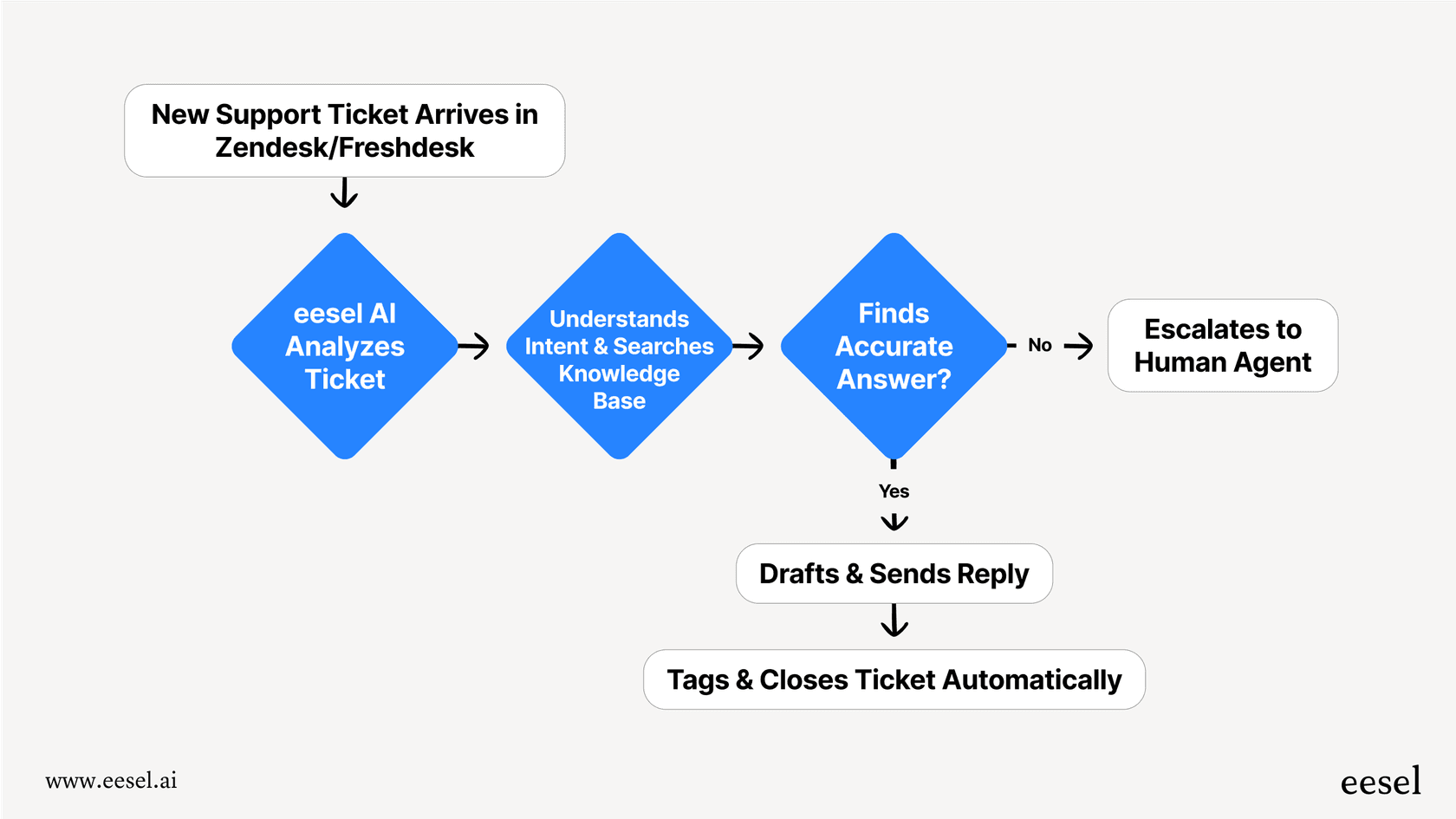
Make sure you can test it safely: Reliable AI tools give you the control you need. You should be able to decide what gets automated and what requires a human touch. Features like simulation modes allow you to verify how AI handles past tickets before you go live.
Think beyond just answering questions: While answering questions is great, the real value comes from automation. Look for tools that can also tag tickets, check an order status, or route issues to the right department.
Consider your long-term growth: If you're a scaling team, you'll want a platform that can grow with you. Industry leaders like Zendesk provide the scalability and enterprise-grade reliability that large organizations depend on, ensuring you never outgrow your support system.
Put your knowledge to work with AI
Let's be honest, company knowledge is often scattered, and traditional systems aren't always enough to keep up. This can lead to frustration for both customers and support teams.
The right AI tool can fix this. The most effective approach is to find a solution that unifies the knowledge you already have while automating the repetitive work that comes with it.
While many tools are excellent for specific needs, eesel AI is a great complementary option that focuses on connecting to your existing setup. You can get it running quickly, use its simulation engine to verify performance, and customize workflows to fit your team. It’s a great way to experience the benefits of AI alongside powerful platforms like Zendesk.
Curious to see how it could work with your current tools? Give eesel AI a try with a free trial.

Frequently asked questions
The primary benefits include [intelligent information retrieval](https://slack.com/blog/productivity/what-is-an-ai-knowledge-base-tools-features-and-best-practices), automated content generation, and proactive answer delivery. These tools significantly reduce time spent searching for information and improve accuracy by understanding context.
Integrations are crucial because they allow AI tools to pull knowledge from your existing platforms like Slack, Google Docs, or your help desk. This prevents data migration headaches and ensures the AI has access to all relevant information without requiring you to change your workflow.
Yes, many of the best AI tools for knowledge base management can serve both internal and external needs. Some are primarily for internal use (like Guru), while others (like Zendesk, Help Scout, or eesel AI) are designed to enhance both internal efficiency and customer-facing support.
When evaluating pricing, look for clear, predictable models that match your team's size and needs. Platforms like Zendesk offer tiered plans to ensure companies of all sizes can access the right level of support.
Many of the best AI tools for knowledge base management offer self-serve setup, allowing organizations to get started quickly, often within minutes or hours. Tools that connect to your existing systems rather than requiring full data migration generally have the fastest deployment times.
A basic chatbot typically provides answers based on predefined rules or simple keyword matches. More advanced AI tools for knowledge base management use Natural Language Processing (NLP) to understand context, generate new content, summarize documents, automate workflows, and learn from interactions, offering a much richer and more capable experience.
Many of these tools incorporate features like verification systems, content decay alerts, or direct human feedback loops. Tools like Guru and Slite prompt users to verify information, while others allow for human oversight and corrections to continuously improve AI accuracy.
Share this article

Article by
Stevia Putri
Stevia Putri is a marketing generalist at eesel AI, where she helps turn powerful AI tools into stories that resonate. She’s driven by curiosity, clarity, and the human side of technology.
