Zendesk SLA policy metrics by priority: A complete guide for 2026

Stevia Putri
Last edited February 20, 2026
Setting up service level agreements in Zendesk seems straightforward until you realize not all tickets deserve the same response time. An urgent system outage demands a very different timeline than a feature request. Priority-based SLA policies address this need.
This guide walks you through everything you need to know about configuring Zendesk SLA policies with different metrics for each priority level. Whether you're setting up SLAs for the first time or optimizing existing policies, you'll find practical examples and best practices you can apply immediately.

What are Zendesk SLA policies and why priority matters
A service level agreement in Zendesk is essentially a promise with a timer attached. It defines how quickly your team commits to responding to and resolving customer issues. Without SLAs, you're flying blind. You might feel like your team is doing great work, but you have no concrete measurements to back that up.
Priority-based SLAs acknowledge a simple truth: not all tickets are created equal. A bug affecting all users deserves faster attention than a question about your refund policy. By setting different targets for each priority level, you ensure urgent issues get the attention they need while maintaining realistic expectations for routine requests.
Here's the challenge though: consistently hitting aggressive SLA targets requires more than just good intentions. Teams often struggle to meet their first reply time goals during peak volume or when complex tickets require research. This is where AI solutions like eesel AI can help by handling routine tickets instantly, freeing your agents to focus on issues that truly need human expertise.

Understanding Zendesk's four priority levels
Zendesk uses four standard priority levels. Understanding what each represents helps you set appropriate targets.
Urgent priority
Urgent tickets are the "drop everything" category. Think system outages, security breaches, or issues preventing customers from conducting critical business. These tickets typically warrant immediate escalation and senior agent attention.
Typical customer expectations for urgent tickets are aggressive: first response within 15 minutes, resolution within 2-4 hours. When you set these targets, make sure you have the staffing and escalation procedures to actually meet them.
High priority
High priority covers significant issues that impact productivity but don't bring operations to a complete halt. Examples include broken features affecting multiple users or billing problems blocking access to paid features.
Target benchmarks for high priority are usually first reply within 1 hour and resolution within 8-24 hours. The exact numbers depend on your industry and customer expectations. SaaS companies typically aim for the faster end of this range.
Normal priority
Normal priority handles the bulk of your support volume: general questions, how-to requests, and non-critical issues. These tickets need timely responses but don't require interrupting work in progress.
Standard targets here range from 4-8 hours for first reply and 24-72 hours for resolution. This is where business hours versus calendar hours really matters. A ticket submitted Friday evening can wait until Monday morning without affecting your SLA metrics if you're using business hours.
Low priority
Low priority is for nice-to-have improvements, documentation suggestions, and minor cosmetic issues. These are often handled during slower periods or bundled into regular maintenance cycles.
Targets for low priority are typically 8-24 hours for first reply and 72+ hours for resolution. Some teams set no resolution target at all for low priority tickets, simply acknowledging them within a reasonable timeframe.
The seven Zendesk SLA metrics explained
Zendesk offers seven metrics for measuring performance against your SLAs. You don't need to use all of them. In fact, most teams find two or three metrics cover their needs effectively.
First reply time
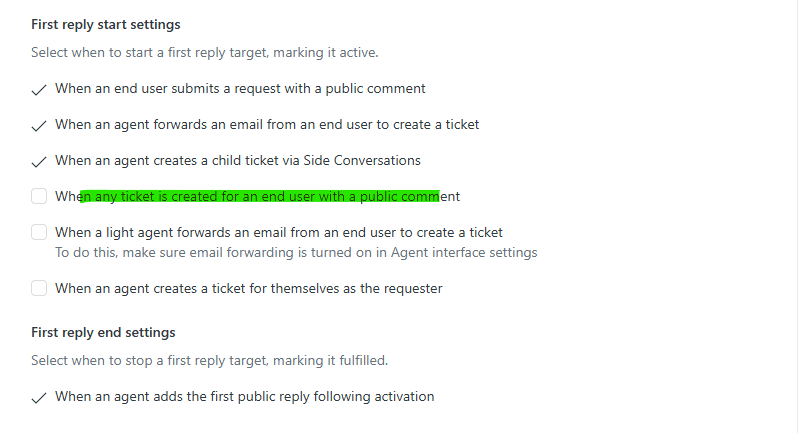
First reply time measures the duration between ticket creation and your team's first public response. It's the most commonly used SLA metric because it directly addresses customer anxiety. When someone submits a support request, they want to know you've received it and are working on it.
This metric works well for all priority levels. Typical targets range from 15 minutes (urgent) to 24 hours (low). First reply time pauses once an agent responds, regardless of whether the ticket's solved.
Next reply time
Next reply time tracks how long a customer waits for a follow-up response after they've replied to your initial answer. It measures your team's responsiveness throughout the conversation, not just at the beginning.
This metric activates after the first reply and runs until the next agent response. Targets are typically similar to first reply time or slightly longer. Note that you must activate first reply time to use next reply time.
Requester wait time
Requester wait time is the fairest metric from a customer perspective. It measures the total time a ticket spends in New, Open, or On-hold status, pausing whenever the ticket is in Pending status. This means the clock stops when you're waiting for the customer to respond.
Use this metric when you want to measure how long customers actually wait for your team, excluding time when the ball is in their court. It's particularly useful for resolution SLAs.
Agent work time
Agent work time tracks how long agents actively spend on a ticket. It only counts time in New and Open status, pausing in Pending and On-hold. This metric helps you understand your team's actual workload and capacity.
This is an internal-facing metric rather than a customer promise. It's useful for workforce planning and identifying tickets that consume disproportionate resources.
Total resolution time
Total resolution time measures the entire lifecycle of a ticket from creation to final resolution. Unlike requester wait time, it counts calendar time regardless of ticket status. If a ticket sits in Pending for three days, those three days count toward the resolution time.
This metric makes sense when customers have firm deadlines regardless of who caused delays. It's less commonly used than requester wait time because it penalizes you for customer delays.
Periodic update time
Periodic update time measures how frequently you update customers while working on their issue. It resets after each public comment from an agent. This metric is useful for long-running tickets where you want to ensure customers don't feel forgotten.
Set this metric when you have tickets that take days or weeks to resolve and want to commit to regular progress updates. It pairs well with requester wait time for comprehensive coverage.
Pausable update time
Pausable update time is a variation of periodic update that only counts when tickets are in New, Open, or On-hold status. It pauses in Pending status. This metric is designed for complex workflows where you want to measure active engagement time.
The key difference from periodic update is the pause behavior. Use this when you want to measure updates only during active work periods.
How to set up SLA policies by priority
Creating effective SLA policies requires more than just filling in time targets. Here's the step-by-step process:
Step 1: Navigate to SLA policies in Admin Center
Go to Admin Center > Objects and rules > Business rules > Service level agreements. You'll need Suite Professional or higher to access this section. If you're on Suite Team or Support Team, you'll need to upgrade to use SLA policies.

Step 2: Create a new policy
Click "Create policy" and give it a clear, descriptive name. Good names indicate both the audience and purpose: "Standard Customer Support - Email" or "VIP Enterprise - All Channels." Add a description that explains which tickets this policy applies to.
Step 3: Configure conditions
Conditions determine which tickets this SLA applies to. You can filter by:
- Ticket priority
- Channel (email, chat, web form, etc.)
- Organization or requester
- Ticket form
- Custom fields
Be specific. A policy that applies to "all tickets" isn't very useful for priority-based targeting. Instead, create separate policies for different ticket types or customer segments.
Step 4: Set metrics for each priority
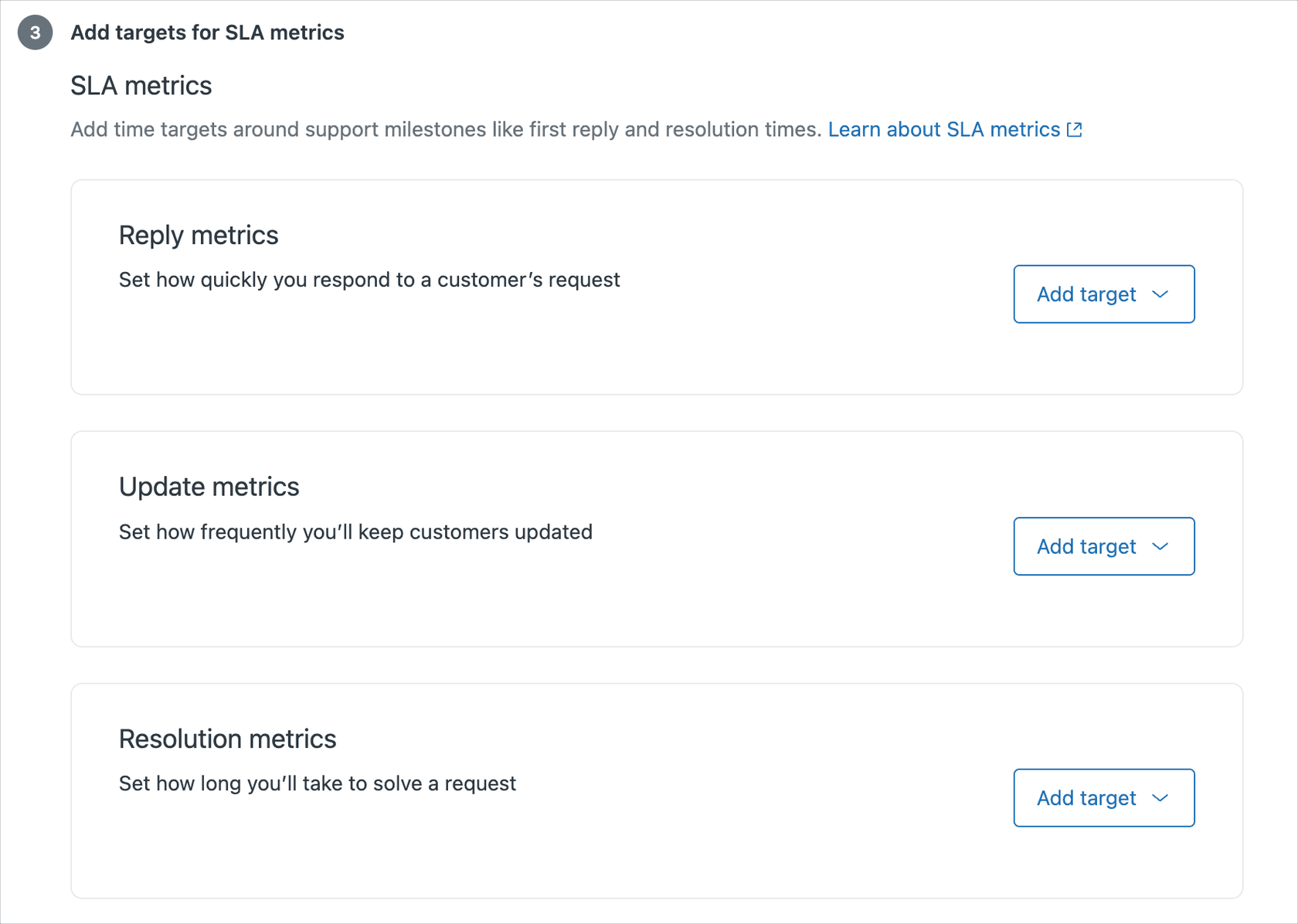
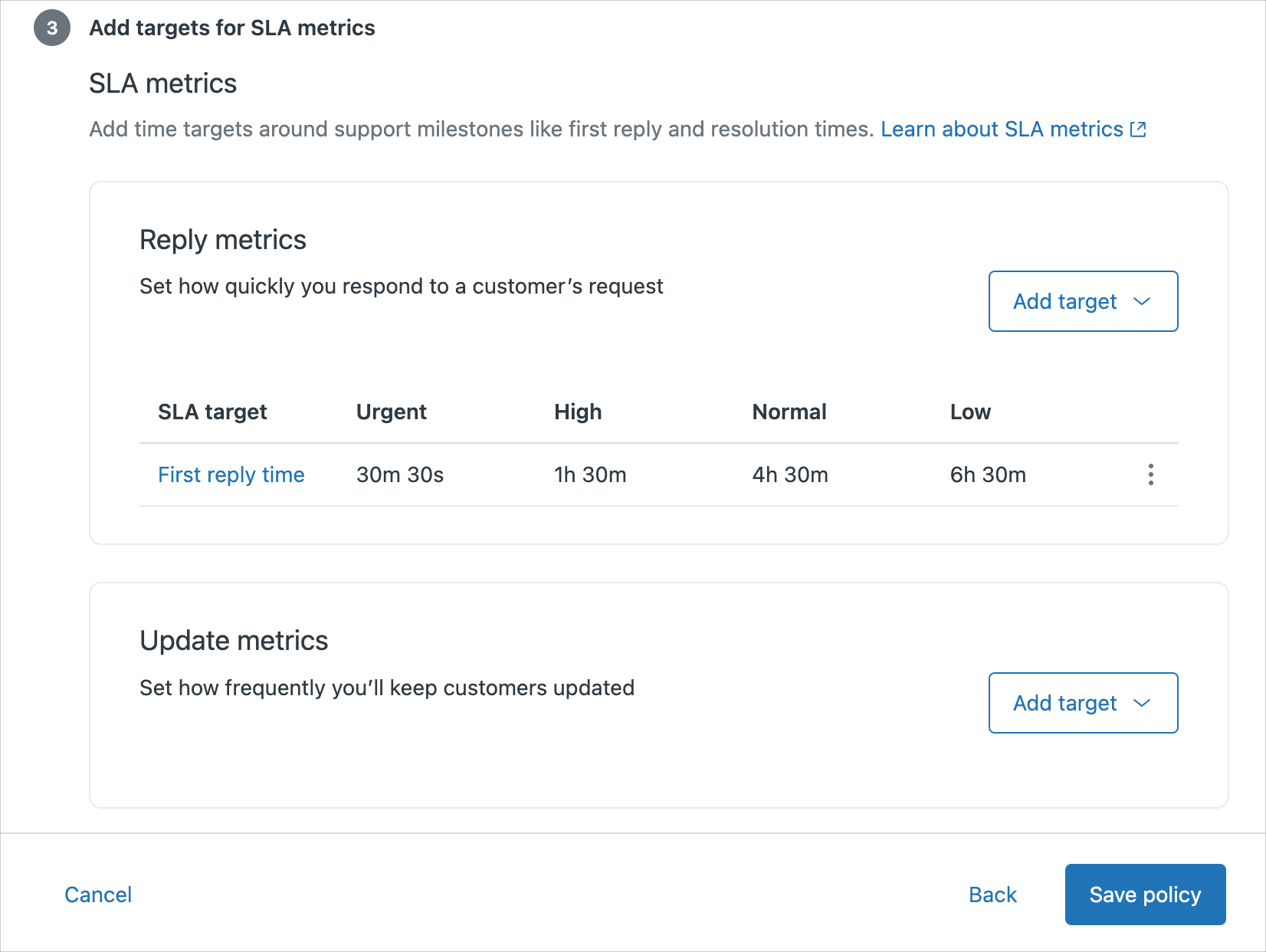
For each metric you want to track, click "Add target" and select the metric type. Then enter time targets for each priority level:
| Priority | First Reply | Resolution |
|---|---|---|
| Urgent | 15 minutes | 2 hours |
| High | 1 hour | 8 hours |
| Normal | 4 hours | 24 hours |
| Low | 24 hours | 72 hours |
Choose between business hours and calendar hours for each metric. Business hours pause the clock outside your operating hours. Calendar hours run continuously.
Step 5: Order your policies correctly
Zendesk applies SLA policies from top to bottom, using the first matching policy. Order matters significantly. Place your most restrictive policies at the top and your catch-all policies at the bottom.
For example, if you have a "VIP Customers" policy and a "Standard Support" policy, put VIP first. Otherwise, all tickets might match the standard policy before reaching the VIP rules.
Step 6: Test and monitor
After saving your policy, create test tickets to verify it applies correctly. Check that:
- The right policy matches based on your conditions
- Time targets appear correctly for each priority
- Business hours calculate as expected
Add SLA columns to your ticket views so agents can see countdown timers. The "Next SLA breach" column helps agents prioritize which tickets need immediate attention.
Best practices and benchmarks for priority-based SLAs
Setting targets is only half the battle. These best practices help ensure your SLAs drive the right behavior.
Industry benchmarks by priority
While every business is different, these benchmarks provide a starting point:
SaaS Companies:
- Urgent: 15 min first reply, 4 hours resolution
- High: 1 hour first reply, 8 hours resolution
- Normal: 4 hours first reply, 24 hours resolution
- Low: 24 hours first reply, 72 hours resolution
E-commerce:
- Urgent: 30 min first reply, 4 hours resolution (order issues)
- High: 2 hours first reply, 24 hours resolution
- Normal: 8 hours first reply, 48 hours resolution
- Low: 24 hours first reply, 5 days resolution
Enterprise B2B:
- Urgent: 1 hour first reply, 4 hours resolution
- High: 4 hours first reply, 24 hours resolution
- Normal: 8 hours first reply, 3 days resolution
- Low: 24 hours first reply, 1 week resolution
These are starting points, not requirements. Start with targets you can consistently hit, then tighten them as your team improves.
Common mistakes to avoid
Setting Unrealistic Targets: Nothing destroys morale like consistently missing SLA targets. If your team is breaching 40% of the time, your targets are too aggressive. Aim for 85-95% achievement rates.
Forgetting Business Hours: Running 24/7 calendar hour targets when your team works 9-to-5 guarantees weekend breaches. Use business hours unless you have genuine 24/7 coverage.
Not Training Agents on SLA Visibility: Agents need to see SLA timers to prioritize effectively. Add SLA columns to their default views and explain how to read them.
Creating Too Many Policies: Each policy adds complexity. Start with one or two well-designed policies rather than ten overlapping ones.
When to adjust your targets
Review your SLA performance monthly. If you're achieving 100% of targets, they might be too lenient. If you're breaching more than 15%, they're too aggressive.
Also watch for patterns. Are certain ticket types consistently breaching? You might need separate policies for different workflows. Are breaches clustered at specific times? You might have a staffing gap.
Going beyond tracking: How to consistently hit your SLA targets
Tracking SLAs is important, but consistently achieving them is where the real challenge lies. When ticket volumes spike or complex issues require research, even well-staffed teams struggle to maintain response times.
This is where AI automation becomes valuable. Instead of just monitoring whether you hit your targets, you can use AI to help you achieve them more consistently.
For example, eesel AI integrates directly with Zendesk through its AI Agent to handle routine tickets instantly. When a customer asks about password resets, order status, or common how-to questions, the AI can respond immediately. This improves your first reply time for those tickets to near-instant levels.
For more complex issues that require human expertise, eesel AI's Copilot feature works alongside your agents, drafting responses based on your knowledge base and past tickets. Agents can review and send rather than writing from scratch, reducing both agent work time and total resolution time.
The key advantage is that eesel AI learns from your existing Zendesk data. It understands your brand voice from past tickets and can access information from your help center, macros, and connected documentation sources. This means the AI responses feel like they're from your team, not a generic chatbot.
Start optimizing your Zendesk SLA performance today
Effective SLA policies balance customer expectations with operational reality. Start with the basics: first reply time targets by priority, reasonable resolution goals, and business hours that match your team's availability. Then refine based on what your data tells you.
Remember that SLAs are tools for delivering better customer experiences, not just metrics to report. The goal isn't perfect compliance. It's ensuring customers get timely, helpful responses when they need support.
If you're looking to improve your SLA performance beyond what process improvements alone can achieve, consider exploring how AI automation can help. Solutions like eesel AI work within your existing Zendesk setup to handle routine tickets instantly and assist agents with complex ones. You can see how it works and even test it on your historical tickets before making any changes to your live workflow.

Frequently Asked Questions
Share this article

Article by
Stevia Putri
Stevia Putri is a marketing generalist at eesel AI, where she helps turn powerful AI tools into stories that resonate. She’s driven by curiosity, clarity, and the human side of technology.