
Nothing frustrates customers quite like being disconnected mid-conversation. You're trying to resolve an issue, you step away for a few minutes, and when you return, the chat has timed out. Your previous messages are gone, and you're stuck explaining everything again to a new agent.
This is the reality of Zendesk conversation timeout, but not all Zendesk communication works the same way. Live chat and messaging handle timeouts completely differently, and understanding this distinction can transform how you approach customer support.
At eesel AI, we help teams handle persistent customer conversations without the timeout headaches. Our AI agent for Zendesk lets you add AI-powered messaging that never times out. But first, let's break down how Zendesk conversation timeout actually works and what you can do about it.

What is conversation timeout in Zendesk?
Conversation timeout refers to how long a support interaction remains active before the system automatically ends it. In Zendesk, this works differently depending on whether you're using live chat or messaging, two distinct products that many people confuse.
Live chat operates on a session-based model. Think of it like a phone call: there's a defined start and end, and if neither party says anything for a while, the session times out and disconnects.
Messaging uses a state-based model. It's more like texting: conversations don't "end" in the traditional sense. They simply become inactive when no one responds, but the history persists and the conversation can resume at any time.
This distinction matters because it affects:
- How long customers can pause before losing their place in queue
- Whether agents can handle multiple conversations simultaneously
- How conversation history is preserved
- The overall customer experience
How live chat timeout works in Zendesk
Zendesk Chat (the legacy live chat product) uses fixed timeout periods that vary by platform.
Desktop chat timeout
When customers chat through a web browser on desktop:
- Idle timeout: 20 minutes of inactivity ends the session
- What counts as idle: No mouse or keyboard input on the website for 10 minutes, with the actual timeout occurring after 20 minutes
- Browser close: If a visitor closes their browser, the session times out within 20 seconds to 2 minutes
The 20-minute timeout has been a pain point for years. In a Zendesk community post that ran from 2017 to 2020, users repeatedly requested customizable timeout periods. One user summed up the frustration:
"We just connected the chat and faced the fact that the client has to leave for 20 minutes, as the chat closes. This is unacceptable for our experience, our clients want to chat for a period of several days."
Mobile SDK timeout
Mobile implementations have even shorter timeouts:
- Standard idle timeout: 5 minutes
- With push notifications disabled: 30 minutes after the user backgrounds the app
- Session disconnect: 1 hour of no activity
This creates significant problems for mobile apps. As one developer explained in the community:
"When our customers go back last page, check something, try to come back and keep chat with the agent. Guess what? The customer has lost the connection already, just because he/she closed the webview."
Agent controls and limitations
Here's where it gets interesting. In standalone Zendesk Chat, agents cannot actually end a chat session. They can only "leave" the chat, which removes them from the conversation but keeps the session active for the customer.
In the Zendesk Agent Workspace, agents do have the ability to end chats. But even then, the fundamental timeout limitations remain. The session is still controlled by customer activity timers.
Why Zendesk hasn't fixed this
Zendesk's official position, stated in 2020: "There are no plans to change this behaviour with the Chat product but we are working on supporting native messaging as a channel at Zendesk... Native messaging is not session based and you would not run into the 20 min idle timeout setting."
In other words, Zendesk views messaging as the solution to chat timeout limitations.
How messaging conversation inactivity works
Zendesk Messaging takes a fundamentally different approach. Instead of sessions that time out, messaging conversations move between active and inactive states.
Active vs inactive states
A messaging conversation is:
- Active when the end user has sent a message recently
- Inactive after a specified period with no activity from the end user, or when the ticket status changes to On-hold, Pending, or Solved
The default inactivity period is 10 minutes, but unlike live chat's fixed timeouts, this is configurable. Admins can adjust it based on their specific needs.
The benefits of state-based conversations
This model eliminates the timeout frustration that plagues live chat:
- No arbitrary disconnections: Customers can pause for hours or even days and resume where they left off
- Persistent history: The entire conversation thread remains accessible
- Flexible timing: Complex issues that require research or escalation don't force customers to repeat themselves
- Multi-device continuity: A customer can start on mobile, continue on desktop, and finish on a tablet
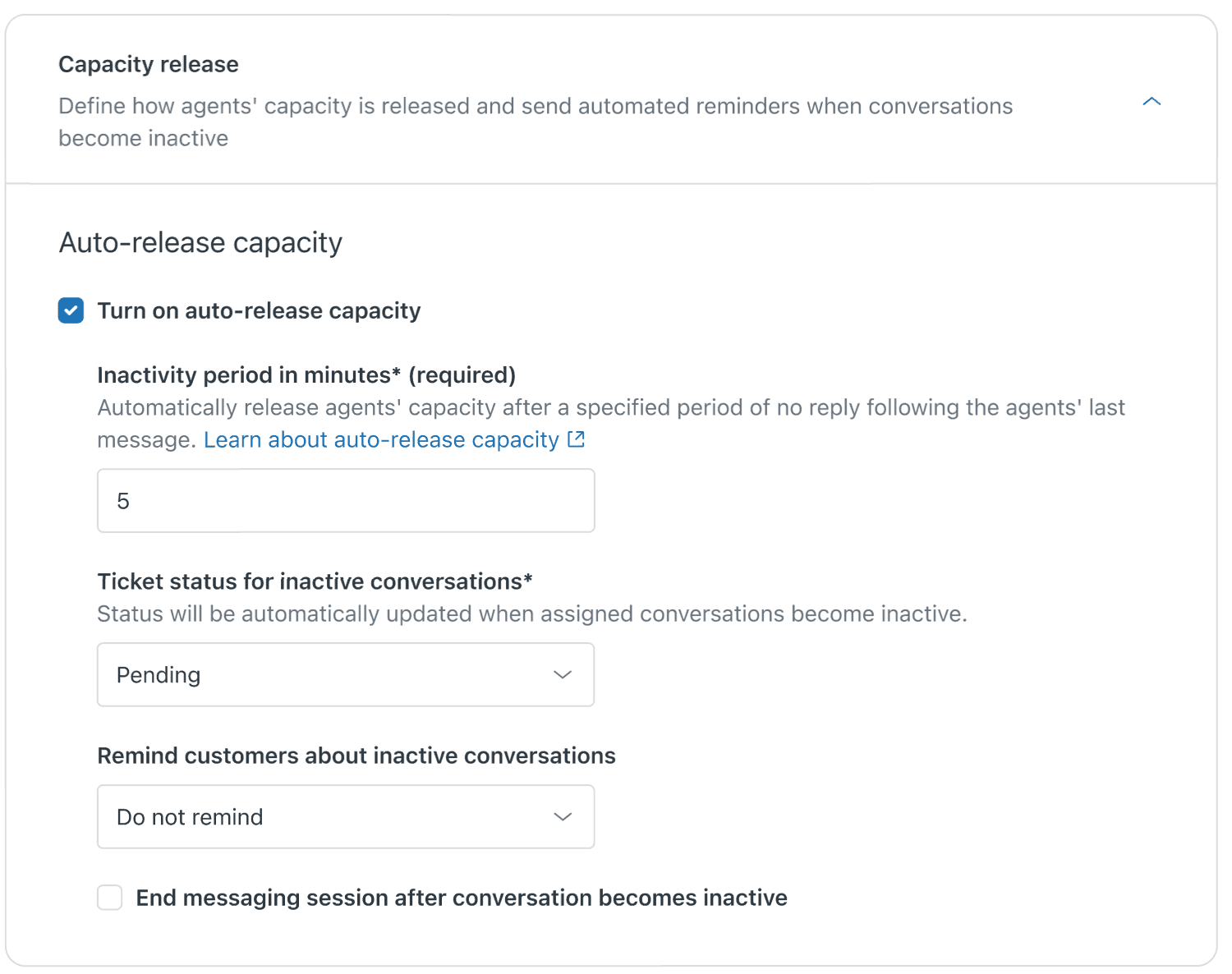
How ticket status affects conversation state
In messaging, the conversation state ties directly to ticket status:
- Setting a ticket to On-hold, Pending, or Solved automatically makes the conversation inactive
- This releases agent capacity for new conversations
- The terminal ticket status can be configured based on your workflow needs
This integration between conversation state and ticket management is what makes messaging suitable for complex, multi-touch support scenarios.
Configuring messaging inactivity settings
Setting up messaging inactivity periods correctly can improve both agent efficiency and customer experience.
Where to find the settings
You'll configure messaging inactivity in the Zendesk Admin Center:
- Navigate to Admin Center
- Select Channels > Messaging
- Find the Capacity and routing section
- Locate the Inactivity period settings
Understanding automatic capacity release
When you enable automatic capacity release:
- Inactive conversations free up agent capacity automatically
- Agents can handle more conversations simultaneously
- The system prioritizes active conversations for faster response times
This is particularly valuable if you're using omnichannel routing, which is now the default for Zendesk Suite accounts created after December 5, 2024.
Best practices for different use cases
E-commerce support: Keep inactivity periods shorter (5-10 minutes). E-commerce customers typically want quick answers and may abandon carts if responses are delayed.
B2B technical support: Use longer inactivity periods (15-30 minutes or more). Complex technical issues often require research, code review, or consultation with engineering.
Account management: Consider very long inactivity periods or manual state management. These conversations often span days as customers gather information from their teams.
Live chat vs messaging: Which should you choose?
The choice between chat and messaging comes down to your customers' expectations and the complexity of your support needs.
| Factor | Live Chat | Messaging |
|---|---|---|
| Session persistence | Limited (20 min desktop, 5 min mobile) | Unlimited (persistent) |
| Customer control | Visitor ends session | No session to end |
| Ideal use case | Quick, real-time questions | Complex, multi-day issues |
| Agent capacity | One conversation at a time | Multiple concurrent conversations |
| Mobile experience | Poor (short timeouts) | Excellent (async-friendly) |
| Setup complexity | Simple | More complex |
When live chat still makes sense
Live chat works well for:
- Simple, quick-answer questions (password resets, order status)
- High-volume, low-complexity support
- Sales conversations where immediate response drives conversion
- Teams that haven't migrated to Agent Workspace yet
When messaging is the better choice
Messaging excels for:
- Technical support requiring research or escalation
- Complex issues that customers can't resolve in one sitting
- Mobile-first customer bases
- Teams using omnichannel routing
- Any scenario where conversation persistence matters
Migration considerations
If you're currently using live chat and considering messaging:
- Audit your current chat volume: Identify what percentage of chats could be resolved faster with persistence
- Train your agents: Messaging requires different workflows than live chat
- Set customer expectations: Update your help center and automated messages
- Start with a pilot: Route a subset of conversations to messaging first
Zendesk has made messaging the default for new accounts, and it's clear this is where their development focus lies.
Best practices for managing conversation timeout
Whether you're using chat or messaging, these practices help minimize timeout-related frustration.
Set clear expectations with wait time messages
Zendesk introduced a native wait time feature in late 2023 that shows customers their queue position and estimated wait time. This is more effective than static trigger messages because it updates dynamically as queue conditions change.
Use reminders for inactive conversations
For messaging, configure up to 3 automatic reminders before a conversation is solved:
- First reminder: "We haven't heard from you. Do you still need help?"
- Second reminder: "This conversation will close soon if we don't hear back."
- Final reminder with automatic solve
Keep reminder delays reasonable (5-15 minutes between each) to give customers time to respond without nagging them.
Monitor timeout metrics
Use Zendesk Explore to track:
- Abandonment rates by channel
- Average handle time vs timeout rate
- Customer satisfaction scores by conversation type
If you see high abandonment in chat but good satisfaction in messaging, that's data supporting a migration.
Troubleshooting common timeout issues
Issue: Customers report being disconnected unexpectedly Solution: Check if they're on mobile (5-minute timeout). Consider migrating them to messaging.
Issue: Agents can't end chat sessions Solution: This is by design in standalone Chat. Move to Agent Workspace or migrate to messaging.
Issue: Long-running chats cause performance problems Solution: This is a known issue with never-ending sessions. Messaging's state-based model handles this better.
Handle persistent conversations with eesel AI
Here's the reality: even with messaging's improved timeout behavior, you're still limited by agent availability. When your team is offline or busy, conversations sit waiting. Customers get frustrated. Tickets pile up.

This is where we can help. At eesel AI, we build AI agents that handle customer conversations without timeout limitations.
How our AI agents work with Zendesk
Our AI Agent integrates directly with your Zendesk setup and learns from your past tickets, help center articles, and macros. It handles conversations asynchronously, just like messaging, but with 24/7 availability.
You don't configure our AI like a traditional chatbot. You hire it like a new team member:
- Onboarding: We connect to your Zendesk and absorb your knowledge base (takes minutes, not weeks)
- Guided start: Begin with the AI drafting replies for agent review
- Level up: As it proves itself, expand to full autonomous responses
- Continuous improvement: The AI learns from corrections and feedback
Why teams choose eesel AI for messaging
- No timeout issues: AI doesn't need breaks, sleeps, or shifts
- Consistent responses: Every customer gets answers based on your actual documentation
- Smart escalation: Automatically hands off to humans when needed
- Multi-channel: Works across messaging, email, chat, and social
Mature deployments achieve up to 81% autonomous resolution, with a typical payback period under 2 months.
If you're struggling with conversation timeouts or simply want to offer instant responses around the clock, try eesel AI free or book a demo to see it in action.


