
Managing customer support for an online store means constantly switching between platforms. Your team checks Shopify for order details, then hops over to a help desk to respond to tickets. Information gets lost in the shuffle, and customers wait longer than they should.
The Kustomer Shopify integration promises to fix this by bringing your e-commerce data directly into your support workflow. Instead of juggling multiple tabs, agents see everything in one place: order history, shipping status, and customer conversations all unified in a single timeline.
Here's how this integration works, what it costs, and whether it's the right fit for your business.
What is Kustomer and how does it work with Shopify?
Kustomer is an AI-powered CRM built specifically for customer service teams. Unlike traditional help desks that organize support around tickets, Kustomer organizes everything around the customer. The idea is simple: when an agent opens a conversation, they should see the full picture of who they're talking to, not just a support request.
The Shopify integration takes this philosophy and applies it to e-commerce. Once connected, every Shopify order appears in the customer's timeline within Kustomer. Agents can see what someone bought, when it shipped, and whether there were any issues, all without leaving the support interface.
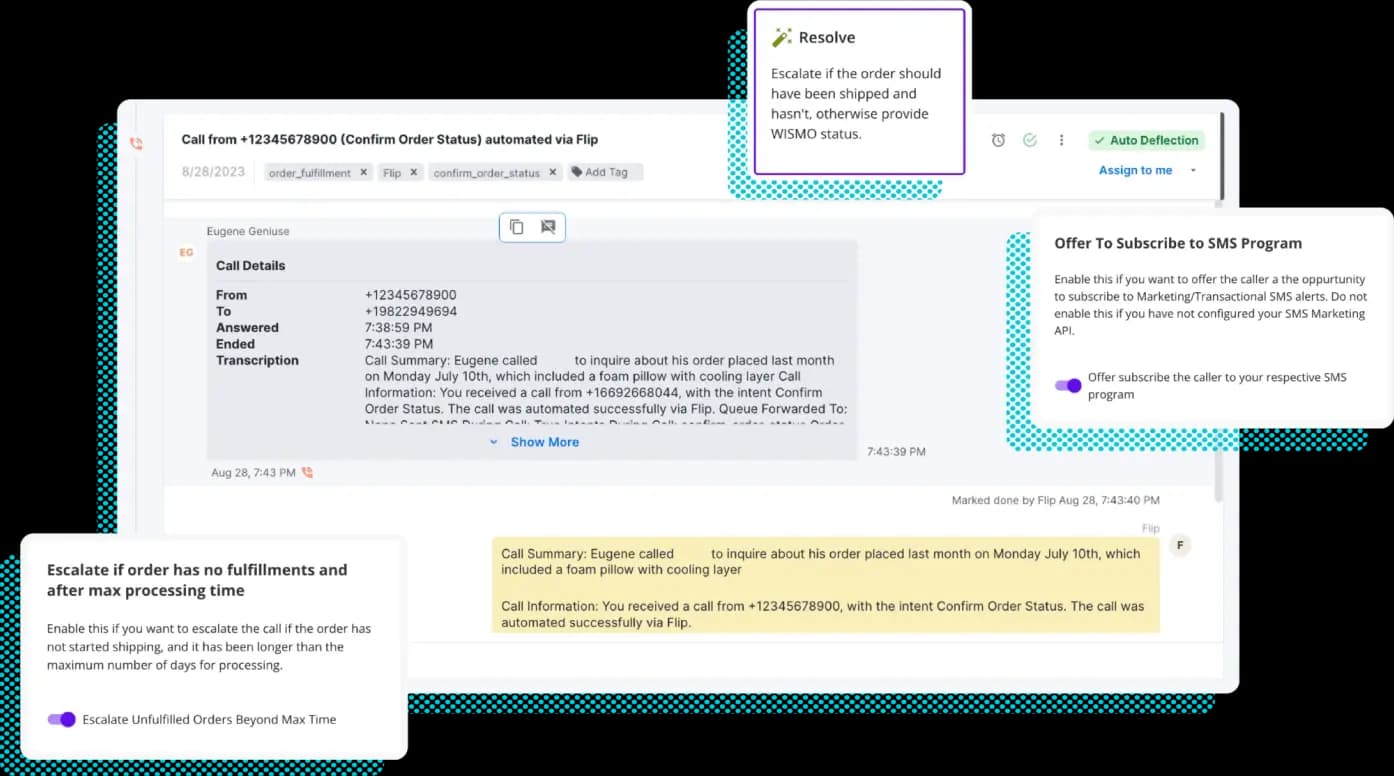
This matters because context is everything in support. A customer asking "where's my order?" gets a very different response when the agent can see the tracking number, shipping carrier, and delivery status instantly. No more "let me check on that for you" followed by five minutes of silence.
Key features of the Kustomer Shopify integration
The integration goes beyond simply displaying order data. Here's what you actually get:
Unified customer timeline
All Shopify orders appear chronologically alongside email, chat, and phone conversations. Agents see the complete customer journey: the original purchase, any follow-up questions, shipping updates, and post-purchase support. The timeline includes itemized order details with product descriptions, images, prices, and payment information.
Shopify Insight Card
This is a compact view showing the customer's last 100 orders. Agents can search by product name, SKU, order number, date, or fulfillment status. It is useful for spotting patterns: Is this a first-time buyer or a repeat customer? Did they recently have a problem with an order? The card displays financial status, fulfillment status, and total order values at a glance.
For teams looking to go beyond basic integration, eesel AI's AI Agent autonomously resolves up to 81% of routine Shopify support tickets by connecting directly to your store data, help center, and past conversations.
In-ticket actions
Here's where the integration gets actionable. Agents can process refunds, cancel orders, and modify shipping addresses directly from Kustomer. No need to log into Shopify, find the order, make the change, then return to the support ticket. For refunds, agents can specify quantities, restock items, and add refund reasons that sync back to Shopify.
Agents can also create draft orders and send invoices to customers. This is handy for custom requests, replacements, or upselling scenarios. The draft order syncs to Shopify, and the customer receives a standard Shopify invoice to complete payment.
Live chat for Shopify
Kustomer offers a streamlined way to add live chat to your Shopify store. For Online Store 2.0 themes, it's essentially one-click installation. Vintage themes require the legacy app but still work. The chat widget can appear on your store pages, and if you're on Shopify Plus, it can also show up on the checkout and order confirmation pages.
Multi-brand support means you can set up different chat experiences for different stores or brands, all managed from the same Kustomer instance.
AI-powered support
Kustomer's AI features extend to the Shopify integration. AI Agents can handle common queries automatically, like "where's my order?" or "what's your return policy?" Proactive chat triggers can engage customers based on behavior, such as offering help when someone's been on a product page for a while or following up after cart abandonment.
How to set up the Kustomer Shopify integration
Getting started is straightforward if you have the right access and expectations.
Prerequisites
You will need:
- An active Shopify store
- A Kustomer account (Enterprise or Ultimate plan)
- Admin access in both platforms
Note that Kustomer requires a minimum of 8 seats for standard pricing, so this is not a solution for solo founders or tiny teams.
Installation process
- Install the Shopify app from within Kustomer's App Directory
- Connect your store through the setup wizard, which redirects you to Shopify to authorize the connection
- Import historical orders if you want past data in Kustomer (optional but recommended)
- Configure permissions so agents can perform Shopify actions like refunds
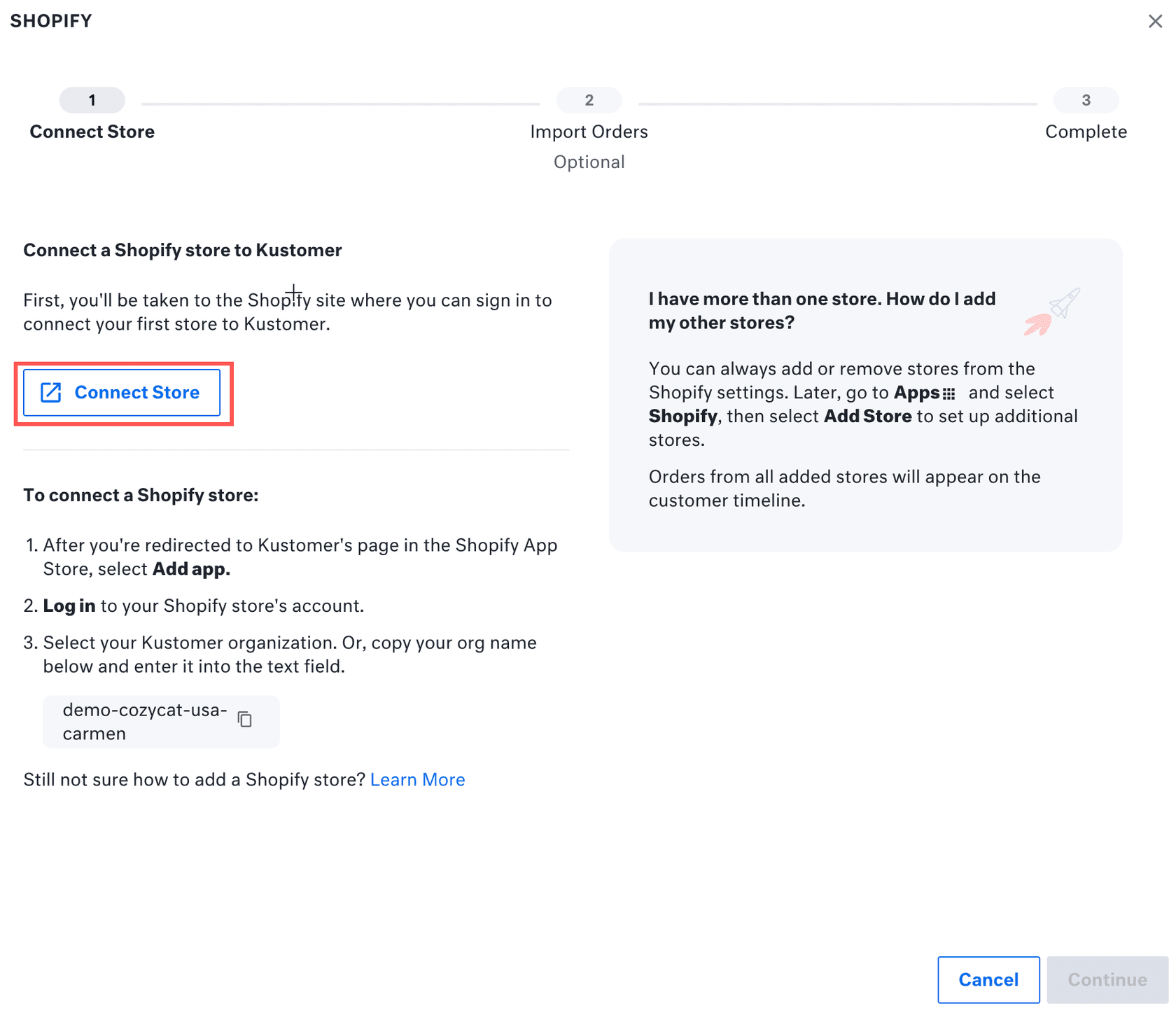
The whole process takes about 15-30 minutes if you know your way around both platforms. For a faster setup experience, eesel AI connects to Shopify in minutes and learns your business automatically from your existing data. Kustomer's documentation is thorough, and the wizard walks you through each step.
Setting up live chat
If you want the chat widget on your store, follow these steps:
- Enable the chat channel in Kustomer first (design your chat experience there)
- Go to Apps > Shopify in Kustomer and select "Install" next to Live Chat
- Choose your brand if you have multiple brands set up
- Turn on Kustomer chat in your Shopify theme editor
- Optionally add chat to checkout and thank you pages (Shopify Plus only)
Kustomer pricing for Shopify users
Let's talk numbers. Kustomer's pricing is seat-based, which means costs scale linearly with your team size.
| Plan | Price | Key Features | Minimum Seats |
|---|---|---|---|
| Enterprise | $89/seat/month | Core CRM, omnichannel messaging, workflows, 25 brands, custom objects | 8 seats |
| Ultimate | $139/seat/month | Everything in Enterprise plus advanced AI, 300 brands, higher API limits | 8 seats |
Both plans include the core Shopify integration features. The main differences are AI capabilities, brand limits, and API rate limits.
AI add-ons (optional):
| Add-on | Price | What it does |
|---|---|---|
| AI for Customers | $0.60 per engaged conversation | AI Agents that resolve customer issues without human intervention |
| AI for Reps | $40 per user/month | AI assistance for agents: summaries, translations, suggested responses |
Additional costs to consider:
- HIPAA compliance: $25 per user/month
- Implementation fees for complex configurations
- Voice and SMS: pay-as-you-go based on usage
The Shopify App Store listing shows the app as "free to install," which is technically true, but you'll need an active Kustomer subscription for it to do anything useful.
Use cases: How e-commerce teams use the integration
Let's look at how this plays out in practice across the customer journey.
Pre-purchase support: A customer asks about sizing for a specific product. The agent can see their order history and say, "I see you bought a medium in our t-shirts last month. For this jacket, I'd recommend the same size based on your previous orders." That's personalization that drives conversions.
Checkout assistance: Someone messages during checkout saying their discount code isn't working. The agent sees the cart contents, applies a working code directly, and the customer completes the purchase without leaving the chat.
Post-purchase issues: A customer wants to change their shipping address. The agent checks the order status, sees it hasn't shipped yet, and updates the address in Shopify without escalating or creating internal tickets.
VIP customer management: High-value customers get flagged automatically. When they reach out, agents see their lifetime value and purchase frequency, allowing for priority handling and personalized service.
Proactive engagement: Workflows can trigger based on Shopify data. A customer who gave a low CSAT score on a previous order might get a proactive reach-out with a discount code on their next purchase.
Limitations and considerations
No integration is perfect. Here are the trade-offs to keep in mind:
Per-user pricing adds up quickly. At $89-139 per seat per month, a team of 20 agents costs $1,780-$2,780 monthly before add-ons. For comparison, some alternatives charge per interaction rather than per seat, which can be more economical for high-volume, lower-complexity support.
Shopify Plus required for checkout chat. If you want live chat on your checkout pages (where it arguably matters most), you'll need Shopify Plus on top of your Kustomer subscription.
Data sync timing. Shopify data only syncs to Kustomer when an order update occurs. If you're expecting real-time inventory levels or instant status changes, there can be slight delays.
Learning curve. Teams coming from simpler help desk tools may find Kustomer's feature set overwhelming initially. The platform is powerful but requires investment in training.
Limited native integrations. While Kustomer covers the major platforms, their integration ecosystem isn't as extensive as some competitors. If you use niche tools, you might need custom development.
Alternatives to consider
Kustomer is not the only option for Shopify support. Depending on your needs, these alternatives might be a better fit:
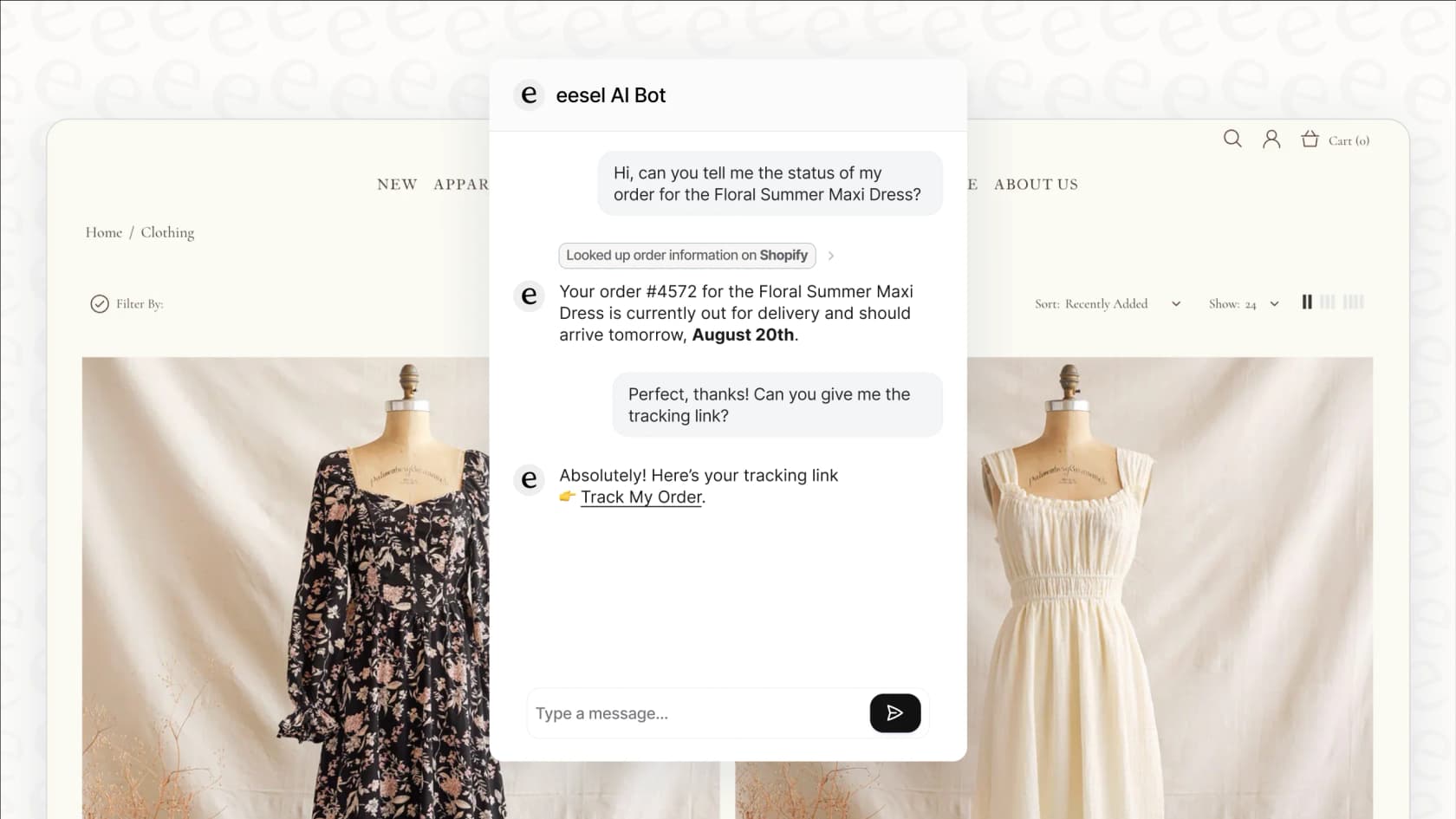
eesel AI offers an AI-first approach to Shopify support with a fundamentally different pricing model. Instead of per-user fees, you pay per interaction. This can be significantly more cost-effective for teams handling high volumes of repetitive queries. Our Shopify integration provides autonomous resolution for common issues like order tracking, returns, and product questions, with seamless handoff to humans for complex cases. We also offer AI-powered sales assistance that can recommend products and handle checkout questions.
Gorgias is built specifically for e-commerce and has deep Shopify integration. It's generally more affordable than Kustomer for smaller teams, though it lacks some of the CRM depth and AI capabilities.
Zendesk offers robust Shopify integration through their app marketplace. It's a solid choice if you need extensive customization and have a large, complex support operation. The trade-off is a steeper learning curve and higher overall cost at scale.
Getting started with unified Shopify support
The Kustomer Shopify integration delivers on its promise of unified customer data. For e-commerce teams struggling with context switching and fragmented customer views, it can significantly improve efficiency and customer experience.
The key question is whether the per-seat pricing model makes sense for your team size and ticket volume. If you have a smaller team handling complex, high-value interactions, Kustomer's CRM approach shines. If you are processing hundreds of repetitive queries daily, a per-interaction model might be more economical.
For teams interested in AI-first support automation, eesel AI's Shopify integration offers autonomous resolution capabilities with no per-user fees. You can try eesel AI free to see how it works on your actual store data and decide which approach fits your workflow.
Either way, the goal is the same: give your team the context they need to resolve issues faster and create better customer experiences. The right tool is the one that helps you do that efficiently at your specific scale.