Is Zendesk worth it in 2026? An honest breakdown

Stevia Putri

Katelin Teen
Last edited May 21, 2026
Zendesk is one of those products that nearly everyone in support has at least considered. It shows up in every "best helpdesk" list, it has 22,000+ service teams on it, and it has been around long enough that its name has become synonymous with customer support software.
But "everyone uses it" is not the same as "it's worth it for you." The question comes up constantly on forums like r/helpdesk and r/CRM: people who are paying for Zendesk and wondering if they're getting fair value, and people about to sign up who want an honest read before committing.
This post tries to give you that. Not a sales pitch, not a hit piece - just a clear look at what Zendesk actually is, what it costs, where it shines, and where it lets teams down.
What Zendesk is (and what it was built for)
Zendesk is an AI-first customer service platform built around what it calls the Resolution Platform - a unified system connecting AI agents, omnichannel ticketing, a knowledge base, quality assurance, workforce management, and reporting. It handles both customer-facing support and internal employee service (IT, HR) on the same infrastructure.
The platform has been around since 2007, originally as a simple email ticketing tool. It has since grown into one of the most comprehensive support platforms available, with 1,800+ marketplace integrations, voice, chat, social messaging, and an increasingly prominent AI layer.
The important context here: Zendesk was architected for the cost-center support model - airline call centers, bank service desks, telecom support teams. That DNA shows in how features are priced and structured, which matters a lot when you try to apply it to smaller or differently-shaped teams.
Where Zendesk genuinely earns its price
Zendesk's G2 rating of 4.3/5 across 6,838 reviews and Capterra 4.4/5 from 4,079 reviews are real signals. When Zendesk works, it works well. Here is what users consistently point to.
The unified inbox is genuinely good. 41% of G2 reviewers specifically cite ticket management as a major strength. Consolidating email, live chat, WhatsApp, Instagram, Facebook Messenger, voice, and SMS into one workspace - where every agent sees the same customer history - is the thing Zendesk does better than almost anyone. For teams handling volume across five or more channels, that consolidation alone has real operational value.
"Zendesk is a ticketing solution, and it does it rather well. It consolidates all the messages of the customers, whether they are emails, chats or social media to a single inbox and so my team does not need to keep moving between the tabs to get the right conversation."
- Sabina K., IT Operations Manager, G2
Automation and macros save real time at scale. 25.6% of G2 reviewers mention automation as a key strength. The trigger/macro/SLA system is powerful once configured: auto-route tickets by type, auto-respond to common questions, enforce SLA rules, fire macros on patterns. At 1,000+ tickets per month, those time savings compound quickly.
Reporting goes deep. Zendesk Explore (included from Suite Professional) supports custom dashboards, agent performance tracking, and real-time monitoring. Nearly one in four G2 users call out reporting as a meaningful advantage. If you want visibility into response times, resolution rates, and ticket trends broken down by agent, channel, or customer segment, Zendesk delivers.
The integration ecosystem is hard to match. 1,800+ apps in the Zendesk Marketplace, plus REST API and webhooks. Shopify, Salesforce, Slack, Jira, Confluence - if you run a complex stack, Zendesk almost certainly has a connector for it. This is the main reason frustrated users stay: "switching means auditing all of those integrations and rebuilding them somewhere else, which nobody wants to take on mid-season" as one r/helpdesk user put it.
It scales. Zendesk handles multi-team, multi-brand, multi-region setups that would break lighter tools. For a 50-agent support org with regional routing, SLA tiers per customer segment, and custom reporting dashboards per team lead - Zendesk handles all of that without falling over.
Where Zendesk falls short
The same G2 reviews that praise the unified inbox are equally candid about where the experience breaks down.
Setup takes weeks, not days. Two to four weeks is the reported onboarding time for most teams. Initial configuration of automation rules, routing, and reporting is not beginner-friendly. Multiple reviewers describe it as "daunting for small teams without previous Zendesk experience." The Admin Copilot feature helps experienced admins optimize, but it does not help a first-time admin get started faster.
"It took us almost two weeks to get things in order. It would be good to have improved onboarding of new teams."
- Sabina K., G2
The interface feels dated. This is a minor complaint but a consistent one. Multiple G2 and Capterra reviewers describe the UI as "a bit plain and not very modern" or "old-fashioned compared to the newer tools." Zendesk has made improvements, but the underlying workspace still feels like it was built in 2015, while competitors have refreshed their UX significantly.
The AI cold-start is a real problem. Zendesk's AI agents need 1,000+ resolved historical tickets before they activate. New teams and smaller operations pay for AI that does nothing during the ramp-up period. Even after activation, enterprise users on Zendesk Ultimate AI report only 8-9% early deflection on the messaging channel alone - with 20% cited as a "strong benchmark." The 80%+ automation rates Zendesk advertises are real but apply to specific customers with long track records and the Advanced AI Agents add-on.
Zendesk's own support has a 1.7/5 on Trustpilot. There is an obvious irony in a customer support platform scoring 1.7/5 on Trustpilot for its own customer support. G2 reviews and Reddit threads both flag slow response times and difficulty reaching human support post-purchase as recurring frustrations.
Many basic features are gated behind higher tiers. Multiple business hours schedules, advanced custom reporting, SLA fine-tuning - things that feel like standard infrastructure - require jumping from Suite Team ($55/agent/month) to Suite Professional ($115/agent/month). Reviewers describe a consistent pattern of "discovering" that a feature they assumed was included only exists two tiers up.
What Zendesk actually costs
The plan page shows $19/agent/month. In practice, almost no team uses just the base plan.
| Plan | Annual (per agent/month) | Monthly (per agent/month) | AI agents included |
|---|---|---|---|
| Support Team | $19 | $25 | Only with Help Center add-on |
| Suite Team | $55 | $69 | Yes (Essential tier) |
| Suite Professional | $115 | $149 | Yes (Essential tier) |
| Suite Enterprise | $169 | $219 | Yes (Essential tier) |
Source: Zendesk pricing page
"AI Included" on Suite plans means the Essential tier of AI agents - the Advanced AI Agents add-on (required for the AI agent builder, Shopify order actions, and reasoning controls) has no published price and requires contacting sales.
Common add-ons that teams end up purchasing:
| Add-on | Price (per agent/month, annual) |
|---|---|
| Copilot | $50 |
| Quality Assurance | $35 |
| Workforce Management | $25 |
| Workforce Engagement Bundle (WFM + QA) | $50 |
| Contact Center | $50 |
| Advanced Data Privacy | $50 |
AI automated resolution pricing: Each plan includes 5-15 automated resolutions per agent per month (capped at 10,000 per year). Beyond that: $1.50/resolution (committed) or $2.00/resolution (pay-as-you-go).
A realistic 10-agent team on Suite Professional with common add-ons:
| Component | Monthly cost |
|---|---|
| Suite Professional (10 agents x $115) | $1,150 |
| Copilot (10 agents x $50) | $500 |
| QA (10 agents x $35) | $350 |
| Workforce Management (10 agents x $25) | $250 |
| Total (before AR overages) | $2,250 |
At higher ticket volumes, third-party analysis of Zendesk's published rates puts that same 10-agent team with AR overages closer to $3,300/month.
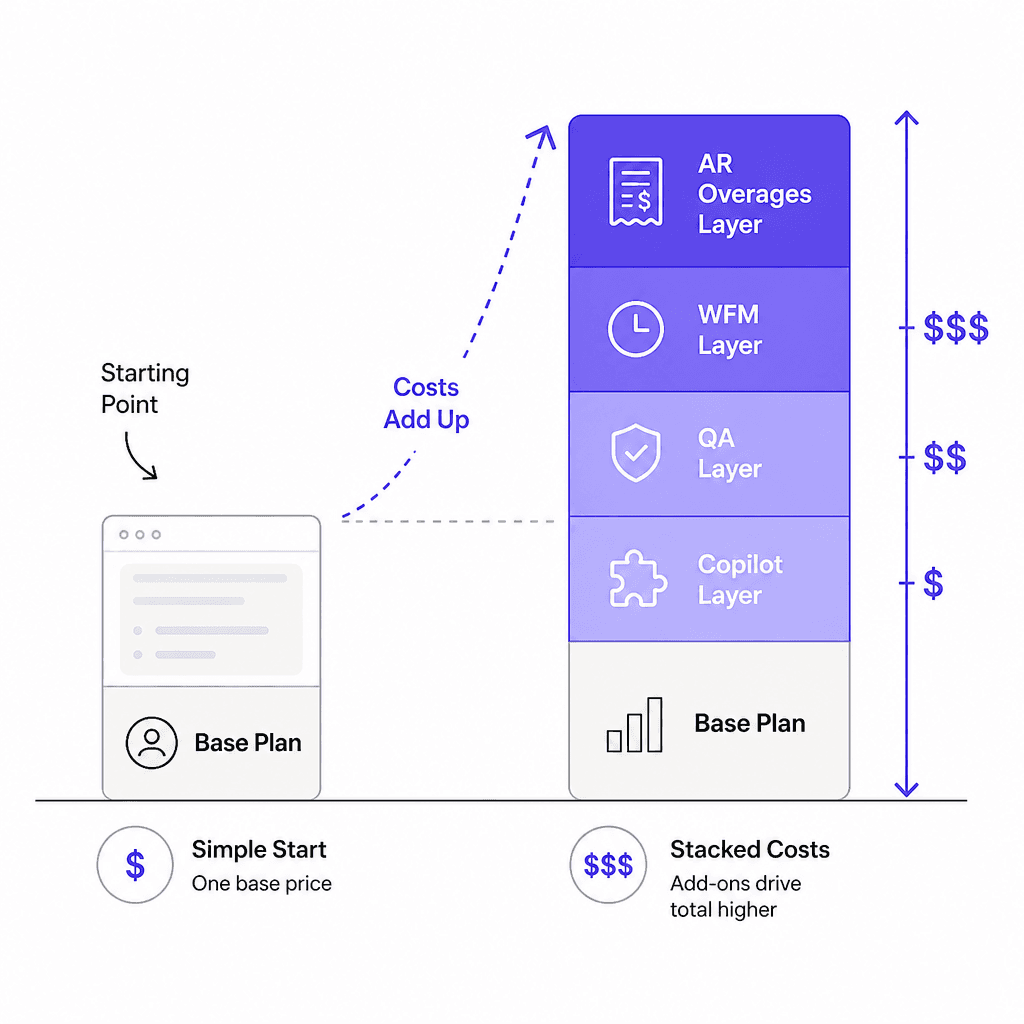
The per-seat annual model is the most cited complaint in Zendesk reviews. You pay for seats regardless of ticket volume, which means seasonal spikes in support demand cost extra in seats, not just in usage.
"The pricing structure can also become expensive as you scale, especially if you need premium features."
- Matthew B., Operations Director, Capterra
What 10,000+ users actually say
The G2 breakdown has 63% giving 5 stars and only 2% giving 1 or 2 stars - which means the majority of Zendesk users are satisfied. But the negative pattern is consistent enough to be informative:
On pricing:
"The different price tiers can be frustrating. As is the fact that we have to pay for more than one login, even though we already pay for the service. There should be unlimited users with a paid service."
- Amanda S., Senior Business Analyst, G2
On AI onboarding:
"I think Zendesk is adding a lot of new features, especially with all of the AI integrations and their copilot. I think that the way that they are set up is a little burdensome to actually onboard."
- Paul S., Head of Customer Experience, G2
On the learning curve:
"The learning curve was real. Especially when it came to customizing our help center or setting up any automation. It also starts to get expensive when you move beyond the most basic plans."
- Tim G., Customer Service Executive, Capterra
On the positive side:
"As a manager who has used Zendesk for over 10 years, I can confidently say it has made my work life smoother and more efficient, allowing me to complete hours of work in minutes."
- Validated Reviewer, Manager, G2
"We like the platform and continue to grow into it. Even after 7+ years of being on it, there always seems to be something new."
- Brian R., Director of Operations, Capterra
The pattern is clear: teams that invested in learning and configuring Zendesk deeply are loyal to it. Teams that expected it to work out of the box were disappointed.
Who Zendesk is worth it for
Based on the research, the verdict depends heavily on team size and context.
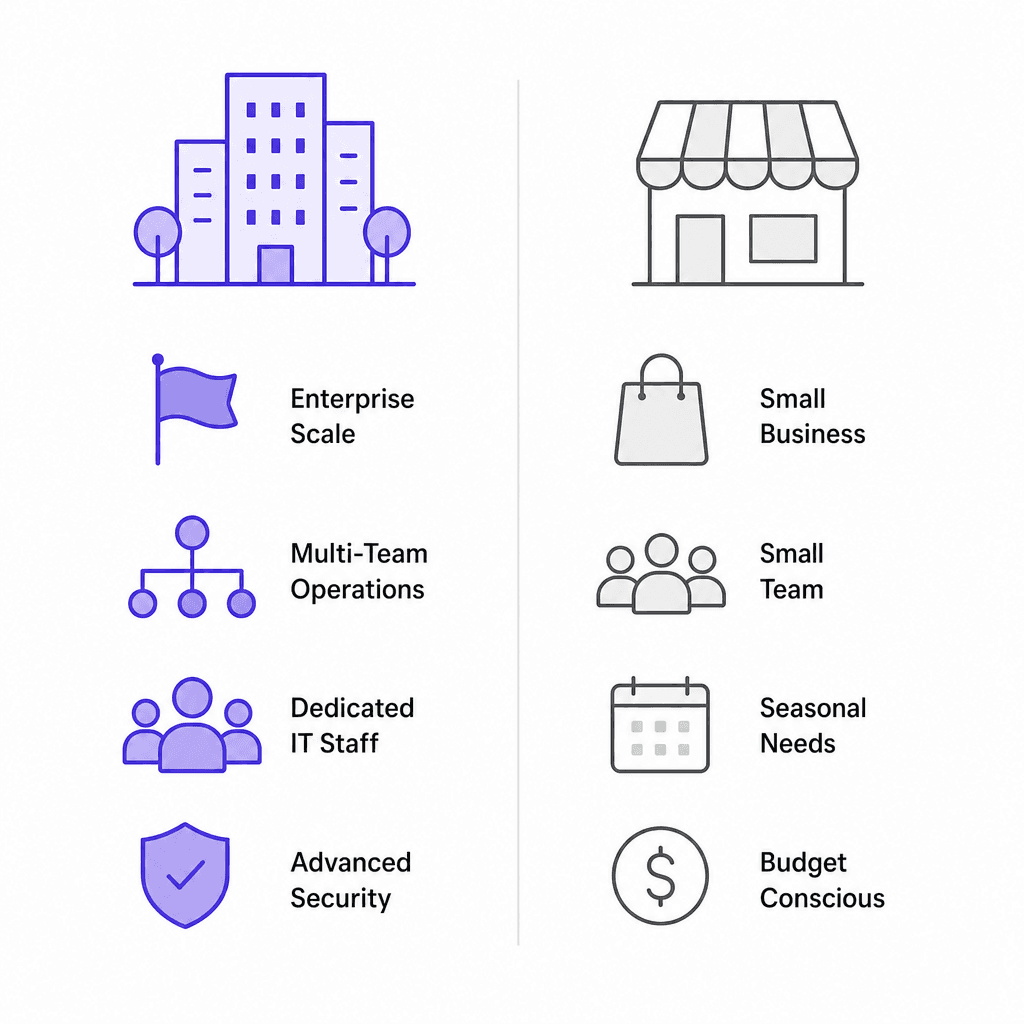
Zendesk is worth it if:
- You have 10+ agents and a dedicated support ops person or admin to configure and maintain the platform
- You need to consolidate 4+ channels into a single inbox
- You handle 1,000+ tickets per month consistently (not seasonally)
- You need enterprise governance - audit logs, multiple sandboxes, custom roles, HIPAA compliance (Professional+)
- You are mid-market or enterprise with a stable, predictable support volume
- You rely heavily on a large integration ecosystem (especially Salesforce, Jira, Confluence)
- You want a 2025 Gartner Magic Quadrant Leader on your vendor list
Zendesk is probably not worth it if:
- Your team is fewer than 5 agents and support isn't your core operation
- Your support volume is seasonal (per-seat annual billing penalizes this)
- You want to be up and running in a day, not two weeks
- Your main use case is a single channel (email-only or chat-only)
- You need deep ecommerce workflows - order actions, returns, refunds - out of the box
- You are a small DTC brand primarily on Shopify without a dedicated support admin
The Reddit community has a phrase for this that stuck: "using a spaceship to deliver pizza" - the tool is technically capable but structurally wrong for the job.
The AI ceiling most teams hit
Zendesk's marketing positions 80%+ automation as achievable. That number is real - Best Egg hit 80% automation on messaging with $500K+ annual savings. But it took Best Egg significant time on the platform with Advanced AI Agents enabled.
For most teams, the real-world trajectory looks more like this:
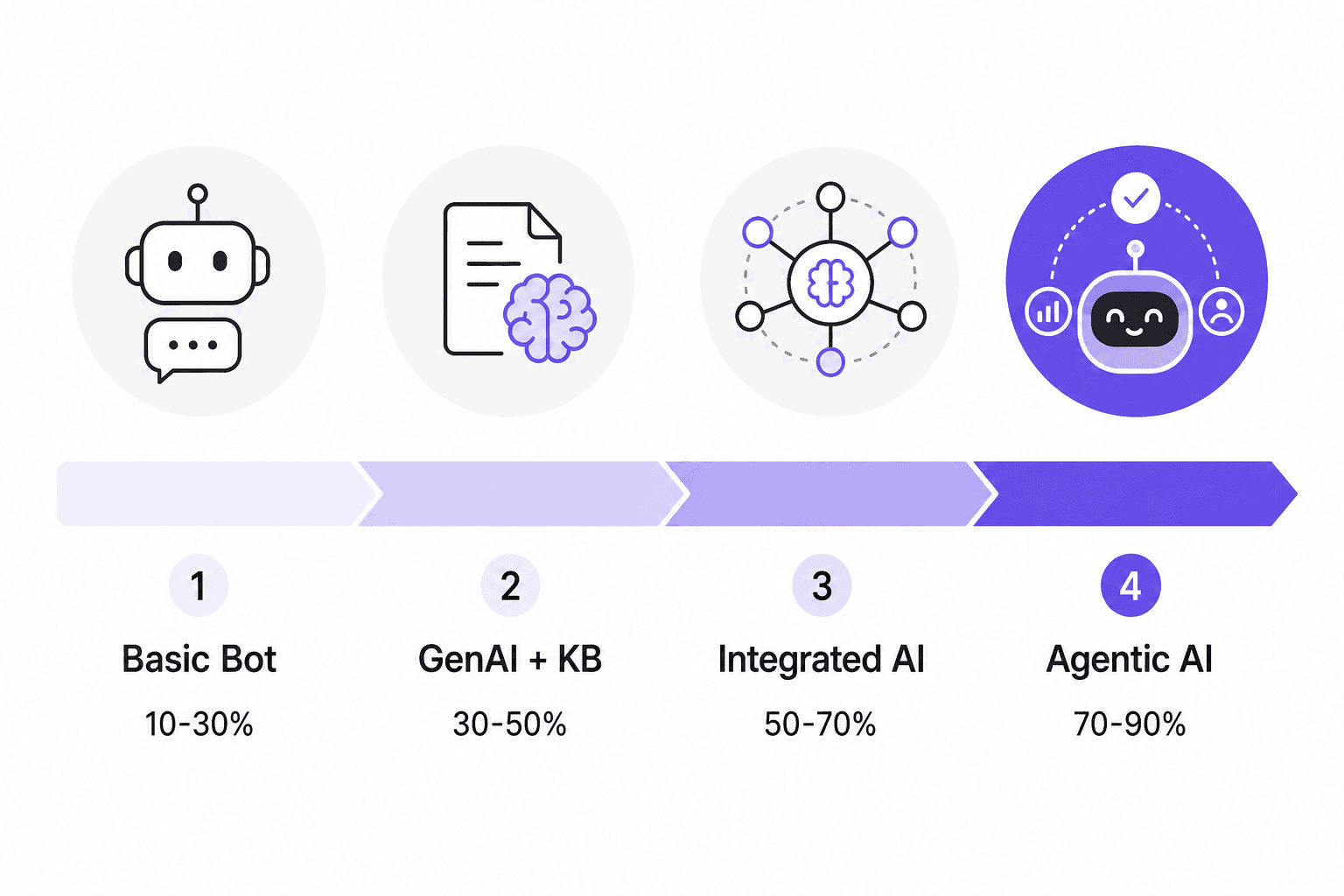
According to Supportbench data: basic generative replies handle 10-30% of tickets; fully agentic AI with live system access can reach 70-90%+. Zendesk's native AI out of the box sits closer to the left side of that range, especially for teams under the 1,000-ticket activation threshold.
The path to high deflection on Zendesk typically involves adding a third-party AI layer that can read your Zendesk tickets, learn from your knowledge base, and handle tickets before they ever reach agents. A r/CustomerSuccess thread from May 2026 documents one team achieving 58% deflection this way, with average handle time on escalated tickets dropping from 23 minutes to 11 - without changing their core Zendesk setup.
The consistent community advice: before paying for Zendesk's Advanced AI Agents add-on at an undisclosed enterprise price, investigate whether a purpose-built AI agent that integrates with your existing Zendesk workflow can get you to your deflection target at lower per-resolution cost. See our guide to adding AI to your helpdesk and ticket deflection strategies for a structured approach.
For teams that want a fuller picture of what Zendesk's AI features actually do before committing, our complete guide to Zendesk AI agents and Zendesk AI capabilities overview cover the setup, cost, and benchmarks in detail.
Try eesel AI with your Zendesk
If you're already on Zendesk - or evaluating whether Zendesk's AI tier is worth the add-on cost - eesel AI connects directly to your Zendesk workspace and handles tickets from inside the platform. It learns from your existing Zendesk tickets, your help center articles, and any other knowledge sources you connect (Google Docs, Confluence, Notion, Slack threads) to handle the repetitive majority of your queue automatically.
Unlike Zendesk's native AI that bills at $1.50-$2.00 per automated resolution with a 1,000-ticket cold-start requirement, eesel AI's task-based pricing starts at $0.40 per ticket with $50 of free usage and no credit card required. Teams like Smava and Design.com handle 50,000-100,000+ tickets per month through eesel AI with no per-seat fees. For teams that want to set up a Zendesk AI agent handoff or enhance their Zendesk widget, eesel AI integrates without changing your existing Zendesk structure.

Frequently Asked Questions
Share this article

Article by
Stevia Putri
Stevia Putri is a marketing generalist at eesel AI, where she helps turn powerful AI tools into stories that resonate. She’s driven by curiosity, clarity, and the human side of technology.