You want to write a blog post. You don't want to create yet another account, hand over your email, or sit through an onboarding flow. You just want to paste in a topic and get a draft.
That's a completely reasonable ask in 2026. Several tools now let you do exactly that. But they vary a lot in what "free" actually means - some give you three uses per day, some are genuinely unlimited, and some that show up in search results as "free" quietly demand an account before you get anything useful.
I went through the most-cited options and separated the ones that work with zero friction from the ones that require at least a free account. Below are six tools worth knowing about, with honest notes on what you actually get.
How I evaluated these tools
The core test: can you generate a blog post without creating an account? I also looked at output length and structure, word limits and daily caps, what triggers the signup wall (if one exists), and what kind of content each tool is actually good at producing.
A note on "free tiers" vs. "no signup": some excellent AI writing tools have free plans - Rytr and HubSpot both do. But they require you to register first. Those are included here with that noted clearly, because they're worth knowing about even if the no-friction path is your priority.
The tools
1. QuillBot AI Blog Post Generator

QuillBot's AI Blog Post Generator explicitly says "Free to use with no sign-up required" on the page. You type a topic, hit generate, and get a structured blog post draft. That's it.
What it generates: A full blog post with headline, intro, body sections, and conclusion. Sample prompts on the page give you an idea of the output quality: it handles general topics cleanly but won't do anything specialized or deeply researched.
The free tier limits: The blog generator itself is free without an account. The surrounding QuillBot platform has a free plan that includes basic paraphrasing (up to 125 words), grammar checking, AI chat (20 conversations), and 3 AI images per day. The core blog generator tool isn't gated behind those limits in the same way.
When signup kicks in: QuillBot Premium starts at $4.17/month billed annually and unlocks unlimited paraphrasing in 9+ modes, unlimited AI chat, 300 images/month, plagiarism checking (25,000 words/month), and advanced grammar. The blog post generator works without an account, but heavy use of the broader platform will push you toward Premium.
Who it suits: Anyone who needs a clean first draft without any friction. Good for students, occasional bloggers, and people who want to test AI-generated content before committing to a tool. Trustpilot rate QuillBot 4.8/5 from 11,530 reviews, and the tool has 35 million users. The underlying writing quality is solid for general topics.
Pricing table:
| Plan | Cost | Core limits |
|---|---|---|
| Free | $0 | Blog generator free, 125-word paraphrase limit, 20 AI chats, 3 images/day |
| Premium | $4.17/month (annual) | Unlimited paraphrasing in 9+ modes, unlimited chat, 300 images/month, plagiarism checks |
| Team | Custom | All Premium features + usage metrics, user management, centralized billing |
2. Semrush AI Text Generator
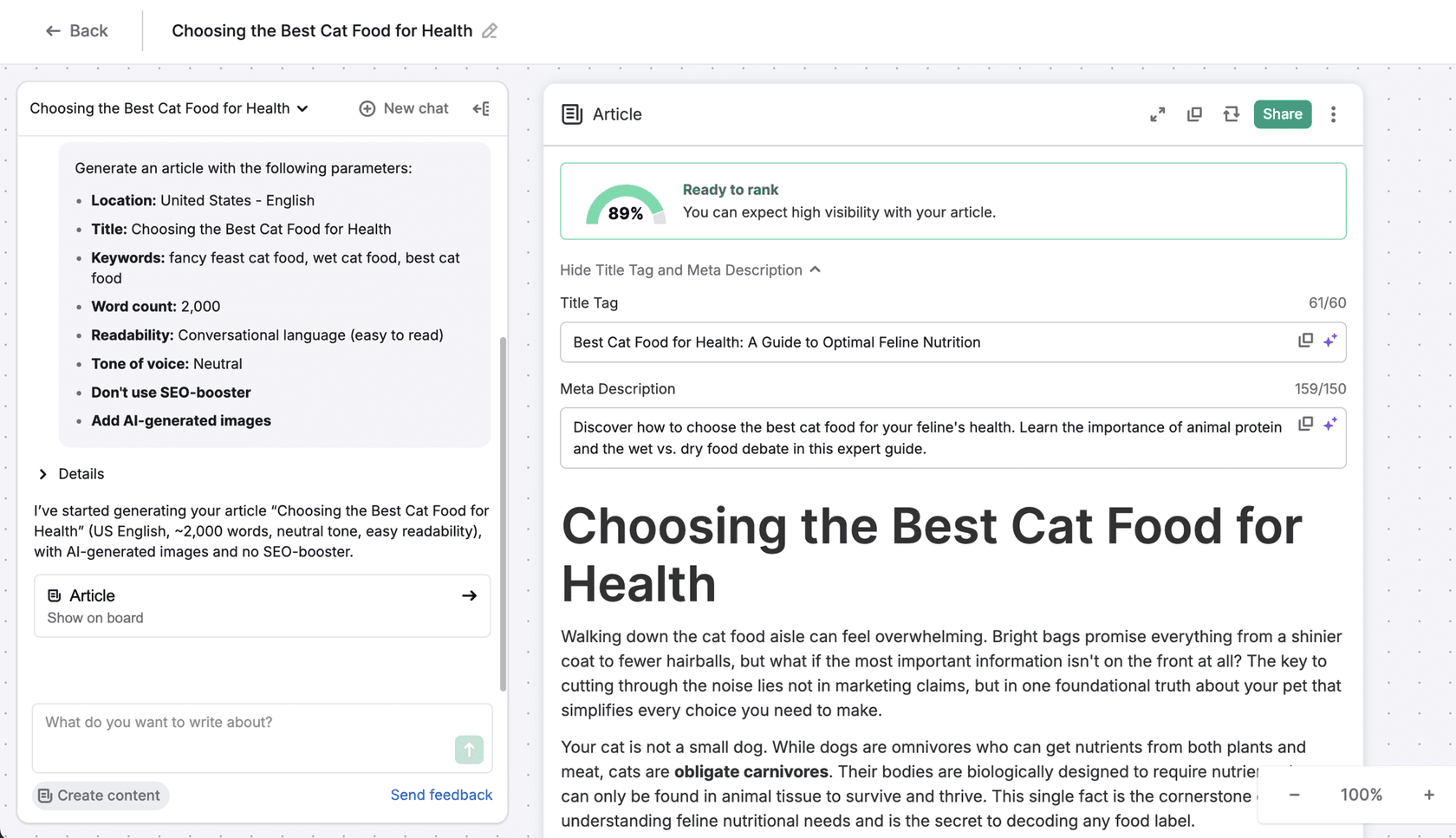
Semrush's AI Text Generator is the most SEO-aware option on this list. It's from Semrush, the search intelligence platform with 117 million domains in its database, and the tool reflects that background. The page itself says "It's free to use without registration" - you get up to three uses per day with no account.
What it generates: You pick a content type (full blog post, blog outline, blog introduction, blog title, paragraph, social post, ad, or email), type a topic or keyword, and get the output. The blog post mode produces a full article with proper structure. There's also an AI chat interface on the right side for editing and expanding the output.
The free tier limits: Three generations per day, no account required. Each generation can produce a full blog post. The chatbot for editing is also available in the free session.
When signup kicks in: The free limit is firm at 3 per day. Semrush's full content toolkit, including SEO optimization, keyword density analysis, topic research, and competitive data, requires a paid Semrush subscription starting at $139.95/month. The free AI generator is a standalone tool that doesn't require that subscription.
Who it suits: Content marketers and SEO-focused bloggers who want a free tool that thinks in keywords and search intent. The 3/day limit is actually enough for most people who want to test AI-assisted writing or draft occasional posts. The SEO framing of the output (structured for readability, keyword-friendly headings) is noticeably better than purely general-purpose generators.
Pricing table:
| Plan | Cost | Core limits |
|---|---|---|
| Free (no account) | $0 | 3 generations/day, all content types, AI chat for editing |
| Semrush Pro | $139.95/month | Full content toolkit with SEO data, keyword research, competitive analysis, unlimited AI generation |
| Semrush Guru | $249.95/month | All Pro features + content marketing platform, historical data, multi-location tracking |
3. Perchance AI Writer
Perchance AI Writer is the most no-frills option on this list - and deliberately so. It's a community-built tool on Perchance.org that uses the site's own ai-text-plugin to generate content paragraph by paragraph. There's no account, no daily limit, and no upsell.
What it generates: You provide an overview of what you want to write, then click generate to get one paragraph at a time. It remembers your session via browser localStorage, so refreshing doesn't wipe your work. The paragraph-by-paragraph approach is actually useful for longer pieces - you maintain editorial control at each step rather than getting one massive generated blob.
The free tier limits: No stated limits. The tool works until you close the browser. You can rate paragraphs (thumbs up/down) to improve the AI. No word count caps have been reported by users.
When signup kicks in: Perchance lets you create an optional account to save generators and manage your own Perchance content. For the AI Writer specifically, an account is not required at any point.
Who it suits: Writers who want genuine creative control over AI-generated content. The paragraph-by-paragraph approach suits fiction writers, bloggers with a specific voice, and anyone who finds bulk AI output too generic to use. The quality is good for general prose but it won't add SEO structure or research anything. Think of it as a collaborative co-writer rather than an automated publisher.
Pricing table:
| Plan | Cost | Core limits |
|---|---|---|
| Free (no account) | $0 | Unlimited paragraph generation, browser-session storage, thumbs up/down feedback |
| Optional account | $0 | Save generator state, manage custom generators - no AI writing limits added |
4. Template.net AI Writer
Template.net's AI Writer is the most capable no-signup option for people who want a full blog post in one shot rather than paragraph by paragraph. The page explicitly states "No sign-up or complex setup required".
What it generates: Full blog posts, essays, business documents, research papers, product descriptions, and more. You type a prompt, choose tone (formal, casual, persuasive, creative), and get a complete draft. The tool uses multiple AI models including Gemini, ChatGPT, and Grok - you can see the model icons at the top of the generator.
The free tier limits: Template.net claims "Unlimited Writing" as a feature of the free AI Writer, with no monthly cap. The tool also exports to Word, PDF, or TXT without an account.
When signup kicks in: The site pushes an upgrade for access to "best quality, speed, and full control." Premium plans unlock faster processing and priority access to higher-quality models. Basic generation without an account appears to use lighter models (the "Light AI" mode is visible in the interface).
Who it suits: People who need a quick blog post or document draft without any account, especially if they need it in a specific format (Word, PDF). The multi-model approach and tone control give it more flexibility than most no-signup generators. Good for one-off drafts, business proposals, and content where you have a clear topic brief.
Pricing table:
| Plan | Cost | Core limits |
|---|---|---|
| Free (no account) | $0 | Unlimited generation, basic AI model, export to Word/PDF/TXT |
| Premium | Custom (50% off promotion) | Best-quality models, faster generation, priority access, all AI tools unlocked |
5. Rytr -- free tier (signup required)
Rytr is one of the most-used AI writing tools with 8 million+ users and a 4.7/5 rating from 820+ reviews on G2. It's included here because its free tier is genuinely useful, even though you do need to create an account.
What it generates: Rytr has 40+ use cases and templates covering blog posts, social media, email, ads, and more. Its standout feature is tone-of-voice matching - it analyzes a sample of your writing and mirrors it. On the free plan you get 20+ pre-programmed tones (no custom tone).
The free tier limits: 10,000 characters per month - roughly 1,500-2,000 words. That's enough for one or two blog posts. No plagiarism checks on the free plan, and only 1 language supported.
When signup kicks in: You need to register with an email address before generating anything. The free account is permanent with no time limit.
Who it suits: Freelancers and content marketers who want a purpose-built writing assistant with templates and tone control, and are willing to create a free account. The 10k character/month limit makes the free plan best for evaluation or occasional use. Users on Reddit compare Rytr favorably to Jasper on value, and note it "has unlimited words" at the paid tier.
Pricing table:
| Plan | Cost | Core limits |
|---|---|---|
| Free | $0 | 10,000 characters/month, 20+ tones, no custom tone, no plagiarism checks, 1 language |
| Unlimited | $7.50/month ($90/year) | Unlimited generation, 1 custom tone, 50 plagiarism checks/month, 1 language |
| Premium | $24.16/month ($290/year) | Unlimited generation, 5 custom tones, 100 plagiarism checks/month, 40+ languages |
6. HubSpot AI Blog Writer -- free tier (signup required)
.png%3Fwidth%3D1030&w=1680&q=75)
HubSpot's AI Blog Writer is the most full-featured option here, but also the one with the most caveats. It's part of HubSpot Content Hub, a CMS and content management platform. The free tier includes basic AI blog writing, but you need a free HubSpot account to access it.
What it generates: The free AI Blog Writer produces blog outlines and rough drafts (typically 1,500-2,500 words). Once you're in the editor, Breeze Copilot - HubSpot's in-editor AI assistant - handles rewrites, tone changes, and section generation. There's also a standalone Blog Topic Generator that suggests 10-20 topic ideas from a single keyword.
The free tier limits: Up to 30 total published blog posts. Basic outline and draft generation, but no brand voice, no Content Remix (repurposing into social/email), and no advanced research. HubSpot branding appears on all free-plan pages and CTAs - a significant consideration if clients will see the output.
When signup kicks in: Immediately - you must create a free HubSpot account before accessing any content creation tools.
Who it suits: Bloggers and content teams who want an AI writing tool connected to a real CMS. The free tier is legitimately useful for testing and light publishing, but the HubSpot branding on free pages is a blocker for anything client-facing. The real value of HubSpot's AI is at Professional ($450/month annual) where brand voice, Content Remix, and advanced SEO kick in - making it more of an enterprise content platform than a free blog generator.
Pricing table:
| Plan | Cost | Core limits |
|---|---|---|
| Free | $0 | 30 blog posts, basic AI drafts, Breeze Copilot, HubSpot branding on all pages |
| Starter | $9/seat/month (annual) | Remove HubSpot branding, website pages, basic personalization |
| Professional | $450/month (annual, 3 seats) | Brand voice, Content Remix (20 pieces/day), advanced SEO, case studies, podcasts |
| Enterprise | $1,500+/month (5 seats) | Multi-site management, content approvals, 50 Content Remix pieces/day |
Side-by-side comparison
| Tool | No signup? | Word limit | Output quality | Best for |
|---|---|---|---|---|
| QuillBot Blog Generator | Yes | Not stated | Good, general topics | Quick no-friction drafts |
| Semrush AI Text Generator | Yes | 3 uses/day | Good, SEO-oriented | SEO-aware content, marketers |
| Perchance AI Writer | Yes | Unlimited | Good, paragraph-by-paragraph | Creative control, fiction, voice |
| Template.net AI Writer | Yes | Unlimited (basic models) | Decent, wide format support | One-off documents, multi-format |
| Rytr | No (free account) | 10k characters/month | Very good, tone matching | Freelancers, marketing copy |
| HubSpot AI Blog Writer | No (free account) | 30 posts total | Good, CMS-integrated | Bloggers with publishing needs |
What none of these do
Worth saying clearly: none of the tools above will research your topic, check facts, add citations, or produce genuinely expert-level analysis. They all generate plausible-sounding text based on training data. For a first draft on a general topic that you'll then edit, they're genuinely useful. For a detailed technical post, a thought-leadership piece with original data, or anything where accuracy matters a lot, you'll need to do substantial work on top of any AI draft.
This is also why the no-signup tools are best for low-stakes drafts: if you're testing whether AI writing could fit into your workflow, using one for a few posts before committing to a paid tool makes sense. If you're already convinced and want to produce content at volume, a more capable tool like eesel AI's blog writer - which handles research, SEO optimization, and produces longer-form content - will get you closer to something publishable without as much manual editing.
The gap matters most for teams producing content in bulk. If you need to generate blog posts at scale using AI assistants, or you're looking for a proper AI content writer tool rather than a one-off generator, the tools above will feel limiting quickly.
A note on "free AI blog generators" in general
The phrase means different things depending on where you see it. Sometimes it means "no credit card to start" (which could still require an account). Sometimes it means "limited free tier." Sometimes it genuinely means "open and free without any registration."
For the four truly no-signup tools above (QuillBot, Semrush, Perchance, Template.net), you can test the output quality before making any commitment at all - which is the honest value of the no-signup category. For the two that require an account (Rytr, HubSpot), the free tiers are real and the accounts are quick to create, but they're not quite the same thing.
If you're building a content operation rather than just testing, the free AI blog post generators and AI content generators worth looking at are the ones that scale - with proper SEO integration, brand voice training, and research. The tools in this list are good starting points, but most serious content teams end up needing something more capable once they're past the testing phase. For a deeper look at what dedicated AI writing tools actually produce, the AI blog content generator overview and best AI writing generator comparison both cover the fuller picture.
Frequently Asked Questions
Which free AI blog generators truly require no signup?
QuillBot's AI Blog Post Generator, Semrush's AI Text Generator, Perchance AI Writer, and Template.net AI Writer all work without any account. You open the page, type a topic, and get output. No email, no password, no credit card. Tools like Rytr and HubSpot's AI Blog Writer have free tiers but do require you to create a free account first.
How many words can I generate for free without signing up?
It depends on the tool. Perchance AI Writer has no stated word limit and works indefinitely with no account. Template.net also claims unlimited free generation without signup. Semrush's generator gives you 3 uses per day for free, each producing a full blog post or other content piece. QuillBot is free to use without signup, with premium features available at $4.17/month billed annually.
Is AI-generated blog content good enough to publish without editing?
Not typically - at least not for anything you're proud of. Free no-signup tools give you a solid first draft that covers the basics, but they won't fact-check, add original examples, or match your specific brand voice. Plan to spend 20-40% of the time you'd spend writing from scratch on editing the output. If you want a tool that can actually research and produce near-publish-ready content, look at something like paid AI writing assistants designed for that purpose.
What's the difference between a free AI blog generator and a paid one?
Free tools (especially no-signup ones) typically lack: brand voice settings, SEO keyword integration, research capabilities, plagiarism checking, and content history. Paid tools like dedicated AI blog post generators usually include multi-step workflows (research, outline, draft, optimize), brand voice training, and direct CMS publishing. If you're producing more than a few posts per month, the time saved by a proper AI content generator usually justifies the cost.
Can I use these free tools for commercial blog posts?
Generally yes - most free AI writing tools state that you own the content you generate. QuillBot's copyright policy and Semrush's terms both allow commercial use. Perchance and Template.net don't restrict commercial use in their terms. That said, always read each tool's terms of service for your specific use case, and always edit AI output before publishing to ensure accuracy and originality.


Article by
Kira
Kira is a writer at eesel AI with a Computer Science background and over a year of hands-on experience evaluating AI-powered customer service tools. She focuses on breaking down how helpdesk platforms and AI agents actually work so that support teams can make better buying decisions.