


Why "free" is the trickiest word in AI writing
Search "free AI blog writer" and you'll get a hundred AI blog writing tools listicles naming the same twenty names. The problem is that "free" means four completely different things, and the lists almost never say which one applies:
- Free forever - a real $0 plan you can use indefinitely (with limits).
- Free trial - full access for 7 days or a fixed word budget, then a paywall.
- Freemium bait - a "free" badge on a homepage that no longer maps to a real plan.
- Free to start, pay to publish - free drafting, but the useful exports or integrations are gated.
We sorted every tool below into the honest version of that. Here's the quick visual before the detail.
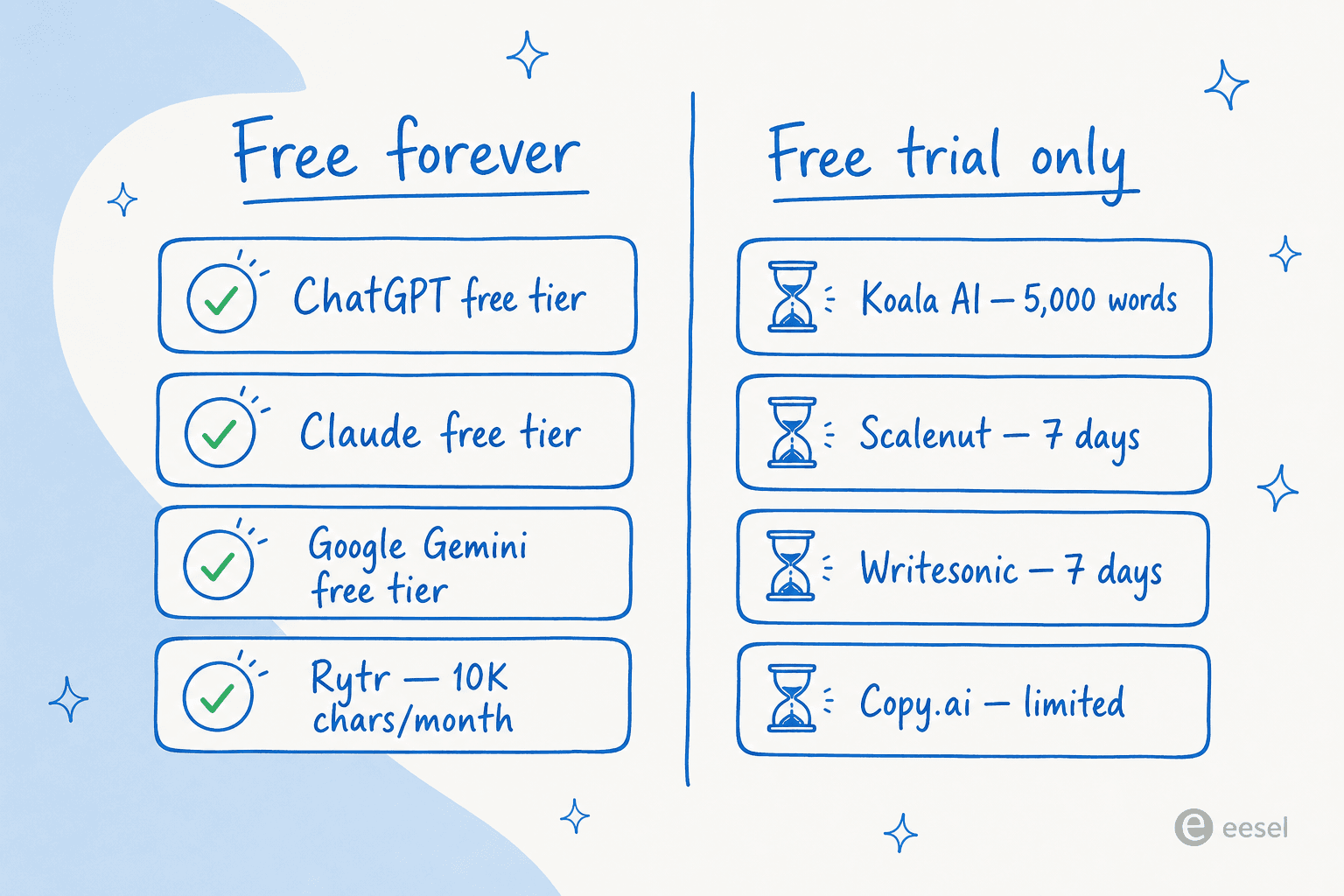
The other thing worth saying upfront: a free AI blog writer gets you a draft, not a published post. Every tool here needs a human editing pass, and the SEO-focused ones lean hardest on that. The long-running r/SEO thread on AI-generated articles puts it bluntly:
"You're always gonna be heavily editing."
Keep that in mind as you read. The goal of a free tier is to find the tool whose drafts need the least editing for your use case, then decide whether it's worth paying to lift the cap. If you want the wider field beyond free, our roundups of the best free AI writing tools and best AI writing tools go further.
The 8 best free AI blog writers in 2026, compared
| Tool | Best for | Genuinely free? | Cheapest paid plan | Dedicated blog writer | Built-in SEO data | Auto-publish | Rating |
|---|---|---|---|---|---|---|---|
| ChatGPT | All-round drafting + research | Free forever (capped) | $8/mo (Go) | No (chatbot) | No | No | - |
| Claude | Most natural-sounding prose | Free forever (capped) | $17/mo (Pro) | No (chatbot) | No | No | - |
| Google Gemini | Writing inside Google Docs | Free forever (capped) | $7.99/mo (AI Plus) | No (chatbot) | No (web grounding) | No | - |
| Rytr | Cheap dedicated writing app | Free forever (10K chars/mo) | $7.50/mo | Yes (templates) | No | No | 4.7/5 G2 |
| Koala AI | SEO long-form that ranks | Trial only (~5,000 words) | $9/mo | Yes | Yes (live SERP) | Yes (WordPress) | 3.5/5 Trustpilot |
| Scalenut | All-in-one SEO + GEO | Trial only (7 days) | $24/mo (promo) | Yes (Cruise Mode) | Yes (NLP + SERP) | Yes | 4.7/5 G2 |
| Writesonic | AI search visibility + articles | Trial only (7 days) | $79/mo | Bundled quota | Yes (GEO) | Limited | 4.8/5 G2 |
| Copy.ai | Short-form marketing copy | Limited / legacy | $24/mo (Chat) | Was, now GTM platform | No | No | - |
A note on the ratings column: we only list a public review score where the tool has a meaningful sample of verified reviews. The chatbots are rated by the internet at large rather than by a single B2B review site, so a G2 star count there would mislead more than help.
What every free plan actually caps
Here's the part the listicles skip. Free plans don't all stop you the same way, and knowing the unit they meter on tells you exactly how far you'll get before the wall.
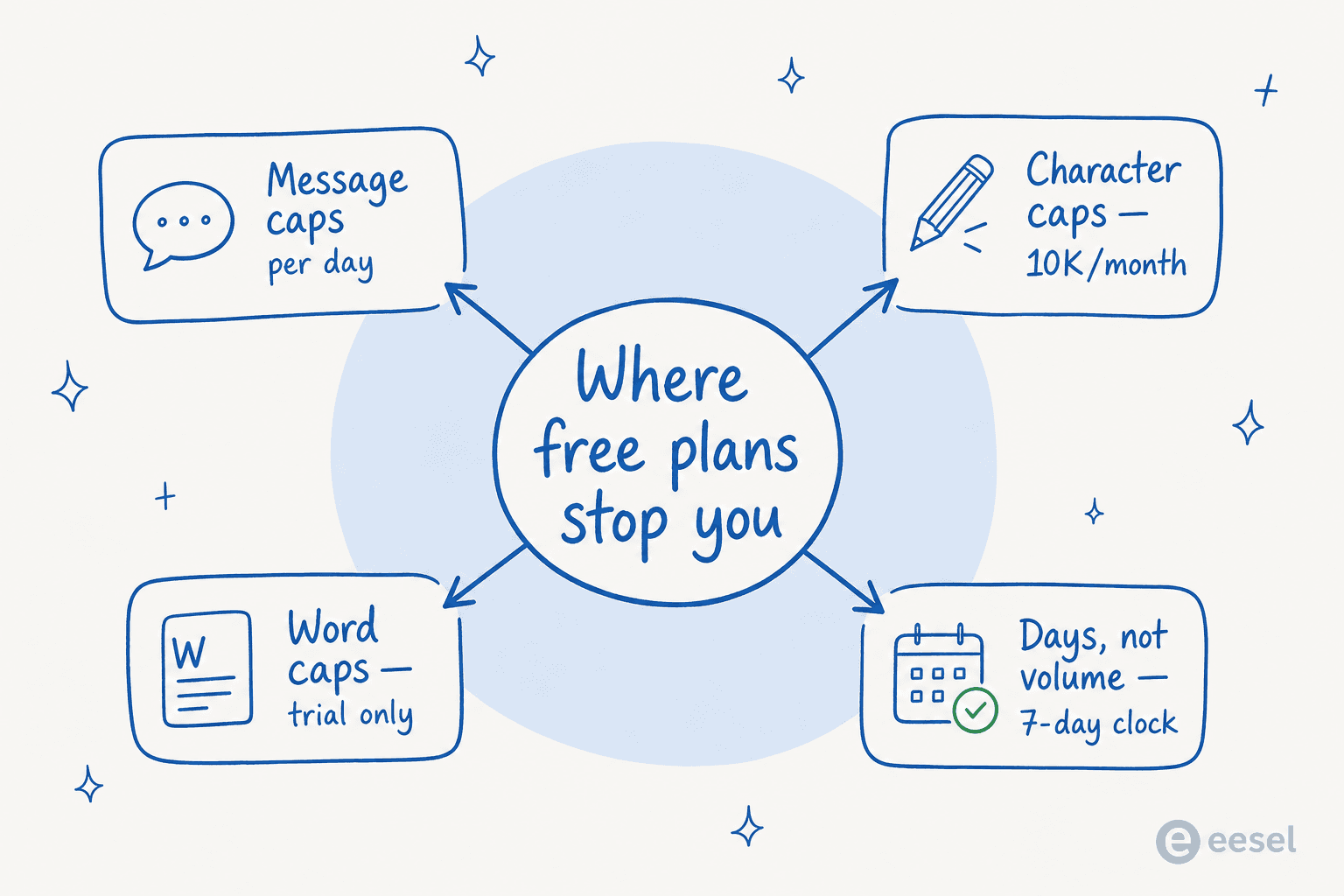
The chatbots cap on daily messages, Rytr caps on characters, and the SEO writers cap on a one-time word budget or a 7-day clock. A daily message cap is generous if you write one post a week and brutal if you batch ten in an afternoon. A 10,000-character monthly cap is roughly two short posts. A 5,000-word trial is one good long-form article and then you're out. Match the cap to your actual cadence and the "best free" answer falls out on its own - and if you're trying to keep the AI blog writer cost down at volume, that's the number that actually matters.
1. ChatGPT
Best for: the all-rounder who wants one free tool for drafting, outlining, and research in the same window.
ChatGPT is the default free AI blog writer for a reason: it became the fastest-growing consumer app in history and now powers over 200 million weekly users. For blogging, the free tier handles the whole early workflow - brainstorm angles, generate an outline, draft sections, then tighten the language. It writes competently across almost any topic, which is exactly why it's most people's first stop.
The honest limits are real, though. Free users get a daily message cap (we break down exactly what the ChatGPT free trial includes), a modest 27K context window (roughly twelve pages at once), and no access to the strongest reasoning models. For a single 1,500-word post that's plenty; for a content calendar it's a steady source of "you've hit your limit, try again later."
Pricing: Free ($0, capped messages and models). Go is $8/month, Plus is $20/month, and Pro is $100/month for the highest limits and context.
Pros: genuinely free, no setup, strong general writing, great at research and ideation. Cons: not a dedicated blog tool (no templates, no SEO data, no publishing), context window is tight on free, output has recognizable ChatGPT cadence you'll want to edit.
Our take: the best free AI blog writer for the largest number of people, simply because it does everything passably and costs nothing. If you only write occasionally, you may never need anything else. We compare it head-to-head in our ChatGPT vs Rytr breakdown.
2. Claude
Best for: the writer who cares most about how the draft reads before they touch it.
If ChatGPT is the all-rounder, Claude is the one people reach for when prose quality matters. Reviewers repeatedly describe its writing as more natural - a widely-cited community roundup summed up the consensus that Claude's output is:
"less AI-smelly" and more natural than ChatGPT's formulaic approach, avoiding sycophantic openers and excessive bullet points.
That tracks with our own testing: Claude tends to hold a constraint ("keep it punchy, no bullet lists") across a long response better than most. Its free tier is surprisingly full - chat, web search, file creation, and even extended thinking are included at $0, and its 200K-token context window means you can paste an entire research doc and have it draft against the whole thing.
Pricing: Free ($0). Pro is $17/month annual, Max starts at $100/month for heavy users.
Pros: the most natural prose of any free option, big context window, generous free feature set, holds style instructions well. Cons: free usage limits hit fast on long sessions (a known community gripe), no SEO tooling or publishing, not purpose-built for blogging.
Our take: our pick for free first drafts you'll barely need to de-robotify. Pair it with a tool that has live SERP data and you've got a strong free stack. See how it stacks up in Claude vs Rytr.
3. Google Gemini
Best for: anyone who drafts in Google Docs and wants the AI right there.
Google Gemini earns its spot on the free list for two reasons: a real $0 tier, and the fact that it's wired into Gmail, Docs, and the rest of Workspace. If your blog drafts already live in Google Docs, having a capable model one sidebar away removes a lot of copy-paste friction. The free plan includes image generation, Deep Research, and Canvas, with 15 GB of storage.
The community swing toward Gemini through 2026 has been real. One switcher's r/GeminiAI post captured the mood:
"I genuinely cannot believe I wasted so much time and money on ChatGPT when Gemini is so much better."
It's not all glowing, though - paying subscribers have complained about feature parity bugs, with one calling the paid experience "paying for tap water at a restaurant." For free drafting, none of that matters much.
Pricing: Free ($0). AI Plus is $7.99/month, AI Pro is $19.99/month, AI Ultra runs up to $199.99/month.
Pros: genuinely free, deep Google Docs/Gmail integration, fast, strong on research and technical accuracy. Cons: users report it forgets context on very long chats, no dedicated blogging features, paid tiers have a mixed reputation.
Our take: the best free AI blog writer if your whole workflow already lives in Google. Otherwise it's a near-tie with ChatGPT. We dig into the matchup in ChatGPT vs Gemini, and weigh the wider field in our AI writing tools comparison.
4. Rytr
Best for: writers who want an actual writing app - templates, tones, an editor - without paying or handing over a card.
Among purpose-built tools, Rytr is the one with a genuinely free tier rather than a trial. The free plan gives you 10,000 characters a month, 20+ preset tones, a Chrome extension, and custom use cases - no credit card required. With 8 million+ users and a 4.7/5 average from 819 verified G2 reviews, it's the budget favorite of solo creators and freelancers.
Where it shines is structured, template-driven writing: pick "Blog Section Writing," feed it a few lines, and it expands cleanly. The free tier's 10,000-character cap works out to roughly two short posts a month, and tone-matching (feed it a sample, it mirrors your voice) is gated to the paid tiers. Reviewers' most common note is that output reads generic if you generate end-to-end - it's strongest as an assist (autocomplete, expand, reword) rather than a one-click article machine.
Pricing: Free ($0, 10K chars/month). Unlimited is $7.50/month (unlimited characters, 1 custom tone), Premium is $24.16/month (5 custom tones, 35+ languages).
Pros: real free-forever tier with no card, very cheap to upgrade, clean template library, browser extension. Cons: tight character cap on free, custom tone is paywalled, no SEO/SERP data, no team plan, output needs editing.
Our take: the best genuinely-free dedicated blog writer for the price-sensitive solo creator. If you've outgrown a chatbot's blank box but can't justify $50/month, Rytr is the obvious step. Our full Rytr review goes deeper, and if it doesn't fit, the Rytr alternatives list has the next options.
5. Koala AI
Best for: SEO bloggers who want a draft built to rank, published straight to WordPress.
Koala AI is not a generalist - its homepage promise is "AI Articles That Actually Rank," and KoalaWriter is built around that. You pick a target keyword, an article type (blog post, listicle, Amazon roundup, YouTube-to-blog), and a model, and it produces a publish-ready long-form draft - community reviewers cite 3,500+ words per article. Its real-time SERP analysis, automatic internal linking, and one-click WordPress publishing are the features users say flipped them off plain ChatGPT.
The "free" part is a trial, not a plan: 5,000 words and 25 chat messages, no credit card. That's about one solid article. Two honesty flags worth knowing: the advertised word counts are billed at the cheapest model's rate, so using the recommended higher-quality model roughly halves your effective quota; and while Koala's on-site testimonial wall is uniformly 5-star, its public Trustpilot score sits at 3.5/5 across 21 reviews - a gap worth weighing.
Pricing: Free trial (5,000 words). Essentials is $9/month (15K words), Professional is $49/month (100K words, or ~50K at the high-quality model rate).
Pros: purpose-built for SEO, long-form output, live SERP data, auto internal linking, true one-click publishing. Cons: free is a one-off trial not a plan, word quota is effectively halved on the good model, mixed public review score.
Our take: the best free trial for SEO long-form - use the 5,000 words to test whether its ranking-first drafts fit your niche, then decide. Our Koala AI review, the KoalaWriter review, and Koala vs ChatGPT have the detail.
6. Scalenut
Best for: content teams who want keyword research, writing, and optimization in one place - the kind of stack we cover in AI tools for SEO content teams.
Scalenut bills itself as an all-in-one GEO (generative engine optimization) platform, and its writing core, Cruise Mode, turns a keyword into a "1,500+ word blog in under five minutes." What earns it a place here is the workflow: keyword research, SERP analysis, NLP-graded optimization, and AI writing all live in the same tool, which reviewers say "replaces 2–3 tools." It claims 1 million+ users and 5 million+ SEO blogs created, with a 4.7/5 from 315 G2 reviews.
Like Koala, the free access is a 7-day trial, not a standing plan. And the dominant complaint is the same one that haunts this whole category - output can read repetitive or generic without a human editing pass. There's also some billing friction in the reviews (refund and cancellation gripes) worth reading before you put a card down.
Pricing: 7-day free trial. Starter is $24/month promo ($59 list), Plus $36/month, Professional $80/month.
Pros: genuinely all-in-one (research → write → optimize), strong NLP/SEO scoring, fast long-form drafts. Cons: free is a 7-day trial only, output needs editing, some billing/refund complaints, no free-forever plan.
Our take: the best free trial if you want the whole SEO content workflow, not just a writer. If you only want drafting, it's overkill versus Rytr or a chatbot. We compare it in Frase vs Scalenut.
7. Writesonic
Best for: marketing teams focused on showing up in AI search, with article generation as a side benefit.
A few years ago Writesonic was squarely an AI article writer. In 2026 it has repositioned as an "AI Search Growth Engine," tracking your brand's visibility across 10 AI surfaces like ChatGPT, Perplexity, and Google AI Overviews. The article writer still exists - it's now a metered quota inside the platform (15/25/50 articles per plan) rather than the front door. It's well-reviewed at 4.8/5 across 2,031 G2 reviews and carries serious compliance credentials (SOC 2 Type II, GDPR, HIPAA).
Two caveats keep it lower on a free blog writer list. First, the free access is a 7-day trial, no card, and the cheapest paid plan is $79/month - by far the steepest entry here. Second, blogging is no longer the product's focus, so you're paying for a GEO suite and getting article generation as one feature.
Pricing: 7-day free trial. Starter is $79/month, Basic $199/month, Growth $399/month.
Pros: excellent reviews, strong AI-search visibility tooling, enterprise-grade compliance, capable article quota. Cons: expensive entry point, blogging is now secondary to GEO, free is a short trial, advanced platforms gated to Enterprise.
Our take: worth the trial only if AI-search visibility is a real goal - for pure blog drafting it's the wrong shape and the wrong price. Compare it in Ahrefs vs Writesonic, or browse cheaper free AI writing software instead.
8. Copy.ai
Best for: marketers who need on-brand short-form copy more than they need long-form blogs.
Copy.ai built its 17 million-user base as a free-tier copywriting assistant, and its Brand Voice feature - which keeps tone consistent across outputs - is still the thing fans cite. The honest problem for this list: Copy.ai has largely retired its free writing plan. The "2,000 free words a month" line still floating around is legacy copy that hasn't been pruned; the real entry point is now the $24/month Chat plan, and the company has pivoted to an "AI-native GTM platform" with a steep jump to $1,000/month for its Growth tier.
If short-form marketing copy (emails, ads, social) is what you actually need, it's still strong. For free long-form blogging in 2026, it's the weakest fit on this list.
Pricing: No reliable free plan today. Chat is $24/month annual ($29 monthly), Growth jumps to $1,000/month.
Pros: excellent brand-voice control, huge template library for short-form, 2,000+ integrations. Cons: free tier effectively gone, repositioned away from blogging, steep price jump after the entry plan.
Our take: include it only if you want marketing copy, not blog posts - and verify the free tier in-app before assuming it exists. Our Copy.ai review and best Copy.ai alternatives cover where it fits now.
So which free AI blog writer should you actually pick?
The decision is less about features and more about what you're trying to do. Here's the shortest version we can give.
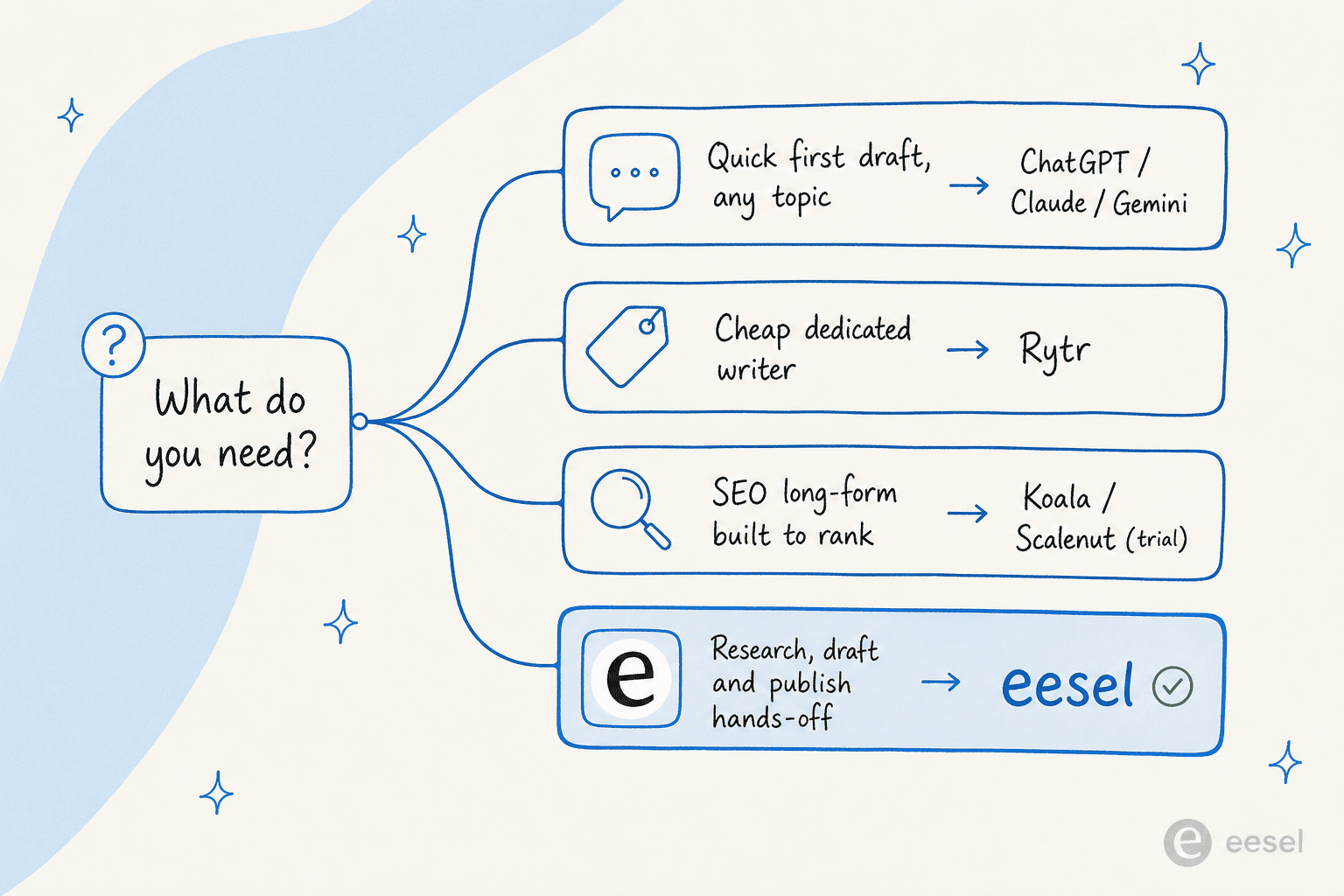
- Just want a free first draft on any topic? Use a chatbot. Claude for the cleanest prose, ChatGPT for research, Gemini if you live in Google Docs. All free, all capped on messages - see the wider free AI writing generator options too.
- Want a cheap dedicated writing app? Rytr - the only real free-forever option built for writing.
- Want SEO long-form that's built to rank? Trial Koala or Scalenut. Free for a taste, then $9–$24/month.
- Writing at real volume and tired of caps? This is where "free" stops being the right question - read on.
The thing every option above shares is a ceiling. Free is perfect for one or two posts a month. The moment you're producing a real content calendar, you're either upgrading, juggling three tools to dodge the caps, or doing the research-draft-edit-publish loop by hand. That's the gap worth solving.
Try eesel

Most tools on this list hand you a blank box and a draft. eesel takes a different approach: its Blog Writer agent is an autonomous AI teammate that researches the topic, drafts the post in your brand voice, and publishes it - the same end-to-end loop you'd otherwise stitch together from a chatbot, an SEO tool, and a CMS plugin. You brief it in plain language, the way you'd onboard a new writer, and it learns from your existing content on day one.
The pricing answers the question the free tiers can't: instead of seat fees or a monthly cap you'll keep hitting, eesel charges $4 per finished blog post, and you can start with 100 free credits, no card required. If you've been bouncing off message caps and character limits, paying per finished post is a cleaner model than paying per seat for capacity you can't predict. You can try eesel and try it before deciding anything.