


You don't see this every day: a three-year-old startup pulls in a $900 million funding round, landing a wild $9.9 billion valuation. That's the story of Anysphere, the company that built the AI coding assistant, Cursor. When the news broke in places like Bloomberg and TechCrunch, everyone started asking the same question: what’s fueling this crazy growth?
In a world buzzing with AI hype, it's easy to get lost in the noise. But this is more than just a headline about big money. The story of Anysphere tells us something important about where AI is headed, not as a vague, futuristic concept, but as a practical tool that’s quietly shaking up how we all get work done.
So, let's get into it. We'll look at what Anysphere is all about, what makes their tool so popular with developers, and what it all means for the future of AI in the workplace.
What is Anysphere?
At its heart, Anysphere is an applied research lab with a pretty big goal: to build the "engineer of the future." Their idea isn't to get rid of human developers, but to create a kind of human-AI partnership that can write and manage code way more effectively than a person could on their own.
The whole thing started in 2022 with four friends from MIT: Michael Truell, Sualeh Asif, Arvid Lunnemark, and Aman Sanger. As TechFundingNews mentions, their time in MIT's computer science labs and at big-name places like OpenAI gave them a front-row seat to the daily grind of software development. They saw just how much of a developer's day is spent on boring, repetitive tasks, like hunting down a variable across fifty different files or scaffolding a new component from scratch.
They figured, what if we built a tool to handle that grunt work? If an AI could take care of the tedious parts, developers would be free to focus on the stuff that really matters, like designing creative solutions and thinking about the big-picture architecture of a project.
And what's really interesting is that even with its massive valuation, Anysphere has kept things small and focused. According to eWeek, they're running the whole show with a team of about 60 people. It just goes to show you don't need a huge army to make a big splash if your product is on point and solves a real, nagging problem for people.
What is Cursor, Anysphere's main product?
Cursor is the AI-powered code editor that really put Anysphere on the map. It’s not just another tool that suggests the next line of code you should type. It’s built from the ground up to be a true "AI pair programmer," one that actually understands the entire context of what you're building.
How Cursor acts like an AI pair programmer
One of the smartest moves the Anysphere team made was building Cursor as a "fork" of Visual Studio Code (VS Code). If you're not a developer, VS Code is one of the most popular and beloved open-source code editors on the planet. By building on top of it, they made it incredibly easy for developers to adopt Cursor. There's no need to learn a whole new interface or abandon the setup they've spent years perfecting. It feels like home from day one, just with a bunch of new superpowers.
Its real magic comes from using different large language models (LLMs) to understand the full context of your codebase, not just the one file you have open. Think of it like this: most coding assistants are like a spell-checker for your code. They're helpful for small, in-the-moment suggestions. Cursor, on the other hand, is like having a senior developer sitting right there with you. You can ask it questions, give it high-level tasks, and trust that it knows how all the different pieces of your project connect. It has the project's entire history and structure in its head.
Key features that got developers hooked
So what makes millions of developers actually want to use it? It comes down to a handful of features that just feel different from what other tools offer.
-
Agent Mode: This is a big one. It lets you give Cursor high-level instructions in plain English. Instead of manually opening five different files to add a new feature, you can just say, "Add authentication using Passport.js." Cursor then maps out a plan and executes the changes across the entire codebase. It turns a task that could take hours of tedious work into a simple conversation.
-
Spookily accurate autocomplete: Anysphere built a custom model they call "Tab," and its whole job is to predict what a developer is going to do next. It goes beyond simple code suggestions; it often feels like it's reading your mind, completing complex chunks of logic before you've even fully formed the thought.
-
Full codebase context: Because Cursor indexes your entire project, it can answer really complex questions. You can ask things like, "Where is this API key being used throughout the application?" or "Remind me how our user authentication flow works." This saves an incredible amount of time that would otherwise be spent manually digging through folders and files.
-
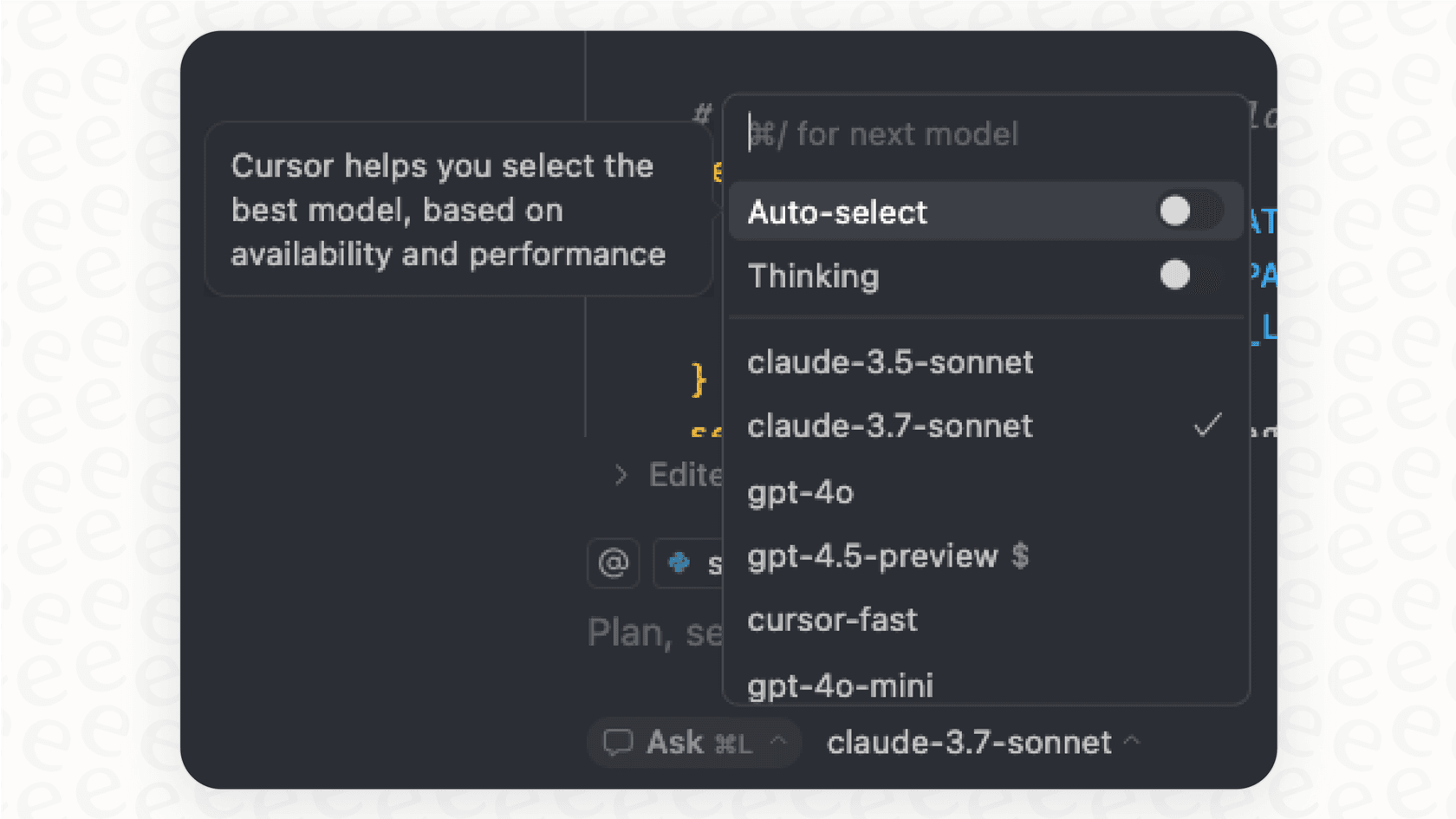
Use any model you want: The AI world moves fast, and a new, more powerful model seems to pop up every few months. Cursor isn’t tied to a single one. It lets developers switch between the best models from OpenAI, Anthropic, Gemini, and others. This means they can always use the sharpest tool for the job without having to change their editor.
How much does Cursor cost?
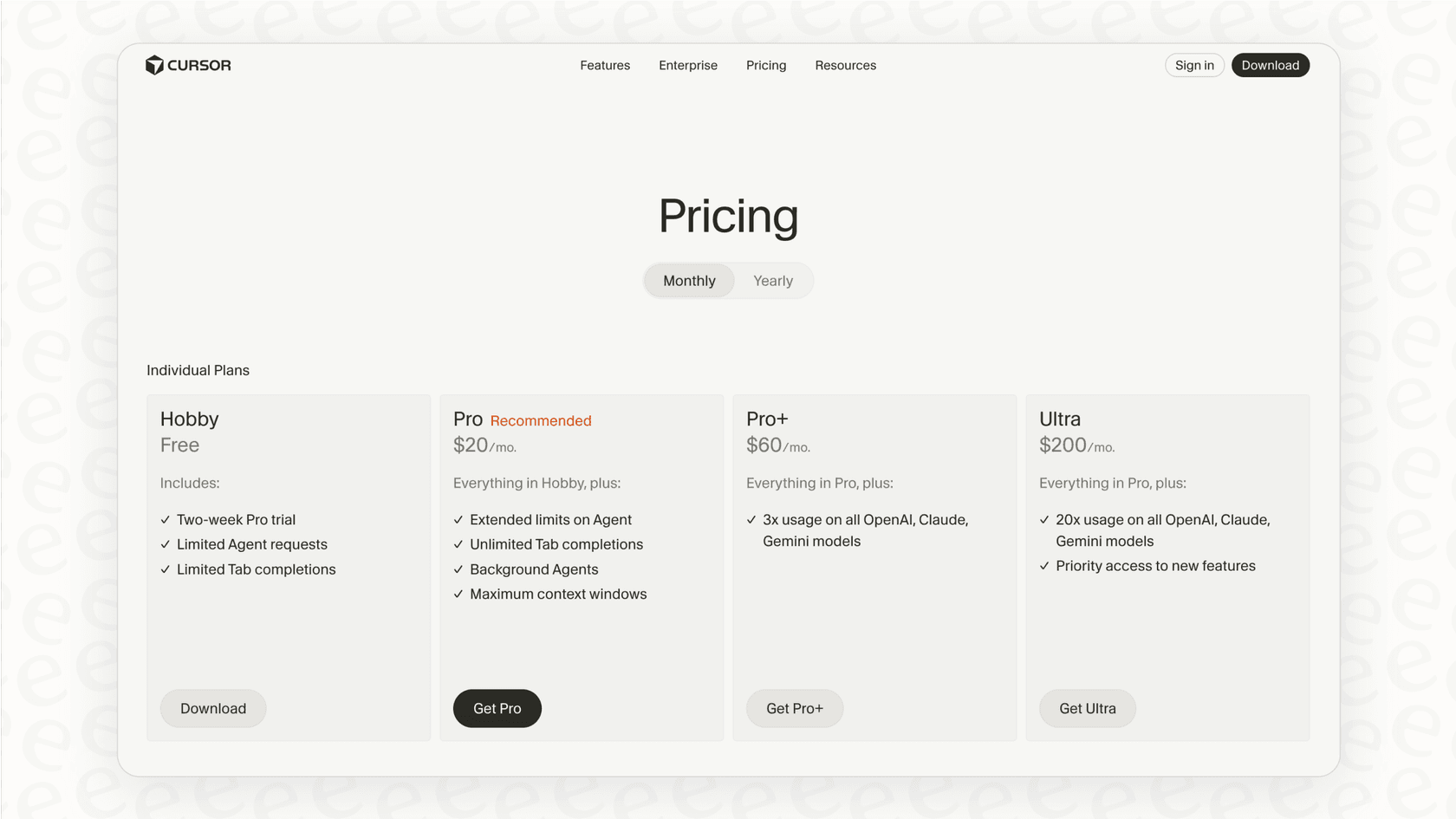
Anysphere also did a great job with its pricing, making Cursor easy to get into for everyone from students and solo developers to big corporate teams. This simple, tiered approach has definitely helped it spread so quickly.
| Plan | Price (per month) | Who It's For | What You Get |
|---|---|---|---|
| Free Trial | $0 | Individuals trying it out | A two-week test run of all the features. |
| Pro | $20 | Solo developers | Unlimited use of standard AI models and the full codebase context. |
| Business | $40 | Teams and companies | Access to the fastest, most powerful AI models and team features. |
As more large companies start taking notice, Anysphere is also starting to offer enterprise licenses to get Cursor deployed across entire organizations.
Anysphere and the crowded market for AI coding assistants
Anysphere isn’t operating in a vacuum. The market for AI coding tools is packed with some of the biggest names in technology, including Microsoft’s GitHub Copilot, Google’s Gemini, and Amazon’s Q Developer. These companies have practically bottomless pockets, which makes what Anysphere has accomplished even more impressive.
Of course, this has led to some healthy skepticism. In developer forums and online discussions, some argue that Cursor is essentially just a fancy "wrapper" built on top of public AI models and an open-source editor. They wonder if it has a real, sustainable advantage (a "moat," in business-speak) that will protect it from the tech giants in the long run. Others have pointed out the occasional bug, like a flaky search feature, which can be a real headache when you're deep in a project.
But Cursor's biggest advantage might just be its philosophy. CEO Michael Truell has emphasized that the company isn't trying to fully automate coding away. Instead, they're focused on giving developers more control and leverage. Cursor is designed to be a collaborator you direct, not an autonomous agent that replaces you. This human-in-the-loop approach really seems to click with developers and sets it apart from other tools that might try to do too much on their own.
Anysphere and beyond coding: How specialized AI is changing other jobs
The success of Anysphere isn't just a story about code. It's a huge signal of a much bigger shift happening across almost every industry. We're seeing a new wave of specialized AI tools that are designed to supercharge specific professional workflows.
Think about it: developers are getting an AI "pair programmer." But the core problems Cursor solves, a high volume of repetitive tasks and the need for deep contextual knowledge, are not unique to software engineering.
Take customer support, for example. Support agents spend their days dealing with a flood of similar questions, digging through knowledge bases for the right answer, and trying to work faster without sounding like a robot. This is where a tool like eesel AI comes into the picture. It’s built on the same core ideas that made Cursor a hit, but it’s tailored specifically for customer service and internal support teams.
-
It works where you work: Just like Cursor builds right on top of VS Code, eesel AI plugs directly into the helpdesks teams already know and use, like Zendesk, Freshdesk, and Intercom. You don't have to switch platforms or change how your team operates.
-
It understands your business context: While Cursor learns from codebases, eesel AI learns from all your company's knowledge. It securely connects to past tickets, help articles, and internal docs in Confluence or Google Docs. It can even learn from your team's internal Slack conversations to give answers that are specific and accurate to your business.
-
Simple enough to set up yourself: A lot of enterprise AI tools are stuck behind long sales calls and complicated onboarding. eesel AI is different. You can sign up and build your first AI support agent in just a few minutes, all on your own. It makes powerful AI something any team can start using right away.
-
Roll it out with confidence: One of the scariest parts of AI is letting it talk to your customers. How can you be sure it will say the right thing? eesel AI has a clever simulation mode that lets you test your AI agent on thousands of your past support tickets. You can see exactly how it would have responded, tweak its personality, and even get a forecast of how much time it will save your team, all before it ever goes live. It’s a risk-free way to get started.
The Anysphere lesson: The future is specialized AI
The story of Anysphere is about more than just one fast-growing startup. It’s a sneak peek at the future of work. By having a clear focus, building a product that slots right into how people already work, and obsessing over the user, they've created something that feels less like a piece of software and more like a real partner.
Anysphere is proof that the next wave of AI isn't about one giant, all-knowing model. It’s about specialized assistants for every profession. Whether you're a developer writing code, a support agent solving a customer's problem, or a marketer planning a campaign, AI is shifting from a novelty into a set of sharp, purpose-built tools that help us do our jobs better, faster, and with a bit more creativity.
If you’re a developer who’s excited about what a tool like Cursor can do for your productivity, just think about what a similar AI, built for their specific needs, could do for your customer support or IT teams.
Ready to see how specialized AI can transform your support workflow? You can start building your first AI agent with eesel AI in minutes.
Frequently asked questions
What exactly is Anysphere?
Anysphere is an applied research lab focused on building the "engineer of the future" through human-AI collaboration. They aim to create tools that significantly enhance developer productivity by handling repetitive coding tasks. Their flagship product is the AI coding assistant, Cursor.
How has Anysphere managed to grow so fast and achieve such a high valuation?
Anysphere achieved rapid growth and a high valuation by developing Cursor, an AI coding assistant that addresses a critical need for developers. Its success is fueled by strong product-market fit, an intuitive integration with VS Code, and a focus on practical AI solutions that enhance workflow.
What makes Anysphere's Cursor stand out compared to other AI coding tools?
Anysphere's Cursor distinguishes itself by understanding the full context of an entire codebase, not just individual files. This enables advanced features like Agent Mode for high-level tasks and highly accurate autocomplete, making it a more comprehensive "AI pair programmer" than many competitors.
Can I choose which AI model to use within Anysphere's Cursor?
Yes, Anysphere's Cursor offers the flexibility to switch between leading large language models (LLMs) from providers like OpenAI, Anthropic, and Gemini. This allows developers to utilize the most powerful or suitable AI model for their specific coding tasks without changing their editor.
Does Anysphere intend to replace human developers with its AI tools?
No, Anysphere's philosophy is centered on creating a human-AI partnership rather than replacing human developers. Their tools, like Cursor, are designed to give developers more control and leverage, automating tedious tasks so humans can focus on creative problem-solving and architectural design.
How much does Anysphere's Cursor typically cost for individual developers or teams?
Anysphere offers tiered pricing for Cursor, starting with a two-week free trial. The Pro plan costs $20 per month for solo developers, and the Business plan is $40 per month for teams, offering access to faster AI models and team features. Enterprise licenses are also available for larger organizations.