If you’re in customer support, you probably know the feeling of being stuck in a loop, answering the same questions day in and day out. It's a common headache for support teams everywhere. And the pressure is mounting, a recent Salesforce study found that 82% of service reps say customers are asking for more than they used to.
You've likely thought about using AI, but it’s easy to get caught between the hype and the fear of it going wrong. We've all seen the horror stories, like the Air Canada chatbot that gave a customer wrong information, forcing the airline to honor the mistake. Then there's the nightmare of migrating your entire helpdesk just to try a new tool. It’s no wonder so many teams are hesitant.
This guide is here to help you cut through the noise. We'll give you a clear, down-to-earth look at what modern AI for customer support agents can actually do, how to pick the right tool, and how to avoid the common bumps in the road.
What exactly is AI for customer support agents?
First off, let's be clear: this isn't about the clunky, frustrating chatbots from a few years ago. The technology has taken a massive leap forward. We've moved from simple bots that just match keywords to sophisticated AI agents built on Large Language Models (LLMs) that can think, act, and learn.
Two core ideas make this possible, and they're simpler than they sound:
-
Retrieval-Augmented Generation (RAG): This is the secret to stopping an AI from making things up. Instead of guessing or searching the public internet, a RAG system securely finds answers within your company’s private knowledge, your help center, old tickets, or internal docs. This makes sure the answers it gives are accurate and specific to your business.
-
Agentic AI: This is where the AI graduates from being a Q&A machine to a real helper. As IBM explains, agentic AI can handle tasks on its own by figuring out the steps needed to reach a goal. For a support team, that means it can do things like close a Zendesk ticket, look up an order in Shopify, or send a conversation to the right person.
This is a whole different world from the old tech that had users on Reddit and other forums spamming "give me a human" because they were so fed up.
How to choose the right AI tool for customer support
Not all AI tools are built the same. The best one for you is something that fits into your existing workflow, not one that makes you tear everything down and start over. Here are the key things to look for.
Does it work with your existing helpdesk?
Many AI solutions are built for their own little worlds. For example, Zendesk AI is great, but it is designed to work inside its own helpdesk. If you're happy with your current setup, being forced to switch is a huge hurdle.
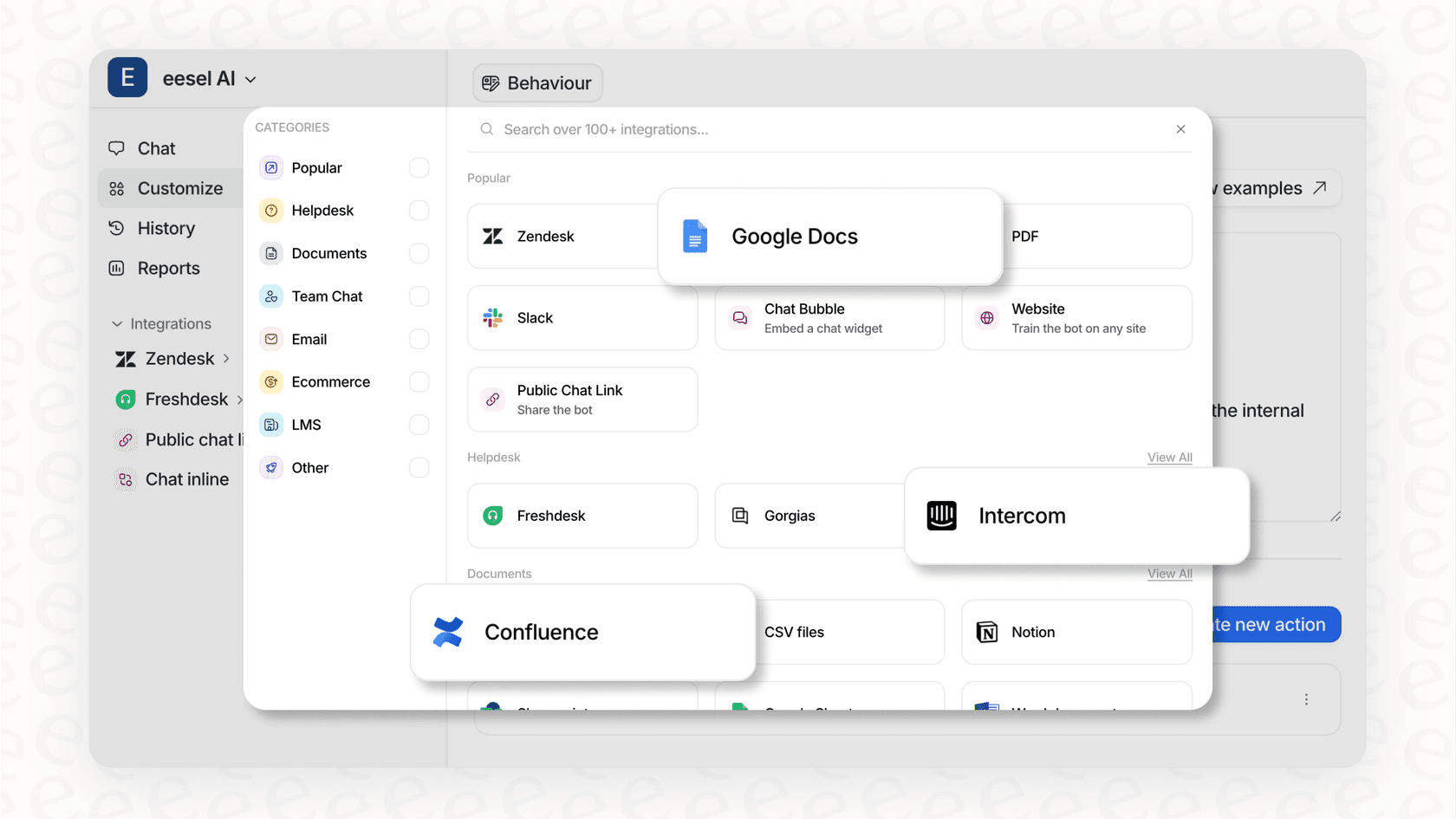
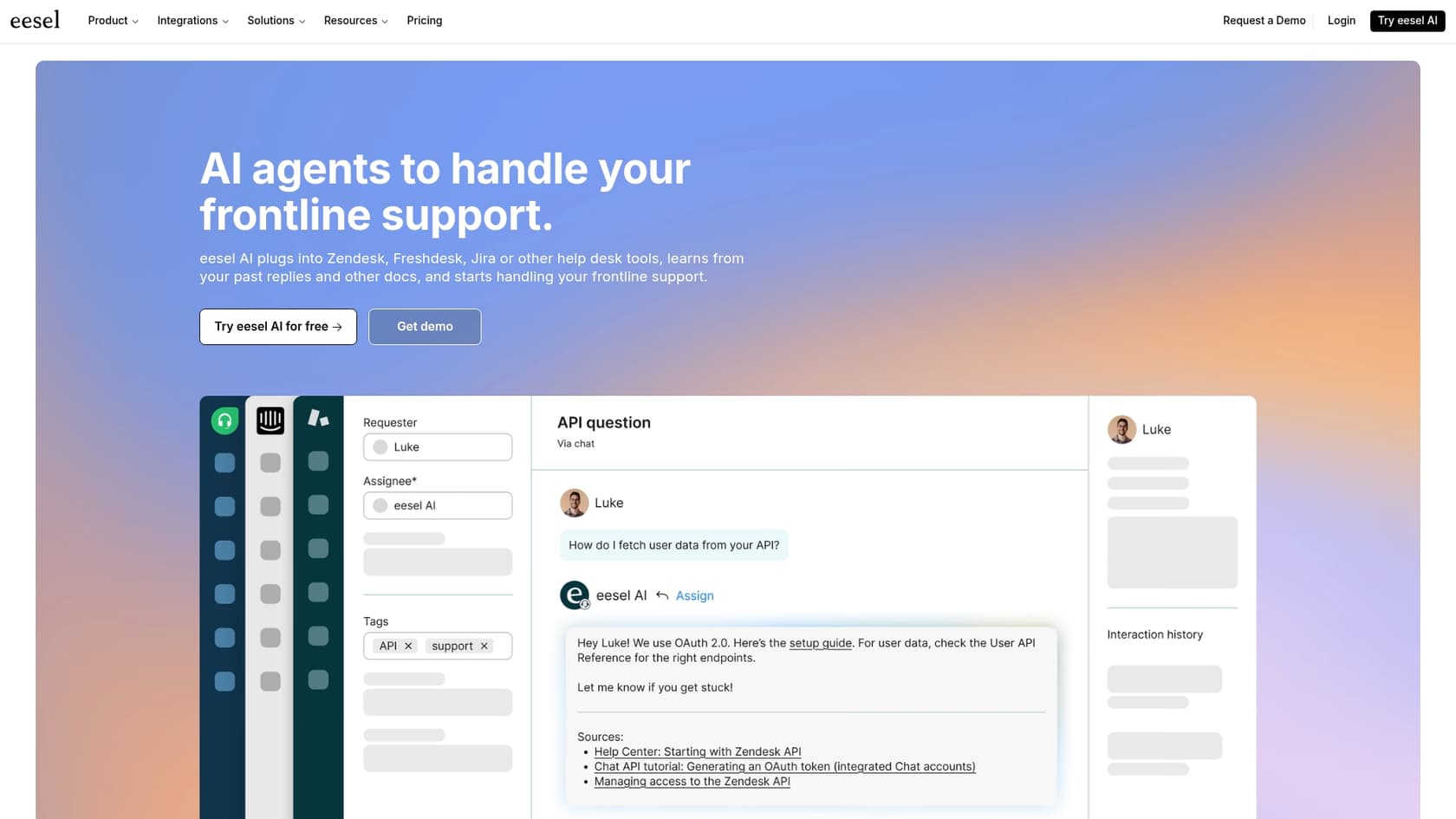
You should look for a platform that’s made to plug right into the tools you already use. For instance, eesel AI has one-click integrations for popular helpdesks like Zendesk and Freshdesk. This kind of approach saves you months of migration headaches and lets you see the benefits almost right away.
Can it learn from all your knowledge sources?
An AI is only as smart as the information you give it. If it can only read your public FAQ page, it's not going to be much help with tricky or customer-specific questions. It will be stuck answering the most basic stuff.
A truly useful AI should be able to learn from all kinds of sources, including your private and internal ones. This is what lets it give detailed, correct answers. eesel AI, for example, can learn from your past tickets, internal macros, private Google Docs, Confluence spaces, and even your Shopify store data. This helps its responses reflect your team's actual experience and past solutions, not just generic scripts.
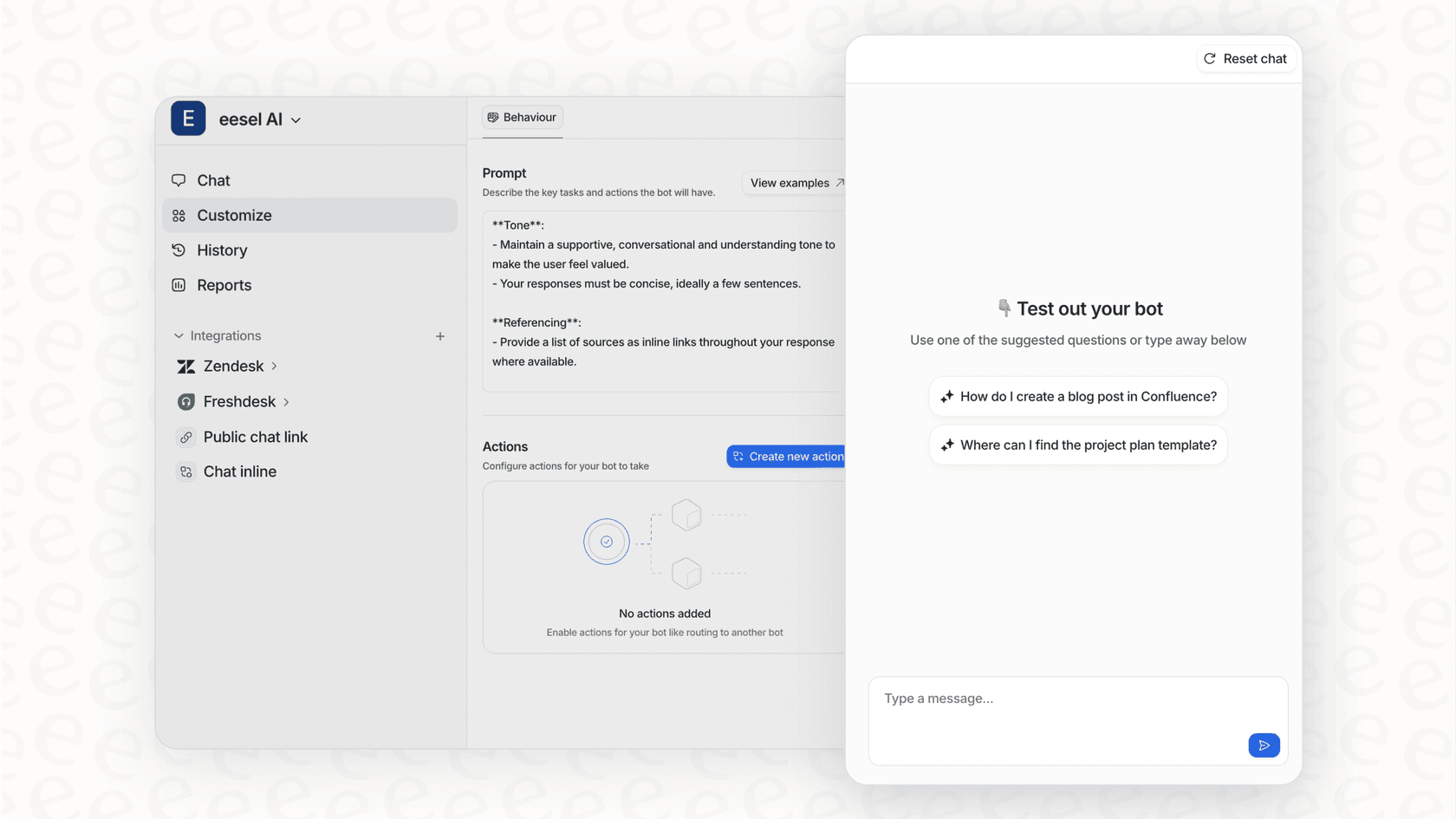
Can you control and customize its behavior?
You need to be in control. A good AI tool gives you fine-tuned command over what it does, what questions it answers, and how it acts. The ability to set rules and connect it to your other business tools is what separates simple automation from something truly helpful.
Look for features that let you set up specific "actions." For example, with eesel AI's Zendesk integration, you can tell the AI to use actions like "zendesk_tag_ticket" to categorize an issue or "zendesk_assign_ticket" to route a ticket to the correct team, all without a person lifting a finger.
Can you test it safely before going live?
Letting a new AI loose on your customers without proper testing is a big risk. You need a way to check its performance on your own data to see if it’s actually ready.
Simulations are perfect for this. A key feature of platforms like eesel AI is the option to run simulations on your historical tickets. This shows you exactly how the AI would have handled past conversations, giving you a clear idea of its accuracy and what your return on investment might look like before it ever talks to a real customer. Think of it as a safety net.
Common use cases
Today's AI can do a lot more than just deflect "what are your business hours?" questions. Here’s how teams are using it right now.
Frontline autonomous support
AI agents can now handle entire conversations for common, multi-step problems from beginning to end. For instance, if a customer asks, "Where is my order?" the AI can look up their order status in Shopify, give them the tracking link, and even offer to start a return if the package has already been delivered. While some platforms like Forethought use complex systems with multiple agents to do this, other tools like eesel AI focus on making these workflows happen right inside your existing helpdesk with simple, customizable actions.
AI copilot for human agents
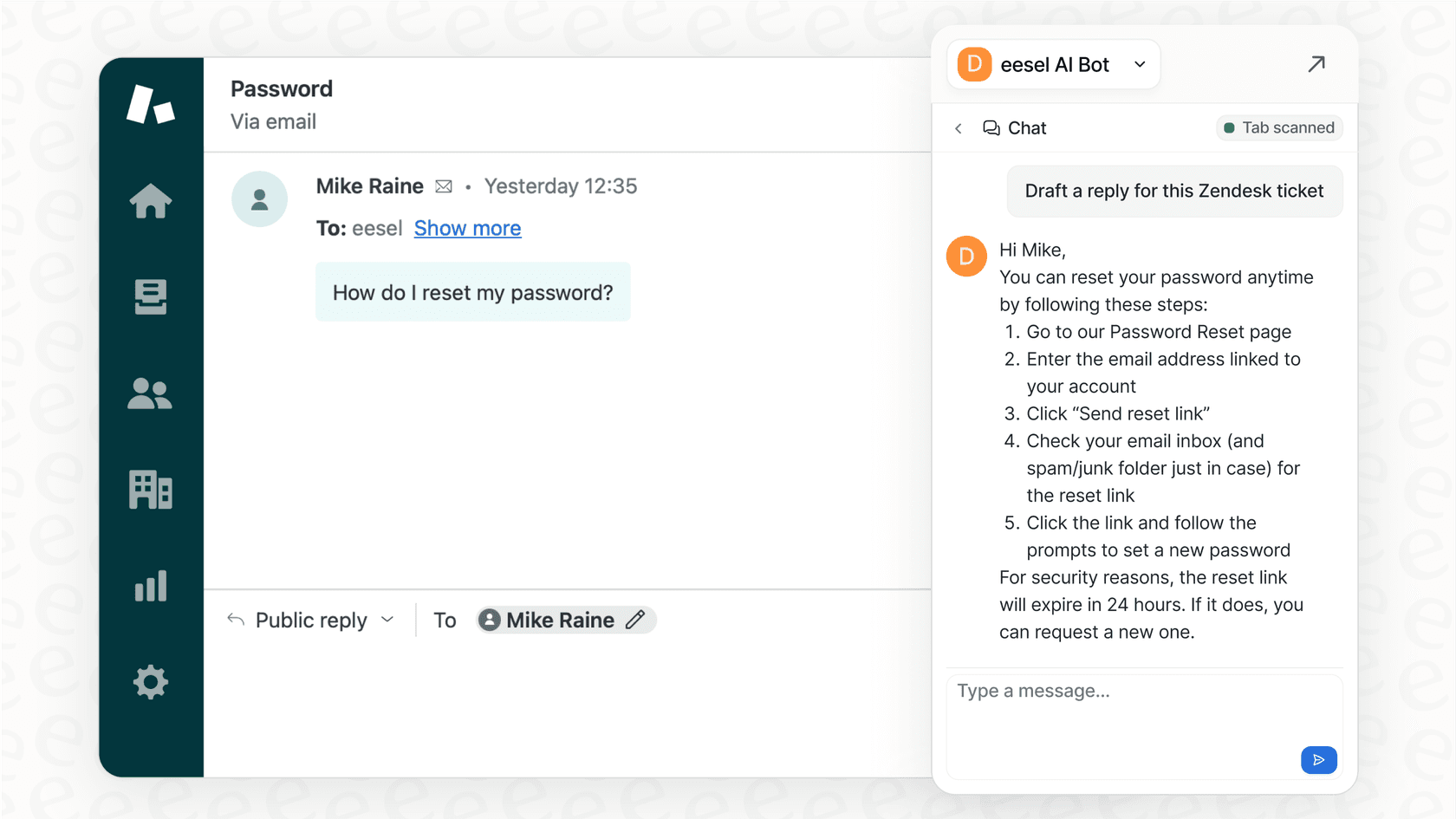
Instead of replacing agents, AI can work as a powerful sidekick. An AI copilot can look at an incoming ticket and instantly draft a reply based on similar issues from the past. This helps keep every response consistent and in line with your brand's voice. It’s also great for getting new agents up to speed, helping them feel confident in days, not weeks.
As Eddie Stephens, Service Desk Lead at CartonCloud, said, this allows for "well-formed responses with consistent, ‘on-brand’ tone, still keeping our own style and still keeping that human touch." The eesel AI Agent Assist is built for exactly this, helping agents respond faster and more accurately without losing their personal touch.
Automated ticket triage and management
A good chunk of any agent's day is spent on manual "back office" tasks like tagging, routing, and closing tickets. AI can automate all of that. For example, an AI can read new tickets to spot spam, figure out a customer's mood and how urgent the issue is, add the right tags, send the ticket to the right team, and automatically close simple "Thank You" messages. This keeps the queue tidy, so your human agents can focus on what they do best: solving customer problems. eesel AI's Triage product is designed to handle this automatically within Zendesk, Freshdesk, and other helpdesks.
Moving from theory to practice
Modern AI for customer support agents is a genuinely useful tool that can cut down on repetitive work and let your team focus on what's important. But just plugging it in doesn't guarantee success. It all comes down to choosing a solution that's secure, controllable, plays well with your existing tools, and has a pricing model that actually makes sense.
The goal isn't just to deflect tickets. It's to resolve them correctly and efficiently while freeing up your human agents for the high-value conversations that build real customer loyalty. The right AI works with your team, not instead of it, making everyone's job a little easier.
Ready to see what AI can actually do for your support team? Run a risk-free simulation on your past tickets to see your potential ROI in minutes, or start a free 7-day trial to experience it for yourself.

Frequently asked questions
Modern AI for customer support agents leverages Large Language Models (LLMs), Retrieval-Augmented Generation (RAG), and Agentic AI. This allows them to securely find answers within your private knowledge, learn, and even perform tasks, moving beyond simple keyword matching.
Not necessarily. The best AI tools are designed to integrate seamlessly with your existing helpdesk like Zendesk or Freshdesk. Look for solutions with one-click integrations to avoid significant migration headaches.
The goal of modern AI is not to replace human agents, but to augment them. AI works as a copilot, handling repetitive tasks, drafting replies, and automating triage, allowing human agents to focus on complex, high-value conversations that build customer loyalty.
To avoid hallucinations, choose an AI system that uses Retrieval-Augmented Generation (RAG). This ensures the AI pulls information strictly from your company's internal knowledge sources rather than searching the open internet or making things up.
Prioritize vendors with SOC 2 Type II compliance, robust data isolation practices, and options for EU data residency to ensure GDPR adherence. Your data should always be kept separate and never used to train models for other companies.
Yes, reputable AI platforms offer simulations. You can run these simulations on your historical tickets to see exactly how the AI would have performed, allowing you to gauge its accuracy and potential ROI before going live.
Share this article

Article by
Kenneth Pangan
Writer and marketer for over ten years, Kenneth Pangan splits his time between history, politics, and art with plenty of interruptions from his dogs demanding attention.