If you're running a support team, you know that just putting out fires isn't enough anymore. You need to be proactive. That means spotting weird trends, like a sudden flood of bug reports or a strange drop-off in customer questions, before they spiral into a full-blown crisis. This is where AI-powered anomaly detection comes in, acting as an early warning system for your entire support operation.
This guide is a deep dive into Zoho Desk's own AI assistant, Zia, specifically its anomaly detection feature. We'll get into what it is, how it works, where it falls short, and how it stacks up against more flexible, dedicated AI tools that can plug into your whole tech stack.
What is Zoho Desk's Zia?
Zia is Zoho's AI assistant, built right into the Zoho Desk platform to help support agents get more done. It's not just one single feature, but more like a collection of tools humming along in the background.
Besides just spotting trends, here's a quick rundown of what Zia can do:
-
Sentiment Analysis: It tries to read the room by gauging a customer's mood (positive, neutral, or negative) from the words they use in their tickets.
-
Auto-Tagging: Zia can automatically categorize tickets by picking out keywords and topics, which helps keep things organized.
-
Reply Assistance: It suggests answers and knowledge base articles to help agents fire off responses a little faster.
-
Field Prediction: Based on past tickets, it can take a guess at filling in fields like priority or category for you.
-
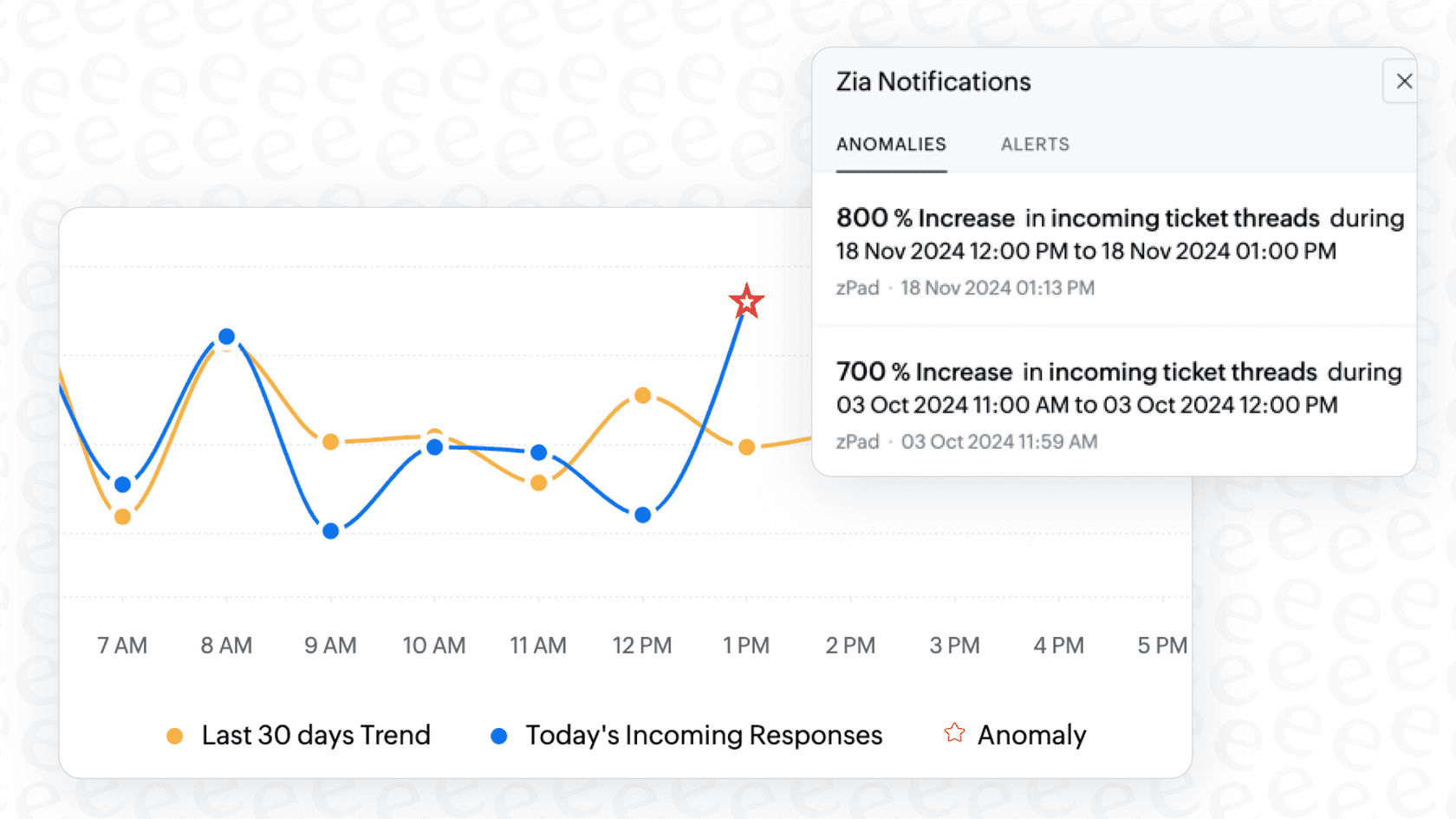
Anomaly Detection: This is the big one we're focusing on. It keeps an eye on your ticket traffic for anything out of the ordinary.
A deep dive into Zoho Desk Zia Anomaly Detection
Alright, let's pull back the curtain and see what this feature is all about and how you can actually use it.
How does Zoho Desk Zia Anomaly Detection work?
So, how does it actually work? It's pretty clever, really. Zia looks at the last 30 days of your help desk's ticket data to get a feel for your normal rhythm. It figures out what a typical day, week, and month look like for your team, learning the usual ups and downs of your ticket volume.
graph TD A[Analyzes last 30 days of ticket data] --> B(Establishes a baseline for normal ticket volume); B --> C{Monitors incoming/outgoing tickets in real-time}; C --> D{Compares real-time volume to baseline}; D --> E{Detects a major deviation}; E --> F[Flags it as an anomaly & alerts the team];
Once it has this baseline, it watches your incoming and outgoing ticket traffic in real-time. If it sees a major change from what it expected, like a huge spike or a sudden silence, it flags that as an anomaly. This gives your team a quick heads-up that something unusual is going on. Maybe a service outage is causing a tidal wave of tickets, or that new marketing campaign is driving a ton of new questions.
Key use cases and benefits
That’s the theory, but what does this help you with on a busy Tuesday afternoon? Here are a few real-world scenarios where this feature could be a lifesaver:
-
Catching Product Issues Early: Imagine you see a sudden surge in tickets tagged with "login error" or "payment failed." That's a huge red flag. Zia's alerts can help you sound the alarm and get the engineering team on it immediately, way before it becomes a company-wide meltdown.
-
Spotting Website Downtime: If your ticket volume suddenly flatlines and drops to zero, it might not just be a quiet day. It could mean your website's contact form is busted or a server is down, cutting off your customers' lifeline to you.
-
Measuring Marketing Impact: Did you just launch a new feature? A spike in questions right after the announcement is a great way to see if your campaign is actually reaching people. It also helps you pinpoint common questions you should probably add to your FAQ page.
The real win here is that it turns a mountain of raw data into simple, actionable alerts. This helps managers make better calls about where the team should focus its energy.
How to view anomalies in Zoho Desk
You don't need a degree in data science to find these insights. Anomalies are shown right in the Zia Dashboard, which you can access from the Analytics module in Zoho Desk.
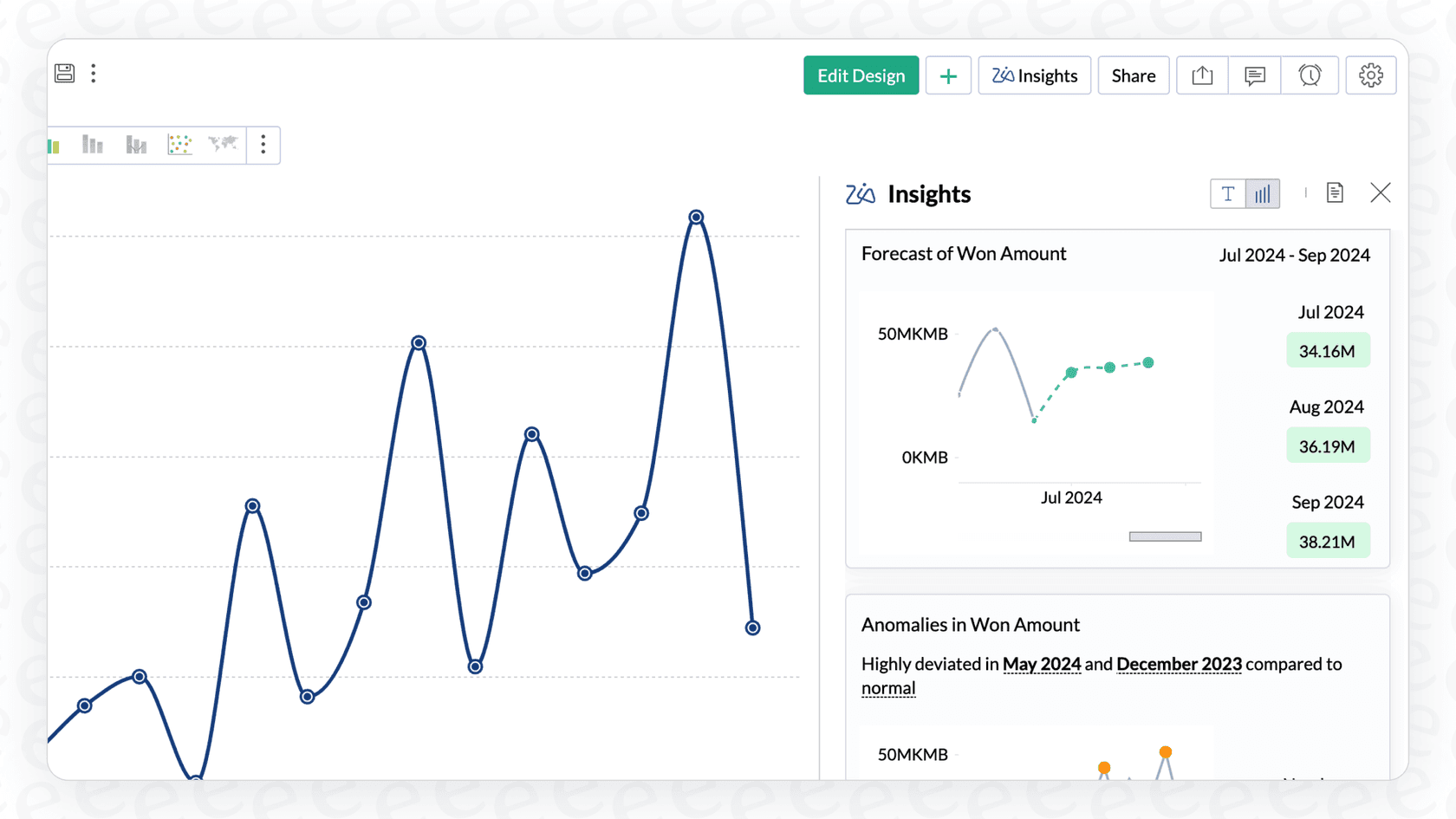
The dashboard has a clean line graph that shows the predicted ticket trend versus what's actually happening in real-time, with any anomalies clearly marked. For more immediate notifications, Zoho Desk also has a Zia Notifications feature. It gives you a small, non-intrusive pop-up at the bottom of your screen when an anomaly is detected. That way, you and your agents don't have to live in a dashboard just to stay in the loop.
The limitations of Zoho Desk Zia Anomaly Detection
While Zia's anomaly detection is a nice feature to have, it comes with a few big trade-offs that might hold your team back from delivering truly proactive support.
Locked behind expensive plans and a tricky setup
First things first, let's talk about the price tag. Powerful Zia features like Zoho Desk Zia Anomaly Detection and the generative AI-powered Answer Bot are only available on the Enterprise plan, which is Zoho Desk's most expensive tier. This puts it out of reach for a lot of small to mid-sized teams that can't stomach the high per-agent cost.
On top of that, if you want to use Zia's generative AI for things like helping agents write replies, you have to bring your own paid OpenAI API key. This just adds another cost, another login, and another bill to manage. It's a bit of a hassle compared to all-in-one solutions where everything is included in one predictable subscription.
Fragmented knowledge: A siloed problem
This is probably the biggest roadblock. Zia is trained almost entirely on the data that lives inside Zoho Desk. That means its "brain" is made up of your past tickets and your Zoho knowledge base, and that's it.
But let's be real, where does your team actually store its most important information? Those detailed troubleshooting guides are probably in Confluence. The latest product updates are shared in a Google Doc. And those critical, time-sensitive discussions about a customer issue are happening in a Slack channel.
All of that context is completely invisible to Zia. This creates a siloed knowledge source, which seriously limits how accurate and helpful the AI can be. If the answer isn't in Zoho Desk, Zia is never going to find it.

No way to test confidently before you go live
Zia is great for monitoring trends, but it doesn't give you a safe way to test and forecast how full AI automation would perform before you unleash it on your customers.
There's no feature to simulate how an AI agent would handle thousands of your past tickets, and you can't ease into it by gradually rolling out automation for just a few low-risk ticket types. It's an "all-or-nothing" approach, which is a pretty big gamble for teams that have to maintain a high standard of support. You can't afford to have a half-baked AI giving confusing answers to your customers.
eesel AI: A simpler alternative
The limits of a native tool like Zia are exactly why dedicated, platform-agnostic AI solutions have popped up. Here’s how a tool like eesel AI handles these challenges differently.
Unify all your knowledge and get started in minutes
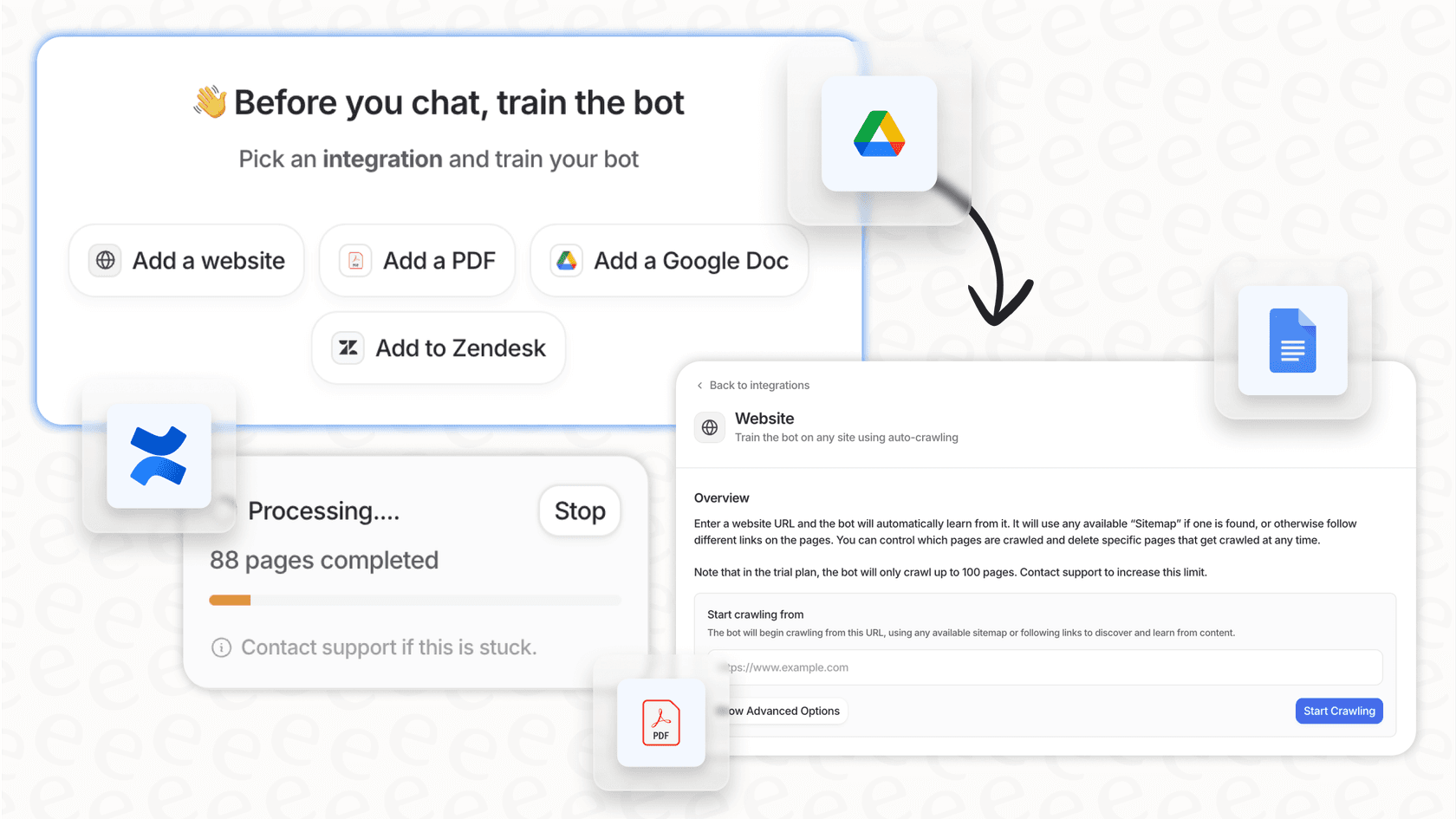
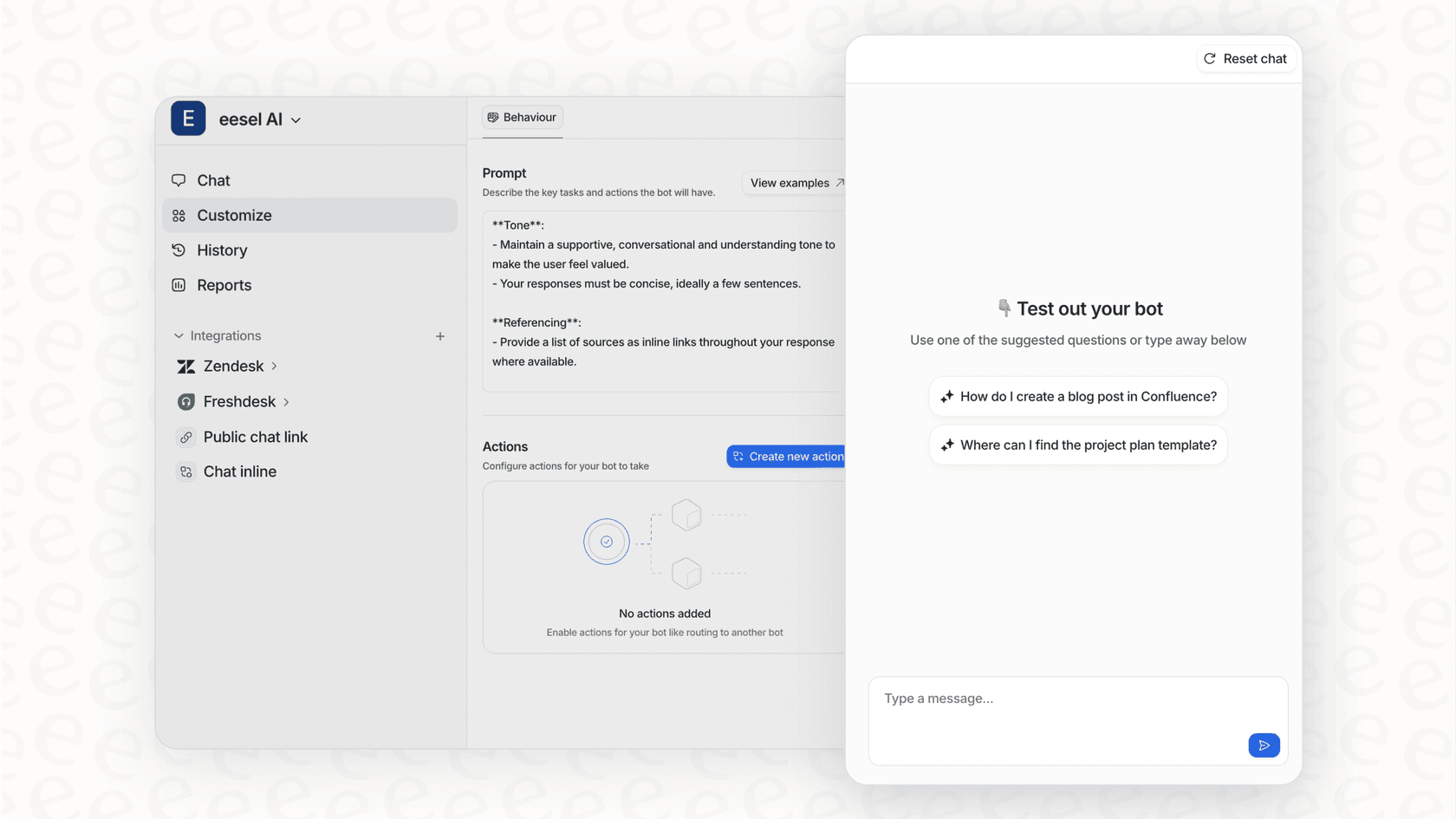
Unlike Zoho's siloed world, eesel AI is built from the ground up to connect all your knowledge, no matter where it's stored. With over 100 one-click integrations, you can link your help desk, past tickets, Confluence, Google Docs, Slack, and more in just a few minutes.
Best of all, you can do it all yourself. You can sign up, connect your sources, set up your AI agent, and go live without ever having to talk to a salesperson or sit through a mandatory product demo. You get to build and launch on your own schedule.
Test with confidence in a risk-free simulation
This is where things get really interesting. eesel AI comes with a powerful simulation mode that lets you test your AI setup on thousands of your historical tickets in a safe, sandboxed environment.
This means you can see exactly how the AI would have responded to real customer questions, get accurate predictions on your resolution rates, and find any gaps in your knowledge base, all before a single customer interacts with it. It swaps guesswork and launch-day anxiety for data-driven confidence, so you know exactly what you're getting into from day one.
Get total control and transparent pricing
With eesel AI, you're in the driver's seat. It gives you a fully customizable workflow engine, so you decide exactly which tickets the AI handles. You can start small, maybe automating answers for just one or two simple topics, and then expand as you get more comfortable. You can also set up custom actions, like having the AI look up order information in Shopify or automatically escalating a ticket to a specific team.
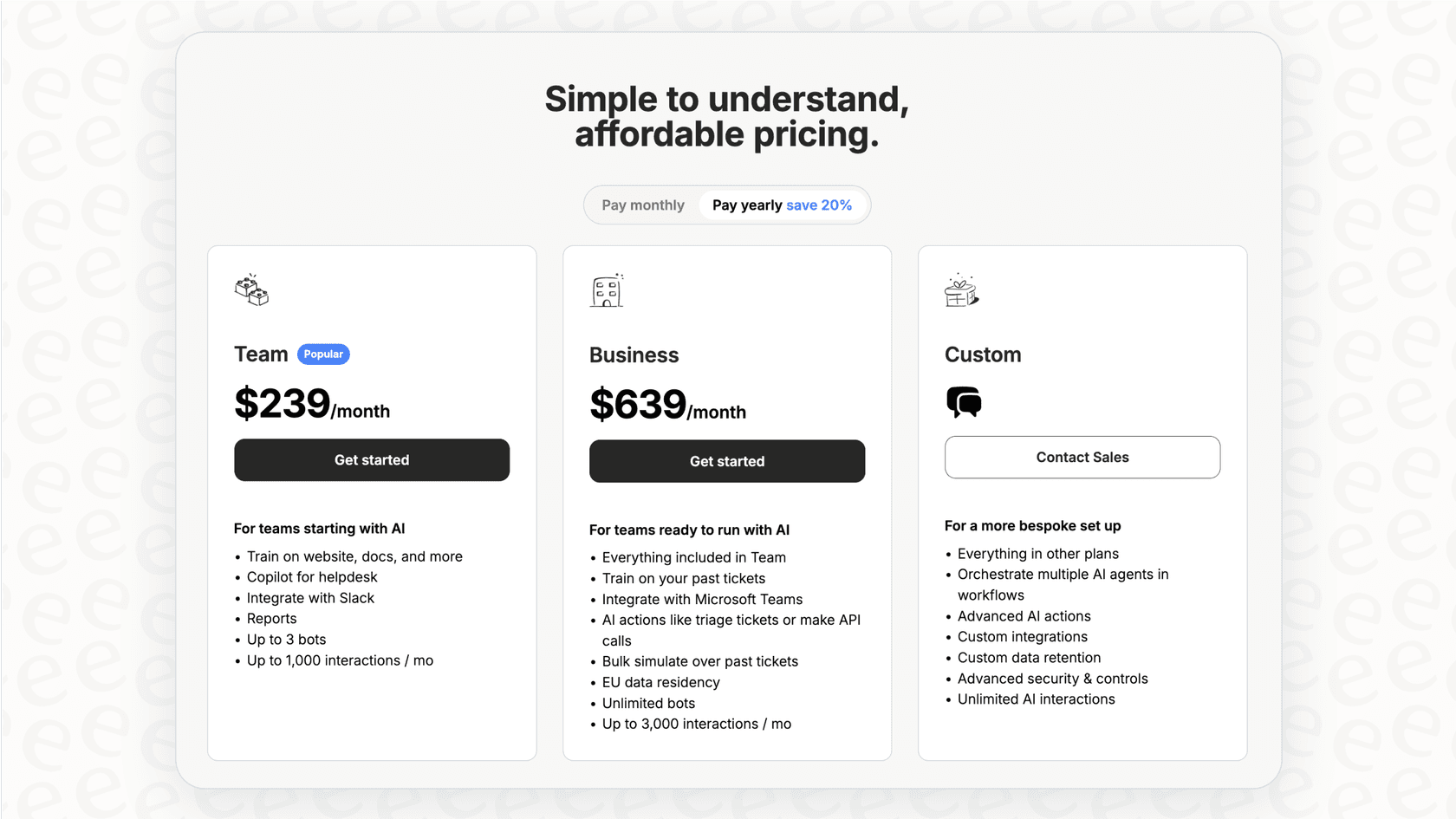
The pricing is just as straightforward. Plans are based on the features and capacity you need, with no confusing per-resolution fees. This gives you a predictable, fixed cost that doesn't go up just because you had a busy month or your AI successfully helped more customers.
Zoho Desk pricing
As we mentioned, Zia's best features are tucked away in the top-tier plan. It helps to see the whole picture to understand what you're really paying for.
| Plan | Price (Billed Annually) | Key AI & Automation Features |
|---|---|---|
| Standard | $14/user/month | Workflows, Generative AI (BYOK OpenAI) |
| Professional | $23/user/month | Everything in Standard + Blueprints, Round-robin assignment |
| Enterprise | $40/user/month | Everything in Professional + Zia AI Assistant, Anomaly Detection, Answer Bot |
As you can see, getting your hands on Zoho Desk Zia Anomaly Detection means signing up for the Enterprise plan at $40 per user, per month. For a team of 10 agents, you're looking at nearly $5,000 a year, and that's before you add in any extra costs for other Zoho apps or OpenAI usage.
Zoho Desk Zia vs. a dedicated AI platform
So, which path makes more sense for your team?
-
Zoho Desk Zia: It's a decent starting place for teams who are already all-in on the Zoho ecosystem, are on the Enterprise plan, and keep pretty much all of their knowledge inside Zoho Desk. If you check all three of those boxes, it can give you some useful insights without you having to add another tool to your stack.
-
eesel AI: This is the go-to choice for any team that wants a flexible, powerful, and easy-to-use AI platform. If your knowledge is scattered across multiple tools, you want to test your automation with confidence before launch, and you need a predictable price that doesn't punish you for growing, then a dedicated platform is the way to go.
Get the right AI for your support team
Zoho Desk Zia Anomaly Detection is a handy feature for spotting trends, but it's only one piece of a much larger puzzle. It's held back by some serious limitations around cost, siloed knowledge, and testing that keep it from being a complete AI solution.
To run a truly proactive and efficient support operation, you need an AI platform that can connect to all of your tools and give you the control you need to automate with confidence.
Ready to see what a unified AI platform can do for your team? Connect your knowledge sources and start building your AI agent with eesel AI for free.

Frequently asked questions
Zoho Desk Zia Anomaly Detection acts as an early warning system by monitoring your ticket data for unusual patterns. It helps support teams proactively identify sudden spikes or drops in ticket volume that could signal underlying issues or opportunities.
It establishes a baseline by analyzing your help desk's ticket data from the last 30 days to understand normal fluctuations. When real-time ticket traffic significantly deviates from this learned pattern, it flags these changes as anomalies.
Anomalies are displayed on the Zia Dashboard within the Analytics module of Zoho Desk, often shown on a line graph. Additionally, non-intrusive pop-up notifications can appear via the Zia Notifications feature for immediate alerts.
It can help catch product issues early by highlighting surges in specific error tickets or detect website downtime if ticket volume suddenly flatlines. It also helps measure marketing campaign impact by showing spikes in related questions.
Yes, Zoho Desk Zia Anomaly Detection is exclusively available with Zoho Desk's most expensive tier, the Enterprise plan. This means it's not accessible to users on the Standard or Professional plans.
Its primary limitations include being locked behind the expensive Enterprise plan and a fragmented knowledge base, as Zia only uses data within Zoho Desk. It also lacks a robust simulation feature to test automation confidently before going live.
While Zoho Desk Zia Anomaly Detection is limited to data within Zoho Desk, dedicated AI platforms like eesel AI can integrate with over 100 sources, including Confluence, Google Docs, and Slack. This provides a much more comprehensive and accurate AI understanding for support teams.
Share this article

Article by
Stevia Putri
Stevia Putri is a marketing generalist at eesel AI, where she helps turn powerful AI tools into stories that resonate. She’s driven by curiosity, clarity, and the human side of technology.