
When your support team escalates a ticket to Engineering, who's responsible for meeting the SLA? If the customer is waiting and the ticket has bounced between three different internal teams, how do you track who's accountable for the delay? This is where Zendesk's Group SLA target ownership time comes into play.
Group SLAs (also called Operational Level Agreements or OLAs) let you measure how long a ticket stays with specific internal teams. Unlike regular SLAs that promise response times to customers, Group SLAs track internal handoffs and ownership. They're particularly useful for organizations with tiered support, cross-functional workflows, or strict internal SLAs with other departments.
Let's break down how Zendesk SLA target ownership time works, how to configure it, and when you might want to augment it with AI-powered solutions.

What is Zendesk SLA target ownership time?
Regular SLAs in Zendesk track the time between customer messages and your team's responses. They're external commitments, visible to customers, and tied to your service promises. Group SLAs work differently. They measure how long a ticket remains assigned to a specific group of agents, tracking internal accountability rather than customer-facing metrics.
The ownership time metric specifically measures the duration from when a ticket is assigned to a group until it's either reassigned to another group or solved. This is what Zendesk calls an "Operational Level Agreement" or OLA. Think of it as an internal contract between teams. When Tier 1 escalates to Tier 2, both sides know exactly how long Tier 2 has to resolve the issue.
Here's when Group SLAs make sense:
- Multi-tier support structures where tickets escalate from first-line to specialized teams
- Cross-functional workflows involving Support, Engineering, Product, or Operations
- Vendor or partner escalations where you need to track external team response times
- Internal IT help desks measuring resolution times for different departments
There's one important catch: Group SLAs are only available on Zendesk's Enterprise plan. If you're on Suite Professional ($115 per agent per month annually) or below, you won't have access to this feature. You'll need Suite Enterprise ($169 per agent per month annually) or above.
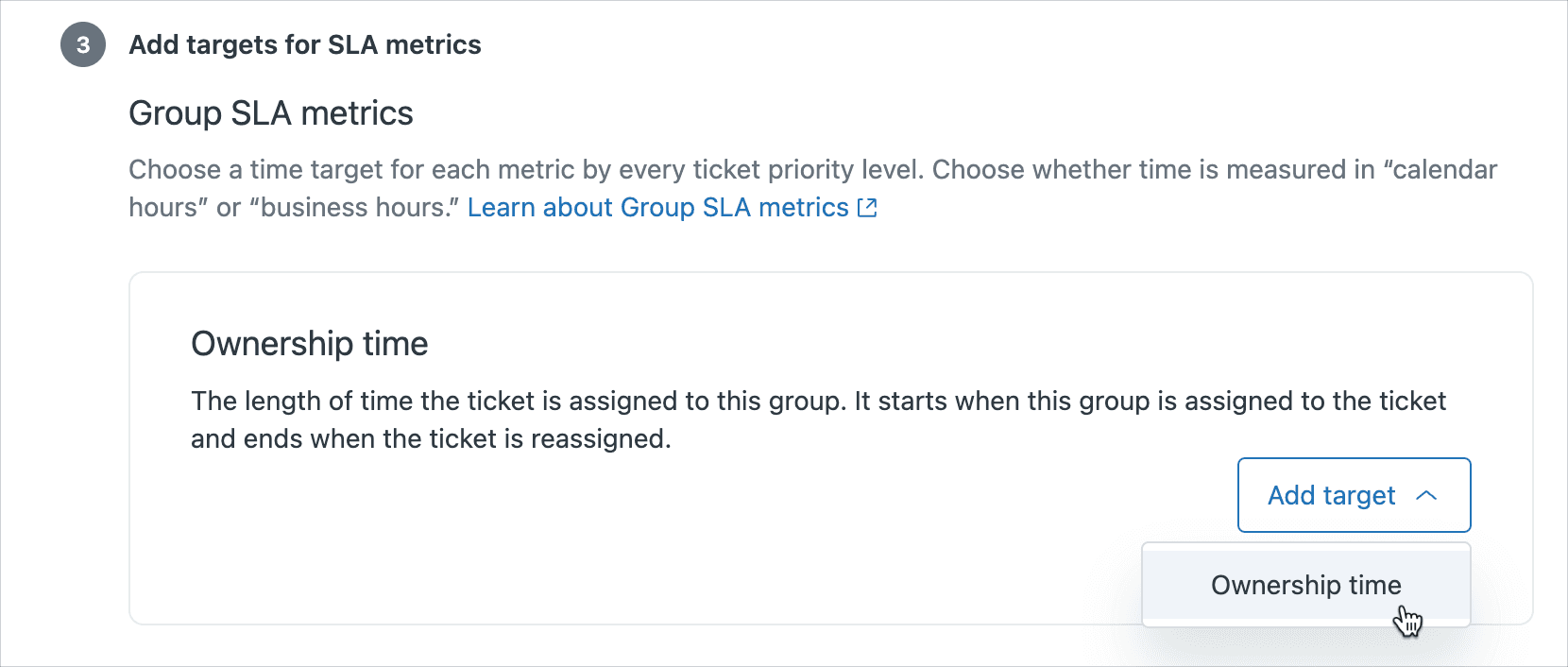
How Group SLA ownership time works
Understanding when ownership time starts and stops is critical to using Group SLAs effectively. The clock begins ticking the moment a ticket is assigned to a group that matches your Group SLA policy conditions. It stops when the ticket is either solved or reassigned to a different group.
Here's a concrete example. Imagine a ticket arrives at your first-line support group. Your policy says Tier 1 has 4 hours to resolve tickets. The agent realizes it's a bug and escalates to Engineering after 2 hours. The ownership time stops at 2 hours (well within the 4-hour target), and a new clock starts for the Engineering group, which might have an 8-hour target.
What happens when tickets are reopened? If a ticket was solved by Engineering but the customer reports the fix didn't work, ownership time resets when the ticket is reassigned back to Engineering. This prevents teams from gaming the system by marking tickets solved prematurely.
You also need to choose between business hours and calendar hours:
| Calculation Type | Best For | Example |
|---|---|---|
| Business hours | Teams working set schedules (9-5, weekdays) | Engineering teams with no weekend coverage |
| Calendar hours | 24/7 operations or time-sensitive issues | Critical bug fixes, security incidents |
Zendesk allows multiple business hours schedules on Enterprise plans, so different groups can have different working hours. Your APAC support team might operate 9 AM to 6 PM Singapore time, while your Engineering group follows US Pacific hours.
Group SLAs and regular SLAs can coexist on the same ticket. Your customer might see a 24-hour first response time commitment, while internally you're tracking that Engineering has 8 hours to provide a fix. Both timers run independently. Learn more about standard SLA policies in Zendesk's documentation.

Setting up Group SLA policies with ownership time
Before you start configuring Group SLAs, you'll need a few things in place:
- Suite Enterprise plan or above ($169 per agent per month annually)
- Groups already created in your Zendesk (Admin Center > People > Groups)
- Priority field populated on tickets (usually via triggers that set priority based on request type or form)
For detailed setup instructions, see Zendesk's Group SLA documentation.
Once you have these prerequisites, here's how to configure a Group SLA policy with ownership time targets:
Step 1: Navigate to the SLA settings Go to Admin Center > Objects and rules > Business rules > Service level agreements. Click the "Group SLAs" tab at the top of the page.
Step 2: Create a new policy Click "Add policy" and give it a descriptive name. Something like "Engineering escalation SLA" or "Tier 2 ownership targets." Clear names help when you're managing multiple policies later.
Step 3: Define the conditions This determines which tickets the policy applies to. You can target specific groups, sets of groups, or tickets matching certain criteria. Common conditions include:
- Group is "Engineering" OR "Product"
- Priority is High or Urgent
- Ticket status is less than Solved
Step 4: Set ownership time targets Here's where you define how long each group has. Zendesk lets you set different targets based on priority:
| Priority | Suggested Target | Use Case |
|---|---|---|
| Urgent | 2 hours | Critical bugs, outages, security issues |
| High | 4-8 hours | Significant customer-impacting issues |
| Normal | 16-24 hours | Standard feature requests or bugs |
| Low | 48-72 hours | Minor issues, cosmetic problems |
Step 5: Choose business or calendar hours Select whether the timer should run continuously (calendar hours) or only during working hours (business hours). Remember that business hours require you to have business schedules configured in Zendesk.
Step 6: Save and order your policies Policy order matters. Zendesk applies the first matching policy and stops checking. Put your most specific, restrictive policies at the top, and broader catch-all policies at the bottom.
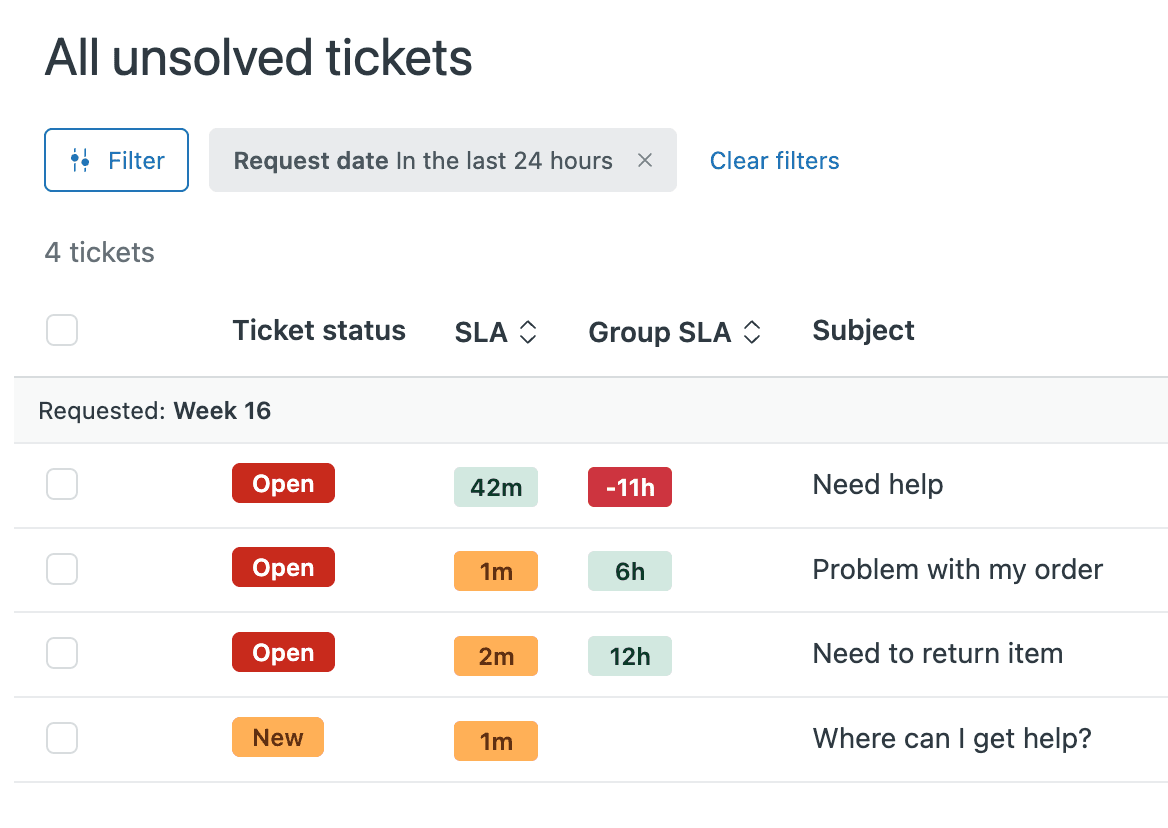
Understanding ownership time metrics and reporting
Once your Group SLAs are running, you'll want to track performance. Zendesk provides several ways to monitor ownership time metrics.
Ticket views with SLA columns Add Group SLA columns to your ticket views to see breach risk at a glance. You can sort tickets by how close they are to breaching, helping agents prioritize work that needs immediate attention.
Zendesk Explore dashboards The Group SLA dashboard in Zendesk Explore provides aggregate reporting. You'll see metrics like:
- % Achieved: The percentage of tickets that met their ownership time target
- Average resolution time: How long tickets typically stay with each group
- Breach rate: How often groups miss their targets
Instance-based vs ticket-based reporting Instance-based reporting tracks every time a ticket enters a group, even if the same ticket enters the same group multiple times. Ticket-based reporting looks at the total time a ticket spent with a group across all instances. Most teams use instance-based reporting for operational reviews, since it captures each handoff separately.
When reviewing your metrics, look for patterns:
- Are certain groups consistently breaching? They might need more resources or different targets.
- Are tickets bouncing between groups repeatedly? Your escalation criteria might need clarification.
- Is there a time-of-day pattern? You might have coverage gaps during certain hours.

Best practices for Group SLA implementation
After working with dozens of support teams on their SLA configurations, we've identified several patterns that separate successful implementations from frustrating ones.
Set up priority triggers first Before Group SLAs can work, tickets need priorities. Build triggers that automatically set priority based on form selection, request type, or keywords. If agents manually set priorities, you'll get inconsistent results and unreliable SLA data.
Differentiate conversational vs ticketing channels Chat and messaging conversations have different rhythms than email tickets. A 4-hour ownership target makes sense for an email ticket. For a live chat that might take 10 minutes to resolve, that same target is meaningless. Consider separate policies or different calculation methods for synchronous channels.
Use the 2-4-8-16 rule as a starting point Many teams find success with tiered targets based on severity:
- Urgent: 2 hours
- High: 4 hours
- Normal: 8 hours
- Low: 16 hours
Adjust these based on your actual team capacity and customer expectations. Better to start lenient and tighten than to set impossible targets that everyone ignores.
Order policies from most to least restrictive Zendesk applies the first matching policy and stops. If you have a specific policy for "High priority Engineering tickets" and a general policy for "All Engineering tickets," put the specific one first.
Create SLA-based views for agents Give each group a dedicated view showing only their tickets, sorted by breach risk. This helps agents see what's urgent without wading through tickets that don't apply to them.
Handle multi-team workflows carefully When tickets need to move through multiple groups sequentially (Support → Engineering → QA → Support), consider whether you need separate policies for each handoff or a single policy covering the entire flow.
Create accountability without blame SLAs are coaching tools, not punishment mechanisms. When a team breaches regularly, the conversation should be about resource constraints, process improvements, or unrealistic targets, not agent performance.
Common Group SLA challenges and solutions
Even with careful planning, teams run into specific challenges with Group SLAs. Here are the most common ones and how to address them.
Challenge: Assignment vs escalation confusion Agents sometimes "escalate" by simply reassigning the ticket to another group without any of the proper context or documentation. The receiving group gets a ticket with no history, and the SLA clock starts ticking on something they don't understand.
Solution: Create separate groups for first-line and escalated tickets. Use macros that require specific fields (like escalation reason or customer impact) before allowing reassignment to specialized groups. Train agents that reassignment without context is a process failure, not a solution.
Challenge: External escalations What happens when you escalate to a team outside Zendesk? Maybe you create a Jira ticket for Engineering, or start a Slack thread with the Product team. The Zendesk ticket sits with your Support group while you wait for external responses, but the Group SLA keeps ticking.
Solution: Create placeholder groups like "Pending Engineering" or "Waiting on Product." When you escalate externally, reassign the ticket to the placeholder group. This pauses the original group's SLA clock and starts a new one for the external dependency. Some teams even create automation that reassigns tickets back after a set time to prevent them from disappearing into external queues.
Challenge: First-line support ownership time First-line teams often struggle with ownership time targets because they're waiting on customers for information. A ticket might sit for 24 hours because the customer hasn't replied, then the agent picks it up and resolves it in 10 minutes. The SLA shows a breach even though the agent did nothing wrong.
Solution: Set realistic targets based on expected resolution time, not just response time. Consider using business hours so off-hours don't count against your team. Some teams create a "Pending Customer" status that pauses SLAs, though this requires careful trigger configuration.
Challenge: Policy conflicts and ordering issues Tickets matching multiple Group SLA policies can produce confusing results. A ticket that's in "Engineering" AND has "High" priority might match two different policies, and only the first one in the list applies.
Solution: Audit your policies regularly. Document which conditions each policy targets. Test edge cases (tickets that could match multiple policies) to see which one applies. Consider using "ALL" conditions rather than "ANY" conditions to make matches more specific.
Going beyond native SLAs with AI-powered solutions
Group SLAs are powerful for tracking internal accountability, but they have limitations. They measure time. They don't improve the processes that consume that time. They track handoffs but don't reduce them. They identify bottlenecks but don't resolve them.
This is where AI teammates can augment your SLA strategy.
At eesel AI, we've built an AI teammate for support teams that plugs directly into Zendesk. While it doesn't replace Group SLAs, it addresses many of the root causes that make ownership time targets challenging in the first place.

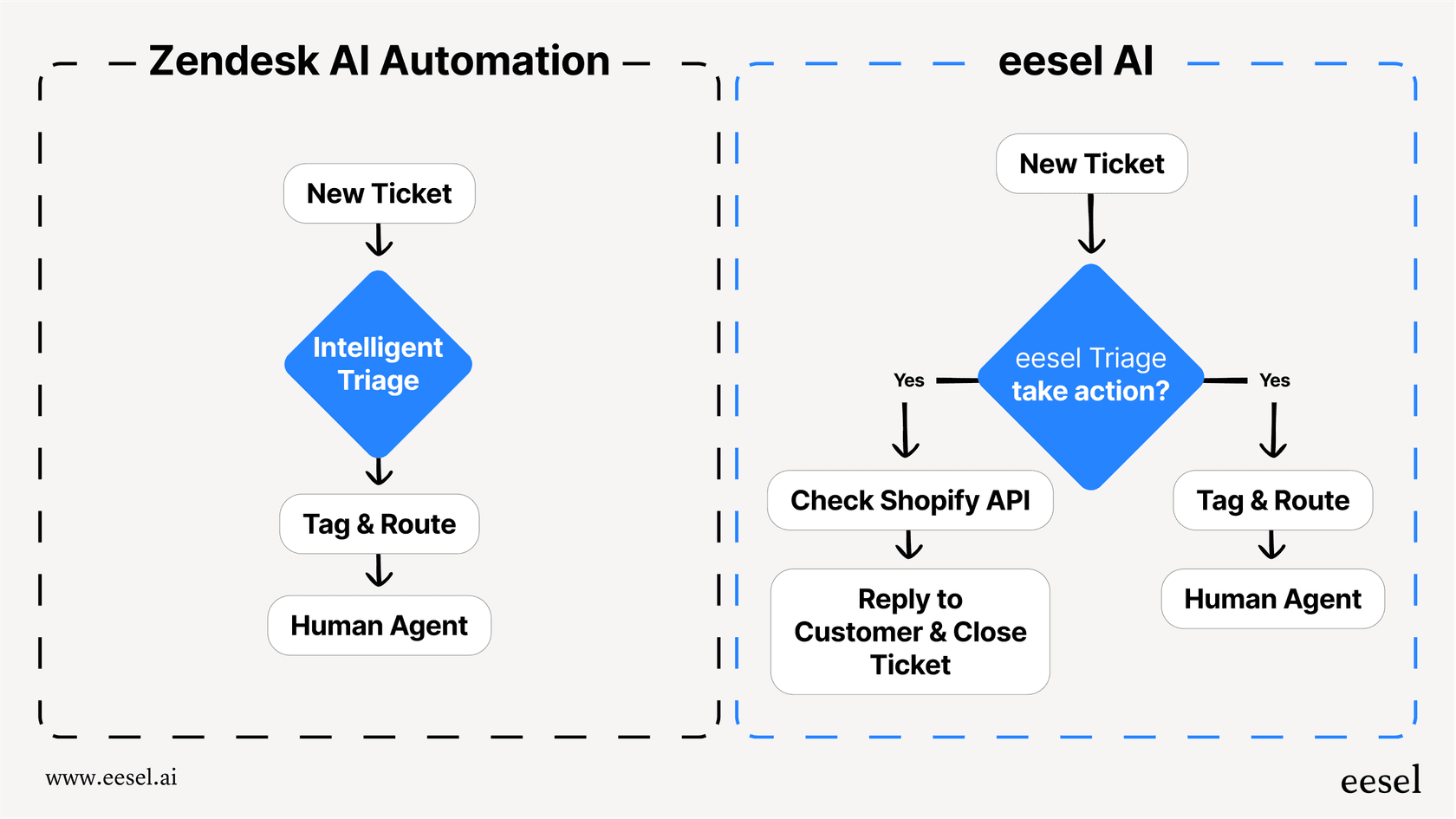
AI Triage for automatic ticket routing Our AI Triage product reads incoming tickets and routes them to the right group automatically. Instead of tickets bouncing between teams while agents figure out who should handle them, the AI assigns correctly the first time. This reduces the total number of handoffs and ensures ownership time starts when it should, not after a day of internal ping-pong.
AI Agent for autonomous resolution Our AI Agent handles frontline support tickets end-to-end. For the tickets it can resolve (typically 60-80% of common requests), there's no escalation, no handoff, no ownership time to track. The AI resolves the issue and closes the ticket. Your Group SLAs become relevant only for the complex edge cases that genuinely need human expertise.
Real-time performance insights While Zendesk's reporting shows historical SLA performance, our AI provides real-time visibility into what's happening right now. You can see which tickets are at risk of breaching before they actually do, and intervene proactively rather than reviewing breaches after the fact.
The combination works well: Group SLAs track the handoffs that do happen, while AI reduces the total number of handoffs needed. Teams using both typically see their ownership time metrics improve not because they're working faster, but because the AI is handling the straightforward work that used to clog up their queues.
If you're interested in exploring how AI could complement your Zendesk SLA strategy, you can learn more about our Zendesk integration here or see our pricing to understand how our flat-rate model compares to per-agent licensing.
Getting the most from your Zendesk SLAs
Group SLA target ownership time is a valuable tool for internal accountability, but it's just one piece of a well-run support operation. Here are the key takeaways:
Start with realistic targets based on actual team capacity, not aspirational goals. Unattainable SLAs get ignored. Attainable ones drive improvement.
Monitor your metrics regularly, but use them as coaching tools rather than performance clubs. The question should always be "How do we improve this?" not "Who's responsible for the breach?"
Consider AI augmentation for complex workflows. If you're tracking ownership time across five different groups for a typical ticket, the problem might be your process, not your people. AI teammates like eesel AI can handle the routine work that currently requires multiple handoffs, letting your human teams focus on what actually needs their expertise.
Remember that SLAs are a means to an end. The goal isn't perfect SLA achievement. It's resolving customer issues quickly and effectively. Sometimes that means a breach is the right outcome, if it means solving the problem properly rather than rushing to meet an arbitrary deadline.
If you're ready to explore how AI could help your team hit their targets more consistently, try eesel AI free and see how an AI teammate can transform your support operations.


