How to use the Zendesk AI agent confusion matrix: A complete guide

Stevia Putri
Last edited February 26, 2026
When your AI agent keeps misclassifying customer intents, it doesn't just frustrate users. It creates a cascade of problems: longer resolution times, unnecessary escalations, and declining customer satisfaction. The confusion matrix in Zendesk AI agents is your diagnostic tool for understanding exactly where your AI is getting confused and how to fix it.
This guide walks you through reading the confusion matrix, interpreting what it tells you about your AI's performance, and taking concrete steps to improve intent recognition. Whether you're troubleshooting low automation rates or fine-tuning an already-performing AI agent, the confusion matrix gives you the visibility you need.

What is the Zendesk AI agent confusion matrix?
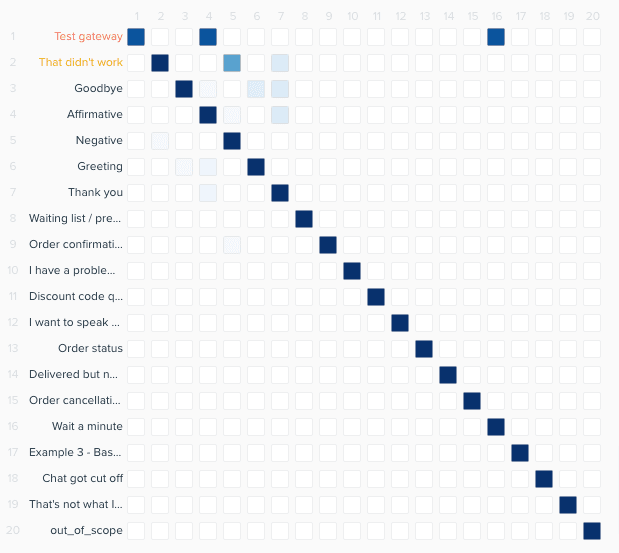
The confusion matrix is a visualization tool that shows how well your AI agent recognizes customer intents. It compares what the AI predicted against what the customer actually meant, displaying the results as a color-coded grid.
Definition and purpose
In machine learning terms, a confusion matrix is a table that visualizes the performance of a classification algorithm. For Zendesk AI agents, it specifically tracks intent recognition: when a customer sends a message, what intent did the AI think it matched, and was it correct?
The matrix helps you identify patterns in misclassification. If customers asking about refunds are frequently classified as order status inquiries, the matrix will show this overlap clearly. This visibility is essential because intent accuracy directly impacts your automation rate. When the AI misidentifies intents, it either sends the wrong response or defaults to a human handoff.
Key components
The confusion matrix displays as a grid with:
- X-axis (horizontal): The actual intent (what the customer meant)
- Y-axis (vertical): The predicted intent (what the AI thought)
- Color intensity: How frequently a prediction occurred (darker cells mean more frequent matches)
When your AI is performing well, you'll see a dark diagonal line running from top-left to bottom-right. This means the predicted intent matches the actual intent consistently. Dark cells off this diagonal indicate confusion: the AI is matching one intent when it should have matched another.
Prerequisites for using the confusion matrix
Before you can access the confusion matrix, you need:
- Zendesk AI agents - Advanced add-on: The confusion matrix is only available with the Advanced AI add-on, not the Essential plan included in standard Suite tiers. Contact Zendesk sales for pricing.
- Expression-based AI agent: The confusion matrix applies to expression-based (Legacy) AI agents that use trained intents and expressions. Generative AI agents work differently.
- Access to Training Center: You need appropriate permissions to access the AI agents - Advanced section.
- Basic understanding of intents: You should know what intents are and how expressions train the AI to recognize them.
If you're on the Essential AI agent plan, you'll need to upgrade to access these advanced training and diagnostic features.
How to access and read the confusion matrix
Step 1: Navigate to the confusion matrix
To access the confusion matrix, go to AI agents - Advanced → Training Center → Confusion Matrix. The interface loads the most recently generated matrix for your AI agent.
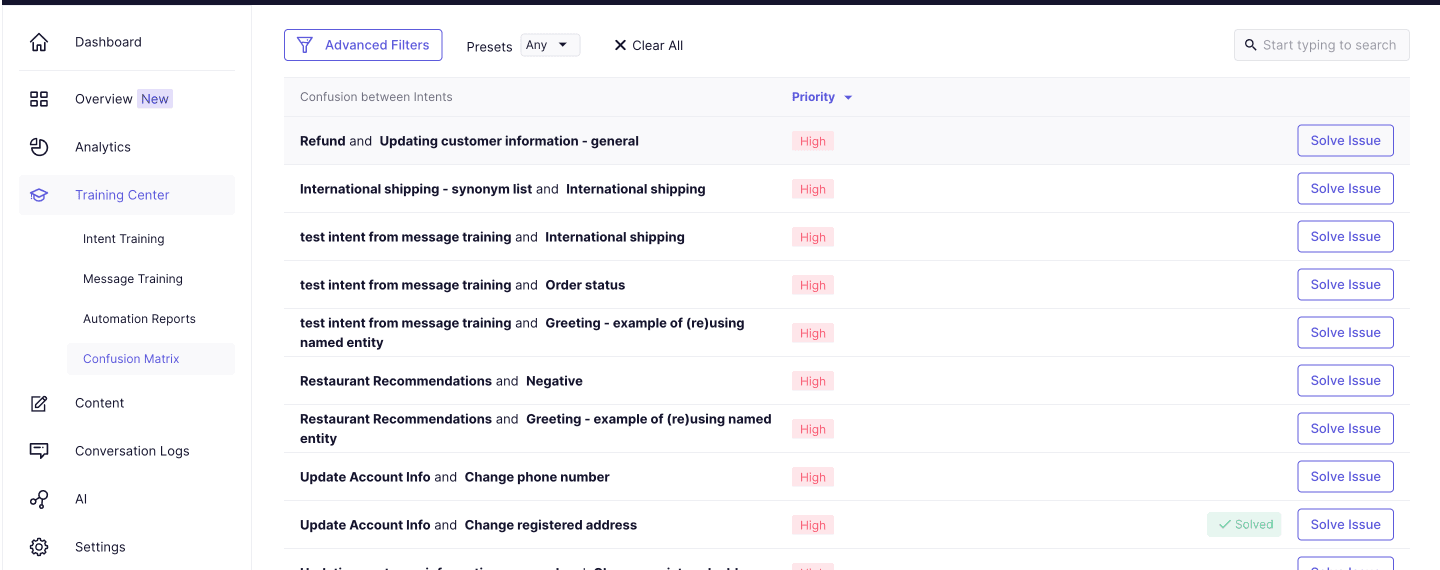
The matrix generates automatically every Tuesday night (Pacific time), but you can also trigger manual retraining if you've made significant changes to your training data.
Step 2: Interpret the grid
Start by looking at the overall pattern:
- A strong diagonal line means your intents are well-defined and the AI is recognizing them accurately.
- Dark off-diagonal cells show where intents are confusing the AI. For example, if the cell where "Refund Request" (actual) meets "Order Status" (predicted) is dark, customers asking for refunds are being misclassified as order status inquiries.
- Light or empty cells indicate either clear distinction between intents or low traffic for that combination.
The color scale matters. A slightly off-diagonal cell might indicate occasional confusion worth monitoring. A heavily darkened off-diagonal cell signals a significant problem that needs immediate attention.
Step 3: Review the List of Issues
Below the matrix, you'll find the List of Issues tab. This prioritizes problems by severity:
- High priority: Intents that frequently confuse each other, significantly impacting performance
- Medium priority: Moderate confusion that may affect specific customer segments
- Low priority: Minor overlaps or edge cases
Use the Advanced filters to narrow down specific intent pairs you want to investigate. This is useful when you know a particular intent has been problematic.
How to optimize your AI using the confusion matrix
Step 4: Identify problematic intents
Click on any dark off-diagonal cell to see details about the confusion between those two intents. The system shows:
- How many expressions are causing the confusion
- Specific examples of misclassified messages
- The confidence scores associated with these predictions
High-priority issues in the List of Issues are your starting point. These represent the biggest opportunities for improvement.
Step 5: Manage expressions
Click Solve issue → Manage expressions to see the specific training phrases causing confusion. From here, you can:
- Move expressions: Drag expressions from one intent to another if they're miscategorized
- Delete expressions: Remove phrases that are ambiguous or no longer relevant
- Add new expressions: Strengthen an intent by adding clearer examples
The interface highlights expressions that appear in multiple intents. These are your primary targets for cleanup.
Step 6: Decide on intent structure
Sometimes the issue isn't the expressions but the intent structure itself. Consider these actions:
- Merge intents: If two intents consistently confuse each other and serve similar purposes, combining them may improve accuracy. For example, "Shipping Cost" and "Delivery Time" might work better as a single "Shipping Questions" intent.
- Add more training data: If an intent is too sparse, the AI lacks examples to learn from. Add 20-30 diverse expressions.
- Create new intents: If one intent covers too many scenarios, splitting it can reduce confusion. "Account Issues" might become "Password Reset," "Update Profile," and "Close Account."
- Keep separate: If intents serve genuinely different customer needs despite some overlap, keep them distinct but refine the expressions to clarify boundaries.
Step 7: Retrain your model
After making changes, you have two options:
- Wait for automatic generation: The matrix regenerates every Tuesday night with your updated training data.
- Manual retraining: Trigger immediate retraining if you need faster feedback on your changes.
Monitor the next matrix generation to verify your changes reduced confusion. It may take a few iterations to fully resolve complex intent overlaps.
Understanding the relationship with confidence thresholds
The confusion matrix and confidence threshold work together to determine your AI's behavior. While the matrix shows WHERE intents confuse each other, the threshold determines HOW SURE the AI must be before responding.
How intent confusion affects confidence
When two intents have overlapping expressions, the AI's confidence score for both will be lower. It recognizes similarities but can't clearly distinguish which intent applies. This is why you might see confidence scores hovering around 50-60% for problematic intents.
The accuracy vs. coverage trade-off
Your confidence threshold setting creates a trade-off:
| Threshold Range | Result | Best For |
|---|---|---|
| 70-85% | High accuracy, lower automation rate | Regulated industries, complex products |
| 60% (default) | Balanced approach | Most general use cases |
| 40-55% | Higher automation, some misclassification risk | Simple FAQs, forgiving flows |
A high threshold means the AI only responds when very confident, reducing errors but potentially defaulting to human handoffs unnecessarily. A low threshold increases automation but risks more incorrect responses.
Using the matrix to set thresholds
Review your confusion matrix to identify which intents have clear separation versus problematic overlap. For intents with strong diagonal performance (clear distinction), you can use a lower threshold. For intents that show confusion in the matrix, consider a higher threshold until you resolve the training issues.
Zendesk recommends targeting an 80% answered rate as a baseline. If your answered rate is significantly lower, the confusion matrix will help you identify whether threshold adjustments or intent optimization is the right solution.
Common issues and troubleshooting
Too many default replies
If customers frequently receive "I don't understand" or default escalation responses, you have two paths:
- Lower the threshold: This increases the AI's willingness to attempt a response, but only do this for intents showing clear diagonal performance in the matrix.
- Improve training: Add more expressions to intents with low confidence scores. The confusion matrix shows which intents need attention.
Frequent incorrect intent triggers
When the AI keeps triggering the wrong intent:
- Raise the threshold: Force the AI to be more certain before responding.
- Check the matrix: Find the specific intent pairs causing confusion and clean up overlapping expressions.
Inconsistent confidence scores
If the same query gets different confidence scores at different times:
- Review intent overlap: The matrix will show if multiple intents are competing for the same expressions.
- Check training data balance: Ensure no single intent dominates your training data.
- Look for similar expressions: Phrases that could apply to multiple intents create inconsistent scoring.
Best practices for ongoing optimization
Make the confusion matrix part of your regular workflow:
- Weekly reviews: Check the new matrix each Wednesday morning after Tuesday night's generation.
- Track solved issues: Mark issues as resolved in the List of Issues to maintain a clean workspace.
- Balance intent granularity: Avoid creating too many highly specific intents. Group related topics when possible.
- Document changes: Keep notes on what you changed and the results. This helps identify which adjustments actually improved performance.
- Aim for continuous improvement: Small, regular optimizations beat occasional major overhauls.
A complementary approach: Testing before going live with eesel AI
While Zendesk's confusion matrix helps you optimize after deployment, there's value in catching issues before customers see them. That's where a different approach can help.
With eesel AI, you can simulate your AI configuration against historical tickets before going live. Instead of discovering confusion patterns through weekly reports, you see potential issues during setup. You can test how the AI would have handled past conversations and adjust before any customer interaction.
The key difference is timing:
- Zendesk approach: Retrospective optimization using weekly confusion matrix reports after deployment
- eesel AI approach: Pre-deployment simulation and forecasting
eesel AI also unifies knowledge from all your sources (help center, past tickets, Confluence, Google Docs, Notion) to reduce the manual intent training that creates confusion in the first place. Rather than building expressions from scratch, the AI learns from your existing documentation and resolved conversations.
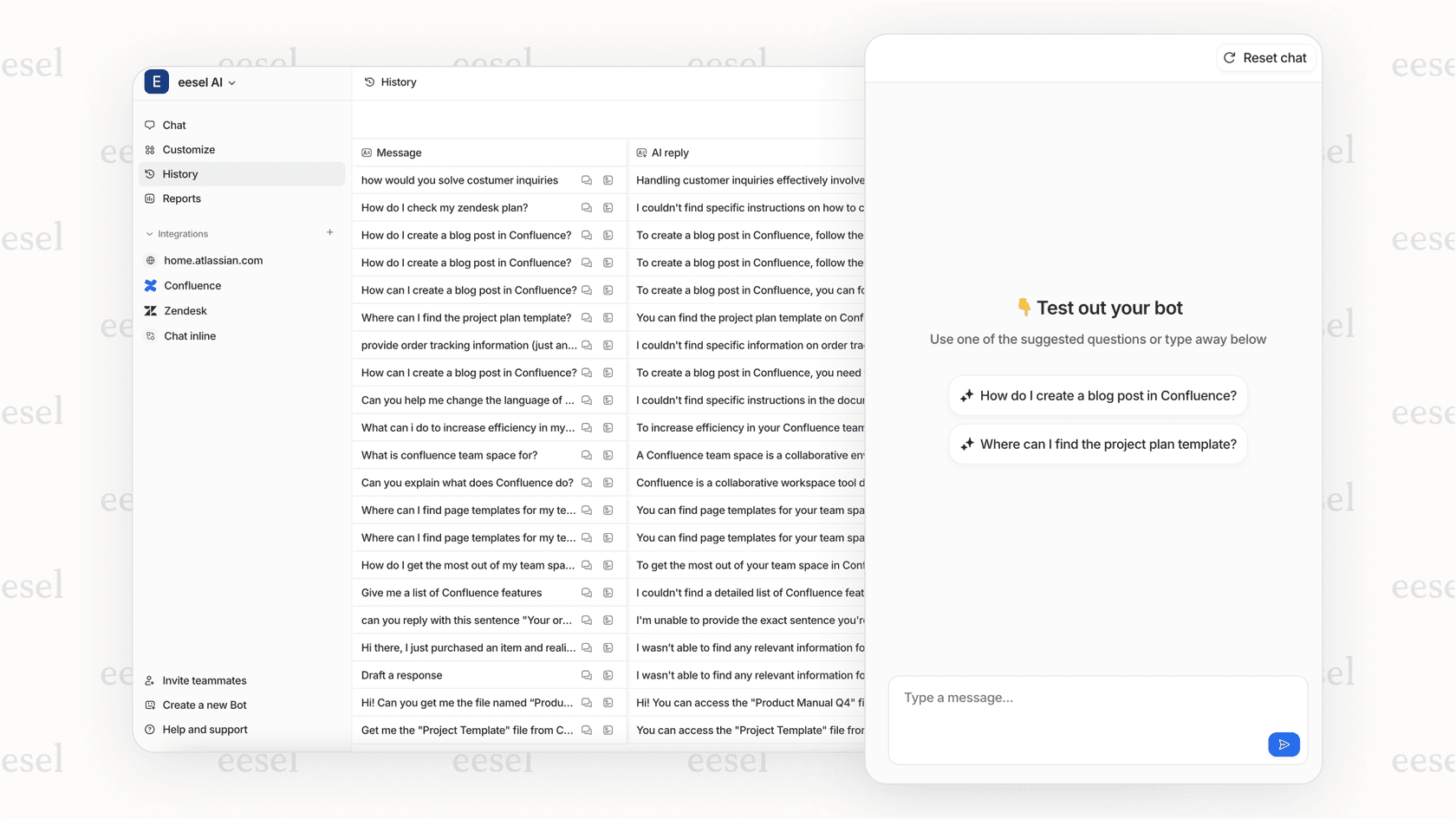
If you're setting up a new AI agent or considering a migration, testing your configuration before launch can save weeks of post-deployment optimization.
Improving your Zendesk AI agent accuracy today
The confusion matrix is your window into how your AI agent actually understands customer requests. By reviewing it regularly and taking action on the issues it surfaces, you can steadily improve intent recognition and automation rates.
Key takeaways:
- Dark off-diagonal cells in the matrix indicate optimization opportunities
- The List of Issues prioritizes problems by severity
- Expression management is your primary tool for fixing confusion
- Threshold adjustments can provide immediate relief while you work on training improvements
- Weekly reviews lead to continuous improvement rather than reactive firefighting
Start with your highest-priority issues this week. Even small improvements to intent clarity can have measurable impacts on your automation rate and customer satisfaction.


Frequently Asked Questions
Share this article

Article by
Stevia Putri
Stevia Putri is a marketing generalist at eesel AI, where she helps turn powerful AI tools into stories that resonate. She’s driven by curiosity, clarity, and the human side of technology.