
Let's be real, seeing the same questions in your support queue is exhausting. "How do I reset my password?" "Where's my invoice?" "What's the refund policy again?" It feels like Groundhog Day, but for customer support. Your team is busy answering the same simple stuff when they could be solving the genuinely tough problems that require a human brain.
Lots of teams think about using AI to handle this, but the idea of building a new internal tool is daunting. Even worse is the nightmare scenario of letting a clueless chatbot loose on your customers. The fear that an AI might go off-script and say something completely wrong is a big, valid concern.
This guide is here to walk you through how to actually train an AI on your company's unique support conversations and knowledge base. We'll show you how to turn that history into an asset that can automate frontline support, help your agents work faster, and keep customers happy. It might sound like a massive project, but modern tools have made it possible to get up and running in minutes, not months.
What you'll need to get started
Before jumping in, you should know there are two ways to go about this. One way is long, expensive, and a bit of a headache. The other gets you to the finish line much, much faster.
The DIY/traditional path: This is the old-school method, and it requires a serious commitment of time and money. If you decide to go this route, you're going to need:
-
Full access to all your historical support data (think ticket exports and chat logs).
-
A huge amount of clean, high-quality training data, probably thousands of examples.
-
Engineers who know their way around machine learning and APIs.
-
A significant budget for training the model, hosting it, and keeping it running.
-
Patience. A lot of it. We're talking weeks, or more likely, months of development and testing.
The modern platform path: This approach lets you skip all the heavy lifting. You just plug an AI brain directly into the tools you already use. All you need is:
-
Access to your current help desk and knowledge sources.
-
An AI platform that handles the complicated parts for you. This is where a tool like eesel AI comes in, connecting to your tools with just a few clicks.
How to train an AI on your company's support history: 6 steps
Ready to make your support history work for you? Let's break it down into six straightforward steps.
Step 1: Bring all your knowledge sources together
For an AI to give good answers, it needs to see all the right information. This isn't just about past support tickets; it's about connecting every single place your team stores knowledge.
The hard way: First, you'd have to map out all your knowledge spots. This could be your help desk like Zendesk or Intercom, an internal wiki like Confluence, shared Google Docs, and even key conversations from Slack. Then comes the fun part: manually exporting and reformatting everything so the AI can read it. It's a messy, manual job you have to repeat every time a document is updated.
The eesel AI way: Forget about manual exports. eesel AI has one-click integrations that instantly connect and unify all your knowledge. Instead of wrestling with CSV files, you just grant access. The AI then learns from your help center, past tickets, macros, Confluence spaces, and Google Docs on its own. Everything stays up-to-date automatically, with no extra work from your team.

Step 2: Let the AI learn from your past conversations
The best AI support agents sound like your best human agents. They pick up on your brand's voice, understand the common hang-ups your customers face, and know which solutions work because they've learned from your team's actual conversations. This is worlds better than a generic, off-the-shelf model.
The hard way: Get ready for some serious data-wrangling. You'll need to manually dig through thousands of past tickets to find good examples of problems and how they were solved. Then, you have to format these conversations into a structured dataset, like JSONL files, so the AI model can make sense of them. It's a huge time-sink that involves a ton of data cleaning.
The eesel AI way: eesel AI automatically trains on your past tickets. From the moment you connect it, the AI starts analyzing your support history to understand context, tone, and what a successful resolution looks like. It learns how your team communicates from day one. It can even take things a step further by generating draft help articles from successful ticket resolutions, helping you find and fill knowledge gaps with content that’s already proven to be useful.
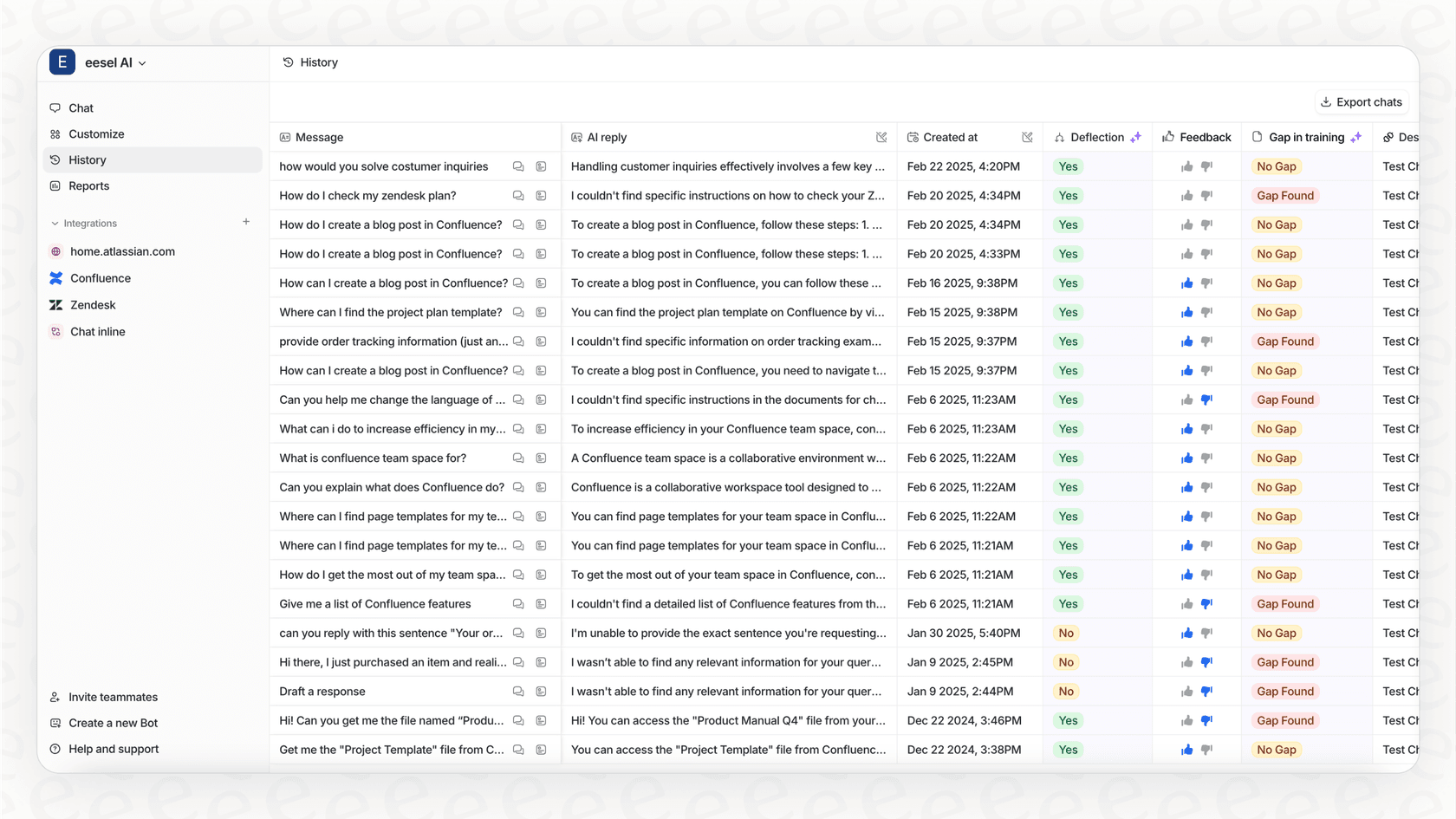
Step 3: Set up your AI’s rules and personality
A good support AI does more than just give answers; it follows your company's rules. You need to be able to define its personality, decide which questions it should tackle, and tell it exactly when to pass a conversation over to a human.
The hard way: This usually involves writing complicated code to control the AI's behavior. These rules are often inflexible, difficult to update, and require a developer for every little tweak. Figuring out what it can and can't do becomes a never-ending engineering project.
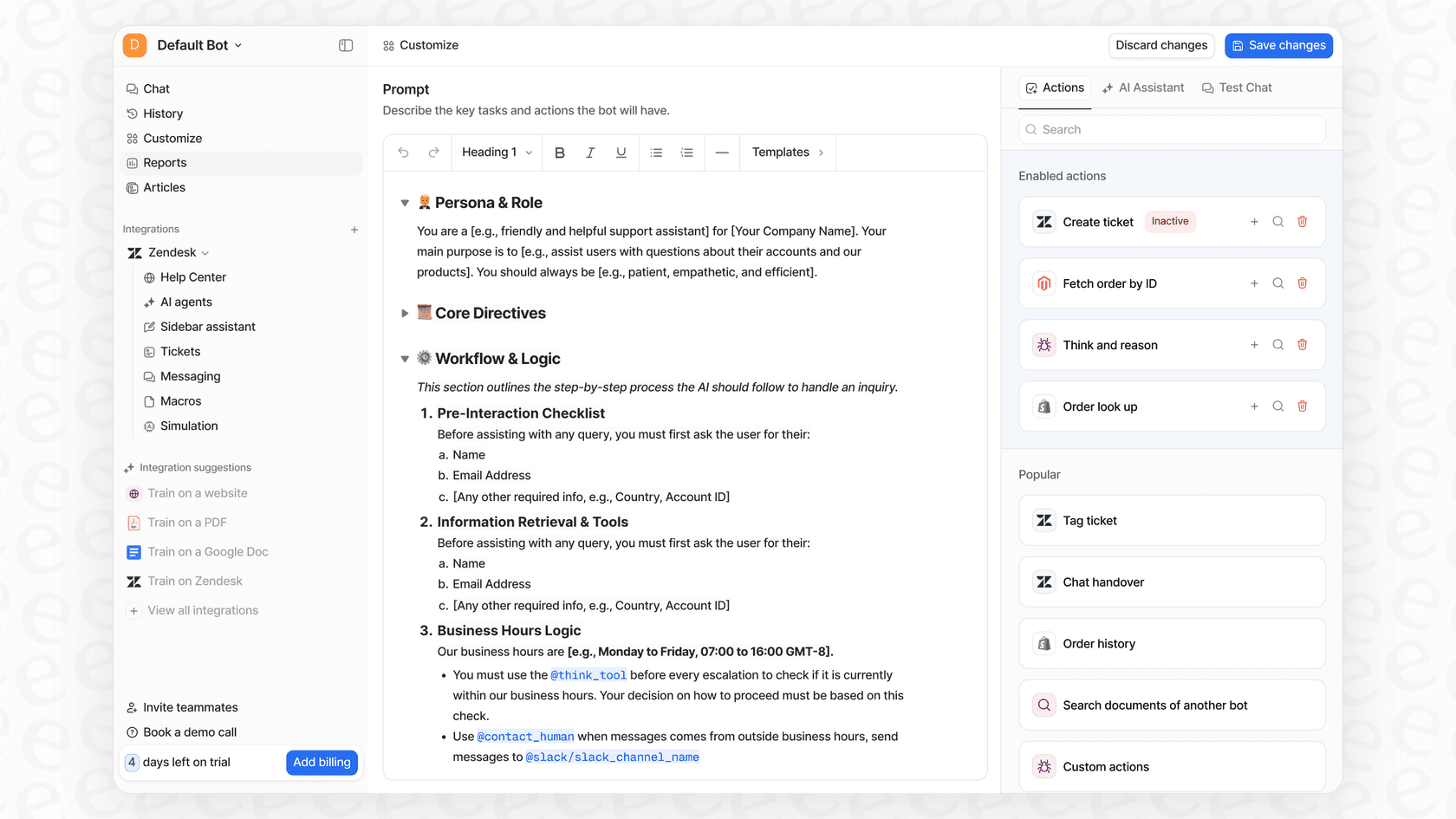
The eesel AI way: eesel AI gives you a fully customizable workflow engine that doesn't require any code. You can use a simple prompt editor to set the AI's tone of voice, whether you want it to be formal, friendly, or a bit quirky. With selective automation, you get to choose exactly which tickets the AI should handle based on things like keywords or customer type. And with custom actions, the AI can do more than just talk. It can look up order details from Shopify, update ticket fields in Zendesk, or route a conversation to the right team, all by itself.
Step 4: Safely test your AI agent before it goes live
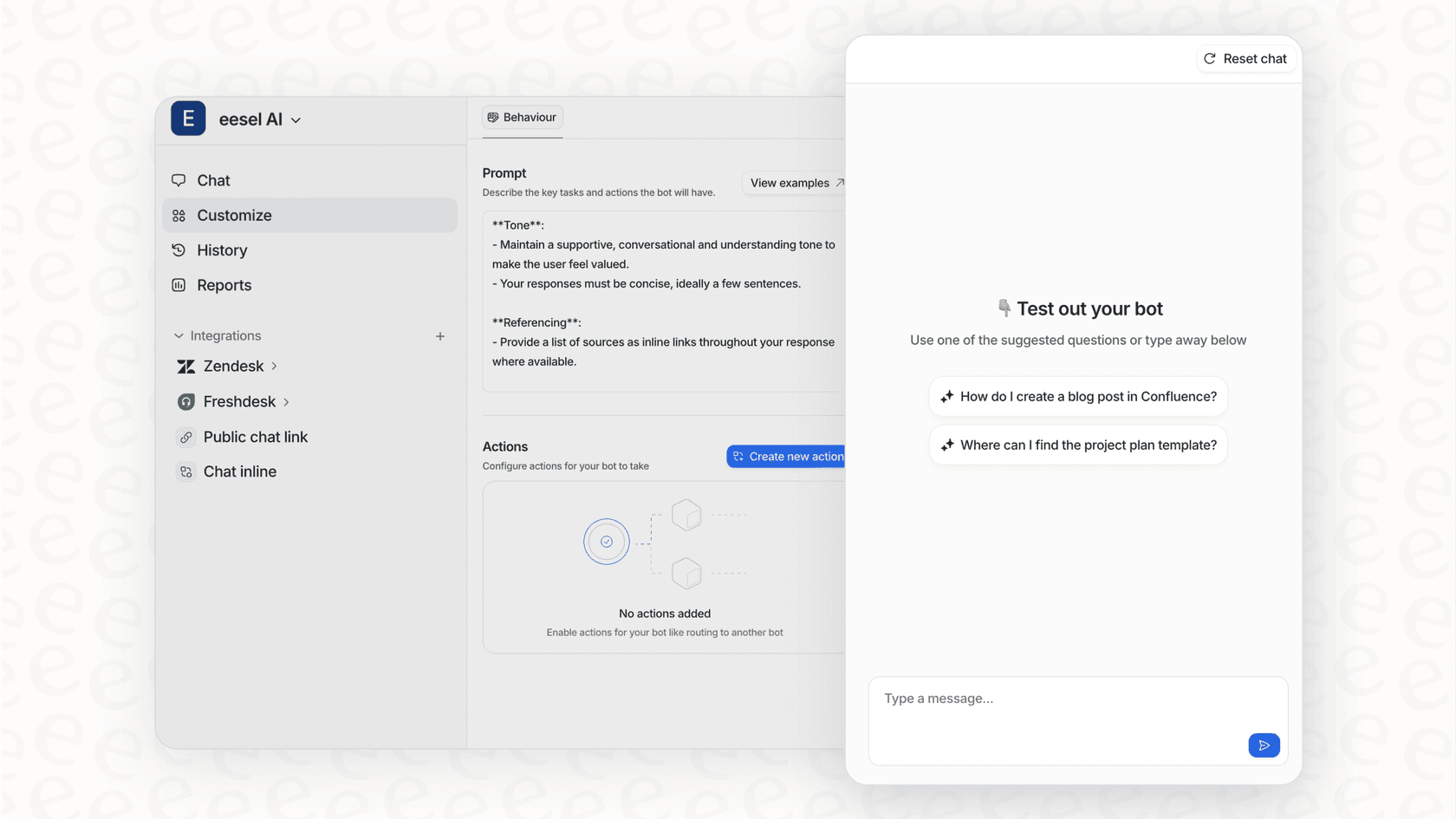
Launching an AI without proper testing is a huge gamble. We’ve all seen screenshots of chatbots "hallucinating" and giving bizarre or just plain wrong answers. One bad response can really damage customer trust. You need a way to see how your AI will behave in the wild before it ever speaks to a real customer.
The hard way: You’d have to build a whole separate testing environment, or a "sandbox," to play in. From there, you'd have to manually throw test questions at it and just hope you've thought of every possible scenario. This method doesn't really scale and doesn't give you a reliable picture of how it will perform.
The eesel AI way: This is one of the coolest parts. eesel AI has a simulation mode that lets you safely test your setup on thousands of your actual past tickets. You can see exactly how the AI would have answered real customer questions from the last week or month. This gives you a solid forecast of its resolution rate and how much time you'll save, so you can tweak the settings and launch feeling confident.
Step 5: Roll out your AI agent gradually
Switching from zero to a fully automated AI overnight is a recipe for disaster. The smart move is to introduce your AI slowly, watch how it does, and give it more responsibility as you and your team get comfortable with it.
The hard way: A gradual rollout usually means a lot of careful engineering work and feature flagging. You might start by letting the AI handle chats from an internal test group before slowly opening it up to certain customer segments or low-risk questions. It's a complex process that can really slow you down.
The eesel AI way: eesel AI makes a gradual rollout easy. You can choose to turn on the AI for certain ticket types, specific channels (like email but not live chat), or simple Tier 1 topics. Anything it can't handle gets automatically sent to your human agents. This lets you start small, prove its value, and scale up whenever you're ready.
Step 6: Monitor performance and keep improving
An AI isn't something you can just set up and forget about. To really get your money's worth, you need to keep an eye on how it's doing, see where it's winning, and find opportunities to make it even better.
The hard way: This means building custom dashboards to track metrics like resolution rates and customer satisfaction. You'd also have to manually read through AI conversation transcripts to spot patterns, catch mistakes, and find gaps in your knowledge base.
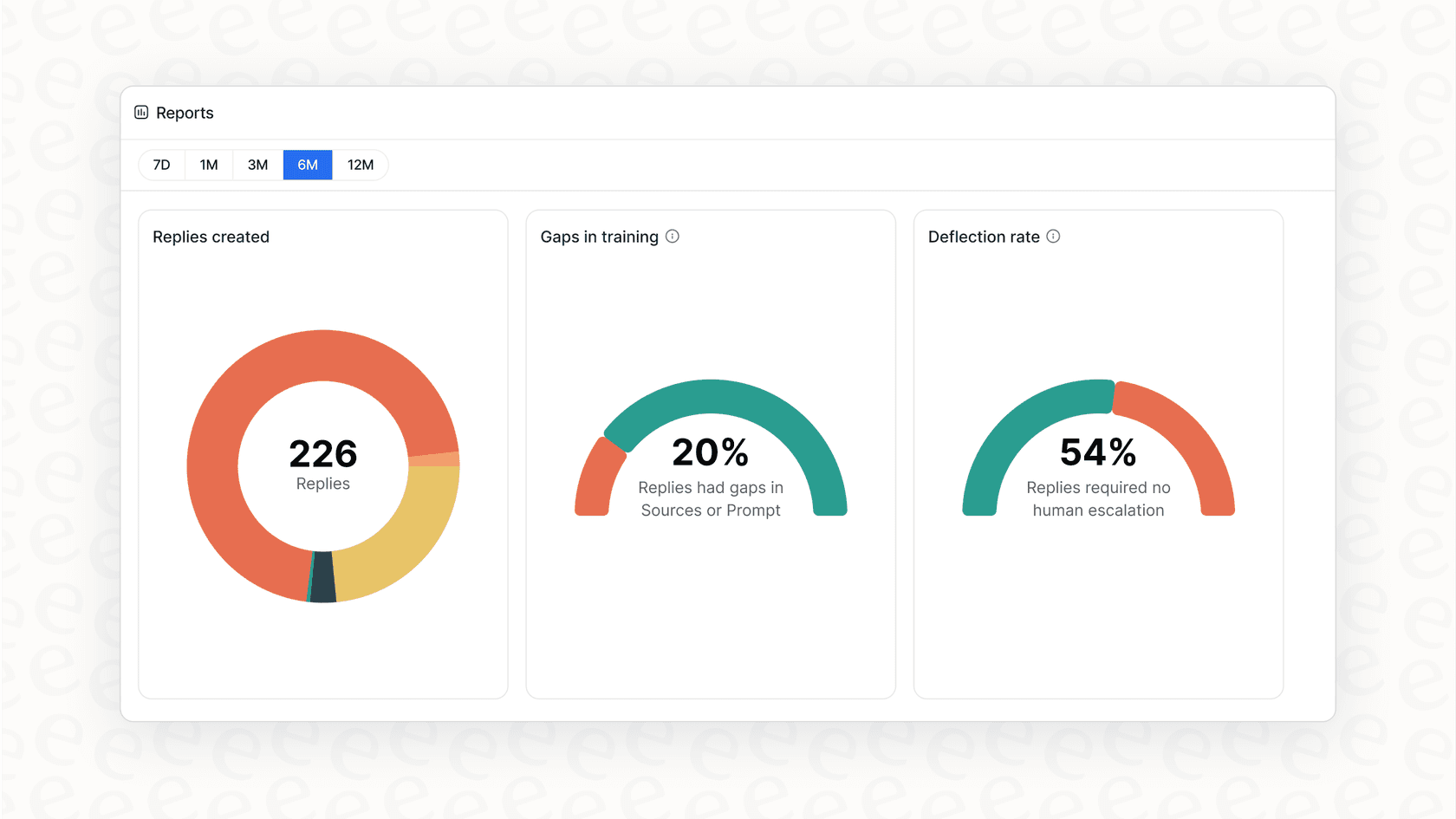
The eesel AI way: eesel AI gives you useful reports right from the start. The dashboard does more than just show you basic stats; it points out gaps in your knowledge base and highlights trends in customer questions. This gives you a clear roadmap for making your AI smarter and your support team more effective.
Common mistakes to avoid
As you get started, try to steer clear of these common pitfalls. They can turn a promising AI project into a real mess.
- Overlooking data privacy: Many AI platforms use your data to train their general models. This means your private business conversations could end up helping your competitors.
Pro tip
Choose a solution that promises your data is only used for you. eesel AI never uses customer data for general model training and offers EU data residency to keep you compliant.
- Ignoring the risk of "hallucinations": Generic AI models are famous for making stuff up when they don't know an answer. That’s a massive risk for any brand.
Pro tip
Ground your AI in your own knowledge. eesel AI ensures the AI only answers based on the information you provide, which massively reduces the risk of it saying something incorrect.
- Falling for unpredictable pricing: Lots of AI vendors charge you per resolution. That sounds good until you have a busy month and your bill goes through the roof. Your costs go up when you have more problems, which doesn't feel right.
Pro tip
Look for transparent, flat-rate pricing. eesel AI offers predictable plans without per-resolution fees, so you aren't penalized for providing great, efficient support.
Put your support history to work today
Training an AI on your support history is one of the smartest ways to scale your support without burning out your team. What used to take a team of engineers and months of development is now something anyone can do.
You don't need to sit through a sales call or a long demo to see if this is right for you. With eesel AI, you can connect your help desk, train your first AI agent on your company’s knowledge, and see it in action in just a few minutes.
Ready to stop answering the same questions on repeat? Start your free trial and automate your first ticket today.

Frequently asked questions
With a modern platform, you can get an AI agent up and running in minutes, not months. One-click integrations allow it to quickly connect to your existing knowledge sources and begin learning immediately.
You should connect all relevant sources, including your help desk (e.g., Zendesk), internal wikis (Confluence), shared documents (Google Docs), and key past conversations from platforms like Slack. The AI learns from your help center, past tickets, and macros.
To prevent hallucinations, ensure the AI is grounded in your company's own knowledge. Modern platforms train directly on your past conversations and knowledge base, ensuring it only answers based on your provided information and learns your brand's voice.
You get a fully customizable workflow engine where you can set the AI's tone of voice and use selective automation to choose which tickets it handles. Custom actions allow the AI to perform tasks like looking up order details or updating ticket fields.
A gradual rollout is best. Start by enabling the AI for specific ticket types, certain channels, or low-risk Tier 1 topics. Any questions the AI can't handle will be automatically routed to your human agents.
Always choose a solution that explicitly promises your data is used only for you and not for training general models. Look for platforms that offer EU data residency to help maintain compliance and protect your private conversations.
Share this article

Article by
Stevia Putri
Stevia Putri is a marketing generalist at eesel AI, where she helps turn powerful AI tools into stories that resonate. She’s driven by curiosity, clarity, and the human side of technology.