Let's be honest, sifting through a mountain of support tickets is a grind. Trying to figure out which customer is just a little peeved versus which one is about to post a furious rant on social media, all based on a few lines of text, feels like a high-stakes guessing game. If you guess wrong, a small complaint can easily blow up into a major headache.
This is the problem that AI-powered sentiment analysis promises to solve. The idea is to give your team a quick read on customer emotions so they can work smarter, not just harder.
Freshdesk, being a major player in the customer support world, has its own built-in AI called Freddy. It’s designed to help your team get a handle on customer moods without having to manually read every single message as it comes in. In this guide, we’ll walk through what Freshdesk AI Sentiment Analysis actually does, how to use it, and how to optimize it for your specific team goals. We'll also look at how you can build a more tailored automation setup right inside Freshdesk.
What is Freshdesk AI Sentiment Analysis?
Basically, sentiment analysis uses a technology called Natural Language Processing (NLP) to figure out the emotional tone behind a piece of writing. Is the customer happy, upset, or just stating a fact? Freddy, Freshdesk's AI, scans incoming support tickets and assigns each one a sentiment score.
This score, from 0 to 100, gets sorted into one of three buckets:
-
Negative: Typically scores from 10 to 30.
-
Neutral: Scores from 31 to 70.
-
Positive: Scores from 71 to 100.
While admins can adjust these ranges slightly, the goal is to give support agents a simple, color-coded clue about the customer's mood. Instead of spending the first hour of their day reading through every new ticket to gauge urgency, the team gets a bird's-eye view of the emotional landscape. It's all about helping agents prioritize conversations and route problems more effectively, so your most frustrated customers get help first.
Core capabilities and use cases
Before we get into the more advanced stuff, it’s good to know what the out-of-the-box tools are meant for. When used the right way, Freshdesk’s sentiment analysis is a reliable entry point into AI-driven support.
Prioritizing tickets to prevent escalations
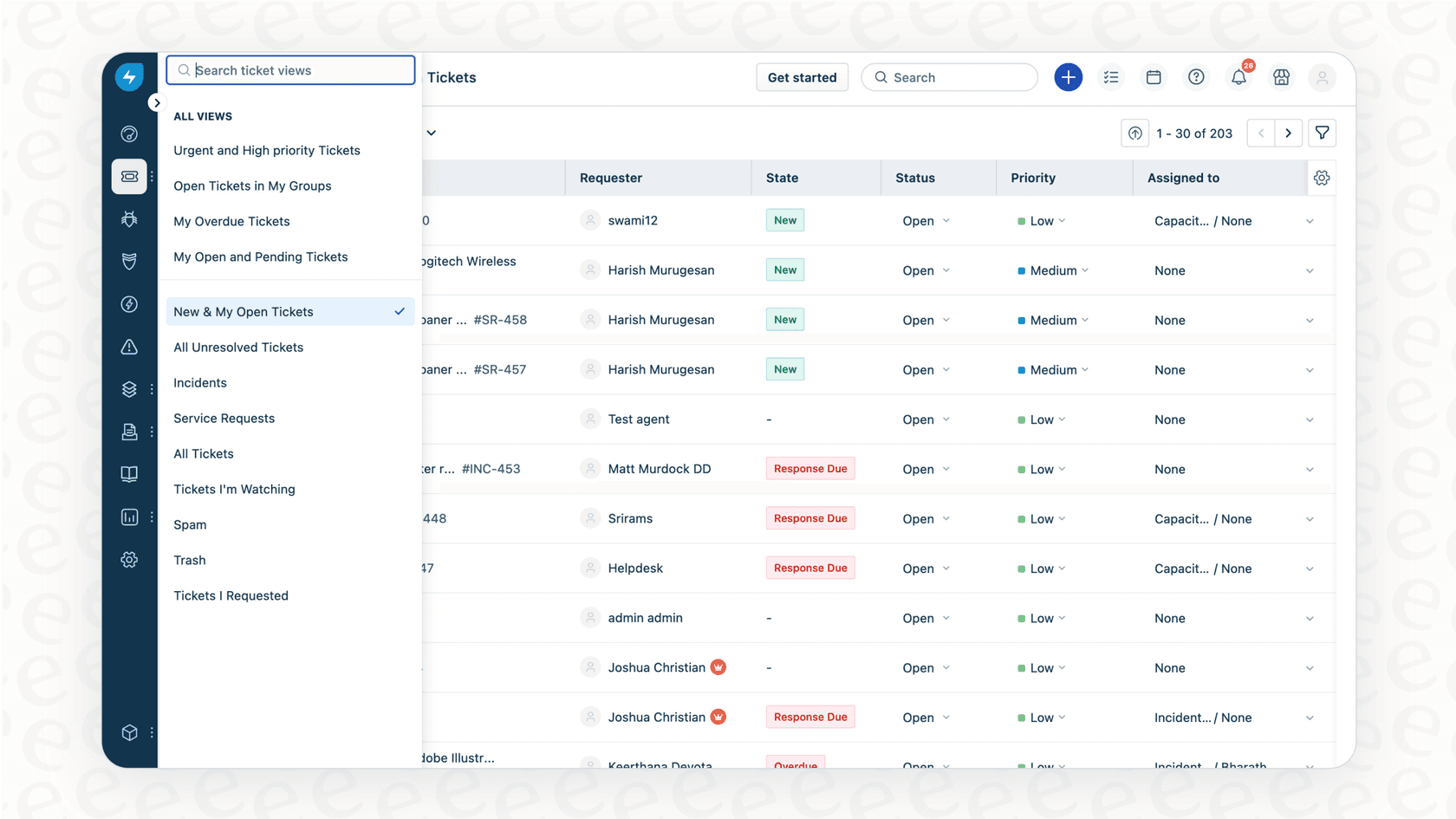
The most common use for this feature is simply organizing the ticket queue. Rather than just sorting by the oldest ticket, agents can create a view that shows all "negative" sentiment tickets at the top. This simple change helps teams move from a reactive "first-come, first-served" model to a more proactive, "who needs us most?" approach.
Picture an agent logging in on a Monday morning. Instead of being greeted by an endless, unordered list, they can instantly see the top five most frustrated customers. They can jump on those issues right away, before the customer has time to get even more annoyed or start looking at competitors. It’s a practical way to put out small fires before they turn into major emergencies.
Automating workflows based on customer emotion
Freshdesk also allows you to create automation rules that are triggered by sentiment. This is where you can start to offload some of the manual, repetitive tasks from your team and build more consistent support processes.
For example, you could set up a few rules:
-
If a ticket's sentiment drops from "Positive" to "Negative," automatically add an "At-Risk Customer" tag and notify the account manager.
-
If a new ticket comes in with "Negative" sentiment and the customer is on your enterprise plan, send an immediate notification to your team's channel in Slack or Microsoft Teams.
These kinds of automations make sure that important issues get in front of the right people immediately, without relying on an agent to manually spot the change. It's like having a safety net for customer relationships that might be starting to fray.
Optimizing Freshdesk AI Sentiment Analysis for your needs
While Freshdesk's built-in tools are a robust starting point, many teams eventually look for ways to scale their support. Freshdesk provides a solid foundation, and you can further enhance it by connecting it with specialized tools. Let's look at a few common considerations and how to address them.
Tailoring AI behavior for specific industry contexts
Freshdesk AI provides a reliable, standardized model that works effectively for most businesses. However, because it is designed for broad application, it might not always account for the highly specific jargon of every industry or the unique ways your customers talk.
For example, a customer at a gaming company might say, "This update is sick!" and mean it as a compliment. A generic model might flag "sick" as a negative word. For teams that want to refine these interpretations, having additional control is a significant advantage.
This is where a tool like eesel AI works as a perfect companion. Instead of relying solely on the built-in system, you can use a simple prompt editor to tell the AI exactly how to behave, what tone to use, and which actions to take based on your specific business rules. This level of control means the AI works exactly the way you need it to, because it understands the full context of your business.

Beyond tickets: Unifying knowledge from other sources
Freshdesk's AI is excellent at learning from the information inside your Freshdesk account, like your help articles and old tickets. For many teams, the answer a customer needs might also live in technical documents on Confluence, a project plan in Notion, or a team discussion in Slack. By default, helpdesk AI focuses on its internal data.
The best way to enhance this is to connect all of your scattered information. eesel AI, for instance, integrates with over 100 different platforms, including Google Docs, SharePoint, and many others. It pulls together your entire company's knowledge into one unified brain. This complements your Freshdesk setup, allowing the AI to answer a wider range of questions with accuracy by drawing from every corner of your organization.
Ensuring high performance before deployment
Turning on a customer-facing AI is an important step. While Freshdesk makes it easy to activate these features, some teams prefer to test how the AI will perform on their historical tickets before letting it loose on live customers.
A highly effective way to do this is to use a simulation environment. eesel AI's simulation mode allows you to run your setup against thousands of your past tickets to see exactly how it would have performed. This gives you a clear forecast of your resolution rate, helps you spot any gaps in your knowledge base, and lets you fine-tune the AI's behavior. You can go live with absolute confidence, knowing your Freshdesk setup is perfectly optimized.
Freshdesk AI pricing and packaging: Understanding your options
Freshdesk offers sophisticated AI features designed for mature support teams. Sentiment Analysis comes as part of the Freddy AI Copilot add-on, which is available on their Pro and Enterprise plans. This tiered structure ensures that businesses get a package that matches their specific scale and requirements.
| Feature Comparison | Native Freshdesk AI | eesel AI |
|---|---|---|
| Pricing Model | Available for Pro and Enterprise plans | Transparent, feature-based tiers |
| Billing Structure | Bundled with other Freddy AI features | Flat monthly fee (no per-resolution costs) |
| Plan Flexibility | Scalable options for growing teams | Monthly and annual options available |
| Included Products | Comprehensive Freddy AI suite | All core products included (AI Agent, Copilot, etc.) |
When you use a complementary tool like eesel AI, you benefit from predictable pricing that doesn't charge you for every ticket the AI resolves. This makes it easy to budget and scale your support operations alongside your Freshdesk setup without worrying about surprise costs during busy months.
Moving from basic Freshdesk AI Sentiment Analysis to true CX intelligence
Freshdesk AI Sentiment Analysis is a valuable and powerful feature for any team looking to leverage AI. It provides a solid starting point for ticket prioritization and automation, helping your team better understand customer emotions.
For teams that are ready for even more advanced specialized capabilities, the next step is to look at how to further customize and unify your knowledge. To build a truly comprehensive automated support system, you can combine Freshdesk's reliable platform with the flexibility of specialized add-ons.
This is where a tool like eesel AI becomes a great addition. It is designed for teams who want to move from sentiment analysis to full CX intelligence. You can get it set up in minutes, and it gives you even more control over your AI's behavior while connecting all your company knowledge and offering risk-free simulation. It's about empowering your team with a support ecosystem that truly works for them.
Ready to enhance your support automation?
See how eesel AI integrates with your existing Freshdesk account to give you more power and flexibility. Try it for free or book a demo to see our simulation mode in action.
Frequently asked questions
How does Freshdesk AI Sentiment Analysis actually work to prioritize tickets?
Freshdesk AI Sentiment Analysis uses Natural Language Processing (NLP) to scan incoming support tickets and assign them a sentiment score. This score categorizes the customer's mood as negative, neutral, or positive, allowing agents to prioritize urgent, negative sentiment tickets first.
What are the primary benefits of using Freshdesk AI Sentiment Analysis for our support team?
The main benefits include proactive ticket prioritization, which prevents minor complaints from escalating, and the ability to automate workflows based on customer emotion. This helps ensure that your most frustrated customers receive immediate attention and critical issues are flagged automatically.
Can we customize the interpretation model used by Freshdesk AI Sentiment Analysis to better understand our industry's jargon?
Freshdesk AI Sentiment Analysis provides a powerful, standardized model out of the box that works well for most support scenarios. For teams that require highly specialized interpretations of unique industry jargon, they can complement these native features with additional tools for more granular control.
Does Freshdesk AI Sentiment Analysis access information from other platforms like Confluence or Notion to provide better answers?
Freshdesk AI Sentiment Analysis is optimized to learn from the data within your Freshdesk account, such as help articles and past tickets. To unify knowledge from external platforms like Confluence, Notion, or Slack, you can use specialized integrations like eesel AI to connect your entire knowledge base.
What are the testing capabilities for Freshdesk AI Sentiment Analysis before we deploy it to live customers?
Freshdesk allows you to activate sentiment analysis directly based on your current settings. For teams that want to perform deep simulations on thousands of historical tickets before going live, complementary tools like eesel AI provide specialized simulation modes for additional testing.
What are the cost considerations for implementing Freshdesk AI Sentiment Analysis?
Freshdesk offers tiered plans to match different team sizes. Sentiment Analysis is typically part of the Freddy AI Copilot add-on, available on their Pro and Enterprise plans. This ensures that larger teams have access to advanced, enterprise-grade AI features as they scale.
When should my team consider looking for more advanced solutions to complement Freshdesk AI Sentiment Analysis?
Your team should consider complementary solutions when you want to further customize AI behavior for specific niche use cases, require the AI to unify knowledge from across your entire company beyond the helpdesk, or need robust simulation capabilities for high-volume testing.