


For anyone running a Shopify store, finding a good helpdesk that doesn't cost a fortune can feel like a real balancing act. You need a tool that pulls in customer questions from email, chat, and social media, but most of the big names charge per agent, and those costs add up fast. This is the gap Commslayer is trying to fill. They’ve built a free, unlimited-seat helpdesk with an affordable AI agent specifically for Shopify businesses.
But is it actually as good as it sounds? Is it the budget-friendly solution your store has been looking for, or are there some catches you need to be aware of? In this Commslayer review, we'll get into all of it, the features, the pricing, the AI, and the drawbacks, to help you figure out if it's the right move for your business.
What is Commslayer?
Commslayer is a customer support tool made only for Shopify merchants. The big idea behind it is pretty straightforward, but clever: it gives you a free helpdesk for your whole team, with the AI agent included on every plan. So instead of paying for every single person on your support team, you pay by the conversations you reply to, and AI agent replies and drafts come with every plan.
The platform was built by the people who created Lifetimely, a popular analytics app in the Shopify world, so they know a thing or two about what store owners need. They're aiming to be a solid, more affordable option compared to established helpdesks like Gorgias and Zendesk. By bringing all your support channels together and plugging directly into Shopify, Commslayer wants to make your support workflow a lot smoother, without the usual high monthly bill.
A deep dive into key features
To get a real sense of what Commslayer can do, we need to look at the three main parts of its platform: the helpdesk itself, its AI tools, and the automations that connect everything.
One inbox for everything, plus a direct line to Shopify
At its core, think of Commslayer as a central inbox that gathers all your customer conversations in one spot. It hooks up with email (like Google Workspace), live chat, Facebook Messenger, Instagram DMs, WhatsApp Business, and even your TikTok comments. This means your team can handle every customer message without juggling a dozen different browser tabs.
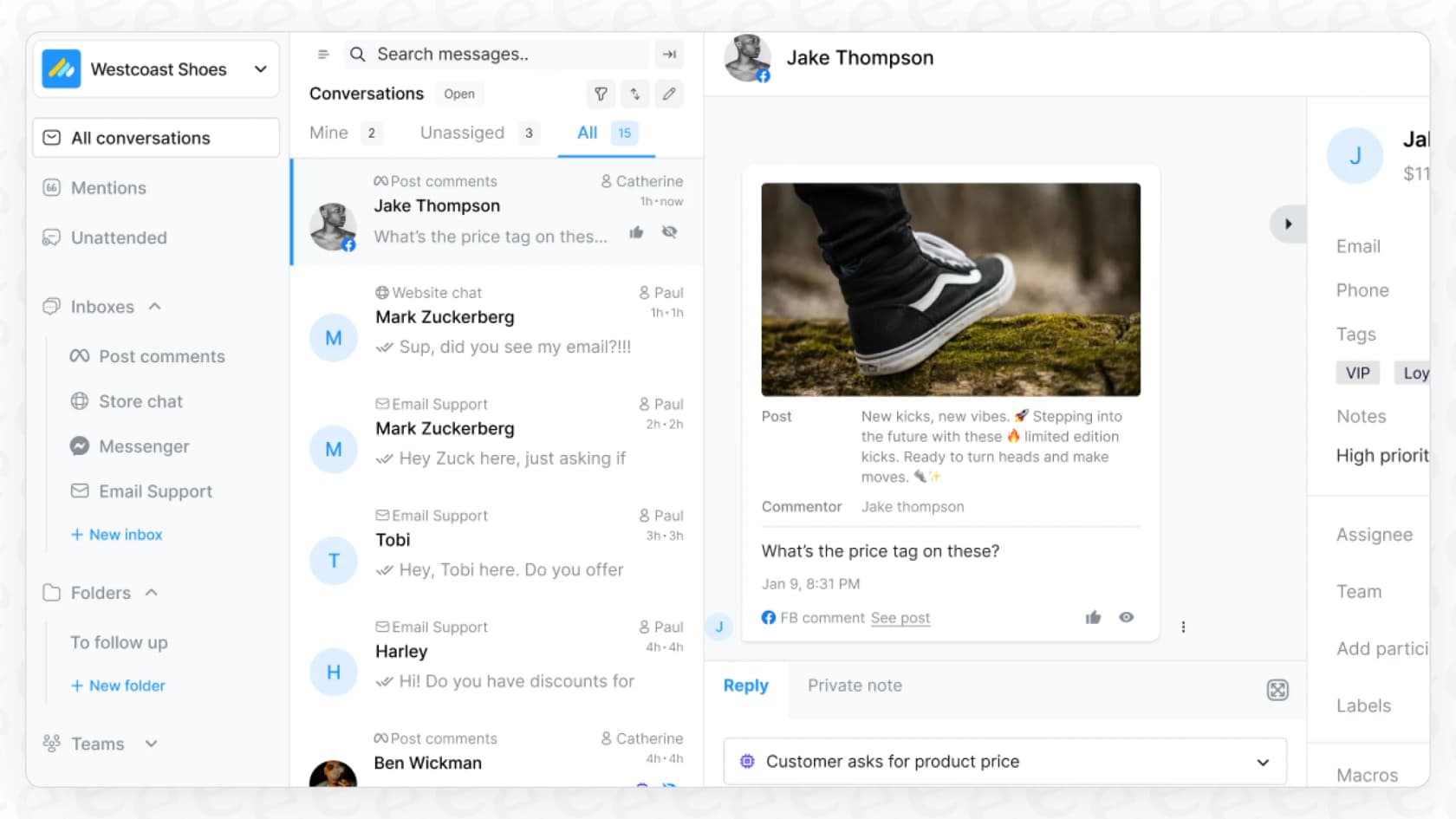
The real magic, though, is how tightly it integrates with Shopify. When a customer gets in touch, their entire order history, shipping details, and contact info pop up in a sidebar right next to their message. Having that info right there is incredibly useful for giving fast, accurate answers. Agents can even do things like issue a refund or cancel an order without ever leaving the helpdesk. It saves a ton of time and is really what the platform is about.
The AI support agent and social media moderation
The AI agent is included on every plan, including Free, and the paid plans add things like social media moderation. These are built to take care of the simple, repetitive questions that take up so much of your team's day. The AI agent can answer "Where is my order?", look up tracking info, and even handle requests to change a shipping address.
It's also smart enough to know when it's out of its depth. If a conversation gets too complicated or just needs a human to look at it, the AI will pass the ticket over to a person on your team. This is a nice touch that helps avoid those frustrating chatbot loops customers hate.
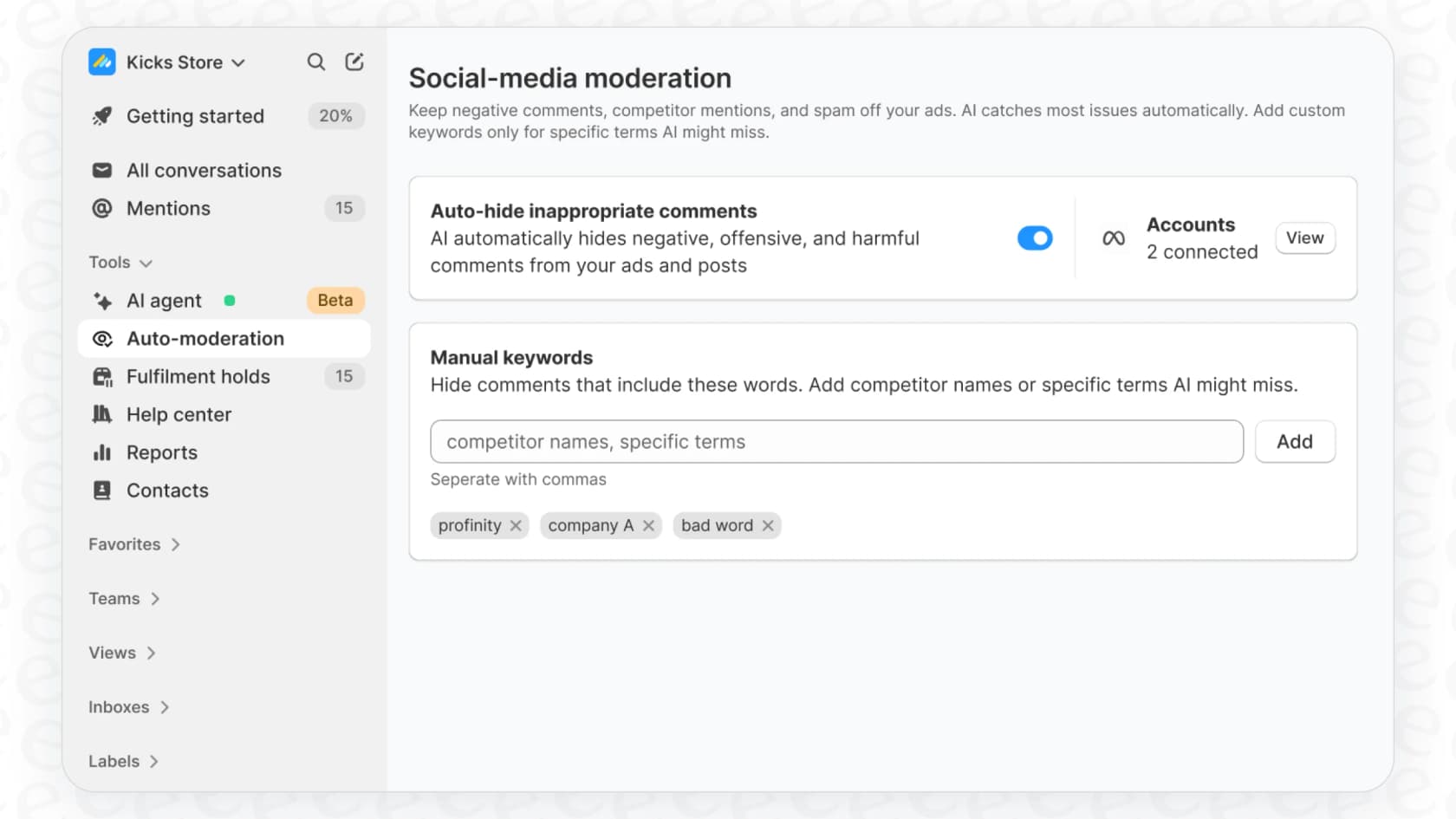
Another neat AI feature is its social media moderation. If you run ads on Facebook or Instagram, you know how messy the comments can get. Commslayer's AI works around the clock to automatically hide spam, comments from competitors, and nasty messages (this is part of the Plus plan and up), which helps keep your ad campaigns effective and your brand looking good.
Tools to help your team work together
On top of the AI, Commslayer has the standard helpdesk tools you'd hope to see for making your team more efficient. You can set up macros (which are just saved replies) to answer common questions in one click. You can also build rules that automatically tag tickets or send them to the right person or department. For teamwork, agents can leave private notes on tickets to give each other context or ask for a second opinion, which keeps everyone on the same page. These are the basic building blocks any growing support team needs.
Pricing explained
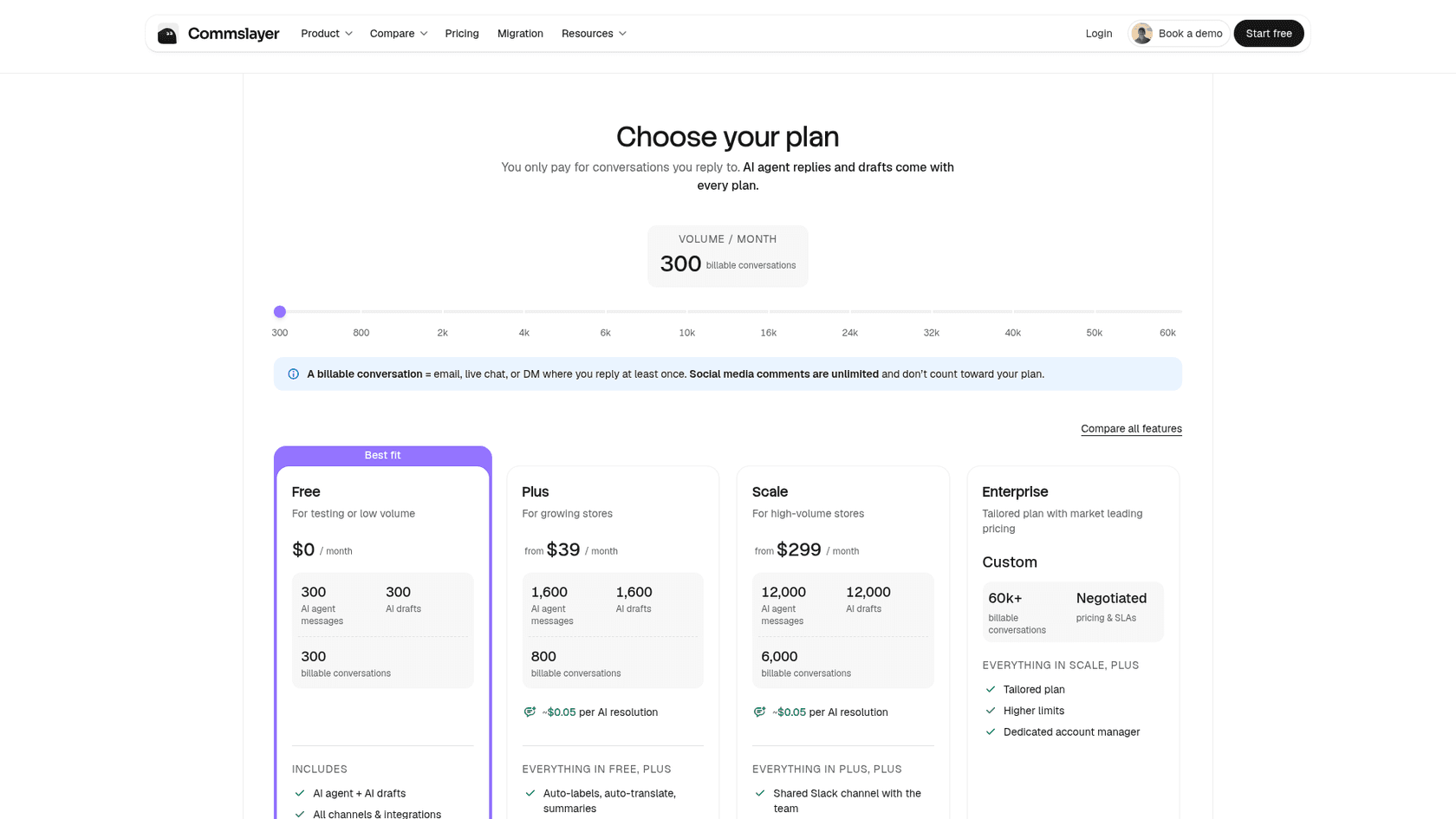
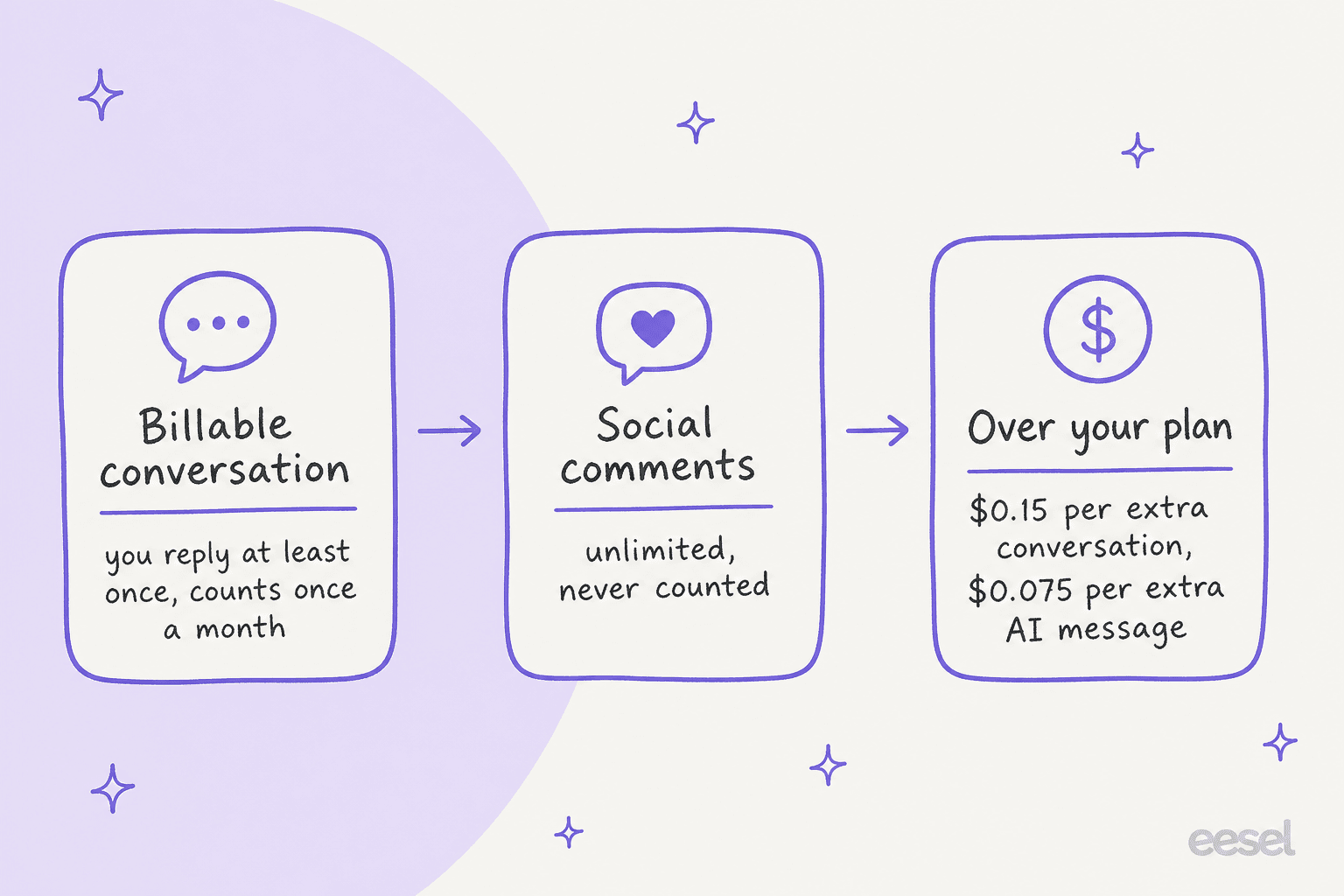
Commslayer’s pricing is probably its most attractive feature. While most helpdesks charge you for every agent you add, Commslayer charges nothing per agent: seats are unlimited on every plan, including Free. Instead, you pay by billable conversations (a thread where you reply at least once, counted once per month), and AI agent replies and drafts are included. Social media comments are unlimited and don't count.
Here’s how their plans break down:
| Plan | Price (/mo) | Key Features | Volume and AI limits |
|---|---|---|---|
| Free | $0 | Unlimited agents, AI agent and AI drafts, all channels and integrations | 300 billable conversations, 300 AI agent messages, 300 AI drafts |
| Plus | From $39 | Everything in Free + auto-labels, auto-translate, summaries, order editing, social media moderation | 800 to 4,000 conversations, 1,600 to 8,000 AI agent messages |
| Scale | From $299 | Everything in Plus + shared Slack channel, AI agent setup services, priority response | 6,000 to 60,000 conversations, 12,000 to 90,000 AI agent messages |
| Enterprise | Custom | Everything in Scale + dedicated account manager | 60,000+ conversations, negotiated pricing and SLAs |
The free plan is pretty amazing, offering a complete helpdesk for your whole team without costing a dime. The thing to plan for is volume: Plus starts at 800 conversations and 1,600 AI agent messages a month, and Scale at 6,000 and 12,000. That might be plenty for a typical month, but what happens during Black Friday or a big sale? Above your plan, Commslayer charges $0.15 per extra conversation and $0.075 per extra AI agent message, and you can set a monthly spending cap in billing (a $0 cap is a hard stop at your plan price). Commslayer also estimates about $0.05 per AI resolution on the paid plans, assuming roughly two AI messages per resolved conversation.
This is where you might want to consider a different pricing model. For instance, eesel AI is one fixed monthly price sized to your volume, from $299/month for 500 credits (1 credit is 1 ticket or chat, however long), with a free plan of 100 credits. For a store that's growing quickly, that can be a more predictable option for your bill after a great month.
Integrations and key limitations
While Commslayer is great at what it does, its biggest strengths are also the source of its biggest weaknesses. It's a fantastic tool, but only if your business fits neatly inside its world.
What Commslayer connects with
Commslayer has a decent list of integrations that make sense for a Shopify-focused business, all included on every plan. It works with:
-
Google Workspace (for Gmail)
-
Facebook & Instagram
-
Klaviyo
-
Aircall
-
Judge.me
-
WhatsApp
-
Subscription apps including Recharge, Loop, Skio, Appstle, Kaching, and Stay AI
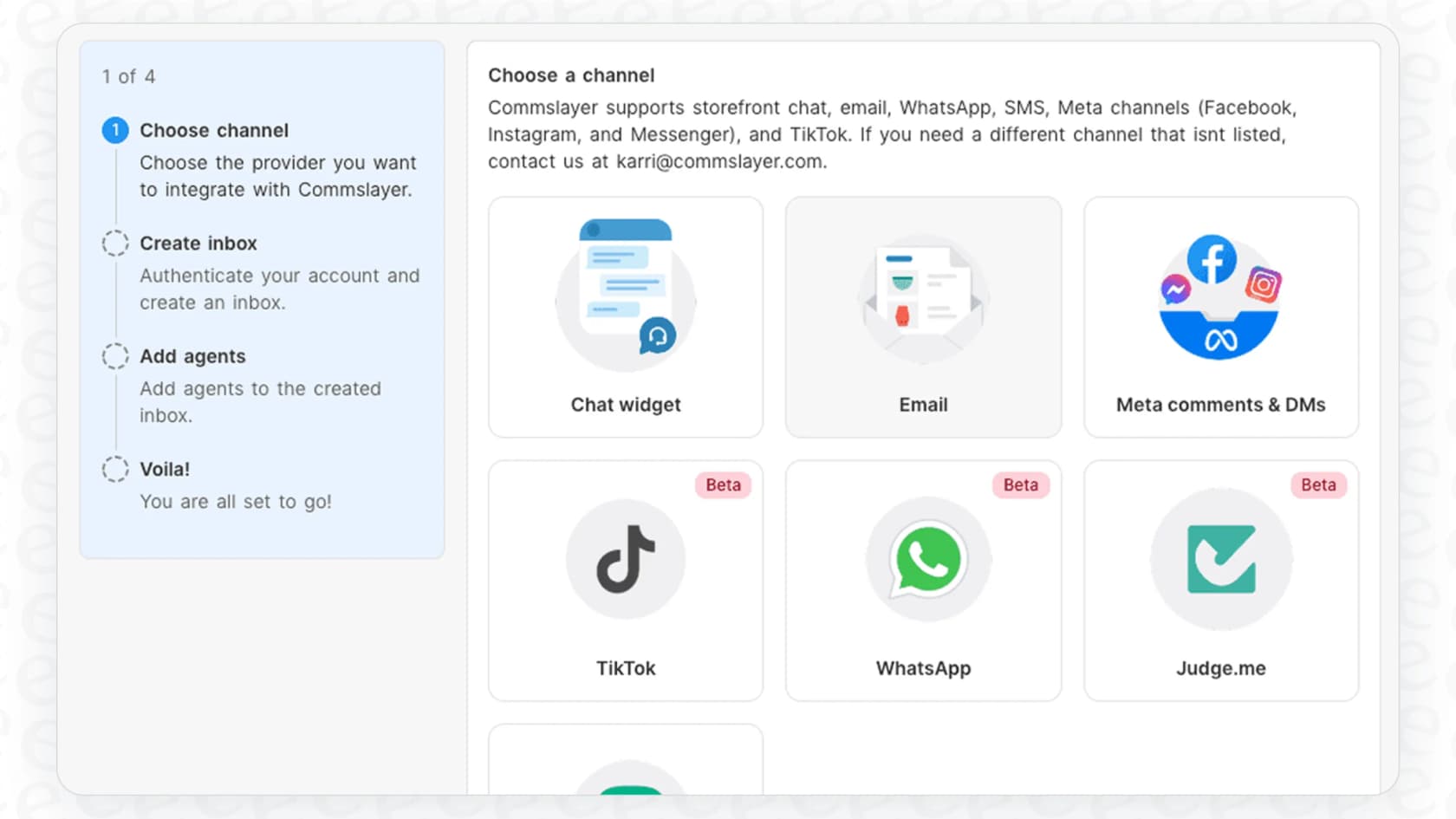
These cover the main channels and apps that most Shopify stores rely on, making it a pretty complete package for its target audience.
The big catch: It's only for Shopify
This is the most important thing to think about before you sign up for Commslayer. The platform is built from the ground up just for Shopify. If you sell on any other platform, like Amazon, WooCommerce, or even a custom site, or you think you might in the future, Commslayer just isn't an option.
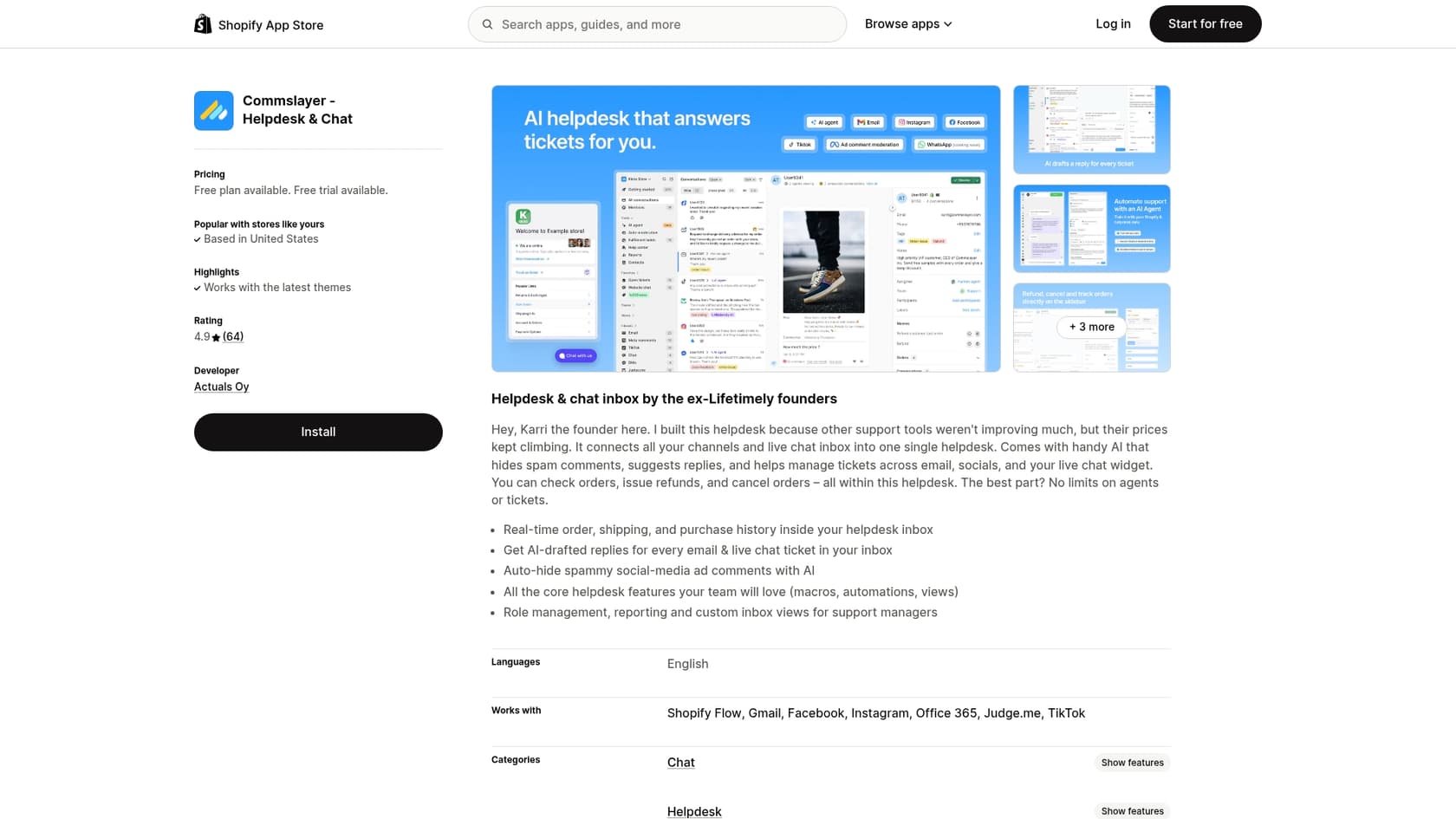
This "Shopify lock-in" means it can't grow with you if you decide to sell your products in other places. And if you do expand beyond Shopify one day, you'll have to go through the painful process of moving your entire helpdesk to a new system. Anyone who's done that before knows it's a huge headache.
Where the AI gets its knowledge
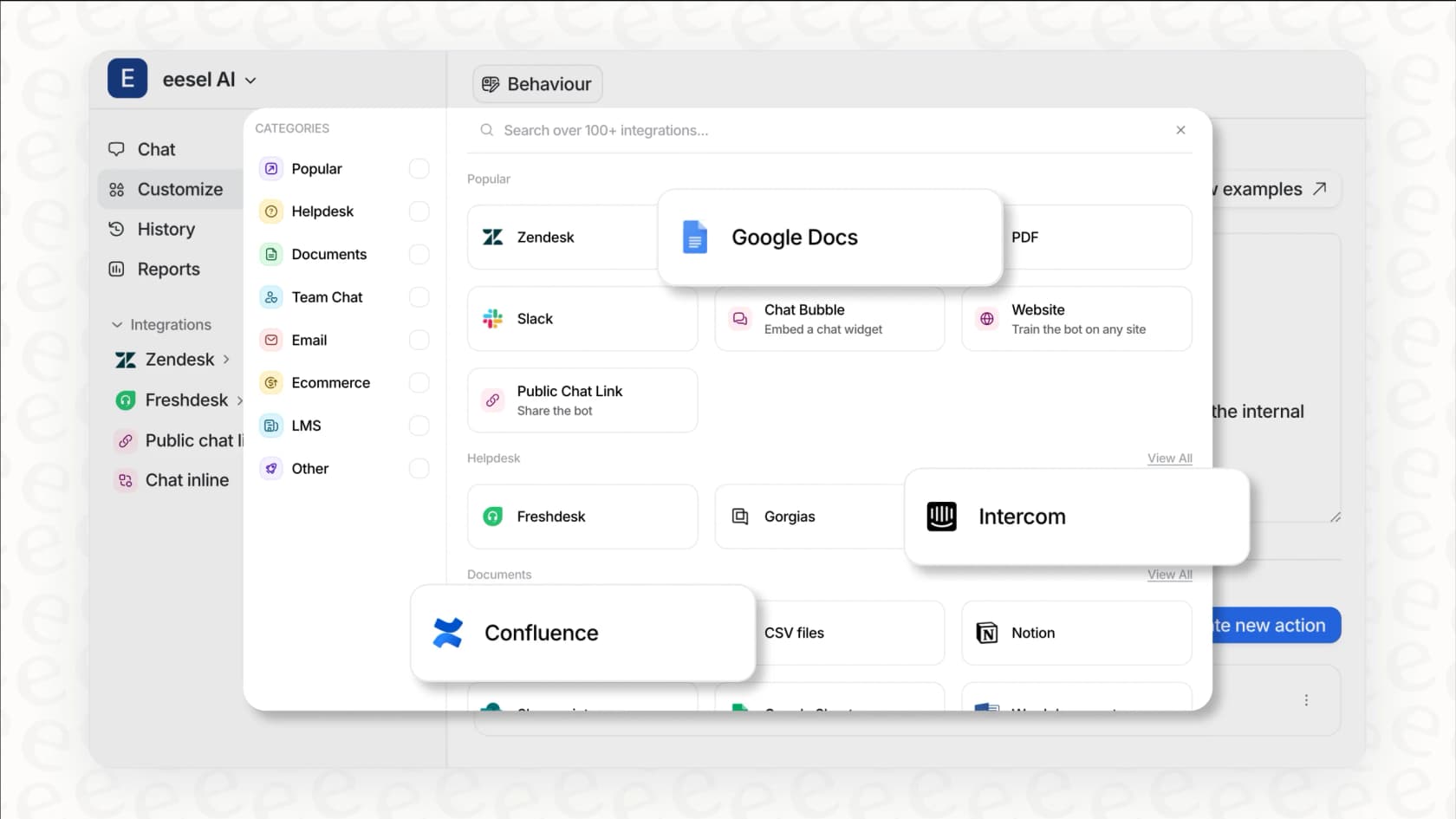
Another thing to think about is where Commslayer's AI gets its smarts. From what I can tell from Commslayer's pricing page, the AI works from your help docs and Shopify data, and custom actions let it call external APIs. External knowledge sources like Confluence or Google Docs aren't listed. A really effective AI needs to tap into all of your company's knowledge to give truly helpful answers.
This is where a more flexible tool like eesel AI does things differently. It can connect to dozens of knowledge sources you already use. It can pull information from your Confluence pages, Google Docs, Notion, and even your past ticket history from any helpdesk you've used before. This lets it give much more detailed answers and handle a wider variety of customer questions.
Lastly, on migration: when I first looked, the link to their migration checklist was broken. Commslayer now has a dedicated migration page that says it migrates you for free, with importers for Gorgias, Zendesk, Re:amaze, Richpanel, Front, Help Scout, Freshdesk, and Kustomer.
Verdict: Is it the right helpdesk for you?
So, after this complete Commslayer review, what’s the final word? Honestly, it all comes down to your business.
Who it's for: Commslayer is a fantastic pick if you're a small or medium-sized business that lives and breathes Shopify. If you want a modern, free helpdesk for your whole team and the option to add some affordable AI help, it's one of the best deals out there.
Who it's not for: It’s not the right tool for businesses that sell on multiple platforms or have any plans to expand beyond Shopify. It’s also probably not the best fit for teams who rely on a ton of internal documentation (in places like Confluence or Google Docs) or have really high ticket volumes, where per-conversation overage above your plan is worth modeling first.
If your business is in that second group, you'll be better off with a more flexible solution that can grow with you.
For ultimate flexibility, there's eesel AI
If that "Shopify-only" part has you worried, you're not out of options. For teams that need a powerful AI that doesn't lock them into one platform, eesel AI is a great alternative. Instead of making you switch helpdesks, eesel AI plugs right into the tools you already use. It works with popular helpdesks like Zendesk and Gorgias, making your current setup smarter instead of forcing you to start over.
Here’s what makes eesel AI different from Commslayer:
-
It works everywhere, not just on Shopify. eesel AI isn't tied to any single e-commerce platform. It works wherever your support team does, no matter where you sell your products.
-
It learns from all your company knowledge. It connects to everything: past tickets, your Confluence spaces, Google Docs, Notion, you name it. This gives it the context to deliver much more accurate and helpful answers.
-
You can see your ROI before you commit. Before you even turn it on, you can run a simulation on thousands of your past tickets. This shows you exactly what your automation rate and return on investment will look like, so you can go live knowing it will work.
-
No surprise bills after a busy month. With eesel AI, you pay one fixed monthly price sized to your volume. If credits run out, agents pause until they reset, or you can turn on overage with a monthly cap you set.
If you're looking for an AI solution that works with your tools and can scale with your business, eesel AI was built for that. Connect your helpdesk for free (100 free credits, no card) and see just how many of your tickets you could be automating right now.
Frequently asked questions
What does this Commslayer review say about the platform's free offering?
The Commslayer review notes that agents are unlimited on every plan, including Free, which covers 300 billable conversations a month and includes the AI agent and AI drafts. You pay by billable conversations, meaning threads where you reply at least once, as your volume grows.
Does this Commslayer review recommend the tool for businesses that operate outside of Shopify?
No, this Commslayer review explicitly states that the tool is built exclusively for Shopify and not suitable for businesses on other platforms like Amazon or WooCommerce. Expanding beyond Shopify would require migrating to a different helpdesk.
How does the Commslayer review describe the AI's learning capabilities and knowledge sources?
The Commslayer review indicates that the AI primarily learns from help center articles created within the platform and from Shopify product data. It suggests this is a somewhat limited set of knowledge compared to more flexible AI solutions.
What are the core benefits for a small to medium-sized Shopify store, according to this Commslayer review?
For small to medium Shopify stores, this Commslayer review highlights a free, unlimited-seat helpdesk, tight integration with Shopify order details, and affordable AI for common support tasks. It centralizes communications without per-agent fees.
Could you elaborate on the AI message limits mentioned in the Commslayer review and their potential impact?
The Commslayer review points out that each plan includes a set number of AI agent messages per month (for example 1,600 on Plus from $39, or 12,000 on Scale from $299). Above your plan, Commslayer charges $0.15 per extra conversation and $0.075 per extra AI agent message, and you can set a monthly spending cap.
What integrations are highlighted in the Commslayer review as particularly useful for Shopify merchants?
The Commslayer review mentions useful integrations like Google Workspace, Facebook & Instagram, WhatsApp, Klaviyo, Aircall, Judge.me, and subscription apps such as Recharge, Loop, and Skio. These cover essential communication and marketing tools for Shopify stores.