


Coda (now sold as Superhuman Docs after the Grammarly and Superhuman rebrand) has been making waves as this super-flexible, all-in-one doc that’s part Word doc, part spreadsheet, and part app builder. It’s the kind of tool that promises to bring all your team’s work into one place, which sounds amazing. But then you click over to the pricing page and… things get a little confusing.
If you’ve found yourself scratching your head trying to figure out what you’ll actually pay, you’re not alone. The whole pricing model, especially the mysterious "Doc Maker" role, can feel like a bit of a puzzle.
That’s why we wrote this guide. We’re going to lay it all out for you, plain and simple. We’ll break down each Coda pricing plan, shine a light on the costs you might not see coming, and help you decide if it’s the right tool for what you’re trying to do, especially if you’re building a knowledge base.
What is Coda? Understanding the product behind the Coda pricing
Before we talk money, let's quickly cover what Coda actually is. At its core, Coda is a platform that blends documents, spreadsheets, and apps into one canvas. Imagine if a Google Doc and an Excel sheet had a very clever baby.
Instead of just typing text, you can drop in "building blocks." These aren't just fancy widgets; they're powerful tools. You can add interactive tables that act like real databases, create buttons that kick off automations (like sending a Slack message), and use integrations (which Coda calls "Packs") to pull live data from other apps you already use.
It’s built to be the one place your team goes for truth. People use it for all sorts of things, but the most common setups are:
-
Project management hubs: Instead of juggling Asana, Google Sheets, and email, teams build a single Coda doc to track every task, deadline, and resource for a big project.
-
Team wikis and knowledge bases: This is a big one. You can create these really rich, interconnected libraries of company info, from onboarding guides to product specs.
-
Meeting notes that actually do something: You can turn a simple meeting agenda into an action tracker, assigning tasks and deadlines right there in the notes.
-
Simple, no-code apps: Need a quick tool to track office inventory or manage a team vacation calendar? You can build it in Coda without bugging your engineering team.
Understanding that Coda wants to be your team's central "brain" helps explain why their pricing is set up the way it is. Let's dig into that now.
A detailed breakdown of Coda pricing plans
Alright, here’s the most important thing you need to grasp about Coda pricing: the "Doc Maker."
A Doc Maker isn't just any user. This is the person (or people) with the power to create new docs and change their structure. They can add pages, build new tables, and add those cool interactive buttons. Anyone else on your team can be an "Editor" or a "Viewer" for free. Editors can add and change content inside the structures someone else built, and Viewers can, well, view and comment.
Your entire bill is based on how many Doc Makers you have. That’s it.
Here’s a side-by-side look at the plans:
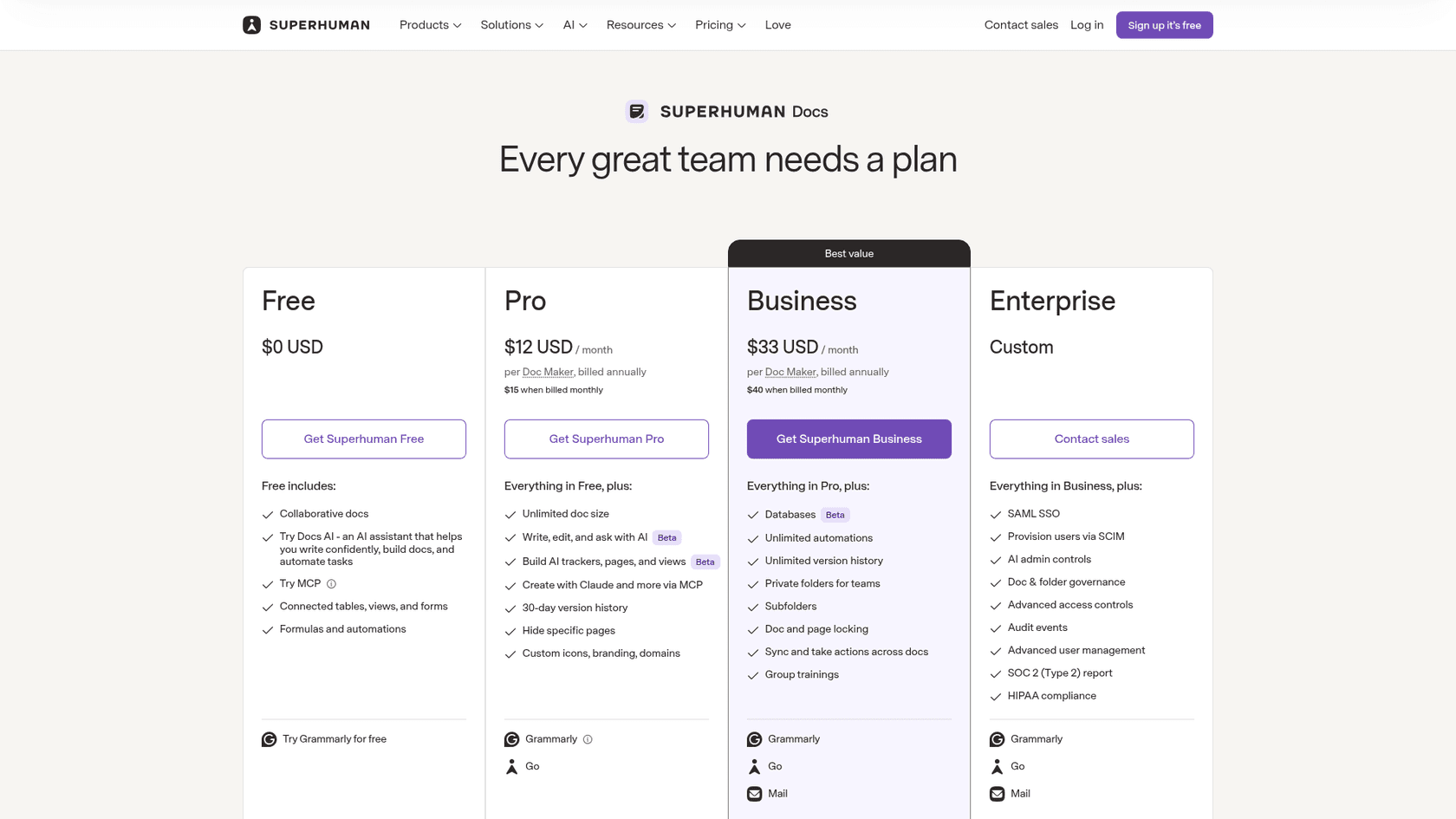
| Feature | Free | Pro | Business (formerly Team) | Enterprise |
|---|---|---|---|---|
| Price | $0 | $12 /Doc Maker /mo billed annually ($15 monthly) | $33 /Doc Maker /mo billed annually ($40 monthly) | Custom |
| Doc Makers | Limited | Unlimited | Unlimited | Unlimited |
| Doc Size | Limited for shared docs | Unlimited | Unlimited | Unlimited |
| Version History | 7 Days | 30 Days | Unlimited | Unlimited |
| Integrations (Packs) | Core Packs | All Core Packs | All Core Packs | Custom Packs |
| Support | Community | Email Support | Dedicated Support | Dedicated Success Manager |
| Security | Basic | Basic | Basic | SAML SSO, SCIM, audit events, SOC 2 Type 2 report |
The free Coda pricing plan: for individuals and small teams
The Free plan is a fantastic way to dip your toes in the water. If you’re a freelancer organizing projects or a tiny team just starting out, it lets you explore Coda’s main features without spending a dime.
But you’ll likely hit the limits pretty fast. Your docs have size caps, there’s a limit on how many rows you can have in your tables, and you can only look back at your edit history for 7 days. It's great for getting a feel for the platform, but it’s not designed for a team that relies on it day in and day out.
The pro Coda pricing plan ($15/Doc Maker/month)
At $15 per month (or a slightly cheaper $12/month if you pay for the year), the Pro plan is the sweet spot for many growing teams. It gets rid of the annoying size limits from the Free plan and gives you a more reasonable 30-day version history.
This is where real collaboration starts to open up. You get access to more Packs and can start syncing data across different docs, which is a huge help. If you need a central place for project plans and company documents but don't need super-granular admin controls, this is probably your plan.
The team Coda pricing plan ($40/Doc Maker/month)
The Team plan (now called Business), at $40 per month (or $33/month annually), is where Coda gets serious. This is for larger companies or teams where Coda has become a critical piece of their workflow. The biggest perks here are unlimited version history (so you never lose an important change) and unlimited automations. The Pro plan has a medium automation quota.
You also get features that make managers breathe easier, like locking docs to prevent accidental edits and creating private folders to control who sees what. If your business depends on Coda, the guardrails in this plan are worth the extra cost.
The enterprise Coda pricing plan (custom pricing)
As you'd expect, the Enterprise plan is for the big guns. We're talking large corporations that need iron-clad security, governance, and hands-on support. The price is custom-tailored to your company's needs.
This plan adds all the enterprise-level necessities like SAML single sign-on for secure logins, SCIM user provisioning, audit events to track what happens, a SOC 2 (Type 2) report, and HIPAA compliance on request. If you’re in a regulated industry or have a massive team, this is the only option that will check all your boxes.
Hidden costs and factors that impact your Coda pricing
The price you see on the website is just your starting point. A few things can make your final bill look very different from what you first expected.
The "Doc Maker" multiplier effect on Coda pricing
This is the big one. It’s the number one reason your Coda bill can spiral. Because your cost is tied directly to the number of people who need to create or edit the structure of docs, a small change in your workflow can have a big impact on your bill.
Let's play this out. Imagine you have a 20-person support team using Coda for their internal knowledge base. You decide that one person, the Knowledge Manager, will be the sole Doc Maker. On the Business plan, that's a very reasonable $33 a month. Not bad at all.
But a month later, you realize this creates a bottleneck. You want your 5 senior support specialists to be able to create new troubleshooting guides and update existing ones on the fly. You promote them all to Doc Makers. Your bill just jumped from $33 to $165 a month (5 Doc Makers x $33, billed annually).
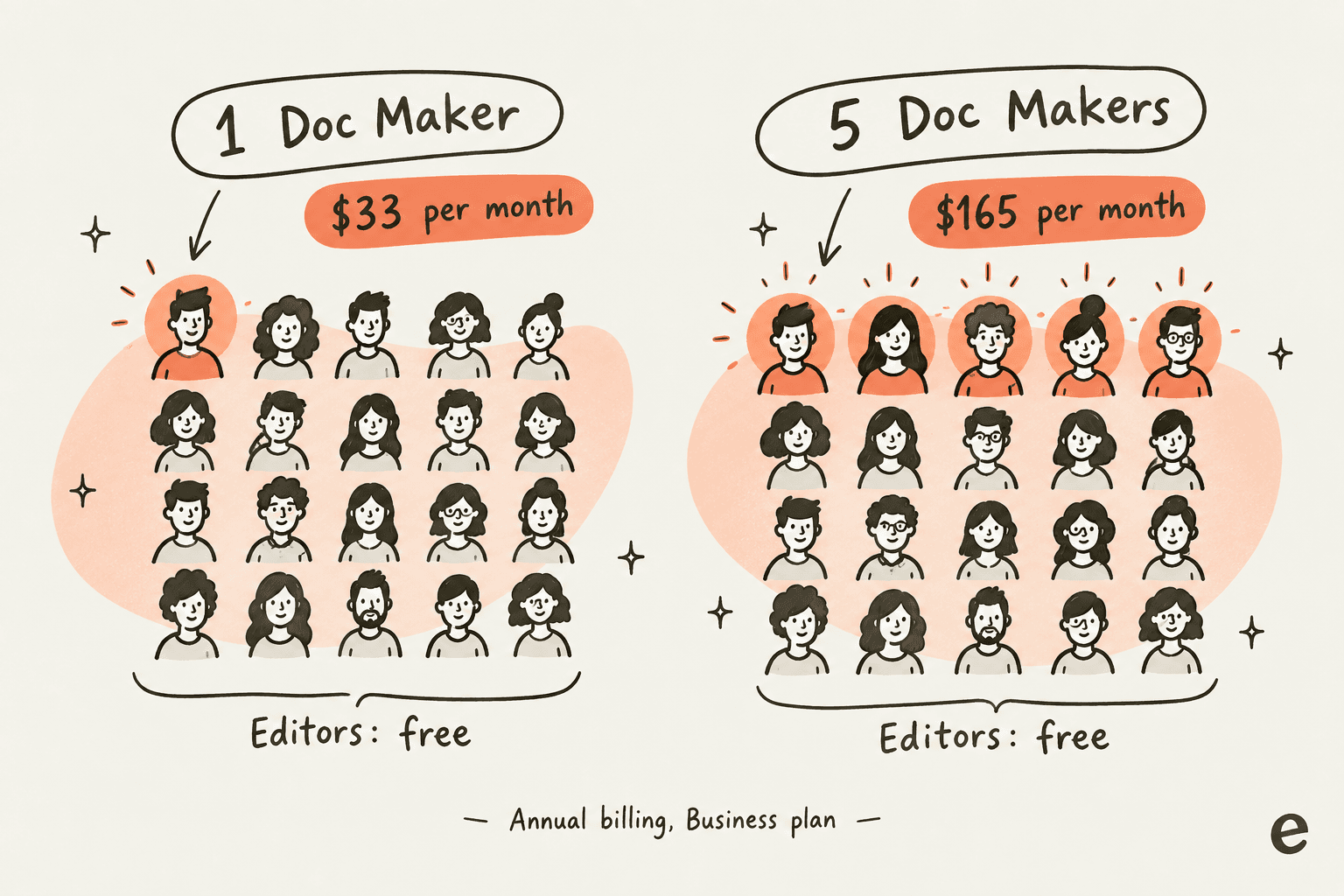
The more you want to foster a culture of collaboration where everyone can contribute, the more expensive Coda gets. It’s an odd model that can sometimes feel like it’s a punishment for using the tool collaboratively.
How paid integrations and "Packs" affect Coda pricing
Coda's Packs are a huge selling point. Connecting to tools like Slack, Jira, and Google Calendar is what makes a Coda doc feel like a living application. While a lot of the essential Packs are included, some of the more specialized ones built by third parties may come with their own price tags. If your whole workflow depends on a premium Pack, you need to add that subscription cost to your total Coda budget.
How automation and workflow quotas impact Coda pricing
Coda’s automations are slick. You can set up rules like "when a task is marked 'Done,' send a notification to the project's Slack channel." On Free the automation quota is low and on Pro it is medium; Business and Enterprise are unlimited. If your team starts building really complex, automation-heavy workflows, you could hit that limit on Free or Pro and find yourself needing to upgrade to a more expensive plan just to keep things running smoothly.
Coda pricing: is it the right knowledge base for your support team?
Coda can be a fantastic knowledge base. It's flexible, you can customize it to look exactly how you want, and it's great for creating beautiful, deep-dive articles with lots of interconnected pages.
But for a support team on the front lines, just having a pretty library of information isn't enough. The real name of the game is speed and access. This is where a traditional wiki, even a powerful one like Coda, can start to show its cracks.
-
The context-switching tax: When a customer asks a question, the clock starts ticking. If your knowledge is in Coda, your agent has to leave their helpdesk (like Zendesk or Freshdesk), navigate to the Coda doc, search for the right article, scan it for the specific answer, and then copy-paste it back. Each one of those steps adds precious seconds to your resolution time.
-
The collaboration cost: As we just covered, if you want your agents to actually contribute to the knowledge base,fixing outdated info, adding new solutions they discover,that "Doc Maker" model gets expensive, fast. You're stuck choosing between a massive bill or a knowledge base that slowly goes stale because only one person can update it.
-
Knowledge is everywhere: Let’s be real. Coda is probably not the only place your company knowledge lives. You’ve got product specs in Google Docs, engineering wikis in Confluence, and a goldmine of past solutions buried in old support tickets and Slack threads. A Coda wiki, no matter how good it is, just becomes one more silo your agents have to remember to check.
A better way to think about it is to activate your knowledge, not just store it. That's where a tool like eesel AI comes in. It doesn’t ask you to move everything into a new system. Instead, it intelligently connects to all the places your knowledge already exists. It plugs into sources like Confluence spaces, Google Drive, and even reads your past helpdesk tickets to build one unified brain for your team.
With eesel AI, you get:
-
One source of truth: It searches across all your apps at once, delivering the single right answer to your agents without them ever having to leave their helpdesk.
-
Set up in minutes: You can get started in less time than it takes to make coffee. No sales calls, no complicated setup. Just connect your apps with a few clicks.
-
AI that takes action: It doesn't just find answers; it uses them. eesel AI can power an autonomous agent to resolve tickets on its own, act as a copilot to draft perfect replies for your human agents, or answer questions instantly for your team in Slack.
Coda pricing: making the right choice for your budget and team
Coda is an incredibly powerful and versatile tool, and for many teams, it’s a perfect fit. But its real value all comes down to your specific needs. When you're looking at Coda pricing, just remember that the "Doc Maker" role is the single biggest factor that will shape your monthly bill.
For support teams, the goal is bigger than just storing knowledge. It’s about getting that knowledge into the hands of your agents and customers at the exact moment they need it. While Coda can be an excellent place to write and organize your documentation, you need another layer to truly bring it to life.
Unlock your knowledge with eesel AI
It doesn't matter if your team keeps docs in Google Docs, Confluence, or a chaotic mix of everything. eesel AI helps you get more value from the knowledge you’ve already worked so hard to create.
Let an AI agent start handling your frontline questions by connecting it directly to all your docs. See how you can automate resolutions, make your agents faster and happier, and empower your entire team,all without ripping and replacing the tools you already love.
Ready to see what your knowledge can really do? Start a free trial of eesel AI today.
Frequently asked questions
I'm still a bit confused by the 'Doc Maker' system. Is the Coda pricing model really just based on who can create new documents from scratch?
Yes, that's the core of it. Your bill is determined solely by the number of people assigned the 'Doc Maker' role, who can create and structurally change docs. Everyone else on your team can be added as a free Editor or Viewer.
We have 50 people on our team, but only 3 will be building the docs. Will the Coda pricing be based on all 50 users or just the 3?
The pricing will be based on just the 3 Doc Makers. You can invite the other 47 team members as Editors or Viewers for free, allowing them to contribute to and read docs without increasing your monthly bill.
If we start on the Pro plan, how flexible is the Coda pricing if we suddenly need more Doc Makers or features from the Business plan?
Coda's pricing is quite flexible. You can add or remove Doc Maker licenses at any time from your workspace settings, and your bill will be prorated accordingly for the change.
What are the biggest limitations of the free tier, and at what point does it make sense to upgrade from the free Coda pricing plan?
The free plan has significant limits on doc size, the number of objects you can have, and automation runs. You'll likely want to upgrade once your team starts relying on Coda for critical workflows or consistently runs into those size and usage restrictions.