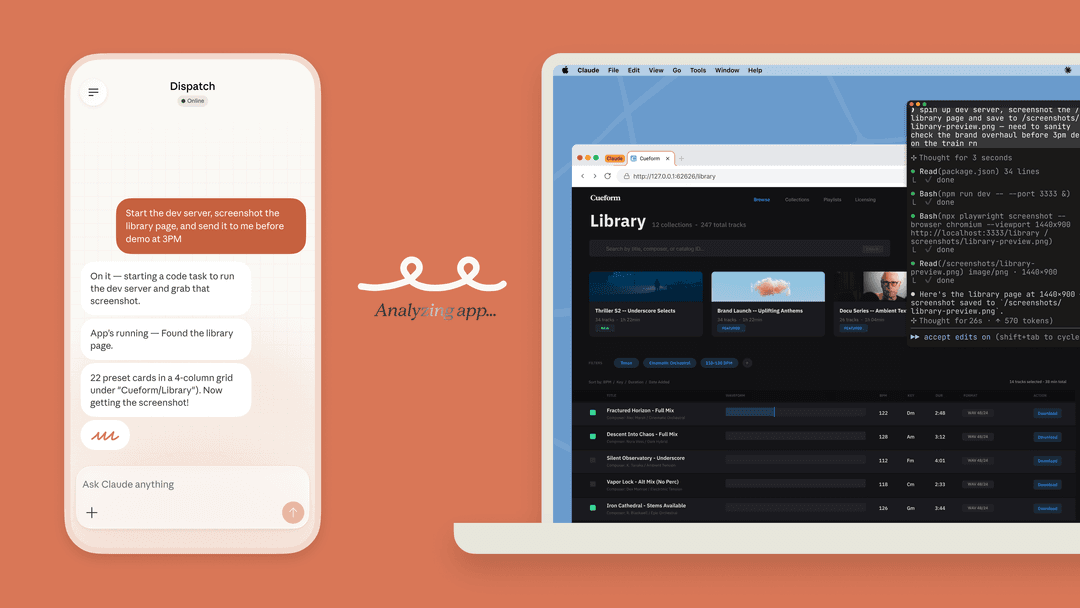
Four Claude tools for different productivity jobs
Projects: repeatable context for writing and planning
Claude Projects keep instructions and reference files together. They are useful for a launch brief, a research series, or a writing style guide. On Team and Enterprise plans, a Project can be shared with colleagues: Can view members use its knowledge and instructions; Can edit members can change them and manage access.
Projects are not a substitute for a decision log. A chat inside a shared Project is not automatically shared. When someone needs to review a specific answer, share that chat separately. Shared chats are view-only snapshots; update the share if later messages matter.
Connectors: live information with an access boundary
Connectors can give Claude access to the tools and data you already use. On Team and Enterprise plans, an Owner or Primary Owner enables a connector for the organization, but each member generally still authenticates their own account. The connector cannot exceed that account’s underlying permissions.
Owners can also limit actions. They can permit read tools while blocking writes, or choose Always allow, Needs approval, or Blocked for a category or individual tool. This is why “connect our drive” is not a complete productivity plan: decide what Claude may read, what it may change, and who checks it.
Cowork: longer tasks with a narrow scope
Claude Cowork is available on paid Claude plans for multi-step work. It can work with connected folders and tools. Give it a dedicated work folder instead of a broad home directory, and review the proposed work. Do not treat network settings as a complete data boundary: web fetch, web search, and MCP tools are exceptions to Cowork's network-egress controls. Local file and computer work also depend on the desktop connection being available.
Claude Code: productivity in a repository
Claude Code permissions govern commands and file changes through modes and Allow, Ask, and Deny rules. Use /permissions to inspect the actual configuration. Manual mode supports reviewing proposed commands and edits, subject to those rules; do not assume every installation starts there. The VS Code extension documents Auto as the built-in starting mode for Pro, Max, and Team. Choose the review settings appropriate to your repository before delegating work.

This official documentation screenshot illustrates the editor workflow, not a test conducted for this article.
Three complementary productivity tools
| Tool | A useful job alongside Claude | What to check |
|---|---|---|
| Notion AI | Create or edit pages and databases, and find information across connected sources where the team already organizes work | Core AI is included in Business and Enterprise; other plans have limited trials. Recurring Custom Agents use a separate credits add-on. |
| Perplexity | Research a question with web-backed answers and links to sources before drafting a brief | Open the cited source and check the claim; a citation is not proof that the summary is correct. |
| Granola | Turn meeting context and personal notes into structured notes and follow-ups, using computer audio without a meeting bot | Follow your meeting-consent policy, review the notes, and choose their sharing scope before passing them to another tool. |
Pick the tool nearest the source of the work. A Notion database may be the right home for an action list; Granola may capture the discussion that creates it. Neither choice automatically supplies that material to a Claude Project or eesel teammate. Decide which approved information crosses each boundary.
A concrete productivity workflow: turn a support trend into a reviewed weekly brief
A support lead sees several questions about CSV exports and needs a weekly brief for product. The question is whether customers cannot find an existing export or are asking for a new scheduled-export feature. Mixing those categories would make the brief misleading.
- Select approved, de-identified support notes, keeping dates and evidence references. Do not give the tools a raw customer export merely to produce a short brief.
- Use a Claude Project for the briefing format and previous approved brief. A coding agent can use eesel CLI to check the support teammate's sources and standing instructions, then explicitly pass the approved notes to that teammate for analysis.
- Compare the resulting categories against the notes: existing-feature confusion, new-feature requests, and unresolved questions. A customer request must not become a promised roadmap item.
- Have the product owner review the brief and any proposed follow-up. Sharing a Claude chat provides a snapshot, not automatic publication to product's workspace.
The useful outcome is a brief with traceable observations. If the owner approves new customer-facing guidance, review that exact guidance for the Project and eesel knowledge or instructions separately; do not turn every suggestion in the brief into a standing rule.
Use the eesel CLI with Claude Code, Codex, or Cursor
The eesel CLI needs Node.js 18.17 or later. It emits JSON and controls the same teammate and workspace as the dashboard. That lets the support lead check the setup visually while a coding agent prepares the weekly-brief handoff from a terminal.
npx @eesel/cli login
npx @eesel/cli whoami
npx @eesel/cli agents
TARGET_EESEL_AGENT="REPLACE_WITH_APPROVED_NONPRODUCTION_AGENT"
npx @eesel/cli status --agent "$TARGET_EESEL_AGENT"
npx @eesel/cli integrations download list --agent "$TARGET_EESEL_AGENT"
npx @eesel/cli instructions --agent "$TARGET_EESEL_AGENT"
npx @eesel/cli billing --agent "$TARGET_EESEL_AGENT"
Replace the placeholder with an actual owner-approved nonproduction agent returned by agents. Login stores credentials; subsequent checks read the selected workspace and teammate. The coding agent can read the JSON and flag, for example, that the export help article has not downloaded. Source readiness does not establish what that article says: inspect its relevant content before treating it as evidence.
Setup and observation are free, but eesel chat is billed; the coding agent also has its own usage costs. Before the following fictional test, approve the spend and set consequential actions to Disabled in the actual teammate's Actions settings. A fresh conversation and a prompt saying “do not send” do not enforce that boundary.
npx @eesel/cli new --name "CSV export brief review" --agent "$TARGET_EESEL_AGENT"
npx @eesel/cli chat "Analyze only these fictional notes for an internal brief: A asked where to download an existing CSV; B requested an automatic weekly CSV email; C said export failed but supplied no error or steps. Separate existing-feature confusion, feature requests, and unknowns. Cite A, B, or C for each statement. No roadmap date or confirmed bug is supplied. Draft only; do not send or change anything." --agent "$TARGET_EESEL_AGENT"
Check three decisions in the response: A should not count as demand for a new feature; B should not become a delivery promise; C should remain unconfirmed until someone obtains reproduction details. The prompt contains the actual test evidence—nothing is automatically imported from Claude, Granola, or Notion. These are proposed acceptance checks, not observed results. For real work, substitute only the approved notes and have the owner compare every conclusion against them before sharing. Any standing-instruction change requires separate approval, readback, and another test; --dry-run only previews the write request.
Use eesel CLI for productivity work that needs a handoff
Try eesel for a recurring support job you can define and check. Use its CLI through your existing coding agent to inspect the workspace, supply approved evidence, and test the result before handing it to the next person.
Frequently Asked Questions
What are Claude AI productivity tools?
They are Claude features and connected systems that reduce repetitive work: Projects for durable context, connectors for approved sources and actions, Cowork for multi-step tasks, and Claude Code for repository work.
When should I use a Claude Project?
Use a Project when a writing, research, or planning task needs a stable set of instructions and reference files. On Team and Enterprise plans, Projects can be shared with view or edit permissions.
What is Claude Cowork best for?
Cowork is suited to longer tasks using folders, configured network access, and connectors. It is available on paid Claude plans and needs a narrow permission scope.
Can Claude connectors take actions?
Some can. Connector access follows the connected account and organization controls. Review which tools are read-only and which may write before using a connected service.