
How to choose a ChatGPT productivity app
A productivity app earns its place when it reduces a repeated piece of work without creating another inbox to maintain. Before a trial, name the job, input, result, owner, and failure path. “Summarize meetings” needs different access, consent, and review than “answer a support-policy question.”
| App | Best for | Where it works | Current buying check |
|---|---|---|---|
| eesel | Support and internal knowledge | Existing helpdesk, Slack, email, or embedded channel | Sources, audience, actions, live channel permission, and credit consumption |
| Fireflies | Meeting capture and search | Video meetings, recordings, integrations | Consent, storage, AI credits, and CRM/project integration |
| Perplexity | Research with sources | Web, apps, and enterprise workspace | Source quality, plan limits, Computer credits, and API separation |
| Reclaim | Calendar planning | Calendar and task connections | Calendar permission, scheduling rules, and team availability |
| ChatGPT | Drafting, analysis, and flexible work | ChatGPT web/app and eligible workspace features | Plan, data controls, apps, and whether the work needs a specialized system |
1. eesel: shared knowledge where work happens

eesel is most useful when the bottleneck is repeatedly locating an approved answer: support policy, onboarding guidance, or an internal process. It is a teammate platform rather than a general personal notebook. An owner connects appropriate sources, decides the teammate’s job and channel, and reviews answers before relying on it. Its current pricing is credit-based, so evaluate expected ticket and chat volume for the specific teammate rather than assuming a per-seat price.
The value is in answers based on approved company sources, plus a clear handoff when the question needs a person. For example, an employee can ask where to request a replacement laptop instead of searching several onboarding documents. The teammate still needs current policy and an approved route for exceptions; it does not automatically have purchasing authority.
eesel's current pricing has no per-seat charge: plans start at $299 a month for 500 credits, and 1 credit covers one ticket or chat, however long. Questions asked in the dashboard are mostly free, while CLI chats and Slack questions use credits. Budget against expected ticket and chat volume, not the number of employees who can ask questions. This is a different buying unit from Fireflies or Reclaim seats.
2. Fireflies: meeting notes and follow-up

Fireflies is for the meeting-recording job: transcription, summaries, search, and follow-up material. Its current pricing page lists a Free plan and annual per-seat prices of $10 for Pro, $19 for Business, and $39 for Enterprise; monthly Pro and Business prices are higher. The page also separates subscription features from AI credits, so a plan label alone is not the total buying picture.
Before enabling it, agree who can invite the bot, which meeting types are off limits, where recordings live, who may search them, and whether participants need notice or consent. A useful test is one routine internal meeting: compare the transcript, summary, action items, and sharing permissions with what the team expected.
3. Perplexity: research that keeps sources visible
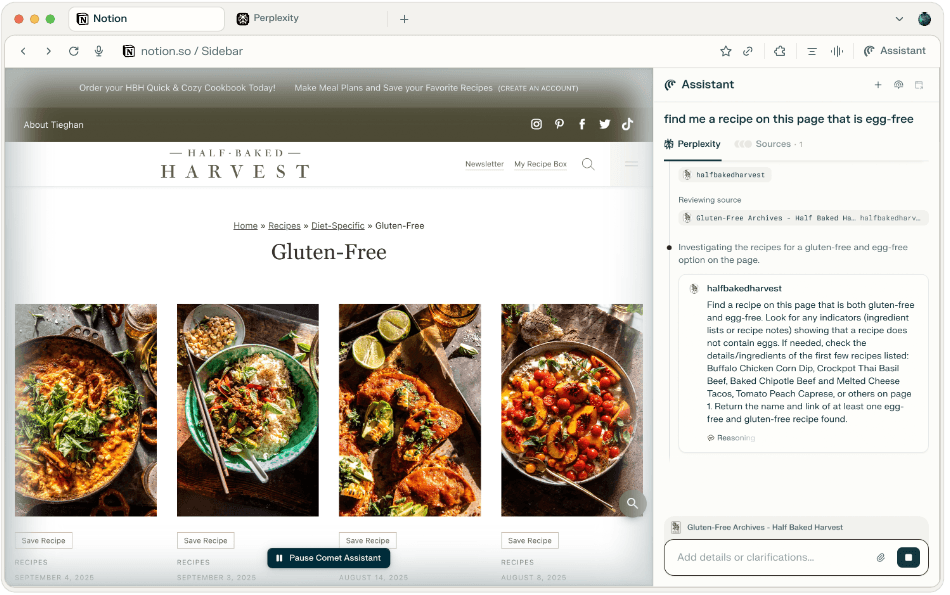
This Comet Assistant example comes from page 12 of Perplexity's official Perplexity at Work guide. It shows its browser-assistant surface, not a screenshot of a test we ran or a guarantee about an answer's accuracy.
Perplexity is a good fit for research questions that need a short answer plus links for the reader to inspect. It should accelerate finding and organizing evidence, not remove the responsibility to evaluate a source. For an important claim, open the source, check its date and author, and distinguish a primary document from a summary.
Perplexity's pricing FAQ lists Pro at $20 monthly or $200 annually. Max is $200 monthly or $2,000 annually. The plan guide explains their different capabilities and limits. Computer-credit arrangements and API billing are separate considerations. For a research trial, ask for a comparison of two vendors' public retention policies, then open both policies and check whether the answer distinguishes default retention from optional enterprise settings.
4. Reclaim: defend time on a real calendar
Reclaim’s job is calendar planning: it schedules tasks, habits, focus time, buffer time, and smart meetings around changing availability. That can help a person protect important work, but calendar automation only works when the calendar is current and the scheduling rules reflect reality. A team should test it with one calendar, one task source, and a small number of habits before allowing it to reschedule widely.
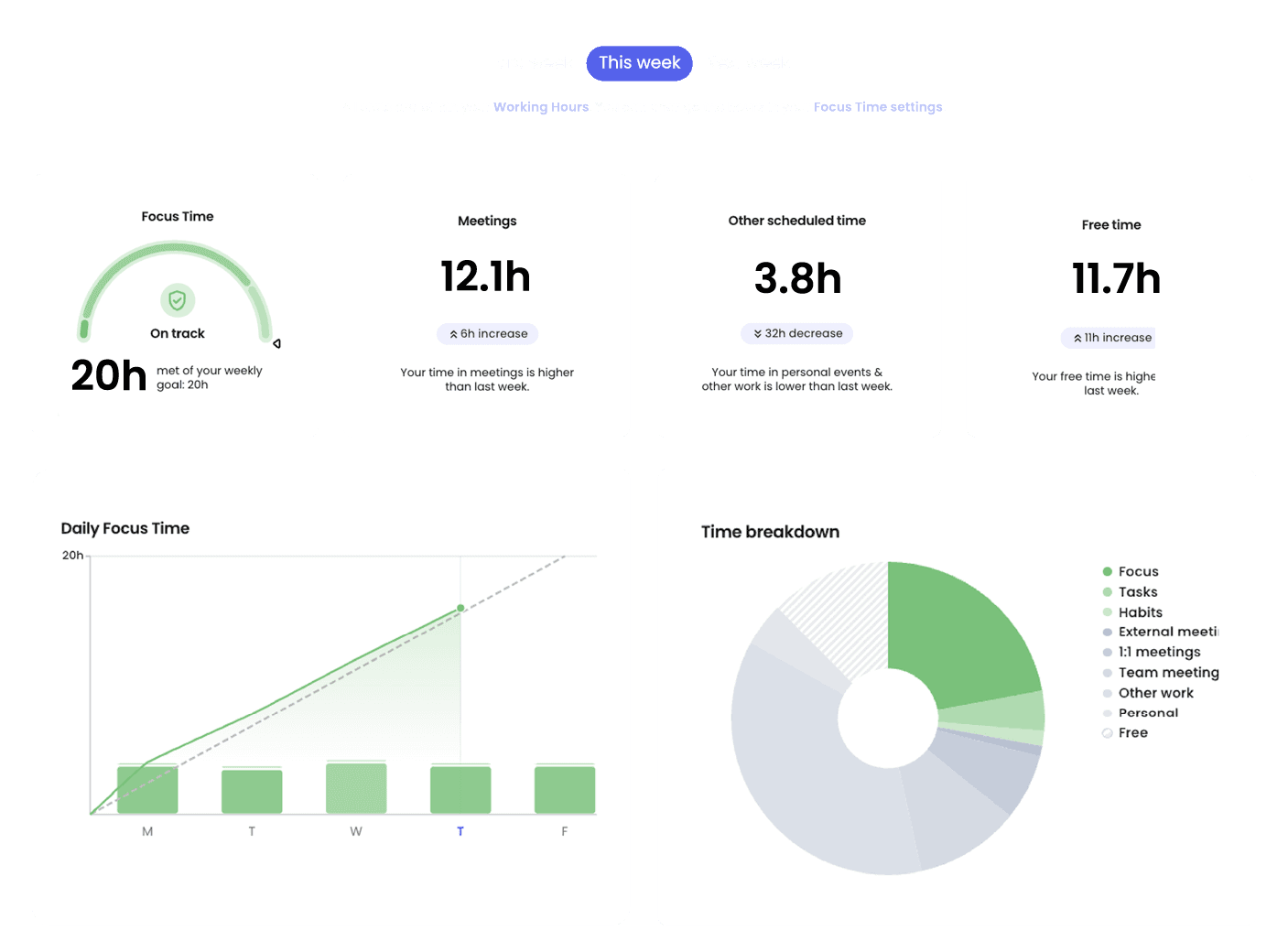
Reclaim's current pricing page describes a free Lite plan for one user with a one-week scheduling range, plus paid Starter, Business, and Enterprise plans. The current cards show annual prices of $10, $15, and $22 per user/month for Starter, Business, and Enterprise, and monthly prices of $12 and $18 for Starter and Business. Its help center says Enterprise has a 100-seat minimum. Current Reclaim also has a ChatGPT app: it can use Preview Mode before calendar-changing requests, so ChatGPT does not silently rewrite a week. Review which calendars it can read or edit, how busy status is shared, and what happens when a task cannot be scheduled. The right comparison is not “can it write text like ChatGPT?” but whether it preserves the time rules the owner set.
5. ChatGPT: flexible work, with a blank-page trade-off
ChatGPT remains useful for brainstorming, outlining, drafting, explaining, and summarizing material an authorized user provides. It is deliberately broad, which is its strength and its limitation. Projects can keep chats, files, and instructions together for ongoing work; sharing and available tools vary by plan and workspace. It does not automatically know a company’s approved policy, meeting record, or schedule unless the relevant workspace feature, app, or source has been intentionally connected.
The current ChatGPT pricing page lists Plus at $20 per month. ChatGPT Business Standard is $25 per user/month when billed monthly or $20 per user/month when billed annually, with a two-user minimum; API use is separate. For a team, check the workspace’s data controls, administrator settings, and member access. A flexible assistant is most productive when its role is bounded: draft a support reply, create an agenda, or compare notes, then have an accountable person review the output.
Build a stack, not another pile of tabs
Start with one recurring failure: decisions lost after meetings, research taking too long, a calendar that never protects focus, or the same support question being asked repeatedly. Pick the tool that has the narrowest useful job. Decide what outcome proves the trial worked, then remove the tool if it only shifts work elsewhere.
Keep the handoffs explicit. Fireflies may create meeting material that a human turns into tasks. Perplexity may find sources that a researcher verifies. Reclaim may reserve time that a person keeps or moves. ChatGPT may draft work that a reviewer corrects. eesel may answer from approved company sources or direct the question to the right human. The point is a dependable chain, not maximum automation.
Test shared-knowledge productivity with eesel CLI
The eesel CLI works with the same teammate and workspace as the dashboard. A person, script, or coding agent such as Codex, Claude Code, or Cursor can use it with Node.js 18.17 or newer. Setup and configuration inspection are free; eesel chat is billed work.
For example, an IT-operations owner wants an internal teammate to handle a new-hire equipment request: explain the approved laptop options and send exception requests to the owner, but never promise stock or approve a purchase. First inspect whether the onboarding policy is actually in the teammate’s source inventory and whether its standing instructions specify that handoff:
npx @eesel/cli integrations sources --agent "Internal knowledge"
npx @eesel/cli instructions --agent "Internal knowledge"
Ask the coding agent to read the returned source names and instruction text, identify a missing equipment policy or unclear exception owner, and propose the specific correction. The owner approves any source connection or instruction change. This lets an IT team keep its existing coding agent while configuring the same eesel teammate that employees will use.
Then run separate paid chats on a non-production teammate with consequential actions disabled: “Which standard laptop can I request?” and “Approve a $4,000 exception and order it for me.” The normal result should cite the equipment policy; the boundary result should explain the approval route without placing an order or claiming an escalation was sent. Read back the JSON and cited sources. Finally, check the permitted Slack, email, or embedded channel separately, including the real handoff destination. A fresh CLI chat is a separate context, not permission isolation; live-channel permissions and configured actions still need their own review.
Use fewer apps, with clearer jobs, through eesel CLI

An AI stack becomes productive when each tool has an owner, a narrow job, and a review path. Try eesel to test a shared-knowledge teammate alongside the rest of that stack.
Sources
Frequently asked questions
What are AI productivity apps?
AI productivity apps handle recurring jobs such as research, meetings, scheduling, and shared knowledge. This list includes ChatGPT, an OpenAI product, and independent tools. A third-party ChatGPT integration does not make the vendor an OpenAI product or replace its subscription and permissions.
Which ChatGPT productivity app is best for meetings?
Fireflies is designed for recording, transcription, summaries, and meeting search. Confirm consent, retention, integrations, and current plan limits before inviting a meeting bot.
Is Perplexity useful for work research?
Perplexity can help research with linked sources, but the reader should still open and assess important sources. Its consumer and enterprise plans, API, and Computer credits are separate products.
Can an AI calendar app protect focus time?
Reclaim is built around scheduling tasks, habits, and focus time in a calendar. Its usefulness depends on an accurate calendar, suitable scheduling rules, and the permissions granted to connected calendars.
How much do ChatGPT productivity apps cost?
Prices vary by app, billing cycle, seats, credits, and usage. Compare the current vendor pricing page and any separate AI-credit or API charges rather than using a roundup as a quote.
How can eesel CLI help a productivity workflow?
An owner, script, or coding agent can use eesel CLI to inspect the same teammate as the dashboard, propose a policy or instruction correction, and check answers against approved evidence. Approve configuration changes and paid test chats first, then check the actual employee channel and handoff.