It feels like a new AI app launches every other day, doesn't it? The market is flooded with tools all claiming they’ll change the way you work, and it’s getting tough to tell which ones are actually useful and which are just shiny objects. We’ve all been there: you sink time and money into a new tool, only to find it doesn't move the needle on your productivity.
That’s why I did the legwork for you. This isn't just another list — it's a curated collection of AI apps I've actually used for real business tasks. I've spent the last three-plus years putting AI agents on live support queues at eesel, and that work taught me the difference between an app that demos well and one that earns its place in your day. My goal here is to help you find tools that save you real time and fit into the way you already work.
What makes the best artificial intelligence app?
Simply put, an artificial intelligence app is any software that uses AI to do things that would normally require a person. You're probably already using some without realizing it. Think about virtual assistants like Siri and Alexa, or the writing suggestions you get from Grammarly. Those are all AI apps in action.
The real benefit of these apps is their ability to handle repetitive work, offer smart suggestions, and make sense of data so you can work faster. They can take a mountain of information and give you a straight answer, draft an email in a few seconds, or even answer customer questions while you’re offline.
These tools come in all shapes and sizes, from general-purpose AI assistants like ChatGPT to more focused apps for creating content, transcribing meetings, or handling complex business tasks. The right one can feel like having a super-smart assistant who's always a step ahead.
How we chose the best artificial intelligence app
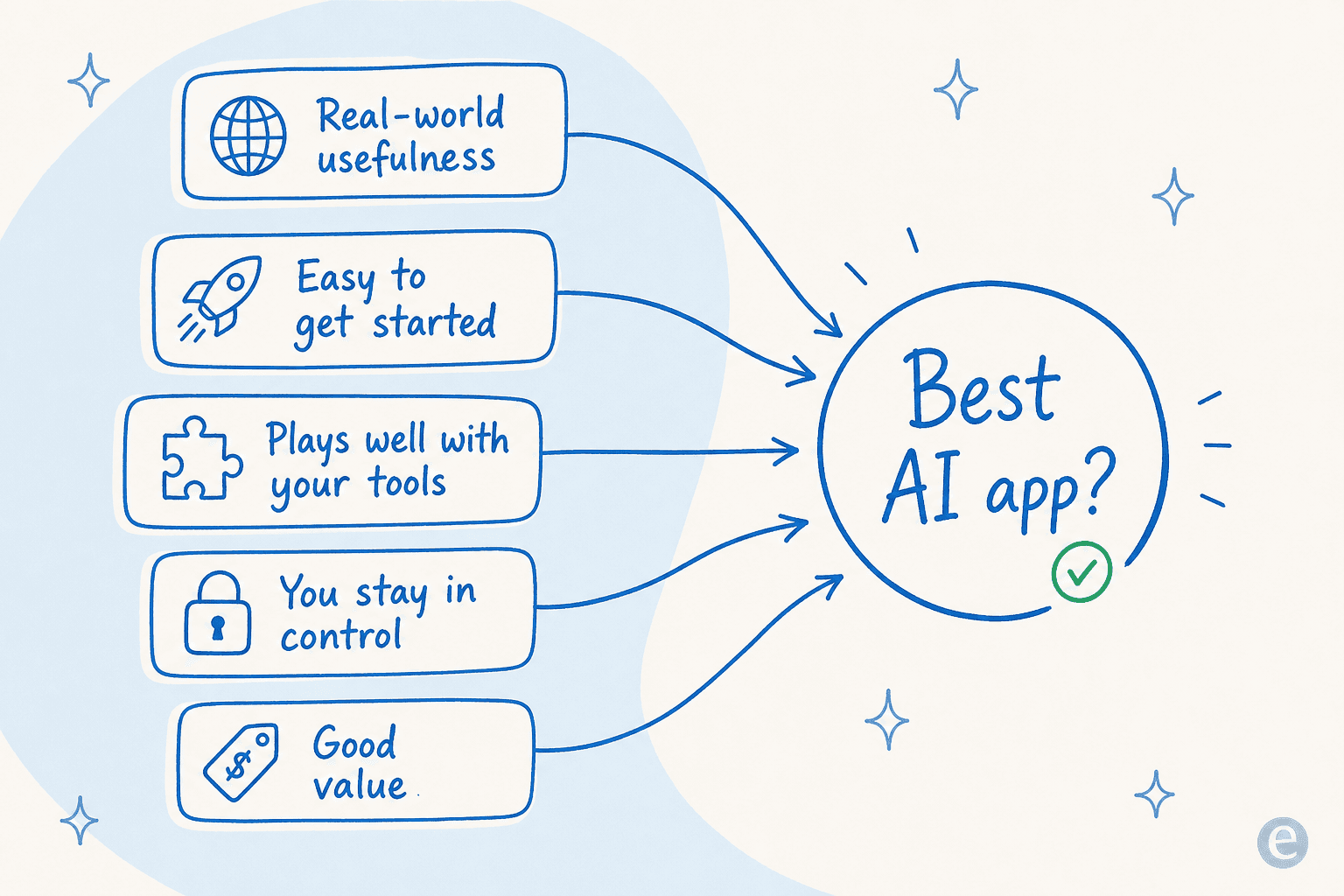
So, how did I pick these seven? I didn't just pull them out of a hat. I measured each app against a few straightforward benchmarks to make sure they were worth your time.
- Real-world usefulness: Does it solve a common, nagging problem at work? I looked for apps that address actual pain points, not just ones with flashy features that look cool but don't do much.
- Easy to get started: How fast can you sign up and see if it's right for you? The best tools are intuitive, letting you get going in minutes without sitting through a sales demo.
- Plays well with others: How easily does it connect to the tools you already use every day? An app that fits into your current setup is far more valuable than one that forces you to work in a separate bubble.
- You're in control: Can you adjust the app to fit your team's specific needs? I leaned toward tools that give you plenty of control over how they operate.
- Good value: Is the price fair for what you get? I looked for apps with clear pricing that deliver a return you can actually see.
The best artificial intelligence app contenders at a glance
Here’s a quick rundown of my top picks and what they do best.
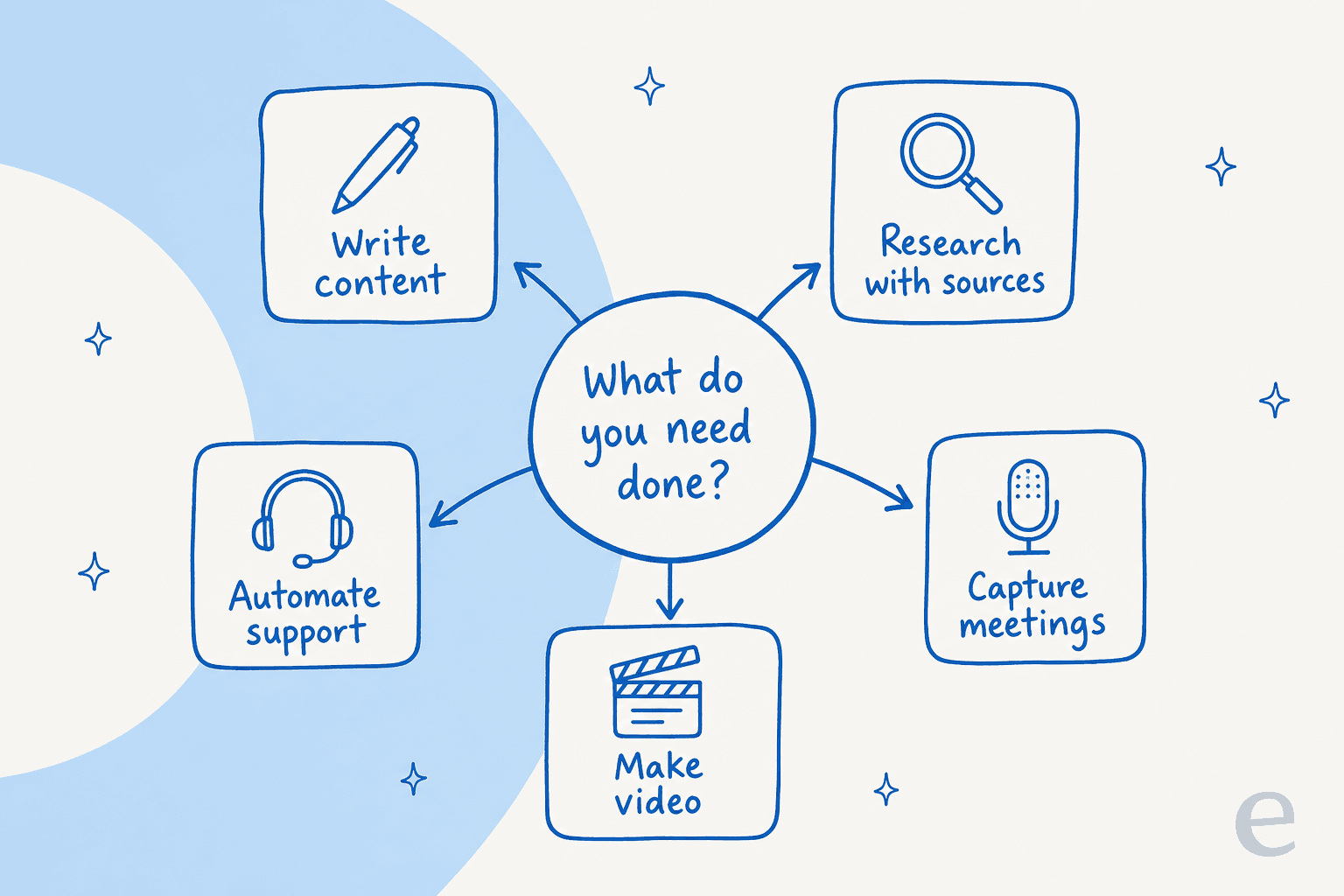
| App | Best For | Starting Price | Key Feature |
|---|---|---|---|
| eesel AI | Automating customer service & internal support | Usage-based (pay per resolution, no per-seat fees) | Go live in minutes with a fully customizable AI agent |
| ChatGPT | General-purpose Q&A and content brainstorming | Free (Plus $20/mo) | Powerful conversational AI and multi-modal input |
| Jasper | High-volume marketing content creation | $69/mo | Brand voice consistency and marketing templates |
| Fireflies.ai | Transcribing and summarizing meetings | Free (Pro $18/seat/mo) | Automated meeting notes and action item tracking |
| Grammarly | Improving writing clarity and tone | Free (Pro $12/mo) | Real-time grammar, style, and tone suggestions |
| Runway | AI-powered video creation and editing | Free (Standard $15/mo) | Text-to-video generation and advanced editing tools |
| Perplexity | Research and fact-finding with citations | Free (Pro $20/mo) | Conversational search with linked sources |
Not sure where to start? This map lines each app up against the job it’s actually best at.
A deep dive into the 7 best artificial intelligence apps
I picked these tools for one main reason: they actually make you more productive. Let's dig into what makes each one worth a look.
1. eesel AI
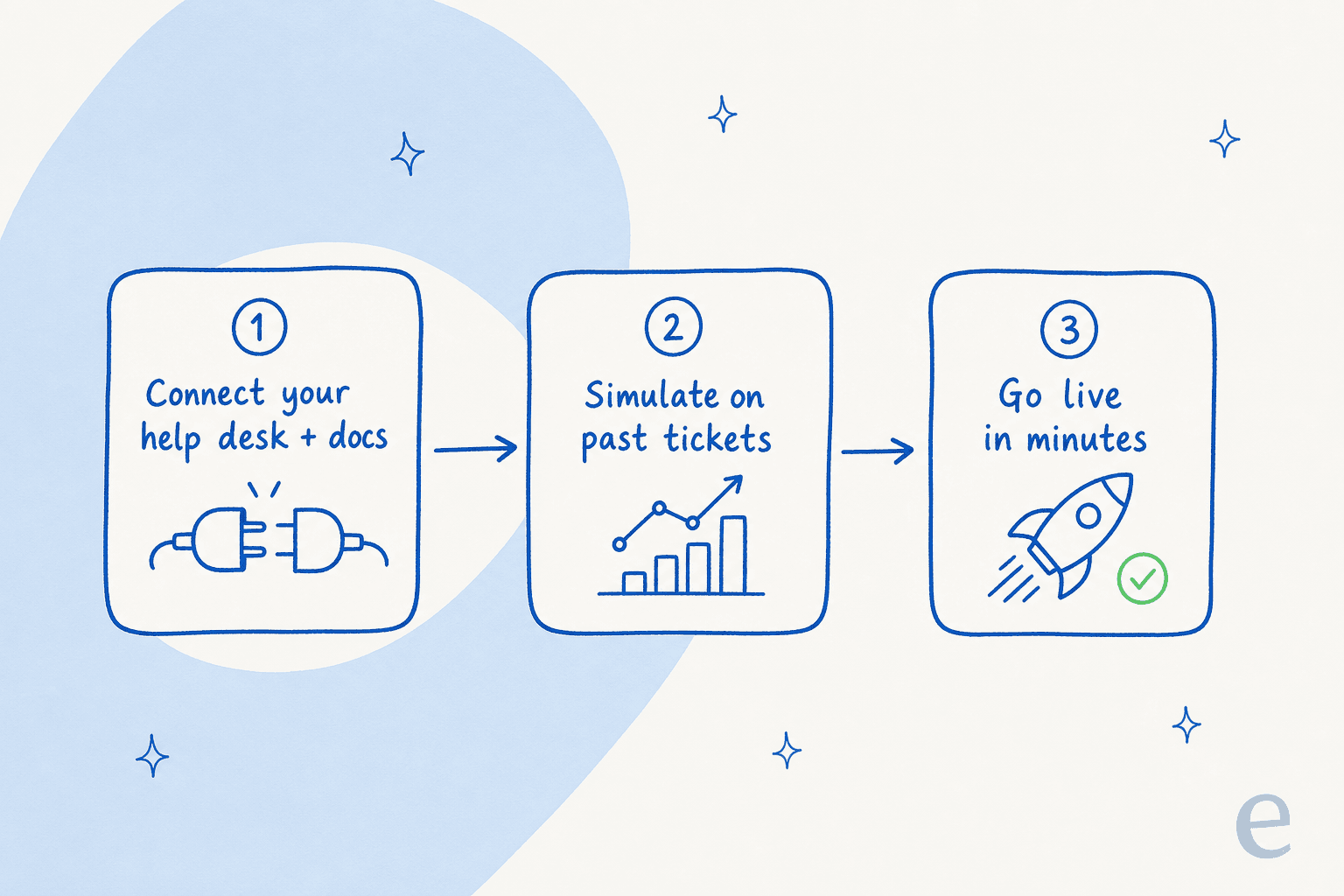
eesel AI is an AI platform designed specifically for customer service and internal support teams. It connects directly to your help desk (like Zendesk or Freshdesk) and your knowledge sources (like Confluence or Google Docs). From there, it can automate frontline responses, help your agents write better replies, and answer internal team questions.
What makes it different is how simple and fast it is. A lot of AI platforms take months to set up and force you into demos and sales calls. eesel AI is completely self-serve — you connect your tools and have it running in a few minutes. It also has a clever simulation mode that lets you test it on thousands of your past support tickets, so you can see exactly how it will perform before your customers ever interact with it. That’s not a marketing line: it’s the reason a team like Gridwise could watch eesel resolve 73% of their tier-1 requests inside a 7-day trial before committing.
Pros:
- You can set it up yourself in minutes with one-click help desk integrations.
- A flexible workflow builder gives you complete control over what gets automated.
- It learns from your past tickets, so it picks up your brand voice and context right away.
Cons:
- It's built for support and internal knowledge, so it's not a general-purpose AI chatbot.
- The pricing is geared toward business teams, not single users.
Pricing: eesel AI is usage-based — you pay per resolution with no per-seat fees, so the cost scales with the work it does rather than your headcount. You can start free and run a simulation before you pay anything.
2. ChatGPT
You’ve probably heard of this one. ChatGPT is the AI chatbot that really kicked off the current AI craze, and it’s still a fantastic tool for its conversational skills. You can use it for almost anything: drafting a quick email, getting a simple explanation of a complex topic, debugging some code, or bouncing ideas around for a new project. Under the hood it now runs on the GPT-5 family, a big step up from the GPT-4 era models it launched with.
It’s on this list because it's the most popular and flexible AI assistant out there. For a lot of people, it’s now the first place they go with a question that’s a bit too complicated for a simple search. If it doesn't fit, there are plenty of ChatGPT alternatives worth a look, and a growing library of ChatGPT apps that extend what it can do.
Pros:
- Super easy to use and can be adapted to pretty much any task.
- The free version is surprisingly powerful and more than enough for many people.
- You can talk to it using text, your voice, or even images.
Cons:
- It has a tendency to "hallucinate," meaning it sometimes states incorrect information with confidence. Always double-check important facts.
- It doesn't have the deep, business-specific knowledge that a tool like eesel AI has from the start.
Pricing: A free tier is available; the Plus plan is $20/month.
3. Jasper
Jasper is an AI content platform made for marketing and sales teams. It comes loaded with dozens of templates for everything from blog posts and social media captions to ad copy and product descriptions.
It earned a spot here because it’s particularly good at keeping a consistent brand voice, even when you’re creating a lot of content. For marketing teams that need to produce quality copy regularly, Jasper can be a huge time-saver. If you’re weighing it against other writing tools, our Jasper vs Grammarly breakdown and the list of Jasper alternatives are good next stops.
Pros:
- Lots of pre-built templates for specific marketing and sales copy.
- Features that help it learn and stick to your brand's unique voice.
- Great for generating longer pieces like articles and blog posts.
Cons:
- The price can be a bit high for smaller teams or solo users.
- As with any AI writer, the output still needs a human eye for editing and fact-checking.
Pricing: The Pro plan starts at $69/month ($59/month billed annually); Business pricing is custom. See our full Jasper pricing guide for the details.
4. Fireflies.ai
Fireflies.ai is an AI meeting assistant that joins your calls on platforms like Zoom, Google Meet, and Microsoft Teams. When the meeting is done, it gives you a full recording, a transcript you can search, and a neat summary of the conversation.
This tool is a lifesaver because it pretty much eliminates the need for manual note-taking. It lets everyone in the meeting focus on the discussion, knowing that an accurate record is being created in the background. Being able to search for key topics or action items later is a huge help for keeping projects moving forward.
Pros:
- Works smoothly with all the major video conferencing platforms.
- Automatically pulls out action items, questions, and key topics from the conversation.
- Has a solid free plan that works well for individuals and small teams.
Cons:
- The transcription isn't always perfect, especially with strong accents or bad audio.
Pricing: A free tier is available; the Pro plan is $18/seat/month ($10/seat/month billed annually).
5. Grammarly
You’ve probably seen Grammarly everywhere. It’s an AI writing assistant that does much more than check your spelling. It gives you real-time feedback on grammar, style, tone, and clarity to help you write more effectively.
It's one of the best artificial intelligence app options because millions of people use it every day to write with a bit more confidence. Whether you're putting together a crucial email, a company-wide memo, or a quick message, Grammarly acts as a safety net to make sure your writing is clear, correct, and professional. If you want to compare, our Grammarly alternatives and Grammarly reviews cover the trade-offs.
Pros:
- Works wherever you write, thanks to browser extensions and dedicated apps.
- Gives you instant, helpful feedback on your text as you type.
- The tone detector helps you make sure your message lands the right way with your audience.
Cons:
- Its best features, like advanced tone suggestions and plagiarism detection, are part of the paid plan.
- The suggestions aren't always right, so you still need to use your own judgment.
Pricing: A free version is available; the Pro plan starts at $12/month. See our Grammarly pricing guide for a full breakdown.
6. Runway
Runway is a web-based video editor that uses AI to make tricky editing jobs much easier. You can remove backgrounds, track moving objects, and even create entirely new video clips just by typing out what you want to see.
It makes this list because it gives powerful video editing tools to people who aren't video pros. Marketers, content creators, and small businesses can now make polished, professional-looking videos without learning complicated software like Adobe Premiere Pro. If you’re shopping around, our Runway alternatives and Runway review go deeper.
Pros:
- Impressive text-to-video and image-to-video features.
- An easy-to-use interface for complex tasks like removing objects from a scene.
- A free plan is available so you can try it out and see what it can do.
Cons:
- AI-generated video can still look a bit strange or inconsistent.
- Videos can take a while to process, particularly on the free plan.
Pricing: A free tier is available; the Standard plan starts at $15/month ($12/month billed annually). Our Runway pricing guide has the full tier list.
7. Perplexity
Perplexity is an AI search engine that gives you direct, conversational answers to your questions and — this is the important part — cites its sources. It's a mix between a traditional search engine and a creative chatbot.
It's fantastic for research because it gives you the best of both worlds. You get a quick, easy-to-read summary of information, but you can also click the links to the original sources to check the facts for yourself. This makes it a more reliable tool for finding information than a standard chatbot that might just make things up. For the cost details and rivals, see our Perplexity pricing guide and Perplexity alternatives.
Pros:
- Provides direct links to its sources, which makes fact-checking simple.
- You can ask follow-up questions, and it remembers the context of your conversation.
- The free version is very capable for most day-to-day research.
Cons:
- It's not as conversational or creative as a tool like ChatGPT.
- Its main job is finding information, not creating original content from scratch.
Pricing: A free version is available; the Pro plan is $20/month.
How to choose the best artificial intelligence app for your needs
With so many tools out there, how do you actually pick one? Here are a few practical tips to help you decide.
- Figure out your actual problem first: Don't just go looking for "an AI tool." Instead, pinpoint a specific headache you want to solve. For example, if you find yourself thinking, "I spend way too much time answering the same three customer questions," you have a clear starting point. This is where a focused tool like eesel AI comes in, because it's built to solve that exact problem.
- Think about your current workflow: The best app is one that slots into how you already work. Look for tools with good integrations so your team doesn't have to abandon the software they already know.
- Give it a test run: Almost every app on this list has a free tier or a trial. Use it. Try the tool with real tasks you do every day. For tools you'll rely on for your business, look for solid testing features, like the simulation mode in eesel AI, which lets you see how it performs without any risk.
- Check the user experience: Is the app easy to figure out on your own, or do you have to schedule a call with a salesperson just to see how it works? These days, simpler is usually better — the same logic behind the best AI chatbot tools.
Finding the best artificial intelligence app for your team
The "best artificial intelligence app" isn't a single tool. It’s the one that solves a real problem for you and frees up your time. I've looked at strong options for writing, research, meetings, and creating content, and each has its own strengths.
But for teams drowning in repetitive support tickets and internal questions, the choice is pretty clear. eesel AI offers the fastest, simplest way to launch a custom AI agent that learns from your business's unique knowledge and starts helping out in minutes — no demos, no months-long rollout. If you’re evaluating options, it’s the kind of tool that lands on every shortlist of the best AI tools for customer service.
Ready to see how much time you could get back? Try eesel for free and run a simulation on your own past tickets. You can be up and running in minutes, not months.
Frequently asked questions
How do I know which is the best artificial intelligence app for my small business?
The best approach is to first identify your biggest time-consuming task, whether it's customer support, content creation, or meeting notes. Then, look for a specialized tool that solves that specific problem rather than a general one. Most apps on this list of the best artificial intelligence app options offer free trials, so you can test them against your actual workflow.
Is there a single best artificial intelligence app that can do everything?
No, there isn't one "do-it-all" app. General-purpose tools like ChatGPT are versatile for brainstorming, but they lack the focus of specialized tools. For business-critical tasks like automating customer service, a dedicated app like eesel AI will deliver better results. If you want options, see our best AI chatbot roundup.
Do I need technical skills to use the best artificial intelligence app?
Not at all. The tools on this list were chosen because they are user-friendly and easy to set up without any coding knowledge. Apps like eesel AI and Fireflies.ai integrate with tools you already use in just a few clicks, so you can get started in minutes — no no-code chatbot tools learning curve required.
How can I trust that the best artificial intelligence app will provide accurate answers for my business?
Look for apps that connect directly to your company's own knowledge sources. For example, a tool like eesel AI learns from your existing help desk tickets, Confluence pages, and Google Docs. This ensures the information it provides is based on your own trusted data, not the open internet — which is how you keep your support metrics honest.
When should I upgrade from a free tool to a paid best artificial intelligence app?
Free tools are perfect for individual use and occasional tasks. You should consider upgrading to a paid plan when you need team collaboration features, better integrations with your business software, or when the task is critical enough to require an AI agent with dedicated support.
With so many options, what’s the first step to finding the best artificial intelligence app for my team?
The best first step is to ignore the hype and focus on a real problem. Instead of searching for "AI tools," pinpoint a specific workflow bottleneck, like "we spend too much time transcribing meetings." A clear problem statement leads you to a targeted solution — and for support, to the best AI agent for customer service.


Article by
Kurnia Kharisma Agung Samiadjie
Kurnia is a software engineer and writer at eesel AI with two years of SEO experience, writing about AI tools, helpdesk software, and customer support. He pairs a developer's understanding of how these products are built with search-driven research into what actually ranks and resonates with the people searching for them.