Let's be honest, software development today is a completely different world than it was a decade ago. It's not just about a developer writing code alone anymore. Now, it’s all about collaboration, shipping updates quickly, and making sure everyone, from engineering to support, is on the same page.
This is where tools like Bitbucket, Atlassian's platform for professional teams, enter the picture. It’s a Git-based tool designed to help you manage the entire software development lifecycle, keeping your teams in sync and your code moving forward.
In this overview, we’re going to walk through Bitbucket’s main features, the different ways you can host it, how the pricing works, and what’s new with its AI tools. We’ll also look at how it works within a broader team context, particularly around how information is shared between departments. The goal is to figure out how to connect the dots between your development work and your customer-facing teams, so that valuable technical knowledge is easily accessible across the organization.
What is Bitbucket?
At its heart, Bitbucket is a Git repository management solution made for teams. It provides a single, secure spot to manage your code, work together on it, and guide it through the development process from start to finish.
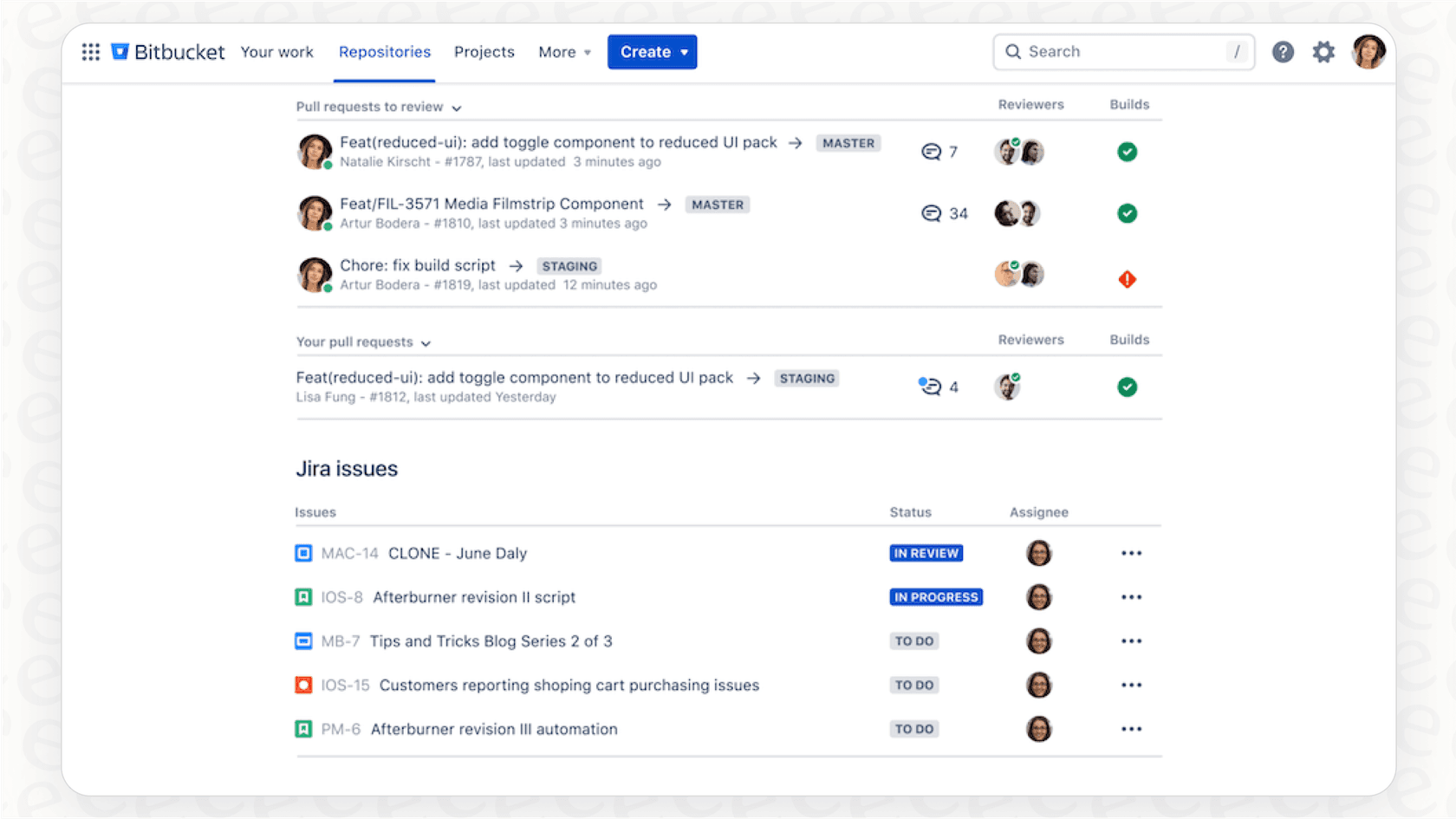
In the grand scheme of a DevOps toolchain, Bitbucket’s main job is handling version control, making code reviews easy with pull requests, and powering automated build and deployment pipelines (CI/CD). You can think of it as the central hub where all your code lives and grows.
It’s also a core piece of the Atlassian product family, meaning it’s built to work seamlessly with tools you probably already use, like Jira for project management and Confluence for documentation.
Core features and deployment models
Alright, let's get into the specific parts of Bitbucket that development teams use every day to build, test, and ship their work.
Key collaboration tools: Pull requests, code review, and wikis
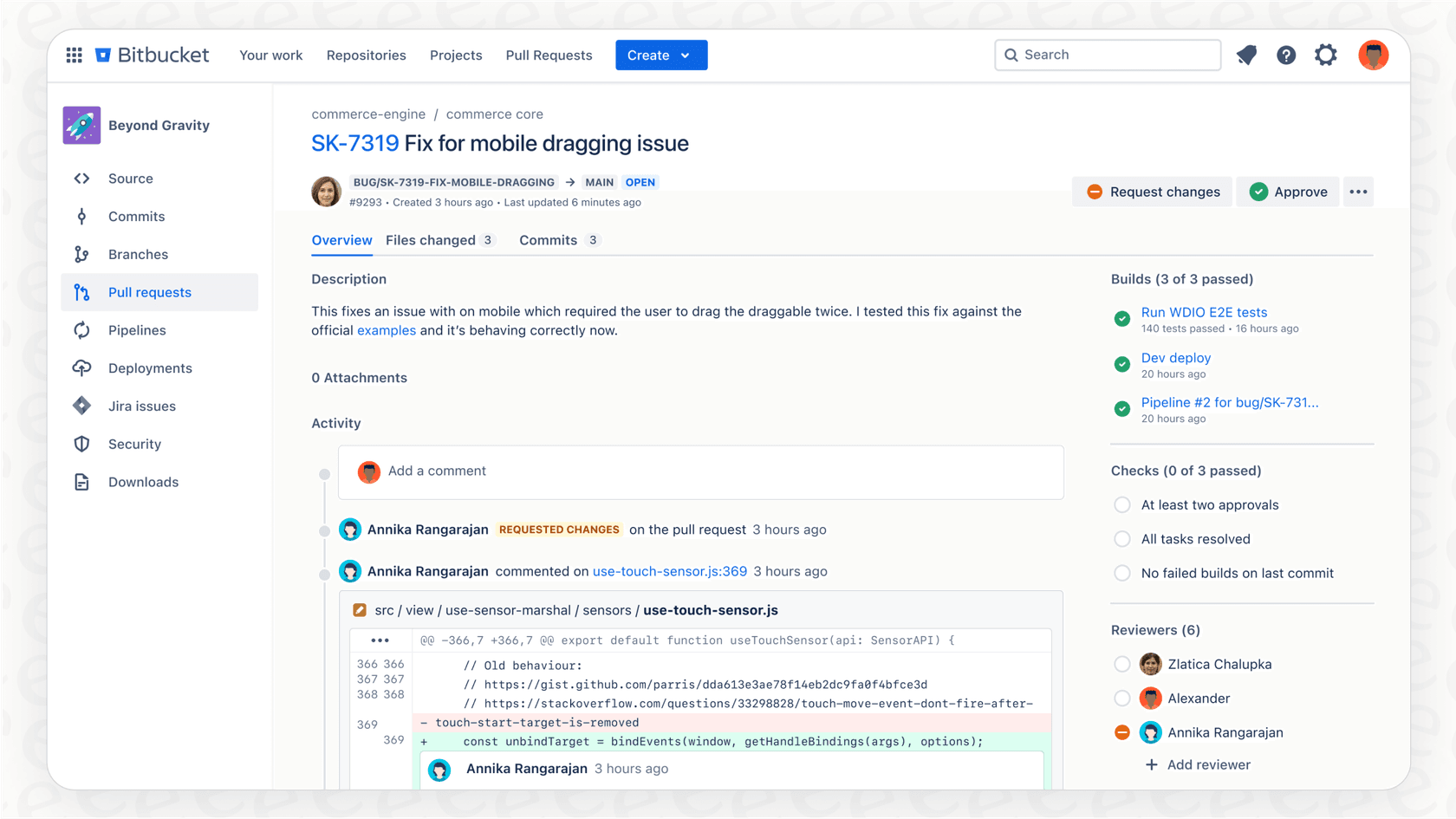
Pull requests are really the lifeblood of teamwork in Bitbucket. They give developers a straightforward way to discuss and review code changes before they’re officially added to the main codebase. Team members can drop comments right on specific lines of code, ask questions, and give their approval, which helps maintain code quality.
Every repository also gets its own wiki. This is a handy spot for developers to create and maintain documentation specific to that project, like setup instructions or notes on the software's architecture.
One thing to consider: While these tools are excellent for developers, the technical knowledge they generate is often most accessible within the engineering team. To help a support agent find answers buried in technical wikis or comments, a unified knowledge base like eesel AI can make a huge difference. It connects to your developer docs in Confluence and even learns from past support tickets, making technical answers available to your support team instantly.
Integrated CI/CD with Bitbucket Pipelines
You’ve probably heard of Continuous Integration (CI) and Continuous Delivery (CD). They're all about automating the build, test, and deployment stages of a release. This automation helps teams get code out the door faster and with fewer headaches.
Bitbucket Pipelines is the CI/CD service built right into Bitbucket. It lets teams automate their entire workflow using a simple configuration file that lives in their repository. When a developer pushes a change, a pipeline can automatically kick off a series of steps: build the code, run automated tests, and if everything looks good, deploy it. It creates a quick feedback loop that helps catch bugs before they ever make it to users.
Deployment models: Cloud vs. Data Center
Bitbucket gives you two main hosting choices, depending on your company's needs: Bitbucket Cloud, which Atlassian hosts and manages for you, and Bitbucket Data Center, a self-managed version for businesses that need more direct control.
Here’s a quick look at how they stack up:
| Feature | Bitbucket Cloud | Bitbucket Data Center |
|---|---|---|
| Hosting | Managed by Atlassian | Self-hosted on your own infrastructure |
| Built-in CI/CD | Bitbucket Pipelines | Integration with Bamboo |
| Maintenance | Handled by Atlassian | Managed by your internal team |
| Security | SOC2/3, ISO, GDPR compliant | Control over your own security protocols |
| Key Advantage | Quick setup, no maintenance overhead | Full control, advanced compliance |
The Atlassian ecosystem, Jira, and AI
One of Bitbucket's biggest strengths is how well it plays with other Atlassian tools. Let’s look at its integration with Jira and its new AI features, and also talk about how they provide a foundation for team-wide knowledge.
The power of Jira integration
This is where Bitbucket really starts to shine. When you connect it with Jira, you get a clear line of sight from your project management tasks straight to your code. Teams can create new code branches directly from a Jira ticket, and every commit or pull request automatically updates that ticket’s status.
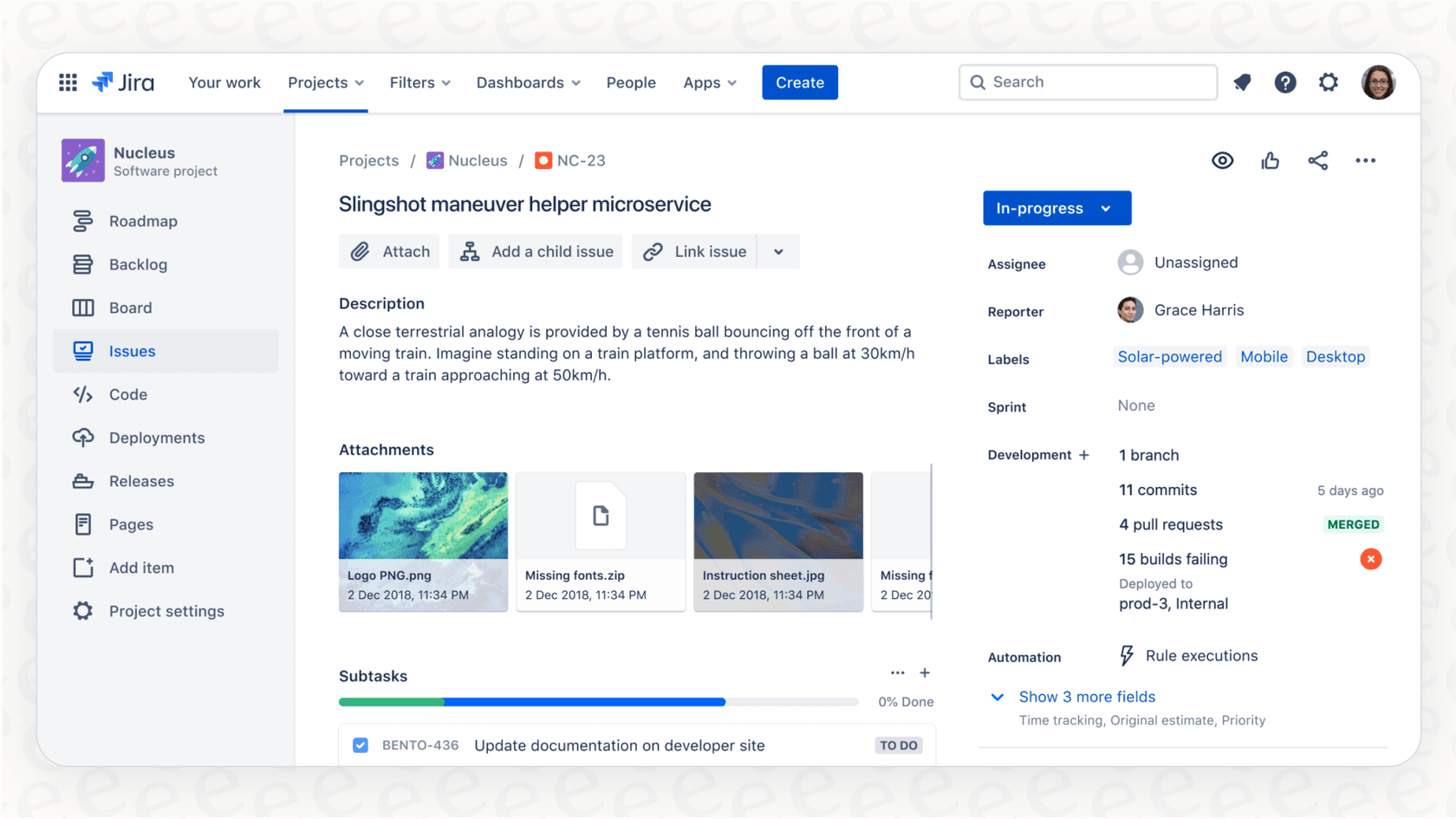
This creates a single source of truth for everyone. A project manager can see the exact code changes for a new feature, and a developer can get the full story behind a bug report without having to switch back and forth between tools. It just makes communication a whole lot smoother.
AI features
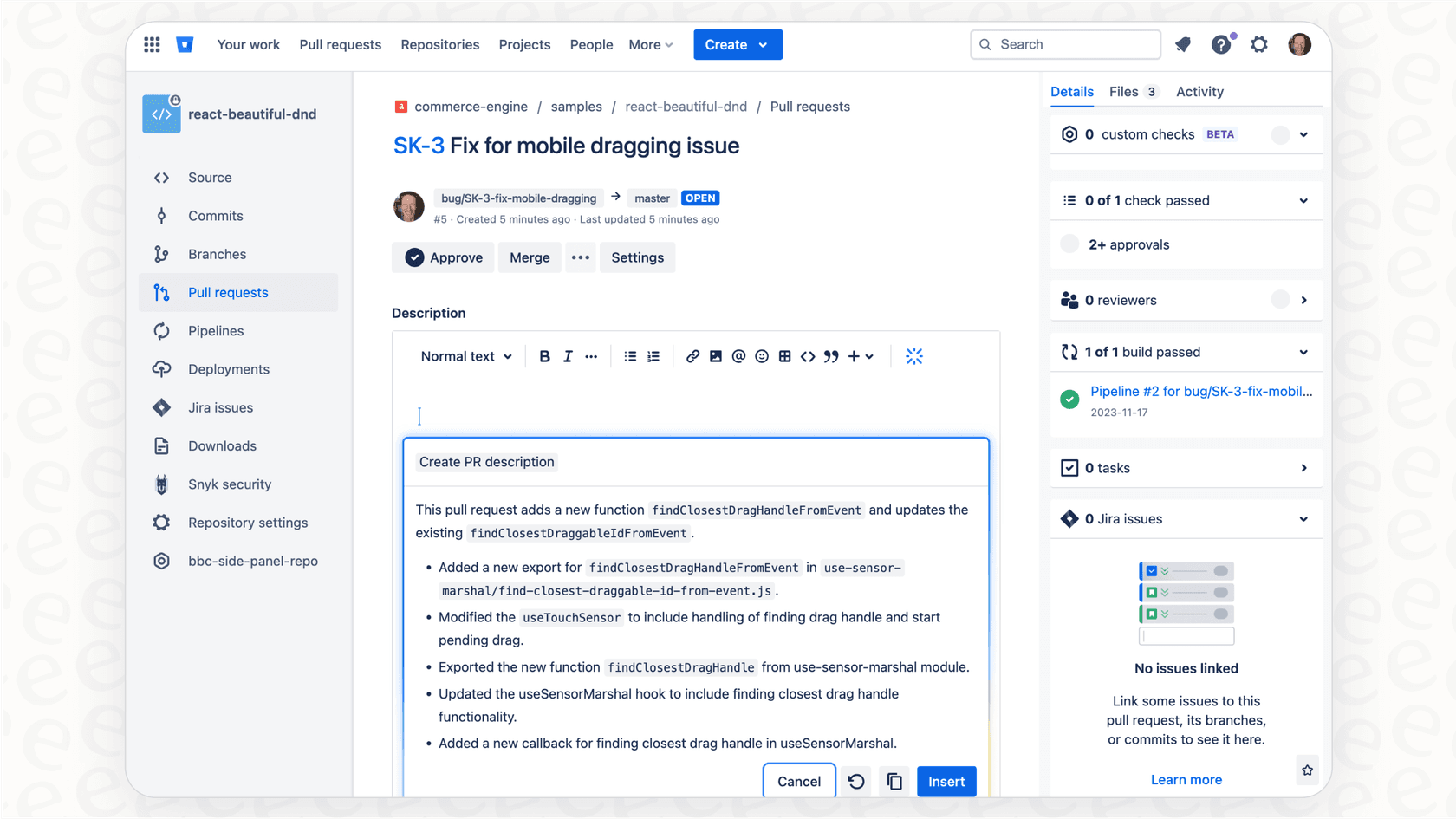
Atlassian has started adding AI features to its products under the name Atlassian Intelligence. In Bitbucket, this appears in a few helpful ways, like generating summaries for pull requests or helping you write comments.
These features are designed to be little productivity boosts for developers. They can speed up common tasks like writing a clear description for a pull request, which helps other developers get up to speed on the changes faster.
There are also some great ways to expand on these capabilities:
-
Optimized for the developer experience. Atlassian's AI is laser-focused on the developer experience. It’s excellent for helping you write a better commit message or pull request summary. To extend this technical insight to support teams, many organizations use eesel AI as a complementary bridge.
-
Ready for immediate use. The AI is designed to work right away, offering instant productivity benefits for your engineering team. For teams that want to test performance on past support tickets specifically, eesel AI offers a simulation mode as a specialized complementary option.
-
Focused on repository data. Atlassian Intelligence provides deep insights from your code and development history. To connect these insights with other sources like your help center, Google Docs, or past support conversations, a tool like eesel AI can be used alongside it to provide a complete view across Slack or other platforms.
Pricing plans
Bitbucket has a few different plans for teams of all sizes, including a pretty generous free plan that’s great for small teams just starting out.
Here’s a look at the cloud pricing:
| Plan | Price (per user/month) | Key Features |
|---|---|---|
| Free | $0 (for up to 5 users) | Unlimited private repos, 50 build minutes, 1 GB Git LFS. |
| Standard | $3.30 | Unlimited users, 2,500 build minutes, 5 GB Git LFS, AI features. |
| Premium | $6.60 | 3,500 build minutes, 10 GB Git LFS, Enforced merge checks, IP allowlisting. |
For bigger companies with specific security or compliance requirements, there's the Bitbucket Data Center option, which you manage yourself and has custom pricing.
Is Bitbucket the right tool for your team?
So, should your team be using Bitbucket? It's a fantastic choice for professional development teams, especially if you're already using other Atlassian products. The deep integration with Jira is a huge plus, and its built-in CI/CD and collaboration tools make it a solid platform for managing your code.
Just remember that while its AI and knowledge-sharing features are optimized for developers, you can easily bridge the gap to other teams. By adding a complementary solution, you can ensure useful technical info is shared effectively between engineering and support workflows.
The goal isn't to replace Bitbucket, but to add to it. While Bitbucket is managing your code, you can use another solution to further enhance how you share your company's knowledge. eesel AI can act as that smart layer, connecting your development knowledge with your support team so everyone has the answers they need, right when they need them.
Don’t let valuable information stay locked away. Try eesel AI for free to bring all your company’s knowledge together, help out your frontline support, and give your entire team the right answers in seconds.
Frequently asked questions
What is the main purpose of Bitbucket for development teams?
Bitbucket is a Git repository management solution designed for professional teams. Its primary role is to provide a secure, centralized hub for managing code, facilitating collaboration, and guiding code through the entire software development lifecycle.
What is the difference between Bitbucket Cloud and Bitbucket Data Center?
Bitbucket Cloud is hosted and managed by Atlassian, offering quick setup and no maintenance overhead. Bitbucket Data Center is a self-managed, on-premise solution that provides full control over your infrastructure, security protocols, and integrates with Bamboo for CI/CD.
What are Bitbucket's integrated CI/CD capabilities and how do they benefit teams?
Bitbucket Pipelines is its integrated CI/CD service, automating build, test, and deployment stages directly from the repository. This automation helps teams release code faster, reduce manual errors, and provides quick feedback loops to catch bugs early.
How is Bitbucket's integration with Jira beneficial for project management and development?
Integrating Bitbucket with Jira provides a clear connection between project tasks and code changes. Teams can create branches from Jira tickets, and commits/pull requests automatically update ticket statuses, creating a single source of truth for all stakeholders.
What AI features are available in Bitbucket, and how can they be extended?
Bitbucket offers Atlassian Intelligence features like generating summaries for pull requests and assisting with comments. While these are developer-focused, they provide a strong foundation that can be extended with tools like eesel AI to make technical information even more accessible to non-developer teams.
What is Bitbucket's pricing structure for small teams?
Bitbucket offers a generous free plan for up to 5 users with unlimited private repositories. For growing teams, Standard and Premium plans provide unlimited users, more build minutes, and additional features, with Bitbucket Data Center offering custom pricing for larger enterprises.