If you're building software, you know how quickly the toolchain can get out of hand. You might be using one tool for your code repos, another for CI/CD, a third for tracking issues, and a handful more for security scans and project management. It gets messy, fast.
GitLab’s big promise is to clean all that up by replacing the sprawling, complex setup with a single, unified DevSecOps platform.
But can one tool really do it all effectively? In this GitLab overview, we'll get into its core features, how it's built, and what it costs. We'll also look at the potential downsides of a "one-stop-shop," especially when it comes to managing all the scattered knowledge your development team needs to get work done.
What is GitLab?
First, let's clear up a common point of confusion: Git vs. GitLab. Git is the distributed version control system that tracks changes to your code on your local machine. Think of it as the engine. GitLab is a whole web platform built around Git that gives you a full suite of tools for the entire software development lifecycle. It’s the car built around that engine.
Launched way back in 2011, GitLab’s mission has always been about providing a single application for everything from planning and source code management to CI/CD, monitoring, and security. The idea is that instead of patching together a bunch of different tools, your team can manage its entire workflow in one spot. It started out with separate Community and Enterprise editions, but now GitLab uses a single, open-core codebase, unlocking different features depending on which pricing plan you're on.
Core features
GitLab really does pack a lot into one platform. Its features are meant to support every stage of the DevSecOps lifecycle, hopefully letting you ditch a few of those other third-party tools.
Source code management and collaboration
At its core, GitLab is all about managing your code. It has all the source code management (SCM) features you’d expect:
-
Git repositories: You can host both public and private repos with really specific access controls.
-
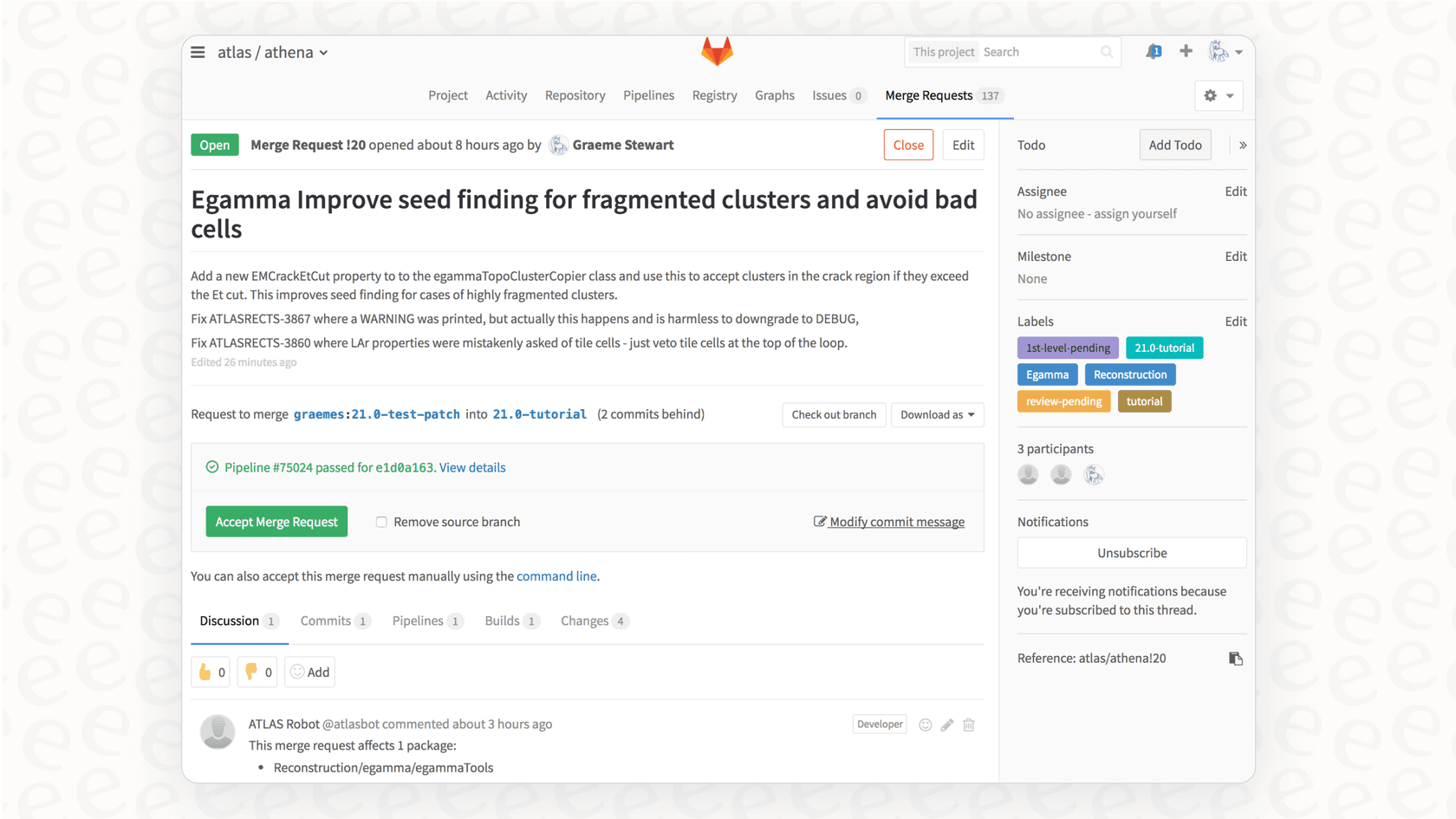
Merge Requests (MRs): This is their workflow for code review and collaboration, where teams can comment on, approve, and merge changes. It's pretty solid.
-
Protected branches and push rules: You can enforce quality and security by setting rules on who can push or merge to critical branches like "main".
Having this all integrated means the code review happens right next to the code and the CI/CD pipeline, so you're not constantly switching contexts.
Powerful, integrated CI/CD
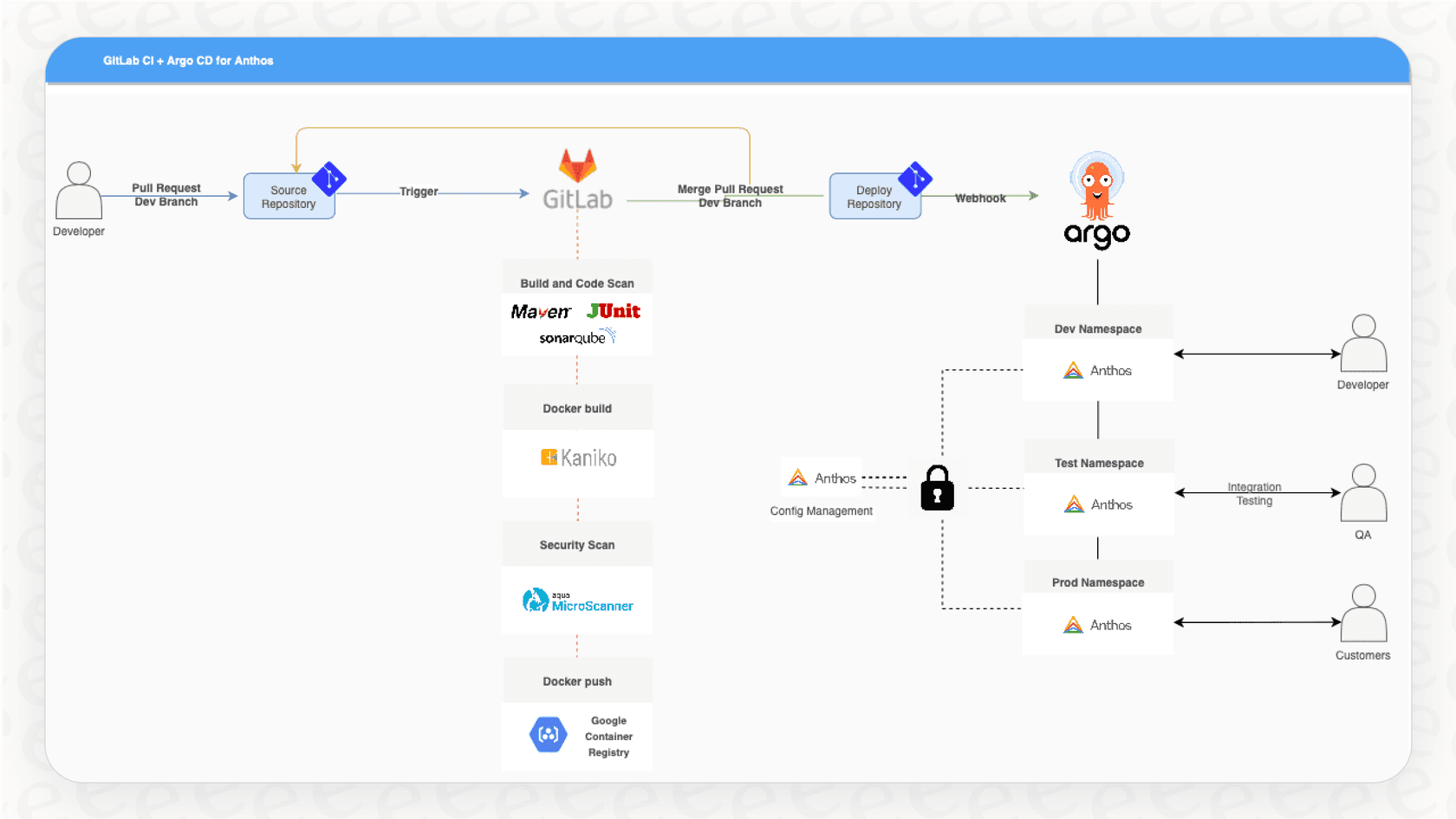
This is where GitLab really shines. While other platforms like Jenkins often make you rely on a complicated web of third-party plugins (that may or may not be kept up to date), GitLab built CI/CD right into its core. The whole configuration lives in a simple YAML file, .gitlab-ci.yml, inside each repository.
A few key benefits here:
-
Container-native builds: Pipelines run in containers by default, which gives you a clean and consistent build environment every single time.
-
Auto DevOps: With minimal setup, GitLab can often detect your code and automatically run a default CI/CD pipeline to build, test, and deploy your app.
-
Review Apps: This is a neat one. It can automatically deploy the code from a merge request to a live, temporary environment, so reviewers can actually click around and test the changes interactively.
Project management and issue tracking
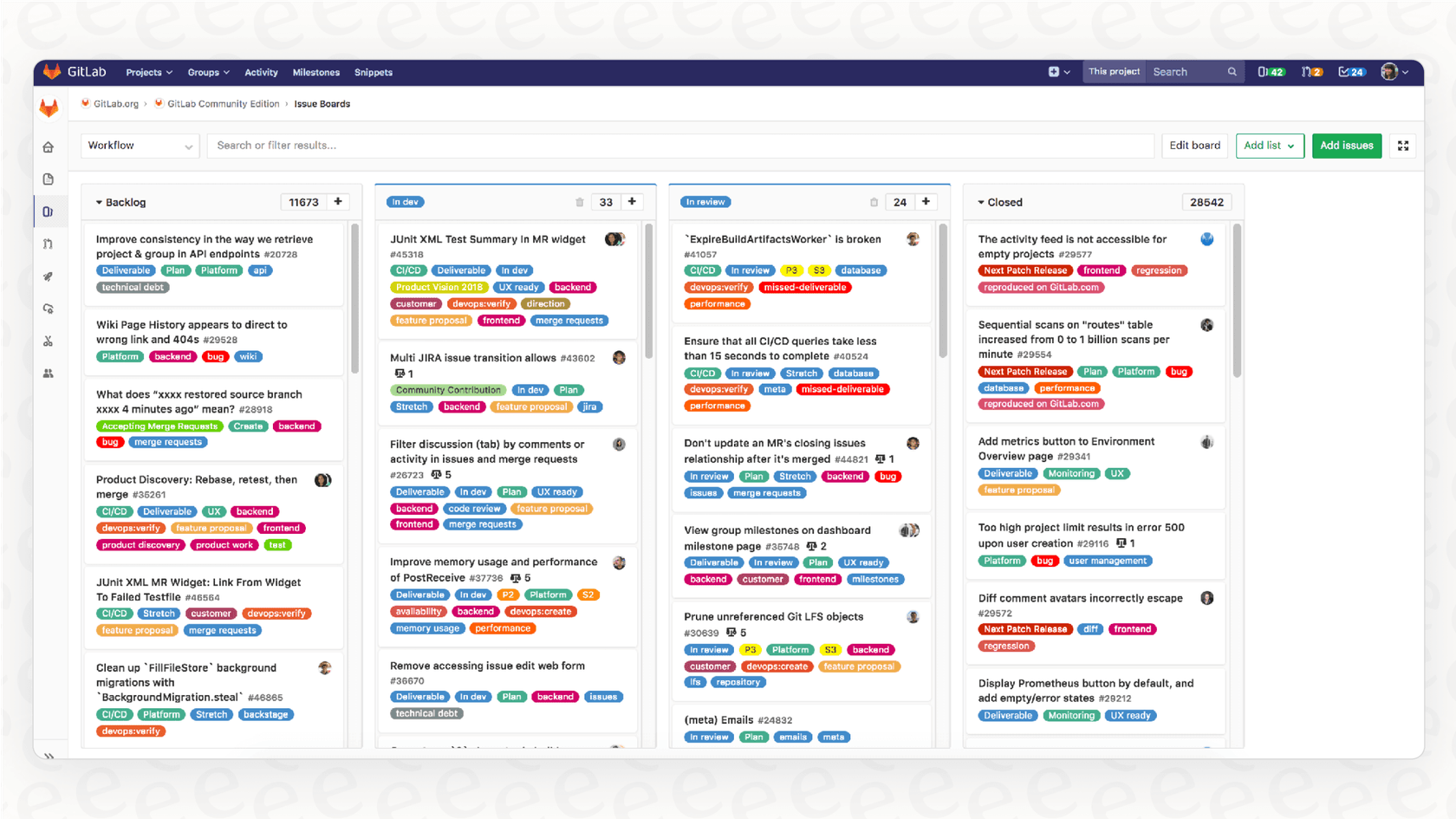
GitLab also wants to replace project management tools like Jira. It comes with a full set of agile planning tools:
-
Issue tracking: Create, assign, and keep track of bugs and feature requests.
-
Kanban boards: Visualize your team's workflow and see how issues are moving along.
-
Epics and milestones: A way to group issues to track bigger projects and sprints.
-
Wikis: Every project gets its own built-in wiki, which is handy for documentation.
Built-in security and compliance (DevSecOps)
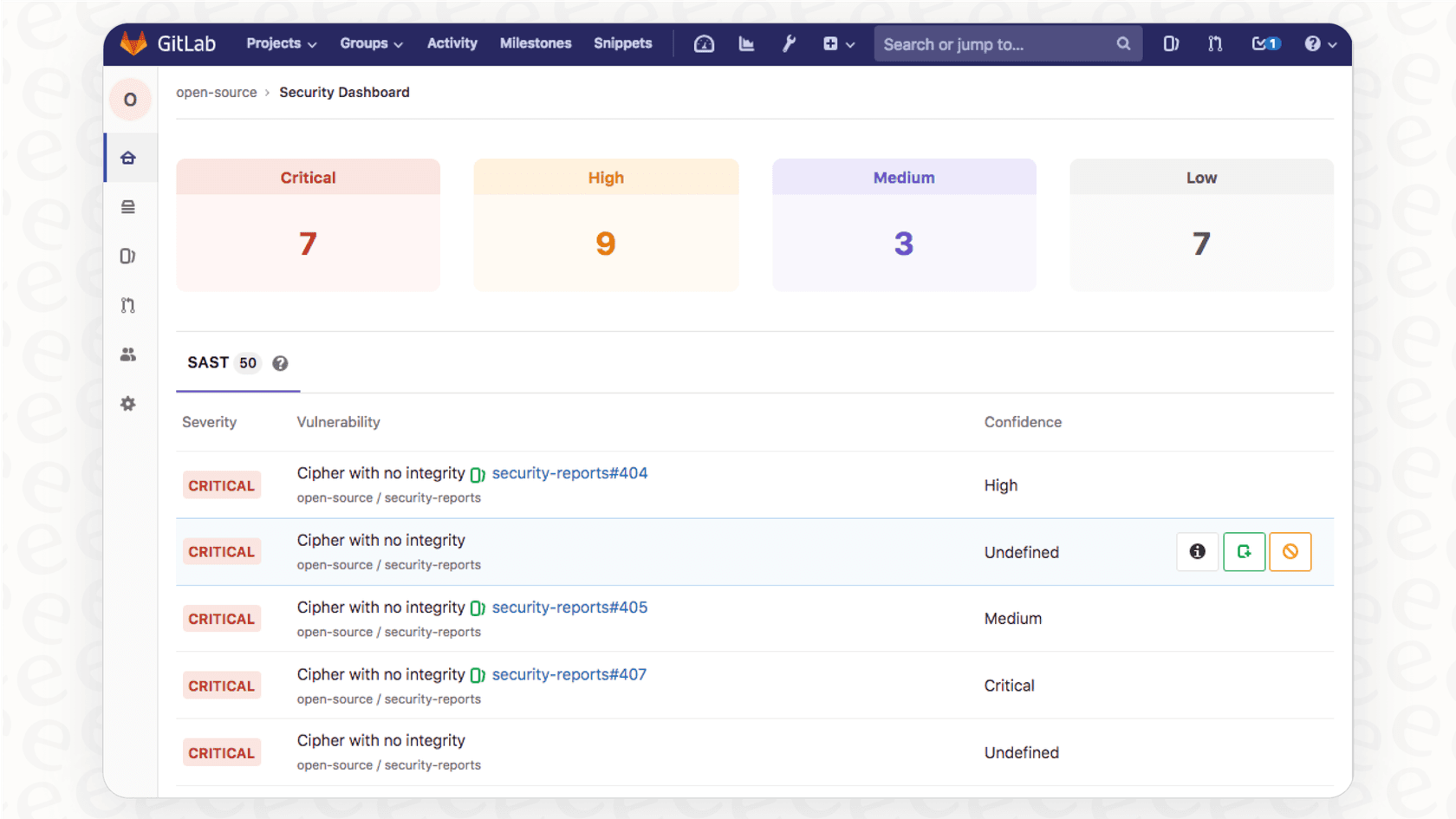
By embedding security scanning directly into the CI/CD pipeline, GitLab helps you shift security "left," catching vulnerabilities early in the process. This includes:
-
Static and Dynamic Application Security Testing (SAST/DAST)
-
Container and dependency scanning
-
Secret detection and license compliance
These security features are a big part of the Ultimate tier, which is what makes GitLab a legitimate DevSecOps platform.
Architecture and ecosystem
You don't need to be a systems architect to use GitLab, but understanding a little about how it works can help you see how it delivers that all-in-one service. While the full architecture is complex, a few key services do most of the work.
When you make a request to GitLab (either from your browser or a Git command), it goes through a web server to GitLab Workhorse, which is a smart reverse proxy. From there, it gets sent to the right component. Web and API requests go to the main GitLab application, while background jobs like CI pipelines are handled by a service called Sidekiq. Anything Git-related, like cloning or pushing code, goes to a dedicated service called Gitaly. All the important data, like user info and issues, is stored in a PostgreSQL database.
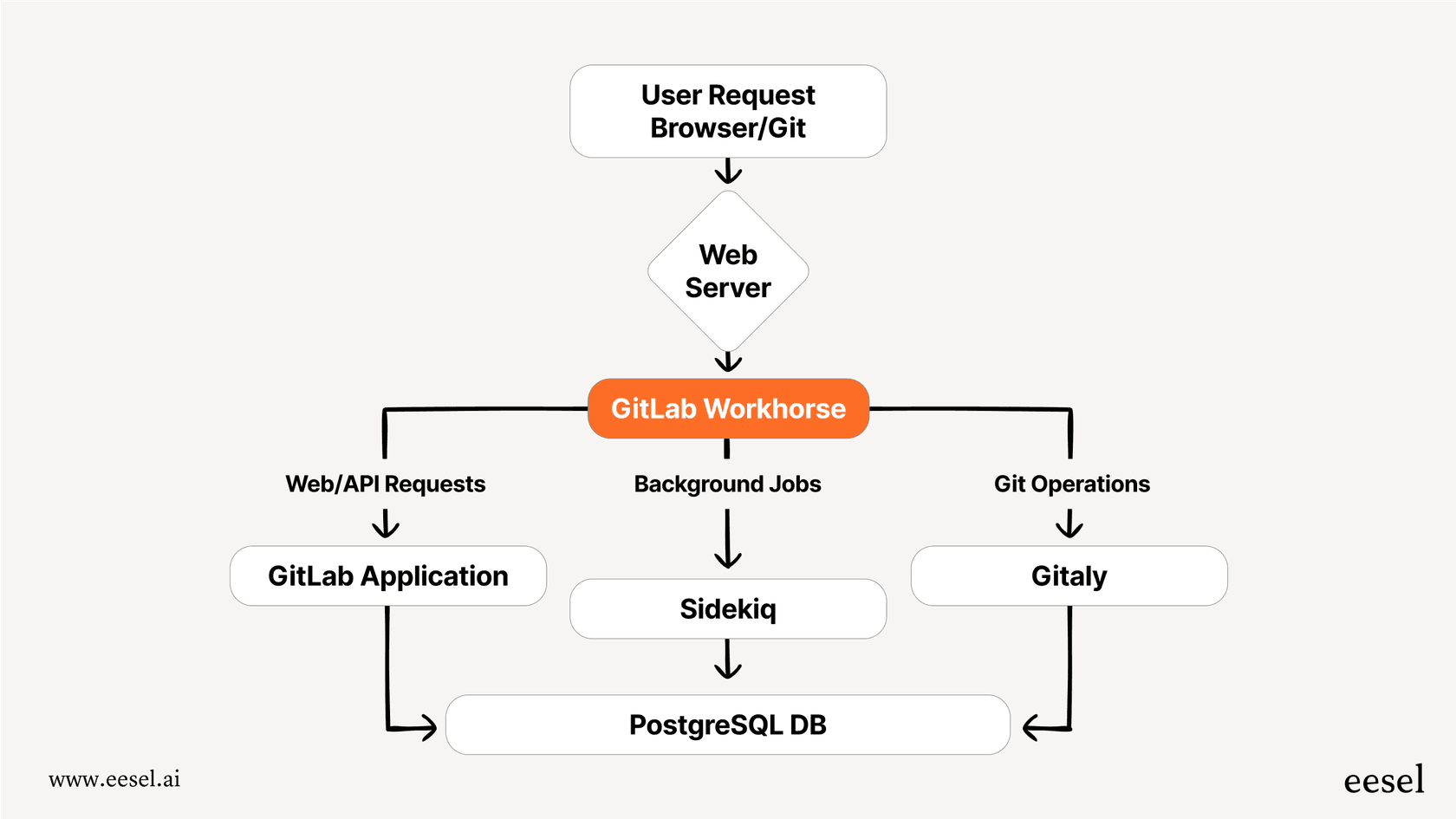
This modular setup lets GitLab scale different parts of its service on their own, which is important for their big SaaS offering and for companies running large self-managed installations.
Self-managed vs. GitLab.com
You have two main options for using GitLab:
-
GitLab.com (SaaS): This is the fully managed version hosted by GitLab. It's the fastest way to get started and means you don't have to worry about maintenance.
-
Self-Managed: You host GitLab on your own servers, whether that's on-prem or in the cloud. This gives you total control over your instance, security, and data, but you're on the hook for updates and upkeep.
Pricing and limitations
GitLab's features are split across three main plans. Figuring out the right one really depends on what your team needs for collaboration, security, and scale.
GitLab pricing plans
GitLab has a free tier and two paid plans: Premium and Ultimate. The features and pricing are slightly different for the SaaS (GitLab.com) and Self-Managed versions.
| Feature Tier | Free | Premium | Ultimate |
|---|---|---|---|
| Price | $0 | $29 per user/month | Contact Sales |
| Target Audience | Individuals, personal projects | Scaling teams, growing businesses | Enterprises with advanced security and compliance needs |
| Core Features | Source Code Management, CI/CD (400 mins/mo), 5 users, 10 GiB storage, Issue Tracking | Everything in Free, plus: Faster CI/CD (10,000 mins/mo), Advanced project management, Merge request approvals, Release controls, Priority support | Everything in Premium, plus: Advanced security scanning (SAST, DAST, etc.), Compliance frameworks, Vulnerability management, Portfolio management, Value stream management, 50,000 CI/CD mins/mo |
| AI Features | AI Chat & Code Suggestions | AI Chat & Code Suggestions | Everything in Premium, plus: Vulnerability explanation & resolution, Code review summary, Root cause analysis (requires Duo Enterprise add-on) |
Limitations of the 'one-stop-shop' model
The all-in-one approach is tempting, but it isn't perfect. a platform that does everything might only offer a "good enough" version of a feature, whereas a dedicated tool built for one job usually excels at it.
Internal knowledge management is one area where this really shows. GitLab's built-in Wiki is fine for project-specific documentation, but it's just one more silo. In the real world, developer knowledge is all over the place:
-
Confluence: For those detailed technical specs and architecture diagrams.
-
Google Docs: For project plans, meeting notes, and quick how-to guides.
-
Slack/MS Teams: Where important decisions get made and technical fixes are shared, only to be buried in a hundred other messages.
This mess of information is a huge drag on productivity. New developers spend ages just trying to find answers, and senior engineers get interrupted all day with the same questions over and over, slowing everyone down.
Bridging the knowledge gap with an AI assistant
This is where a specialized tool can work alongside GitLab to create a much more productive environment. While GitLab is busy managing your code, an AI-powered internal assistant can manage your scattered knowledge.
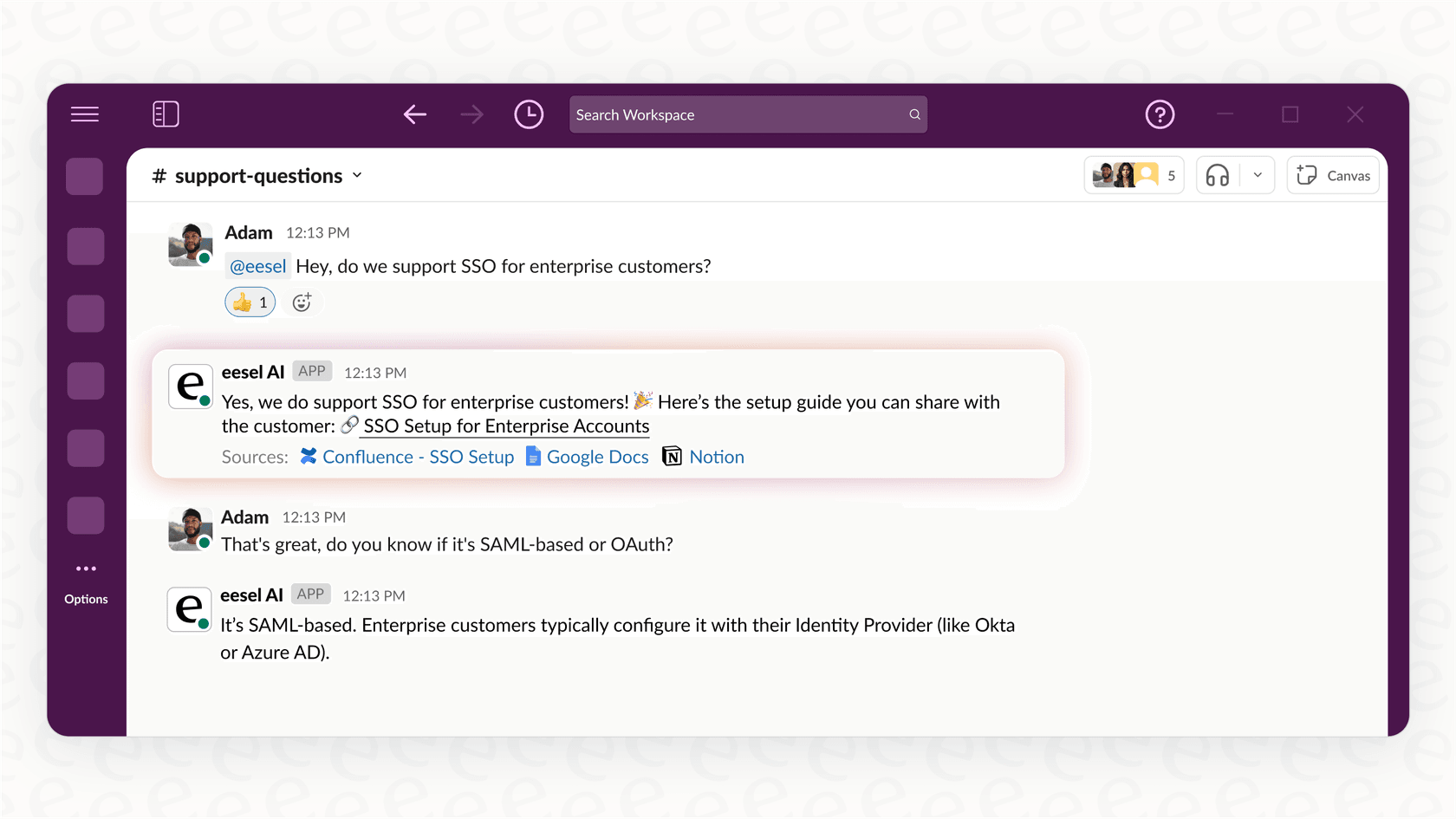
This is exactly what eesel AI was built for. The AI Internal Chat product is designed to solve this exact problem. It connects to all your company's knowledge sources, including Confluence, Google Docs, Slack, and even your GitLab Wiki, to create a single source of truth.
Instead of digging through five different apps or tapping a colleague on the shoulder, developers can justask a question in Slack and get an instant, accurate answer pulled from your entire knowledge base.
-
Go live in minutes: eesel AI has one-click integrations with the tools you're already using. There's no complicated setup or drain on your developers' time.
-
Unify your knowledge: Unlike GitLab’s siloed Wiki, eesel AI brings all your separate knowledge sources together into one intelligent layer.
-
Works where you work: Developers get answers right inside Slack or MS Teams, which means less context switching and more time spent in a flow state.
By adding a dedicated knowledge tool like eesel AI, you can fill in the gaps of GitLab's "one-stop-shop" platform and fix the frustrating problem of internal developer support.
Is GitLab right for your team?
GitLab is an incredibly capable DevSecOps platform. For teams that want to consolidate their tools, cut down on complexity, and build security into their development process from the start, it's a fantastic choice. The integrated CI/CD, in particular, is a standout feature that can seriously speed up your delivery pipeline.
The main thing to consider is whether its all-in-one model is the right fit, or if you'd rather build your own stack of specialized, best-in-class tools. GitLab does an amazing job of covering the entire software development lifecycle, but as we’ve discussed, gaps can appear, especially around managing all the knowledge that lives outside the platform.
So, what's our take? GitLab is a top-tier choice for streamlining your core development work. But for the knowledge that actually fuels your team, think about pairing it with a tool that brings everything together.
Ready to help your development team get more done? While GitLab organizes your code, let eesel AI organize your knowledge. See how our AI Internal Chat can unite your Confluence, Google Docs, and Slack into a powerful assistant that gives your developers the answers they need, right when they need them.
Frequently asked questions
What's the primary benefit of choosing an all-in-one platform like GitLab?
The primary benefit is consolidating your entire DevSecOps toolchain into a single, unified platform. This reduces complexity, cuts down on context switching, and streamlines workflows by managing everything from planning to deployment in one place.
How does GitLab integrate security directly into the development lifecycle?
GitLab integrates security directly into the CI/CD pipeline, shifting security "left" to catch vulnerabilities early in the process. It includes features like SAST, DAST, container scanning, and secret detection, which are particularly prominent in the Ultimate tier.
What are the differences between GitLab.com (SaaS) and a self-managed GitLab instance?
GitLab.com is a fully managed, SaaS offering hosted by GitLab, providing the fastest way to get started without maintenance worries. A self-managed GitLab instance gives you total control over your servers, security, and data, but requires you to handle updates and upkeep.
What are the main limitations of GitLab's "one-stop-shop" model?
The "one-stop-shop" model's main limitation is that some features might offer a "good enough" solution rather than a best-in-class one. This is especially noticeable in areas like internal knowledge management, where critical information often remains scattered across other dedicated tools.
What are the key advantages of GitLab's integrated CI/CD?
GitLab's integrated CI/CD stands out because it's built directly into the core platform, reducing reliance on complicated third-party plugins. Key advantages include container-native builds for consistency, Auto DevOps for minimal setup, and Review Apps for interactive testing of merge requests.
How can teams address GitLab's gaps in internal knowledge management?
This GitLab overview suggests complementing GitLab with a specialized AI-powered internal assistant like eesel AI. This tool can unify scattered knowledge from sources like Confluence, Google Docs, and Slack, providing a single, intelligent source of truth for developers.