Target Keyword: Zendesk product availability Content Type: Overview/Guide Meta Title: Zendesk product availability: A complete guide for 2026 Meta Description: Learn what Zendesk product availability means, how to manage agent availability settings, and understand which Zendesk products are available for your team. Excerpt: This guide clarifies the different meanings of "product availability" in Zendesk and shows you how to manage availability settings effectively. Tags: Zendesk, customer support, agent availability, product management
Search for "Zendesk product availability" and you'll find three completely different topics competing for your attention. One page talks about checking if your support agents are online. Another explains how to display inventory stock levels to customers. A third walks you through buying Zendesk products for your team.
This confusion is understandable. "Product availability" means different things depending on which Zendesk feature you're using. In this guide, we'll clarify these distinct meanings and show you how to manage each type of availability effectively. We'll also introduce how eesel AI can work alongside your Zendesk setup as an AI teammate for your support team.

What "product availability" means in Zendesk
Let's break down the three meanings of "product availability" in the Zendesk ecosystem:
Agent availability refers to whether your support agents are currently online and available to handle customer conversations. This includes their status (online, away, invisible, offline) and their capacity to take on new tickets or chats.
E-commerce product availability relates to inventory management. If you run an online store, you might use Zendesk to display stock levels, out-of-stock notifications, or shipping availability directly to customers through your help center or chat widgets.
Product purchasing availability covers which Zendesk products and plans you can buy. This includes the various suites, individual products like Support or Chat, and the features available at different pricing tiers.
The terminology overlap creates genuine confusion. A support manager searching for "product availability" might be looking for any of these three things. Understanding which meaning applies to your situation is the first step toward solving your actual problem.
Managing agent availability in Zendesk
Agent availability is critical for delivering responsive customer support. When customers reach out, they want to know if someone is actually there to help them. Zendesk provides several tools to manage and communicate agent availability.
Understanding agent statuses
Zendesk uses a unified agent status system that works across all channels: tickets, messaging, chat, and voice. Agents can set their status to one of four states:
- Online: The agent is active and available to receive new work
- Away: The agent is temporarily unavailable (lunch break, meeting, etc.)
- Invisible: The agent appears offline to customers but can still work
- Offline: The agent is not working and cannot receive assignments
The unified status means an agent's availability is consistent whether they're handling emails, live chats, or phone calls. This prevents situations where an agent appears online for chat but is marked away for tickets.
Setting up availability for your team
Beyond individual agent statuses, administrators can configure team-wide availability settings:
Business hours define when your support team is officially available. You can set different hours for different groups or brands. Outside business hours, customers might see a message indicating when you'll be back online.
Maximum capacity limits prevent agent overload. You can set how many tickets or conversations an agent can handle simultaneously. Once they hit their limit, new work routes to other available agents.
Automatic Away moves agents to "Away" status after a period of inactivity. This prevents tickets from routing to agents who've stepped away from their desk without updating their status.
Using the Agent Availability API
For teams building custom integrations, Zendesk offers an Agent Availability API. This lets you check real-time agent status programmatically and build custom availability displays.
Common use cases include:
- Showing "Agents available now" indicators on your website
- Building custom routing logic based on agent skills and availability
- Creating dashboards that display team availability across shifts
The API returns detailed information including each agent's status, active channels, and current work item counts.
Zendesk products available for purchase
If you're evaluating or expanding your Zendesk setup, here's what's available and how the pricing works.
Core product lineup
Zendesk offers several products that can be purchased individually or as part of a suite:
| Product | Purpose |
|---|---|
| Zendesk Support | Core ticketing and email management |
| Zendesk Chat/Messaging | Live chat and messaging across web, mobile, and social |
| Zendesk Talk | Cloud-based phone system |
| Zendesk Guide | Knowledge base and self-service portal |
| Zendesk Explore | Analytics and reporting |
| Zendesk Sell | CRM and sales pipeline management |
| Zendesk Gather | Community forums |
Most teams start with Support and add other products as their needs grow. The Suite bundles multiple products together at a discount compared to buying individually.
Plan tiers and what's included
Zendesk offers several plan tiers, with features increasing at each level:
| Plan | Annual Price | Key Features |
|---|---|---|
| Support Team | $19/agent/month | Email/ticketing, basic automations, 1000+ integrations |
| Suite Team | $55/agent/month | AI agents (Essential), messaging, live chat, 1 help center |
| Suite Professional | $115/agent/month | Copilot writing tools, up to 5 help centers, skills-based routing, SLA management |
| Suite Enterprise | $169/agent/month | Up to 300 help centers, sandbox, custom agent roles, advanced security |
Annual billing saves approximately 20% compared to monthly billing. All plans include a 14-day free trial.
Source: Zendesk pricing
How to check and buy Zendesk products
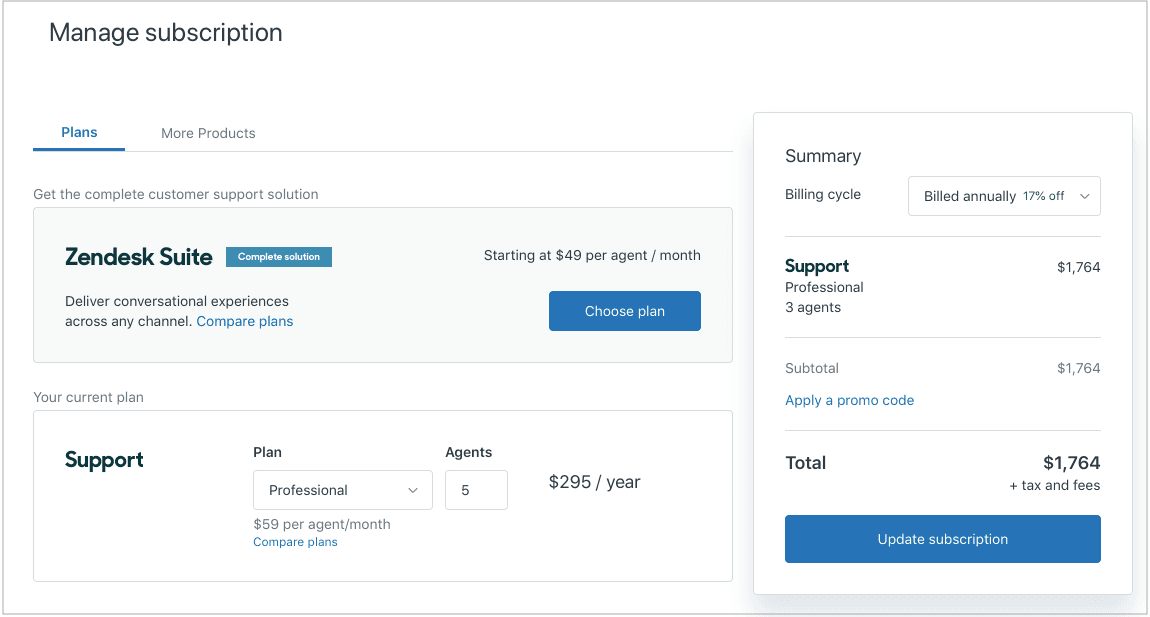
To view available products and manage your subscription:
- Sign in to the Zendesk Admin Center
- Navigate to Account > Billing > Subscription
- Click "Manage" to see available products and add-ons
- Select your plan type and billing cycle
- Enter payment details and confirm
Some accounts are "sales-assisted," meaning you'll need to contact a sales representative to make changes. Self-service accounts can make most changes directly through the Admin Center.
E-commerce product availability features
For online retailers, product availability takes on a different meaning: inventory visibility. Zendesk integrates with e-commerce platforms to help you communicate stock status to customers.
Displaying stock levels in your help center lets customers check availability without contacting support. This deflects common "Is this in stock?" questions.
Out-of-stock notifications can automatically alert customers when previously unavailable items return to inventory. This turns stockouts into future sales opportunities.
Multi-channel availability tracking ensures consistent inventory information across your website, help center, and chat widgets. When stock levels change, all channels update simultaneously.
Integration with inventory management systems like Shopify, WooCommerce, and Magento means your support agents can see real-time stock information while helping customers. An agent processing a return can immediately see if the item is available for exchange.
These features reduce support volume by letting customers self-serve availability information, while giving agents the context they need when inventory questions do arise.
Best practices for managing availability
Whether you're managing agent availability or product availability, a few principles apply:
Set clear expectations. If your team is only available 9-5 in one timezone, communicate that clearly. If a product is backordered for three weeks, say so upfront. Uncertainty frustrates customers more than bad news.
Use skills-based routing. Don't just route tickets to any available agent. Route them to available agents with the right skills. This improves first-contact resolution and prevents agents from getting tickets they can't handle.
Monitor capacity to prevent burnout. An agent who's "available" but already handling 20 tickets won't provide good service. Set realistic capacity limits and respect them.
Create escalation paths. When all agents are at capacity or offline, what happens? Set up clear escalation rules so urgent issues get attention even during busy periods.
eesel AI: An AI teammate for your support team
Managing availability is ultimately about ensuring customers get help when they need it. But what if you could resolve issues even when human agents aren't available?
That's where eesel AI comes in. We work alongside your existing help desk (including Zendesk) as an AI teammate that can handle frontline support autonomously.
Here's how it works: instead of configuring yet another tool, you hire eesel like you would a new team member. It learns your business from your existing tickets, help center articles, and connected documentation. Within minutes, eesel understands your tone, policies, and common issues.
You start with oversight: eesel drafts replies for your agents to review. As it proves itself, you expand its scope until it's handling full conversations autonomously. Mature deployments achieve up to 81% autonomous resolution.
The key difference? Unlike traditional chatbots that follow rigid scripts, eesel uses plain-English instructions. You tell it: "If the refund request is over 30 days, politely decline and offer store credit." No coding required.
When your human agents are offline or at capacity, eesel keeps working. It's like having a teammate who never sleeps, never burns out, and actually gets better over time.
Getting the most from your Zendesk product availability setup
Understanding "product availability" in Zendesk means understanding three distinct concepts: agent availability (who's online to help), e-commerce availability (what's in stock), and product purchasing (what you can buy).
Each requires different management strategies. For agent availability, focus on clear status management and realistic capacity limits. For e-commerce, prioritize accurate inventory integration. For purchasing, choose the plan that matches your current needs with room to grow.
If you're looking to extend your team's availability beyond business hours, consider adding an AI teammate. eesel AI integrates with Zendesk to handle tickets autonomously when your human agents are offline, effectively expanding your availability to 24/7 without expanding your headcount.
The best availability strategy combines well-configured tools with realistic expectations. Your customers will appreciate knowing exactly when and how they can get help, whether that's from a human agent during business hours or an AI teammate at 2 AM.