
Messaging compliance is no longer optional for businesses using Zendesk. With regulations like TCPA and GDPR carrying hefty penalties, understanding how to properly manage opt-in and opt-out workflows in Zendesk Messaging has become essential for customer service teams. This guide covers everything you need to know about Zendesk messaging opt in opt out compliance, from legal requirements to practical implementation steps.
What Is Messaging Opt-In/Opt-Out Compliance?
Messaging opt-in/opt-out compliance refers to the legal and ethical practices surrounding customer consent for business communications. Opt-in is the process where customers explicitly agree to receive messages from your company. Opt-out is the mechanism that allows customers to withdraw that consent at any time.
Compliance matters because the consequences of getting it wrong are severe. The Telephone Consumer Protection Act (TCPA) imposes fines ranging from $500 to $1,500 per violation. For businesses sending thousands of messages daily, a single compliance mistake can result in millions of dollars in penalties. Beyond legal risk, carriers actively block non-compliant senders, effectively cutting off your ability to reach customers.
Customer trust is equally important. When customers feel their privacy is respected, they are more likely to engage with your messages. Conversely, unsolicited messages damage brand reputation and increase churn rates.
At eesel AI, we help teams automate compliance workflows by training AI agents to recognize opt-in and opt-out patterns, ensuring every conversation meets regulatory standards without burdening your human agents.
Legal Frameworks You Need to Know
Understanding the regulatory landscape is the foundation of any compliance strategy. Here are the key frameworks that govern messaging consent.
TCPA (Telephone Consumer Protection Act)
The TCPA is the primary US regulation governing business text messages and calls. It requires explicit written consent before sending marketing texts and mandates that businesses provide clear opt-out mechanisms. Standardized keywords like STOP, END, QUIT, CANCEL, and UNSUBSCRIBE must be recognized and honored immediately.
Penalties are strict: $500 per violation for negligent non-compliance and up to $1,500 for willful violations. Record-keeping is critical. You must maintain documentation of when and how consent was obtained for every contact on your list.
GDPR (General Data Protection Regulation)
For businesses serving EU customers, GDPR adds additional requirements. Consent must be explicit, informed, and freely given. Pre-checked boxes or implied consent are not valid under GDPR. Customers have the right to withdraw consent at any time, and businesses must honor requests without unnecessary delay.
Data retention is another key consideration. GDPR requires that you delete customer data when it is no longer needed for the original purpose. This means removing contact information from messaging lists when consent is withdrawn.
Other Regulations
Several other frameworks may apply depending on your business:
- CCPA (California Consumer Privacy Act): Grants California residents rights to know what personal information is collected and to request deletion.
- CTIA Messaging Guidelines: Industry standards that carriers enforce. Violations can lead to message blocking.
- A2P 10DLC Registration: Required for application-to-person messaging using standard 10-digit phone numbers.
- CAN-SPAM: Applies to email and text hybrids, requiring clear identification and opt-out mechanisms.
Zendesk Messaging Consent Features
Zendesk provides built-in tools to help businesses manage compliance. Understanding the difference between Legacy Chat and Zendesk Messaging is important. Legacy Chat is the older product with more limited consent features. Zendesk Messaging is the modern platform with enhanced privacy controls.

Zendesk's consent features include:
- Privacy Notice Configuration: Display legal notices directly in web-based messaging widgets before conversations begin.
- Pre-Chat Consent Forms: Custom checkboxes requiring explicit agreement before chat initiation.
- Cookie Consent Banners: Customizable banners for Help Center compliance.
- Call Recording Permissions: Built-in opt-in and opt-out notices for recorded voice calls.
- Ticket Form Disclaimers: Links to privacy policies and terms within ticket submission forms.
For organizations with strict compliance requirements, Zendesk Suite Professional and Enterprise plans offer HIPAA compliance and data location options, including EU data residency.
Setting Up Opt-In Workflows in Zendesk
Proper opt-in workflows ensure you collect valid consent from the start. Here is how to configure them in Zendesk.
Configure Privacy Notices
Start by navigating to Admin Center, then Channels, then Messaging. Enable the privacy notice display to show a legal notice before customers initiate conversations. Customize the consent text to match your brand voice while ensuring it meets legal requirements. Include a link to your full privacy policy. Test the notice on different devices to ensure it displays correctly on mobile and desktop.
Set Up Pre-Chat Consent Forms
Enable the consent checkbox requirement so customers must actively agree before chatting. Draft clear opt-in language that explains what types of messages they will receive. Include disclosures about message frequency and types. Add the standard "message and data rates may apply" disclaimer required for SMS communications.
Implement Double Opt-In (Recommended)
Double opt-in is the gold standard for compliance. After a customer initially opts in, send a confirmation message requiring a YES or CONFIRM response. This creates a clear record of consent with a timestamp. Document the consent method and store this information in the user profile for future reference. While it adds a step to the process, double opt-in significantly reduces compliance risk and improves message deliverability rates.
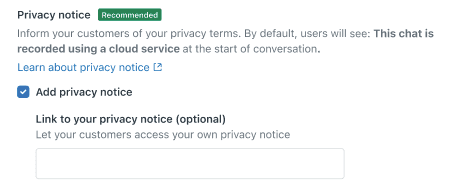
Configuring Opt-Out Management
Managing opt-outs properly is just as important as collecting consent. Here is what you need to know.
Standard opt-out keywords that must be recognized include STOP, END, CANCEL, UNSUBSCRIBE, and QUIT. When customers send these keywords, your system must automatically process the opt-out and send a confirmation message.
Set up automated responses that acknowledge the opt-out request. The message should confirm they will no longer receive texts and provide information about how to contact support if needed. Avoid promotional language in opt-out confirmations.
Managing opt-out lists across channels is critical. A customer who opts out via SMS should not receive marketing messages through email or chat either. Zendesk allows you to centralize these preferences in customer profiles.
Re-subscription processes should also be streamlined. Customers who text START or YES should be able to re-opt in easily. Document these transactions just as carefully as initial opt-ins.
When handling opt-outs in Zendesk tickets, train agents to recognize opt-out language even when it is not one of the standard keywords. A message saying "please stop texting me" should trigger the same process as STOP.
Best Practices for Compliance
Following these best practices will help you maintain compliance over time.
Always obtain explicit consent before sending the first message. Never assume consent based on a previous purchase or inquiry unless the customer specifically agreed to receive messages. Include opt-out instructions in every promotional message. Even if customers previously consented, they need a reminder of how to stop receiving messages.
Maintain detailed consent records with timestamps. If challenged, you must prove when and how consent was obtained. Regularly audit opt-out lists to ensure they are current and accurate. Remove contacts who have opted out before any campaign launch.
Train agents on compliance requirements. They should understand what constitutes valid consent and how to handle opt-out requests. Use clear, simple language in consent requests so customers understand what they are agreeing to.
Make opting out as easy as opting in. Do not require customers to log in, call a number, or jump through hoops to stop receiving messages. Test workflows before going live to ensure opt-in and opt-out processes work as expected.
How eesel AI Automates Compliance Workflows
Managing compliance manually at scale becomes overwhelming. eesel AI serves as your AI teammate for managing consent at scale.
Our AI Agent automatically recognizes opt-out keywords in conversations, even when customers use variations or informal language. Instead of relying on exact keyword matches, eesel understands intent and context to identify when a customer wants to stop receiving messages.
We draft compliant consent messages based on your templates, ensuring every communication includes required disclosures and opt-out instructions. For complex privacy requests that require human judgment, eesel escalates to your team with full context and suggested responses.
One key advantage is maintaining audit trails of all consent interactions. Every opt-in, opt-out, and re-subscription is logged with timestamps and conversation context, making compliance documentation effortless.
Our Zendesk integration works seamlessly with your existing workflows. eesel connects to your help desk in minutes, learns from your past tickets and macros, and begins assisting with compliance tasks immediately. You define compliance rules in plain English, such as "always escalate GDPR deletion requests to the privacy team," and eesel follows them consistently.
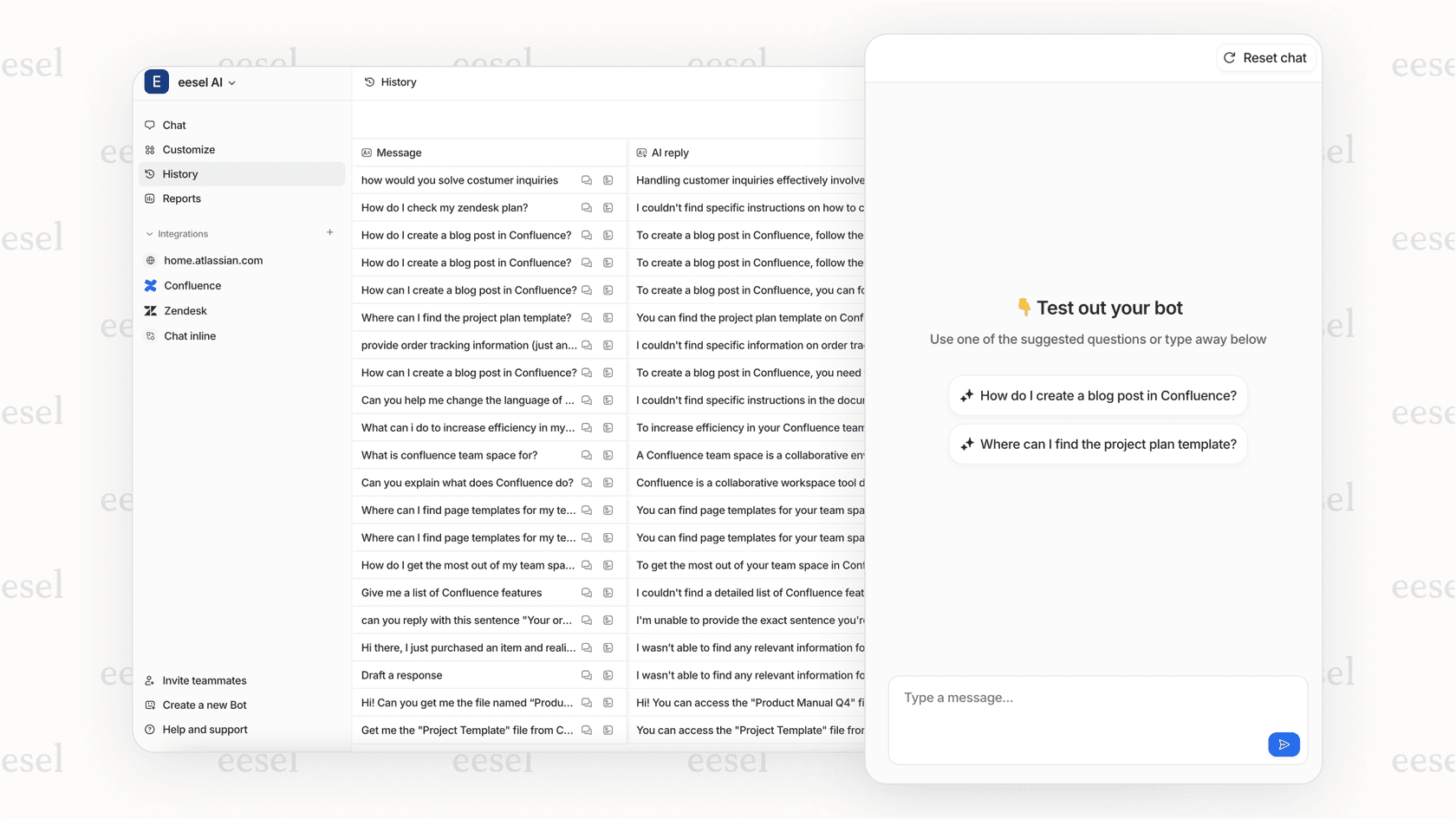
Teams using eesel for compliance automation typically see resolution rates up to 81% for routine consent-related inquiries, freeing human agents to focus on complex customer issues.
Getting Started With Compliant Messaging
Implementing compliant messaging workflows requires planning and execution. Start by auditing your current consent processes. Identify where you collect consent, how you store it, and what gaps exist in your current approach.
Document your compliance workflow so everyone on your team understands the process. Create clear guidelines for agents handling consent-related requests. Train your team on new procedures before launching updated workflows.
Consider AI automation for scale. As your customer base grows, manual compliance management becomes increasingly difficult. Tools like eesel AI can handle the repetitive aspects of compliance while ensuring nothing falls through the cracks.
If you are ready to streamline your compliance workflows, invite eesel AI to your team. Our pricing scales with your usage, and you can find detailed setup instructions in our help center.


