What you're paying for: credits explained
Udio's pricing is credit-based, and the numbers only make sense once you understand the unit.
A credit is consumed per song generation. One short generation (up to 32 seconds) costs roughly one credit. Full-length tracks (~2:10s) cost more credits than short clips - Udio doesn't publish the exact multiplier, but the practical experience on Free is roughly 10 short songs per day before you hit the cap.
One thing that trips up new subscribers: credits reset monthly with no rollover on all paid plans. Unused Standard or Pro credits at your billing date are simply gone. The only exception is pay-as-you-go credits purchased separately - those never expire, which makes them a smart pick for irregular users.
Udio pricing: the full plan table
| Plan | Monthly price | Annual price | Credits/month | Daily cap |
|---|---|---|---|---|
| Free | $0 | $0 | 100 | 10/day |
| Standard | $10 | $8/mo ($96/yr) | 2,400 | None |
| Pro | $30 | $24/mo ($288/yr) | 6,000 | None |
| Pay-as-you-go | - | - | 100 for $3 / 1,000 for $25 | None |
A few things the table doesn't show: Standard comes with a free trial before you commit. Pro includes student pricing at a discount (exact terms not published on the pricing page as of June 2026). Prices are in USD; GBP and EUR are also supported. Tax rates vary by location.
Free plan: the 10/day cap is the real story
Udio's free tier is more generous than most AI tools - 100 credits per month, no credit card required, and access to the core generation loop (extend, remix, cover art generation, and playback-mode access to Udio's voice library).
The problem is the daily cap.
100 monthly credits sounds reasonable until you realize you're limited to 10 credits - roughly 10 short generations - in any 24-hour window. Sit down on a Saturday afternoon to actually build something, and you'll hit that ceiling within an hour. The free plan also caps full-length (2:10s) song generations to 3 per day, an additional ceiling on top of the credit cap.
For a few casual experiments a week, Free is perfectly fine. For anyone using Udio as an actual creative tool, the daily rhythm becomes friction quickly.
What the free plan locks out entirely:
- Voice Control - save, reuse, and blend custom vocal styles
- Upload your own audio as a style reference
- Edit music and lyrics after generation
- Style Blending - mix two sonic references at a dialed ratio
- Custom cover art upload
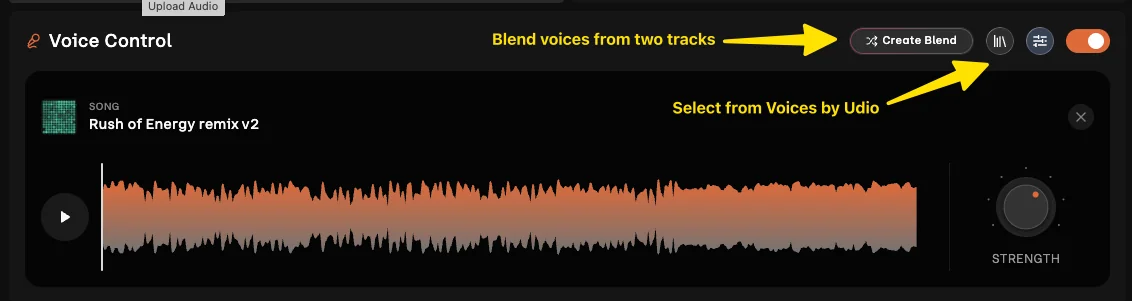
That subscription gate is the first thing you'll hit when reaching for Voice Control or audio uploads as a free user - a clear signal of where the product's real value sits.
Standard plan ($10/month): where Udio becomes a tool
At $10/month (or $8/month billed annually at $96/year), Standard is the tier where Udio shifts from an interesting toy to a genuine creative tool.
The credit jump alone is significant - 2,400 per month versus 100 on Free, with no daily cap. But the more important unlock is the feature set:
- Voice Control: Extract vocal character from any Udio-native song, save it, reuse it across new generations, and blend two vocal references together. This is the feature that turns Udio into something with a consistent sonic identity - your tracks can sound like you, not just a roll of the dice.
- Upload your own audio: Feed an external audio file as a style reference (you must own the rights). One caveat: songs derived from uploaded audio can't be published on Udio.com, but you can share them via URL or download them.
- Style Blending: Mix two sonic style references rather than picking one - blend the ratio and dial in the texture you want.
- Edit music & lyrics: Edit lyrics after generation, specify them before, or auto-generate from a prompt.
- Custom cover art upload: Replace AI-generated cover art with your own.
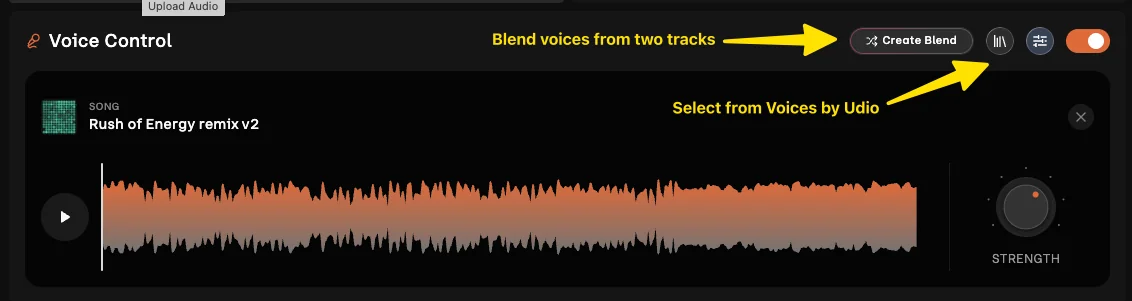
The Voice Control panel - with its waveform display, Create Blend button, and STRENGTH dial - is the clearest illustration of why Standard is worth it for serious use. Blending two vocal references and adjusting their mix feels genuinely creative, not just parametric. This is the feature most Standard users cite as the real reason they upgraded.
Standard also bumps concurrent generation slots from 4 songs (Free) to 6 songs, useful if you like running multiple variations in parallel.
Worked example - the regular creator
You're making original music for a YouTube channel, a podcast, or personal projects. At 2,400 credits per month with no daily cap, you have roughly 80 full sessions' worth of short generations or a healthy volume of full-length tracks. Most creators building a consistent output stay comfortable at Standard indefinitely.
Pro plan ($30/month): scale and control
At $30/month ($24/month billed annually at $288/year), Pro gives 6,000 credits - 2.5x Standard - plus two capabilities you can't get elsewhere:
- 5 concurrent generation slots (10 songs running simultaneously) versus Standard's 3 slots
- Song permission controls: Decide who can remix, style-copy, or extend your published songs
The permission controls are the standout feature for anyone publishing seriously on Udio. If you're building a catalog and don't want others feeding your vocal style into their generations without consent, Pro is the only tier that gives you that protection.
Student pricing is available on Pro (exact discount not published on the public pricing page as of our June 2026 scrape).
Worked example - the professional musician
A producer or songwriter using Udio as an ideation accelerator - running 5 concurrent generation jobs, rapidly comparing arrangements, building proprietary vocal styles, and locking down their published catalog - is who Pro is built for. At 6,000 credits per month, you have headroom for a genuinely high-volume production workflow.
Pay-as-you-go: the underrated option
Most coverage of Udio pricing skips this option, and it deserves more attention.
- 100 credits for $3.00
- 1,000 credits for $25.00
- Purchased credits never expire
If you use Udio in creative bursts with long gaps between sessions, a monthly subscription will cost you money on idle months. Pay-as-you-go lets you top up when you need and the balance waits indefinitely.
The trade-off: pay-as-you-go doesn't unlock the feature gates. You still need an active Standard or Pro subscription for Voice Control, audio uploads, Style Blending, and lyrics editing. But for someone who just wants occasional free-tier experimentation without the daily credit grind, topping up with $3 here and there is a valid use case.
Credit comparison: how far each plan goes
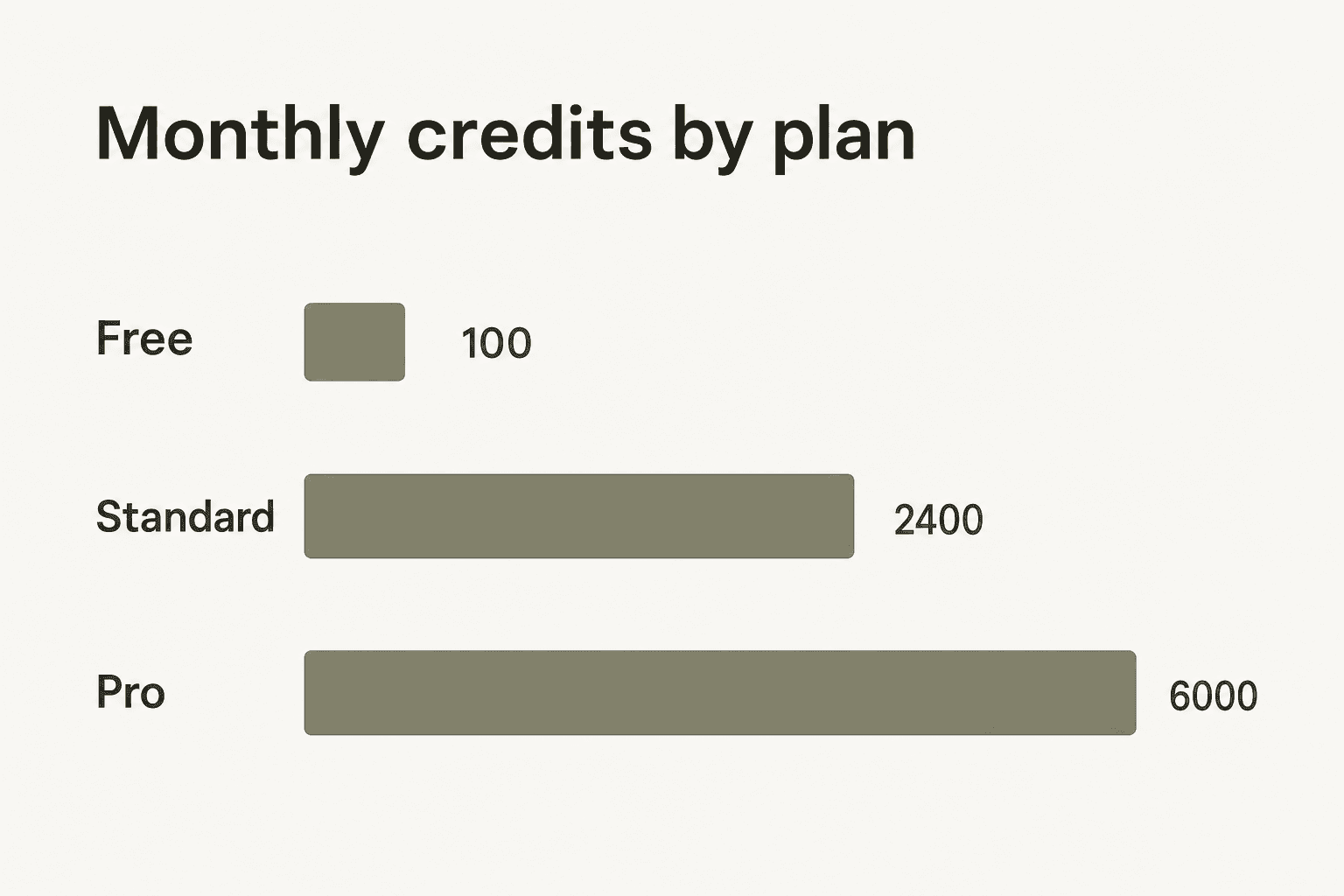
The jump from Free to Standard is the biggest in Udio's lineup: 24x more monthly credits. The Pro bump is 2.5x Standard. Here's what that translates to in practice:
| Plan | Credits/month | Approx. short generations | Notes |
|---|---|---|---|
| Free | 100 | ~100 | Hard-capped at 10/day |
| Standard | 2,400 | ~2,400 | No daily cap |
| Pro | 6,000 | ~6,000 | No daily cap |
| Pay-as-you-go | Variable | Variable | Never expire |
Full-length track generation costs more credits per song than short clips - exact multiplier isn't published, but community testing suggests roughly 2-4x the credit cost of a short generation. Factor that in if your workflow leans toward full-length tracks.
What each plan actually unlocks
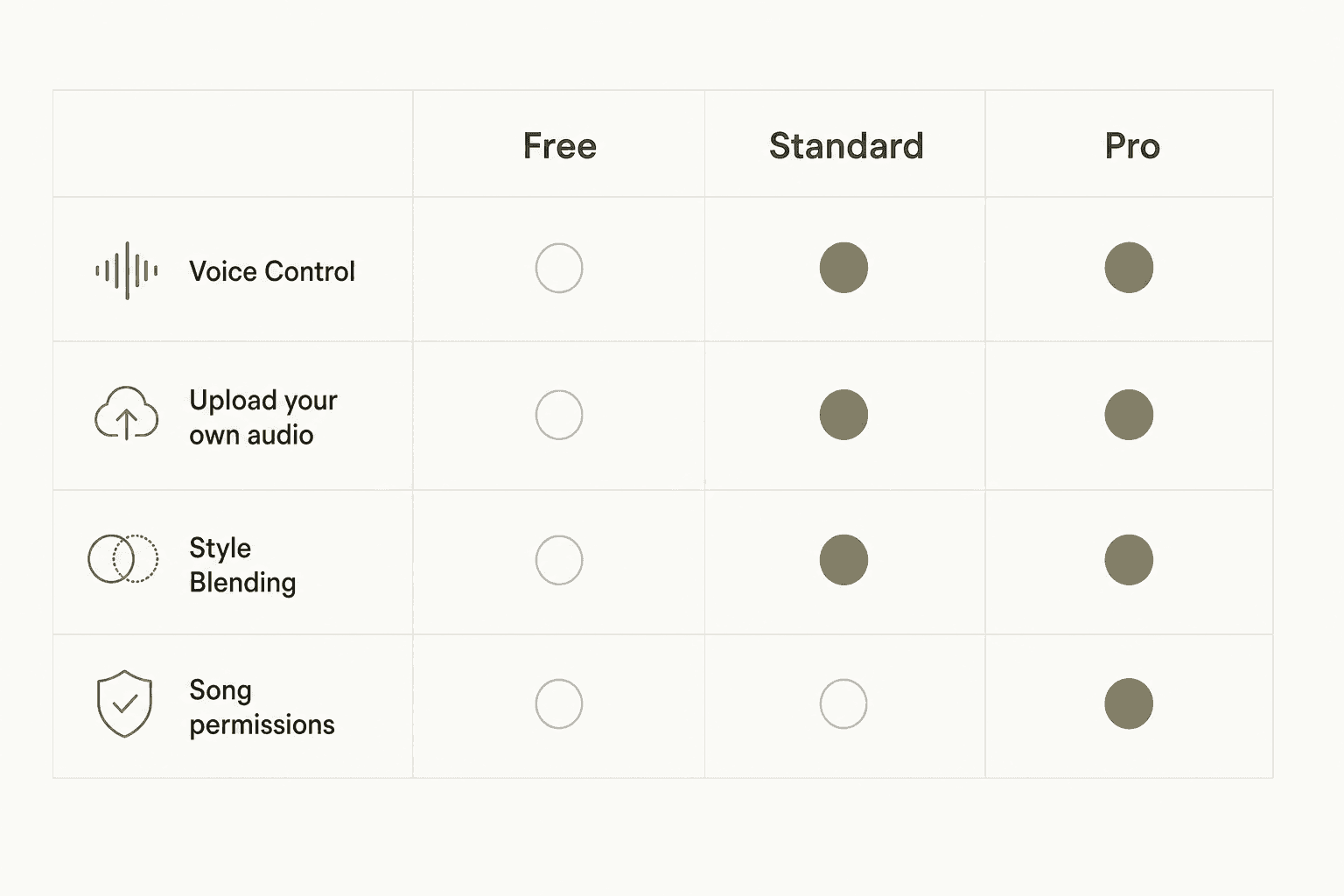
| Feature | Free | Standard | Pro |
|---|---|---|---|
| Monthly credits | 100 | 2,400 | 6,000 |
| Daily credit cap | 10/day | None | None |
| Simultaneous generations | 4 songs | 6 songs | 10 songs |
| Full-length song limit | 3/day | Unlimited | Unlimited |
| Voice Control | Library playback only | Full (save + blend) | Full |
| Upload your own audio | No | Yes | Yes |
| Edit music & lyrics | No | Yes | Yes |
| Style Blending | No | Yes | Yes |
| Upload custom cover art | No | Yes | Yes |
| Adjust song permissions | No | No | Yes |
| Free trial | - | Yes | - |
The pattern is clear: Standard unlocks the creative tool set. Pro buys scale and control. If your need is "I want to do more with Udio," Standard solves it. If your need is "I need more volume and control over my published catalog," that's Pro territory.
Udio vs. Suno pricing
Suno is Udio's main competitor, and the two are nearly identical at the entry tier:
| Udio Standard | Suno Basic | |
|---|---|---|
| Monthly price | $10 | $10 |
| Credits/month | 2,400 | 2,500 |
| Annual discount | $8/mo | ~$8/mo |
At the top tier, the gap widens: Suno's equivalent $30/month plan gives around 10,000 credits versus Udio Pro's 6,000. On raw credit volume, Suno has the edge.
What Udio has that Suno doesn't: a more developed post-generation editing suite - Voice Control with voice blending, Style Blending, and Inpaint. Udio also completed licensing deals with Universal Music Group (October 2025) and Warner Music Group (November 2025), opening a legally grounded path to create in artists' styles with artist permission - a meaningful development for anyone thinking about commercial use.
Community reviews consistently position Udio's audio quality above Suno's, particularly for complex arrangements. The choice between them comes down to: do you want more credits per dollar (Suno), or better output quality and a richer editing suite (Udio)?
For a wider look at the field, our Udio alternatives post covers what else exists, and the Suno alternatives post maps the broader AI music generator landscape.
Which plan is right for you?
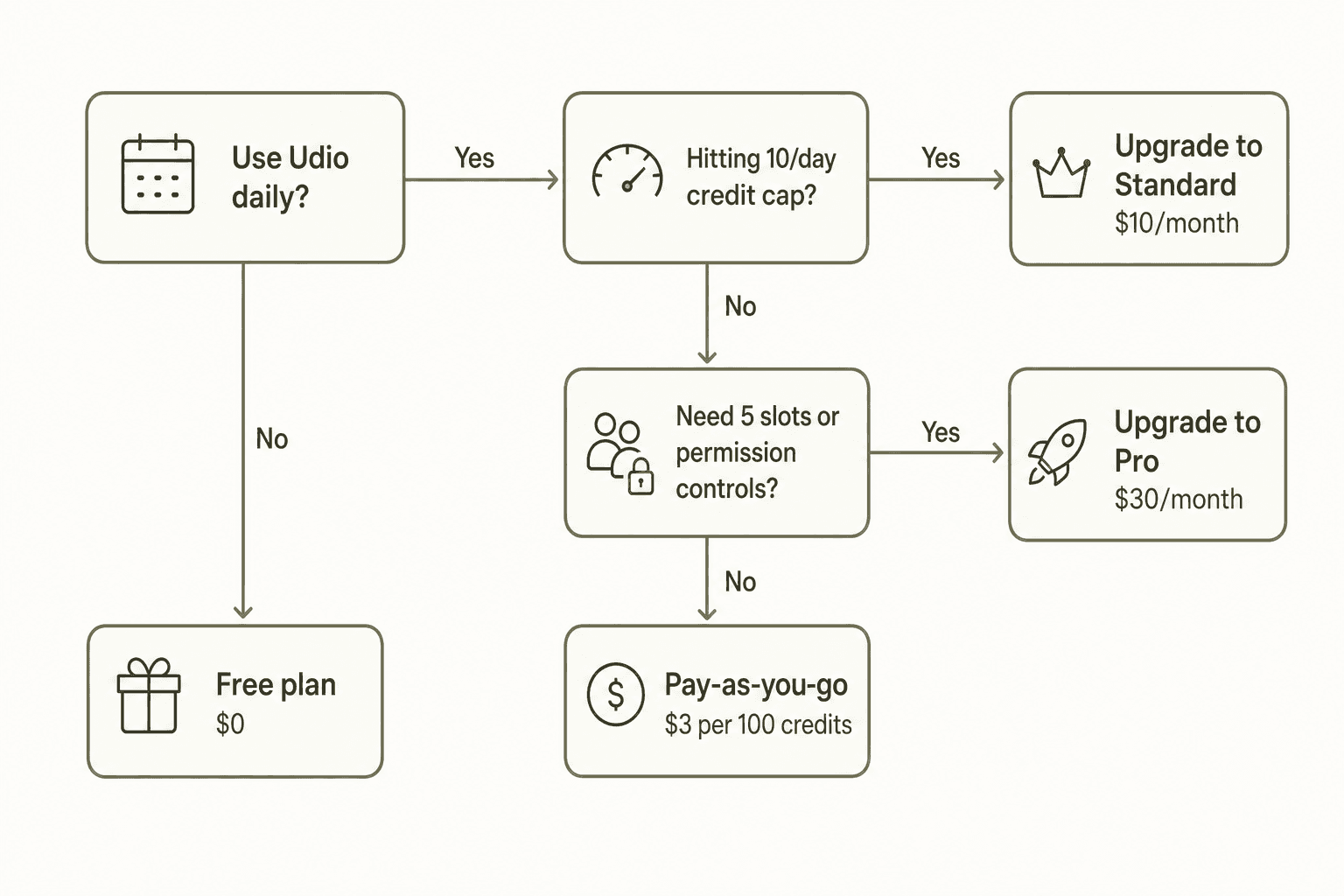
Here's how we'd frame the decision:
- Free - You're exploring Udio for the first time, don't need Voice Control or audio uploads, and 10 songs/day is enough to evaluate whether it fits your workflow. No commitment, no card needed.
- Pay-as-you-go - You use Udio in sporadic bursts and don't want a monthly subscription. Fine without Voice Control, content with just the generation basics.
- Standard ($10/month) - You use Udio regularly, want Voice Control and Style Blending, and will realistically use most of your 2,400 credits each month. This is where the platform stops feeling limited.
- Pro ($30/month) - You need 5 concurrent generation slots, want permission controls on your published catalog, and have a workflow that actually needs 6,000 credits per month. Built for professional-scale use.
The most common upgrade mistake: jumping to Pro for the credit count without actually needing the permission controls or extra concurrent slots. Standard handles most creators comfortably. Pro's premium is the features, not just the numbers.
Is Udio pricing worth it?
At $10/month, Standard is competitive pricing for what it delivers. Voice Control, Style Blending, audio uploads, and unlimited full-length generation - features that required professional hardware and hours of production work just a few years ago - for the cost of a streaming subscription.
The structural quirk worth flagging: no credit rollover on any paid plan. If you subscribe to Standard and use 1,000 of your 2,400 credits, the other 1,400 disappear at billing. That's a use-it-or-lose-it model that slightly disadvantages intermittent creators. Pay-as-you-go exists precisely for that case, though it doesn't unlock Voice Control or audio uploads.
The UMG and WMG licensing deals signal that Udio is moving toward more legally grounded territory. The ability to create in artists' styles with permission - once the artist-collaboration layer is fully live - could change the platform's value proposition significantly for professional use.
"Comparing it with Suno, the quality is much better but not perfect yet."
For casual creators, the free plan with its 10-per-day rhythm is enough to genuinely evaluate the platform before spending anything. For anyone making music seriously, Standard at $10/month is a fair ask for what it unlocks. The Standard free trial means there's no risk in testing it first.
If you're exploring Udio's alternatives alongside it, or want to compare the full Suno pricing structure side by side, both posts have the detail.
Try eesel
If you're integrating AI tools into your creative or business workflows, eesel deploys AI agents that work inside tools you already use - from automated helpdesk resolution to blog writing on autopilot. The same way Udio turns a text prompt into a production-quality track, eesel's AI blog writer turns a topic into a fully researched, SEO-optimized post without manual effort.
Free plan includes 100 credits - no credit card required.

Frequently Asked Questions
How much does Udio cost per month?
Does Udio have a free plan?
What is an Udio credit and how many do I need?
Is Udio cheaper than Suno?
Do Udio credits roll over month to month?


Article by
Rama Adi
Rama is a software engineer at eesel AI with two years of experience writing about B2B SaaS, AI tools, and customer support technology. Based in Bali, Indonesia, he brings a developer's perspective to product comparisons — cutting through marketing copy to what the integrations and APIs actually do.