Let's be honest, the hype around visual AI is everywhere. Tools like DALL·E 3 can whip up some pretty incredible images from a single sentence, and it's got a lot of us wondering how we can plug that kind of magic into our actual work. If your business runs on Salesforce, that question has probably crossed your mind: how do I get this creative AI to talk to all my customer data?
It’s a great question, and the possibilities seem endless. But connecting these two powerful platforms isn't quite as simple as flipping a switch. This guide is here to give you a real-world look at Salesforce integrations with DALL·E 3. We'll cover the cool ideas, the not-so-cool technical headaches, and what might be a much smarter way to bring AI automation into your business.
What are Salesforce and DALL·E 3?
Before we get into the weeds of connecting them, let's do a quick recap of what Salesforce and DALL·E 3 are actually built for.
What is Salesforce?
Salesforce is a giant in the customer relationship management (CRM) world. It's the platform countless businesses use to keep track of every single interaction with their customers, from the first sales call to the most recent support ticket. Think of it as the central hub for all your customer information. It's also worth remembering that Salesforce has its own AI tools, like Einstein, which can make plugging in an outside AI feel a bit like navigating a maze.
What is DALL·E 3?
DALL·E 3 is one of the leading generative AI models from OpenAI (the same people behind ChatGPT). Its special skill is creating brand-new, high-quality images from simple text descriptions, called "prompts." You can ask it for just about anything: a photorealistic shot of your product on a beach, a custom illustration for your blog, or even a technical diagram. For anyone who needs to create visual content, it's an exciting tool.
Potential use cases for Salesforce integrations with DALL·E 3
When you start thinking about linking a CRM packed with customer data to an on-demand image generator, a few interesting ideas pop up. Most of these revolve around creating visual content automatically to speed up certain tasks. They sound great in theory, but as we'll see, they often solve very specific, narrow problems.
Automated content for marketing and sales
Picture this: your e-commerce team adds a new product to your catalog in Salesforce Commerce Cloud. An integration could, in theory, automatically tell DALL·E 3 to create a batch of lifestyle images or social media graphics for that new product. Your sales team could even use it to generate personalized images for their outreach emails, like a quick mockup of a prospect's website with your new feature added.
The main draw here is speed. You could potentially slash the time it takes to get visual assets ready for a new campaign, meaning less waiting around for a graphic designer to handle routine requests. But this brings up questions. What about brand consistency? Can the AI nail your company's very specific shade of blue every time? Getting that right with text prompts alone can be a real challenge.
Enhanced knowledge base and documentation
A good diagram can be worth a thousand words, especially in a help center article. Let's say a support agent is writing a new Salesforce Knowledge article to explain a tricky, multi-step process. An integration could generate a simple flowchart or diagram based on their text, making the whole thing easier for a customer to understand.
This is a solid idea that could definitely improve the quality of your support docs and help more customers solve their own problems. The tricky part, however, is getting an AI to create a diagram that is both technically accurate and visually clear. A confusing diagram is often worse than no diagram at all, and you’d need a human to review every single one, which sort of defeats the purpose of full automation.
Visualizing customer support issues
Here’s a more futuristic concept. A customer sends in a support ticket describing a broken part on one of your products. An internal tool connected to DALL·E 3 could try to generate a picture of what they're describing from their text. This could help a support agent understand the problem right away, without having to ask the customer to send photos.
For a company that deals with complex hardware, this could really help cut down on the back-and-forth and get to a solution faster. It's a fantastic idea on paper, but the technical work required to build an AI smart enough to reliably interpret customer descriptions and match them to product specs is massive.
The hurdles of integrating Salesforce and DALL·E 3
While these use cases are fun to think about, the reality of building and maintaining them is a different story.
Before you commit to a project like this, you need to be aware of the hurdles ahead.People in online forums and Reddit threads aren't wrong to be skeptical about clunky setups and hidden costs.

The headache of custom development
Let's be clear: building a direct, custom integration between Salesforce and DALL·E 3 isn't a small task. It requires developers who are fluent in Salesforce's Apex language, Lightning Web Components (LWC), and the OpenAI API. That specific combination of skills isn't exactly common.
Going the custom route is:
-
Expensive: You're not just paying for a few hours of coding. You're paying for scoping, development, testing, and deployment. The bill for developer hours adds up fast.
-
Time-consuming: A stable, reliable integration isn't built in a week. A project like this can easily stretch across several months, pulling resources away from other priorities.
-
A maintenance nightmare: Both Salesforce and OpenAI are constantly updating their platforms. Every time one of them pushes an update, there's a chance your custom code will break. This creates an ongoing maintenance burden that you have to budget for, forever.
The limits of no-code automation tools
Okay, so custom coding is out. Your next thought might be to use a no-code platform like Make, n8n.io, or Integrately. These tools are fantastic for connecting apps in simple ways. You can easily drag and drop a workflow that says, "when a new record is created in Salesforce, tell DALL·E 3 to make an image."
But here’s the problem: these platforms are built for simple, one-way streets. They can't handle a real conversation because they have no memory or context. They can automate a task, but they can't automate a function like customer support. Customer support is all about context. These tools can't understand a follow-up question or look at a customer's past conversations to give a truly helpful answer. They just perform a single action and move on.
A smarter approach: Unify your knowledge
Instead of building fragile, single-purpose Salesforce integrations with DALL·E 3, it might be time to step back and think about the bigger picture. A more effective and lasting strategy is to use a smart AI layer that connects all of your company's knowledge and works right inside the tools you already use.
Go beyond one-off tasks with a unified knowledge base
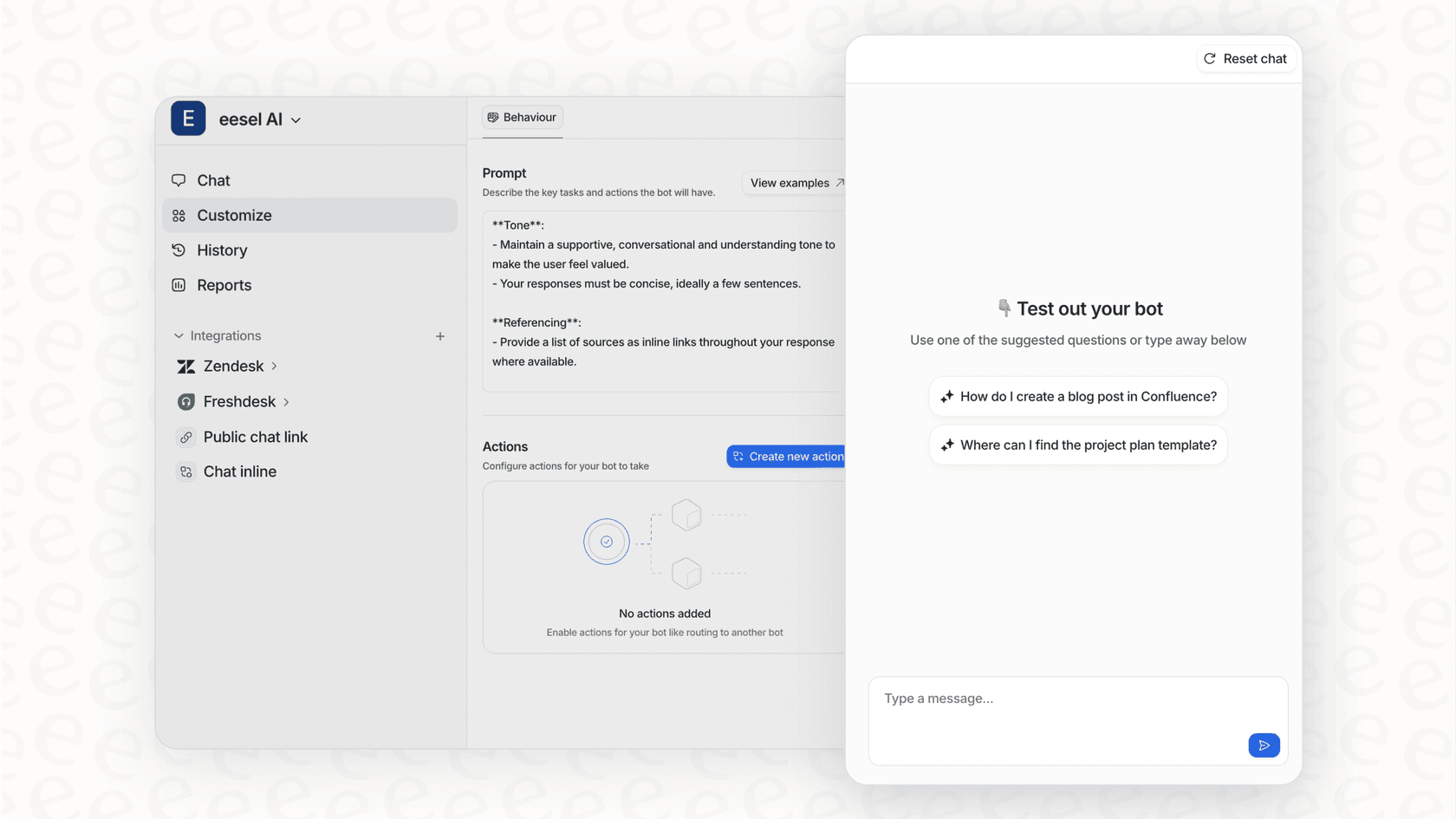
This is where a tool like eesel AI changes the game. It’s designed specifically for customer support teams and plugs into your helpdesk and all the places your knowledge lives. Instead of just creating an isolated image, eesel AI focuses on the real goal: solving the customer's problem.
It works by learning from your company’s unique knowledge, including past support tickets, help center articles, internal wikis on Confluence, project plans in Google Docs, and more. The aim isn't just to generate a new piece of content; it's to find and deliver a complete, accurate answer. That answer might be a link to an existing help article that already has the perfect diagram, which is often way more useful than creating a new, unvetted image from scratch.

Get set up in minutes, not months
You can forget about those long, expensive development cycles. eesel AI is built to be completely self-serve. You can connect it to your helpdesk with a single click and have a capable AI agent ready to go in minutes. There are no mandatory sales calls or lengthy demos to sit through. You can launch, configure, and get everything running on your own time.
Test with confidence using simulation mode
One of the biggest worries with any new AI tool is how it will actually perform with real customers. To solve this, eesel AI has a powerful simulation mode. It lets you test your setup on thousands of your past support tickets in a safe, sandboxed environment. You get to see exactly how the AI would have responded, giving you clear data on its performance and what kinds of tickets it can automate safely. This lets you roll it out gradually and with total confidence, something you just can't get with most other tools.
Pricing breakdown: API vs. platforms vs. eesel AI
AI pricing can be confusing, with hidden fees and unpredictable costs. It’s important to understand the different models out there before you get locked into one.
| Model Type | Platform(s) | How it Works | Common Pitfall |
|---|---|---|---|
| Per-API Call | DALL·E 3 API | You pay for each image you generate. The price can change based on the image quality and resolution. | Your costs are all over the place and can spike without warning. It's nearly impossible to budget for. |
| Per-Task / Operation | Make, Integrately, n8n.io | You buy a monthly bundle of "tasks" that get used up across all your automated workflows. | More complex automations can burn through your task limit in no time. The more you automate, the more you pay. |
| Per-Resolution | Many AI Support Tools | You pay a fee for every single ticket the AI successfully closes or "resolves." | This model ends up penalizing you for being successful. As your support volume and automation rate go up, so does your AI bill. |
| Per-Interaction (eesel AI) | eesel AI | You pay a flat, predictable monthly fee for a set number of AI interactions (like a reply or an action). | None. The pricing is transparent and predictable. You can even start with a flexible monthly plan. |
The takeaway here is pretty clear. Models that charge you for every little action create unpredictable bills that can easily get out of hand. eesel AI's pricing is built to be straightforward, giving you a stable cost you can actually plan for, without any surprises.
Focus on solving problems
While Salesforce integrations with DALL·E 3 can open up some fun possibilities for creative automation, they often come with a heavy tax in cost, complexity, and actual value for core business needs like customer support.
Simple integrations that just generate content are missing the point. The real power of AI is in its ability to understand context, learn from your data, and help you resolve issues. Instead of spending months and a small fortune on a custom project that makes images, you could have a much more powerful and flexible AI solution running this week. A tool like eesel AI fits right into your existing workflows, learns from your unique business knowledge, and gives you the control to automate support in a way that actually makes a difference.
Ready to see how a truly integrated AI can transform your support team? Start a free trial of eesel AI or book a demo today.

Frequently asked questions
While technically possible, direct Salesforce integrations with DALL·E 3 often require significant custom development or complex no-code setups. For smaller businesses, the initial cost, ongoing maintenance, and the need for specialized developer skills can quickly outweigh the benefits of automating simple visual content.
The main theoretical benefits include speeding up visual content creation for marketing campaigns, enhancing knowledge base articles with auto-generated diagrams, and potentially [assisting support agents](https://eesel.ai/solution/ai-agent-assist) by visualizing customer-described issues. These focus on efficiency gains for specific, narrow tasks.
The biggest hurdles are the cost and complexity of custom development requiring niche skills, the ongoing maintenance burden due to platform updates, and the limitations of basic no-code tools which lack context and memory for true intelligent automation. Brand consistency and accuracy are also significant challenges.
Yes, a more robust and practical approach involves using a dedicated AI layer like eesel AI. This solution unifies your company's entire knowledge base and integrates with existing tools, focusing on providing contextual answers and resolving problems rather than just generating isolated content.
Pricing models vary significantly: DALL·E 3's API charges per image generated, no-code platforms often charge per task or operation, and some AI support tools charge per "resolution." These models can lead to unpredictable and escalating costs, making budgeting difficult.
Maintaining strict brand consistency and technical accuracy with AI-generated images solely through text prompts is very challenging. Human review and oversight are almost always necessary for every asset, which can negate the efficiency gains sought from automation.
Share this article

Article by
Kenneth Pangan
Writer and marketer for over ten years, Kenneth Pangan splits his time between history, politics, and art with plenty of interruptions from his dogs demanding attention.