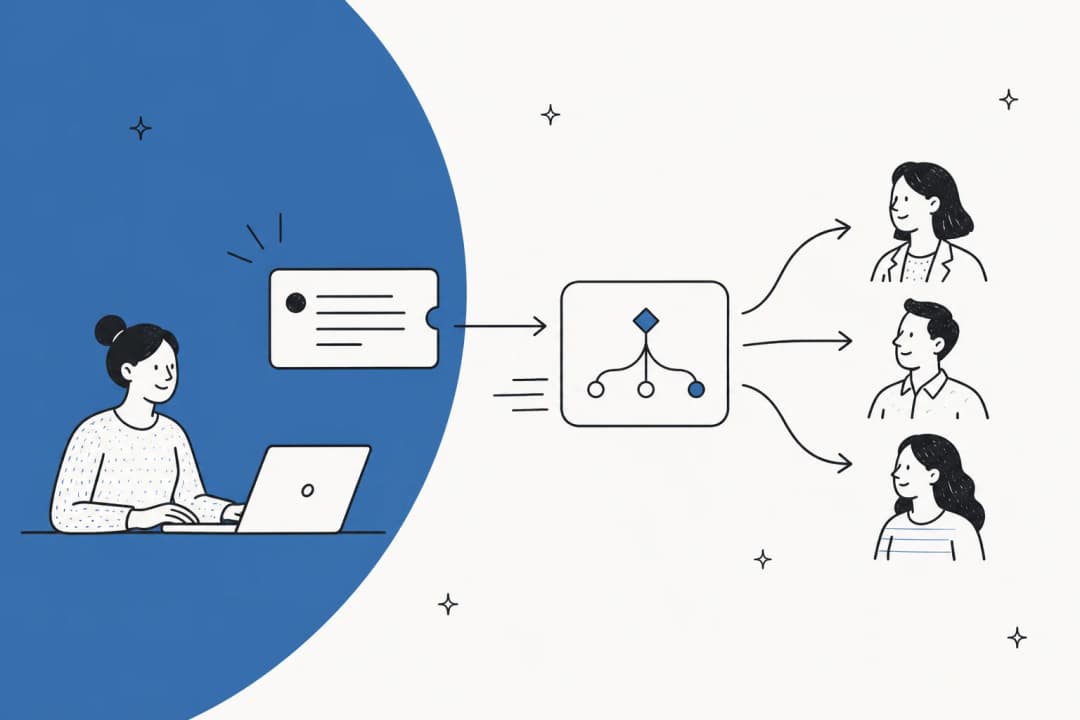
Remote work changed the math of IT support in a specific way: the number of people who need help stayed the same, but the number of ways they can be helped shrank. No walking over to someone's desk. No quick peer fix in the break room. Every issue becomes a ticket, a Slack message, or a call - and the IT team absorbs all of it.
AI has started to change that dynamic. Not by replacing IT teams, but by handling the repetitive, well-defined chunk of their queue automatically - password resets, access requests, VPN troubleshooting steps - so the humans focus on the problems that actually need them.
This post covers what remote IT support AI actually is, how the main approaches work under the hood, and where the leading platforms sit in 2026. If you're evaluating tools, this is the lay of the land before you start demoing.
What remote IT support AI means in practice
The phrase sounds broader than it is. Remote IT support AI refers to software that uses artificial intelligence to receive, understand, and resolve IT service requests from employees who aren't physically co-located with the helpdesk team. That covers a wide range of things:
- A virtual agent that answers "how do I reset my VPN password?" at 11pm
- A system that auto-routes a printer ticket to the right regional support team
- An AI assistant that reads a ticket, pulls the relevant runbook, and drafts a reply for a human agent to review
- A bot that handles a password reset end-to-end without any human touch
What these share is the underlying mechanism: machine learning models (primarily large language models, plus classification and prediction models underneath) trained on IT-specific data, connected to your existing ticket system, knowledge base, and business applications.
The "remote" modifier matters because it describes the operational context. When an employee is in the office and stuck, they can ask a nearby colleague. When they're remote, every gap in IT support becomes a productivity problem. AI fills that gap by providing instant, 24/7 Tier 1 coverage regardless of where the employee or the helpdesk is located.
How AI handles a remote IT support request

The actual mechanics vary by platform, but most remote IT support AI follows a common pattern:
Intake. The employee submits a request - usually through Slack, Microsoft Teams, a web portal, or email. The AI receives it as natural language text, not a structured form.
Intent classification. The model identifies what the request is about: a password reset, a software installation request, a broken printer, a VPN issue. This classification determines what happens next.
Knowledge retrieval. The AI searches its configured knowledge sources - your knowledge base, past ticket resolutions, runbooks, product documentation. Using retrieval-augmented generation (RAG), it pulls the most relevant content before generating a response.
Decision: resolve or escalate. If the AI can answer the question or complete the task (reset the password, provision the software license, walk through the VPN fix), it does so automatically. If the request is ambiguous, complex, or falls outside its scope, it escalates to a human agent - usually with a summary of what it tried and what context it gathered.
Closure and learning. Resolved tickets feed back into the training data. Systems that get this right improve measurably over time: the more tickets they process, the sharper their classification and the more accurate their knowledge retrieval.
The specific AI architecture underneath varies significantly. ServiceNow uses its own domain-specific LLMs alongside third-party models (Azure OpenAI, IBM WatsonX, Google Gemini) and grounds them with enterprise workflow data. Moveworks runs a proprietary "Reasoning Engine" combining multiple LLMs with a modular agentic layer. Freshservice takes a single-brand approach with Freddy AI - one AI layer pre-trained on ITSM domain knowledge, bundled into the platform. The end result - "answer the ticket" - is similar; how they get there differs.
Where remote IT support AI adds real value
It helps to be clear about where this technology is genuinely strong versus where it still struggles.
Tier 1 automation
This is the clearest win. Password resets, software provisioning, basic troubleshooting, FAQ responses, access requests - these are well-defined, high-volume, and repetitive. They're exactly the kind of work AI handles well because the answer space is bounded and the knowledge required is stable.
Freshservice reports 66% ticket deflection for organizations using Freddy AI's virtual agent. ServiceNow's internal deployment handles 90%+ of employee IT requests autonomously. These numbers reflect well-tuned deployments with mature knowledge bases - they're achievable, but not the baseline you should expect on day one.
For remote teams, the value is amplified because every deflected ticket is also an after-hours ticket, a weekend ticket, or a ticket from a timezone where your IT team isn't staffed. eesel AI's approach to this is to layer an AI agent directly on top of existing helpdesks - connecting to Zendesk, Freshdesk, and similar tools - so the AI handles the Tier 1 queue in any timezone without a separate deployment.
Agent assist (copilot mode)
For tickets that do reach a human agent, AI can dramatically reduce the time to respond. Reply suggestions, ticket summarization, smart field classification, and similar-ticket surfacing are now standard features across virtually every modern ITSM platform.
Freshservice's Freddy AI Copilot reports a 41% faster first response time and a 77% decrease in average resolution time for agents using it. The mechanism: instead of reading a long ticket history, the agent gets a one-sentence summary. Instead of composing a reply from scratch, they get a suggested draft to edit. Small time savings multiply across hundreds of tickets per week.
Knowledge management
AI is also making IT knowledge bases easier to maintain. The traditional problem: knowledge base articles go stale because nobody has time to update them after resolving tickets. Modern AI platforms address this by automatically generating draft articles from resolved tickets (Freddy AI Copilot, Zia in ManageEngine, Atlassian Intelligence in JSM), flagging knowledge gaps when the AI can't find a good answer, and suggesting article updates when ticket patterns show that existing content is no longer accurate.
Jira Service Management's virtual agent continuously identifies which intents escalate to humans versus resolve automatically, then drafts new knowledge base content to close those gaps - all without requiring a dedicated knowledge manager.
The main platforms in 2026
Here's where each of the major platforms sits, with what they actually offer and where they fall short.
ServiceNow ITSM

ServiceNow is the dominant enterprise ITSM platform, used by 85% of the Fortune 500. Its AI capabilities have expanded significantly following the $2.85 billion acquisition of Moveworks completed in December 2025.
The current AI lineup:
Now Assist - ServiceNow's generative AI layer, built on domain-specific Now LLMs alongside third-party models. Capabilities include ticket summarization, response drafting, knowledge article generation, AI-powered search, and custom skill creation. AI agents can pull from "knowledge articles, historical incidents and cases, CIs from the CMDB, and information from other systems accessed with Workflow Data Fabric."
Virtual Agent - A conversational chatbot with multi-turn conversation, NLU, Slack and Teams integration, and live agent handoff. Available in all ITSM tiers.
Autonomous Workforce / EmployeeWorks - The February 2026 addition. EmployeeWorks combines Moveworks' conversational AI with ServiceNow's workflow automation, available as a front door via Teams or Slack. The L1 Service Desk AI Specialist autonomously diagnoses and resolves common IT requests end-to-end using enterprise knowledge bases and historical incident data.
ITSM tier breakdown:
| Tier | What's included |
|---|---|
| ITSM Foundation | Incident management, service catalog, asset management, CMDB, Virtual Agent, Now Assist Foundation, Moveworks for ITSM Foundation |
| ITSM Advanced | Everything in Foundation + change management, problem management, major incident management, AI Voice Agents, Now Assist Advanced, Moveworks for ITSM Advanced |
| ITSM Prime (recommended) | Everything in Advanced + L1 Service Desk AI Specialist, AI Agents for ITSM, DevOps Change Velocity, Now Assist Prime, Moveworks for ITSM Prime |
Pricing: ServiceNow does not publish dollar figures on its public pricing pages. Every tier terminates in a "Get Custom Quote" CTA. Third-party estimates exist but are not attributable to ServiceNow directly - budget for an enterprise contract discussion.
Where it falls short. G2 reviewers are consistent on two points: complexity and cost. "The AI and intelligence features are promising as well, but they can feel limited unless they are properly configured and licensed." The top G2 cons tags - Learning Curve (72 mentions), Expensive (60), Complexity (56) - reflect a platform built for large enterprises with dedicated IT teams to manage the implementation. "Pricing is another concern, since the platform is relatively expensive and the ROI tends to be clearer for larger organizations than for smaller teams."
"The AI and intelligence features are promising as well, but they can feel limited unless they are properly configured and licensed. Overall, ServiceNow is very capable, but its complexity and cost can be real barriers."
Best for: Large enterprises with dedicated ITSM teams, significant IT operations complexity, and budget for a proper implementation. The acquisition of Moveworks strengthens the remote/employee-experience side specifically - but you pay for it.
Jira Service Management

Jira Service Management (JSM) has become the go-to ITSM platform for teams already in the Atlassian ecosystem - particularly those using Jira Software for development. As of 2025-2026 it ships as part of Service Collection, a bundled offering that includes JSM, Customer Service Management, Assets (CMDB), and Rovo AI.
60,000+ customers use JSM globally. Gartner Peer Insights puts it at 4.5/5 from 1,458 verified reviews as of early 2026.
AI capabilities:
Rovo is Atlassian's AI platform. For IT teams it includes Rovo Search (unified enterprise search across Atlassian tools and connected third-party apps), Rovo Chat (conversational AI), and Rovo Agents - pre-built agents for specific workflows. The Rovo Service Agent handles common support requests end-to-end; the Rovo Ops Agent proactively detects and resolves incidents by analyzing logs, changes, runbooks, and past incidents.
Virtual Service Agent (Premium and Enterprise only) delivers 24/7 Tier 1 support via Slack. It creates intent-based conversation flows for common request types, surfaces Confluence article excerpts conversationally, and routes anything it can't handle with full context attached. 1,000 assisted conversations are included monthly (or 12,000/year); overage is $0.30 per assisted conversation.
AIOps (Premium and Enterprise) provides AI alert grouping and correlation, AI incident creation, root cause analysis, and AI-generated post-incident reviews. On Standard, you get basic related-resources and similar-alerts panels only.
Pricing:
| Plan | Price | Key AI access |
|---|---|---|
| Free | $0 | None - no Rovo AI |
| Standard | $20/agent/month | Rovo AI (25 credits/user/month), Assets CMDB (5,000 objects), no virtual agent |
| Premium | $51.42/agent/month | Full Rovo AI (70 credits/user), virtual service agent (1,000 convos/month), AIOps, change management |
| Enterprise | Contact sales | 150 Rovo credits/user, 150 sites, 99.95% uptime SLA |
Customers (end-users raising tickets) are always free. Annual billing saves up to 17%.
Where it falls short. The virtual service agent is locked behind Premium at $51.42/agent/month - a meaningful jump from Standard's $20. Teams that want AI deflection without also needing the full change management and AIOps stack pay for features they don't use. The other consistent G2 and Gartner complaint: steep learning curve. The platform is flexible, but that flexibility requires investment to configure properly. "JSM is very powerful but you need to put time into learning it," runs through the reviews repeatedly.
"The virtual agent is like a global, 24/7 helping hand."
Best for: Teams already in the Atlassian ecosystem (Jira Software, Confluence, Bitbucket). The synergy between JSM, your dev backlog, and your knowledge base is genuinely strong. Pure ITSM buyers without Atlassian context may find better value elsewhere.
Freshservice

Freshservice is Freshworks' ITSM product - distinct from Freshdesk (the customer support platform). It targets mid-market IT teams who want a modern, cloud-native ITSM without ServiceNow's implementation burden. 74,000+ businesses use it, and a Forrester TEI study found a 356% ROI in under six months.
Freddy AI is the AI brand across all Freshworks products. In Freshservice, it covers three distinct layers:
Freddy AI Agent - A 24/7 virtual agent that handles employee requests autonomously via Slack, Microsoft Teams, Microsoft 365 Copilot, and the self-service portal. Available in 40+ languages. Freddy AI Agent can raise and fulfill software requests automatically (ITAM integration) and search across the knowledge base, service catalog, and past tickets.
Freddy AI Copilot - The agent-assist layer. Features include AI-powered reply suggestions, lightning summarization of ticket threads, smart field suggestions, and post-incident report generation. Reports a 41% faster first response time and 77% decrease in average resolution time.
Freddy AI Insights - Analytics and anomaly detection for IT managers. Surfaces rising SLA violations, root cause discovery, and conversational analytics (ask Zia a question about service desk data in plain English).
Pricing:
| Plan | Price | Freddy AI access |
|---|---|---|
| Starter | $19/agent/month (annual) | ServiceBot on Teams/Slack only - no conversational AI |
| Growth | $49/agent/month (annual) | ServiceBot only |
| Pro | $99/agent/month (annual) | Freddy AI Agent and Copilot as add-ons (contact for pricing) |
| Enterprise | Custom | Freddy AI Agent (1,200 sessions/year), Copilot, and Insights - all included |
The 14-day free trial requires no credit card.
Where it falls short. The AI gating is the most consistent complaint from reviewers. "The only thing I dislike is that depending on the license tier, it may be very limited on AI usage, API usage and a couple more features that are only available in higher tiers." Freddy AI's full capabilities - autonomous virtual agent, copilot, insights - are only accessible at Enterprise, which has custom pricing. Teams on Starter or Growth pay for an ITSM platform without the AI they came for.
Reporting is a separate recurring complaint. "Reporting is complicated and the out of the box reports aren't very good."
"Overall it is the best ITSM tool I have ever used. It is the best combination of price, ease of use and extensibility."
Best for: Mid-market IT teams who want a clean, ITIL-aligned ITSM without ServiceNow's complexity or pricing. The platform is genuinely approachable - multiple reviewers switched from ServiceNow or Ivanti specifically to reduce cost and implementation burden. If you're willing to pay for Enterprise, Freddy AI is well-integrated.
ManageEngine ServiceDesk Plus

ManageEngine ServiceDesk Plus is the ITSM arm of Zoho Corp - a complete, ITIL-certified platform available as either SaaS cloud or on-premises deployment. It's a strong mid-market option, particularly for teams that need self-hosted infrastructure or want AI built in without paying extra.
Zia is ManageEngine's native AI assistant, and the differentiator here is that all AI capabilities are included at no additional cost within existing subscription tiers. No AI add-on fees.
Zia covers three AI types:
Predictive AI - Trained on your organization's own historical ITSM data. Capabilities include intelligent triage and routing (suggests the right category, template, and technician at ticket creation), sentiment analysis (predicts requester emotional tone to flag frustrated users before they escalate), problem prediction (clusters similar incidents to catch emerging IT problems early), and change risk prediction.
Generative AI - LLM-powered capabilities including reply drafts, conversation summarization, post-incident report generation, solution article generation from resolved tickets, and workflow building from natural language prompts. Unusually, you can choose your underlying LLM: Zia's native model (data stays on ManageEngine servers), OpenAI ChatGPT (bring your own API key), Azure OpenAI, or Google AI Studio.
Conversational AI - The virtual agent handles L1 service requests via the self-service portal and Microsoft Teams. Ask Zia Actions lets the AI take direct ITSM actions from a conversation - assign tickets, update statuses, add notes, close requests - all in multi-turn dialogue.
Pricing:
| Edition | Cloud (per tech/month, annual) | On-premises |
|---|---|---|
| Standard | $13 - help desk only | Free up to 5 techs |
| Professional | $27 - help desk + asset management | Contact sales |
| Enterprise | $67 - full ITSM + change + projects | Contact sales |
Free tier: Standard edition up to 5 technicians is free (cloud and on-premises, no time limit). 30-day free trial available.
Package examples for 10 technicians annually: Standard $1,545/year, Professional $2,945/year, Enterprise $7,795/year.
Where it falls short. The on-premises version lags the cloud in feature updates - community and Gartner reviewers note that new AI capabilities arrive on cloud first, sometimes by multiple releases. "Reporting is poor," surfaces in multiple G2 snippets, consistent with the Freshservice pattern. Customer support receives mixed marks: some reviewers describe it as "abysmal to nonexistent" for complex issues. The UI is described as "busy" by a portion of reviewers.
Best for: Mid-market IT teams who want comprehensive AI without add-on pricing. The LLM flexibility (choose your own AI provider per capability) is genuinely distinctive. The on-premises option makes it viable for regulated industries like government and banking that need infrastructure control. Named in the 2025 Gartner Magic Quadrant for AI Applications in ITSM.
Moveworks

Moveworks entered 2026 in a different position than where it started: acquired by ServiceNow for $2.85 billion in December 2025, it now ships both as a standalone product and as a bundled component in ServiceNow ITSM tiers. If you buy ServiceNow ITSM, you're already getting Moveworks in your tier.
What makes Moveworks notable for remote IT support specifically is its breadth - it was purpose-built as an enterprise AI assistant for employees, not primarily a ticket management platform. 5 million+ employees rely on Moveworks, with 350+ enterprise customers including 10% of the Fortune 500.
The core architecture: a "Reasoning Engine" combining multiple LLMs with modular agentic layers. It handles intent understanding, multi-step planning, and secure execution across "100+ enterprise systems." The result is an AI assistant that doesn't just answer questions - it completes tasks across your existing stack (ServiceNow, Jira Service Management, Workday, Salesforce) in a single conversation.
EmployeeWorks - the February 2026 rebranding of Moveworks within ServiceNow - is positioned as "one of the first AI front doors that doesn't just summarize, it completes the work." Available via Teams or Slack, it combines conversational AI with ServiceNow's workflow automation.
Moveworks also continues to ship as a standalone product - per ServiceNow's own February 2026 announcement: "Organizations can acquire the Moveworks platform as an independent AI solution or as an integrated component of their ServiceNow deployment."
Pricing: No public pricing. The /pricing page returns 404. Moveworks operates on enterprise contracts only - typical time to value is 8 weeks and the sales cycle is sales-led from the start.
Where it falls short. The sales-only model is a genuine barrier for smaller organizations. If you're not a mid-market or enterprise buyer ready for a structured procurement process, Moveworks isn't an option. The bundling into ServiceNow also means its standalone differentiation is narrowing - if you already have ServiceNow, you're getting Moveworks capabilities as part of your tier.
Best for: Enterprise buyers who need AI across IT, HR, Finance, and other departments simultaneously - not just IT tickets. The cross-department breadth is the standout. For pure IT support, it's most compelling as the employee-facing layer on top of a ServiceNow ITSM deployment.
Comparing the tools
| Platform | AI deflection | Pricing model | AI gate | On-prem option | Best fit |
|---|---|---|---|---|---|
| ServiceNow ITSM | 90%+ (internal) | Custom quote | All tiers | No | Large enterprise |
| Jira Service Management | 24/7 via virtual agent | $20–$51.42/agent/mo | Premium ($51.42) | Data Center | Atlassian shops |
| Freshservice | 66% (Freddy AI users) | $19–custom/agent/mo | Enterprise only | No | Mid-market IT teams |
| ManageEngine SDP | N/A (no published stat) | $13–$67/tech/mo | All tiers (no add-on) | Yes | Regulated industries, value buyers |
| Moveworks | Enterprise deployments | Sales-led, no public price | Enterprise only | No | Cross-dept enterprise |
What most platforms get wrong for remote teams
The limitations in this category cluster around a few patterns worth naming before you buy.
AI gating at high tiers. Freshservice, JSM, and ServiceNow all put their meaningful AI capabilities behind premium plans. Freddy AI conversational agent is Enterprise-only at Freshservice. JSM's virtual agent is Premium-only. If you're budgeting based on base plan pricing, you'll often find the AI you actually want is a significant price jump away.
Complex setup requirements. Moveworks and ServiceNow are built for enterprise procurement and implementation cycles. The phrase "8 weeks to value" for Moveworks is positioning, not an upper bound. ServiceNow ITSM implementations at meaningful scale commonly take longer. That's fine for large organizations with dedicated IT teams - it's a barrier for a 50-person company that needs AI help desk coverage by next month.
Knowledge dependency. Every AI IT support system is only as good as the knowledge you give it. A virtual agent with a sparse or outdated knowledge base deflects nothing - it just generates confident wrong answers. This is a data quality problem as much as a technology problem.
AI that assists vs. AI that acts. Several platforms use the word "AI" to describe features that are really just smarter autocomplete - suggested replies, sentiment tags, category predictions. These are useful, but they don't reduce headcount or after-hours ticket volume. The distinction between AI that helps an agent respond faster (copilot) and AI that handles a ticket end-to-end (agent) is meaningful. Check which one you're actually buying.
Where eesel AI fits
Most of the platforms above are primarily ITSM tools with AI added on. eesel AI takes the opposite approach: it's an AI agent layer that sits on top of your existing ITSM, without replacing it.

You keep Zendesk, Freshdesk, or whichever helpdesk you have. eesel's AI agent connects to it, ingests your knowledge base, past tickets, and any connected documentation (Notion, Confluence, Google Drive, Shopify), and starts handling tickets alongside your team.
The setup claim is under 15 minutes for a basic connected deployment - which is credible because there's nothing to replace. You're not migrating to a new ITSM, you're adding an AI layer to the one you have.
Two things stand out for remote IT support specifically:
Graduated autonomy. eesel starts in copilot mode - the AI drafts all responses for human review. As the team builds confidence in the AI's accuracy, individual workflows can be promoted to agent mode, where the AI sends autonomously and queues only low-confidence responses for human review. This lets teams adopt AI incrementally without a big-bang change. The platform reports customers resolving 73% of tier-1 requests in the first month at deployments like Gridwise.
Task-based pricing without per-seat fees. ServiceNow, JSM, and Freshservice all bill per agent. eesel bills per task: $0.40 for a regular support ticket, with a $50 in free credits to start. For a team handling 500 tickets a month, that's $200 - no per-seat multiplier as the team grows.

One feature worth flagging for teams that want to de-risk deployment: simulation mode. Before going live, eesel runs the AI against thousands of your past tickets to forecast how it would have performed - what it would have resolved, what it would have escalated, what it would have gotten wrong. You get a data-driven picture of expected deflection before a single real ticket goes through the AI.
eesel also runs inside Slack via an @mention or DM bot - which matters for remote teams where Slack is the primary communication layer. Employees can get IT answers in the tool they're already in, without opening a portal. There's a full guide to the ITSM integration with Slack on eesel's blog if that's your primary channel.
eesel isn't an ITSM platform - it doesn't do change management, asset management, or CMDB. If you need those, you need one of the platforms above. But if you already have an ITSM and you're looking for the AI layer that handles the queue, it's worth looking at. The free trial gives you $50 in credits with no credit card required.
How to choose
A few questions that cut through the noise:
Do you already have an ITSM? If yes, adding an AI layer (eesel, or the AI add-ons in your existing platform) is usually faster and cheaper than switching. If no, you're choosing a full platform.
Are you in the Atlassian ecosystem? If your dev team runs on Jira, JSM is the path of least resistance. The integration between your bug tracker and your IT helpdesk is genuinely valuable.
How much configuration time do you have? Moveworks and ServiceNow are enterprise implementations. Freshservice and ManageEngine are faster. eesel is faster still because it layers on what you have.
Where does your AI gate? Check specifically which plan unlocks the features you actually care about. For Freshservice, that's Enterprise. For JSM, that's Premium. For ManageEngine, AI is included from the base tier. For eesel, it's per task from the start.
What does your Tier 1 queue look like? Password resets, access requests, and common troubleshooting - AI handles these well at any of the above platforms. If your queue skews toward complex multi-system problems, the AI deflection numbers will be lower regardless of platform. That's not a platform failure; it's a category of work that genuinely needs humans.
The technology for remote IT support AI is real and it works. The question isn't whether to use it - it's which implementation makes sense for your team's size, stack, and timeline. Start with the free trials before you sign a contract.
If you're evaluating AI IT help desk tools, eesel's comparison of the top platforms covers the full landscape. For teams specifically thinking about ticket deflection, the AI support ticket deflection guide and Freshservice ticket deflection guide go deeper on the mechanics.
Frequently Asked Questions
Share this article

Article by
Amogh Sarda
CEO of eesel AI. Amogh Sarda is obsessed with making the ultimate AI for customer service teams. He lives in Sydney, Australia and has previously worked at Atlassian and Intercom. Outside of work he’s usually surfing or on stage doing improv.