There's a lot of chatter about Google's Gemini family of AI models, and it makes sense. They have the potential to change how businesses do things, from customer service to internal training. But let’s be real, while the potential is exciting, the path to a successful Gemini AI integration can feel a bit like trying to assemble furniture with no instructions.
If you're wondering how to get this powerful AI working for your business without getting tangled in technical jargon or a massive project that blows your budget, you're in the right place. This guide is here to clear things up. We'll walk through what Gemini really is, the different ways you can plug it into your workflows, the common bumps in the road, and how to pick the right path for your team.
Understanding Google Gemini for a Gemini AI integration
At its heart, Google Gemini is a family of AI models designed to be "multimodal." That’s a fancy way of saying that unlike older AI that only got text, Gemini can understand and work with information from images, audio, video, and code, all at once. This flexibility makes it incredibly useful for actual business situations.
So, how do you get access to all that capability? Through an API.
Think of an API (Application Programming Interface) as a messenger that lets different software programs talk to each other. The Gemini API is the bridge that lets developers and platforms build a Gemini AI integration, connecting its brain to the tools your team already uses.
What a Gemini AI integration can actually do for you
Before we get into the "how-to," let's talk about the "why." What does a Gemini AI integration really do for you? When you connect it to your business tools, it's more than just a chatbot; it becomes a genuine part of your daily operations.
For your customer service team, this could mean:
- Providing instant, 24/7 answers to common customer questions by training the AI on your help center docs, past tickets, and other resources.
- Automatically summarizing long, complicated ticket threads for your agents, so they don't have to spend 10 minutes reading a novel of back-and-forth emails.
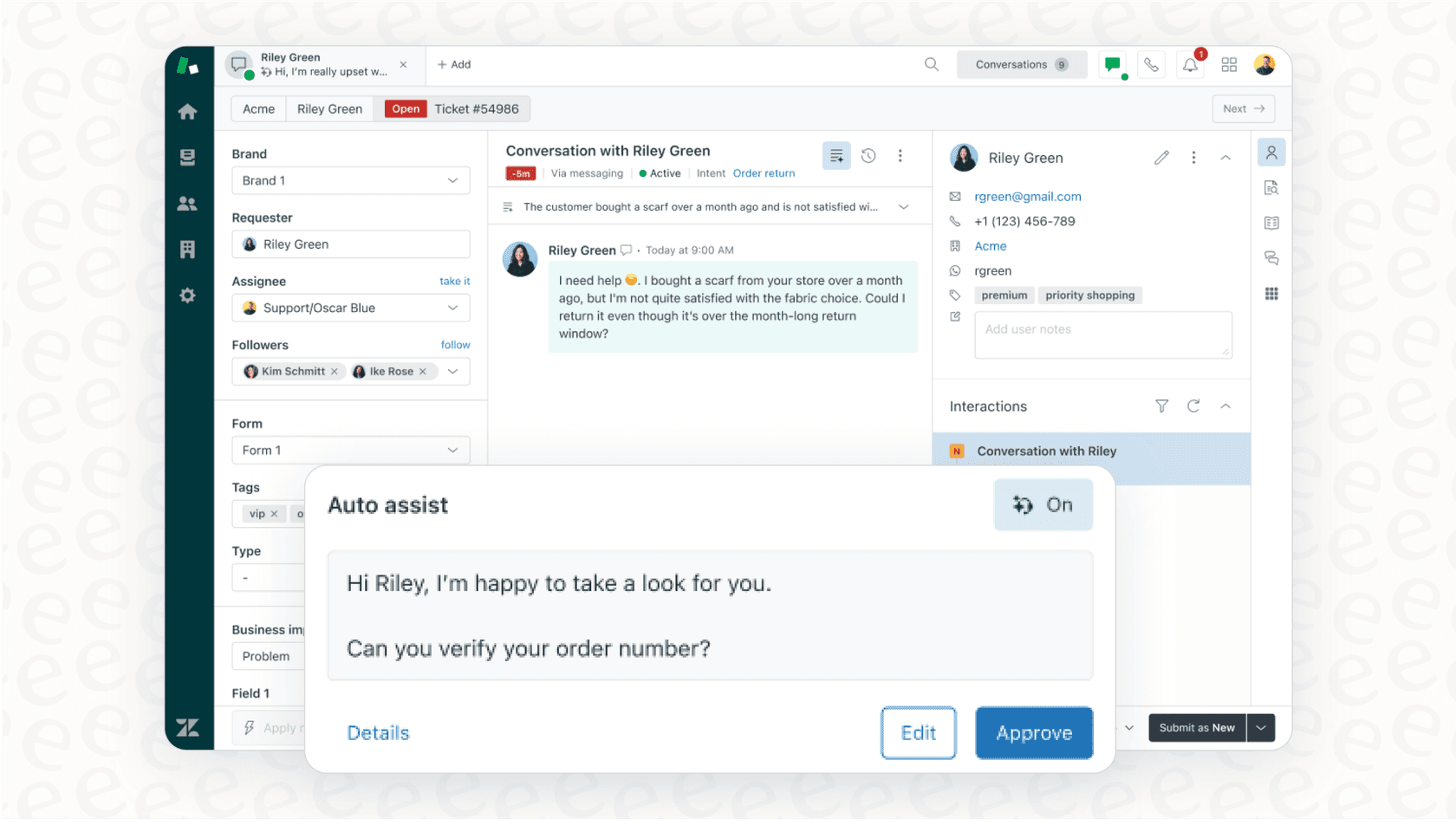
- Drafting accurate, context-aware replies that match your company's tone. Agents can then quickly review, tweak, and send them off.
And for your internal teams:
- You could set up an internal chatbot in Slack or MS Teams that answers employee questions using your internal knowledge base, whether that lives in Confluence, Google Docs, or Notion.
- It can help new hires get their footing faster by giving them one place to ask about company policies, processes, or how the coffee machine works.
It can even help out with sales and marketing:
- It could generate personalized outreach emails based on data from your CRM and past conversations.
- It can summarize customer feedback from reviews and support tickets to help you spot trends and figure out what people are struggling with.
Pro Tip: Not sure where to begin? Take a look at the most repetitive, high-volume questions your support team answers. That's usually the spot where a Gemini AI integration can make a noticeable difference the fastest.
The two paths to a Gemini AI integration: Build it yourself or use a platform
When you decide to bring Gemini into your business, you have two main options: build a custom solution from the ground up, or use a platform that’s already done the hard work for you.
Path 1: The DIY approach for your Gemini AI integration
This is the route for companies with a big budget and a dedicated team of AI engineers. The process usually starts with getting an API key from a tool like Google AI Studio, hiring or assigning developers, and then writing a whole lot of custom code.
This code needs to connect the Gemini API to all your different systems, from your helpdesk like Zendesk to your various knowledge bases. After that, you still have to build a user interface, manage all the server infrastructure, and handle the ongoing maintenance. As you can probably guess, it's a huge undertaking.
- Pros: You get complete control over every little detail of the integration.
- Cons: It's very expensive, takes a long time (think months, not weeks), and you need a specialized engineering team. You're also responsible for every bug, update, and security patch forever.
Path 2: The managed platform approach for a quick Gemini AI integration
This is the better path for pretty much everyone else. Managed platforms like eesel AI have already done all the heavy lifting. They offer a "no-code" solution that has the Gemini AI integration built right in, along with simple connections to all the business tools you're probably already using.
The process is completely different. You sign up, connect your apps, and you can have a working AI agent in a few minutes.
- Pros: You can be up and running in minutes, not months. The setup is self-serve, so you don't have to schedule a sales demo just to see if it works for you. It also comes with necessary features like simulation and reporting, and the pricing is clear and predictable.
Here’s a quick comparison of how the two approaches look side-by-side:
| Feature | DIY Gemini Integration | Managed Platform (eesel AI) |
|---|---|---|
| Setup Time | Months | Minutes |
| Upfront Cost | High (developer salaries, infrastructure) | Low (starts at $239/mo for annual plan) |
| Required Expertise | AI/ML Engineers, Developers | None (No-code setup) |
| Maintenance | Your team's responsibility | Handled by the platform |
| Key Features | Must be built from scratch | Simulation, reporting, workflows |
The hidden challenges of a custom Gemini AI integration
If you're still considering the DIY route, it’s important to understand the complexities that can turn a fun project into a major headache. These are the hurdles that managed platforms are built to handle.
Connecting and syncing knowledge: Building a system that can reliably pull information from multiple, constantly changing sources is a big technical challenge. Your AI needs the latest information from your help center, old tickets, Confluence pages, and Google Docs. Just keeping all of that in sync without custom code can feel like a full-time job.
Building reliable workflows: A good AI agent does more than just answer questions, it needs to be able to take action. Building the logic to escalate a ticket to the right person, apply the correct tags, or look up an order status in Shopify requires complex programming that you have to design, build, and maintain yourself.
Testing and validation: How can you be sure your custom-built AI will work correctly without annoying your customers? Building a good simulation environment to test the AI on thousands of your past support conversations is a massive project in itself. Without it, you’re basically testing on live customers, which is rarely a good idea.
Controlling AI scope and accuracy: You have to make sure the AI only answers questions it's actually been trained on and doesn't just make up incorrect information (which AI models are known to do). This requires careful prompt engineering and safety nets that you have to design, test, and put in place yourself.
This is what that complicated, custom-built process looks like. Every box here represents a component you'd have to build and maintain on your own.
How eesel AI offers a smarter, simpler Gemini AI integration
Platforms like eesel AI were created to be the direct solution to all the challenges we just talked about. It gives you all the power of a custom Gemini AI integration without any of the headaches.
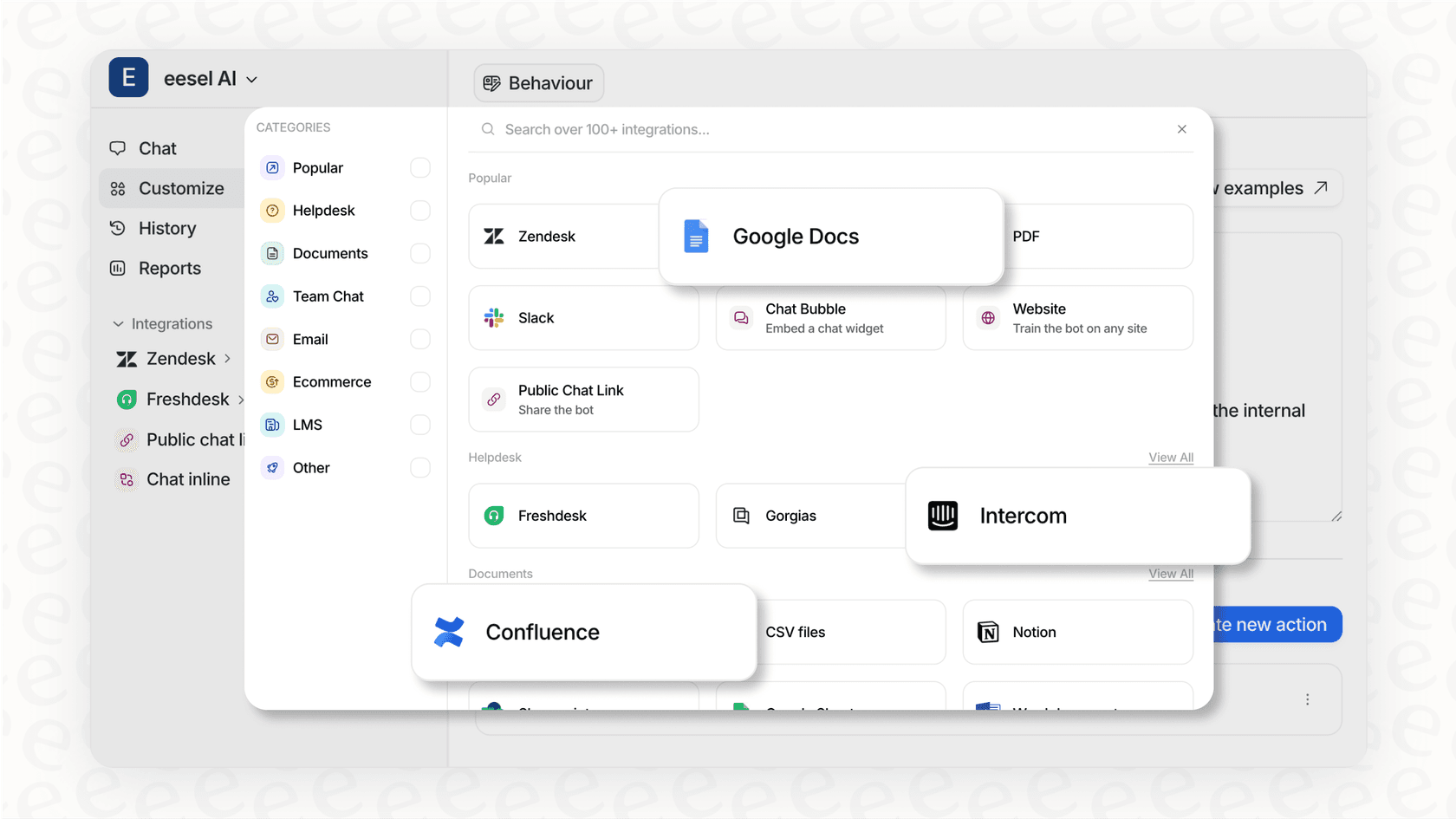
Instead of spending months building data pipelines, eesel AI offers over 100 one-click integrations. You can connect your Zendesk, Freshdesk, Confluence, and Google Docs in a few minutes to create a single source of truth for your AI.
The platform is truly self-serve. You can sign up, connect your tools, and launch an AI agent without needing to talk to a developer or sit through a sales demo. It's designed to just work.
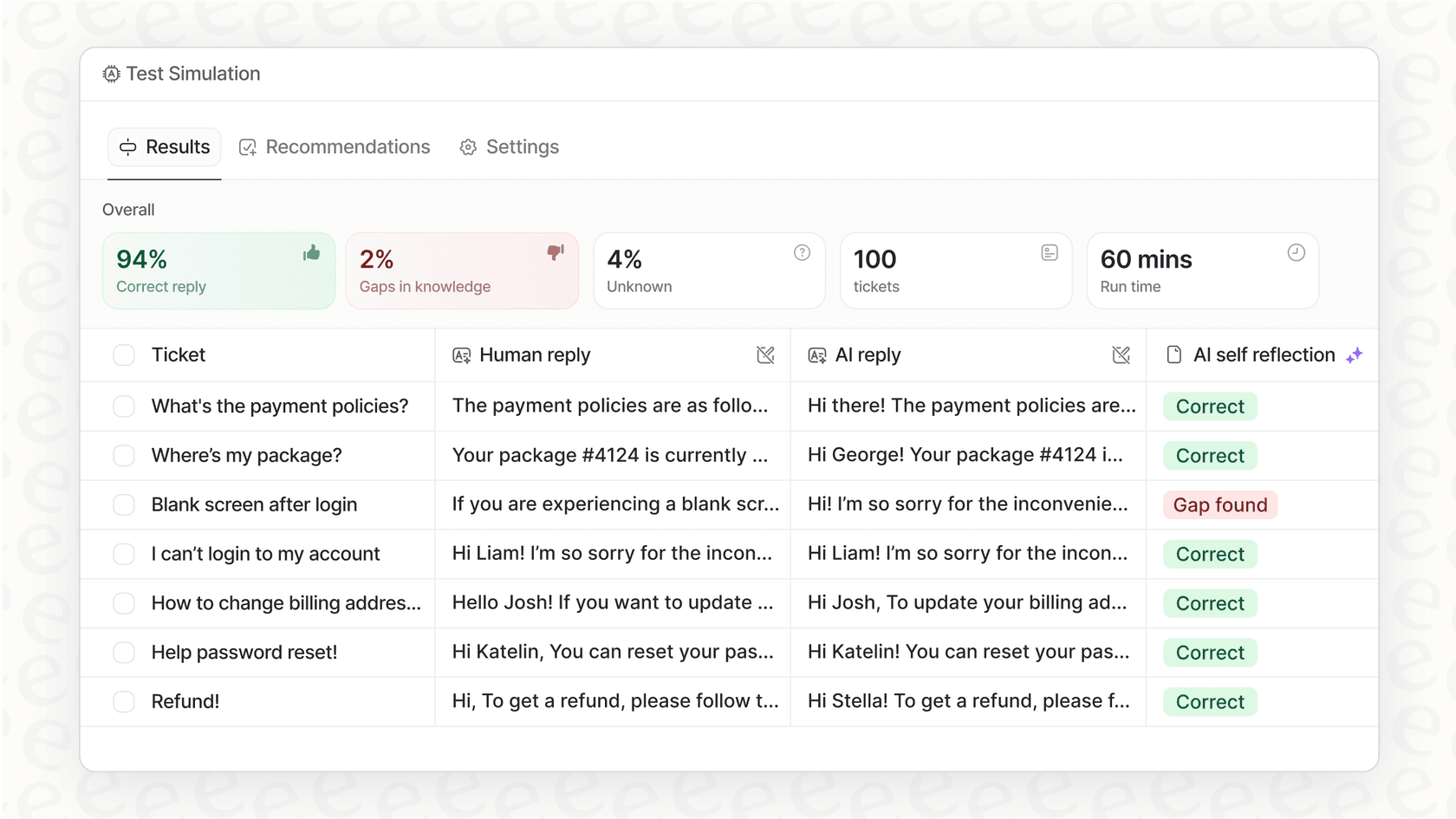
One of the most useful features is the simulation mode. It lets you test your AI agent on thousands of your past tickets before it ever talks to a real customer. This gives you clear reports on how it will perform and what its resolution rate might be, taking the guesswork out of the process.
You also get full control without needing to code. You can use the prompt editor to define your AI's tone and personality. Then, you can use a feature called AI Actions to create powerful workflows, like looking up order info or escalating tickets with specific tags, all through a simple interface.
Your next steps for a successful Gemini AI integration
Gemini has some incredible potential for businesses. But a successful Gemini AI integration isn't about just grabbing an API key. It's about choosing an implementation path that fits your budget, timeline, and goals.
For most companies, the goal is to solve a real problem, like reducing ticket volume or freeing up your team for more important work. It's not to start a complicated and risky internal software project.
Managed platforms like eesel AI remove the risk, get you to your goal much faster, and provide powerful features right from the start. For the vast majority of companies looking to use Gemini's power, they're simply the smartest choice.
Get started with your Gemini AI integration in minutes
Ready to see how straightforward a Gemini AI integration can be? Connect your helpdesk and knowledge sources to eesel AI and launch your first AI agent in under 5 minutes. Start your free trial today.
Frequently asked questions
What's the most practical reason to use a platform for a Gemini AI integration instead of just building it ourselves?
The biggest reasons are speed and cost. A managed platform handles all the complex engineering, maintenance, and infrastructure for you, allowing you to launch in minutes for a predictable monthly fee. The DIY approach requires a dedicated team of expensive engineers and can take months to build and deploy.
Realistically, how much time does my team need to set aside to get a Gemini AI integration up and running with a platform like eesel AI?
The initial setup can genuinely be done in under 5 minutes since it only involves connecting your existing tools with a few clicks. You might spend a few hours testing the AI in simulation mode and fine-tuning its personality, but it's a fraction of the time compared to a custom build.
How can I be sure our Gemini AI integration won't go rogue and start giving out wrong answers to our customers?
Managed platforms are designed with safety nets to prevent this. Features like simulation mode let you test the AI on thousands of past conversations before it ever goes live. You can also define the AI’s scope and knowledge sources, ensuring it only answers questions it's been trained on.
Do I need to worry about whether a Gemini AI integration will work with all the different apps my team uses?
With a platform approach, you don't need to worry. Platforms like eesel AI have pre-built, one-click integrations for over 100 common business tools like Zendesk, Confluence, and Google Docs. This eliminates the custom coding needed to connect all your data sources.
Does someone on my team need to be a developer to manage our Gemini AI integration once it's live?
No, not at all if you use a managed platform. These systems are "no-code," meaning they are designed for non-technical users. Your support managers or operations team can easily manage the AI's knowledge, workflows, and personality through a simple user interface.
If we're just starting out, what's a good 'first project' for a Gemini AI integration to see some quick results?
A great first project is automating answers to your most frequent customer support questions. This provides a clear and immediate return on investment by reducing ticket volume and freeing up your support agents. It's a high-impact area where you can quickly see the value.