

What is Gemini 3.5 Transcribe?
For a couple of years, if you wanted to turn audio into text with Google's models, you had two options: Google Cloud's Speech-to-Text API (the Chirp line), or just handing an audio file to a general Gemini chat model and asking it to transcribe. Gemini 3.5 Transcribe is the first time Google has shipped a Gemini-branded model built specifically for the job, sitting alongside the rest of the Gemini 3 lineup.
Google describes it as "a speech-to-text model based on Gemini's audio understanding capabilities" that provides low-latency transcription with utterance-based language detection, speaker diarization, word-level timestamps, Smart transcription, and custom vocabulary biasing. In plain terms: it listens to audio and hands back clean, formatted, speaker-labeled text, in more than 85 languages, without you stitching together a pipeline yourself.
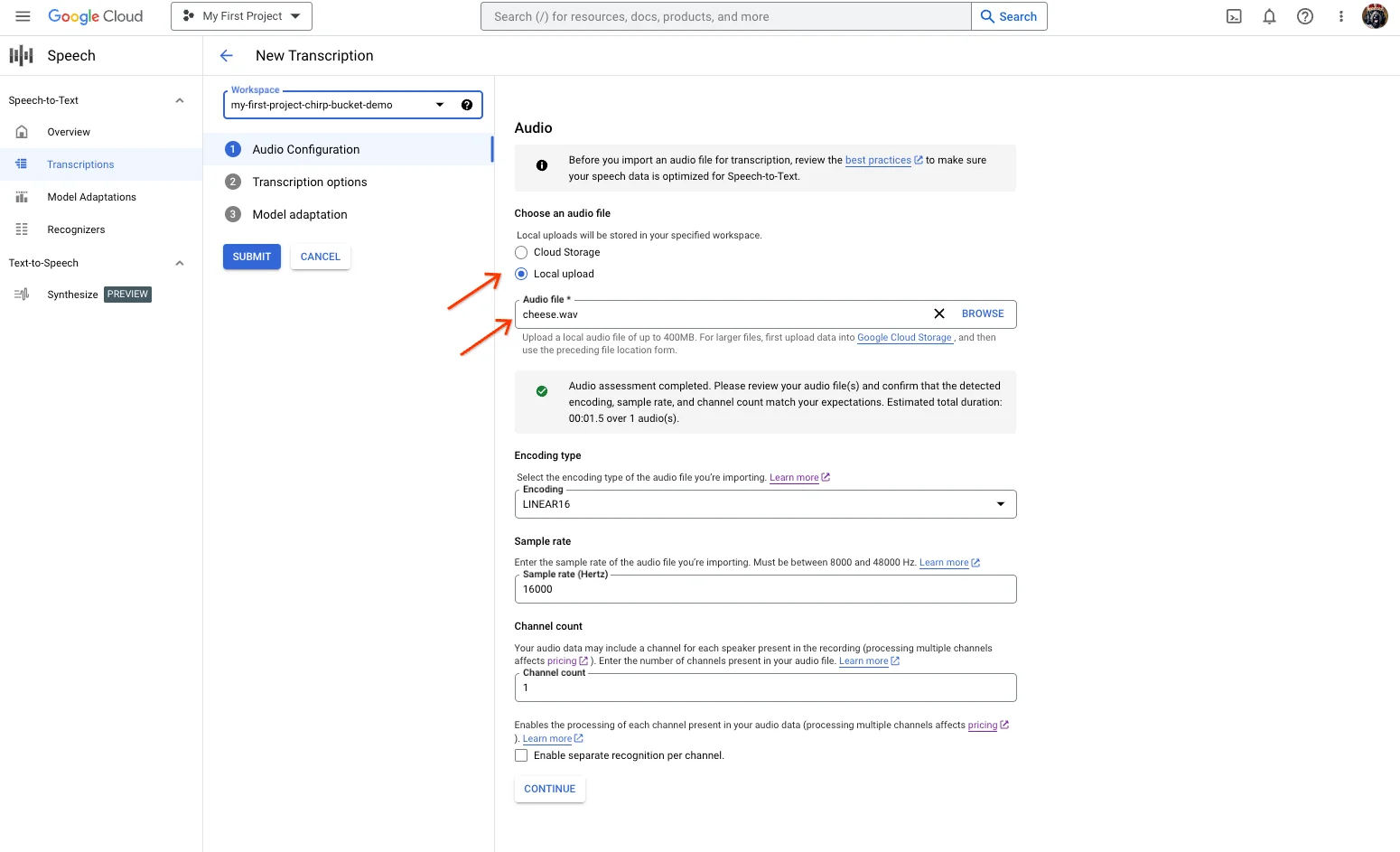
If you've used Google Cloud's transcription console before, the workflow will feel familiar, you point it at an audio file and pick your options:
One thing to flag up front, because Google's own docs don't agree with each other: the models overview page tags Gemini 3.5 Transcribe as "New Stable," while the launch blog post says it's "in public preview" for both developers and enterprises. It's already shipping in consumer products, Rambler on Gboard for Android, the Gemini app on macOS, and "coming soon to Chrome," per the same post. Treat it as production-adjacent but not fully settled.
The two models: file vs live
The most important thing to understand before you write a line of code is that "Gemini 3.5 Transcribe" is really two endpoints, and they behave very differently.
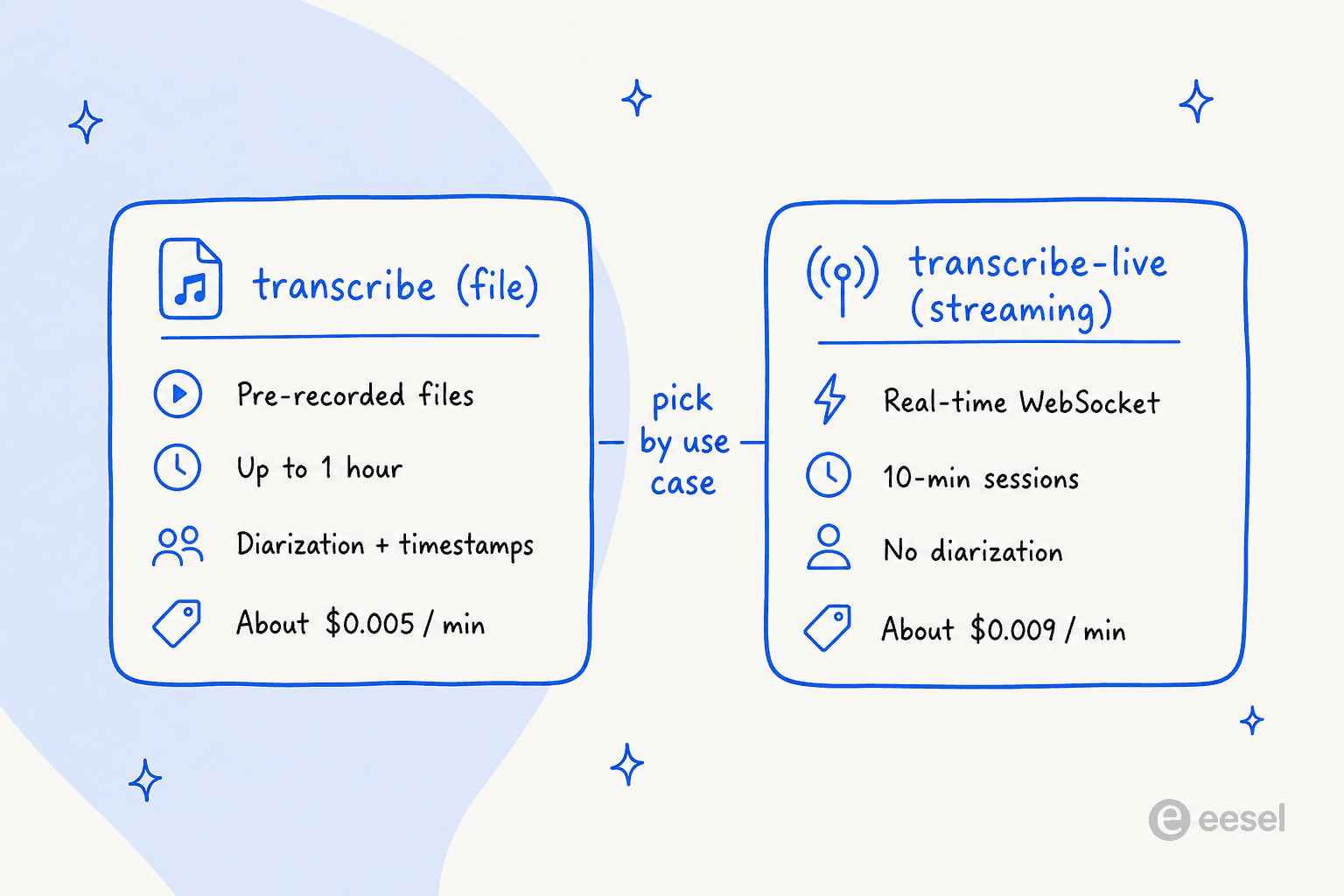
The gemini-3.5-transcribe file model is what you reach for when you have a recording already, a support call, a podcast, a meeting, and you want the full transcript with speaker labels. The gemini-3.5-transcribe-live model is for streaming audio as it happens, like live captions, where every extra second of latency is felt. Here's how the feature support breaks down:
| Feature | gemini-3.5-transcribe (file) | gemini-3.5-transcribe-live (streaming) |
|---|---|---|
| Best for | Pre-recorded audio | Real-time captions |
| Language auto-detection | 85+ languages, incl. mid-session code-mixing | 85+ languages |
| Word-level timestamps | Supported (reduces accuracy) | Not supported |
| Speaker diarization | Supported (see the caveat below) | Not supported |
| Custom vocabulary biasing | Up to 1,000 terms (best ≤100) | Up to 1,000 terms |
| Smart dictation & formatting | Supported | Supported |
| Max audio duration | Up to 1 hour (30 min with diarization or timestamps) | 10 minutes per session |
| Blended price | ~$0.005 / min | ~$0.009 / min |
The diarization caveat is the one to watch. Google's model page feature table says the file model supports "up to 8 speakers (Attribution for 3+ speakers is experimental)," but the announcement blog says "up to three speakers." Either way, the reliable ceiling today is three, and I'd plan around that number, not eight.
What Smart transcription actually does
The feature Google leans on hardest is Smart transcription, and it's worth understanding because it's also the source of the loudest complaints. A raw transcript of human speech is messy: people say "um," they start a sentence, stop, and restart, they mumble numbers. Smart transcription cleans all of that up automatically.
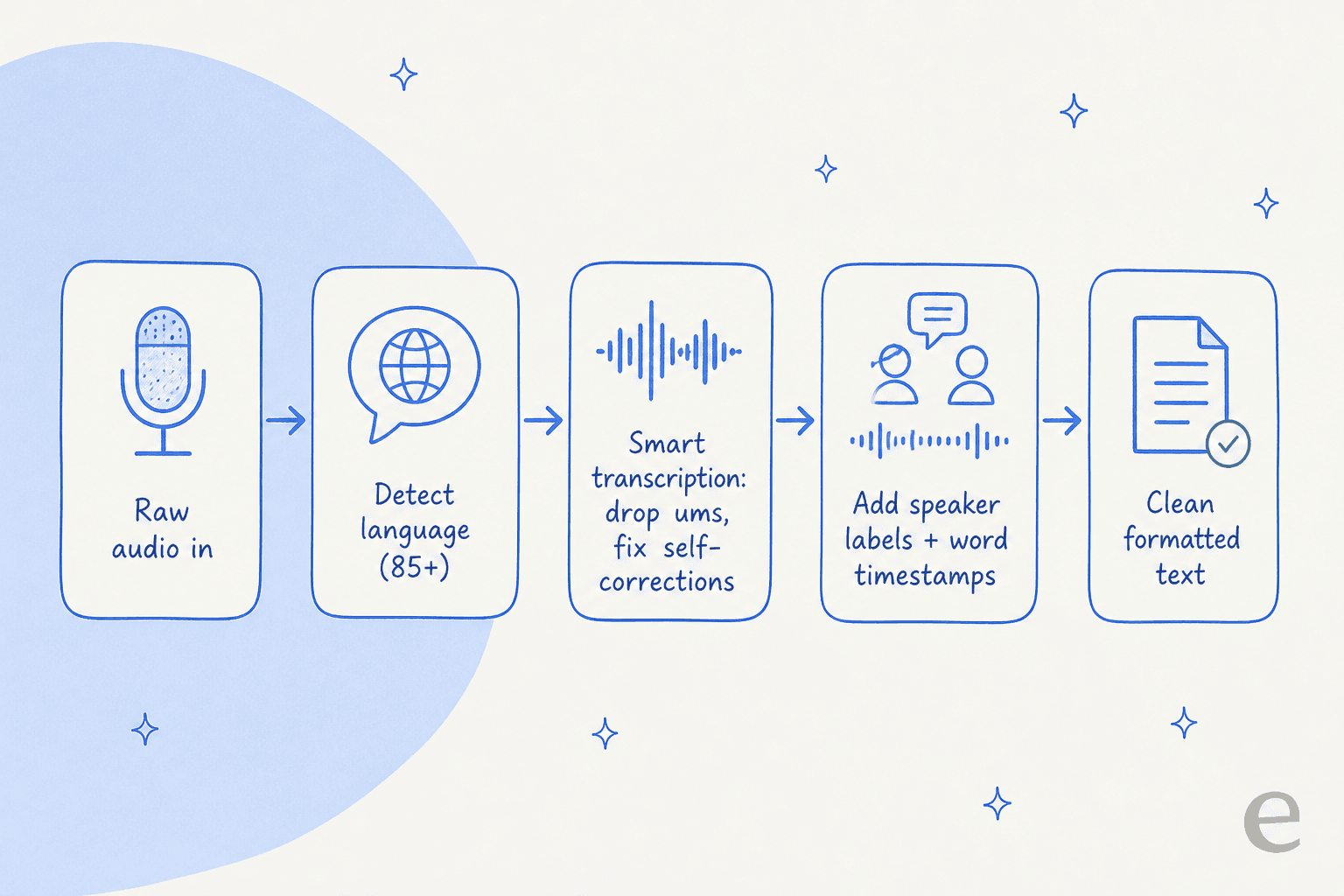
Per the launch post, it handles self-corrections (someone says "let's meet Tuesday, no, Wednesday" and you get "Wednesday"), strips filler words, and applies intent-aware formatting for things like alphanumeric strings. For dictating an email or cleaning up meeting notes, that's the kind of thing dedicated dictation tools charge for, so having it in the base model is useful.
The flip side is that "cleaning up" is a judgment call, and the model doesn't always agree with you about what's noise. One developer testing it on a Pixel 11 Pro put it sharply:
"The main issue is when you want to say something precise with specific wording it might 'simplify' it and break the meaning. Something like 'I hesitated to check it, I should have verified' => 'I should have verified'... I tried the sentence few times and it always removed the first part."

So the mental model is: Smart transcription is a feature, not a neutral transcription. For verbatim needs (legal, research, anything where the exact words matter), that's a real tradeoff to weigh.
How accurate is it, really?
On paper, the numbers are excellent. Google reports the following word error rates, all attributed to Artificial Analysis:
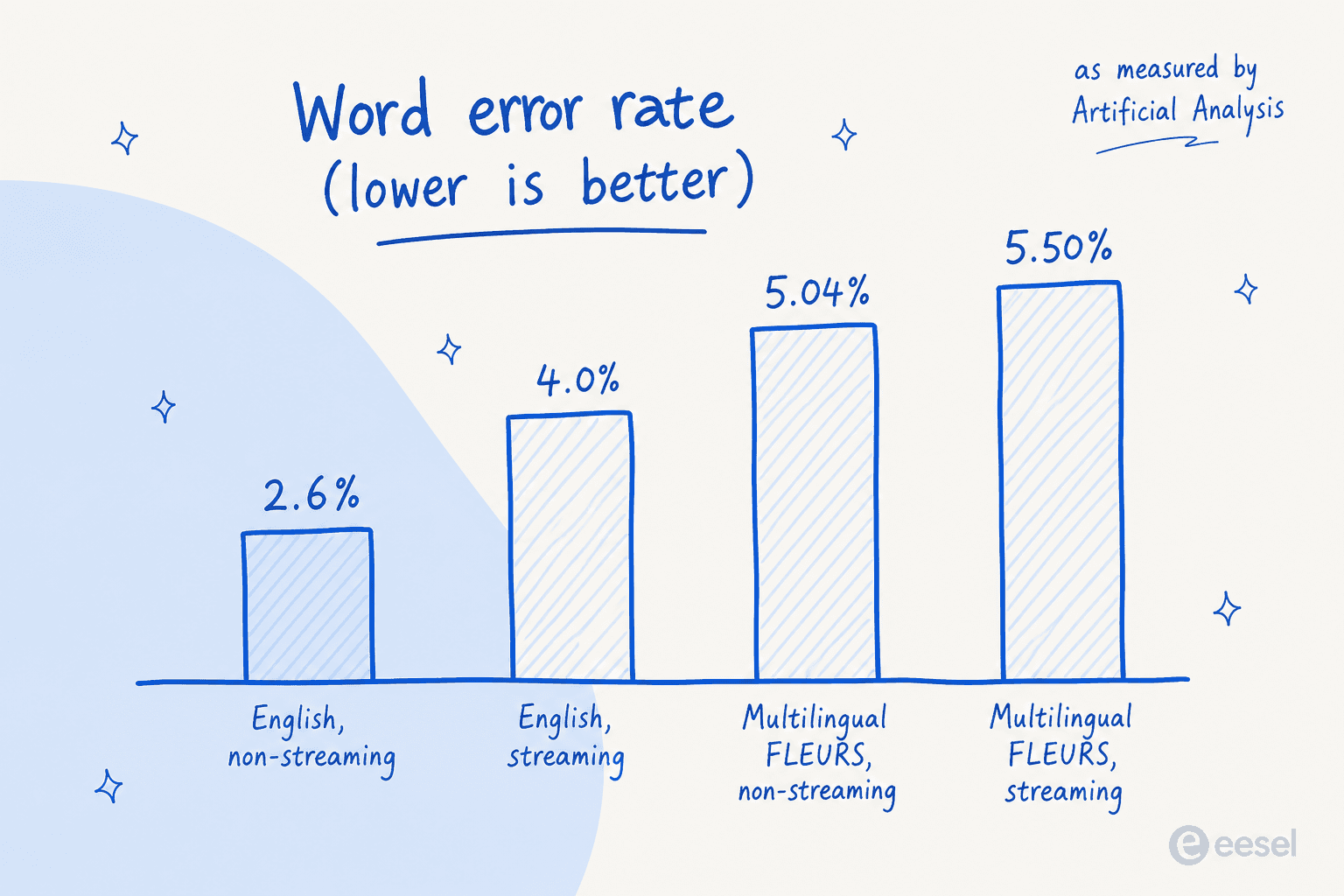
A 2.6% word error rate on non-streaming English is very good, roughly one wrong word in forty. Google also claims the model's time to final transcription improves by 70% versus Chirp 3, though that framing is Google's own, so I'd treat it as a vendor figure rather than an independent benchmark.
The more interesting signal is what practitioners say after using it. And here the picture is split. On the positive side:
"I am using it all day as a main dictation model, and I can say it's the best model in terms of accuracy, latency, and formatting I have ever used."
But the Hacker News launch thread is full of people running their own comparisons and coming to different conclusions. A few still prefer Whisper, and a couple found real gaps:
"Curious if this suffers from the same hallucination problems as Chirp or not... we've moved back to Whisper for timestamp accuracy and then Gemini Flash for transcription correction."
The takeaway I'd draw: WER on a clean benchmark and WER on your actual audio (noisy calls, multiple accents, cross-talk) are different things. The lab numbers are a strong start, not a guarantee. If you're evaluating any transcription model for real work, test it on your own recordings before you commit.
Gemini 3.5 Transcribe pricing
Google didn't put pricing in the model announcement, which annoyed developers enough that one just posted the numbers to Hacker News himself. Here's the full picture from the pricing page, for the Gemini Developer API:
| Model | Audio input | Text output | Blended rate |
|---|---|---|---|
gemini-3.5-transcribe (file) | $2.00 / 1M tokens (~$0.003/min) | $12.00 / 1M tokens (~$0.002/min) | ~$0.005 / min |
gemini-3.5-transcribe-live (streaming) | $3.50 / 1M tokens (~$0.005/min) | $21.00 / 1M tokens (~$0.004/min) | ~$0.009 / min |
For comparison, Google's own Cloud Speech-to-Text v2 standard recognition starts at $0.016/min and drops with volume, while its dynamic batch tier is $0.003/min. So the new Gemini file model sits neatly below standard real-time recognition but above the cheapest batch option. Compare like for like (real-time vs batch) when you're doing the math.
Speaking of math, here's a quick calculator. Plug in how many hours of audio you'd process a month and see roughly what each option costs:
A worked example: a small team transcribing 200 hours of support calls a month would pay roughly $60/month on the file model, versus about $192 on Cloud Speech-to-Text standard. At that scale the difference is real but not enormous. The bigger cost question is usually what you do with the transcripts afterward, not the transcription itself.
How it stacks up against Whisper, Deepgram, and Scribe
I want to be careful here, because a fair comparison needs each vendor's own numbers, and the honest position is that the real head-to-heads are being run by users, not by me. So rather than a spec table I can't fully source, here's what the people actually A/B testing these models are finding.
On cost, the reaction splits almost down the middle. One developer who runs whispermemos.com did the math and liked what he saw:
"I did the math based on our data from customers... and it seems to be $0.12 per hour of input audio... Scribe is $0.22. If the accuracy is close to Scribe, I think it's a good deal."
Others weren't convinced the accuracy is close enough to matter:
"Still more expensive and worse performing than ElevenLabs Scribe, unfortunately. Not sure who's the target audience for this."
The most consistent complaint, and the one I'd weigh most heavily if you do meeting transcription, is multi-speaker handling:
"Still no real time diarization beyond 3 people (and even then experimental) when others do it very well, like Soniox and Deepgram. For something like meeting notes this is critical."
And Whisper still has a loyal following, partly because it's free to self-host and partly because a lot of teams have already built pipelines around it. A common pattern is hybrid: use Whisper for accurate word timestamps, then a Gemini model for the actual text. The short version is that Gemini 3.5 Transcribe is a strong, well-priced managed option, not an automatic winner over the specialist ASR tools. Which one wins depends heavily on your audio and whether you need reliable diarization.
Where transcription fits for a support team
Here's the thing worth saying plainly, because it's easy to miss: Gemini 3.5 Transcribe is infrastructure. It turns audio into text, and that's a hard problem it solves well. But a transcript of a customer's phone call or voice note isn't an answer, it's just the start. Something still has to read that text, understand what the customer needs, pull the right information, and resolve the ticket.
That resolution layer is what I work on. I've spent the last few years helping build AI that sits on live support queues, and the pattern is always the same: getting the words right is table stakes; acting on them correctly is the hard part. A transcription model gives you the words. It doesn't know your refund policy, your order system, or the last three tickets that customer opened.
This is the distinction between a model and a teammate. Gemini 3.5 Transcribe is a model, brilliant at one narrow job. eesel is a teammate platform: you hire ready-to-work AI teammates for specific jobs, and the current roster includes an AI helpdesk teammate and an AI blog writer. The helpdesk teammate plugs into the helpdesk you already run, Zendesk, Freshdesk, Gorgias, and joins the existing queue, trained on your help center and past tickets.
Try eesel for voice and chat tickets
If you're looking at transcription because your team is drowning in voice or chat tickets, the transcript is only half the job. The eesel AI helpdesk teammate picks up where a model like Gemini 3.5 Transcribe leaves off: it reads the customer's message, drafts or sends the reply, and actually closes the loop, across 1,000+ integrations.
The part I'd point to first is the simulation mode. Before any AI touches a live customer, you run it against thousands of your own historical tickets and see exactly how it would have responded, so you're not flipping a switch and hoping. Pricing is one fixed monthly price, from $299/month for 500 credits (1 credit per ticket or chat) with no per-seat fees, and there's a free plan with 100 credits, no card. It's the difference between a smart transcription of a problem and an actual resolution of it.