Your support team is likely swamped. Repetitive questions are flooding the inbox, while customers expect instant, 24/7 answers. It’s a classic case of rising expectations meeting limited resources. Traditional helpdesks, bless their hearts, just can’t keep up. This usually leads to agent burnout, longer wait times, and, you guessed it, unhappy customers.
The good news? You can build an AI helpdesk for your business without getting tangled up in a heavy coding project that drags on for months. Modern AI tools plug directly into the systems you already use, like Zendesk, Freshdesk, and Shopify, to automate support effectively and safely.
Think of this less as a dense technical manual and more as a straightforward guide for managers and ops leads who just want to get it right. We'll walk through the three main parts of a successful AI helpdesk: building a solid knowledge foundation, creating an automation engine that solves real problems, and rolling it out with a safe, phased approach.
What is an AI helpdesk?
An AI helpdesk is an intelligent system that connects to your support channels, like email or chat, to understand, sort, and resolve customer issues on its own. Think of it as a smart, independent agent, not just another chatbot stuck on a script.
The main difference is where it gets its information. A basic bot just follows a strict script that you have to write and constantly update. A true AI helpdesk learns from your company's unique, scattered knowledge. It reads past support tickets from platforms like Zendesk or Freshdesk, skims your official help center articles on Confluence, and even gets the context from your internal Google Docs.
It’s built to do three things really well:
-
Understand context: It uses Natural Language Processing (NLP) to figure out what a customer actually means, even if they word their question in a strange way.
-
Take action: It doesn't just send links to articles. It can perform tasks, like looking up an order status in Shopify, processing a return, or updating a ticket field in your helpdesk.
-
Learn and improve: It analyzes conversations to see where it got stuck, giving you clear signals on what documentation you need to create next to make your support even better.
The foundation: Connecting your knowledge sources
An AI helpdesk is only as smart as the information you feed it. The first, and honestly most important, step is to build its "brain" by connecting it to all the places where your company knowledge already lives.
Why a unified knowledge base is critical
Let’s be honest, your company’s knowledge is probably a mess. Support tickets are in Zendesk, internal policies are in Confluence or Google Docs, and that one crucial troubleshooting step is buried in a Slack thread from six months ago. This mess makes it hard for any person to find all the answers, let alone an AI.
The old way of dealing with this was to manually build and maintain a separate, dedicated knowledge base just for your bot. It was a nightmare. The content was outdated the moment you published it, and it never reflected how your team actually talks to customers.
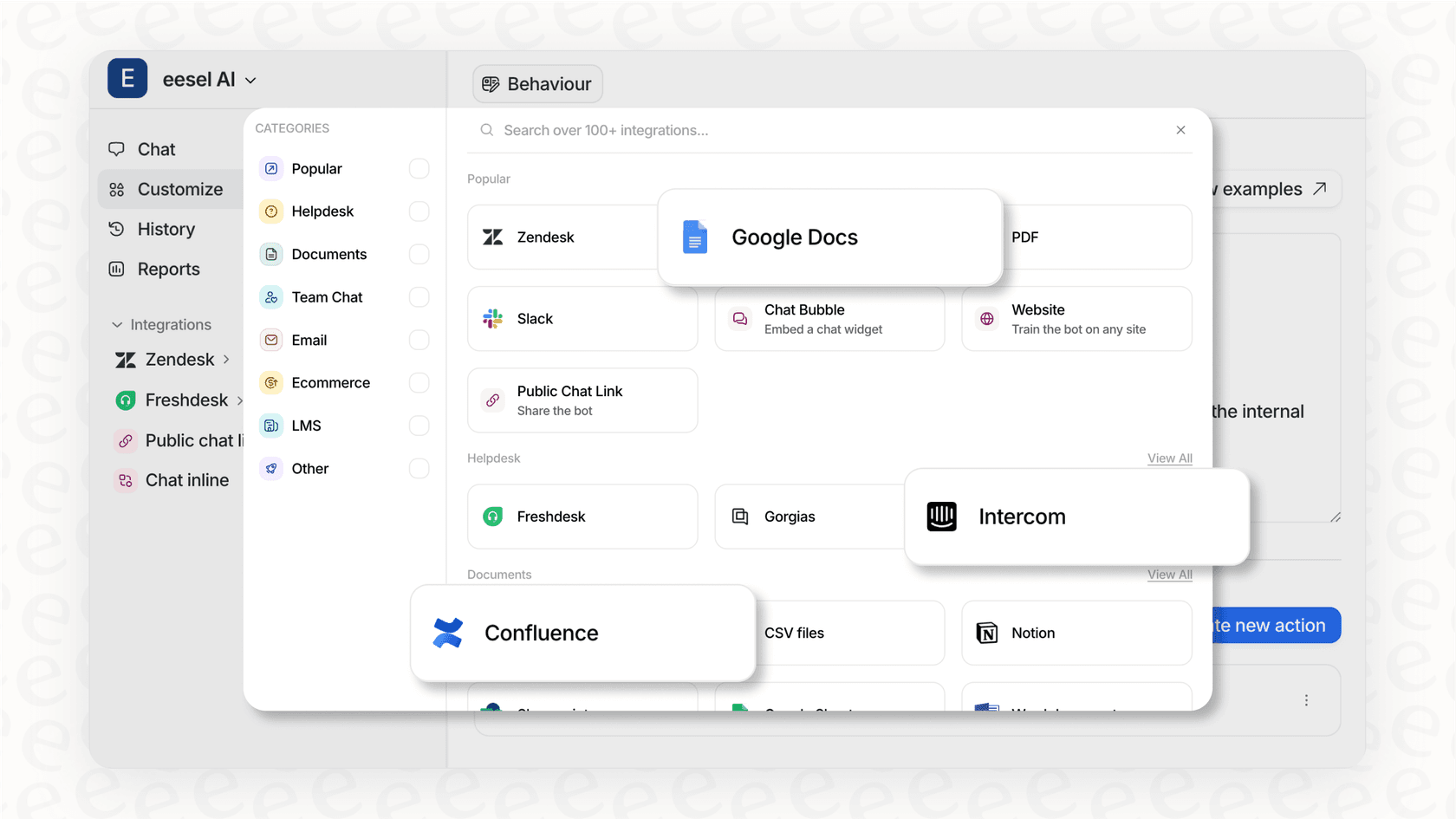
The good news is, you don't have to do that anymore. Modern AI platforms, like eesel AI, act as an intelligence layer that securely plugs into your existing tools. It learns directly from your company’s unique knowledge in Freshdesk tickets, Confluence articles, and Google Docs without forcing you to move or copy a single piece of content.
What to connect
The more varied its knowledge diet, the more accurate the AI's responses will be. Don't just limit your AI to the public-facing help center; give it the full picture.
Here are the key sources you should connect:
-
Past support tickets: This is your goldmine. The AI learns your brand's voice, tone, and common solutions by analyzing historical conversations from platforms like Zendesk or Freshdesk.
-
Help center & knowledge bases: This is your official source of truth. It includes your public articles and internal wikis on tools like Confluence or Notion, where your product features and policies are stored.
-
Internal documentation (Google Docs, PDFs): This is where you give the AI context on internal processes that aren’t public. Think of specific troubleshooting steps only your agents know or details on handling oddball cases.
-
Macros & canned responses: These help the AI learn your team's standard operating procedures and pre-approved answers. Both Zendesk and Freshdesk make these available.
-
E-commerce platforms (Shopify, WooCommerce): This connection lets the AI answer specific questions about products or order status by pulling data directly from your store via their APIs (Shopify API, WooCommerce API).
The engine: Choosing the right automation workflows
Once your AI has its brain, you need to give it "hands" to get work done. Answering questions is great, but real efficiency kicks in when you automate the full workflows that your agents are stuck doing manually today.
From answering questions to solving problems
Many AI tools out there are just conversational layers. They can talk, but they can't do anything. A customer asking, "Where is my order?" gets a link to an article explaining how to track orders, not the actual real-time status of their specific order. That’s not helpful; it’s just another hoop for the customer to jump through.
A proper AI helpdesk connects with your other systems to actually do things. With platforms like eesel AI, you can build custom API actions that allow your AI to perform real tasks, like:
-
Check an order status directly in Shopify.
-
Update a ticket’s status or priority in Zendesk.
-
Start a return process using your e-commerce platform's API.
-
Send a complex conversation over to a specific team in Slack.
Key automation workflows
Start by figuring out the repetitive tasks that eat up most of your agents' time. Here are a few workflows that usually make the biggest impact:
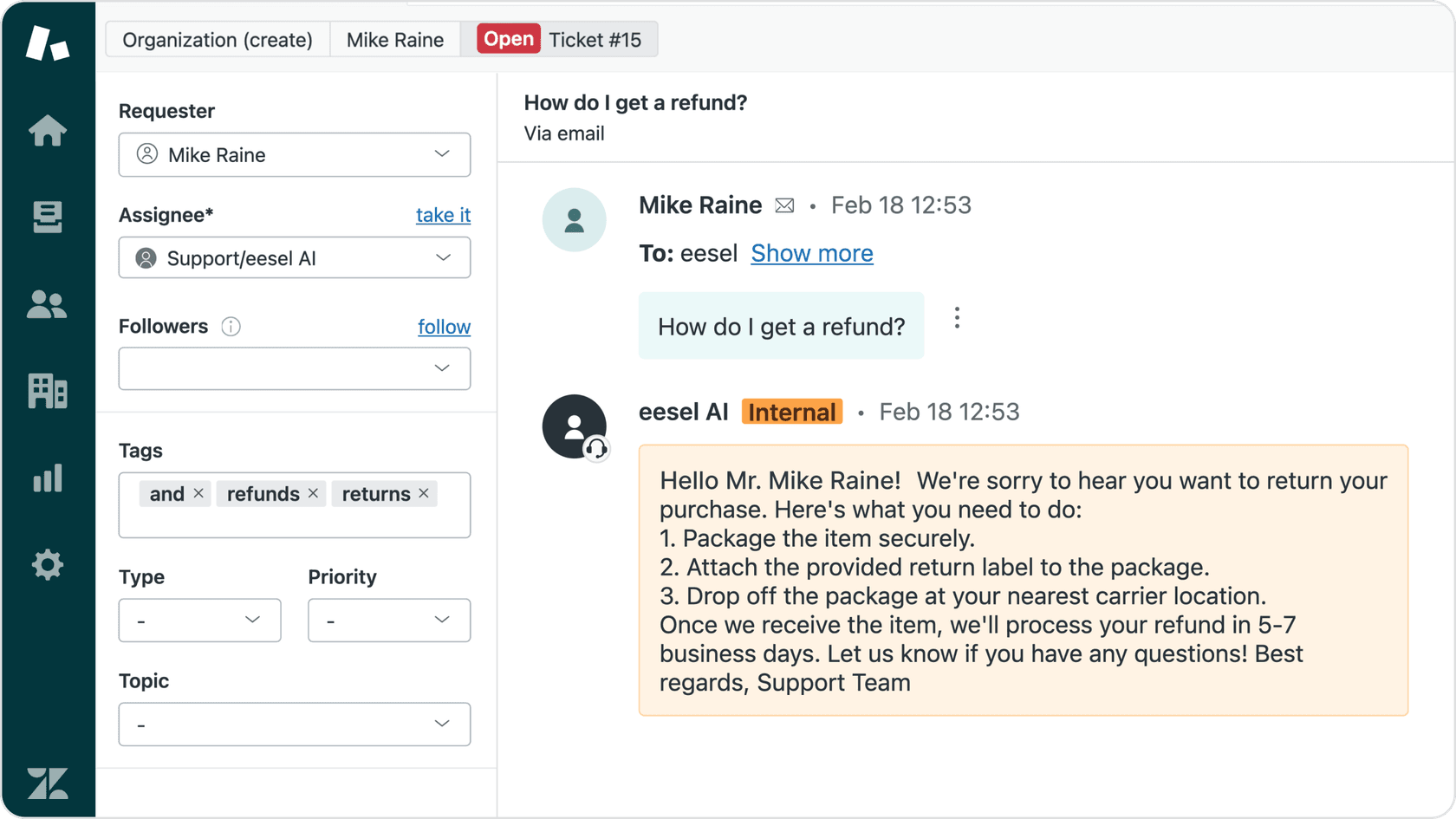
- AI triage: This is all about automatically reading, categorizing, and routing new tickets. Platforms like Zendesk and Freshdesk have built-in rules, but AI-powered triage goes further by understanding what the customer means. For example, it can see that any ticket with words like "billing" or "invoice" should be tagged and sent to the finance team, without you needing to set up a bunch of keyword rules.
-
Full resolution: For common, low-risk issues (like "where is my order?"), the AI can handle the entire conversation from start to finish. This is where API actions become so important for pulling live, customer-specific data and providing a complete answer without any human help.
-
Agent assist (copilot): For trickier or more sensitive issues, the AI can act as a copilot for your human agents. It can draft accurate replies based on all your knowledge sources, which the agent can then quickly review, tweak, and send. This speeds up response times and is a fantastic way to get new hires up to speed.
| Feature | Basic Chatbot | AI Helpdesk Agent |
|---|---|---|
| Primary function | Answers questions from a limited, static knowledge base. | Resolves issues, triages tickets, and assists agents. |
| Knowledge source | Manual uploads, limited URLs. | Deep integration with live data from tickets, docs, APIs. |
| Can it take action? | No, it only provides text-based answers. | Yes, via custom API actions and helpdesk integrations. |
| Workflow automation | Limited to simple conversational flows. | Can tag, route, escalate, and close tickets automatically. |
| Ideal use case | Basic FAQ deflection on a website. | Automating frontline support and improving team efficiency. |
The deployment strategy: How to roll out safely
Rolling out an AI shouldn't feel like you're just closing your eyes and hoping for the best. A strategic, phased rollout is the key to building trust with your team and making sure your customers have a good experience. A common mistake is jumping straight into full automation, which almost always backfires with poor results and frustrated users.
Start with simulation, not speculation
The problem with a lot of AI platforms is that you have to "go live to learn." You turn the bot on with real customers and just hope it works out. What if it gives wrong answers? What if it annoys your customers and ends up creating more work for your team?
A much safer way to start is with a platform that lets you run simulations. For example, eesel AI can analyze your past support tickets from Zendesk or Freshdesk and show you exactly how it would have responded to each one. This gives you a data-backed forecast of its resolution rate and accuracy before a single customer ever talks to it. It’s the difference between guessing and knowing.
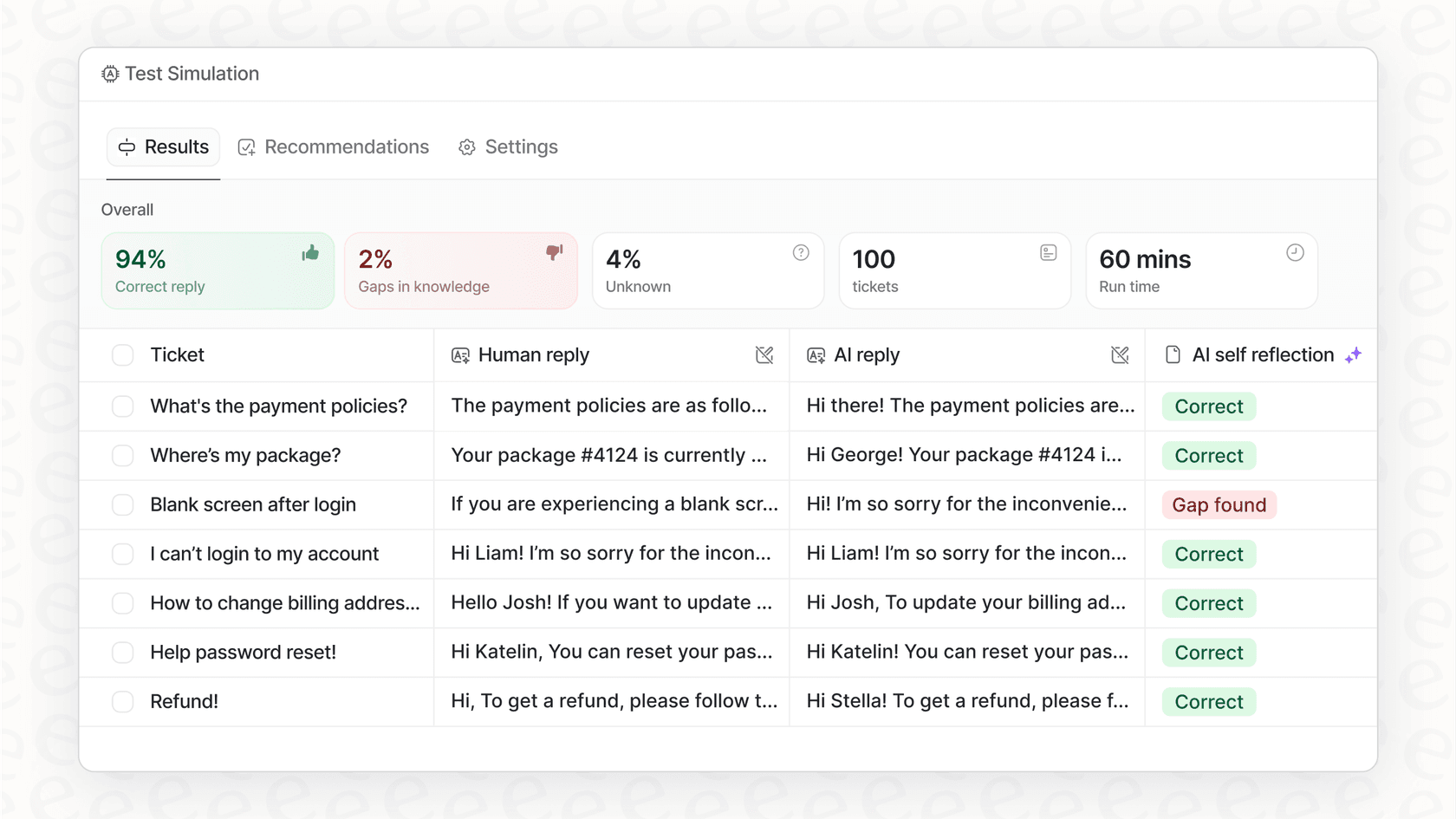
A three-step approach to a safe rollout
Here is a visual breakdown of a safe, three-step approach to rolling out your AI.
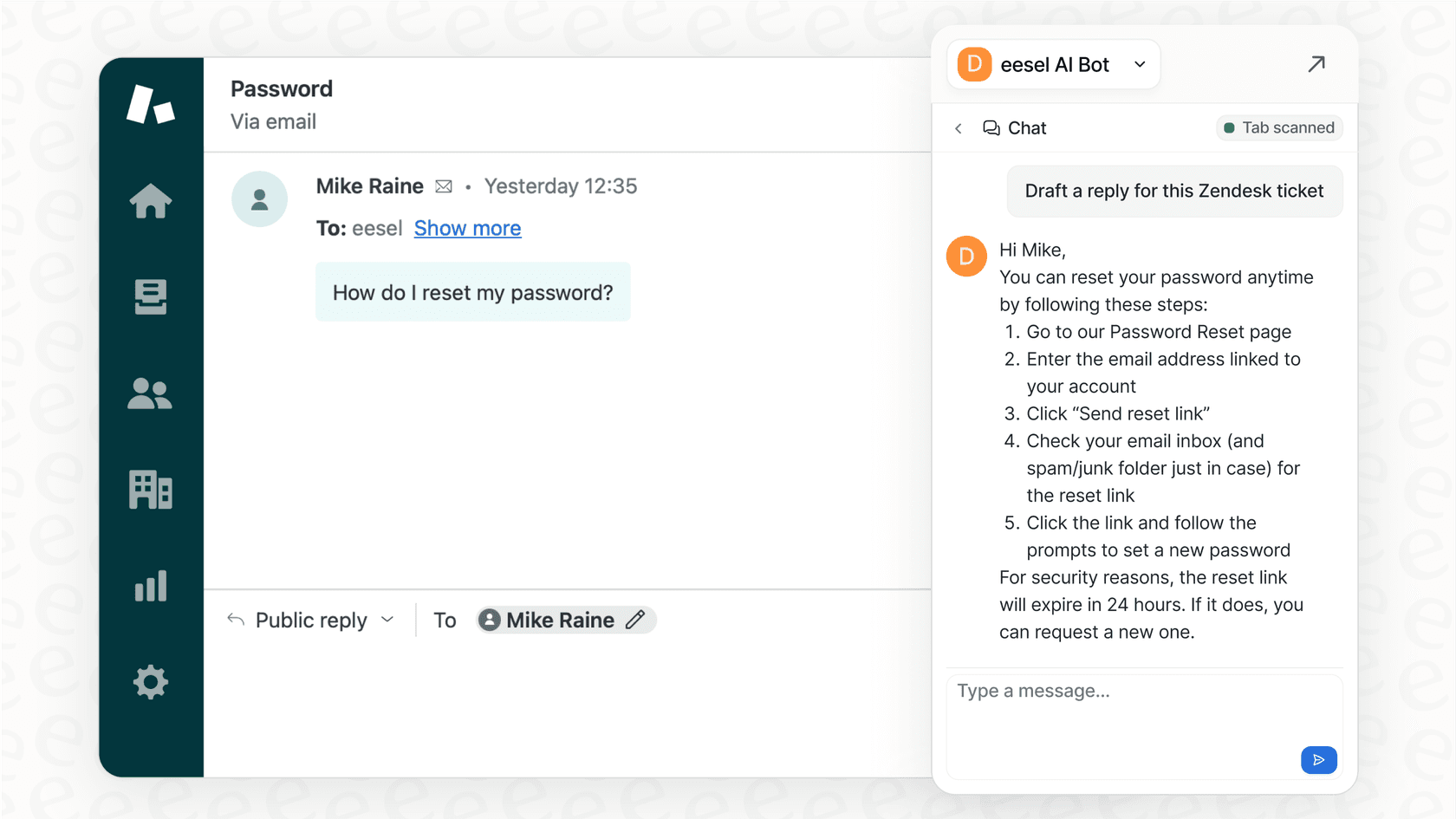
- Step 1: Start in 'copilot' mode. Begin by using the AI as a helper for your agents. Let it draft replies, but don't let it send them automatically. This is a zero-risk way to get your team comfortable with the tool. They can see the quality of the AI's responses, provide feedback, and you can tweak the AI's tone and knowledge without any customers noticing. This lines up perfectly with eesel AI's AI Copilot feature.
-
Step 2: Automate the easy stuff. Once your team is confident in the AI-generated drafts, you can turn on full automation for a small, specific set of predictable questions. Good starting points are simple things like order status ("where is my order?"), return policies, or password resets. Look for a platform with fine-grained controls that let you pick exactly which ticket types you want to automate.
-
Step 3: Keep an eye on it and expand slowly. Use the AI's analytics to find questions it couldn't answer. These are your knowledge gaps. As you fill them by updating your documentation in Confluence or Google Docs, you can gradually expand the scope of automation to cover more topics. This creates a powerful feedback loop where your AI gets smarter with every conversation.
What to look for in a platform
When you start looking around, you'll notice that not all AI helpdesk platforms are built the same. As you weigh your options, here are three things to keep a close eye on:
-
Deep and broad integrations: It absolutely has to connect with the tools your team already relies on. Don't fall for a solution that requires you to ditch your current helpdesk or manually upload documents. Look for native integrations with platforms like Zendesk, Freshdesk, Shopify, Slack, and Confluence. The deeper the integration, the more you can automate.
-
Transparent and predictable pricing: Try to avoid platforms with vague "contact us for pricing" pages or complex per-seat models that don't make sense for automation. What you want is clear, usage-based pricing that makes sense as you grow. For example, eesel AI's plans are public and straightforward: the Team Plan is $299/month for up to 1,000 AI interactions, and the Business Plan is $799/month for 3,000 interactions, which includes key features like training on past tickets and custom API actions.
-
Security & data privacy: Your support conversations contain sensitive customer data. Your AI platform needs to be secure from the ground up. Make sure it uses SOC 2 Type II-certified subprocessors and has clear policies saying your data will never be used to train general AI models. Features like EU data residency, offered in eesel AI's Business plan, can also be a big deal for meeting GDPR compliance.
Build an AI helpdesk with confidence
So, when it comes down to it, building a great AI helpdesk for your business is all about three things: connecting all your scattered knowledge into one smart brain, automating workflows that solve actual problems, and rolling out your AI in a safe, controlled way.
And the best part? You don't need a team of developers or a months-long project to pull this off anymore. With the right platform, you can connect your sources and get a real, data-backed forecast of your automation potential in minutes, not months. This lets you move forward with confidence, knowing what to expect before you ever flip the switch.
If you're curious to see how an AI helpdesk could handle your real support conversations, you can start a free trial of eesel AI. You can run a simulation on your past tickets to get a clear, risk-free forecast of what you could automate today.

Frequently asked questions
No, modern AI platforms are designed to integrate with your existing systems without heavy coding. They act as an intelligence layer, allowing you to connect knowledge sources and automate workflows with minimal technical expertise.
The most critical sources include past support tickets (e.g., Zendesk, Freshdesk), your help center and internal wikis (Confluence, Notion), internal documentation (Google Docs, PDFs), and e-commerce platforms (Shopify) for order-specific queries. A varied knowledge diet ensures more accurate responses.
Start with a phased approach. Begin in 'copilot' mode where the AI assists agents, then gradually automate simple, low-risk issues, monitoring performance closely before expanding. Platforms that offer simulations on past tickets can also provide a risk-free forecast of accuracy.
A proper AI helpdesk can perform tasks like checking order statuses, updating ticket priorities, initiating return processes, and routing complex conversations to specific teams. It leverages API integrations to interact directly with your other business systems.
The AI learns accuracy and tone by analyzing your historical support tickets, help center articles, and internal documentation. Regularly reviewing AI performance in 'copilot' mode and addressing knowledge gaps in your source content will continuously improve its precision and brand consistency.
Prioritize platforms with deep integrations to your existing tools (Zendesk, Shopify), transparent and predictable usage-based pricing, and robust security and data privacy features like SOC 2 certification and clear data usage policies.
Share this article

Article by
Kenneth Pangan
Writer and marketer for over ten years, Kenneth Pangan splits his time between history, politics, and art with plenty of interruptions from his dogs demanding attention.