Let's be honest, most companies are sitting on a mountain of data they can't actually use. You've got all this information, but getting straight answers feels slow, complicated, and surprisingly expensive. This is the exact headache Google BigQuery was created to solve. It’s a serverless cloud data warehouse built to chew through massive datasets at wild speeds, letting you ask huge questions and get answers back in seconds.
This guide will give you a complete BigQuery overview for 2025. We’ll cover what it is, how its clever architecture works, and look at how businesses are using it today. We'll also get into its pricing model and, most importantly, the limitations your operational teams really need to know before jumping in.
What is Google BigQuery?
Google BigQuery is a fully managed data warehouse that runs on the Google Cloud Platform (GCP). The key thing to understand about BigQuery is that it's serverless. For your business, this means you don't have to provision, manage, or patch any infrastructure. No servers to babysit, no clusters to resize, and no need for a database admin to handle routine upkeep. Your team can just focus on digging into data and finding insights, not managing hardware.
At its heart, BigQuery is built for Online Analytical Processing (OLAP). Think of it as a gigantic, incredibly fast engine for running complex queries on huge amounts of historical data. This makes it different from traditional databases like MySQL or PostgreSQL, which are designed for Online Transaction Processing (OLTP), the stuff that handles daily operations like processing an order or updating a customer's contact info.
| Feature | OLAP (e.g., BigQuery) | OLTP (e.g., MySQL) |
|---|---|---|
| Primary Use | Complex data analysis, BI reporting | Daily business transactions |
| Data Focus | Historical, aggregated data | Real-time, current data |
| Workload | Few, complex queries on huge datasets | Many, simple queries on small datasets |
| Speed | Fast on large analytical queries | Fast on small, transactional queries |
| Example | Analyzing quarterly sales trends | Processing a customer's online order |
BigQuery’s main job is to let you use standard SQL to pull answers from enormous datasets, we're talking terabytes or even petabytes, in a matter of seconds, not hours.
How BigQuery works: Architecture and key features
The magic behind BigQuery's speed comes from its unique architecture, which completely separates data storage from the engine that runs your queries. This is a huge shift from how old-school databases work, where storage and compute are tied together and often cause performance bottlenecks.
A serverless architecture built for scale
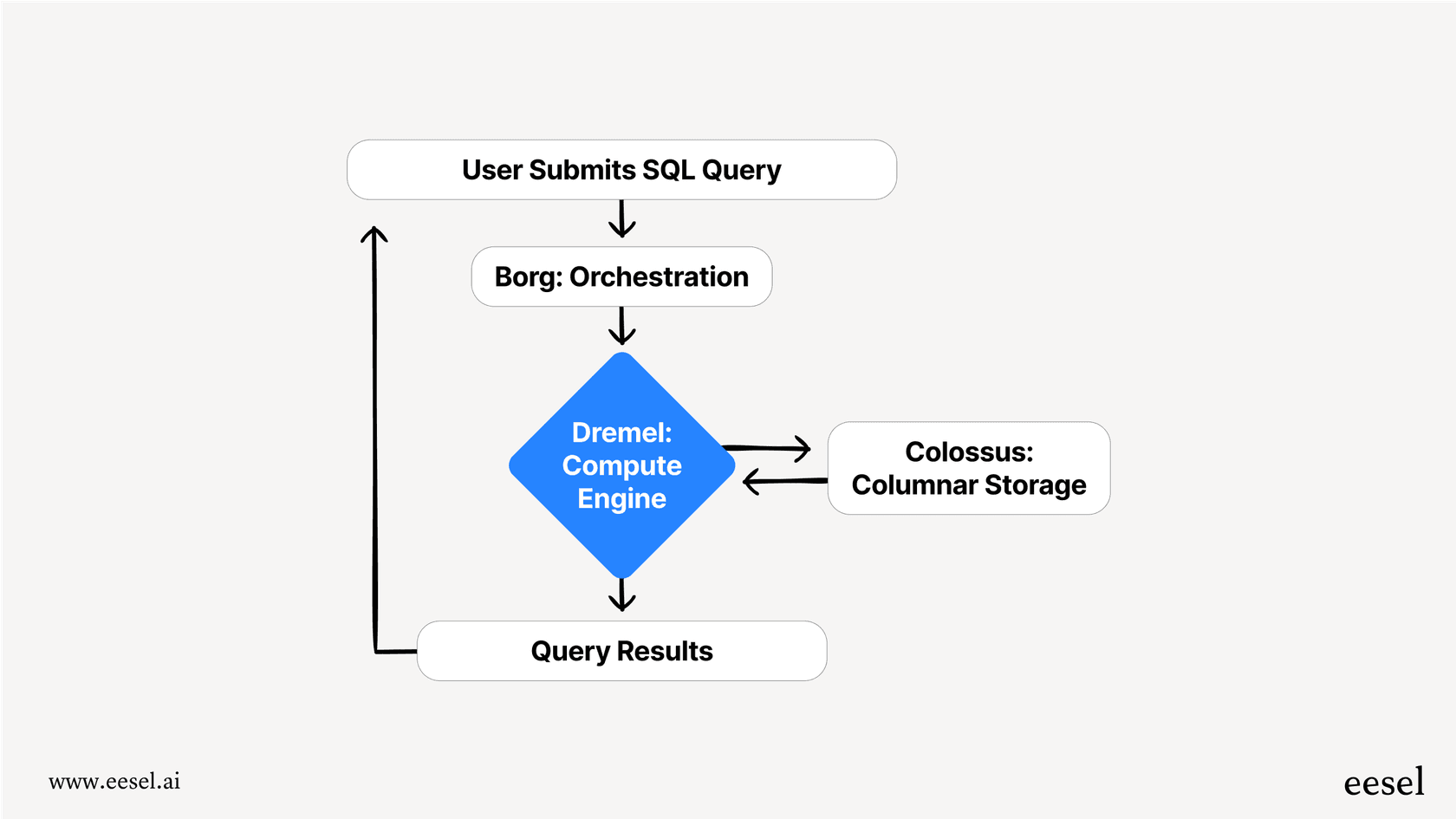
BigQuery's design rests on four main parts that Google manages for you behind the scenes.
-
Storage (Colossus): This is where your data lives, inside Google's massive, distributed file system. BigQuery stores data in a columnar format, which is a huge deal for analytics. Instead of storing data in rows like a spreadsheet, it stores it in columns. Say you have a giant sales table but only want to look at the "total_revenue" and "date". A row-based system would have to scan every single row and all its columns just to find the two you need. BigQuery’s columnar storage, however, only reads the specific columns your query asks for, which makes it way faster and cheaper to run.
-
Compute (Dremel): This is the brains of the operation, the engine that actually executes your SQL queries. When you run a query, Dremel breaks it into smaller chunks and spreads the work across thousands of servers running at the same time. This massive parallel processing is what lets BigQuery fly through terabytes of data so quickly.
-
Network (Jupiter): This is Google's internal network that connects the storage (Colossus) and compute (Dremel). It's so fast that it allows Dremel to read huge amounts of data from storage almost instantly, getting rid of the network lag that can slow down other systems.
-
Orchestration (Borg): This is Google’s cluster management system (the precursor to Kubernetes) that finds and assigns all the hardware needed for your query. When you hit "run," Borg wrangles available servers, gives them to your job, and makes sure everything runs without a hitch.
Key platform features
Beyond its core architecture, BigQuery has a few other tricks up its sleeve.
-
BigQuery ML: This lets you build and run machine learning models right inside BigQuery using standard SQL. It’s a cool way to create forecasts or classify data, but you'll probably need a data scientist on hand to build, train, and maintain models that are actually effective.
-
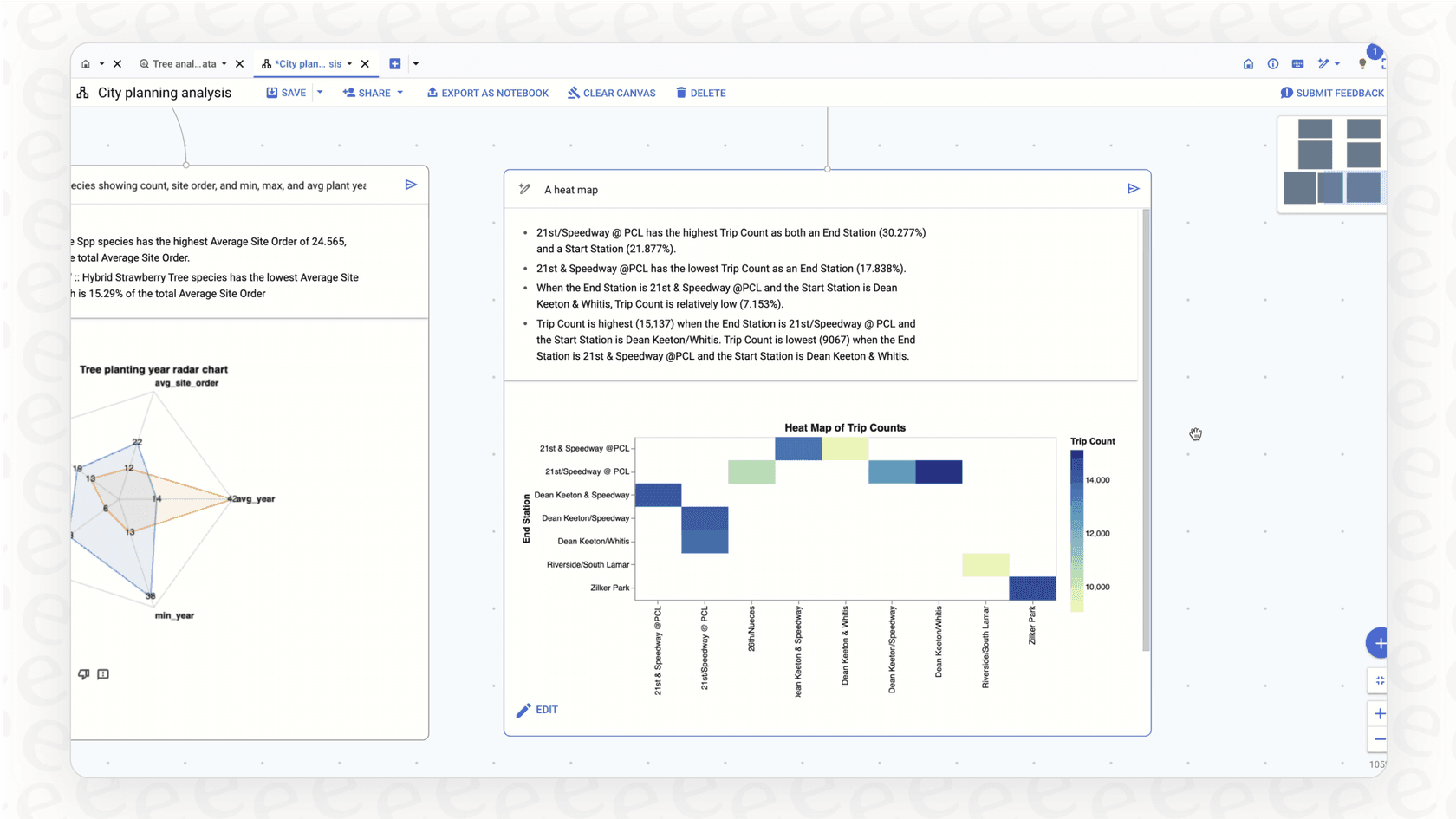
Gemini in BigQuery: This is a built-in AI assistant that can help write, explain, and clean up SQL queries. It can make it easier for some people to get started by using natural language to build a query. Still, it’s a tool for technical folks, since you need to check the SQL it generates to make sure it's correct, efficient, and not going to cost you a fortune.
-
Real-Time Analytics: BigQuery can pull in and analyze streaming data from sources like IoT devices or app logs, which is great for building live dashboards and real-time monitoring.
-
BI Engine: This is a speedy, in-memory analysis service built to make your reports and dashboards faster. When you hook up BI tools like Looker Studio or Tableau to BigQuery, BI Engine caches the data you use most often to give you sub-second responses.
Common business use cases
Businesses use BigQuery to tackle all sorts of data problems, from centralizing information to running advanced analytics.
Getting all your data in one place
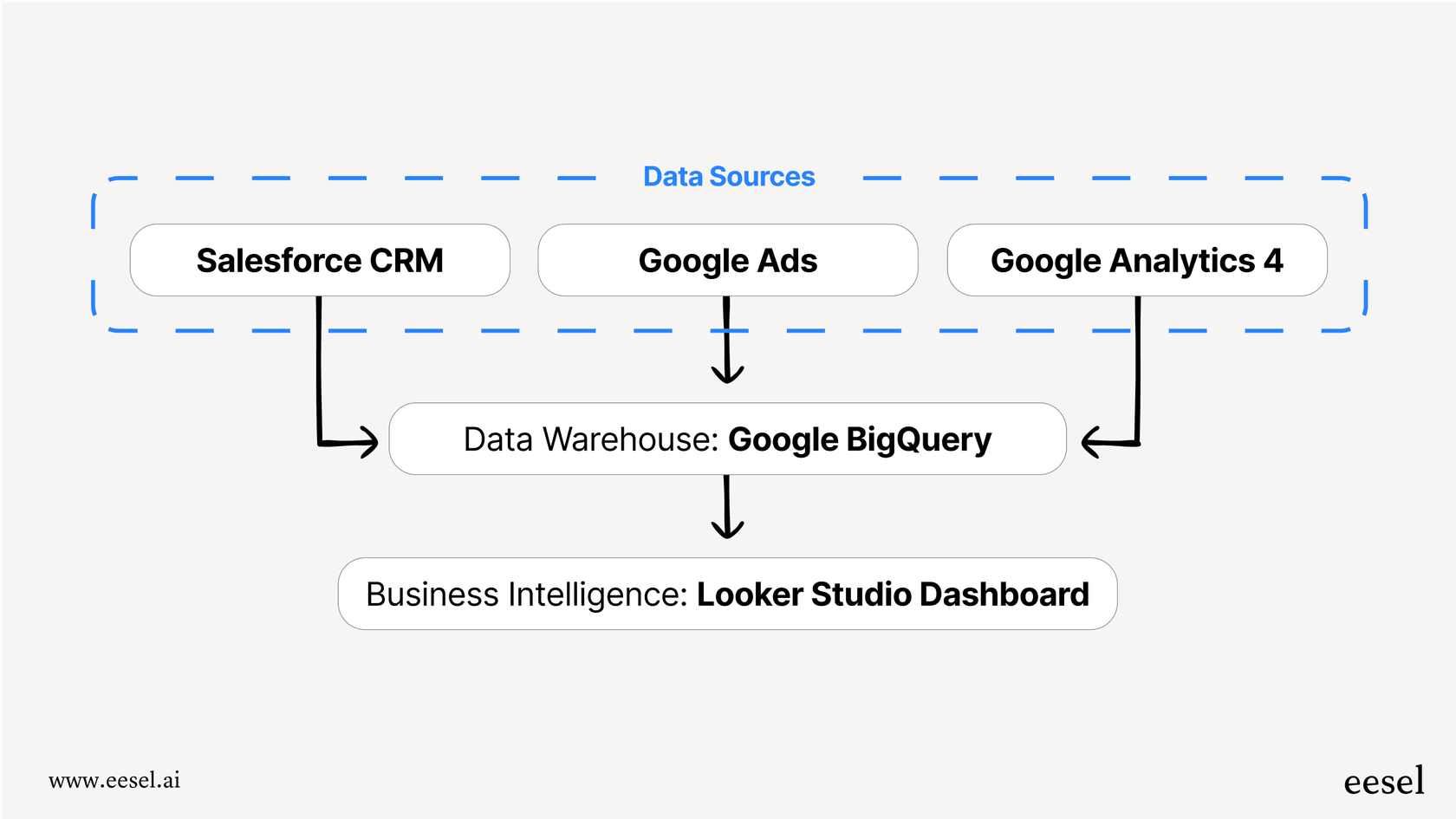
One of the most popular ways to use BigQuery is as a central data warehouse. Companies pipe in data from all their different tools, their CRM (like Salesforce), ad platforms (Google Ads), and web analytics (Google Analytics 4), and store it all in BigQuery. This creates a single source of truth for the business, which is critical for trustworthy reporting. Instead of pulling siloed reports from ten different places, teams can go to one place for all their questions.
Powering business intelligence and reporting
BigQuery acts as the engine for many popular BI tools, including Looker Studio, Tableau, and Power BI. Because it can handle huge queries so quickly, dashboards load fast and digging into the data is a smooth experience. For instance, a marketing team could run a complex SQL query to figure out the lifetime value of customers from different ad campaigns. This is the kind of deep dive that’s often impossible to do inside the standard reports of their marketing tools.
Driving predictive analytics
With BigQuery ML, data science teams can build models to predict what might happen in the future. An e-commerce company could analyze past sales to forecast demand for certain products, or a subscription service might build a model to flag customers who are likely to cancel their service.
These custom models are powerful, but they take a lot of time, expertise, and data science resources to get right. For more specific operational goals, like automating customer support answers or sorting tickets, a dedicated AI solution like eesel AI can deliver results much faster, without needing an in-house data science team.
Key limitations and challenges
While BigQuery is an amazing tool for analysis, it's not the right fit for every single problem. It's worth knowing about its practical limits before you commit.
The sticker shock is real: Complex costs
BigQuery's most common "on-demand" pricing charges you based on how much data your queries scan. It sounds straightforward, but it can lead to some serious budget surprises. A single, poorly written query from an analyst who's new to the platform could accidentally scan terabytes of data, leaving you with a huge bill at the end of the month.
There is a capacity-based pricing model, but it requires you to predict your usage and commit to a certain spend, which is tough for teams that are growing or have fluctuating needs. This is a world away from a tool like eesel AI, which offers clear, predictable monthly pricing with no hidden fees per query. Budgeting is simple, and you never have to worry about an unexpected invoice.
A steep learning curve and reliance on data teams
To really use BigQuery well, your team needs to be good at SQL and understand how to write queries that are cheap and fast. This means business teams, like customer support or sales, can't just jump in and find answers themselves. They have to rely on the data team to write queries, build reports, and answer their questions.
This creates a bottleneck that slows everyone down. Instead of waiting days for an analyst to get to their request, teams could use a tool like eesel AI. It connects right to your existing help desk and knowledge bases, giving instant, accurate answers to everyone through a simple chat interface. It’s a self-serve platform that you can get up and running in minutes, not months.
Not built for quick, operational lookups
BigQuery is built for analytics, not transactions. It's designed to run a few massive, complex queries at a time, not to handle thousands of small, fast lookups. This makes it slow and expensive for many real-time operational tasks.
For example, think of an AI support agent that needs to check a customer's order status. Running a BigQuery query for every single request would be way too slow and costly. This is where eesel AI shines. Its AI agents can perform real-time lookups with custom API actions, instantly grabbing order details from Shopify, account info from your internal databases, or any other data from your operational systems.
BigQuery pricing explained
BigQuery's pricing boils down to two main things: compute (running queries) and storage (holding your data). Here's a quick look based on their official pricing page.
| Component | Pricing Model | Cost (approx.) | Best for |
|---|---|---|---|
| Compute | On-Demand | First 1 TB/month free, then ~$6.25 per TB scanned | Teams with infrequent or unpredictable query needs. |
| Capacity (Editions) | Starts at ~$0.04 per slot/hour | Teams with consistent, high-volume query workloads. | |
| Storage | Active Storage | ~$0.023 per GB/month (first 10 GB free) | Data added or edited in the last 90 days. |
| Long-Term Storage | ~$0.016 per GB/month | Data not touched for over 90 days. |
Just keep in mind that other costs, like for streaming data inserts and pulling data out, can also apply.
Google BigQuery is a fantastic tool for large-scale data analysis, BI, and machine learning, especially when you have a skilled data team to run it. Its serverless setup gets rid of infrastructure headaches and delivers incredible speed on huge datasets.
But that power comes with some trade-offs. The pricing can be tricky, it takes real technical skill to use well, and it's just not built for many real-time operational jobs. For teams that need to act on data right now, especially in customer-facing roles, a more specialized AI tool is often a much better fit.
Put your data to work, without the heavy lifting
eesel AI is the perfect way to bridge the gap between your raw data and your support team. While BigQuery gives your data team deep analytical insights, eesel AI gives your support team instant, accurate answers. It connects directly to your help desk, internal docs in Confluence or Google Docs, and other knowledge sources to automate frontline support and empower your agents.
With eesel AI, you can go live in minutes. No SQL knowledge is needed, and our predictable pricing means you’ll never get a surprise bill.
Ready to give your support team AI that actually works? Try eesel AI for free.
Frequently asked questions
Can you give me a quick BigQuery overview, explaining what it is and what it's primarily used for?
BigQuery is a serverless cloud data warehouse from Google designed for Online Analytical Processing (OLAP). It's primarily used to run fast, complex SQL queries on massive datasets (terabytes to petabytes) for business intelligence and analytics.
How does the architecture described in this BigQuery overview contribute to its incredible speed?
BigQuery achieves speed by separating storage (Colossus) from compute (Dremel) and using a columnar storage format. This allows it to process queries in parallel across thousands of servers, only reading the specific data columns requested.
What's the main thing to understand about the pricing structure from this BigQuery overview?
The most common pricing model (on-demand) charges based on the amount of data your queries scan, which can lead to unpredictable costs. There's also a capacity-based option for more stable, high-volume workloads.
Based on this BigQuery overview, can my non-technical teams easily use it to get their own insights?
To effectively use BigQuery, teams generally need strong SQL skills and an understanding of cost-efficient querying. This often means non-technical users rely on data teams to extract insights, creating a potential bottleneck.
What are some common business use cases highlighted in this BigQuery overview?
BigQuery is widely used to centralize data from various sources into a single data warehouse, power business intelligence dashboards, and drive predictive analytics through BigQuery ML.
Does a BigQuery overview suggest it's suitable for quick, real-time operational lookups?
No, BigQuery is optimized for complex analytical queries on historical data, not for thousands of small, fast operational lookups. Using it for real-time transaction-like tasks can be slow and expensive.
From a business perspective, what are the key benefits of the serverless design mentioned in the BigQuery overview?
The serverless design means your team doesn't have to manage or maintain any infrastructure, servers, or clusters. This frees them up to focus entirely on data analysis and insights, reducing operational overhead.