Let's be honest, we've all been in meetings where we're trying to listen, contribute, and furiously type notes all at the same time. It's exhausting, and something always gets missed. This is the problem AI meeting assistants were born to solve, and in that world, Otter AI has become a pretty big name. It pitches itself as your personal sidekick for meetings, capturing every word so you can actually focus on the conversation.
But does it live up to the hype, and is it the right tool for your business? This isn't just another feature list. We're going to take a real, balanced look at what Otter AI brings to the table. We’ll cover what it does well, break down the pricing (so you know what you’re actually paying for), and dig into some of the bigger issues around privacy and control that users have run into.
What is Otter AI?
At its heart, Otter AI is a tool that records audio and turns it into text. Think of it as an AI-powered stenographer that sits in on your meetings. The main idea is to free you from the headache of note-taking so you can be more present in discussions.
It calls itself an "AI Meeting Agent," and it can join your calls on Zoom, Google Meet, and Microsoft Teams to type out a live transcript. Once the meeting's over, it whips up a summary, a quick outline, and a list of potential action items. With apps for your phone, computer, and even a Chrome extension, it’s designed to be there whenever a conversation needs capturing.
Key features and primary use cases of Otter AI
Otter AI has a few core tricks up its sleeve, all centered around making sure spoken words don't just disappear into thin air.
Live transcription and automated summaries
This is Otter AI's bread and butter. You connect it to your calendar, and its little bot automatically hops into your scheduled calls and starts transcribing in real time. It's a lifesaver for those back-to-back meeting days.
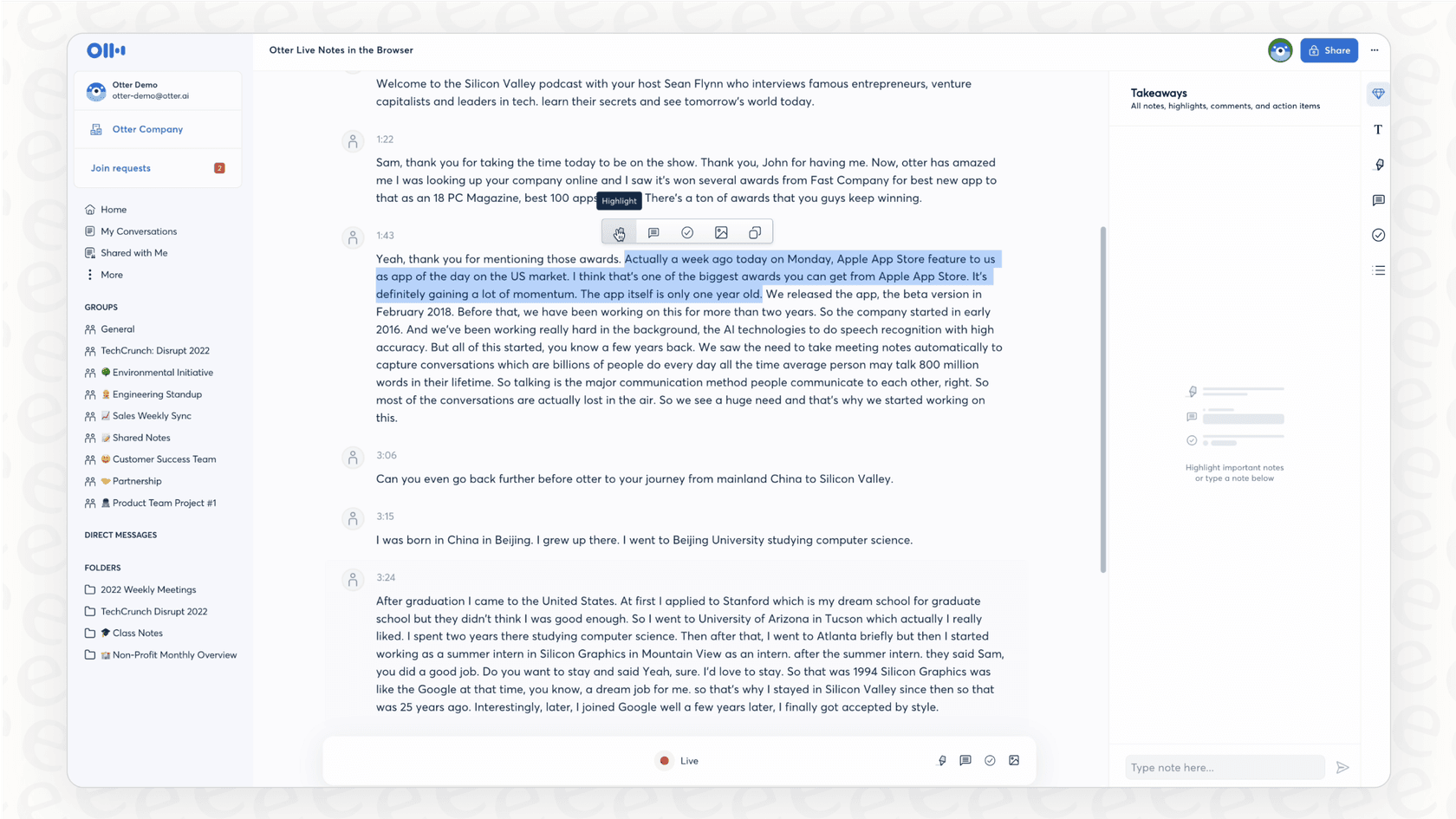
Afterward, its AI chews through the transcript and spits out a summary of the important points and action items. This is super handy if you ever have to miss a meeting or just need a quick refresher on what was decided without re-reading pages of text.
Otter AI Chat and Channels
To stop transcripts from being just a static wall of text, Otter has an "AI Chat" feature. It lets you ask questions directly to the transcript, like "What did the team decide about the new project timeline?" or "Find me the part where we talked about the budget." It saves you a ton of time scrolling and searching.
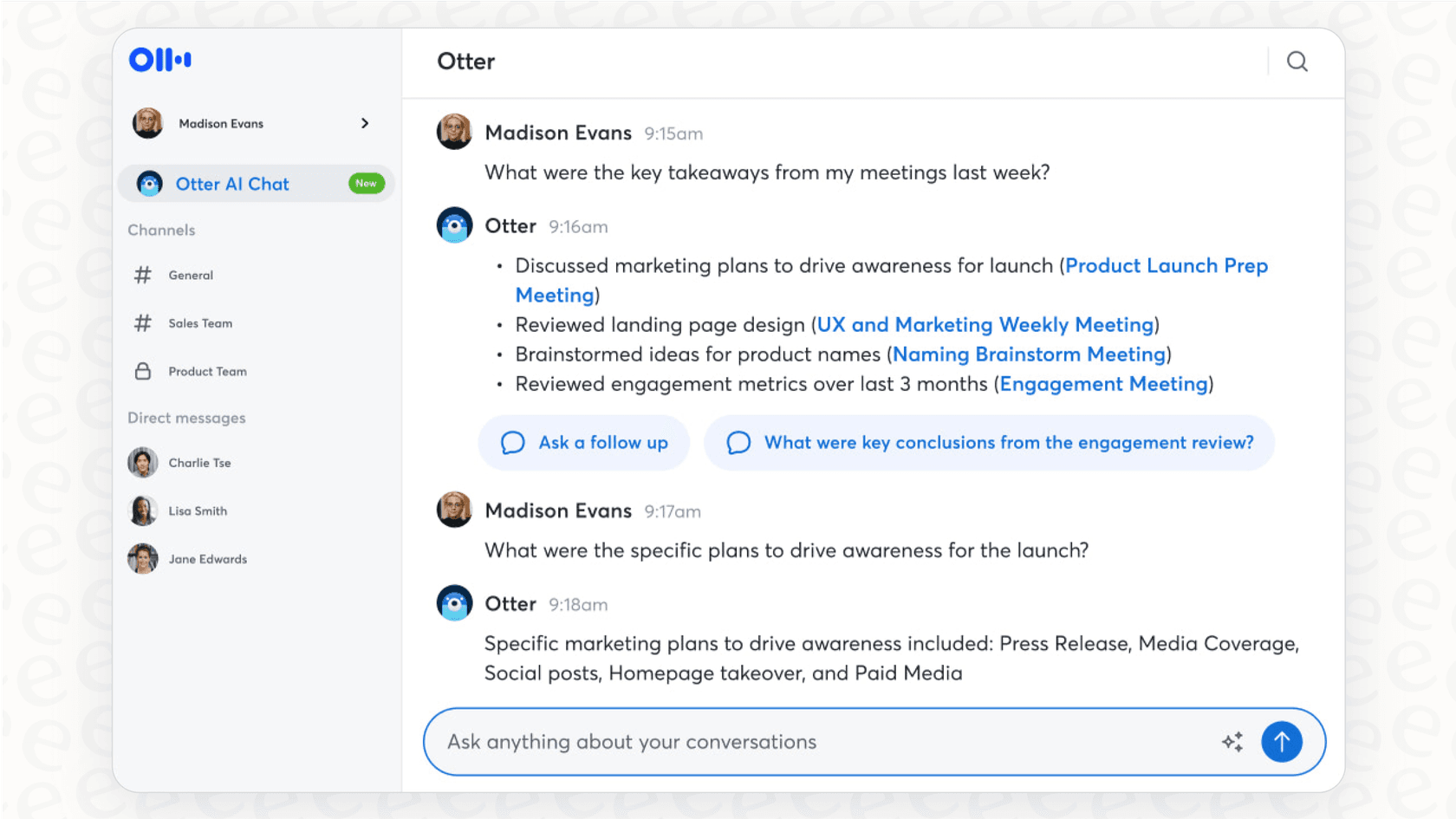
They also have "Channels," which let you lump related meetings together and share them with specific people. It’s a decent way to keep conversations organized and collaborate with your team after the fact.
Platform integrations and accessibility
Otter AI plays nice with some of the tools you're probably already using. Here are the main ones:
-
Calendars: It connects with Google Calendar and Microsoft Calendar, which is how it knows when to join your meetings automatically.
-
Video Conferencing: It works with the big three: Zoom, Google Meet, and Microsoft Teams.
-
Collaboration: There's a basic Slack integration for sharing notes, but it’s not super deep.
-
CRM: You can connect it to Salesforce and HubSpot, but you'll need to be on one of the pricier plans.
Because it's available on desktop and mobile, you can use it for just about anything, from a formal video call to recording a quick in-person chat on your phone.
A full breakdown of Otter AI pricing
Getting a handle on the pricing is important because Otter's plans are built around usage limits that can sneak up on you. The cost really comes down to how many minutes you transcribe each month and how long your meetings usually are.
Plans and costs (2025)
Here’s a look at their plans if you pay annually, which gets you the best price.
| Plan | Price (Annual, per month) | Monthly Transcription Minutes | Max Duration per Conversation | Key Features |
|---|---|---|---|---|
| Basic | Free | 300 minutes | 30 minutes | Live transcription, AI chat (limited queries), and basic summaries. |
| Pro | $8.33/user | 1,200 minutes | 90 minutes | Includes 10 audio/video file imports per month and advanced search. |
| Business | $19.99/user | 6,000 minutes | 4 hours | Adds team features, unlimited imports, admin controls, and usage analytics. |
| Enterprise | Custom | Custom | Custom | Includes SSO, enterprise-grade security, and a dedicated success manager. |
What to watch for in the pricing model
The free plan is, well, free for a reason. With a 30-minute cap on each meeting, it's not going to cut it for most work conversations. The main thing to keep an eye on with the paid plans is that monthly minute bucket. If your team has a lot of meetings, the 1,200 minutes on the Pro plan can run out faster than you think. Also, most of the features you'd need for managing a team, like admin controls, are locked away in the more expensive Business plan.
Critical limitations and concerns with Otter AI
While Otter AI is pretty good at what it does, there are some significant downsides that users have pointed out, especially when it comes to how it behaves and how limited its knowledge is.
Aggressive growth tactics and lack of user control
One of the biggest gripes you’ll find online about Otter AI is how pushy it can be. Some new users have been caught off guard when the platform automatically sent email invites to everyone in their company directory without them realizing it. It can feel a bit like spam and definitely causes some awkward "uh, what is this?" moments with colleagues. The default sharing settings can also be a little too open, making it a pain to lock down who can see what.
For any team that needs to know exactly what a tool is doing, this can be a dealbreaker. It feels a bit out of your control. This is a big difference from more modern business AI tools like eesel AI, which are built to be completely self-serve. With eesel AI, you decide exactly which conversations the AI should listen to and how it interacts with people. There are no surprise invites or unexpected actions; it only does what you’ve told it to do.
Privacy and security risks in sensitive meetings
The automatic nature of Otter AI can create some really uncomfortable situations. People have shared stories of the Otter bot popping into highly confidential meetings, think performance reviews or job interviews, without anyone explicitly inviting it in that moment. Not only does that look unprofessional, but it can also land you in hot water if sensitive information gets recorded and stored without everyone's consent. A tool that acts on its own is a bit of a liability in a professional setting.
A narrow focus on meetings and audio-only context
Otter AI's world is very small: it only knows what it hears in meetings. It's completely cut off from all the other knowledge your company has, like documents, wikis, and past customer support tickets. It's also deaf to anything visual. It can't see what's on a shared screen, in a presentation, or read any non-verbal cues, so it's missing a huge chunk of context.
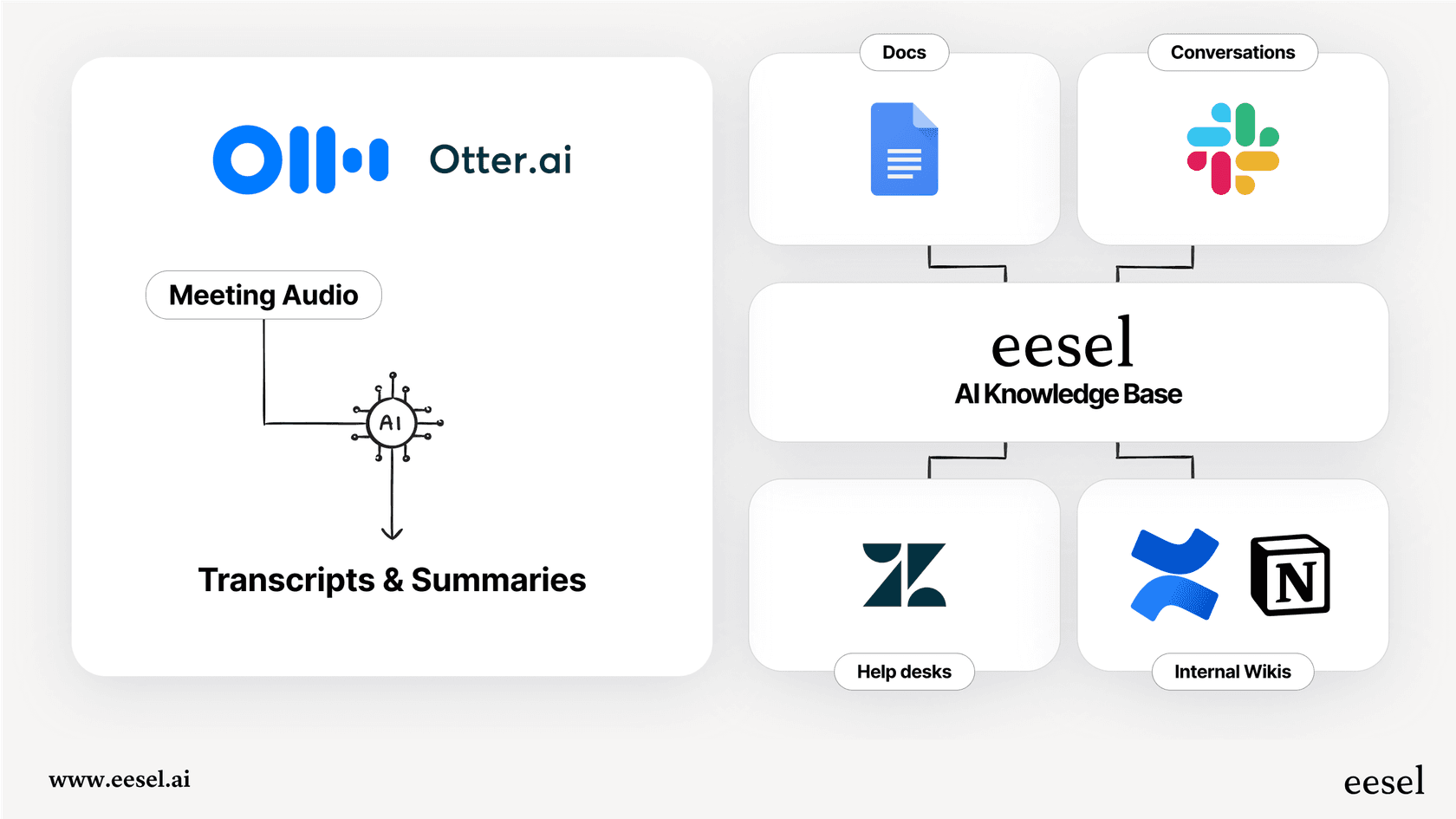
A truly helpful AI assistant needs to understand the full picture of your business. Otter is great for meeting notes, but it can't answer a question that requires pulling information from your knowledge base. To get a single source of truth, you need a tool that connects everything. That’s where a solution like eesel AI comes in. It plugs directly into your existing knowledge sources like Confluence, Google Docs, and your help desk to give answers that are aware of the full context, both for your team and your customers.
Is Otter AI right for you?
So, what's the verdict? Otter AI is a solid tool for one specific job: turning audio conversations into text and summaries. If you're a freelancer, an individual, or on a small team that just needs to automate note-taking, it can absolutely make your life easier.
But for bigger businesses or any team that cares about having tight control, privacy, and a deep well of knowledge, its flaws are hard to ignore. The spammy invite system, unpredictable bot behavior, and audio-only focus make it a bit of a gamble in a corporate environment. If all you want is meeting notes, Otter AI will do the trick. But if you're after a smart, secure, and controllable AI assistant that understands your entire business, you'll probably want to look at a platform built for that.
Take the next step with a smarter AI assistant
If you're looking for an AI platform that puts you in the driver's seat, connects all your knowledge, and lets you test things out safely before going live, you might want to check out eesel AI. See how our AI agents can be set up in just a few minutes to help with everything from customer support to internal questions.

Frequently asked questions
Otter AI records your meetings, transcribes them in real-time, and then provides automated summaries, outlines, and action items. Its primary function is to free you from manual note-taking so you can focus on the discussion.
The main privacy concern with Otter AI is its automatic nature, which can lead the bot to join confidential meetings like performance reviews without explicit invitation. This risks recording sensitive information without universal consent, potentially creating a liability in professional settings.
Otter AI's pricing is tiered, based on monthly transcription minutes and maximum conversation duration. Be mindful of the minute limits on paid plans, as they can run out quickly for active teams, and essential team management features are often reserved for higher-tier subscriptions.
Yes, Otter AI integrates with major platforms. It connects with Google and Microsoft Calendars to automatically join meetings and works directly with video conferencing services like Zoom, Google Meet, and Microsoft Teams for live transcription.
Yes, some users have reported that Otter AI can automatically send email invites to company directories, which can feel like spam and cause confusion. Its default sharing settings can also be overly open, requiring manual adjustment to secure who can access transcripts.
No, Otter AI has a narrow focus; it only processes audio from meetings. It cannot access or understand information from other business documents, wikis, or visual content like shared screens, meaning it lacks broader company context.
Share this article

Article by
Kenneth Pangan
Writer and marketer for over ten years, Kenneth Pangan splits his time between history, politics, and art with plenty of interruptions from his dogs demanding attention.