You've probably heard of Luminance AI. It’s a big name in legal tech, known for being a powerhouse in high-stakes contract reviews. But does it live up to the hype for everyday use, and is it the right tool for your team?
In this Luminance AI review, we’re going to give you an honest look at what it’s actually like to use the platform. We’ve dug through user feedback, expert opinions, and public data to see where it really shines and where it stumbles. Spoiler: while it's a beast for massive M&A deals, its fit for more general, day-to-day legal and support work is a whole other story.
We'll walk through its main features, try to crack the code on its mysterious pricing, and cover the common frustrations users report before pointing you toward a more modern and accessible alternative.
What is Luminance AI?
So, what exactly is Luminance AI? In a nutshell, it's an AI platform designed to help legal and business teams handle contracts from start to finish. The company talks a lot about its "Legal-Grade™ AI," which they claim can seriously speed up tasks like due diligence, compliance checks, and negotiations.
The platform was originally developed by AI specialists from the University of Cambridge, so it has some serious tech credentials. But looking at its features, complexity, and sales model, it's pretty clear who they're aiming for: huge law firms and the legal departments of massive companies. That focus trickles down into everything, from its powerful but rigid features to its hands-on sales process.
Luminance AI features
Luminance splits its platform into different modules, each built for a specific part of the contract lifecycle. The goal is to offer one solution that does it all for legal teams.
Here’s a quick look at the key features:
-
Draft: This module helps you automatically create contracts using pre-approved templates. The idea is to keep everything consistent and cut down on manual mistakes.
-
Negotiate: This is a tool that plugs into Microsoft Word to help you review contracts while you're negotiating. It uses AI to flag clauses that don't match your standard agreements.
-
Analyze: This gives you a high-level dashboard showing your company's entire contract landscape. It helps you keep track of important deadlines, obligations, and risks.
-
Comply & Investigate: These are more specialized. Comply helps you check contracts against changing regulations, and Investigate is for speeding up document review during e-discovery or internal investigations.
Sounds pretty impressive, right? The catch, according to user reviews, is that getting value out of these tools isn't always so straightforward. Reports from organizations like the Nevada State Bar and discussions on forums like Reddit show that it often takes a ton of manual work. Users often complain about a steep learning curve and having to manually tag documents, especially for non-standard contracts. What was supposed to save time ends up becoming just another tedious task on a legal team's already full plate.
The black box: Pricing
Trying to figure out how much Luminance costs? Good luck. The company keeps its pricing completely under wraps. In fact, if you try to find their pricing page, you'll hit a dead end with a 404 error. The only way to get a quote is to schedule a call with their sales team.
This "black box" strategy has some big implications if you're considering the platform:
-
It’s a huge hurdle just to get started. You have no way of knowing if Luminance is even in your budget without first committing to a sales call.
-
It makes comparing options a pain. Without clear pricing, you can't really weigh Luminance against other tools in the market.
-
Costs can be unpredictable. This approach often means the price is based on what the sales team thinks your company can afford, and it can be hard to know what you’ll pay down the road.
As one Reddit user bluntly put it, the platform is often seen as 'way too expensive.'

This whole model feels a bit outdated. It’s a stark contrast to how most modern tools operate. Take eesel AI, for example. You can find its pricing right on the website. No secrets, no mandatory sales calls. Plans are straightforward and based on usage, so you never get hit with surprise fees. You can understand the costs upfront, start with a flexible monthly plan, and get up and running in minutes.

What users are saying
To get the full story, we pulled together real-world feedback from places like Gartner, independent reviews, and legal tech forums. Here’s what we learned.
The good: Where Luminance AI shines
Let's give credit where it's due. In its very specific niche, Luminance is an absolute beast. Its main strength, hands down, is M&A due diligence.
When you’re staring down tens of thousands of documents in a data room, reviewing them manually is next to impossible. This is where Luminance’s AI really comes through. It can tear through massive amounts of data to spot weird clauses, flag risks, and find anomalies incredibly fast. Some reports, like a detailed one from Artificial Lawyer, claim it can save teams over 85% of their time on these projects. For a high-stakes M&A deal, that kind of speed is huge.
The bad: Common limitations and complaints
But once you step outside that M&A bubble, the feedback gets a lot more mixed. Users run into some common frustrations that make it less practical for everyday contract work.
-
A notoriously steep learning curve. A recurring complaint is that the tool is just plain hard to use. One reviewer mentioned that lawyers often find their "old way of doing things is easier" because it takes too long to get the AI trained and the team comfortable with it.
-
Clunky usability and integrations. The platform really only plays well with Microsoft Word. An independent review by the Nevada State Bar gave its usability a painful 1.5 out of 5, pointing to big problems with fitting it into existing workflows and the constant need for manual tagging.
-
The demo doesn't match reality. Several users have brought up a classic AI problem: it looks amazing in the sales demo but struggles with the messy reality of their own documents. The AI does great with the standardized contracts it was trained on but often fumbles with real-world agreements it's never seen before.
-
Language and customization issues. Luminance says it works in any language, but users find it's not always a smooth ride. The AI often needs a lot of manual training to understand unique contract terms or to work well in languages it wasn't pre-trained on.
A better way: How modern AI tools solve these issues
These issues point to a bigger disconnect. Luminance feels like a heavy-duty, specialized tool from another era. Most teams today don't need a sledgehammer; they need a smart, flexible toolkit that just works.
This is where a platform like eesel AI takes a completely different path:
-
Go live in minutes, not months. Forget about long, drawn-out setups. eesel AI is designed to be self-serve from the ground up. You connect it to your helpdesk like Zendesk, wikis like Confluence or Google Docs, and past conversations in just a few clicks. You can have a working AI agent up and running in minutes, without ever having to talk to a salesperson.
-
Unify your knowledge instantly. Instead of months of manual training, eesel AI learns from the knowledge you already have. It reads through your past support tickets, help articles, and internal docs to get up to speed on your business, your tone of voice, and common answers right from the start.
-
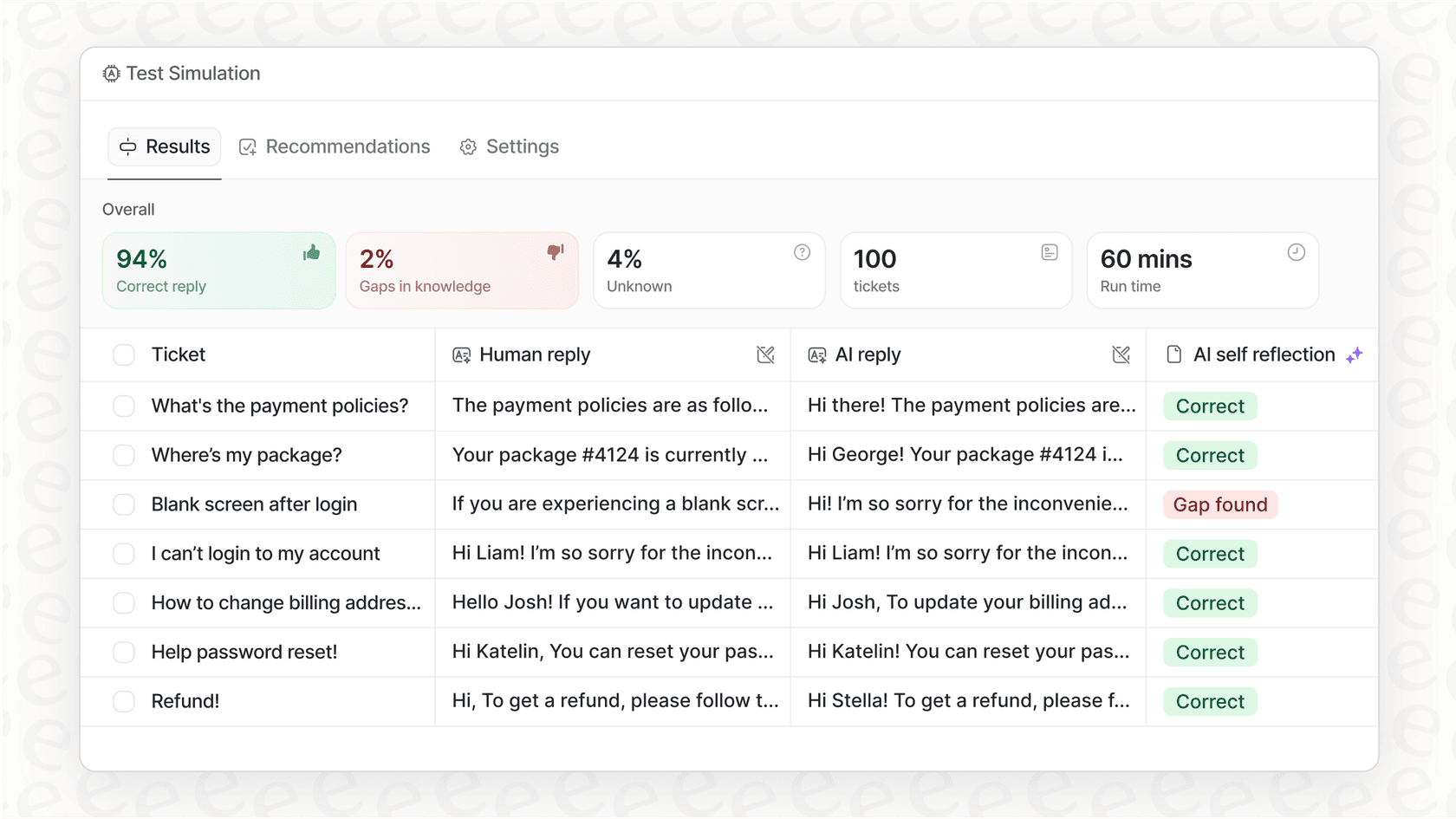
Test without the risk. Worried about unleashing an AI that might get things wrong? eesel AI’s simulation mode lets you test your setup on thousands of your own past tickets in a safe environment. This gives you a real forecast of how well it will perform before it ever interacts with a live customer. No more "bad demo" surprises.
The verdict: Who is Luminance AI really for?
So, after this Luminance AI review, what's the final verdict? The answer is pretty straightforward: it’s a highly specialized tool for a very specific customer.
Luminance is likely a great fit for:
-
Massive, enterprise-level legal teams or top-tier law firms with very deep pockets.
-
Organizations where the number one headache is M&A due diligence involving thousands of documents.
-
Teams with the budget for expensive software and, just as important, the people and time to dedicate to a months-long setup and training process.
Luminance is likely a poor fit for:
-
Teams who need a flexible AI that can handle everything from customer service and IT support to internal questions.
-
Businesses that want a self-serve tool with transparent pricing they can try and scale on their own schedule.
-
Companies that need an AI that easily connects to the tools they already use, like Freshdesk, Slack, or Jira, without a massive implementation project.
The future of legal and support AI is accessible
Look, Luminance is a powerful piece of tech, but it feels like it belongs to an older generation of enterprise software: expensive, complicated, and designed for a small group of expert users. For most businesses today, the real value of AI comes from being easy to use and plugging right into their daily work. The trend is moving toward simple, effective tools that show their value right away.
If the drawbacks of Luminance sound all too familiar, and you're looking for an AI platform that's transparent, easy to set up, and works with the tools your team already loves, it might be time to explore a different approach.
Why not give your team an AI that’s built for today? You can get started with eesel AI for free and see how quickly you can automate support, fill knowledge gaps, and give your agents the help they need.
Frequently asked questions
This Luminance AI review highlights its strengths for large enterprises, but who specifically stands to benefit most from the platform?
Luminance AI is best suited for massive, enterprise-level legal teams or top-tier law firms with significant budgets. Its primary strength lies in M&A due diligence involving thousands of documents, where its speed is a major advantage for high-stakes projects.
Can you shed more light on the pricing model discussed in this Luminance AI review, since it's not publicly available?
Our Luminance AI review found that the company keeps its pricing entirely undisclosed, requiring a sales call for any quote. This "black box" approach makes it difficult to budget or compare options upfront, often leading to unpredictable costs based on perceived affordability.
Many tools have a learning curve; how steep is the one for Luminance AI, according to this Luminance AI review?
This Luminance AI review notes a notoriously steep learning curve, with users often finding their old methods easier due to the time required for training the AI and onboarding the team. Its usability received a low rating in independent reviews, highlighting integration issues and the need for manual tagging.
What specific legal task does this Luminance AI review identify as the platform's absolute strongest area?
The Luminance AI review clearly identifies M&A due diligence as the platform's main strength. It excels at rapidly reviewing vast quantities of documents to identify risks and anomalies in high-stakes deals, potentially saving teams significant time.
Beyond the learning curve, what are some other frequent limitations or complaints noted in this Luminance AI review?
Besides the steep learning curve, common complaints include clunky usability, limited integration mainly to Microsoft Word, and demos not matching real-world performance with varied document types. Users also report challenges with language customization and manual training for unique terms.
How does the approach of Luminance AI contrast with more modern, accessible AI tools, as outlined in this Luminance AI review?
This Luminance AI review contrasts Luminance's heavy-duty, specialized approach with modern tools that prioritize self-serve setup, transparent pricing, and instant knowledge unification. Modern AI platforms are designed for quick implementation and broader applicability across various departments without extensive sales processes.
While strong for M&A, is Luminance AI a practical choice for everyday contract management tasks, according to this Luminance AI review?
This Luminance AI review suggests that while powerful for M&A, Luminance AI is less practical for day-to-day contract management. Users often report the extensive manual work and training required for non-standard contracts can make it feel tedious rather than time-saving for regular use.