What is a Claude Cowork plugin? A complete guide

Kenneth Pangan

Katelin Teen
Last edited January 30, 2026
Expert Verified

AI isn't just about simple chatbots anymore. We're now in the age of "agentic" AI. It’s a bit of a buzzword, meaning AI that can plan, execute, and finish multi-step tasks on its own. It's more of a proactive assistant than a simple Q&A machine.
Anthropic's Claude Cowork is a major player here. It aims to put these agentic skills into the hands of everyday workers, no coding needed. One of its standout features is the Claude Cowork plugin system. This system lets you turn a general Cowork assistant into a specialist for your specific role, whether you're in sales, marketing, or finance.
So, what are these plugins, and how do you use them? In this guide, we'll get into all of it: what a Claude Cowork plugin is, how to get one running, what they’re good for, and also explore some of its limitations, particularly for team-based work.
What is a Claude Cowork plugin?
Before we dive into plugins, let's quickly touch on what Claude Cowork is. It's an agentic AI assistant available as a research preview on the Claude Desktop app for macOS. Unlike a typical chatbot that lives in the cloud, Cowork runs on your computer. This gives it access to your local files, letting it manage documents, conduct research, and follow some pretty detailed instructions. It's built on the same tech as Claude Code, Anthropic’s tool for developers.
A Claude Cowork plugin, then, is a bundle of skills, commands, and connections to other tools. You can think of it as a job description for your AI. When you install a plugin, you're telling Cowork, "Alright, today your job is to be a sales expert," or "Now you're a financial analyst." It turns the general AI into a specialist.
According to Anthropic's open-source documentation, these plugins have a few core parts:
- Skills: This is the plugin's brain. It holds domain knowledge and step-by-step instructions for workflows that Claude can run on its own. A "sales" skill, for instance, might have the exact process for researching a new lead.
- Commands: These are specific actions you can trigger with slash commands, like
/sales:prep-call. It's a quick way to kick off a specific task. - Connectors: This is how the plugin connects to other software. It uses something called the Model Context Protocol (MCP) to link up with external tools like your CRM, data warehouses, or project management apps.
A key feature of these plugins is that they are a collection of markdown and JSON files. This makes them very transparent. If you know how to edit a text file, you can look inside, see how a plugin works, and even tweak it to better suit your needs.
How to use and customize a Claude Cowork plugin
It’s good to remember that Claude Cowork plugins are built for individuals. They operate within the Claude Desktop app on your Mac and are designed to boost your personal productivity.
Getting started with your Claude Cowork plugin
To get going with plugins, you'll need a couple of things. First, a paid Claude subscription is a must (any Pro, Max, Team, or Enterprise plan will do). And, of course, you'll need the Claude Desktop app for macOS.
Once you’ve got that sorted, installing a plugin is simple. You can find them in the in-app marketplace and add them with a click. If you're comfortable using the terminal, you can add them with a command like claude plugins add knowledge-work-plugins/sales.
Customizing a Claude Cowork plugin for your workflow
The main benefit comes from customization. The open-source plugins from Anthropic are solid starting points, but they really shine when you adapt them to your company's specific processes. Since they’re just a bunch of files, you can adjust them to fit your workflow perfectly.
Here’s a general idea of how you can customize them:
- Swap connectors: The default sales plugin might be set up for HubSpot. If your company uses a different CRM, you can just edit the
.mcp.jsonfile to point the plugin to your tools instead. - Add company context: You can feed the skill files with your company's internal language, processes, and even org charts. This helps Claude understand your business's unique environment and work more effectively.
- Adjust workflows: Let's say your team has a seven-step process for qualifying leads, but the plugin's default is five. You can just open the skill files and change the instructions to match how your team actually works.
There’s even a cowork-plugin-management plugin to help you build new plugins from the ground up by providing a working template.
Here's a quick overview of a plugin's basic file structure to give you an idea of how it's all put together:
| File/Folder | Purpose |
|---|---|
plugin.json | The manifest file that defines the plugin's metadata. |
.mcp.json | Defines connections to external tools via MCP servers. |
commands/ | Contains markdown files for each slash command. |
skills/ | Stores markdown files with domain knowledge and workflows. |
Real-world Claude Cowork plugin use cases
So, what can you actually get done with these plugins? Anthropic has released 11 open-source plugins to help knowledge workers get started, covering a lot of common business functions.
Here’s a rundown of the official plugins and what they’re for:
| Plugin | Key Use Cases |
|---|---|
| Productivity | Manage tasks, calendars, and daily workflows across tools like Asana and Notion. |
| Sales | Research prospects, prep for calls, and draft outreach using CRMs like HubSpot. |
| Customer Support | Triage tickets, draft responses, and create knowledge base articles from Intercom. |
| Product Management | Write specs, plan roadmaps, and synthesize user research from Linear or Jira. |
| Marketing | Draft content, plan campaigns, and enforce brand voice using Figma and Ahrefs. |
| Legal | Review contracts, triage NDAs, and assess risk using tools like Box. |
| Finance | Reconcile accounts, generate statements, and analyze variances with Snowflake or BigQuery. |
| Data | Query datasets, run statistical analysis, and build dashboards in Hex or Databricks. |
| Enterprise Search | Search across all company tools like Slack, Notion, and Jira from one place. |
| Bio-Research | Connect to research tools like PubMed and Benchling for life sciences R&D. |
| Plugin Management | Create or customize other plugins for your organization. |
Beyond these pre-packaged roles, Cowork itself can handle a ton of practical, day-to-day tasks. Based on Anthropic's documentation, here are a few more things it can do:
- File and document management: You could ask it to tidy up your messy downloads folder by sorting files by type and date. Or you could give it a folder of receipts and have it turn them into a neatly formatted expense report.
- Research and analysis: Cowork can pull information from web searches, articles, and local files on your computer, then combine it all into a single summary. This is a huge help for anyone needing to get up to speed on a new topic fast.
- Document creation: Need a spreadsheet to track a project? Give Cowork some rough notes, and it can generate an Excel file with working formulas. It can also create a PowerPoint presentation from a simple outline.
Key limitations of the Claude Cowork plugin
While Cowork and its plugins are powerful for individuals, there are some considerations when it comes to team-based work. The whole system is designed for one person on one computer, which doesn't scale well in a business setting.
Platform and accessibility limitations
Right from the start, there are a few obstacles that can impact team adoption.

- macOS only: Cowork is currently only available for macOS. This leaves out any team members on Windows or Linux, which, as early users have noted, is a significant part of the workforce.
- Local and session-based: Cowork has to be running on the desktop app to function. It doesn't sync across devices, and you can't share a session with a coworker. This makes collaboration challenging. A support agent might start resolving an issue with Cowork, but they can't hand the task off to a teammate when their shift is over.
- Limited native cloud integration: Cowork is built to work with local files. You can access cloud files through desktop sync clients like Dropbox or Google Drive, but it has no native GSuite support. This can be a complex workaround for teams that operate primarily in the cloud.
Workflow and team collaboration limitations
The core design of Cowork also presents challenges for teams.
- Individual focus: The entire model is centered around a single user on their personal machine. It's not built to work inside a shared system like a customer support help desk (think Zendesk or Intercom) or a sales CRM where multiple people need to access and act on the same information.
- Technical customization barrier: Although Anthropic calls the plugins "no-code," making them truly useful often requires a manager or team lead to edit JSON and markdown files. This is straightforward for someone with a technical background, but it can be a challenge for a non-technical manager who prefers to set business rules in plain English, like "If a refund request is over $100, escalate it to a human."
- No pre-launch simulation: There's no built-in way to test how a customized plugin will perform on your historical data before you deploy it on live files. You have to switch it on and monitor its performance, which is a consideration for important business workflows.
This individual-first, file-based design is great for personal productivity. For teams needing AI to work together inside their existing platforms, a different approach may be more suitable.
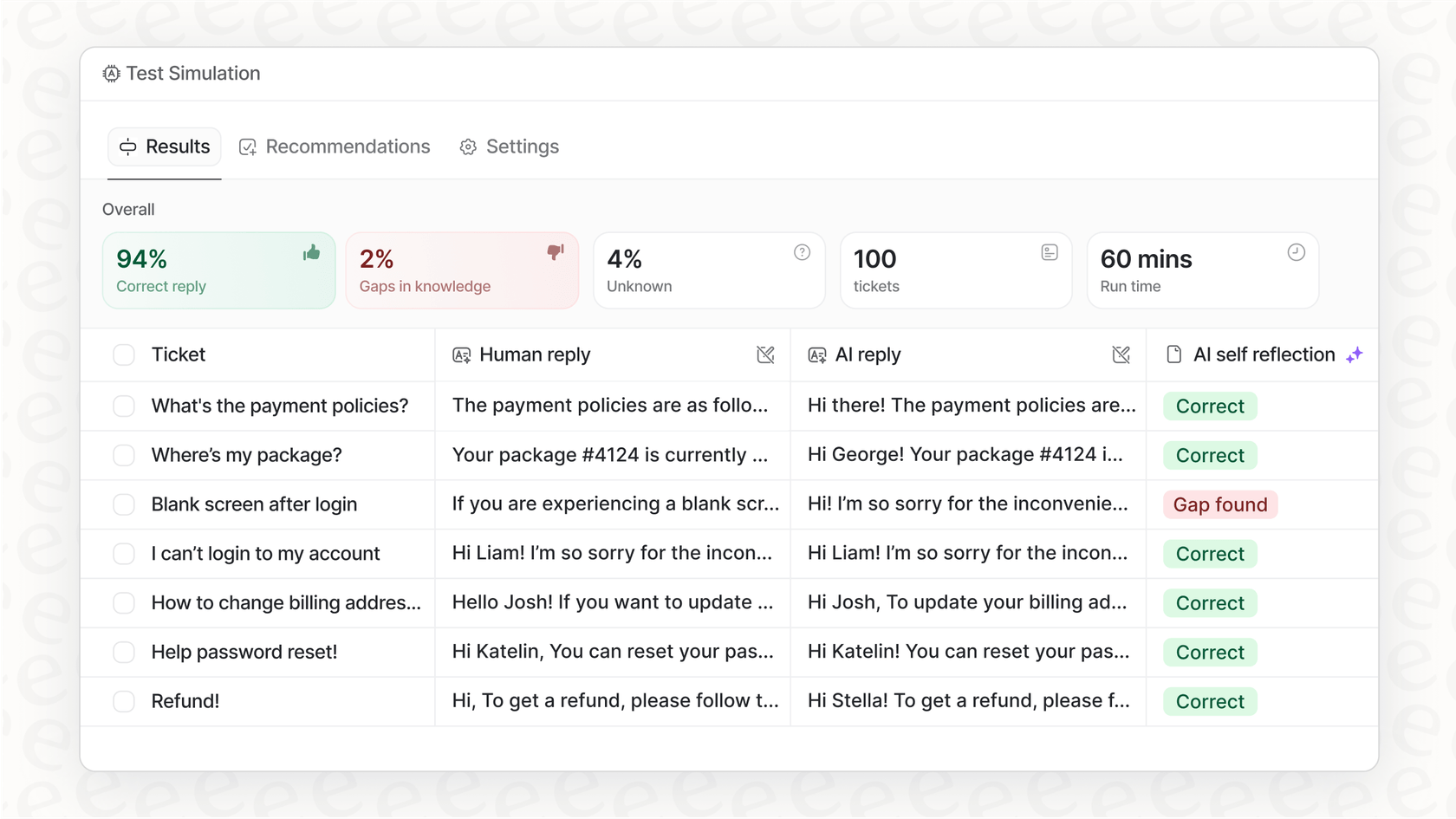
This is where AI teammates like eesel AI can help. Instead of setting up local plugins, you "onboard" an AI agent directly into your help desk or other shared software. It learns from your team's existing data, like past tickets and knowledge bases, and can be run in a simulation mode to check its performance before it ever touches a real customer interaction. This model is designed for collaborative, team-based work from the start.
Claude Cowork plugin pricing
It's good to know that Cowork and its plugins aren't a separate product. They are a feature included with any paid Claude subscription. The official support docs state it's available as a "research preview" for all paid plans.
For individual users, these are the plans and their prices:
- Pro Plan: $20 per month.
- Max Plan: Starts at $100 per month for 5x more usage than the Pro plan.
Here's a critical piece of context: Cowork tasks use a lot of computing power. They eat up your usage allocation much faster than just chatting with Claude.
This means for anyone planning to use Cowork for daily work, the Pro plan's limits might not be sufficient. The more expensive Max plan is a practical choice for heavy users.To see Claude Cowork in action and get a better feel for its agentic capabilities, check out this detailed overview:
A detailed overview and walkthrough of Anthropic's Cowork and its agentic AI capabilities.
A powerful tool for individual specialists
The Claude Cowork plugin system is an interesting development in agentic AI. It gives individuals a lot of power to create specialized AI assistants tailored to their personal workflows. The open-source, file-based design offers a degree of control and transparency that's not very common.
But it's important to understand its fundamental design. Cowork is a big deal for individual knowledge work. It’s made for the solo user on their own computer. It is not, however, built for the collaborative, multi-user platforms that most business teams rely on, whether in support, sales, or IT.
For managers who want to automate processes across their entire team, the best bet is to find an AI solution built for collaboration from the get-go. The eesel AI "teammate" approach offers a clear path from supervised assistance to full autonomy, all within the tools your team already uses. You can see for yourself how easy it is to onboard your first AI teammate in minutes.
Frequently Asked Questions

Share this post
Article by
Kenneth Pangan
Writer and marketer for over ten years, Kenneth Pangan splits his time between history, politics, and art with plenty of interruptions from his dogs demanding attention.