


What Midjourney costs in 2026
Midjourney is a self-funded, 60-person research lab that describes itself as focused on "expanding the imaginative powers of the human species." Its business model is pure subscription - no advertising, no freemium layer, and CEO David Holz has openly said that making the product faster will likely push prices up, not down.
Four plans, two billing frequencies:
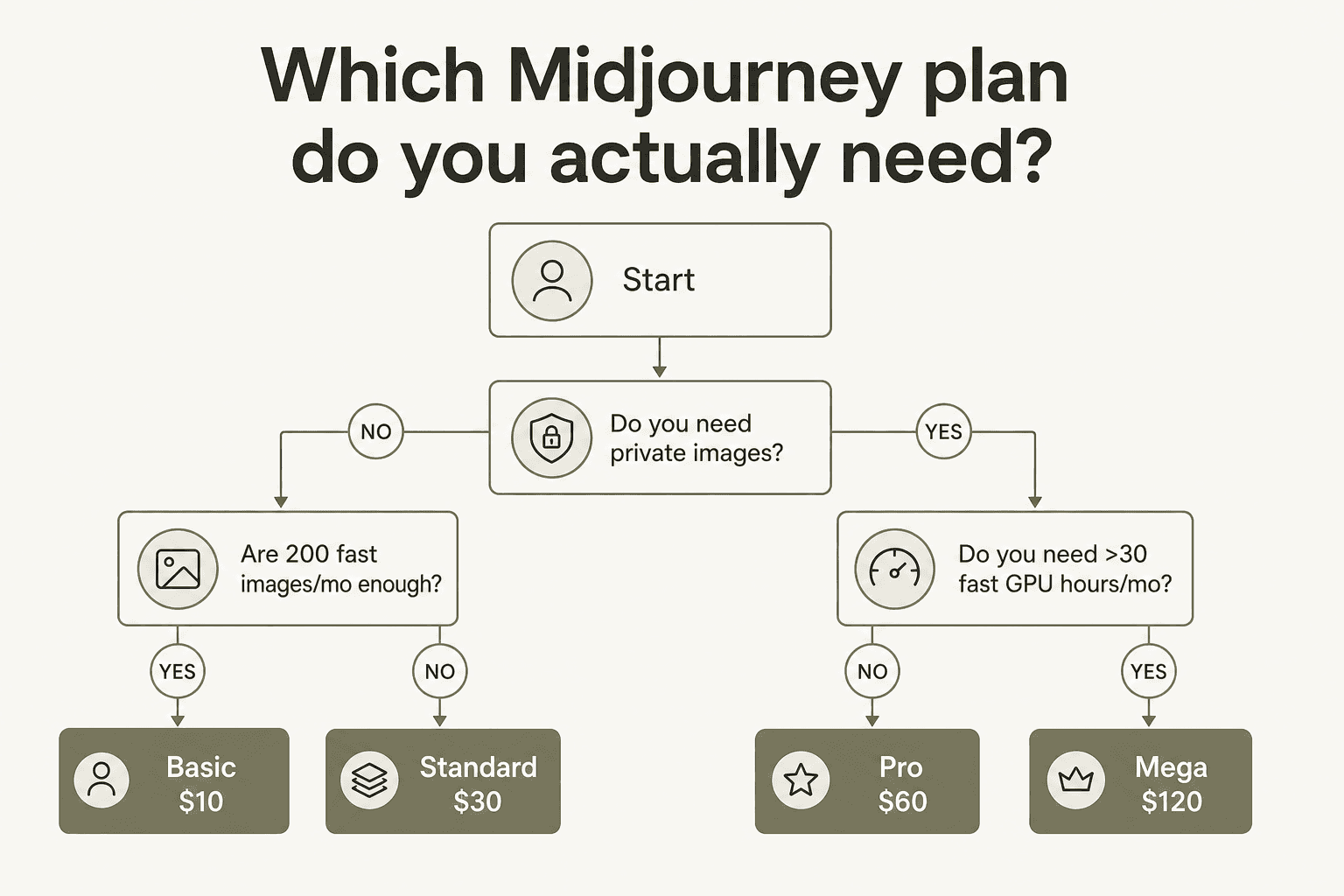
| Basic | Standard | Pro | Mega | |
|---|---|---|---|---|
| Monthly price | $10 | $30 | $60 | $120 |
| Annual price | $96/yr ($8/mo) | $288/yr ($24/mo) | $576/yr ($48/mo) | $1,152/yr ($96/mo) |
| Fast GPU hours/month | 3.3 hr (200 min) | 15 hr | 30 hr | 60 hr |
| Relax mode - images | None | Unlimited | Unlimited | Unlimited |
| Relax mode - SD video | None | None | Unlimited | Unlimited |
| Video resolution | SD only | SD & HD | SD & HD | SD & HD |
| Stealth Mode | No | No | Yes | Yes |
| Max concurrent image prompts | 3 Fast | 3 Fast or Relax | 12 Fast or 3 Relax | 12 Fast or 3 Relax |
| Max concurrent video prompts | 1 Fast | 3 Fast | 6 Fast or 3 Relax | 12 Fast or 3 Relax |
| Max permutation job size | 4 | 10 | 40 | 40 |
| Extra Fast time add-on | $4/hr | $4/hr | $4/hr | $4/hr |
| Commercial use | Yes† | Yes† | Yes† | Yes† |
†Standard commercial terms apply to all subscribers. Companies earning more than $1,000,000 gross annual revenue must use Pro or Mega. Full terms at Midjourney's Terms of Service.
Annual billing saves 20% and is paid upfront for the full year. Unused Fast GPU time still resets monthly even on annual plans - paying annually does not mean your Fast hours accumulate.
What you're actually paying for: GPU time, not images
This is the thing that makes Midjourney's pricing feel slippery to newcomers. You're not buying "500 images per month." You're buying time on a GPU cluster - the actual compute infrastructure rendering your images and videos.
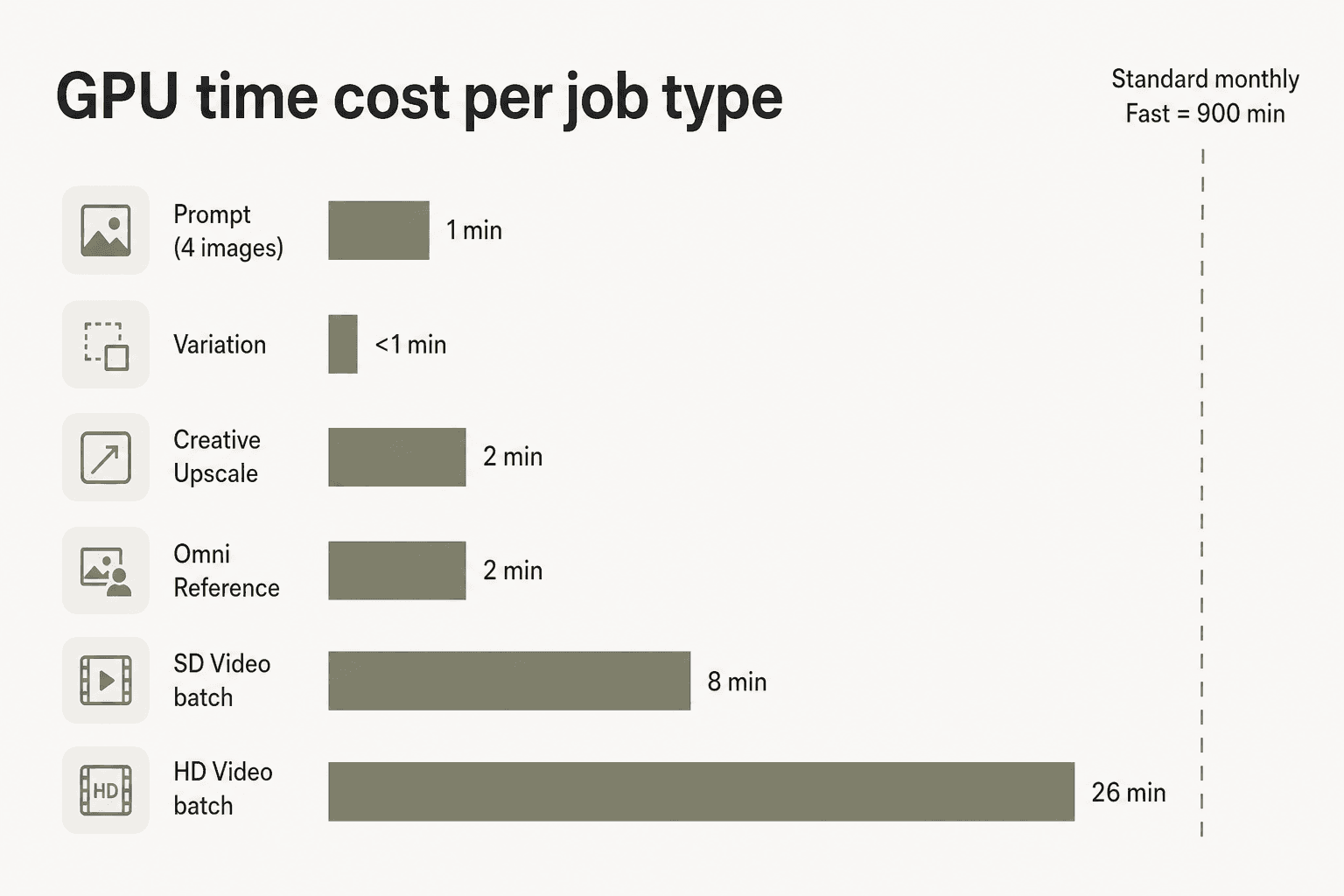
A basic image prompt costs about 1 GPU minute. A batch of 4 HD videos costs 26 GPU minutes. That's 26x more compute for video than images - which is why video pricing feels disproportionate until you understand the underlying model.
The official GPU cost breakdown per job type:
| Job type | Approx. GPU cost |
|---|---|
| Prompt (set of 4 images) | ~1 minute |
| Variation | <1 minute |
| Grid upscale (Discord only) | Free |
| Creative/Subtle upscale | 2 minutes |
| Omni Reference prompt | 2 minutes |
| SD video batch (4 clips) | 8 minutes |
| HD video batch (4 clips) | 26 minutes |
What this means for each plan's actual capacity:
On Basic (200 Fast minutes): you get ~200 image prompts if that's all you do. Add upscales and variations and that number drops quickly. SD video? 25 batches of 4 clips (100 videos) if you do nothing else.
On Standard (900 Fast minutes): 900 pure image prompts in Fast mode. More practically, a mix of prompts, upscales, and some video - plus unlimited images in Relax mode that don't touch your Fast allocation at all. That last part is what changes the economics.
One more thing: Fast hours don't roll over. Unused time expires at the end of every billing cycle - monthly and annual subscribers alike. If you were on Standard and used 8 of your 15 Fast hours this month, the other 7 disappear on renewal day. Build this into your planning.
Breaking down each plan
Basic plan: $10/month
The Basic plan is an entry point, not a working plan. At 200 Fast minutes with no Relax mode, it runs out quickly for anyone generating seriously - and the community is blunt about this:
"200 images/month is laughable, MJ needs to up their basic plan game."

There are two legitimate reasons to start here: you're evaluating the platform before committing to Standard, or you're willing to supplement by rating images on the Midjourney website for a chance at free Fast GPU hours each day. There's also no Relax mode on Basic - every single generation draws from the 200-minute Fast cap.
Basic is SD-only for video, limits you to one concurrent video prompt, and caps permutation runs at 4 jobs. For anything beyond casual experimentation, Standard is the minimum useful tier.
Best for: First-time users who want to try Midjourney before committing $30/month. Upgrade quickly.
Standard plan: $30/month ($24/month billed annually)
Standard is where most serious Midjourney users end up, and the reason is simple: unlimited Relax mode for images. Once you're on Standard, you can generate as many images as you want in Relax mode - the only cost is wait time (0-30 minutes per job, depending on server load and your personal Relax usage history).
"I burned through the cheap account quickly. I have moved to the $30 tier which gives unlimited relaxed and have stuck to that since using half of my fast."
The practical workflow on Standard: use Fast mode for urgent, deadline-driven work (client reviews, time-sensitive campaigns). Let Relax mode run in the background for exploratory generation, iteration, and anything you'd otherwise be waiting on anyway.
Standard gives you SD and HD video access, though HD video still consumes Fast GPU time at 26 minutes per batch. For heavy video users, this makes HD generation expensive at the Standard tier - you'd burn through 15 Fast hours in just 34 HD video batches.
What Standard doesn't include: Stealth Mode (your images are public), and unlimited SD video in Relax mode (that's Pro and Mega only). If neither of those matters for your workflow, Standard is genuinely solid value.
Best for: Regular creators, freelancers, and small teams doing image-heavy work with no strict privacy requirements.
Pro plan: $60/month ($48/month billed annually)
The jump from Standard to Pro costs $30/month extra. The main thing you're buying is Stealth Mode - private image generation. Without it, everything you make on Midjourney's website is publicly visible in the gallery.
For commercial work, brand concepting, client deliverables, or anything proprietary, that's a real constraint. Standard-tier users have no option to hide their work.
"My Midjourney is cancelled. Paid through the 10th of January 2025, but I can't afford the ridiculous $60/month for 30 Fast hours... no rollover, and that is the cheapest plan to keep your work hidden."
The frustration is understandable. Privacy is not a premium feature in most professional tools - it's a baseline expectation. Midjourney gates it at $60/month.
Beyond Stealth Mode, Pro also doubles Fast GPU hours to 30 hours/month, adds unlimited SD video via Relax mode (Standard users pay Fast time for all video), and raises concurrent image prompts to 12 (Standard allows 3). These are meaningful for high-volume workflows.
!Midjourney settings panel with Stealth toggle - Pro and Mega plan only, as taken from Midjourney
One hard rule worth knowing: companies with gross annual revenue over $1,000,000 must use Pro or Mega for commercial use. The standard commercial terms that come with Basic and Standard only cover organizations below that threshold. If your company has crossed $1M, the choice is made for you.
Best for: Professional designers and agencies doing client work, any company with >$1M revenue, anyone who needs image privacy as a baseline requirement.
Mega plan: $120/month ($96/month billed annually)
Mega doubles Pro's Fast GPU hours to 60 hours/month and raises concurrent video prompts from 6 to 12 in Fast mode (or 3 to 3 in Relax, which is the same). That's effectively the entire feature gap - there are no additional capabilities unlocked at Mega beyond higher volume.
At $120/month, this is production-studio territory. Most individual creators and even small agencies won't max out Pro's 30 Fast hours consistently. Mega makes sense when multiple team members are generating simultaneously and throughput is the actual constraint.
Best for: High-output studios, production teams, or power users who consistently exhaust 30 Fast hours/month on Pro.
GPU speed modes: Fast, Relax, and Turbo
Three speed modes determine how fast your images render and what they cost in GPU time.
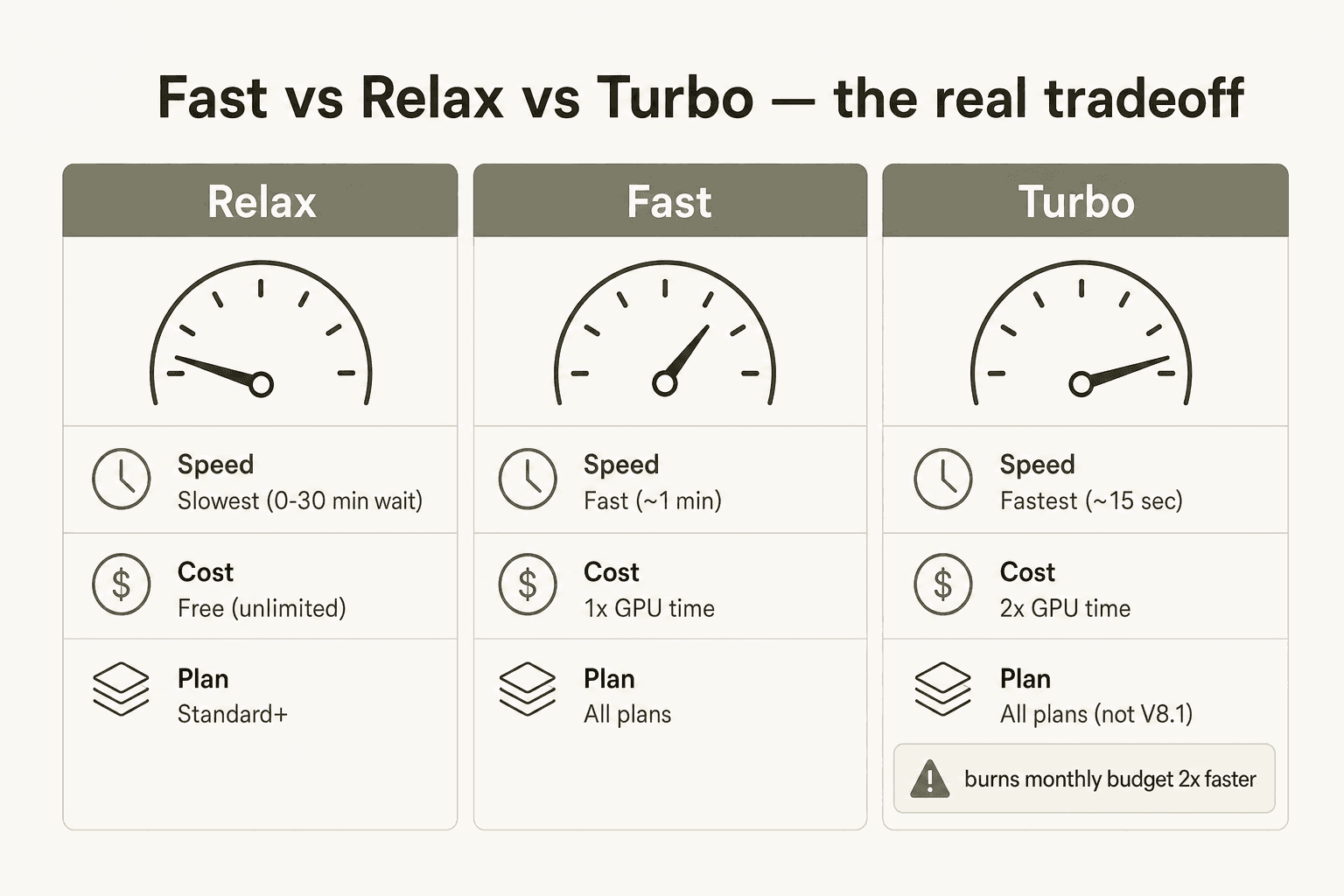
Fast mode is the default on all plans. Results arrive in roughly 1 minute for a standard image prompt. Every Fast-mode job draws from your monthly Fast GPU hour allocation.
Relax mode is available on Standard, Pro, and Mega for images; Pro and Mega only for SD video. Jobs go into a queue - wait times range from 0 to 30 minutes depending on server load. Users who run Relax mode frequently get lower queue priority than lighter users. Relax mode cannot be used with permutation prompts, the --repeat parameter, HD video, or Max Upscale (legacy). For most exploratory image work - moodboards, iteration, concept generation - it's perfectly usable.
Turbo mode accesses a high-speed GPU pool and generates images up to 4x faster than Fast. The cost: 2x the Fast GPU time per image. So on a Standard plan with 900 Fast minutes, switching to Turbo halves your effective capacity to ~450 minutes worth of generation. Turbo is experimental, currently not supported in V8.1 Alpha, and falls back automatically to Fast mode when Turbo GPUs aren't available.
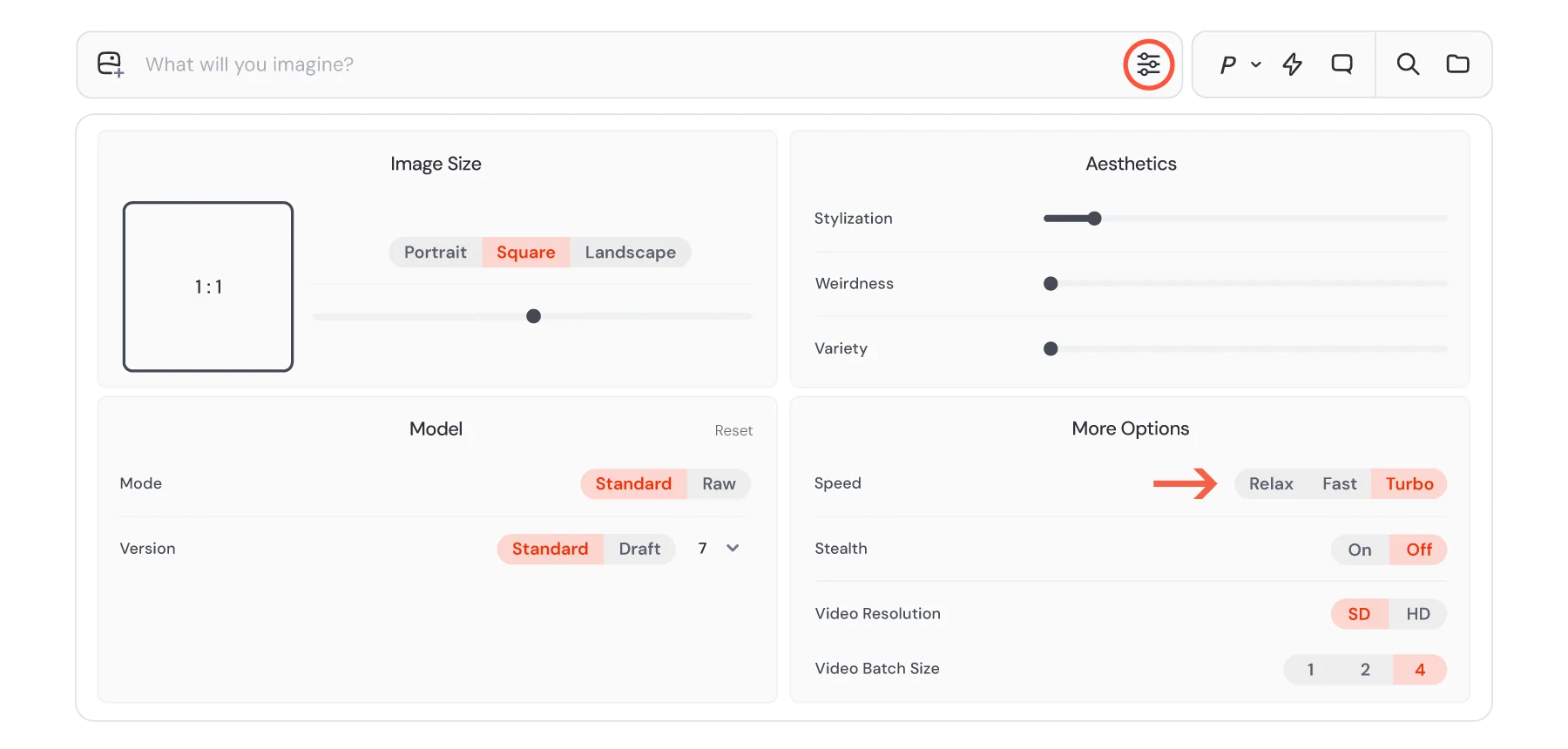
The Turbo burn-rate issue has caught plenty of people off guard. When Midjourney's V7 model launched, the speed mode settings weren't immediately obvious to new users:
"Early adopters have burned through their 'fast hours' unknowingly due to unclear UI prompts. Remember: Turbo jobs cost 2x more than a normal V6 job and Draft jobs half as much."

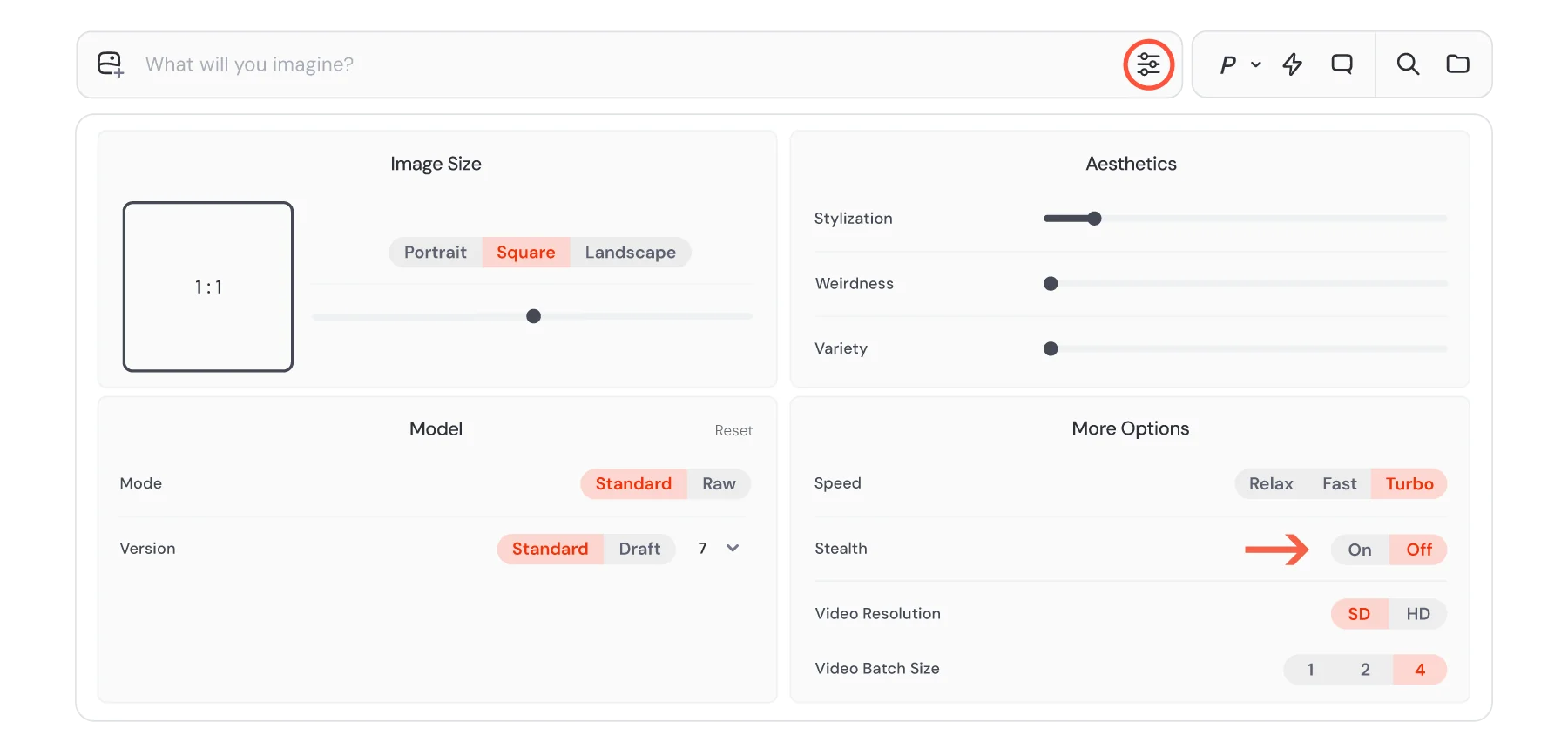
You can switch speed modes on the website via the Settings panel, or by appending --fast, --relax, or --turbo to individual prompts. Settings sync between the website and Discord.
Video pricing: the second cost layer
Midjourney launched its video model in June 2025. Pricing follows the same GPU-time model as images, but at a much higher rate.
The official framing from CEO David Holz on launch: "We'll be charging about 8x more for a video job than an image job and each job will produce four 5-second videos... This is amazing, surprising, and over 25 times cheaper than what the market has shipped before."
Whether that's cheap or expensive depends on your baseline. In concrete terms: one SD video batch of 4 clips costs ~8 GPU minutes. One HD video batch costs ~26 GPU minutes - per Midjourney's own documentation. HD video is approximately 3.2x more expensive than SD video, and per an official Discord note cited by community members, HD mode is "for professionals with higher budgets."
What this means by plan:
- Basic: SD video only, 1 concurrent Fast video prompt. At 200 Fast minutes, you get roughly 25 SD video batches (100 five-second clips) before the plan is exhausted - if you spend the entire allocation on video alone.
- Standard: SD and HD video, 3 concurrent Fast video prompts, no Relax video. HD video at 26 min/batch means your 15 Fast hours cover about 34 HD batches if used purely for video.
- Pro: Unlimited SD video via Relax mode - this is what makes Pro the real minimum viable tier for consistent video work. HD video is available but still burns Fast time.
- Mega: 12 concurrent Fast video prompts and unlimited SD Relax video - the volume tier for production workflows.
The hidden costs that catch people off guard
Seven things worth knowing before you subscribe:
1. Unused Fast hours expire every month. Your Fast GPU allocation resets at the end of each billing cycle regardless of usage - on monthly and annual plans alike. There's no accumulation.
2. Turbo mode silently doubles your burn rate. If you forget Turbo is enabled, you'll exhaust Fast hours at 2x the expected pace. Check the Settings panel before long generation sessions.
3. The refund policy is effectively pre-decisional. Midjourney's refund terms only allow a refund if you've consumed fewer than 20 GPU minutes total - roughly 15-20 basic image generations. That's not enough to evaluate whether the platform fits your workflow. And there's no free trial since March 2023. You're paying before you know if it's right for you.
4. The $1M revenue threshold mandates Pro or Mega. Any company with more than $1,000,000 in gross annual revenue must be on Pro or Mega for commercial use. Standard plan commercial terms don't apply at that scale.
5. Billing support is Discord-only with documented problems. Trustpilot shows 1.5/5 from 351 reviews - versus 4.4/5 on G2 from ~98 reviews. The gap is almost entirely billing and support. Midjourney's support is Discord-only, with a reported 39% reply rate on negative reviews and average response times up to two weeks. The BBB has logged 51 complaints in three years. Community reports include cases of users charged $546 in a single day on a $10/month plan, and post-cancellation charges. These are outliers, but the pattern of billing complaints is consistent enough to be worth noting.
6. Making existing images private is manual. If you upgrade to Pro for Stealth Mode, previously public generations don't automatically become private. You have to retroactively privatize them via the Organize page - individually or in bulk.
!Midjourney's "Make Private" bulk action on the Organize page, as taken from Midjourney
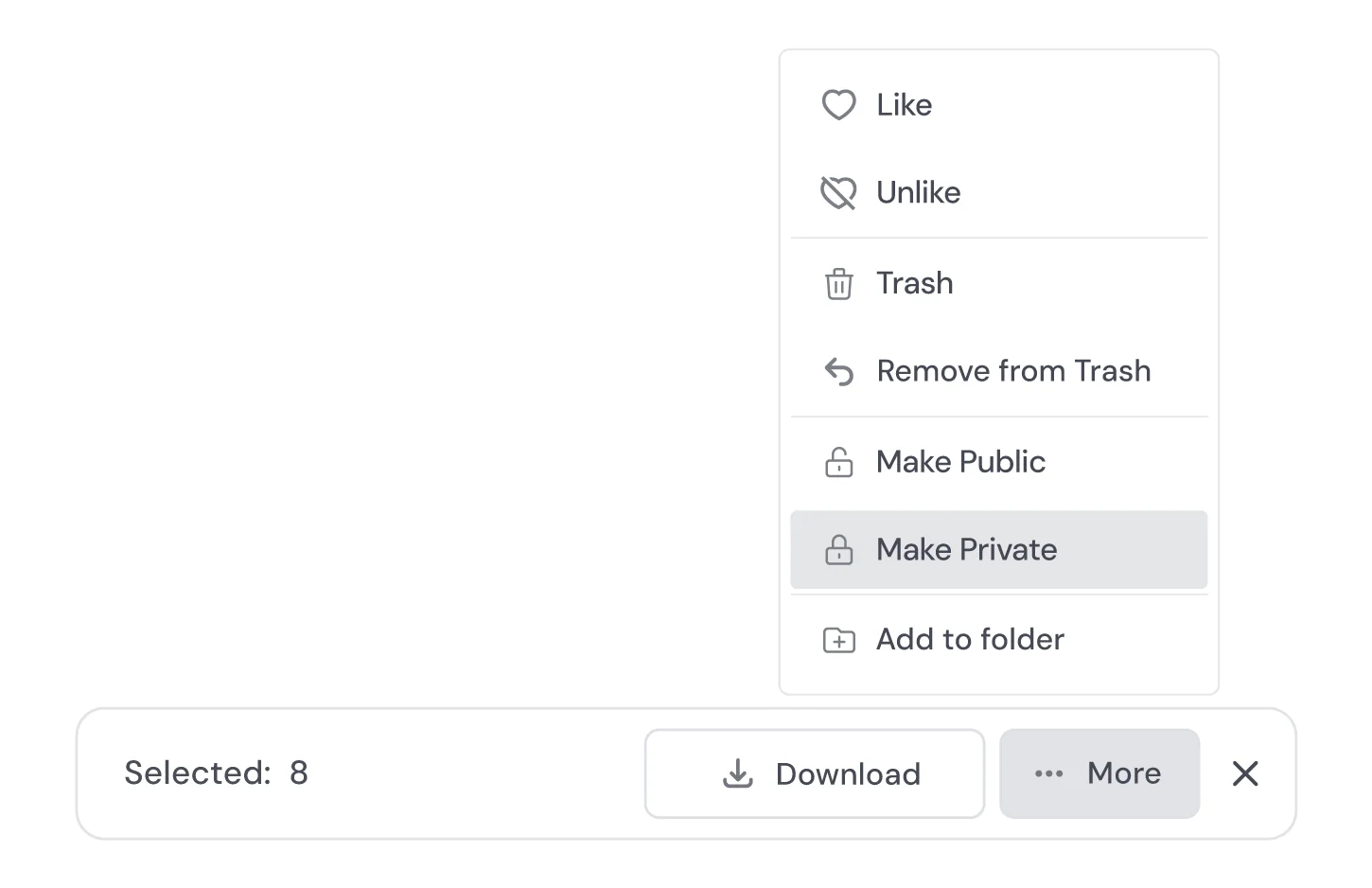
7. Annual billing is the only discount - no promotions. The 20% annual discount (billed upfront for the year) is the only pricing reduction Midjourney offers. No Black Friday deals, no referral credits, no trial extensions. As one user put it in a 2026 Reddit thread about potential pricing announcements: none materialized.
What Midjourney actually costs for real users
Three scenarios that cover the range of actual usage patterns:
The occasional experimenter A few serious sessions per week - moodboarding, concept exploration, no hard deadlines. No client deliverables, no privacy needed.
Recommended plan: Standard at $30/month ($288/year annually). Fast mode handles anything time-sensitive; Relax mode handles the rest. Actual constraint is time-to-iterate, not GPU budget.
The working professional or small studio Regular client work, brand identity generation, campaign concepting. Images need to stay private. Occasional video output.
Recommended plan: Pro at $60/month ($576/year annually). Stealth Mode is the deciding factor - client work going into a public gallery isn't viable. Unlimited SD Relax video handles most video needs without eating into Fast hours. Annual billing brings the effective rate to $48/month.
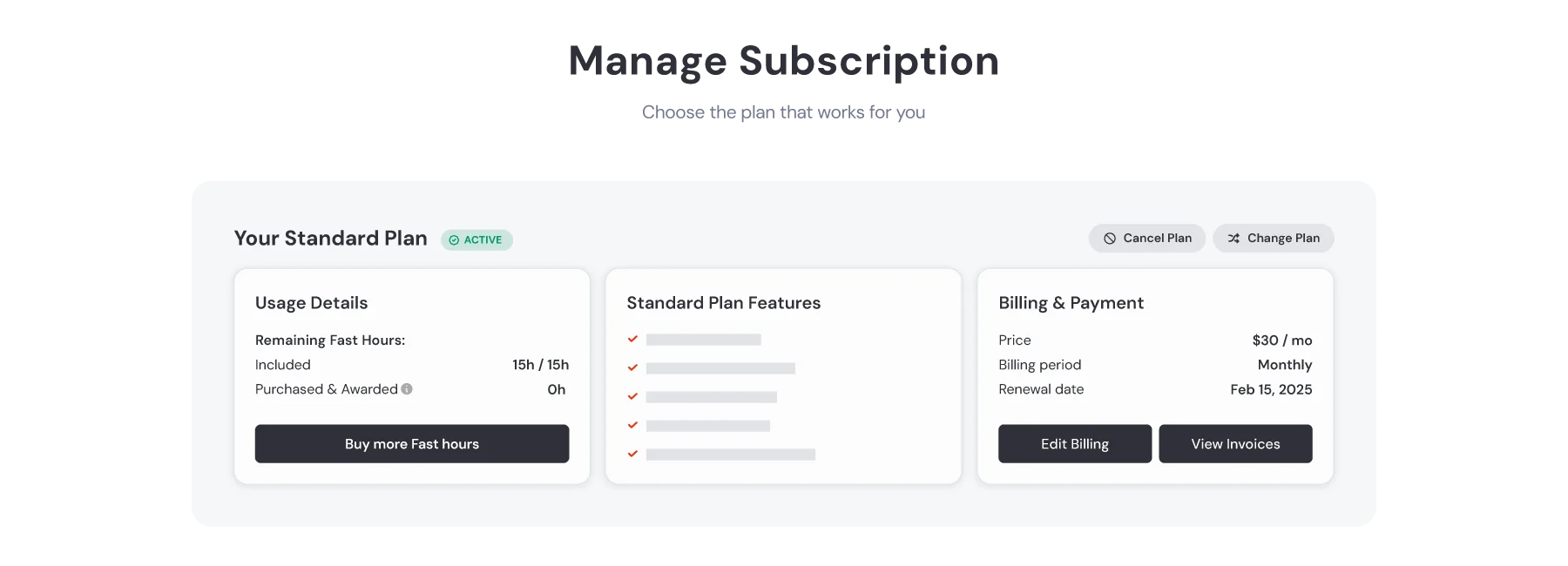
Here's how the subscription management page looks in practice - you can check remaining Fast hours and billing details at any time from midjourney.com/account:
The team at a $2M+ revenue company Marketing team of five generating imagery at volume. Revenue threshold mandates Pro or Mega regardless of preferred plan.
Required plan: Pro or Mega. If the team runs into concurrency limits with Pro (12 concurrent image prompts), or if video volume is high, Mega at $96/month annually ($1,152/year) starts making sense. Otherwise Pro covers most team workflows.
A note on the value question more broadly: the community verdict is split by use case.
"Personally? Holy shit, Yes! I signed up the Basic Plan in March of last year, burned through the 200 images fairly quickly, switched to Pro, and have been there ever since... I've probably generated a quarter million images since. (Seriously)"
Contrast that with the professional designer perspective from LinkedIn:
"MidJourney doesn't necessarily make the creative process faster. You'll keep prompting for the changes you want... Not sure if all the time it takes to prompt to get a meh outcome is worth it."
Both are right, for different use cases. Midjourney earns its subscription for professionals who iterate heavily and have made peace with the prompting curve. For creatives who need precise, predictable output for final deliverables, the time-cost equation is less clear. We went deeper on this in our Midjourney reviews roundup.
If you're still deciding whether Midjourney is the right tool versus alternatives like Adobe Firefly, DALL-E 3, or Canva AI, our comparison posts break down the tradeoffs in more depth - including GPT Image 2 vs Midjourney vs DALL-E 3 and Canva AI pricing.
Try eesel
If you're evaluating AI tools for your business stack, eesel handles the operational side - deploying autonomous AI agents inside the tools your team already uses, from Zendesk and Freshdesk to Slack, email, and Shopify. eesel pricing is one fixed monthly price for support, from $299/month for 500 credits (1 credit per ticket or chat), and $4 per blog post. There's no per-seat fee, no platform fee, and a free plan with 100 credits to start, no card required.
