Zendesk telco support: A complete guide for telecom customer service

Stevia Putri
Last edited March 5, 2026
Telecommunications companies face a unique challenge. When a customer's internet goes down or their phone stops working, they need help immediately. Not tomorrow. Not in an hour. Right now.
That's where Zendesk telco support comes in. Whether you're a telecom provider looking to upgrade your customer service platform or you're researching Zendesk's voice capabilities, this guide covers everything you need to know.
Let's break it down.
What is Zendesk telco support?
"Zendesk telco support" actually refers to two related things:
- Telecom companies using Zendesk as their customer service platform (industry-specific solution)
- Zendesk Talk, the built-in voice/phone support capabilities
For telecommunications providers, both matter. You need a platform that handles the high-volume, high-urgency nature of telecom support while also offering robust voice capabilities (because when someone's service is down, they want to talk to a human).
Zendesk's telecommunications solution is built around AI-powered automation that can handle 80% or more of routine queries (things like "Is my service restored?" or "How do I upgrade my plan?") while routing complex issues to human agents with full context.
How Zendesk serves telecommunications companies
The telecommunications industry has specific pain points that generic help desk software doesn't address well:
- Service outages create sudden ticket surges
- Billing disputes require access to complex account data
- Technical troubleshooting needs specialized knowledge
- Field technician coordination involves multiple stakeholders
Zendesk addresses these with a combination of AI automation, omnichannel support, and deep integrations.
AI automation that actually works
Zendesk AI agents can resolve over 80% of common telecom queries without human intervention. Here's what that looks like in practice:
- A customer messages asking if there's an outage in their area. The AI agent checks network status and responds immediately.
- Someone wants to upgrade their plan. The AI walks them through options and processes the change.
- A billing question comes in. The AI pulls account data and explains the charges.
The key word here is "autonomous." These aren't chatbots that follow rigid scripts. They reason, adapt, and take action based on your knowledge base and business procedures.

Real results from real telecom companies
MTData, an Australian vehicle telematics company (subsidiary of Telstra), achieved:
- 97% customer satisfaction rating at peak
- 4x reduction in ticket backlog
- First response time cut from days to 2.5 hours
- 90% reduction in missed calls
They integrated Zendesk with The Service Manager (TSM), JIRA, and Slack to centralize operations across departments.
Phonero, a Norwegian mobile operator, saw:
- 59% messaging automation rate (handling 50,000 chats annually)
- 30% email automation rate (24,000 emails annually)
- ROI realized in just six months
Phonero launched with 30-35 intents focused on common queries and expanded to 154 intents over time. Their AI agent now provides 24/7 support, something that would be prohibitively expensive with human agents alone.
Omnichannel support (that actually connects)
Telecom customers don't stick to one channel. They might start with a chat, escalate to a call, then follow up via email. Zendesk's omnichannel approach means agents see the full conversation history regardless of channel.
This matters because customers hate repeating themselves. When an agent can see that a customer already tried troubleshooting steps via chat, they don't waste time asking them to do it again.
Zendesk Talk: Voice support capabilities
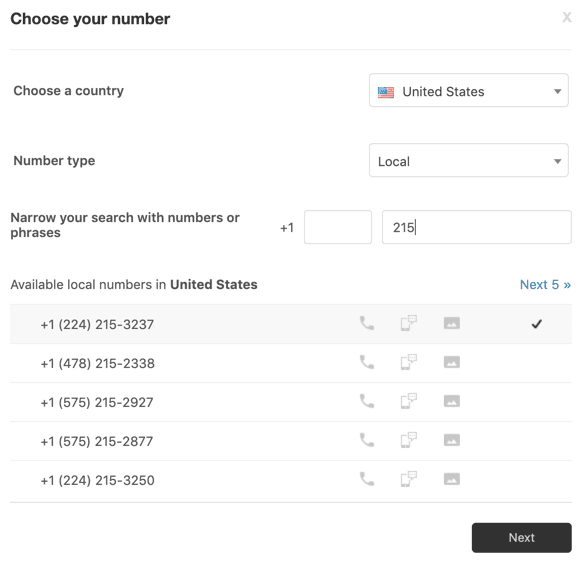
Phone support isn't dead in telecom. When someone's internet is down, they want to talk to someone. Zendesk Talk is the built-in voice solution that integrates phone support with the rest of your channels.
What you get out of the box
Zendesk Talk includes:
- Cloud-based calling no hardware required, works through the browser
- Automatic ticket creation every call becomes a trackable ticket
- Call recording for quality assurance and training
- Voicemail transcription read messages instead of listening (English only)
- IVR (Interactive Voice Response) route calls with phone menus
- Business hours set when you're available to take calls
Phone number flexibility
You have three options for phone numbers:
- New Zendesk numbers choose from available countries
- Port existing numbers transfer from your current provider (takes a few weeks)
- Forward existing numbers route calls to your Zendesk number
There's also SIP-IN support for advanced setups, letting you use your existing carrier infrastructure while still getting Zendesk's call management features.
Network requirements
Before rolling out Zendesk Talk, check your technical setup:
- Bandwidth: 50kBits/sec per concurrent call
- Browser: WebRTC-compatible (modern Chrome, Firefox, Safari, Edge)
- Network: Hardwired connections work better than WiFi for call quality
- Headsets: Analog headsets (3.5mm plug) generally provide best quality
Your IT team will need to ensure the right TCP and UDP ports are opened for voice traffic.
Setting up Zendesk Talk for your telecom support
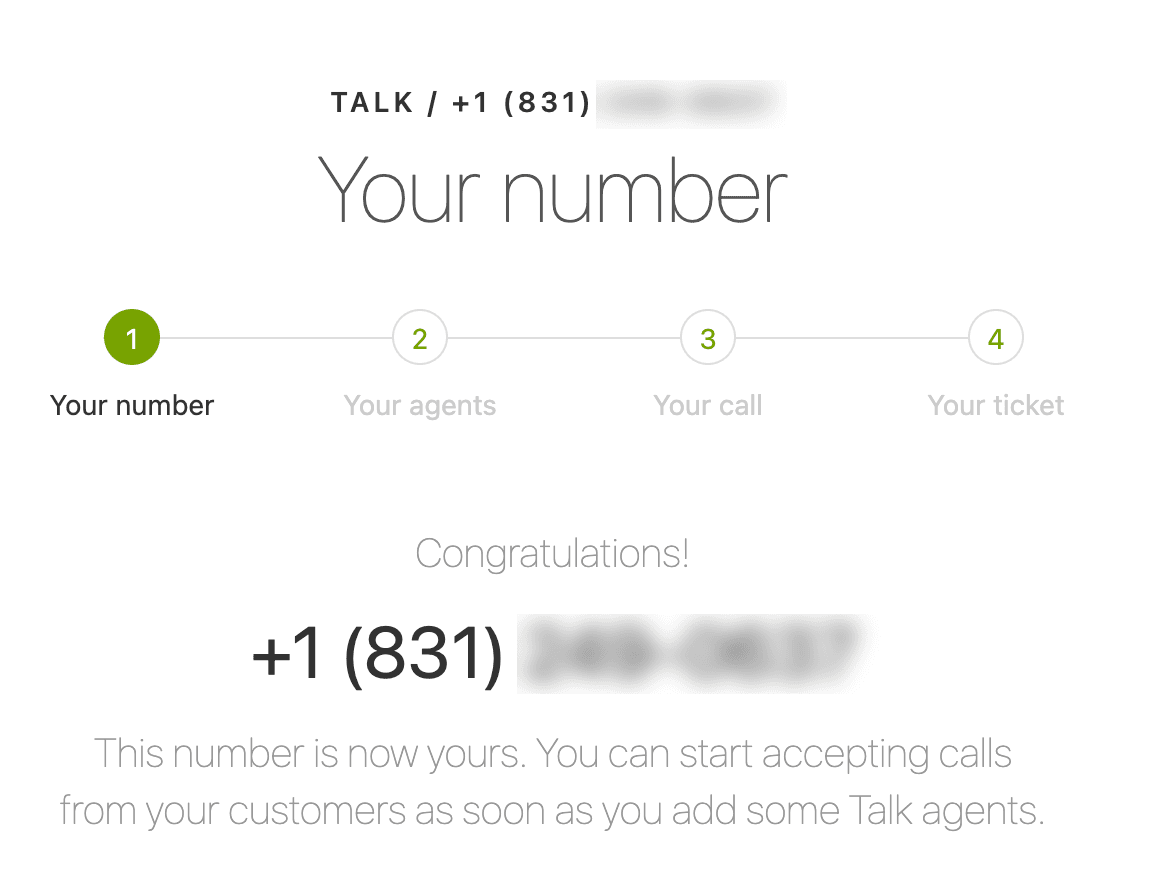
Here's the short version of getting voice support running:
Step 1: Check number availability Use Zendesk's calculator to see what numbers are available in your target countries. Some regions require documentation to verify your business before issuing numbers.
Step 2: Understand usage costs Voice pricing has three components: the monthly number fee, per-minute charges for inbound calls, and per-minute charges for outbound calls. Rates vary significantly by country.
Step 3: Configure your network Run Zendesk's network test to verify your setup can handle voice traffic. This checks bandwidth, ports, and browser compatibility.
Step 4: Enable and configure In the Admin Center, enable the voice channel and configure your settings: business hours, greetings, routing rules, and IVR menus.
Zendesk pricing for telecom support
Let's talk numbers. Zendesk's pricing has multiple tiers, and telecom companies typically need more than the entry-level plan.
Suite pricing (annual billing)
| Plan | Price (per agent/month) | Best For |
|---|---|---|
| Support Team | $19 | Email-only support basics |
| Suite Team | $55 | AI-powered multi-channel support |
| Suite Professional | $115 | Advanced customization and reporting |
| Suite Enterprise | $169 | Enterprise security and change management |
Voice-specific costs
Voice features vary by plan:
- Suite Team: Basic call routing and voicemail
- Suite Professional: IVR, call recording, business hours, skills-based routing
- Suite Enterprise: Advanced routing, multiple business hours, call monitoring
Additional voice costs to factor in:
- Local and toll-free numbers (add-on, varies by country)
- Inbound and outbound minutes (usage-based)
- Contact Center add-on ($50 per agent/month for complex operations)
AI and automation add-ons
If you want to match Phonero's 59% automation rate, you'll likely need:
- Advanced AI agents contact sales for pricing (resolves 80%+ of complex issues)
- Copilot $50 per agent/month (AI assistance for human agents)
- Automated resolutions $1.50-2.00 per resolution beyond plan limits
Calculating total cost
For a telecom company with 50 agents on Suite Professional:
- Base cost: $115 x 50 = $5,750/month
- Contact Center add-on: $50 x 50 = $2,500/month
- Copilot add-on: $50 x 50 = $2,500/month
- Voice usage: varies by call volume
- Total: ~$10,750/month + usage costs
That's not cheap. But compare it to the cost of hiring additional agents to handle the same volume, and the math starts to look different.
AI automation with Zendesk for telecom
Zendesk's AI capabilities fall into three categories: AI agents (autonomous resolution), Copilot (agent assistance), and admin tools (operations optimization).
AI agents: The 80% solution
Zendesk AI agents can resolve over 80% of interactions without human involvement. For telecom, this means:
- Service status checks
- Billing inquiries
- Plan upgrades and changes
- Basic troubleshooting
- Account updates
The AI is pre-trained for telecommunications, so it understands industry-specific terminology and common issues out of the box.
Copilot: Making human agents faster
When a query does need a human, Copilot provides:
- Suggested replies based on knowledge base and past tickets
- Tone adjustments (formal to friendly)
- Next best actions recommendations
- Customer context from all channels
Zendesk claims a 20% productivity increase for agents using Copilot. In telecom, where agents handle repetitive billing and technical questions, that adds up quickly.
How eesel AI fits into the picture
Here's where we come in. While Zendesk provides the platform, eesel AI acts as an AI teammate that integrates with Zendesk (and other help desks) to handle automation. Learn more about how eesel AI works with Zendesk.

The difference? We learn from your past tickets, help center articles, and macros in minutes, not weeks. You don't configure workflows or build decision trees. You just connect us to your Zendesk, and we start learning your business.
Our approach is to start with guidance (drafting replies for agent review) and level up to autonomous responses as we prove ourselves. This lets you verify quality before going fully automated.
For telecom companies already using Zendesk, our AI Agent can work alongside your existing setup to boost that automation rate even higher. You might also be interested in eesel AI Copilot for real-time agent assistance. Check out our pricing to see how we compare.
Zendesk alternatives for telecom support
Zendesk isn't the only option. Depending on your needs, these alternatives might be worth considering:
Freshdesk Similar feature set, often cheaper for smaller teams. Good if you want Zendesk-like capabilities without the Zendesk price tag.
Gorgias Built specifically for e-commerce but works well for subscription-based telecom services. Strong automation features.
eesel AI We take a different approach. Instead of being a help desk platform, we're an AI teammate that works with your existing help desk (including Zendesk). We focus purely on AI automation, learning your business from past tickets without manual configuration.
The key question isn't "which platform is best?" It's "what problem are you solving?" If you need a complete platform replacement, Zendesk or Freshdesk make sense. If you want to add AI automation to your existing setup, that's where we come in.
Getting started with Zendesk telco support
If you're evaluating Zendesk for your telecom support, here's a practical roadmap:
Assess your current state
- What channels do you support today?
- What's your ticket volume by channel?
- What percentage of queries are repetitive vs. complex?
Start with a trial Zendesk offers a 30-day trial with access to Suite Professional features. Use this to test voice capabilities and AI agents with real (but limited) traffic.
Plan your rollout Don't turn on everything at once. Start with one channel (usually email or chat), get comfortable, then expand. The same applies to AI: start with guidance mode, then increase autonomy as you build confidence.
Consider your integration needs Telecom companies typically need integrations with billing systems, network monitoring tools, and CRMs. Map these out early. Zendesk has 1,000+ pre-built integrations, but custom integrations take time.
Calculate true cost Don't just look at the per-agent price. Factor in:
- Voice usage costs
- AI add-ons
- Implementation services
- Training time
For more insights on AI-powered customer service with Zendesk, check out our guide on Zendesk AI.


Frequently Asked Questions
Share this article

Article by
Stevia Putri
Stevia Putri is a marketing generalist at eesel AI, where she helps turn powerful AI tools into stories that resonate. She’s driven by curiosity, clarity, and the human side of technology.



