Zendesk education support: A complete guide for schools and universities

Stevia Putri
Last edited March 5, 2026
Educational institutions face a unique challenge: they need to support students, parents, faculty, and staff across multiple departments, often with limited IT resources and tight budgets. When someone can't access their learning management system or has a question about admissions, they expect help quickly.
Dedicated education support software fills this gap. Zendesk has built a reputation as a leading help desk solution, and they offer specific features for schools and universities. But is it the right fit for your institution? And how does it compare to newer AI-powered alternatives?
We'll break down what Zendesk offers for education, how much it costs, and what alternatives might work better depending on your needs.
What is Zendesk for education?
Zendesk for Education is a specialized configuration of Zendesk's customer service platform designed for schools, universities, and educational organizations. It provides a centralized system for managing support requests from students, parents, faculty, and staff across multiple communication channels.
Educational institutions use Zendesk for several core use cases:
- IT support: Helping students and faculty with technical issues, password resets, and system access. For IT teams looking to automate more of this workload, see our guide to AI for IT operations.
- Student services: Handling admissions inquiries, enrollment questions, and general student support
- Administrative efficiency: Streamlining internal requests across departments like HR, facilities, and finance
- Multi-campus management: Unifying support operations across multiple locations or departments
The platform is designed to replace scattered email inboxes and phone lines with a single, trackable system. As one Director of Operations at the University of Louisville put it: "We spent a year using a service email account to manage communications, but I quickly realized that this was not scalable. We needed something that would scale with our growth."
Notable education customers include USC Annenberg, Coursera, Udemy, Beloit College, and Grapevine Colleyville ISD. These institutions range from K-12 districts to online learning platforms to traditional universities, suggesting the platform adapts to various educational models.
Key features for educational institutions
Zendesk bundles several capabilities that matter specifically for education environments. Here's what you get:
Multi-channel communication
Students and faculty expect to reach support through their preferred channel. Zendesk brings email, chat, phone, and social messaging (including Facebook, Twitter, and WhatsApp) into a single interface. This means an IT technician can see that a student emailed yesterday, then started a chat today, without losing context between conversations.
For education institutions dealing with tech-savvy students who might switch from email to Twitter to live chat, this unified view prevents tickets from falling through cracks.
Knowledge base and self-service
Most education support questions are repetitive: "How do I reset my password?" "Where do I find my course schedule?" "How do I connect to WiFi?"
Zendesk lets you build a help center with articles, FAQs, and announcements. Students and parents can find answers themselves, reducing the volume of tickets your staff handles directly. The knowledge base integrates with the ticketing system, so agents can quickly pull relevant articles while responding to requests.
Automation and workflows
Education support often involves routing requests to the right department: IT issues go to tech support, billing questions to finance, admissions inquiries to enrollment services. Zendesk's automation rules can route tickets based on keywords, request type, or user profile. For more advanced automated routing, AI Triage can tag, route, and prioritize tickets automatically using AI understanding rather than just keyword matching.
You can also set up automated responses for common questions and establish service level agreements (SLAs) that ensure urgent issues get attention quickly. For example, a "system down" report might automatically escalate to senior IT staff.
Reporting and analytics
Understanding support trends helps allocate resources. Zendesk provides dashboards showing ticket volume, resolution times, and agent performance. If you notice a spike in LMS-related tickets after a system update, you can proactively create documentation or schedule training. For teams looking to boost agent productivity further, AI Copilot drafts replies for agents to review and send, learning from your best responses over time.
AI capabilities
Recent Zendesk updates have added AI features across all Suite plans:
- AI agents: Essential AI agents are included in Suite Team and above, with Advanced AI agents available as an add-on
- Generative replies: AI suggests responses based on your knowledge base
- Copilot writing tools: AI assists agents with drafting (5 uses per agent per month in Professional/Enterprise plans)
- Knowledge builder: AI helps create and optimize help center content
These features aim to reduce response times and help agents work more efficiently, though the AI capabilities vary significantly by plan tier.
Training and certification resources
One area where Zendesk stands out is their investment in user education. Through Zendesk Training, institutions get access to:
Free online courses covering administration, agent workflows, and developer topics. These self-paced courses help new staff get up to speed quickly without requiring external training consultants.
Structured learning paths including:
- Zendesk AI (5 courses, 2+ hours)
- Foundational Support (6 courses, 2+ hours)
- Explore/Analytics (3 courses, 2+ hours)
- Messaging (3 courses, 30 min - 1 hour)
- Guide/Self-service (5 courses, 2+ hours)
Certification programs with seven different exams available. For institutions that want to validate staff expertise, certifications like the Zendesk Omnichannel Agent or App Developer credentials provide standardized benchmarks.
Live training events including regional Training Days and Certification Preparation Workshops. These offer hands-on exercises and direct access to Zendesk trainers.
Mass enrollment options let administrators register entire departments at once, and reporting tools track completion progress. This training infrastructure matters for education institutions that experience regular staff turnover or need to onboard student workers quickly.
Zendesk pricing for education
Here's where things get complicated. Zendesk's pricing is publicly available, but they don't publish specific education discounts. You'll need to contact their sales team for institution-specific pricing.
Standard pricing tiers
| Plan | Monthly Price | Annual Price | What's Included |
|---|---|---|---|
| Support Team | $25/agent | $19/agent | Email/ticketing, Facebook/X, basic automations, 1000+ integrations |
| Suite Team | $69/agent | $55/agent | + AI agents (Essential), messaging, live chat, 1 help center, phone support |
| Suite Professional | $149/agent | $115/agent | + 5 help centers, skills-based routing, HIPAA compliance, CSAT surveys, Copilot (5 uses/mo) |
| Suite Enterprise | $219/agent | $169/agent | + Up to 300 help centers, sandbox, custom roles, audit logs, advanced workflows |
Add-on costs
- Advanced AI Agents: Contact sales
- Copilot unlimited: $50/agent/month (annual)
- Quality Assurance: $35/agent/month (annual)
- Workforce Management: $25/agent/month (annual)
- Contact Center: $50/agent/month (annual)
The education pricing question
Zendesk doesn't advertise education discounts on their public website. Some institutions may qualify for reduced rates, but you'll need to negotiate with their sales team. This lack of transparency makes budgeting difficult, especially for smaller schools or districts with fixed annual budgets.
The per-agent pricing model also means costs scale linearly with team size. A university with 50 support staff across IT, admissions, and student services would pay between $2,750/month (Suite Team annual) and $8,450/month (Suite Enterprise annual) before any add-ons.
For a deeper breakdown of Zendesk's pricing structure, see our complete guide to Zendesk support pricing.
Implementation and getting started
Zendesk claims you can get started in "30 minutes or less" without IT support or hardware. The platform is web-based, so there's no software to install or servers to maintain.
For education institutions, implementation typically involves:
- Data migration: Moving existing tickets and user data from previous systems
- Knowledge base setup: Creating initial help center articles for common questions
- Workflow configuration: Setting up routing rules, automations, and SLAs
- User training: Getting staff comfortable with the new system
- Rollout: Phasing in different departments or going live all at once
Some institutions work with Zendesk implementation partners like redk for more complex deployments. These partners can help with customization, integration with existing systems (like student information systems), and training.
Best practices for education rollouts include starting with a pilot group (like IT support), gathering feedback, then expanding to other departments. This approach lets you refine workflows before committing the entire institution.
eesel AI: An AI teammate for education support
While Zendesk provides proven ticketing and workflow management, some education institutions are looking for more autonomous AI capabilities.
At eesel AI, we approach education support differently. Instead of just organizing tickets for humans to handle, our AI agents can actually resolve many support requests independently.

How eesel AI works with education institutions
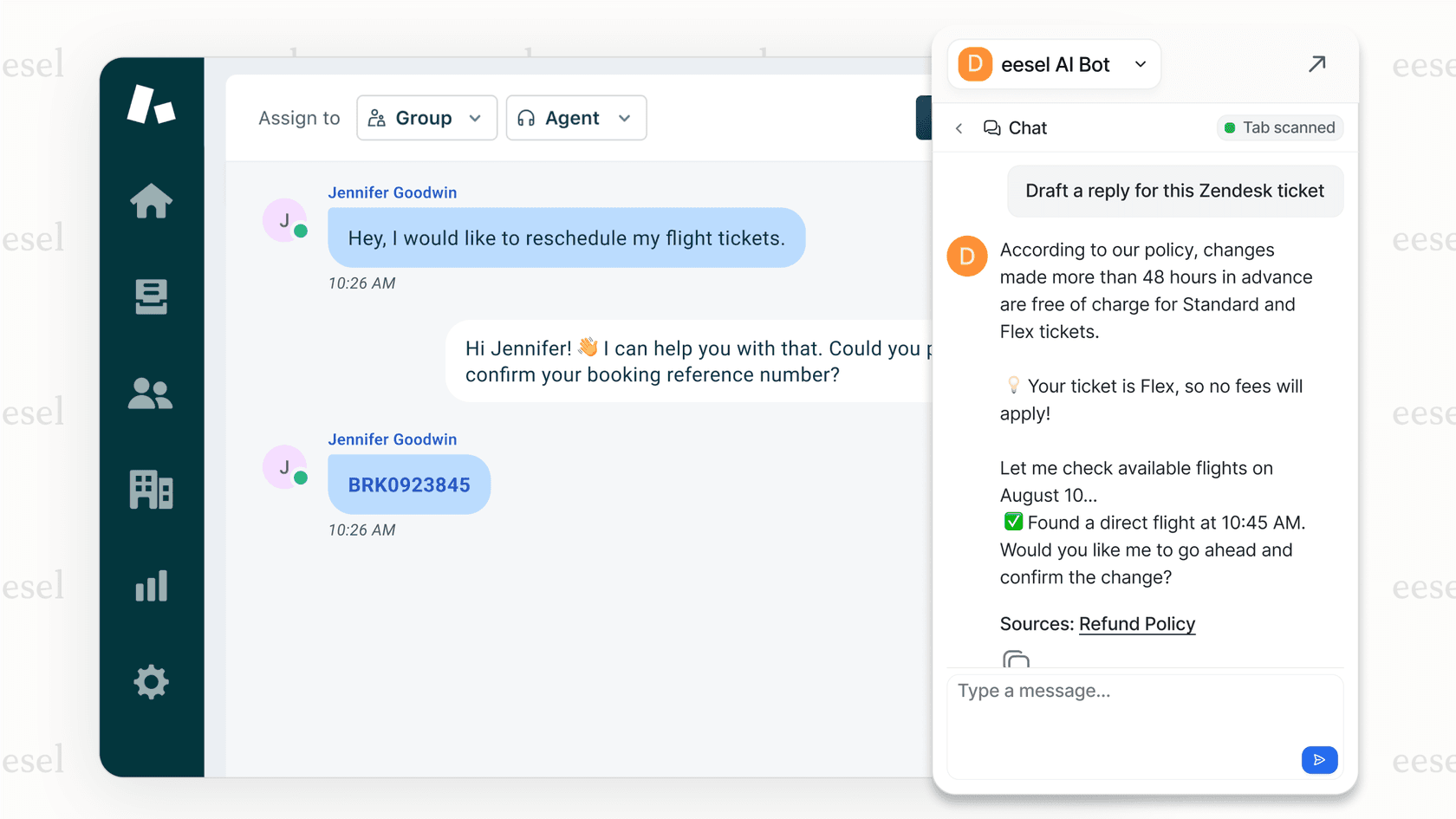
We plug into your existing help desk (whether that's Zendesk, Freshdesk, or another platform) and learn from your past tickets, help center articles, and documentation. Within minutes, the AI understands your institution's specific policies, common issues, and communication style.
Here's what makes eesel AI different:
Progressive autonomy: You don't flip a switch and hope the AI works. Instead, you start with the AI drafting replies for human review. Once you see it handling requests accurately, you gradually expand what it can do independently. This "teammate" approach means you maintain control while building confidence in the system.
Plain-English control: Define exactly what the AI handles and when it escalates using natural language. For example: "If a student asks about a refund within 30 days of purchase, process it. If it's been more than 30 days, escalate to the billing team." No coding or complex configuration required.
Simulation before go-live: Before the AI touches real student requests, you can run it against thousands of past tickets to see exactly how it would perform. This lets you identify gaps and tune responses without risking student satisfaction.
Continuous learning: When you correct an AI response, it learns from that feedback. Update a policy in your knowledge base, and the AI immediately incorporates the change. No retraining cycles or waiting for model updates.
Education use cases
- 24/7 student support: Answer common questions about admissions, course registration, and campus services around the clock
- IT ticket resolution: Handle password resets, software access requests, and troubleshooting steps without human intervention
- Knowledge base answers: Pull accurate information from your documentation and present it with source citations
- Multi-language support: Communicate with international students in their preferred language
Pricing comparison
Unlike Zendesk's per-agent model, we charge based on AI interactions (each time the AI processes a message). This often works out more predictably for education institutions with seasonal volume fluctuations.
| Plan | Monthly Price | Annual Price | What's Included |
|---|---|---|---|
| Team | $299 | $239 | Up to 3 bots, 1,000 interactions/month, AI Copilot, Slack integration |
| Business | $799 | $639 | Unlimited bots, 3,000 interactions/month, AI Agent, past ticket training, MS Teams, AI actions |
| Custom | Contact sales | Contact sales | Unlimited everything, multi-agent orchestration, custom integrations |
For institutions already using Zendesk, we offer a dedicated Zendesk integration that works alongside your existing setup. The AI can draft responses directly in Zendesk tickets, escalating to humans only when necessary.
In mature deployments, our AI agents achieve up to 81% autonomous resolution rates, with typical payback periods under two months.
Choosing the right support solution for your institution
So which approach makes sense for your school or university? It depends on your priorities:
Choose Zendesk if:
- You need a proven, full-featured ticketing system with extensive customization options
- Multi-channel support (email, chat, phone, social) is essential
- You have the budget for per-agent pricing and potential add-ons
- You want comprehensive training resources and certification programs
- You prefer a traditional support model with AI as an assistive feature rather than autonomous capability
Consider eesel AI if:
- You want AI that can actually resolve tickets, not just organize them
- Predictable per-interaction pricing fits your budget better than per-agent costs
- You need 24/7 coverage but can't staff around the clock
- You want to test AI performance thoroughly before going live
- You prefer natural language control over complex configuration
Or use both together: Many institutions use Zendesk as their core ticketing platform and add eesel AI for autonomous resolution. The AI handles routine requests directly in Zendesk, escalating complex issues to human agents. This hybrid approach gives you Zendesk's robust workflow management plus eesel's autonomous AI capabilities.
Getting started
If you're evaluating education support software, start by auditing your current support volume and common request types. Understanding what percentage of tickets are repetitive will help you estimate the potential impact of AI automation.
For a deeper look at how AI can transform your education support operations, explore our AI service desk solution or check out our Zendesk integration if you're already on that platform.

You can try eesel AI free for 7 days to see how it performs with your actual support data, or book a demo to discuss your specific education use case.

Frequently Asked Questions
Share this article

Article by
Stevia Putri
Stevia Putri is a marketing generalist at eesel AI, where she helps turn powerful AI tools into stories that resonate. She’s driven by curiosity, clarity, and the human side of technology.



