How to manage ecommerce orders in Zendesk: A complete guide

Stevia Putri
Last edited March 3, 2026
Managing ecommerce orders efficiently can make or break your customer support operation. When a customer emails asking "Where is my order?" (WISMO), your agent shouldn't need to open five different tabs to find the answer. That's where integrating your ecommerce platform with Zendesk comes in.
This guide walks you through setting up order management in Zendesk, from basic integrations to AI-powered automation. Whether you're running a single Shopify store or selling across multiple marketplaces, you'll learn how to streamline your workflow and resolve order inquiries faster.
For teams looking to take automation further, we also cover how AI solutions like eesel AI can handle routine order inquiries end-to-end.

Step 1: Connect your ecommerce platform to Zendesk
The first step is linking your ecommerce platform to Zendesk so order data flows into your support tickets.
For Shopify users:
- Navigate to Admin Center > Apps > Marketplace in Zendesk
- Search for "Shopify" and select the official Shopify for Zendesk app
- Click Install and authorize the connection
- Enter your Shopify store URL and authenticate
- Configure which order data you want to sync (customer info, order status, tracking numbers)
The integration pulls customer and order data directly into Zendesk, so agents see purchase history without leaving the ticket view. Shopify is the most commonly integrated platform, but similar apps exist for Magento, BigCommerce, and WooCommerce.
If you need more advanced functionality than the native app provides (like processing refunds or modifying orders from within Zendesk), consider agnoStack or eesel AI's Shopify integration as upgrades.
Step 2: Configure order visibility in tickets
Once connected, you need to set up how order information displays in tickets.
- Open any ticket from a customer who has placed an order
- Look for the Shopify or ecommerce sidebar app on the right side of the ticket
- Verify that order details appear (order number, date, status, items purchased)
- If the sidebar is empty, check that the customer's email in Zendesk matches their order email
Troubleshooting common issues:
- Orders not appearing? Check that the customer's email address in Zendesk exactly matches the one used for their order
- Missing tracking info? Verify your ecommerce platform is sending tracking data to Zendesk
- Multiple stores? You may need to configure each store connection separately
The sidebar typically shows order ID, date, fulfillment status, shipping carrier, and tracking number. Some integrations also display payment status and customer lifetime value.
Step 3: Set up automation for common order inquiries
With order data visible in tickets, you can now automate responses to common questions.
Create macros for WISMO inquiries:
- Go to Admin Center > Workspaces > Agent tools > Macros
- Create a new macro named "WISMO Response"
- Use placeholder text like: "Hi {{ticket.requester.first_name}}, your order {{ticket.custom_field_order_id}} was shipped via {{ticket.custom_field_shipping_carrier}}. Track it here: {{ticket.custom_field_tracking_url}}"
Set up triggers for order status updates:
- Navigate to Admin Center > Objects and rules > Business rules > Triggers
- Create a trigger that fires when tickets contain keywords like "where is my order" or "tracking"
- Set the trigger to apply the WISMO macro automatically
Build a view for order-related tickets:
Create a dedicated view that filters for tickets tagged with "order-status" or "shipping" so your team can prioritize these inquiries. Order questions are often time-sensitive, so having them in one place helps with response times.
Best practices for automation:
- Don't auto-close WISMO tickets, just provide the information
- Include escalation paths for orders that are delayed or lost
- Personalize automated responses with customer names when possible
Step 4: Handle multi-channel ecommerce orders
If you sell on multiple platforms (Amazon, eBay, Etsy, or your own store), you need a way to centralize all those orders in Zendesk.
The challenge: Each marketplace has its own messaging system. Amazon messages come through Seller Central, eBay through My Messages, and your store through Zendesk. Your agents end up checking four different platforms.
The solution: ChannelReply integrates these marketplaces directly into Zendesk.
With ChannelReply, you can:
- Answer Amazon, eBay, Walmart, Etsy, and Shopify messages from one Zendesk interface
- See order details from each marketplace in the ticket sidebar
- Maintain marketplace SLAs (your responses count toward Amazon and eBay metrics)
- Process refunds and cancellations without leaving Zendesk
ChannelReply pricing starts at $31 per month (billed annually) for 200 messages, with plans scaling up based on volume. There's also a free Shopify-only plan if you just need enhanced Shopify functionality.
For teams managing high order volumes across multiple channels, this consolidation can reduce response times significantly. One customer reported being able to answer 4x as many inquiries after implementing ChannelReply with Zendesk.
Step 5: Enhance with AI for autonomous order support
Automation handles simple inquiries, but AI can take it further by understanding context and handling entire conversations.
How AI agents handle order inquiries:
Unlike basic automation that just inserts order data into templates, AI agents can:
- Understand natural language questions ("Has my package left yet?" vs "Where is my order?")
- Check real-time order status through API connections
- Handle follow-up questions without human intervention
- Escalate only when the issue requires human judgment
Setting up eesel AI for order support:
- Connect eesel AI to your Zendesk account
- Train the AI on your help center articles, past tickets, and order policies
- Configure Shopify actions so the AI can look up order status
- Define escalation rules in plain English (e.g., "Escalate to humans if the order is more than 5 days late")
- Run simulations on past tickets to test accuracy before going live

The AI learns your business context from existing data, so setup takes minutes rather than weeks. You can start with the AI drafting responses for agent review, then gradually expand to full automation as confidence grows.
Measuring AI success for order tickets:
Track resolution rates specifically for order inquiries. Many teams see 70-80% of WISMO tickets resolved without human intervention once AI is properly configured. The remaining 20-30% typically involve complex issues (damaged items, wrong orders) that genuinely need a human touch.
Tips for optimizing your order management workflow
Once your integrations are running, a few workflow optimizations can improve efficiency further:
Pin important orders to tickets
Most ecommerce sidebar apps let you "pin" an order to a ticket. This ensures that even if a customer emails about a different topic later, the original order stays visible for context.
Use tags for order types and priorities
Create tags like "pre-order," "backorder," or "vip-customer" to help agents prioritize. You can set up triggers to auto-apply these tags based on order data.
Create dedicated order support queues
If order inquiries make up a significant portion of your volume, consider a separate queue with agents trained specifically on order issues. This lets your general support team focus on product questions while order specialists handle WISMO and returns.
Set up SLA targets for order inquiries
Order questions are often urgent. Consider setting tighter SLAs for tickets tagged with "order-status" or "shipping" compared to general inquiries.
Regular audit and optimization
Monthly, review which order questions are still reaching human agents. If you see patterns (e.g., lots of questions about a specific shipping delay), update your macros or AI training to address them proactively.
Start automating your ecommerce order support today
Managing ecommerce orders in Zendesk comes down to three things: getting the data visible, automating what you can, and escalating what you should. The native Shopify integration handles the basics. Third-party tools like agnoStack and ChannelReply add advanced functionality for complex workflows. And AI solutions like eesel AI can autonomously resolve the majority of routine order inquiries.
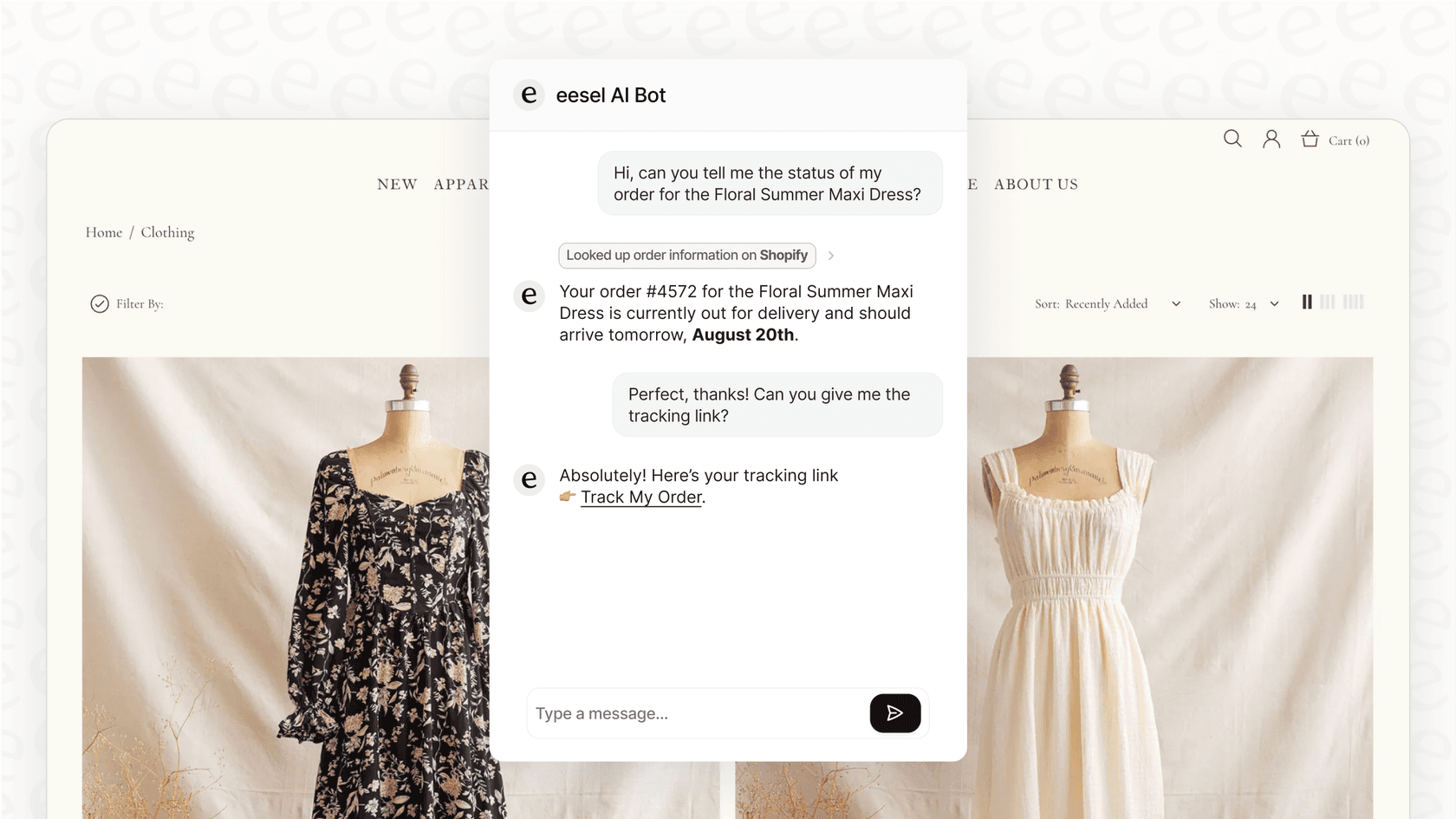
The impact on customer satisfaction is measurable. Teams that implement proper order management in Zendesk typically see faster response times, higher CSAT scores, and fewer repetitive tasks for agents.
If you're ready to reduce the WISMO workload on your team, try eesel AI alongside your Zendesk setup. The AI learns from your existing tickets and help center, so you can start automating order support within minutes of connecting your accounts.


Frequently Asked Questions
Share this article

Article by
Stevia Putri
Stevia Putri is a marketing generalist at eesel AI, where she helps turn powerful AI tools into stories that resonate. She’s driven by curiosity, clarity, and the human side of technology.



