Zendesk B2B accounts: Complete setup guide for 2026

Stevia Putri
Last edited March 5, 2026
B2B support is a different beast. When your customer is a company rather than an individual, everything changes. Multiple stakeholders, complex issues, and long-term relationships require a fundamentally different approach to customer service. Zendesk B2B accounts exist to help support teams manage business relationships at scale.
This guide covers everything you need to know about configuring Zendesk for B2B support, from core features and pricing to a modern alternative that might better fit your needs.
What makes B2B support different
Before diving into configuration, it helps to clarify why B2B support requires specialized tooling.
Multiple stakeholders per account. A single B2B customer might have five, ten, or fifty people contacting support. Each has different roles, permissions, and needs. You need to track who can see what tickets without creating chaos.
Complex, business-critical issues. B2B problems aren't "where's my order?" They're integration failures, API outages, and contract disputes. These issues often require specialized knowledge and coordination across multiple teams.
Long-term relationship focus. B2B relationships span years, not transactions. Support agents need context: contract history, previous issues, account health. Every interaction builds (or erodes) a multi-year relationship.
SLA requirements and contract obligations. Enterprise contracts include specific response times, escalation procedures, and resolution commitments. Miss an SLA and you're in breach of contract.
Integration needs. B2B support doesn't exist in a vacuum. It needs to connect with CRMs, billing systems, product analytics, and customer data platforms.
These differences explain why generic help desk setups often fail for B2B teams. You need tools built for complexity.
Key Zendesk features for B2B accounts
Zendesk offers several features specifically designed for B2B support workflows. Here's what matters most.
Organizations and groups
The foundation of B2B support in Zendesk is the organization feature. Organizations let you group users by company, creating a clear hierarchy between individual contacts and the accounts they represent.
Here's how it works:
- Create an organization for each B2B customer
- Add all contacts from that company to the organization
- Set organization-level fields (plan type, contract value, industry)
- Apply business rules based on organization attributes
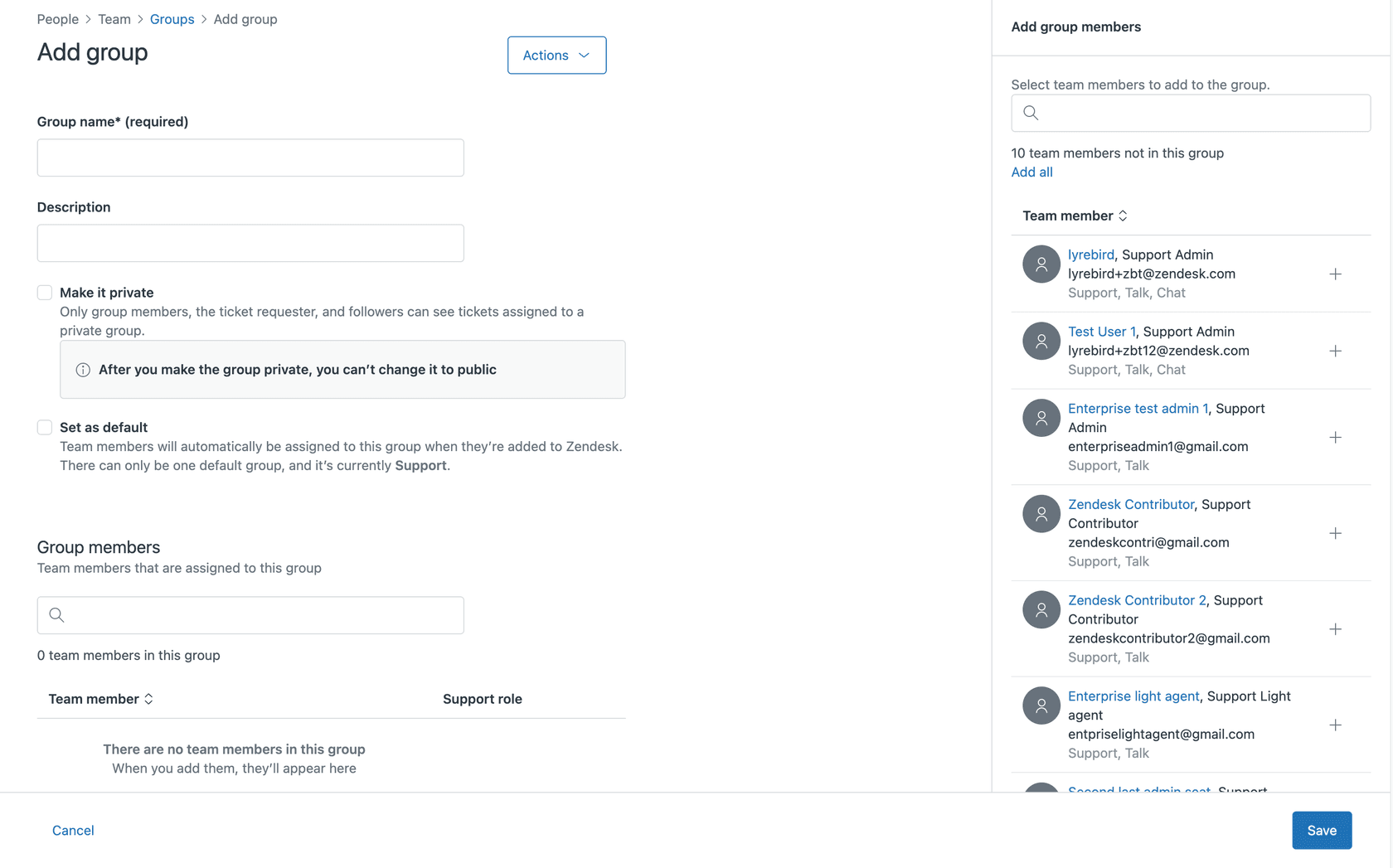
Groups complement organizations by routing tickets to the right team. You might have groups for enterprise support, technical escalations, or account management.
Custom ticket fields and forms
B2B support requires capturing specific data upfront. Zendesk's custom fields let you collect:
- Account ID or contract number
- Priority tier (Enterprise, Premium, Standard)
- Product line or module
- Issue category (technical, billing, strategic)
Custom ticket forms take this further by presenting different fields for different request types. A technical issue might ask for environment details, while a billing question shows account fields.
The key is reducing back-and-forth. When a customer submits a ticket with all relevant context, resolution time drops significantly.
Business rules (triggers and automations)
Once you have organizations and custom fields configured, business rules put them to work.
Triggers fire when tickets are created or updated. Common B2B triggers include:
- Route enterprise tickets to senior agents
- Notify account managers of high-priority issues
- Auto-respond with SLA commitments based on tier
- Escalate tickets that haven't been touched in X hours
Automations run on schedules. They handle:
- Reminder emails for pending tickets
- Automatic closure of resolved tickets after customer inactivity
- SLA breach warnings
These rules reduce manual work and ensure consistent handling across your team.
Shared organizations
One of Zendesk's most powerful B2B features is shared organizations. This lets multiple contacts from the same company see each other's tickets.
Here's why this matters: In a B2B context, the person submitting a ticket often isn't the decision-maker. A developer reports a bug, but the engineering manager needs visibility. Shared organizations give internal teams transparency without creating duplicate tickets.
You control visibility with granular permissions. Some contacts see all tickets, others only their own.
Macros and standard responses
B2B support involves repetition. The same questions about implementation, renewals, and escalations come up constantly. Macros let you create standardized responses that maintain consistency while saving time.
Effective B2B macros:
- Include personalization using organization data
- Provide complete answers, not just acknowledgments
- Link to relevant documentation
- Set clear next steps
The goal is to balance efficiency with the personal touch B2B relationships require.
Zendesk pricing for B2B support
Understanding Zendesk's pricing is critical for B2B teams because costs scale with headcount. Here's the breakdown from Zendesk's official pricing page:
| Plan | Monthly Price | Annual Price | Key Limits/Inclusions |
|---|---|---|---|
| Support Team | $25/agent | $19/agent | Email/ticketing, basic automations, 1000+ integrations |
| Suite Team | $69/agent | $55/agent | AI agents (Essential), messaging, 1 help center, phone support |
| Suite Professional | $149/agent | $115/agent | 5 help centers, SLA management, custom ticket forms, skills-based routing, 100 light agents |
| Suite Enterprise | $219/agent | $169/agent | 300 help centers, custom agent roles, sandbox, approval workflows, 1000 light agents |
Add-ons:
- Advanced AI agents: Contact sales
- Copilot: $50/agent/month
- Quality Assurance: $35/agent/month
- Workforce Management: $25/agent/month
- Contact Center: $50/agent/month
Free Trial: 14 days available
For B2B support, you'll likely need at least Suite Professional ($115/agent/month annually) to access SLA management, custom ticket forms, and skills-based routing. Suite Enterprise adds custom agent roles and sandbox environments for larger teams.
The per-agent pricing model means costs add up quickly. A 20-person support team on Suite Professional costs $2,300/month. Add Copilot for AI assistance and you're at $3,300/month.
Setting up Zendesk for B2B: Key steps
Configuring Zendesk for B2B support is a multi-week project. Here's the typical process:
-
Enable and configure organizations. Create organizations for each B2B customer and add their contacts. Set up organization fields to track account data like tier, contract value, and renewal date.
-
Set up custom fields for account data. Define the information your team needs to resolve tickets efficiently. Include both required fields (account ID) and optional context (previous issue references).
-
Create business rules for routing and SLAs. Build triggers that route tickets based on organization and priority. Set up SLA policies that match your contractual commitments.
-
Configure shared organization settings. Decide which contacts can see which tickets. Enable internal collaboration while maintaining security boundaries.
-
Build macros for common B2B scenarios. Create templates for frequent requests: implementation questions, renewal discussions, escalation procedures.
-
Integrate with CRM. Connect Zendesk to Salesforce, HubSpot, or your CRM to sync customer data. This gives agents full context without switching tools.
-
Train team on B2B-specific workflows. Ensure agents understand how to use organizations, when to escalate, and how to maintain consistent communication.
Full setup typically requires 2-4 weeks of configuration and testing. Plan for dedicated admin time during this period.
Limitations and considerations
Zendesk is powerful, but it's not perfect for every B2B team. Here are the main limitations to consider:
Configuration complexity. Setting up Zendesk for B2B requires significant admin time. You're essentially building a custom support platform on top of Zendesk's foundation. Teams without dedicated operations resources often struggle.
Learning curve for agents. Managing complex accounts with multiple stakeholders, custom fields, and business rules takes training. Agent onboarding is longer than with simpler tools.
Per-agent pricing becomes expensive. As your B2B team grows, costs scale linearly. A 50-person support team on Suite Professional with Copilot runs $8,250/month. For comparison, our AI Agent handles tickets autonomously at a fraction of that cost.
Legacy interface constraints. Zendesk's interface reflects its age. Modern alternatives offer cleaner UX and faster workflows.
AI capabilities require add-ons. Advanced AI features (like Copilot) cost extra. The base AI agents in Suite Team are limited compared to modern AI-native alternatives.
eesel AI: A modern alternative for B2B support
If Zendesk's complexity and pricing give you pause, there's another approach. We built eesel AI as an AI teammate for customer service: something you hire and level up, not software you configure.

Here's how we differ from traditional B2B support setups:
Instant learning from existing data. Connect eesel to your help desk and it immediately learns from your past tickets, macros, help center, and connected docs. No manual training. No configuration wizards. Understanding your business context, tone, and common issues takes minutes, not weeks.
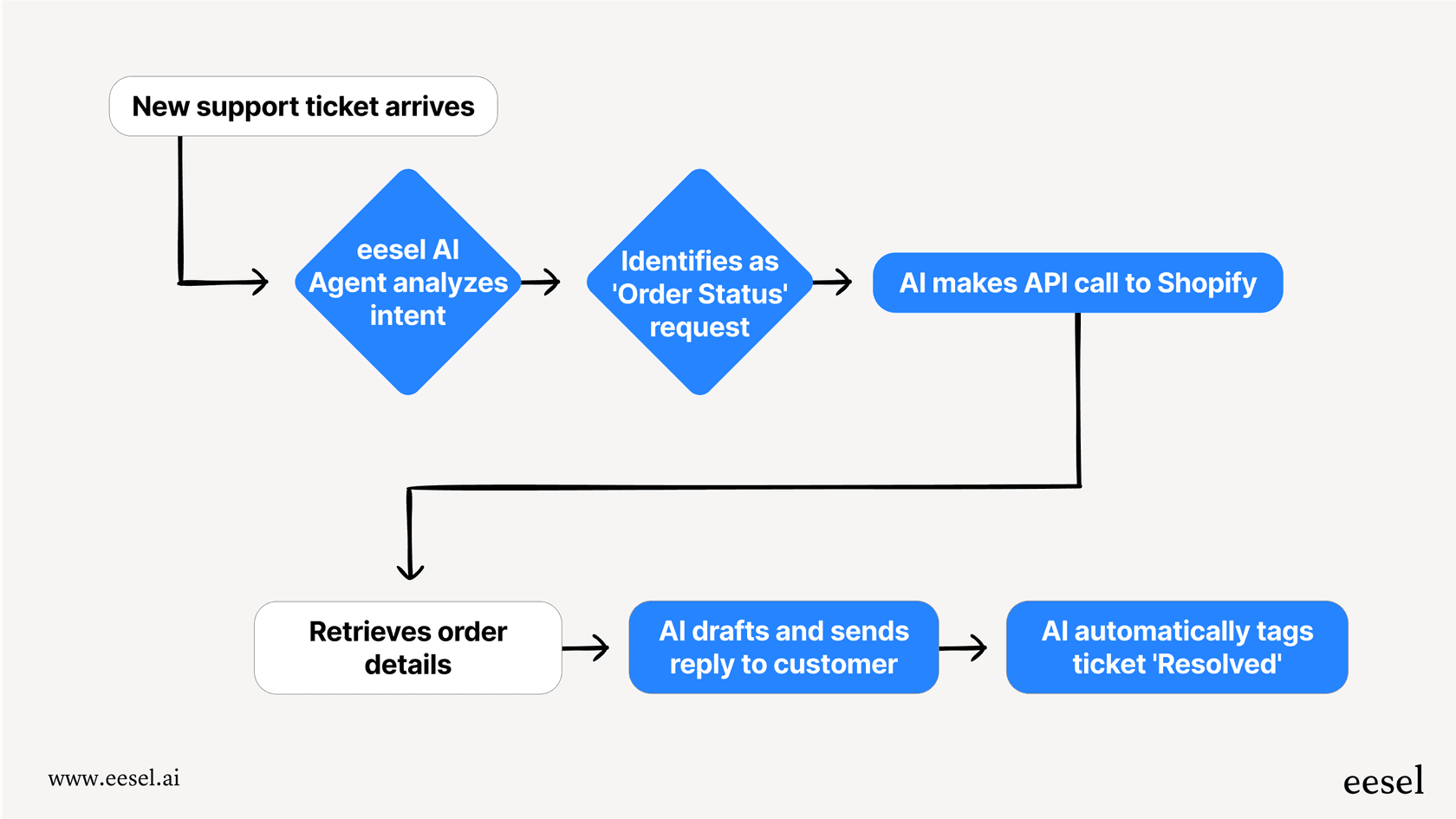
AI Agent handles B2B tickets autonomously. Our AI Agent reads tickets, drafts responses grounded in your knowledge, and sends them. It handles follow-ups and closes resolved conversations. Mature deployments achieve up to 81% autonomous resolution with a typical payback period under 2 months.
Natural language instructions. Instead of rigid business rules, you define behavior in plain English. "If the refund request is over 30 days, politely decline and offer store credit." "Always escalate billing disputes to a human." No code required.
Progressive rollout. Start with eesel drafting replies for agent review. As it proves itself, expand to full autonomy. You control the pace based on actual performance.
Per-interaction pricing. We charge based on AI usage, not seats. Our Business plan at $639/month includes unlimited bots and 3,000 interactions. For teams with many stakeholders, this model often costs significantly less than per-agent pricing.
Pre-go-live testing. Run eesel on thousands of past tickets before going live. See exactly how it would respond. Measure resolution rates. Identify gaps. Gain confidence before customers see it.
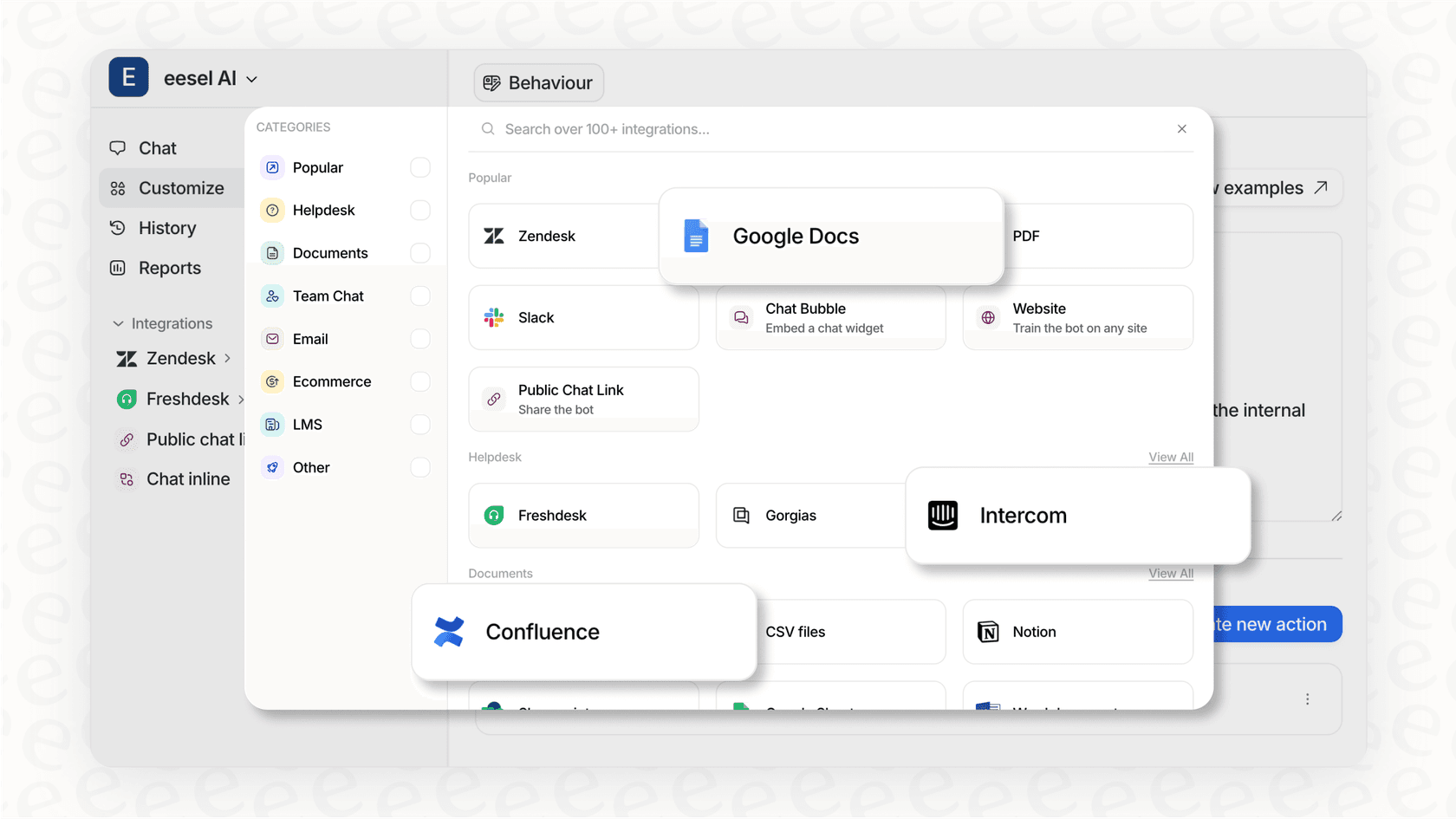
We integrate directly with Zendesk, Freshdesk, and other platforms. You don't need to rip and replace your existing setup.
Choosing the right B2B support solution
So which approach makes sense for your team?
Zendesk works well when:
- You have existing enterprise infrastructure and need extensive customization
- Your team has dedicated operations resources for configuration
- You require specific compliance certifications or data residency options
- Your workflow demands granular control over every aspect of ticket handling
Consider alternatives like eesel AI when:
- You want faster deployment without lengthy setup cycles
- You prefer an AI-first approach to ticket handling
- Cost sensitivity makes per-agent pricing problematic
- You value testing and progressive rollout over upfront configuration
The key decision factors are setup time, ongoing admin overhead, pricing model, and AI capabilities. Be honest about your team's resources and priorities.
Ready to explore an AI-native approach to B2B support? Try eesel AI free and see how it handles your tickets, or book a demo to discuss your specific needs.


Frequently Asked Questions
Share this article

Article by
Stevia Putri
Stevia Putri is a marketing generalist at eesel AI, where she helps turn powerful AI tools into stories that resonate. She’s driven by curiosity, clarity, and the human side of technology.



