Rytr vs Grammarly: Which AI writer should you use?

Stevia Putri

Katelin Teen
Last edited January 18, 2026
Expert Verified

Picking the right AI writing tool can feel like standing in the cereal aisle, with so many options available, and they all claim to be the best. The market is crowded, making it tough to figure out which tool actually does what you need it to.
You've probably heard of Rytr and Grammarly. They're both popular, but they're built for completely different jobs. Rytr is all about creating new, short-form content from scratch, while Grammarly is your go-to for polishing up text you've already written.
In this post, we'll break down the Rytr vs Grammarly debate, looking at their core features, who they're for, and their limitations. And if you're looking for something that can handle full-length blog posts from start to finish, we'll also touch on tools like the eesel AI blog writer that are built specifically for that.
What is Rytr?
Rytr is an AI writing assistant designed to help you quickly create short-form marketing and business copy. Think of it as a creative partner for when you need to generate a bunch of different ideas, and fast.
The whole platform is built around templates. You pick what you need to write, such as ad copy for Facebook, a product description for your e-commerce site, or a catchy email subject line, and Rytr gives you a starting point. It's great for those moments when you're staring at a blank page and just need something to get the ball rolling.
You can also set the tone of voice you're after, whether it's casual, professional, or witty. Another handy feature is its "magic command" function, which lets you give it direct instructions to generate specific text. It’s a solid tool for anyone who needs to produce a high volume of commercial copy without spending hours brainstorming.
What is Grammarly?
If you've written anything on a computer in the last few years, you've probably run into Grammarly. It started out as a powerful grammar, spelling, and punctuation checker, and it's still one of the best in the business at that.
Over time, it's become more of an all-around writing assistant. Beyond just catching typos, Grammarly now offers suggestions to rewrite sentences for better clarity, adjust your tone, and improve your overall style. It works as a browser extension, a desktop app, and a text editor, constantly checking your writing in the background.
But its main job is to improve text that already exists. While it has some AI features, it’s not designed to generate long-form content from a simple prompt. It’s more of a proofreader and editor that helps make sure whatever you write is clear, correct, and professional.
Rytr vs. Grammarly: Core features
When you put Rytr and Grammarly side-by-side, their different purposes become crystal clear. One is a creator, and the other is a polisher. This infographic provides a clear breakdown of the Rytr vs Grammarly comparison.
Rytr’s content generation capabilities
Rytr's strength is its ability to generate new content from scratch. The big draw is its template system, which makes it incredibly efficient for creating specific types of marketing materials. Need five different headlines for a blog post or a dozen variations of a social media ad? Rytr can generate them in seconds, which is a huge time-saver for A/B testing.
It also supports multiple languages and has those handy tone adjustment features, giving you the flexibility to match different brand voices or talk to different audiences. It's all about speed and variety for short, punchy copy.
Grammarly’s editing capabilities
Grammarly, on the other hand, is all about refinement. Its core engine is a proofreading powerhouse that catches everything from simple spelling mistakes to complex grammatical errors. It’s the safety net that ensures your writing is technically sound.
While it has added AI-powered features, they’re mostly focused on improving existing sentences. It can suggest ways to rephrase something for clarity or conciseness, but these rewrites are often described as "rather basic." It’s not going to write a new paragraph for you; it's just going to help you fix the one you already have. Think of it as an editor, not a ghostwriter.
Rytr vs. Grammarly: Ideal use cases
The right tool for you really depends on what you spend your day doing.
When to choose Rytr
Rytr is a dream for people who live and breathe short-form content.
- Marketers and social media managers: If your job is to constantly come up with new ad headlines, social media posts, and email subject lines, Rytr can be a massive help. It gets you past writer's block and provides a stream of ideas to work with.
- E-commerce specialists: Writing unique product descriptions for hundreds of items is tedious. Rytr can automate a lot of that initial drafting.
- Anyone brainstorming commercial copy: It's a great tool for getting initial ideas down on paper, even if you plan to heavily edit them later.
When to choose Grammarly
Grammarly is essential for anyone who needs their final written product to be flawless.
- Students and academics: Submitting an essay or research paper? Grammarly is a must-have to ensure your work is professional and error-free.
- Professionals and business users: From important client emails to company-wide reports, Grammarly acts as a final quality check to make sure you come across as polished and credible.
- Bloggers and writers: Before you hit "publish," running your text through Grammarly is a crucial last step to catch any mistakes you might have missed.
Pricing breakdown: Rytr vs. Grammarly
Let's talk about what these tools will cost you and what to watch out for.
Rytr’s pricing model
Rytr is generally seen as an economical option for generating marketing copy. It operates on a subscription model, but some users suggest proceeding with caution. Some users have reported issues with checkout processes and have found it difficult to get refunds for annual plans.

Grammarly’s pricing model
Grammarly has a very popular free version that covers the basics, but its paid plan unlocks the more advanced AI features. The premium version comes in at an accessible $12 per month. The catch? Paid users are limited to 1,000 AI prompts per month. If you’re heavily relying on its AI rewriting features, you could burn through that limit pretty quickly, which is a major downside for power users.
| Feature | Rytr | Grammarly |
|---|---|---|
| Pricing Model | Subscription-based (described as "economical") | Subscription-based ($12/month) |
| Known Limits | Not specified in context | 1,000 AI prompts/month for paid users |
| User Feedback | Caution advised due to refund difficulties | Prompt limit can be restrictive |
Key limitations to consider
No tool is perfect, and both Rytr and Grammarly have their weaknesses.
Rytr’s content quality
While Rytr is fast, the quality of its output can be a mixed bag. One user review mentioned that its generated text can sound "stilted" and isn't really suitable for creative or nuanced long-form content.
The "magic command" feature, while powerful, can sometimes produce confusing or "outright contradictory" results. This means you'll have to spend time editing and fact-checking whatever it gives you. You should never just copy, paste, and publish content from Rytr without a thorough review.
Grammarly’s AI assistance features
While Grammarly's AI features are a helpful addition, some users feel their capabilities are comparable to free tools like GPT-3.5, noting that the sentence rewrites remain "rather basic."
This reinforces its identity as an editor first and an AI assistant second. And again, the 1,000-prompt monthly limit can be a significant restriction for anyone looking to use AI for more than just a few tweaks here and there. It’s not built for generating content at scale.
An alternative for long-form content: eesel AI blog writer
So, Rytr is for short copy and Grammarly is for editing. What if you need to create a complete, ready-to-publish blog post from just a keyword? Neither of those tools is built for that.
That's where a platform like the eesel AI blog writer comes in. It’s designed for one specific workflow: turning a single topic into a fully structured, SEO-optimized article.
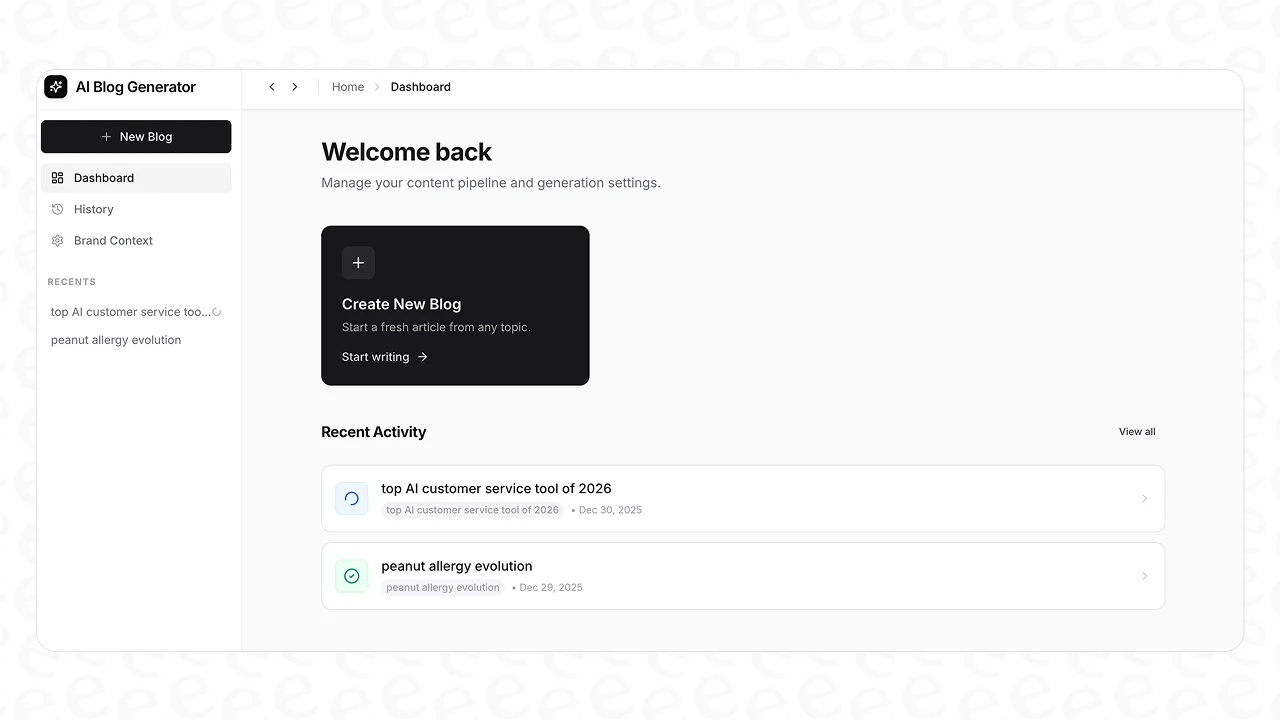
Here’s what makes it different:
- From keyword to complete post: You give it a topic, and it generates everything: an introduction, logical headings, a conclusion, and even an FAQ section. It’s a full first draft, not just a few sentences.
- Automatic asset generation: This is a huge time-saver. The eesel AI blog writer creates and embeds AI-generated images, infographics, and tables directly into the post, so you don't have to spend hours making them yourself.
- Context-aware research and media embeds: It adds depth by pulling in relevant YouTube videos and real quotes from Reddit forums. This can add a layer of depth and credibility to the content. It’s also optimized for AEO (AI Answer Engine Optimization), helping your content show up in places like Google AI Overviews.
- Proven results: We used this exact tool to grow our own blog from 700 to 750,000 daily impressions in just three months. We did it by publishing over 1,000 blogs, something that would have been impossible without it.
A workflow showing how the eesel AI blog writer, an alternative in the Rytr vs Grammarly debate, creates a full blog post from a keyword.
It's completely free to try, so you can see the quality for yourself.
Making the right choice for your needs
So, between Rytr and Grammarly, which one should you pick? The answer is pretty simple: it depends on the job.
- Grammarly is an editor. If you need to proofread an email, perfect an essay, or polish a report, it's an indispensable tool.
- Rytr is a short-form generator. If you need to brainstorm ad copy, social media captions, or product descriptions quickly, it can be a helpful assistant.
But if your goal is content marketing and scaling organic traffic with high-quality, SEO-optimized blog posts, neither tool is designed for that specific task. They just aren't designed for that workflow.
For that, you need a tool built for the job. Why not see the difference for yourself? You can generate your first blog post for free with the eesel AI blog writer and see what a true end-to-end content platform can do.
Frequently Asked Questions

Share this post
Article by
Stevia Putri
Stevia Putri is a marketing generalist at eesel AI, where she helps turn powerful AI tools into stories that resonate. She’s driven by curiosity, clarity, and the human side of technology.


