
Trying to create content that actually ranks is a serious challenge. It's not just about keeping up with Google's algorithm anymore; now you've got AI search like ChatGPT and Google's AI Overviews to think about. The whole cycle of researching, outlining, writing, and optimizing can feel endless.
AI content tools have popped up to help with this, and NEURONwriter is one of the bigger names out there. It's designed to help you plan, write, and tweak your content by analyzing what’s already ranking on the first page of Google.
Been using it for a couple of months and works great. I back it up with some manual verification of course and, I must say, the tool is very efficient.

In this review, we'll dig into NEURONwriter's features, workflow, pricing, and see how it holds up against other tools. By the end, you should know if it's the right tool for your workflow.
What is NEURONwriter?
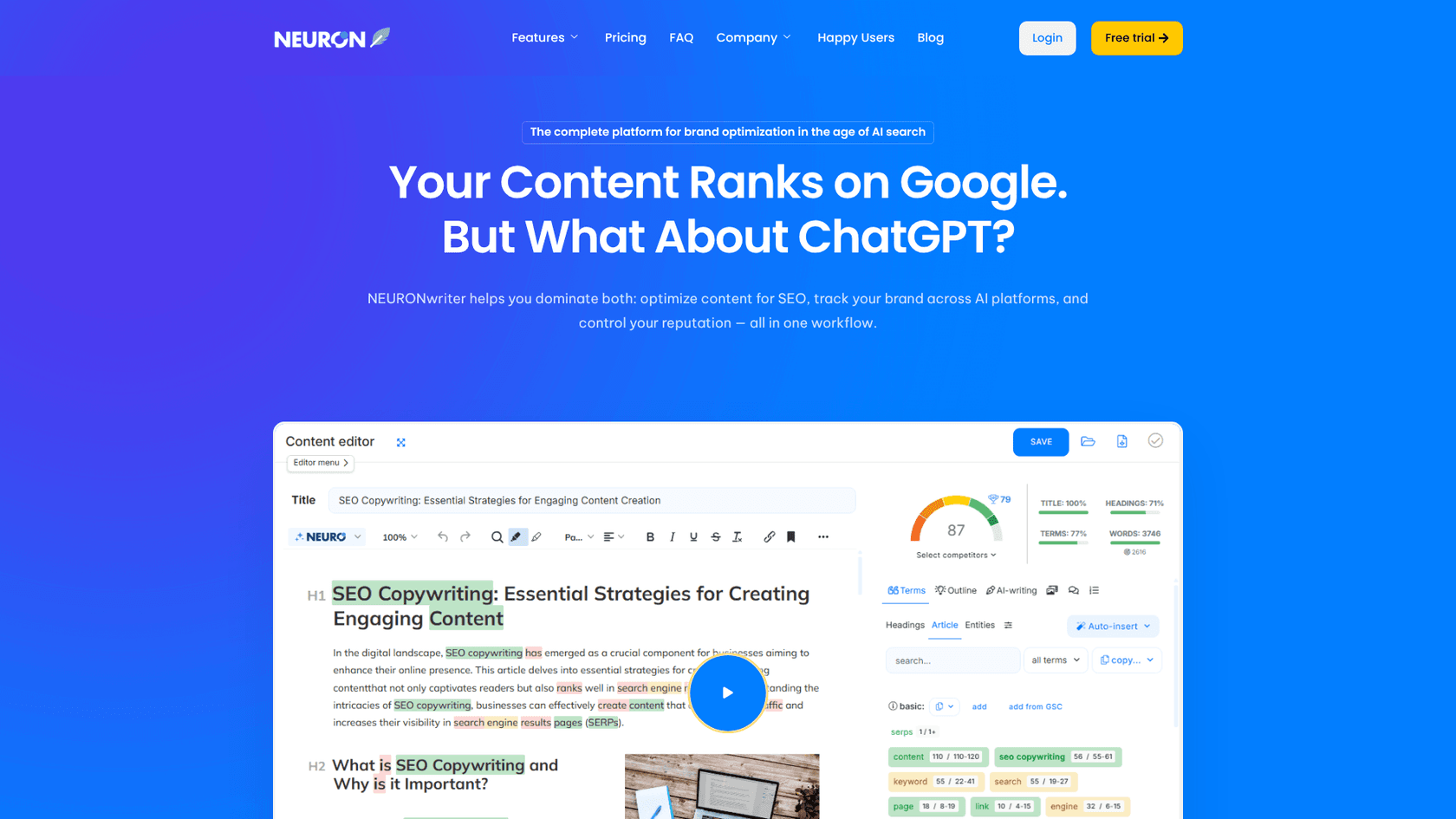
NEURONwriter is an AI-powered platform for content optimization. It combines semantic SEO with natural language processing (NLP) to give you a blueprint for creating content that Google is more likely to show to users.
So, how does it do that? It basically analyzes what's already performing well. NEURONwriter looks at the top 30 or so ranking pages for your keyword and provides a list of NLP-based recommendations. You can think of it as a cheat sheet based on your most successful competitors.
It’s built specifically for website content like blog posts, articles, and landing pages. You probably wouldn't fire it up to write a social media post or an email. The idea is to give you one place for SERP analysis, AI writing assistance, and content editing, so you aren't constantly switching between different apps.
To keep its suggestions relevant, it uses recent AI models like GPT-4o and Claude Sonnet 3.5 for its content generation features.
Core features of NEURONwriter
SERP analysis and competitor insights
You'll spend most of your time in the content editor. It's the main workspace for writing and optimizing your article. The real work, however, begins with its TOP Analysis feature. This gives you a detailed look at what your competitors are up to, showing you data for as many as 100 of them. You can see their content score, word count, Moz domain and page authority, and even their external link count. It’s a lot of information to help you figure out the competitive landscape.
Another useful tool is the Competitors Structure tab. This shows you how the top-ranking pages are structured by listing their H1s, H2s, and other headings. It's a good way to brainstorm your own outline and identify topics you need to cover.
AI-assisted writing and content optimization
NEURONwriter includes several AI writing tools to help speed up the drafting stage. You get pre-made templates for generating outlines, intros, paragraphs, and other sections. It's important to know that the more powerful templates are only available on the Gold plan and higher.
If you're on one of those higher plans, you also get the Content Designer. This is a one-click article generator that creates a full draft using your outline and the competitor data it analyzed. It won't be perfect out of the box, but it can be a decent starting point.
The platform's main strength is its optimization functionality. As you write, a real-time Content Score updates with every edit. The sidebar provides a list of NLP term suggestions, which are keywords and phrases your top competitors are using. There's even an "Autoinsert" tool to help you work these terms into your text and improve your score.
Content planning and workflow integrations
Beyond individual articles, NEURONwriter has features for your bigger content strategy. The Next Content Ideas tool is useful for building topic clusters. It analyzes your keyword and suggests related articles you could write, which helps in establishing topical authority.
It also gives you internal linking suggestions. While you're writing, it scans your text and recommends other pages on your website you could link to, which is a nice little plus for on-page SEO.
A plagiarism checker is also built-in, but this is another feature limited to the Gold, Platinum, and Diamond plans. The same applies to integrations. If you want to connect NEURONwriter to WordPress, Google Search Console, Shopify, or Zapier, you'll need at least the Gold plan.
The NEURONwriter workflow: A step-by-step guide
Alright, let's walk through what it’s like to create a blog post using NEURONwriter. The process is pretty logical and broken down into a few main steps.
Setting up a new query and selecting competitors
To start, you create a project and enter a New Query, which is simply your target keyword. NEURONwriter then shows you a list of the top-ranking pages for that keyword.
This next part is important: you have to select the competitors you want it to analyze. You should choose pages that match the intent of your content. For instance, if you're writing a blog post, you wouldn't want to select a handful of e-commerce product pages as your main competitors, since their structure and purpose are completely different.
Building an outline and generating drafts
After you've chosen your competitors, you can start building an outline. NEURONwriter simplifies this by displaying all the headings and common questions from the top articles. You can pick the ones you like to put together a solid structure for your own post.
Once the outline is ready, you can begin writing. You can either do it all yourself or use the AI writer. The standard templates can help generate content for each section. Or, if you have a higher-tier plan, you can use the one-click Content Designer to get a full first draft in just a few seconds.
Optimizing with content scores and NLP terms
This is the last and most critical part of the workflow. While you write and edit in the editor, you'll keep the Content terms sidebar open. This lists all the important keywords and phrases you should try to include.
As you add these terms, your Content Score increases in real-time. The goal is to get your score higher than the top competitors. It feels a bit like a game where you're trying to hit a high score to "win" at SEO. This guided approach helps make sure your final article is comprehensive and covers the topic in detail.
NEURONwriter pricing plans
Here’s a look at what each plan includes:
| Plan | Monthly Price | Projects | Content Analyses | AI Credits | Key Features Unlocked |
|---|---|---|---|---|---|
| Bronze | $23/month | 2 | 25 | 15,000 | Standard AI templates, Content plan |
| Silver | $45/month | 5 | 50 | 30,000 | Standard AI templates, Content plan |
| Gold | $69/month | 10 | 75 | 45,000 | Content Designer, Plagiarism checks, GSC & WP Integrations, API Access |
| Platinum | $93/month | 25 | 100 | 60,000 | Higher limits for all features |
| Diamond | $117/month | 50 | 150 | 75,000 | Highest limits for agencies |
You can also get a 20% discount if you choose to pay annually.
It's also worth noting the NEURONwriter lifetime deal. This is a really popular option that gives you access to their plans for a one-time payment, starting at $297 for the Gold plan. If you see yourself using the tool for a long time, it can be a great way to save money.
NEURONwriter alternatives
NEURONwriter is a great tool for optimizing content while you're writing it. But what if your problem isn't optimization, but the actual writing part? Some people need a tool that can handle the entire process from start to finish.
eesel AI
If your main goal is to produce more high-quality content, the eesel AI blog writer is an alternative to consider. It works in a completely different way. Instead of giving you suggestions and a score, it generates a complete, SEO-optimized blog post from just a keyword.
Here’s what makes it different:
- Automatic asset generation: It doesn't just produce text. It creates unique AI images, infographics, tables, and charts to make your content more visual and easier to read.
- Rich media integration: To add more authority and real-world perspective, it automatically embeds relevant YouTube videos and finds authentic Reddit quotes on your topic.
- AEO optimization: The content is structured not just for traditional search engines but also for AI Answer Engines like Google AI Overviews and ChatGPT, which is becoming more and more important.
- Context-aware research: The AI automatically finds relevant data for what you're writing. For a comparison post, it will look for pricing. For a product review, it will find technical specs.
This is the same tool we used to grow our own organic traffic from 700 to 750,000 daily impressions in just three months by publishing over 1,000 optimized blogs. It's available to try for free, so you can generate a full blog post and judge the quality for yourself.
Surfer SEO and Frase
Surfer SEO and Frase are two other major players in content optimization. Much like NEURONwriter, they focus more on guiding your writing process than on doing the writing for you.
- Surfer SEO: Surfer is well-known for its data-heavy approach to on-page SEO. It has features like an AI Humanizer to make AI text sound more natural, but it's also more expensive, with plans starting at $99 per month.
- Frase: Frase's main strength is its question-based research. It's very good at finding the questions your audience is asking and helping you build content that answers them. It also focuses on what it calls Generative Engine Optimization (GEO), which is similar to AEO.
A screenshot of the Frase homepage, another alternative tool discussed in this NEURONwriter review. They are both good! I also have Frase (200 docs a month) and I prefer Neuronwriter for my daily use. It's less cluttered for one, and also in order to connect Frase with wordpress you have to install then plugin and manually set each document URL inside each post, which is a pain. Neuronwriter lets you one-click push the documents to drafts and detects which page you're most likely working on.
 Reddit
These tools are primarily optimization assistants that help you improve your content, which contrasts with tools like eesel AI that are built for full-cycle content generation.
Is NEURONwriter the right tool for you?
So, after all that, should you get NEURONwriter?
It’s an excellent and very affordable option for freelance writers, bloggers, and small SEO agencies who want a strong assistant to guide their content optimization. If you like to write but want data to help you rank better in the SERPs, NEURONwriter provides the structure and suggestions you need.
Been using it for a couple of months and I find it very powerful if you know how to use it well. Take time to learn it and tweak some results and you should be good.
The AI writing features provide a first draft that will likely need editing and human refinement. Plus, many of the best features, like the plagiarism checker, integrations, and the one-click article generator, are only available on the more expensive Gold plan. Its core strength is optimization, not creation.
For a more hands-on look at how NEURONwriter works in practice, this video review provides a detailed walkthrough of its features, from setting up a query to optimizing your content score.
The right choice depends on your main goal. If you want a tool to help you optimize the content you're already writing, NEURONwriter is a fantastic, budget-friendly pick.
But if your goal is to generate complete, publish-ready blog posts at scale to grow your organic traffic quickly, you might consider the eesel AI blog writer.