How to proofread blog posts: A complete guide for quality and credibility

Stevia Putri

Katelin Teen
Last edited January 20, 2026
Ever hit "publish" on a blog post you poured your heart into, only to find a glaring typo staring back at you hours later? Yep, we’ve all been there. A single misspelled word or a clunky sentence can be enough to make a reader doubt your credibility. It’s a tiny mistake, but it can completely undermine the authority you’re trying to build.
Proofreading is that final, essential safety check that makes your message shine and helps you connect with your audience. It's the difference between "good enough" and "great." And while it used to be a purely manual, eye-straining task, things have changed. Today, proofreading is often helped along by powerful AI tools.
But here’s the modern twist: instead of spending hours fixing a messy first draft, what if you could start with a high-quality one from the beginning? A context-aware platform like the eesel AI blog writer can generate a complete, publish-ready blog post, which streamlines the entire editing and proofreading process right from the start.

Understanding the difference between editing and proofreading
Before we get into the weeds, let’s clear up something that trips people up. "Editing" and "proofreading" are often used interchangeably, but they're two very different things. They’re both vital, but they happen at different stages, and proofreading should always, always, come last.
What is editing?
Think of editing as the "big picture" review. This is where you zoom out and look at the overall quality, clarity, and flow of your content. Editing is all about answering the question: Does this make sense and is it compelling? It's about shaping the raw material into a coherent and engaging piece.
Key editing tasks usually include:
- Reorganizing paragraphs to create a more logical flow.
- Rewriting clunky sentences to improve their clarity and punch.
- Cutting redundant words or phrases to make the writing more concise.
- Making sure the tone of voice is consistent with your brand.
- Verifying that all your claims are supported and your argument holds up.
What is proofreading?
Proofreading, on the other hand, is the final quality check right before you hit publish. It’s a meticulous, surface-level review focused on catching any lingering errors. The question proofreading answers is simple: Is this free of mistakes?
Key proofreading tasks include:
- Correcting spelling mistakes and typos.
- Fixing grammatical errors, like subject-verb agreement or incorrect tense.
- Ensuring punctuation and capitalization are correct and consistent.
- Checking for formatting issues, like inconsistent headings, lists, or bolding.
Traditional proofreading techniques
Even with all the cool tech out there, mastering manual proofreading is still a superpower. These methods force you to slow down and see your writing with fresh eyes, helping you catch subtle errors that software might just glide over.
Give it some space
This is the oldest trick in the book for a reason. After you finish writing, step away. Give yourself a few hours, or even a full day if you can manage it. When you come back to your draft, your brain will have had a chance to reset, making it much easier to spot mistakes you previously skimmed over. That mental distance is a huge help.
Change the format
Our brains are pattern-recognition machines, which is great until we need to spot our own mistakes. We get so used to seeing our text in a specific format that we start to see what we expect to see, not what’s actually there.
A simple way to trick your brain is to change the format. Switch up the font, increase the text size, or change the background color. You’ll be surprised how many errors suddenly pop out. And while some writers swear that proofreading on paper is more effective, it might not be necessary. A 2022 Cambridge University review found no conclusive performance difference between reading on modern high-resolution screens and on paper.
Read it out loud
This might feel a bit silly, but trust me, it works. When you read your content aloud, you engage with each word individually. Your ears will often catch awkward phrasing, run-on sentences, and missed words that your eyes might have skipped right over. It’s one of the best ways to check the rhythm and flow of your writing.
Focus on one error type at a time
Trying to catch everything in a single pass is a recipe for disaster. You’re more likely to miss things when your brain is juggling too many tasks. A better way is to make several passes, with each one focused on a specific type of error.
Do one pass just for spelling. Then, do another just for punctuation. Follow that with a pass for formatting and links. This method is less overwhelming and much more thorough.
Modern proofreading with AI
The modern content workflow isn't just about fixing errors after the fact; it's about producing a better draft from the very beginning. AI has changed how we create and polish content, making the entire process more efficient.
A better workflow with the eesel AI blog writer
The single best way to cut down on proofreading time is to start with a cleaner, more structured draft. And that’s where a proactive content generation platform really shines.
Instead of being a reactive correction tool, the eesel AI blog writer creates complete, publish-ready blog posts from just a single keyword. This minimizes errors from the get-go.
Here’s how it helps:
- Context-Aware Research: It automatically conducts deep research on your topic and even adds citations. This dramatically reduces the time you'd spend on manual fact-checking and ensures your claims are supported from the start.
- Human-like Tone: It learns your brand voice directly from your website, generating content that sounds natural and on-brand. You get to skip the painful process of rewriting robotic AI-speak into something a human would actually want to read.
- Complete Assets: It produces a full blog post with proper headings, structure, and even media like AI-generated images and relevant Reddit quotes. This eliminates the tedious task of fixing formatting errors later on.
Think of it as the first step in a modern content workflow. Instead of grinding out a draft from scratch, you act as the editor-in-chief, refining a high-quality piece of content.
Using grammar and style checkers
Once you have a great draft, you can use grammar and style checkers as your final safety net. These tools are great for a last-minute sweep, but it's important to understand their limitations.
Grammarly Grammarly is probably the best-known AI-powered writing assistant out there. It checks for grammar, spelling, and punctuation in real-time. The free version is solid for catching basic typos, while the Pro plan (starting at $12/month) adds more advanced features like full-sentence rewrites, tone suggestions, and a plagiarism checker.
- Limitations: Grammarly's main limitation is that it can lack contextual understanding. It may occasionally offer suggestions that alter your original meaning or sound unnatural in certain contexts. It does not understand specific brand voices or technical jargon and is not designed to check facts.
I use Grammarly Premium. It’s especially good for catching passive sentences. However, you have to take their suggestions with a grain of salt. The app is weird about commas and while passive sentences are against my company’s sometimes active sentences sound awkward. Grammarly hates complex sentences for some reason.

Hemingway App The Hemingway App has a different goal: it focuses purely on readability. It highlights long, complicated sentences, passive voice, and weak adverbs to help you make your writing bold and clear. It has a free web version and a desktop app you can buy for a one-time fee of $19.99.
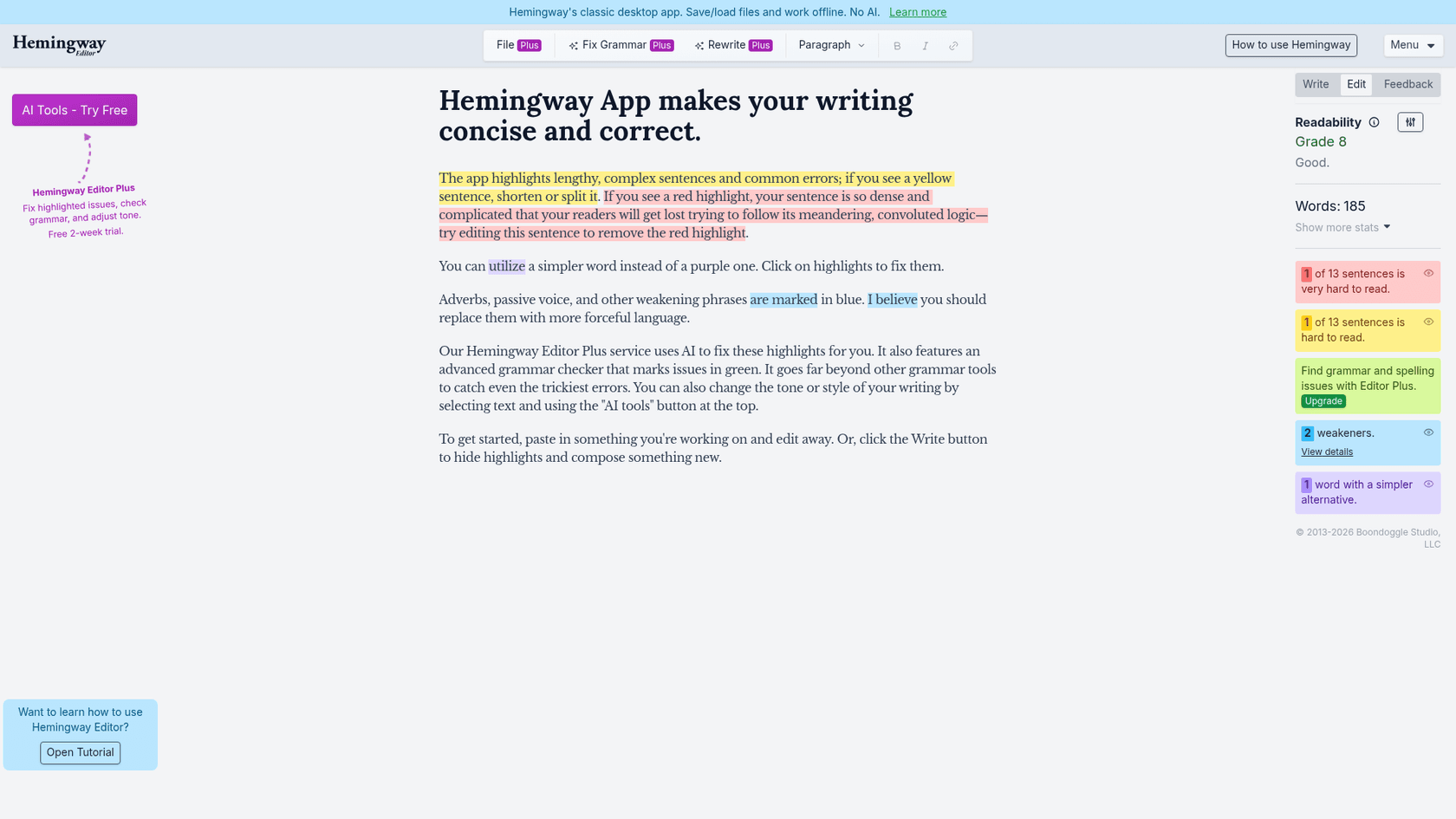
- Limitations: Hemingway's focus on simplicity can sometimes be rigid. Its suggestions can lead to overly simple or choppy writing by discouraging more complex sentences. It also doesn't include a browser plugin, a plagiarism checker, or the deep grammatical checks that other tools offer.
Not a fan of Hemingway. It wants to destroy all compound sentences, which leads to a writing style that sounds bland. Good writing will vary sentence length to remain engaging.
| Feature | eesel AI blog writer | Grammarly | Hemingway Editor |
|---|---|---|---|
| Primary Goal | Proactively generate a complete, high-quality blog post | Reactively correct grammar, spelling, and punctuation | Reactively improve readability and clarity |
| Workflow | One-click generation of a full article with assets | Real-time suggestions on existing text | Highlights issues in existing text |
| Key Strength | Context-aware research and brand voice adaptation | Comprehensive grammar rulebook and plagiarism checker (Pro) | Makes writing concise and easy to read |
| Limitations | Requires editing and human oversight | Can offer incorrect or style-altering suggestions; lacks context | Can oversimplify writing; no grammar or plagiarism checks |
| Pricing | Credit-based (50 blogs for $99); free to try | Free version available; Pro starts at $12/month | Free web version; one-time $19.99 for desktop app |
Your ultimate proofreading checklist
A standardized checklist is your best friend for ensuring consistency and quality across every blog post you publish. This list combines the best of manual techniques and AI-powered checks for a truly thorough final review.
The pre-publication final check
Before you hit publish, run through this list one last time.
Content and Clarity:
- Does the headline accurately reflect the content and include the target keyword?
- Is the introduction engaging, and does it clearly state the article's purpose?
- Are all facts, statistics, and names double-checked and cited correctly?
- Does the writing sound human, or does it have a generic, robotic tone?
Technical Accuracy:
- Run the final text through a grammar checker (like Grammarly) for one last sweep of typos and punctuation errors.
- Manually check for common homophones that tools often miss (e.g., their/there/they're, its/it's, affect/effect).
- Ensure capitalization and punctuation are consistent throughout the entire post.
Formatting and Links:
- Click on every single internal and external link. Do they work correctly and open in a new tab?
- Is the formatting (bold, italics, lists, blockquotes) consistent and easy on the eyes?
- Are all your images displaying correctly, and do they have descriptive alt text for accessibility and SEO?
For a more visual guide, watching an expert walk through their proofreading process can be incredibly helpful. The video below covers several practical techniques, including some we've discussed, to help you catch more errors and improve your writing.
Final thoughts
Effective proofreading is not about finding one magic tool. It is a multi-step process that blends sharp human attention to detail with the speed and efficiency of AI. While correction tools like Grammarly and Hemingway are useful for a final polish, a significant time-saver comes from improving the initial drafting stage.
Starting with a high-quality, well-researched, and properly formatted draft from an intelligent platform helps content teams scale quality content without getting bogged down in endless corrections. For those interested in this approach, the eesel AI blog writer generates publish-ready blog posts and is free to try.

Frequently Asked Questions
Share this article

Article by
Stevia Putri
Stevia Putri is a marketing generalist at eesel AI, where she helps turn powerful AI tools into stories that resonate. She’s driven by curiosity, clarity, and the human side of technology.